
Integral 4GB Crypto-197
4.1Editor score
FIPS 197 Certified
Brute Force Protection
Waterproof Double Layer Design
This guide compares the top encrypted USB flash drives for security and performance to help you choose the best device for protecting your sensitive data.
Secure data storage is essential in today's digital landscape. Encrypted USB flash drives offer hardware-based protection to keep your files safe from unauthorized access and theft. Choosing the right drive requires understanding encryption standards and durability features.
We have evaluated ten top-rated models based on security certifications, build quality, and ease of use. Our analysis focuses on FIPS validation, encryption types, and real-world performance metrics. This list covers options for both personal and enterprise needs.
Each pick highlights key strengths and potential trade-offs to help you make an informed decision. Please note that product availability and specifications may change over time. Always verify current details before purchasing to ensure compatibility with your devices.
4.1Editor score
4.6Editor score

4.5Editor score
This side-by-side comparison highlights the key specifications and features of each selected encrypted USB flash drive to help you quickly identify the model that best fits your security requirements.


This drive stands out as a top choice for users needing certified hardware encryption. It holds FIPS 140-2 Level 3 validation which ensures robust protection for sensitive information. The build quality is exceptional with a rugged metal casing designed to withstand daily wear.
We may earn a commission when you buy through this link, at no additional cost to you.
The encryption relies on a 256-bit AES algorithm that runs directly on the hardware. This means data remains secure even if the drive is lost or stolen. You get separate admin and user modes to control access levels effectively. The configurator software allows customization of security policies for enterprise use.
While the storage is limited to 8GB this model prioritizes security over capacity. It may not suit large file transfers but is perfect for critical documents. The read-only modes prevent accidental overwrites which is useful for distributing verified files.
Anyone requiring compliance with strict data regulations should consider this drive. It balances security features with ease of use. The recovery pins offer a safety net if passwords are lost. Overall it remains a reliable solution for secure data transport.
FIPS 140-2 Level 3 certification ensures the drive meets rigorous security standards required by many government and enterprise entities.
Separate admin and user modes allow organizations to enforce security policies while giving end users simple access to authorized data.
We may earn a commission when you buy through this link, at no additional cost to you.
This model offers significant storage capacity alongside top-tier security features. It is ideal for professionals who need to carry large datasets securely. The hardware-based encryption ensures that all data is protected without slowing down your computer system.
We may earn a commission when you buy through this link, at no additional cost to you.
Security is enhanced with protection against BadUSB attacks which are increasingly common threats. The brute force safeguards will wipe data after failed login attempts to prevent unauthorized access. You can use complex passwords or longer passphrases for better memorability.
The TAA compliance makes it suitable for government contracts and procurement processes. Dual read-only settings help prevent accidental data modification during transfers. However the software requirements may be a hurdle for some users seeking simplicity.
Businesses needing enterprise grade storage should find this drive valuable. The combination of capacity and security is rare in the market. Ensure you check compatibility with your operating system before purchase. It is a robust choice for high value data.
Built-in defenses against BadUSB attacks ensure that the drive cannot be used to infect your computer with malicious code.
TAA compliance means this drive meets trade agreements act requirements making it eligible for government and enterprise procurement.
We may earn a commission when you buy through this link, at no additional cost to you.
This drive bridges the gap between modern devices and high security standards. The Type C connector ensures compatibility with laptops and phones that lack traditional USB ports. It maintains the same rigorous FIPS certification as other Aegis models.
We may earn a commission when you buy through this link, at no additional cost to you.
Authentication happens directly on the drive without needing to install drivers on the host computer. This zero footprint approach is perfect for shared workstations or secure environments. The 128GB capacity allows you to store extensive files without sacrificing security.
The separate admin and user modes provide flexibility for team usage. Data is encrypted using AES XT S hardware encryption which is efficient and secure. You do not need to worry about battery life since it draws power directly from the port.
Tech professionals using newer devices will appreciate the connector choice. It simplifies the workflow by removing software dependencies. Just plug in and authenticate to access your files. This model is a smart investment for modern secure storage.
No software installation is required on the host computer ensuring that the drive works securely across different systems without leaving traces.
The USB 3.2 Type C interface provides future proof connectivity for laptops tablets and smartphones that use this standard connector.
We may earn a commission when you buy through this link, at no additional cost to you.
This option provides essential security features at an accessible price. It is ideal for individuals who need basic protection for small files. The waterproof design makes it suitable for outdoor use or harsh environments where durability matters.
We may earn a commission when you buy through this link, at no additional cost to you.
It meets FIPS 197 certification which is a recognized standard for cryptographic modules. The auto-lock feature ensures that data encrypts when you disconnect the drive. This adds a layer of convenience without requiring extra steps during daily use.
The dual layer construction protects against physical damage like drops or water immersion. Zero footprint means you can use it on any computer without installing drivers. The USB 3.0 interface ensures decent transfer speeds for small documents.
Budget conscious users will find this drive practical for everyday needs. It lacks advanced enterprise features but covers the basics well. If you only need to store text files or images this is a reliable choice. Ensure you remember your password to avoid data loss.
The double layer waterproof design protects the internal electronics from water immersion and physical impacts during transportation.
Data automatically locks and encrypts when the drive is removed or the computer screen is locked preventing unauthorized access.
We may earn a commission when you buy through this link, at no additional cost to you.
This drive features a physical PIN keypad which eliminates the need for on-screen typing. This is useful for securing entry on public computers or shared workstations. The hardware encryption ensures that the PIN never leaves the device.
We may earn a commission when you buy through this link, at no additional cost to you.
It carries multiple certifications including FIPS 140-2 Level 3 and NATO Restricted standards. This makes it highly suitable for government or defense related work. The IP57 rating means it can withstand dust and water exposure effectively.
You can use it across various operating systems without installing additional drivers. The transfer speeds are fast enough for daily tasks involving moderate file sizes. It is important to choose a strong PIN as there is no recovery option without the reset key.
Security professionals will appreciate the physical authentication method. It prevents keyloggers from capturing your password during entry. The rugged build ensures longevity even in demanding conditions. This is a premium tool for high security requirements.
A built-in PIN keypad allows you to authenticate directly on the drive preventing keyloggers from intercepting your credentials.
Compatible with Windows macOS Linux Chrome Android and more ensuring you can access data across different devices easily.
We may earn a commission when you buy through this link, at no additional cost to you.
This drive offers a practical middle ground with decent storage and essential security. The aluminum shell provides a professional look and added durability against physical damage. It uses hardware encryption to keep your files safe from prying eyes.
We may earn a commission when you buy through this link, at no additional cost to you.
Automatic locking occurs after a short period of inactivity or when unplugged. This ensures that you do not forget to secure your data during use. The reset function wipes data after ten failed attempts to deter brute force attacks.
It works without needing to install software on your computer. This makes it convenient for use on restricted machines where admin rights are limited. The USB 3.0 interface supports faster transfers compared to older standards.
Users needing more space than 4GB will find this capacity suitable. It is not certified to the same levels as enterprise drives but offers good protection. Check compatibility with your OS before buying. This is a solid choice for general personal use.
The aluminum alloy shell offers superior durability and heat dissipation ensuring the drive remains safe during prolonged use.
After multiple incorrect password attempts the drive resets and wipes data to prevent unauthorized access by malicious actors.
We may earn a commission when you buy through this link, at no additional cost to you.
This model introduces fingerprint recognition for convenient access to your files. It saves up to ten different fingerprints allowing shared access with trusted contacts. The hardware encryption keeps data safe when the drive is not in use.
We may earn a commission when you buy through this link, at no additional cost to you.
Speed is a major selling point with read rates reaching 400MB per second. This allows you to transfer large video files or backups quickly. The USB 3.2 Gen 1 interface ensures compatibility with modern ports.
Security relies on a combination of AES encryption and biometric validation. This dual layer approach offers both speed and protection. However the sensor may not work with all finger types if you have dry skin or calluses.
Professionals dealing with large media files will appreciate the throughput. It balances performance with security effectively. Ensure you test the fingerprint sensor upon arrival. This is a high speed option for tech savvy users.
Fingerprint authentication allows secure access with a simple touch saving time while keeping unauthorized users out.
Read speeds of up to 400MB per second make file transfers significantly faster than standard USB drives.
We may earn a commission when you buy through this link, at no additional cost to you.
This drive features an IP68 rating offering protection against total immersion in water and dust. It is built for extreme environments where other drives might fail. The physical PIN keypad allows secure authentication without software.
We may earn a commission when you buy through this link, at no additional cost to you.
Security standards include FIPS 140-2 Level 3 which is recognized globally. This makes it a viable choice for government or industrial applications. The encryption happens in real time ensuring all data is protected automatically.
It supports a wide range of operating systems including Chrome and VMware. This versatility makes it easy to integrate into diverse IT environments. The write speeds are robust allowing for efficient data backups.
Users in outdoor or industrial fields will value the rugged build. It is heavier than standard drives but offers greater peace of mind. Ensure you keep the reset key safe for emergency recovery. This is a top tool for field work.
IP68 certification guarantees the drive can withstand prolonged immersion in water and dust preventing hardware failure in harsh conditions.
All data transferred to the drive is encrypted in real time protecting your files from unauthorized access even if lost.
We may earn a commission when you buy through this link, at no additional cost to you.
This drive prepares you for the future with FIPS 140-3 Level 3 certification. It offers a hidden partition feature that allows you to store sensitive data separately. The crypto erase password gives you emergency protection if capture is imminent.
We may earn a commission when you buy through this link, at no additional cost to you.
Brute force and BadUSB protections ensure your system stays safe from external attacks. The zinc casing provides robust protection against physical penetration or tampering. Customizable attributes allow you to tailor security settings to your specific needs.
Management is user friendly with an intuitive interface for setting policies. The drive supports multiple PIN options for flexibility in access control. It is ideal for organizations that need strict adherence to evolving compliance standards.
Security teams will find this drive highly versatile. It balances cutting edge standards with practical features. Check your OS compatibility as it may require specific support. This is a strategic choice for high security enterprises.
Industry first dual hidden partition option allows you to create separate secure areas for different levels of data sensitivity.
A dedicated crypto erase password allows you to wipe the drive instantly in case of theft or forced access.
We may earn a commission when you buy through this link, at no additional cost to you.
This drive offers straightforward hardware encryption for essential security needs. It uses AES 256 XTS encryption to secure all data stored on it. The design is simple allowing you to use it without complex configuration steps.
We may earn a commission when you buy through this link, at no additional cost to you.
Password protection ensures that only authorized users can access the contents of the drive. It is a compact solution for carrying important documents or keys. The 8GB capacity is sufficient for text files and small applications.
The brand reputation adds a layer of trust for hardware reliability. It is a good option for those who need basic encryption without advanced features. Just remember your password as there is no recovery mechanism provided.
Users looking for a no fuss security drive will find this suitable. It is compatible with most standard operating systems. Check the specific model details before buying to ensure full feature support. This is a practical tool for personal security.
Hardware based AES 256 XTS encryption ensures that all data on the drive is securely protected at rest.
A secure password requirement prevents unauthorized users from accessing the files stored on the drive.
We may earn a commission when you buy through this link, at no additional cost to you.
Choosing the right encrypted drive involves evaluating security certifications, storage needs, and compatibility with your existing devices.
Look for drives that use hardware based encryption such as AES 256-bit to ensure data is protected without relying on software that can be bypassed. Hardware encryption is generally faster and more secure against malware that targets software solutions.
FIPS 140-2 or FIPS 140-3 Level 3 validation indicates that the drive meets rigorous government security standards. This is essential for businesses or individuals who need to comply with regulatory requirements like GDPR or HIPAA.
Determine how much space you need based on the file types you plan to carry. While encryption adds security higher capacities often cost more so balance your budget with your data requirements.
Ensure the drive has a compatible connector like USB 3.0 or Type C for your devices. Using an adapter can reduce speed and increase the risk of damage so direct compatibility is preferable.
Choose between password PIN or biometric authentication based on your preference for speed versus security. Physical PIN pads prevent keyloggers while passwords offer more flexibility for shared access.
If you work in harsh environments look for drives with IP ratings for water and dust resistance. A metal casing adds extra protection against drops and physical damage.
Some drives require specific software to manage encryption policies which may not work on all systems. Zero footprint drives are better for shared workstations where you cannot install software.
Check if the drive offers recovery PINs or emergency reset keys. Losing your password can mean permanent data loss so having a backup plan is critical for business use.
Always keep your password or PIN secure and avoid sharing it with others. If you are using a PIN pad ensure you cover your hand while typing to prevent visual recording.
Properly eject the drive from your operating system before unplugging it to prevent data corruption. Even encrypted drives need safe removal to ensure all processes are terminated correctly.
Store the drive in a safe place when not in use and avoid exposing it to extreme heat or moisture. If the drive has a waterproof rating do not test it beyond its specified limits.
While no system is completely unhackable hardware encrypted drives are much harder to breach than software ones. Strong passwords and FIPS validation significantly reduce the risk of successful attacks.
Many modern drives offer zero footprint authentication meaning no software is required. However some enterprise models may include management software for policy enforcement on shared systems.
Most encrypted drives do not allow recovery without a reset key or recovery PIN. You should store these backup credentials safely to avoid permanent data loss.
Most drives listed support macOS but you should verify specific drivers in the product description. Some models may require specific formatting for Mac compatibility.
Hardware encryption is generally faster and more secure since the encryption key never leaves the drive. Software encryption relies on the host system which can be vulnerable to malware.
With proper care they can last for years. However electronic components may degrade so keep regular backups of your data to prevent loss.
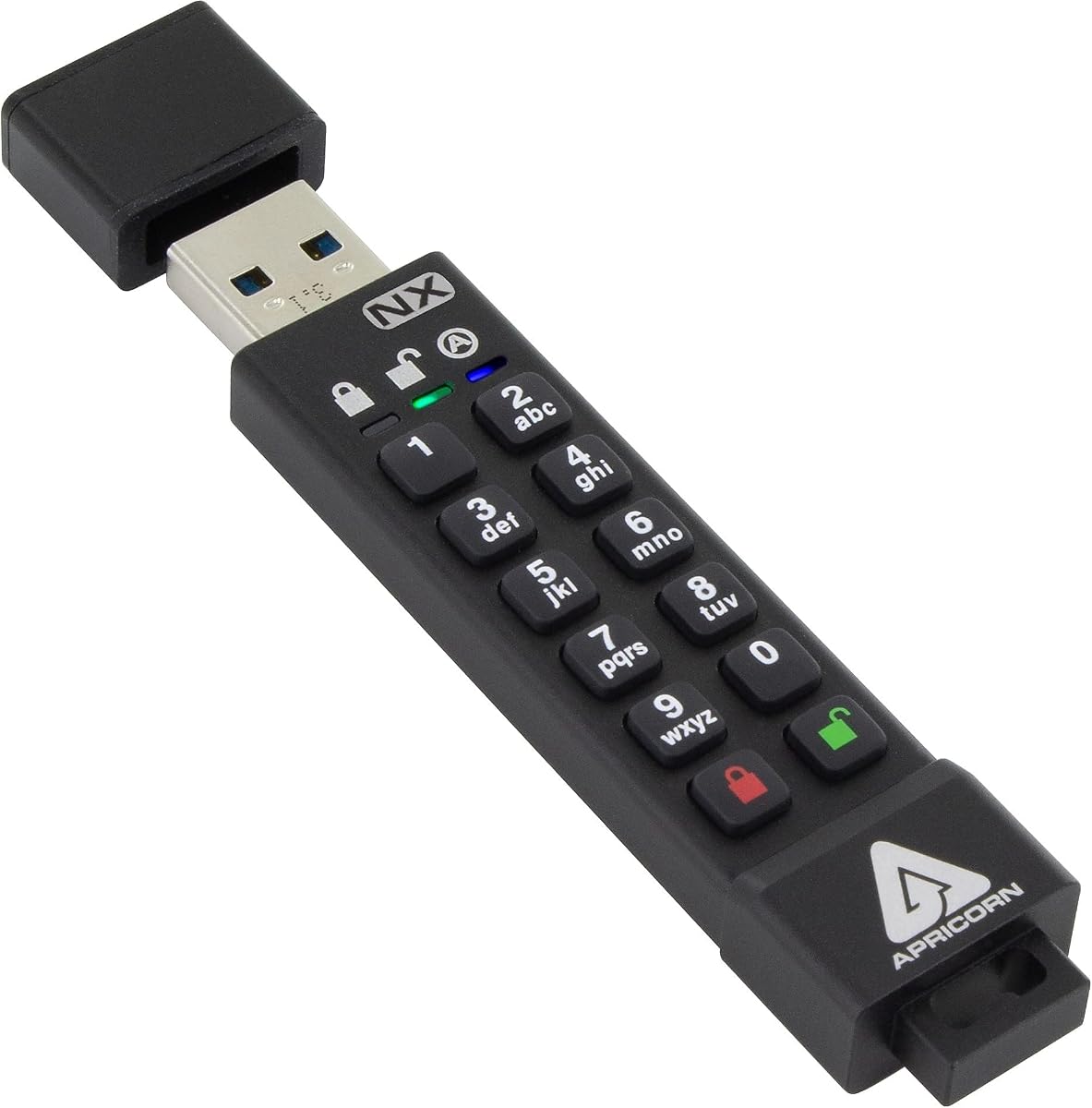
We reviewed ten top options ranging from budget friendly models to enterprise grade solutions. The Apricorn Aegis Secure Key 3 NX leads as our top pick for its robust security features.
Prioritize FIPS certification and hardware encryption when selecting a drive for sensitive data. Consider your specific needs like storage capacity and connector type to ensure compatibility.
Prices and availability change so verify details on the product page before buying. A secure drive is a small investment for protecting valuable information.