
Spacrea Dual Monitor Stand Riser with Drawer and 2 Pen Holders
4.6Editor score
Adjustable length and angle
Integrated pen holder and drawer
One-piece stamped steel structure
Creating a productive workspace often starts with the right desk setup. A dual monitor stand riser for desk elevates your screens to eye level, reducing neck strain and freeing up valuable surface area for your keyboard and mouse.
We evaluated ten top-rated models based on stability, storage options, adjustability, and overall build quality. Each product was selected for its ability to support two monitors while maintaining a clean and organized professional environment.
Every pick includes key specs, pros, and cons to help you decide quickly. Prices and availability change frequently, so check the current links before purchasing to ensure you get the best deal available today.
4.6Editor score

4.7Editor score
4.5Editor score
As an Amazon Associate we earn from qualifying purchases.
This side-by-side comparison highlights the key specifications of all ten models to help you identify the perfect fit for your specific desk layout and ergonomic needs.


The Simple Trending Dual Monitor Stand Riser stands out as the top pick with a solid 4.7 rating. Its standout qualities include a mesh cooling design that prevents overheating and an included 32-inch mouse pad for immediate usability.
We may earn a commission when you buy through this link, at no additional cost to you.
The key strength lies in its ergonomic design. By raising screens to a seven-inch height, it significantly reduces neck and back strain during long sessions. The thick metal frame with steel legs ensures exceptional load capacity up to 100 pounds without wobbling.
Honest trade-offs include the need for assembly, which is minimal, and the fact that the mouse pad is separate, meaning it might wear out over time. These are acceptable given the overall durability and functionality provided.
Gamers and heavy typists should buy this model. It is ideal for setups needing stable support for dual monitors alongside heavy peripherals like Xbox consoles or printers. It offers a perfect balance of cooling and support.
The metal mesh platform allows airflow around devices, keeping them cool during extended use without performance throttling.
Heavy-duty steel legs and a thick frame allow it to hold dual monitors, printers, or gaming consoles without bending.
We may earn a commission when you buy through this link, at no additional cost to you.
The Spacrea Dual Monitor Stand Riser offers excellent value as the best budget option with a 4.6 rating. Its standout qualities include adjustable length and angle to fit various desk sizes and a quick one-minute setup without tools.
We may earn a commission when you buy through this link, at no additional cost to you.
Its key strength is the integrated design. A built-in drawer and pen holders help organize stationery like pens and scissors efficiently. The one-piece stamped steel structure ensures strong load-bearing capacity and prevents deformation over time.
Trade-offs involve small drawer capacity for bulkier items and fixed pen holders that do not adjust. These are acceptable given the low price and the ability to customize the stand's width to fit curved desks.
Students and teachers who need frequent access to stationery should buy this. It is also perfect for smaller offices where desk space is limited and a quick, clean setup is required.
Conforming to ergonomic principles, it relieves cervical spine pressure and helps maintain healthy posture during long work hours.
The stand effectively expands workspace by allowing two monitors to be placed side by side while freeing up surface area below.
We may earn a commission when you buy through this link, at no additional cost to you.
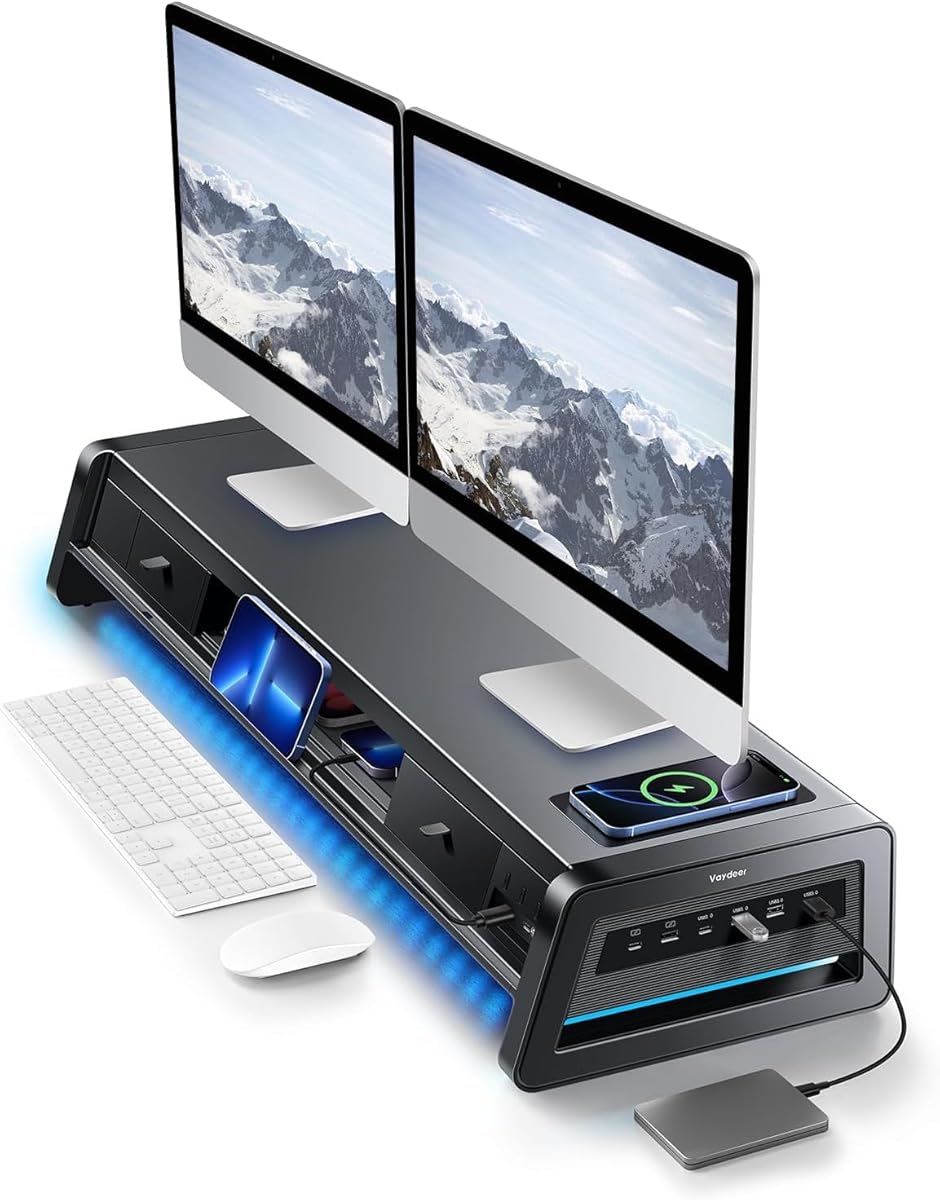
The Vaydeer All-in-One Dual Monitor Stand Riser is the top premium choice with a 4.5 rating. Its standout qualities include eight USB ports, a wireless charging pad, and an LED light strip for a complete tech hub.
We may earn a commission when you buy through this link, at no additional cost to you.
Key strengths involve seamless connectivity and charging. It keeps smartphones, iPads, and drives powered right at your fingertips. The two-tier storage with drawers keeps essentials like notebooks and pens organized and out of sight.
Trade-offs are the higher cost and the need for a power outlet for USB ports and LED lights. These are acceptable for users wanting an integrated workspace solution that reduces cable clutter significantly.
Tech enthusiasts and power users should buy this model. It is ideal for offices or home setups where charging multiple devices and keeping cables hidden is a priority for daily productivity.
Eight USB ports split between fast charging and data transfer allow simultaneous powering of multiple devices without extra adapters.
The built-in soft LED light strip reduces eye strain by illuminating the workspace gently without glare.
We may earn a commission when you buy through this link, at no additional cost to you.
The gianotter Dual Monitor Stand Riser is noted for its no-assembly feature with a 4.5 rating. Its standout qualities include magnetic pen holders and a drawer for organizing accessories immediately after unboxing.
We may earn a commission when you buy through this link, at no additional cost to you.
Key strengths focus on convenience and durability. It is crafted with high-strength metal materials to ensure exceptional support. The patented design ensures a perfect ratio for stability and aesthetics without tools.
Trade-offs include fixed height and limited width options. These are acceptable for users who prioritize immediate usability and a tidy desk over custom adjustability.
Renters and office managers should buy this. It is perfect for transforming cluttered desktop areas quickly without needing tools or spare parts for setup.
Users can skip assembly hassle entirely, transforming their workspace instantly just by unboxing and placing the stand.
Raising monitor height maximizes desktop space underneath for storing keyboards or mice to keep areas clear.
We may earn a commission when you buy through this link, at no additional cost to you.
The TAVR Monitor Stand Riser stands out for adjustability with a 4.6 rating. Its standout qualities include length adjustment from 30.7 to 43.3 inches and the ability to change end piece angles to fit curves.
We may earn a commission when you buy through this link, at no additional cost to you.
Key strengths are its ergonomic height and storage. It elevates computers to eye level while offering three storage spaces underneath for laptops, printers, or accessories. Assembly takes just two minutes with clear instructions.
Trade-offs involve basic color options and assembly requirements. These are acceptable given the flexibility to customize the desk layout and keep items within reach effectively.
Users with curved monitors or large desks should buy this. It is ideal for those needing to adjust the stand to fit specific shapes without sacrificing stability.
Adjustable angles allow end pieces to match the curve of monitors, ensuring a secure fit for various desk layouts.
Elevating screens to eye level develops good posture and relieves neck, back, and waist strain invisibly over time.
We may earn a commission when you buy through this link, at no additional cost to you.
The Simple Trending Dual Monitor Stand Riser is perfect for large surfaces with a 4.7 rating. Its standout qualities include a spacious 38×10.25 inch top and heavy-duty wood construction that supports large devices without crowding.
We may earn a commission when you buy through this link, at no additional cost to you.
Key strengths involve stability and fit. Non-slip suction cups keep it firmly in place on any desk. It easily holds gaming keyboards and consoles side by side for a comfortable setup.
Trade-offs include the need for wood care and slightly higher weight. These are acceptable given the robust support and clean aesthetic that blends well with modern desks.
Gamers and creative professionals should buy this. It offers a wide enough surface for multi-tasking and ensures the stand stays stable during intense typing or gaming sessions.
The large top surface allows placing laptops, Xbox consoles, or printers next to monitors without cluttering the workspace.
Non-slip suction cups prevent wobbling or sliding, keeping the stand firmly in place during heavy typing or use.
We may earn a commission when you buy through this link, at no additional cost to you.
The BONTEC Dual Monitor Stand Riser is best for corners with a 4.6 rating. Its standout qualities include swivel side shelves for angled or corner layouts and a smartphone holder slot for easy device access.
We may earn a commission when you buy through this link, at no additional cost to you.
Key strengths involve flexibility and organization. Swivel shelves help arrange straight or angled monitors. A cable management opening keeps wires neatly arranged for better daily efficiency.
Trade-offs include assembly needs and white finish maintenance. These are acceptable for users prioritizing flexible layout options over rigid straight-line setups.
Home office workers with corner desks should buy this. It is ideal for maximizing desk space in non-linear layouts while keeping devices accessible and organized.
Swivel shelves allow monitors to be angled to fit corner desks, creating a comfortable viewing experience in tight spaces.
A built-in smartphone holder slot lets you view messages or notifications without reaching across your desk clutter.
We may earn a commission when you buy through this link, at no additional cost to you.
The YAOHUOO Dual Monitor Stand Riser offers strong support with a 4.6 rating. Its standout qualities include heavy-duty steel footing and a large 38.6-inch length suitable for two monitors or large TVs.
We may earn a commission when you buy through this link, at no additional cost to you.
Key strengths involve load capacity and versatility. Steel footing ensures stability up to 100 pounds without shaking. It works as a printer or laptop stand too, maximizing utility.
Trade-offs include 10-minute assembly and fixed height. These are acceptable for users needing a robust, large surface that handles heavier equipment like large monitors.
Users with heavier monitors or multi-device needs should buy this. It is perfect for setups requiring a wide and stable platform without budgeting for high-end metal models.
Heavy-duty steel footing protects desk surfaces with non-slip pads, preventing scratches or collapse during use.
Designed as a printer, laptop, and TV riser, it adapts to various devices beyond standard monitors easily.
We may earn a commission when you buy through this link, at no additional cost to you.
The Fenge Dual Monitor Stand Riser provides ample storage with a 4.5 rating. Its standout qualities include two semi-transparent frosted acrylic drawers and a waterproof MDF panel surface resistant to scratches.
We may earn a commission when you buy through this link, at no additional cost to you.
Key strengths involve design and stability. A central support beam enhances stability. Back panels prevent drawers from sliding out and falling. Assembly is quick at 15 minutes.
Trade-offs include assembly time and weight. These are acceptable for users needing a wide, 42.5-inch platform that keeps workspace organized with hidden storage drawers.
Organizers and multi-device users should buy this. It is ideal for keeping files and supplies organized without cluttering the desk surface visually.
Back panels added behind drawers prevent sliding out or falling, ensuring your items stay secure inside the unit.
Thickened MDF panels feature waterproof surfaces that prevent marks like scratches and fingerprints for a cleaner look.
We may earn a commission when you buy through this link, at no additional cost to you.
The Simple Trending Dual Monitor Stand is great for compact needs with a 4.5 rating. Its standout qualities include a smooth-gliding hidden drawer and two side holders for writing tools within easy reach.
We may earn a commission when you buy through this link, at no additional cost to you.
Key strengths involve posture and organization. It raises screens to 4.75 inches for comfortable eye level. A sturdy metal frame supports heavy screens without wobbling, ensuring reliable support.
Trade-offs include lower height than other models and no mesh cooling. These are acceptable for users prioritizing desk tidiness and compact setups without large fans.
Small office workers should buy this. It offers a perfect balance of organization and stability for users needing accessible storage without cluttering their desk.
A smooth-gliding drawer stores small supplies out of sight while side pen holders keep writing tools within easy reach.
The premium metal construction ensures stability under heavy daily use without bending, shaking, or wobbling over time.
We may earn a commission when you buy through this link, at no additional cost to you.
Choosing the right stand depends on your desk size, device weight, and storage needs. This guide outlines key factors to consider.
Look for stands that allow length and angle adjustments to fit your specific desk layout. Some models offer swivel shelves or extendable arms to accommodate corner setups.
Ensure the stand fits within your desk dimensions without overcrowding your workspace.
Metal stands often provide stronger support than wood but may be heavier. Wood offers a premium aesthetic but requires careful handling to prevent damage.
Choose materials that match your desk weight requirements and aesthetic preferences.
Ideal stands raise screens to eye level, typically between 4 to 7 inches. This reduces neck strain and improves posture during long work sessions.
Measure your current monitor height to determine the needed elevation.
Consider models with drawers or pen holders if you need to keep stationery and accessories organized. Hidden storage helps maintain a clean workspace.
Assess your storage needs to choose between open shelves or enclosed drawers.
Some models require minimal assembly with clear instructions, while others are ready to use out of the box. Check if tools are included.
Select a model that matches your comfort level with setup.
Verify the maximum weight limit to ensure it supports your monitors and any additional devices like printers. Heavy-duty steel footing often indicates higher capacity.
Always choose a stand rated higher than your total device weight.
Stands with cable openings or holders keep wires organized and reduce clutter. Look for built-in phone slots as an added convenience.
Organized cables contribute to a tidier and more efficient workspace.
Mesh platforms or holes provide airflow to prevent monitors from overheating during extended use. This protects device longevity.
Prioritize stands with ventilation if you run high-performance computers.
Start by placing the stand on a flat, stable surface. Ensure all legs or suction cups are firmly touching the desk to prevent wobbling.
Clean the stand regularly with a soft cloth to remove dust. For metal stands, use a mild cleaner to prevent corrosion.
Avoid overloading beyond the weight limit. Check periodically if screws or parts need tightening to maintain stability.
The ideal height raises screens to eye level, typically between 4 to 7 inches. This helps reduce neck strain and improves posture during long work sessions.
Yes, many models support heavy gaming monitors and consoles. Ensure the weight capacity matches your specific device requirements before purchasing.
Most models are simple to assemble with clear instructions. Some are ready out of the box while others take only minutes to set up.
Yes, elevating screens to eye level promotes better sitting posture. This reduces stress on the spine and improves comfort over time.
Some models feature adjustable or swivel shelves to accommodate curved layouts. Check product specifications to ensure fit for your desk shape.
Ensure all feet or suction cups touch the desk surface evenly. Avoid overloading beyond the rated capacity to prevent wobbling.
In conclusion, the top picks like Simple Trending for cooling and Spacrea for budget value offer excellent choices. Consider your specific storage and stability needs.
Prioritize ergonomics to protect your health. A sturdy stand that fits your desk space is a smart investment for productivity.
Remember to check current prices and availability before purchasing. Availability may vary based on market conditions today.