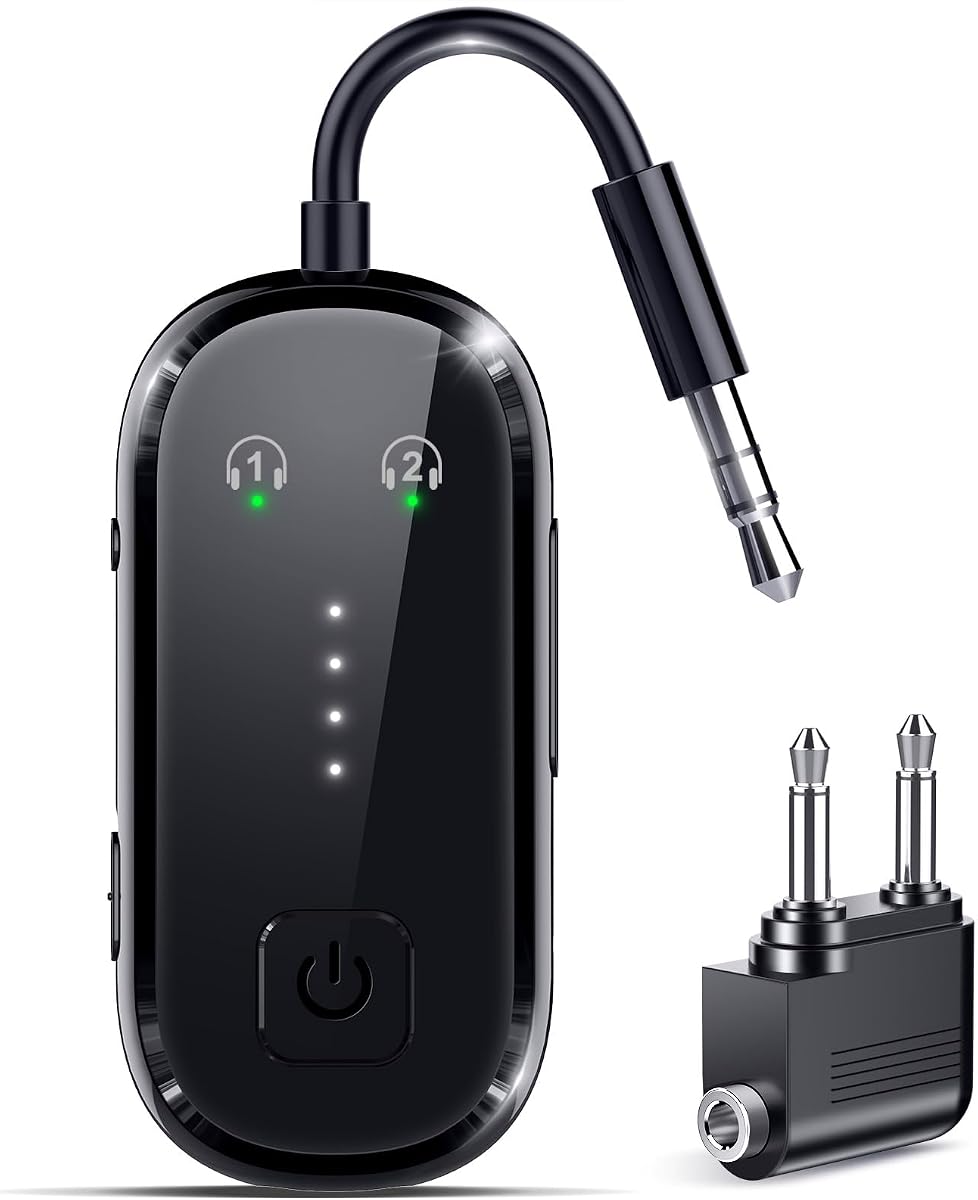
2026 Upgrade Pro Bluetooth 6.0 Transmitter
4.5Editor score
20+ Hour Battery Life
Dual Mode TX and RX
Compact Travel Design
This guide compares the top Bluetooth USB audio transmitters for gaming and music. We review latency, codec support, and compatibility to help you choose the
Connecting wireless headphones to devices like gaming consoles or PCs often requires a reliable adapter. A good Bluetooth USB audio transmitter bridges this gap, enabling high-quality sound without wires. These devices support various codecs to ensure clear audio for gaming and media consumption.
We compared ten top-rated transmitters based on latency, compatibility, and audio quality. Our analysis covers models from major brands like UGREEN and Sennheiser. Each product offers unique features such as low latency modes and support for multiple devices to enhance your listening experience.
Each pick in this list highlights key strengths and potential limitations. We explain which models suit specific needs like PS5 gaming or PC audio streaming. Prices and availability may change, so check the current listings for the most up-to-date information before purchasing.
4.5Editor score

4.4Editor score

4.1Editor score
The following table provides a side-by-side comparison of all ten products reviewed. It highlights key specifications such as Bluetooth version, supported codecs, and unique features to help you identify the best fit for your specific audio needs.


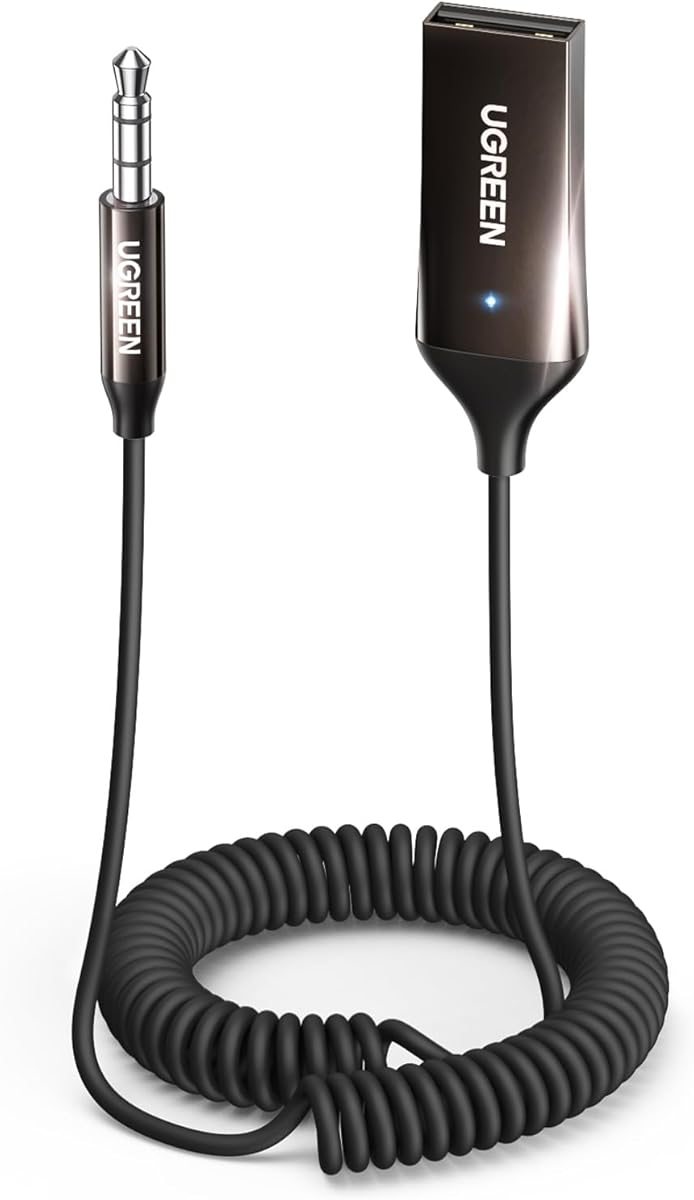
The UGREEN USB-C Bluetooth Adapter stands out as a top choice for gamers and PC users seeking high-quality wireless audio. With a rating of 4.4 stars, it is praised for its ability to connect wireless headphones to PS5 consoles and computers seamlessly. The adapter uses a Qualcomm chipset to support aptX Adaptive low latency, ensuring synchronized audio and video during gameplay.
We may earn a commission when you buy through this link, at no additional cost to you.
Key strengths include its support for multiple audio codecs like aptX HD and SBC, which delivers rich sound quality. The LED lights indicate the working status, helping users verify connections easily. It is designed to be user-friendly with no drivers or software required, making setup straightforward for most users.
However, there are trade-offs to consider. The device is not compatible with PS4 or Linux systems, which may limit some users. Additionally, enabling Bluetooth calling mode can degrade audio quality, so it is advisable to disable it for optimal music and game sounds.
This adapter is ideal for PS5 owners and PC gamers who prioritize low latency and sound fidelity. By selecting the correct audio output settings and disabling unnecessary features, users can enjoy a superior wireless audio experience without wires or interruptions.
The low latency certification ensures audio delay is minimized to less than 100ms for synchronized gameplay.
Support for aptX Adaptive and HD allows matching the optimal format for different devices and scenarios.
We may earn a commission when you buy through this link, at no additional cost to you.
This UGREEN adapter is designed for users who own multiple gaming consoles like PS4 and PS5. It supports Bluetooth 5.3 technology which reduces signal interruption and improves connectivity. The device allows for automatic connection when plugged in, making it simple to add Bluetooth audio capability to unsupported devices.
We may earn a commission when you buy through this link, at no additional cost to you.
Its low latency performance is a major strength, reducing audio lag to less than 60ms. This is four times shorter than standard Bluetooth, ensuring virtually unnoticeable delays during gaming or video streaming. The adapter also supports aptX HD and SBC codecs for high-quality sound.
Users should note that the microphone usage requires specific setup steps, such as connecting an included mic or using a headset mic. While it handles audio transmission well, it does not support file or picture transfer. The range extends up to 33 feet but may be affected by obstructions.
Ideal for gamers switching between consoles or home office users, this adapter offers reliable performance. It supports conference calls on PCs and Macs, automatically switching between music and talk modes for a seamless experience across different activities.
Compatible with PS4 PS5 and Switch allowing one adapter for multiple gaming systems.
Automatic switching between music and talk modes makes it suitable for work calls on PCs.
We may earn a commission when you buy through this link, at no additional cost to you.
This adapter leverages the latest Bluetooth 6.0 technology to offer future-ready audio streaming. It allows users to switch between Low Latency mode for gaming and High-Quality mode for music. The Qualcomm chipset ensures fast pairing and stable connections even in environments with interference.
We may earn a commission when you buy through this link, at no additional cost to you.
A standout feature is the LE Audio multi-sharing capability which allows one-to-many broadcasting. This is perfect for group gaming or family movie nights where multiple listeners want to enjoy wireless audio. It also supports Auracast for compatible headphones after switching modes.
Users should be aware that LE Audio requires headphones or speakers that specifically support it. Classic Bluetooth mode can be selected if devices do not support LC3. The adapter is not designed for data devices like mice or keyboards limiting its scope to audio transmission.
For tech enthusiasts and early adopters this model provides advanced features like dual pairing and Auracast compatibility. It is a solid choice for those who want the latest wireless standards in their PS5 or PC setup.
LE Audio mode supports broadcasting to multiple devices for shared entertainment experiences.
Supports aptX Adaptive HD and SBC to match optimal formats for different devices.
We may earn a commission when you buy through this link, at no additional cost to you.
The Creative BT-W5 focuses on delivering high-resolution audio with support for 24-bit and 96kHz streaming. Its aptX Adaptive codec monitors signal levels to dynamically adjust bitrate for robust and low latency playback. This makes it suitable for work and gaming environments requiring consistent sound quality.
We may earn a commission when you buy through this link, at no additional cost to you.
It features a smart codec system that automatically chooses the best available audio codec supported by the device. Users can easily switch between up to four remembered devices without disconnecting, using a multifunction button or the Creative app. This flexibility is great for multi-device setups.
Voice chat is supported through Hands-free Profile mode allowing quick calls with headset microphones. The lightweight dongle is portable and draws negligible power so it does not drain connected devices. It connects via USB-C and requires no drivers for immediate use.
Ideal for audiophiles and professionals this adapter ensures reliable audio each time you connect. The device switching function saves time when moving between work and entertainment use on PCs or Macs.
Monitors signal levels to adjust streaming bitrate for stable high quality playback.
Remembers up to four devices allowing easy switching without manual re-pairing.
We may earn a commission when you buy through this link, at no additional cost to you.
This versatile adapter offers both transmitter and receiver modes making it useful for various scenarios like travel or home use. In TX mode it connects to audio sources like TVs or airplane seats. In RX mode it plays audio from smartphones through systems lacking Bluetooth. The battery provides over 20 hours of playback for all-day use.
We may earn a commission when you buy through this link, at no additional cost to you.
It features smart auto-pairing with quick reconnection to models like AirPods and Sony. The compact design includes dedicated buttons for volume and mode switching. LED indicators show battery and connection status clearly. It is certified safe with global safety standards for everyday use.
In TX mode it allows connecting two sets of headphones simultaneously for shared entertainment. In RX mode it can pair two smartphones for effortless switching. The device is engineered for life on the move with a built-in microphone for hands-free calls.
Best for travelers and budget-conscious users this adapter delivers reliable performance at a lower price point. It is a travel essential for long flights or commuting with its durable build and intuitive controls.
Over 20 hours of playback allows for long journeys without frequent recharging.
Switches between TX and RX to adapt to different audio source needs.
We may earn a commission when you buy through this link, at no additional cost to you.
Sennheiser BTD 700 offers high-definition audio streaming with aptX Adaptive and aptX Lossless codecs. It delivers high-quality music and clear calls with ultra-low latency. The gaming mode reduces lag to just 30 milliseconds for seamless synchronization which is ideal for video streaming and competitive gaming.
We may earn a commission when you buy through this link, at no additional cost to you.
Auracast multistreaming allows simultaneous streaming to multiple headphones or speakers. This enables several devices to listen at the same time at home or on the go. It works with USB-C and USB-A connections supporting leading headphone brands for smooth calls and media control.
Setup is simple without drivers by plugging in the dongle and pairing headphones. The connection remains stable and uninterrupted ensuring a reliable experience. It retains full headphone control for media and calls during use.
Premium audiophiles will appreciate the lossless streaming and low latency performance. While the price is higher it justifies the quality with features like Auracast and support for multiple devices.
Ultra low latency of 30ms ensures audio video synchronization for immersive play.
Enables multiple listeners to enjoy wireless audio simultaneously with Auracast technology.
We may earn a commission when you buy through this link, at no additional cost to you.
The Sennheiser BTD 600 is an easy-to-use USB dongle for connecting Bluetooth headphones to PCs or Macs. It supports Bluetooth 5.2 and aptX audio codecs for high-definition music and clear calls. Low latency keeps audio and video in sync for a seamless entertainment experience.
We may earn a commission when you buy through this link, at no additional cost to you.
It stays paired so users can plug it into another device and continue using headphones without re-pairing. The USB-C adapter attaches to the USB-A dongle allowing connection to either port type. Controls on the headphones work for media and calls providing intuitive operation.
This model is straightforward for users wanting a reliable connection without complex setup. It ensures perfectly synced videos and clear calls essential for office work or media consumption. The compact design makes it easy to carry between devices.
Ideal for everyday PC users this adapter offers consistent performance. It simplifies the transition to wireless audio with minimal hassle and reliable connection stability.
Stays paired allowing plug and play on different devices without re-pairing.
Includes USB-C adapter to work with both USB-A and USB-C ports easily.
We may earn a commission when you buy through this link, at no additional cost to you.
This adapter is designed for consistent high-quality sound reproduction in work and gaming environments. It uses the latest aptX Adaptive Codec to deliver lossless sound for movies and games. The smart codec automatically adjusts the bit rate to suit the best available codec on your device.
We may earn a commission when you buy through this link, at no additional cost to you.
Users can easily switch the connected output device with a multi-function button. It remembers up to four devices at the same time for quick access. Voice chat is practical with hands-free profile mode enabling clear communication via Bluetooth.
It is portable and requires no driver to be installed. Just plug it into a USB-C port and connect to wireless headphones. The device consumes little energy making it suitable for continuous use without draining power.
For those needing reliable audio transmission this model offers straightforward performance. It ensures that audio quality remains high across different types of content seamlessly.
Automatically selects and adjusts bit rate for optimal codec compatibility.
Consumes little energy allowing continuous use without impacting device battery.
We may earn a commission when you buy through this link, at no additional cost to you.
This bundle includes the Sennheiser BTD 700 dongle with a weather-resistant hard-shell case. It offers high-definition audio streaming with aptX Adaptive and aptX Lossless for high-quality music and media. The ultra-low latency gaming mode reduces lag to 30 milliseconds for seamless synchronization.
We may earn a commission when you buy through this link, at no additional cost to you.
The included case features a built-in mesh pocket and smooth zipper closure. It is portable and suitable for travel and storage with a carabiner included. The dongle supports Auracast multistreaming allowing simultaneous streaming to multiple headphones or speakers.
Users get the same reliable performance as the standard version but with added protection for the device. The simple setup ensures uninterrupted sound without requiring drivers. It works with both USB-C and USB-A ports for wide compatibility.
Best for travelers who value audio quality this bundle ensures the device stays safe. The case provides durable protection while the dongle delivers premium audio features.
Hard-shell case with carabiner protects the dongle during transit.
Allows several devices to listen at the same time with multistreaming.
We may earn a commission when you buy through this link, at no additional cost to you.
This adapter is designed to add Bluetooth to car audio systems using a 3.5mm aux jack. It allows you to stream music and phone conversations through your car speakers easily. With Bluetooth 6.0 chipset it offers a stable 10m connection without delay. The SBC codec delivers clear and enjoyable sound for listening and speaking.
We may earn a commission when you buy through this link, at no additional cost to you.
Hands-free calling is supported with a built-in microphone so you can talk safely while driving. It is plug and play with automatic connection when you turn on the car. The device can remember up to five devices and allows pairing two at a time.
Durable zinc alloy connectors and a premium TPE elastic cable enhance durability and fit. It is compact and does not take up extra space in your car. Power is provided via a USB port so it does not require continuous battery charging.
Ideal for car owners without built-in Bluetooth this adapter provides a reliable solution. It ensures safe and connected audio during journeys with clear calls and music streaming.
Hands-free calling allows you to have conversations without looking at your phone.
Automatically connects to your phone when you turn on the car for convenience.
We may earn a commission when you buy through this link, at no additional cost to you.
Selecting the right Bluetooth USB audio transmitter requires considering several factors to ensure compatibility and performance. This guide outlines key aspects to look for when shopping for an adapter for your devices.
Bluetooth version dictates compatibility and connection stability. Newer versions like 5.3 or 6.0 offer better range and lower power consumption. The chipset determines performance such as support for advanced codecs and low latency. Look for models with reputable chipsets like Qualcomm for reliable audio transmission.
Choose a Bluetooth version that matches your headphones and source devices for optimal performance.
Codecs like aptX Adaptive aptX HD and SBC affect sound quality and latency. aptX Adaptive is ideal for gaming due to dynamic bitrate adjustment. aptX HD provides high-resolution audio for music. Ensure the adapter supports the codecs your headphones utilize for best results.
Prioritize adapters with versatile codec support to maximize sound fidelity and responsiveness.
Low latency is crucial for gaming and video streaming to sync audio with visuals. Aim for models with latency under 100ms or specialized gaming modes. Standard Bluetooth may have delays of 200ms or more which can disrupt immersion. Check product specs for specific latency certifications.
Select low latency models if you plan to use the transmitter for media or gaming.
Verify that the adapter works with your specific devices such as PS5 PC or Mac. Some adapters support multiple platforms while others are console specific. Also check if it supports multiple headphone connections for shared listening. Ensure the USB port type matches your source device.
Confirm compatibility with your console or computer to avoid functional issues.
Bluetooth range determines how far you can move from the source device. Most offer up to 33 feet but obstructions can reduce this. Consider your usage environment such as a large room or car. A reliable signal prevents dropouts during movement.
Choose a range that suits your typical listening distance for uninterrupted audio.
Some transmitters require a battery while others draw power from the USB port. Battery powered models are portable but need charging. Powered models are simpler but rely on the source device. Decide based on your mobility needs and port availability.
Select a power option that aligns with whether you need portability or simplicity.
Durable connectors and materials ensure the adapter lasts over time. Look for features like weather resistance or sturdy cables. A good build prevents issues from daily wear and tear. This is important for travel or frequent use.
Invest in a well-built adapter to ensure longevity and reliability.
Prices vary based on features and brand reputation. Higher-end models may offer better codecs or latency. Budget options can still provide solid performance for basic needs. Balance your budget with required features for the best value.
Evaluate features against cost to find a model that meets your needs affordably.
To start using your adapter plug it into the USB port of your source device. Set your headphones to pairing mode and wait for automatic connection. If needed access your device settings to select the adapter as the audio output.
Maintain performance by keeping the adapter away from other USB devices that might cause interference. Regularly update firmware if available to ensure compatibility with new devices. Clean connectors gently to prevent dust buildup.
For battery models recharge before the battery depletes to extend lifespan. Store the adapter in a dry place when not in use. Avoid exposing it to extreme temperatures which may affect internal components.
Not all transmitters work with every headphone model. Compatibility depends on the supported codecs and Bluetooth versions. Ensure your headphones support the same standards as the adapter like aptX or SBC.
Some transmitters support microphone input via HFP mode or included mics. However enabling this mode may degrade audio quality. Check product details for specific mic capabilities.
Audio lag occurs when the codec does not support low latency. Use an adapter with aptX Adaptive or a gaming mode. Ensure your headphones also support low latency features.
Most modern adapters are plug and play requiring no drivers. Simply insert them into the USB port and pair your device. Some may need a reboot to be recognized.
Some models support dual pairing or Auracast for multiple headphones. This allows group listening or family sharing. Check product specs to confirm this capability.
Many models are designed to work with both PS5 and PC. Ensure you select an adapter that lists compatibility with these devices. Follow setup instructions for audio output settings.
Adapters with multi-device memory allow switching via buttons or apps. Press the multifunction button to cycle through paired devices. This avoids manual re-pairing each time.
Wired connections avoid latency and compression but lack mobility. Bluetooth offers freedom of movement with modern codecs reducing gaps. Choose based on your priority for convenience or absolute fidelity.
We reviewed ten top Bluetooth USB audio transmitters offering a range of features for different needs. The UGREEN PS5 adapter leads with low latency and compatibility for gaming. The Creative BT-W5 excels in high-resolution audio for audiophiles.
When choosing prioritize latency for gaming or codec support for music. Consider compatibility with your specific console or computer to ensure seamless setup. A budget option like the 2026 upgrade pro offers solid value for travel.
Always check the latest prices and availability as these can change. Select the model that aligns with your audio goals and device requirements for the best wireless experience.