
5-in-1 Extemal CD/DVD Drive for Laptop
4.2Editor score
Built-in SD card reader
Affordable price point
USB hub functionality included
This guide compares the top external DVD drives for Windows 11, evaluating performance, compatibility, and portability to help you choose the perfect optical
Modern laptops often skip internal optical drives, making external units essential for media and software. A good drive offers fast speeds, reliable connections, and broad OS support for seamless daily use.
We evaluated ten top models based on connectivity, build quality, and user feedback. Each entry balances performance with portability, ensuring you find a reliable solution for reading and burning discs easily.
Every pick highlights key features, pros, and cons to guide your decision. Prices and availability fluctuate frequently, so verify current details before purchasing to ensure you get the best value now.
4.2Editor score

4.4Editor score

4.5Editor score
The following table provides a side-by-side comparison of all ten drives. It highlights key specifications and unique features to help you quickly identify the right model for your specific needs.




The ROOFULL External CD DVD Drive stands out as a top choice for Windows 11 users needing reliable optical access. With a 4.4 rating, it offers solid performance for reading and burning discs while maintaining a compact form factor ideal for travel.
We may earn a commission when you buy through this link, at no additional cost to you.
Its standout feature is the included protective case, which ensures the drive remains safe during transport. The USB 3.0 and Type-C connectors provide versatile connectivity, and the built-in anti-shock technology helps prevent read errors caused by movement.
While it does not support Blu-ray discs, this limitation is acceptable for standard CD and DVD tasks. Some desktop users may need to connect to a rear USB port for sufficient power, but this is a minor trade-off for the portability.
This drive is perfect for students and professionals who need a dependable external optical solution. Its ease of use and robust build quality make it a highly recommended option for daily media and software management tasks.
The included protective sleeve provides essential defense against dust and scratches, extending the lifespan of the drive significantly.
Dual USB connectors ensure you can connect to modern laptops with Type-C ports or older devices with standard USB slots easily.
We may earn a commission when you buy through this link, at no additional cost to you.
This 5-in-1 drive is an excellent budget-friendly option that adds significant utility beyond basic disc reading. It functions as a CD DVD burner while also offering card reader and USB hub capabilities for a comprehensive peripheral solution.
We may earn a commission when you buy through this link, at no additional cost to you.
Users benefit from the extra USB 2.0 ports which allow you to connect mice or keyboards without using laptop ports. The SD TF card slot is a major plus for transferring photos directly from cameras or phones to your computer.
The trade-off is that it requires external power for optimal performance on some systems, which adds a cable to your setup. However, the included power cable and dual connectors mitigate this issue effectively for most desktop environments.
If you need a multifunctional hub rather than just a disc burner, this is a compelling choice. The long warranty and versatile connectivity make it a smart investment for users seeking value and extra functionality.
Beyond burning discs, this drive acts as a hub allowing you to connect additional peripherals like keyboards or mice easily.
The integrated SD TF card slot allows you to transfer data from camera memory cards directly to your computer efficiently.
We may earn a commission when you buy through this link, at no additional cost to you.
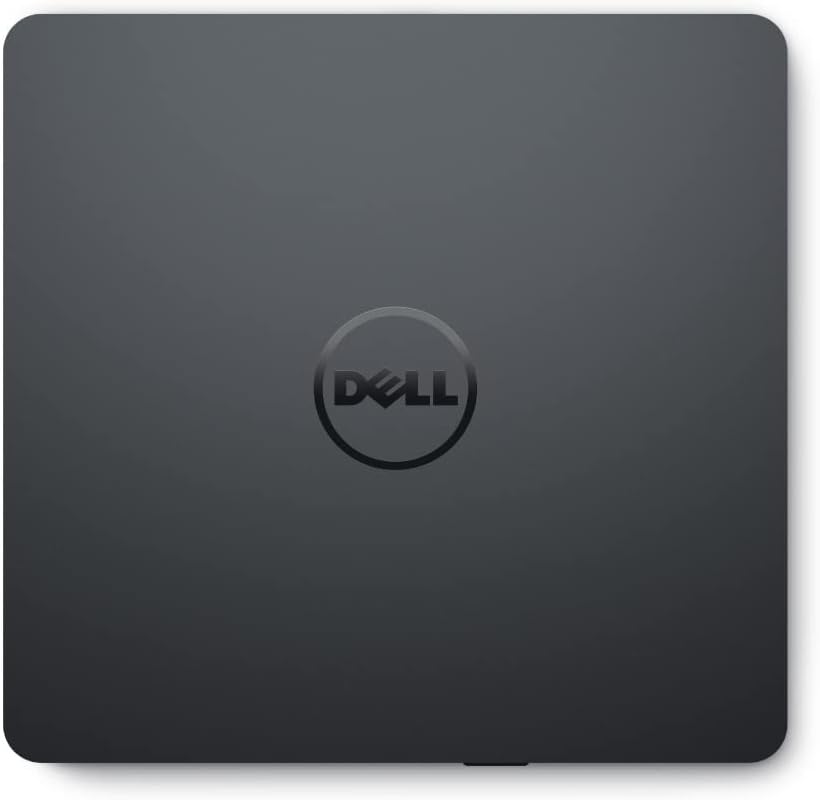
Dell brings its reputation for reliability to this slim external drive, making it a premium choice for business and home users. With a 4.5 rating, it offers a robust build and includes useful media software for immediate use out of the box.
We may earn a commission when you buy through this link, at no additional cost to you.
The CyberLink Media Suite pre-loaded on the drive adds value by allowing users to play and burn discs immediately without needing third-party software. Its slim profile ensures it looks professional on any desk or fits easily into a laptop bag.
While it uses USB 2.0 which is slower than modern standards, the data transfer rates are sufficient for standard disc operations. The included software and Dell warranty provide peace of mind for professional environments where stability is key.
This drive is ideal for users who prioritize build quality and brand trust over raw speed. If you need a dependable solution for daily media playback and software installation on Windows 11, this Dell model is a strong contender.
The pre-loaded CyberLink Media Suite provides immediate ability to burn and play discs without needing extra downloads.
Dell’s reputation for durable hardware shines through in this drive's sturdy yet lightweight construction suitable for travel.
We may earn a commission when you buy through this link, at no additional cost to you.
The Amicool External DVD Drive is a versatile option that supports both USB 3.0 and Type-C connections for maximum compatibility. It delivers solid read and write speeds suitable for standard optical disc operations on Windows 11 and other systems.
We may earn a commission when you buy through this link, at no additional cost to you.
Its slim design and built-in cable make it easy to carry in a laptop bag without the hassle of tangled wires. The plug and play feature ensures quick setup, though desktop users should connect to rear ports for stable power.
While it does not support Blu-ray discs, the CD DVD performance is reliable for most general users. The dual interface options allow you to connect to newer MacBooks or older Windows laptops with equal ease and efficiency.
This drive is a great balance of affordability and performance for casual users. If you need a reliable burner that connects easily to modern Type-C ports, this Amicool model is a worthy addition to your toolkit.
Having both USB 3.0 and Type-C options ensures you can connect to a wide variety of modern and older devices easily.
The integrated cable design keeps the drive compact and ready to use immediately without searching for extra adapters.
We may earn a commission when you buy through this link, at no additional cost to you.
HP continues to deliver reliable hardware with this external DVDRW drive designed for seamless integration with Windows 11 systems. It offers a compact form factor that fits easily into any office setup or travel bag without taking up much space.
We may earn a commission when you buy through this link, at no additional cost to you.
The drive supports both reading and writing discs, making it useful for backing up data or installing software from physical media. Its plug and play nature means no extra drivers are needed, streamlining the user experience significantly.
While detailed technical specs are minimal, the high rating suggests stable performance in real-world scenarios. The brand name adds a layer of trust regarding build quality and long-term reliability for daily usage needs.
This drive is suitable for users who want a trusted brand name without extra features. If you prioritize reliability and simplicity over high-speed specs, this HP model is a solid choice for your optical needs.
HP’s reputation for durable computer hardware ensures this drive meets high standards for build quality and consistency.
Its slim profile ensures it takes up minimal desk space and fits comfortably in most laptop cases for travel.
We may earn a commission when you buy through this link, at no additional cost to you.
The Rioddas External CD/DVD Drive leverages USB 3.0 technology to offer faster data transfer rates for optical discs. It is designed with a physical eject button that provides a reliable manual override when the system fails to recognize the drive.
We may earn a commission when you buy through this link, at no additional cost to you.
Copper mesh technology inside the cable helps reduce interference and ensures stable data transmission during read and write operations. This feature enhances reliability and minimizes the risk of errors when burning large files or playing video discs.
While it is not compatible with Blu-ray discs, it supports all standard CD and DVD formats including RW and DL. The integrated cable keeps the unit neat and portable, making it easy to carry in a laptop bag or backpack.
This drive is a solid choice for users needing quick access to optical media without complicated setup. If you value stability and manual controls alongside speed, the Rioddas model provides a practical solution for Windows 11 PCs.
The included physical eject button ensures you can remove discs safely even when the computer software is unresponsive.
Internal copper mesh shielding protects data signals from interference ensuring smoother burning and reading operations.
We may earn a commission when you buy through this link, at no additional cost to you.
The ORIGBELIE drive is designed for maximum portability with an ultra-slim 13mm profile that slips easily into tight spaces. It supports both USB 3.0 and Type-C interfaces for broad compatibility across different laptop models and operating systems.
We may earn a commission when you buy through this link, at no additional cost to you.
A key feature is the included extra power cable which can connect to a USB power adapter to ensure stable operation. This is particularly useful for desktop users or laptops where the USB port does not supply enough power for spinning discs.
While the warranty period is shorter than some competitors, the drive’s performance is generally reliable for standard CD and DVD use. Its lightweight design and anti-skid bottom make it a convenient travel companion for users on the go.
This drive is ideal for users who prioritize portability and slimness above all else. If you need a drive that takes up minimal space in your bag and supports modern connectors, the ORIGBELIE model is a strong candidate.
The included charging cable allows you to connect an external power source if the USB port alone does not provide enough energy.
The anti-skid rubber bottom keeps the drive stable during operation preventing slipping or vibration while reading discs.
We may earn a commission when you buy through this link, at no additional cost to you.
The ASUS ZenDrive stands out by supporting M-Disc technology for long-term data archiving alongside standard DVD reading. It includes USB Type-C cables and USB 2.0 cables for flexible connectivity across a wide range of devices including modern Macs.
We may earn a commission when you buy through this link, at no additional cost to you.
Included Nero BackItUp software offers convenient tools for backing up your files and managing data on mobile devices. The drive also supports password protection and hidden-file functionality for added data security in professional or sensitive environments.
While USB 2.0 limits transfer speeds compared to USB 3.0, the drive remains fast enough for standard burning and playback. The slim design ensures it fits easily into any workspace or laptop bag without adding bulk to your gear.
This drive is perfect for users concerned about data longevity and security. If you need to archive critical files securely or use backup software out of the box, this ASUS model offers valuable features beyond simple disc reading.
Support for M-Disc technology ensures your data can be archived and read reliably for over a century without degradation.
The included Nero BackItUp software simplifies the process of backing up important files to optical media safely.
We may earn a commission when you buy through this link, at no additional cost to you.
This portable external drive focuses on stability with a pure copper knitted net cable that enhances signal integrity during operations. It connects via standard USB ports to ensure compatibility with most laptops and desktops without needing special adapters or hubs.
We may earn a commission when you buy through this link, at no additional cost to you.
The slim and compact design makes it easy to carry in a laptop bag or backpack for daily use. It supports reading and writing of common disc formats including CD and DVD RW, making it a versatile tool for general data tasks.
While it does not include Type-C cables like some newer models, its standard connection is reliable and widely supported. The high-speed read and write capabilities ensure that burning and copying discs is done efficiently without unnecessary delays.
This drive is a solid choice for users who value stability and simplicity over cutting-edge interfaces. If you need a dependable optical drive for basic Windows 11 tasks, this portable model delivers consistent performance.
The pure copper knitted net inside the cable reduces interference and ensures stable data transmission between the drive and computer.
The drive works immediately upon connection without requiring drivers or complex software installations on your system.
We may earn a commission when you buy through this link, at no additional cost to you.
This Dell Slim drive holds a high reliability rating and supports DVD-RAM formats for more advanced disc usage scenarios. It connects via USB 2.0 which is sufficient for standard reading and burning tasks on most desktops and laptops.
We may earn a commission when you buy through this link, at no additional cost to you.
The slim external design allows it to be used on a variety of Dell systems as well as other brands with minor adjustments. While labeled for specific Inspiron and XPS models, it works broadly with any computer featuring a standard USB port.
Users may find the USB 2.0 speeds slower than modern USB 3.0 drives but this is offset by its stable performance. The drive is an excellent option for those needing a compact optical solution for backups or software installs on older systems.
This drive is ideal for users prioritizing reliability and standard format support. If you need a trusted Dell solution that handles DVD-RAM and maintains solid build quality this model is a strong contender.
Support for DVD-RAM formats allows for rewritable disc use which is useful for temporary backups and frequent data changes.
Despite specific model labels this drive works with most Windows and Mac computers offering wide utility for general users.
We may earn a commission when you buy through this link, at no additional cost to you.
Selecting the right external DVD drive requires considering several factors to ensure compatibility and performance with your specific setup. This guide covers key features to help you make an informed decision.
Most modern external DVD drives use USB 3.0 or Type-C connectors for faster data transfer. Ensure your laptop has the matching port or that the drive includes adapters for broader compatibility.
Check if the drive provides both USB-A and Type-C cables. This flexibility allows you to connect to older and newer machines without needing separate dongles.
Read and write speeds affect how quickly you can burn discs or copy files. Look for drives with at least 8x DVD read/write speeds and 24x CD speeds for efficient performance.
Faster speeds reduce waiting times for large data transfers or long video backups. This is particularly important for frequent users who burn discs regularly.
Verify that the drive supports your OS version such as Windows 11 or macOS. Plug and play support is essential for seamless detection without installing extra drivers.
Some drives may require specific settings on Mac OS such as inserting a disc before connecting. Ensure you understand any OS-specific requirements before purchasing.
Many external drives draw power from the USB port but some desktops may need extra power. Look for drives that include a power adapter or cable if your ports supply limited energy.
Using a powered USB hub can also resolve power issues if the drive is not detected or fails to spin discs properly.
A sturdy build ensures the drive survives travel and daily handling. Look for models with metal components or protective features like anti-shock technology.
Consider drives that come with carrying cases or sleeves to protect them from dust and scratches when stored in a bag.
Some drives offer extra features like card readers or USB hub ports. These can add value if you need to transfer files from memory cards simultaneously.
Advanced software support or encryption tools may be beneficial for specific professional use cases requiring secure data storage.
A reliable warranty can save you money if the drive fails prematurely. Look for products offering at least a one-year warranty and responsive customer support.
Check the return policy to ensure you can get a replacement quickly if the unit is defective upon arrival.
Prices vary based on brand and features. Determine your budget and weigh the cost against necessary features like Type-C connectivity or included software.
Avoid the cheapest options if they lack essential features or have poor reviews. A mid-range drive often offers the best balance of price and reliability.
Connect the drive to an available USB port on your computer. If you are using a desktop, connect to a rear port for better power stability. Wait a moment for Windows to detect the device automatically.
Insert a disc into the drive tray or slot and wait for it to spin up. Open File Explorer to access the drive contents and perform read or write operations as needed using compatible software.
To maintain longevity, keep the drive clean and free of dust. Avoid physical shocks while the drive is spinning and unplug it carefully when finished to prevent data corruption or hardware damage.
Yes, most external DVD drives are plug and play with Windows 11 and do not require drivers. Simply connect the USB cable and wait for the system to recognize the drive before accessing discs.
Yes, most drives support macOS but you may need to insert the disc before connecting the drive. Some models might require specific settings in Finder preferences to display the drive icon on the desktop.
Standard drives support CD, DVD, and RW formats. Most do not support Blu-ray discs unless specified as a Blu-ray burner. Always check the product specs to confirm supported formats.
This is often due to insufficient power from the USB port. Try connecting to a different port especially on the back of a desktop or use a powered USB hub to ensure stable operation.
Yes but they are usually more expensive and labeled specifically as Blu-ray burners. Standard DVD drives will not read or write Blu-ray discs so verify the features before purchasing.
Windows 11 has built-in tools to burn data discs but you may need third-party software for audio or video burning. Most drives do not include dedicated burning software unless stated in the features.
No, external DVD drives generally work only with laptops and desktop computers. They typically require more power and drivers that tablets like iPads or Android tablets cannot support.
Selecting the right external DVD drive depends on your specific needs for speed, connectivity, and durability. The ROOFULL model stands out for its included case and versatile connectors making it a top overall choice.
Budget-conscious users will appreciate the 5-in-1 drive for its added card reader and hub features. Premium buyers may prefer the Dell option for its reliable build and included media software.
Remember that prices fluctuate regularly so verify current deals before purchasing. Checking user reviews and specs ensures you get the best value for your setup today.