
PecuMecu 3-in-1 Bluetooth & USB Wired Scanner
4.3Editor score
Supports 1D and 2D barcodes
Multiple connection modes available
130000 barcode storage capacity
Compare the top barcode scanner for iPad options for mobile inventory retail logistics and library tasks. This guide reviews features compatibility and battery
Finding the right barcode scanner for iPad can transform how you manage inventory track assets or check out customers. A good device should connect easily scan accurately and last all day without needing frequent recharges.
We compared ten highly rated models based on their connectivity options scanning technology battery life and ease of use with iOS devices. Each product was evaluated for real world performance in retail warehouse and office environments.
Every pick shows key strengths potential limitations and ideal use cases to help you choose the best tool for your workflow. Please note that availability and pricing may change over time so verify details before purchasing.
4.3Editor score
4.9Editor score

4.9Editor score
This side by side comparison highlights key specifications and capabilities across all ten selected barcode scanners. It helps you quickly identify which model fits your specific iPad usage needs and environment.


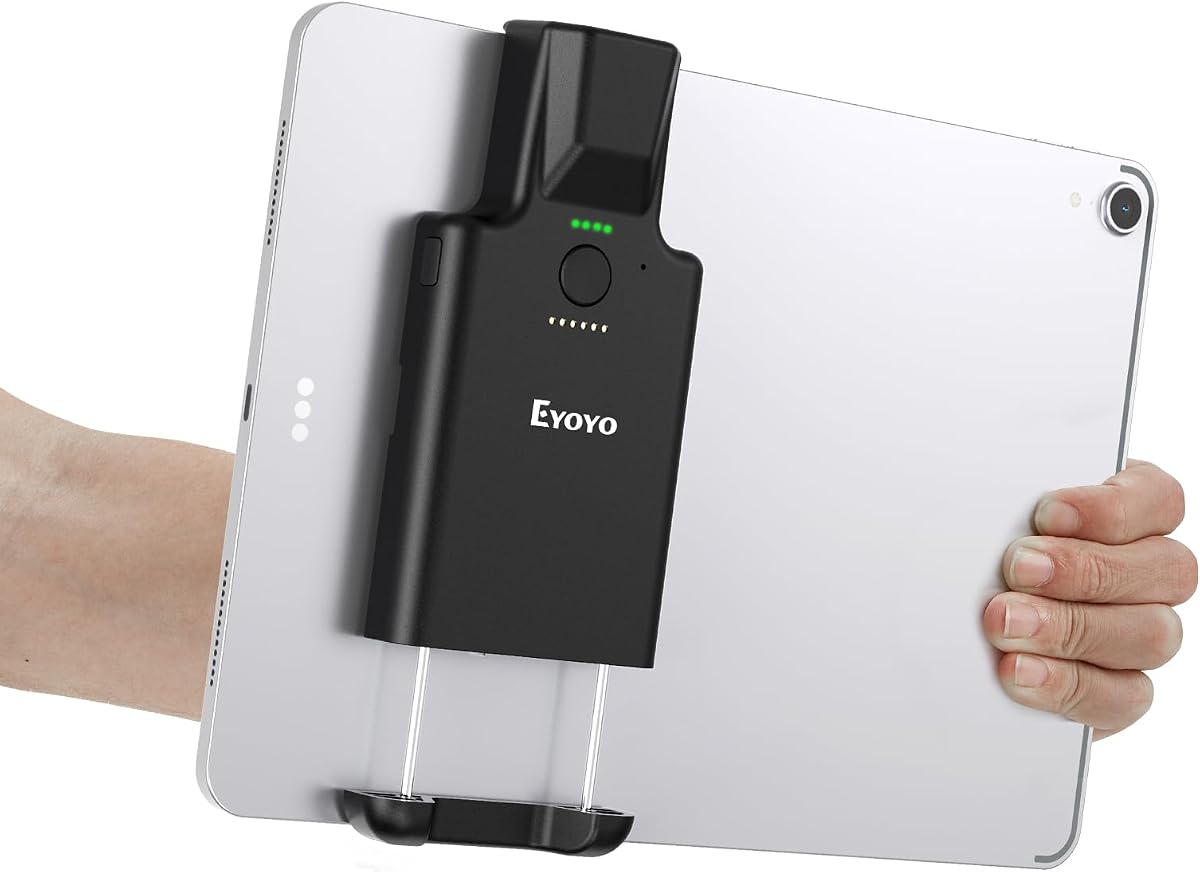
The Eyoyo 1D 2D Portable Bluetooth Barcode Scanner stands out as a top choice for iPad users due to its versatile clip design and robust scanning technology. It holds a strong rating for reliability and ease of use in busy environments.
We may earn a commission when you buy through this link, at no additional cost to you.
Its 2D CMOS imaging sensor ensures quick and precise reads of damaged curved or digital barcodes. The 3000mAh battery supports extended shifts without interruption while the LED indicators keep you informed of power levels.
While it lacks the 2.4G wireless option found in other models the Bluetooth and USB modes cover most use cases. The added weight might be slightly less convenient for ultra portable tasks compared to smaller units.
This scanner is ideal for retail staff or librarians who need to attach the device securely to their tablet. It balances performance durability and convenience effectively making it a strong recommendation for most users.
The retractable clip fits various iPad sizes providing a stable scanning position without needing a separate stand.
With a capacity designed for long shifts you can scan thousands of items before needing to recharge the unit.
We may earn a commission when you buy through this link, at no additional cost to you.
The PecuMecu 3-in-1 Bluetooth & USB Wired Scanner offers excellent value for those seeking a budget friendly option that does not sacrifice essential functionality. It supports both 1D and 2D barcodes which broadens its utility significantly.
We may earn a commission when you buy through this link, at no additional cost to you.
Its 2600mAh battery and 70 meter wireless range make it suitable for larger warehouses or outdoor events where connectivity might be limited. The offline storage feature allows you to collect data even when the receiver is out of range.
However the build materials are more basic compared to higher end models and the interface relies on scanning configuration barcodes in the manual. This may add a small learning curve for first time users.
For small businesses or startups needing reliable scanning without a big investment this model delivers solid performance. It handles everyday tasks well and provides the connectivity flexibility needed for mobile iPad workflows.
You can store up to 130000 codes internally ensuring no data is lost during signal outages in large facilities.
The extended 2.4G range allows you to move freely around a shop or warehouse without losing connection to your iPad.
We may earn a commission when you buy through this link, at no additional cost to you.
The NetumScan Bluetooth Barcode Scanner with Charging Dock is designed for professional settings where durability and convenience are paramount. Its high rating reflects consistent performance and thoughtful design features that reduce workflow interruptions.
We may earn a commission when you buy through this link, at no additional cost to you.
The included charging dock acts as a data receiver as well which streamlines the setup process and keeps your workspace tidy. The sensor reads codes quickly and accurately even on low contrast or damaged labels.
While the upfront cost is higher the robust construction and reliable connection justify the expense for heavy users. The dock makes it less portable for field work but ideal for fixed stations in retail or libraries.
If you need a scanner that can withstand daily drops and frequent use this model is a top recommendation. It offers a premium experience with features like vibration modes and smart controls that enhance operational efficiency.
The dock charges the device and manages data transfers allowing you to swap units quickly without unplugging cables.
Built to survive drops onto concrete the scanner remains functional even in demanding warehouse or retail floor conditions.
We may earn a commission when you buy through this link, at no additional cost to you.
The NETUM Bluetooth Barcode Scanner is known for its strong recognition ability and versatile connectivity options. It works well with iPads and other mobile devices making it a practical choice for inventory and asset tracking.
We may earn a commission when you buy through this link, at no additional cost to you.
The high resolution CCD sensor can read worn or tightly spaced codes which is essential for older inventory labels. Its storage mode allows you to save a large number of scans offline if needed.
Users should note that it is not compatible with certain POS systems like Square or Lightspeed so checking compatibility is important. The configuration process involves scanning specific barcodes in the manual which may take time initially.
Overall this scanner is a reliable workhorse for businesses that need consistent performance and flexibility. It is well suited for libraries warehouses and retail shops where scanning volume is high.
You can switch between Bluetooth 2.4G wireless and wired connections depending on the task and environment.
The upgraded battery supports continuous scanning for long periods reducing the need for frequent recharging cycles.
We may earn a commission when you buy through this link, at no additional cost to you.
The Eyoyo Mini 1D Bluetooth Scanner is perfect for users who prioritize portability and low weight. Its pocket size design makes it easy to keep in a pocket or bag during rounds.
We may earn a commission when you buy through this link, at no additional cost to you.
The vibration mode allows for silent scanning which is ideal in libraries or quiet office environments. Despite its small size it offers a decent wireless range for most indoor settings.
Since it only supports 1D barcodes it may not be suitable for applications requiring QR or Data Matrix codes. The battery life is sufficient for light to moderate use but may need charging more often.
This model is best suited for bookstores or small retail shops where simple product codes are common. Its ease of use and discreet operation make it a great choice for personal or light business use.
Weighing just 35 grams it fits easily in pockets without adding bulk or strain during long scanning sessions.
The adjustable volume and vibration feature ensure you can scan without disturbing customers or patrons.
We may earn a commission when you buy through this link, at no additional cost to you.
The NetumScan Desktop Barcode Scanner is designed for counter setups where items need to be scanned quickly without lifting the device. It features a stable base and omnidirectional sensor for ease of use.
We may earn a commission when you buy through this link, at no additional cost to you.
Its ability to read codes from mobile screens makes it useful for digital vouchers or loyalty programs. The IP54 rating helps protect it from dust and minor spills in busy environments.
While it is excellent for checkout or receiving areas it is not suitable for mobile tasks away from the desk. It is a specialized tool for specific workflows rather than a general purpose handheld scanner.
For retail stores or shipping desks needing a quick and reliable scan station this model works very well. It simplifies the checkout process and reduces physical strain on staff members.
The handsfree design allows staff to scan items while keeping both hands free to pack or handle goods.
It can easily read barcodes from customer phone screens which is common for modern digital tickets or coupons.
We may earn a commission when you buy through this link, at no additional cost to you.
The NetumScan Bluetooth Scanner U820 combines a compact handheld design with a convenient charging dock. It is optimized for iPhone and iPad users who need seamless connectivity during inventory tasks.
We may earn a commission when you buy through this link, at no additional cost to you.
The upgraded wireless chip helps maintain a stable connection reducing dropouts during busy scanning sessions. The dock keeps the scanner charged and ready to use without fiddling with cables.
Its pocket size makes it easy to carry around but the battery capacity is smaller than full size handhelds. This may require more frequent charging in high volume environments.
Ideal for retail or library staff who value portability and ease of charging this scanner offers a good balance of features. It is a practical tool for everyday scanning needs.
The dock serves as both a charger and receiver keeping your workspace organized and your scanner ready.
Improved wireless technology ensures stable pairing with your iPad even in areas with interference.
We may earn a commission when you buy through this link, at no additional cost to you.
The Bluetooth Wireless Handheld Scanner offers substantial offline memory which is useful for long collection trips without connectivity. It supports a wide range of barcode types including PDF417 and Data Matrix.
We may earn a commission when you buy through this link, at no additional cost to you.
Its ergonomic design ensures comfortable use during extended periods while the dual connection modes provide flexibility. The built-in memory allows you to store thousands of codes for later upload.
Some users report a lower average rating which may indicate variability in quality or ease of setup. A physical switch is required to turn it on which adds a small step to the workflow.
For field auditors or inventory staff who need robust data storage this scanner is a strong candidate. It performs well in environments where connectivity is intermittent or unavailable.
With 16MB of memory you can store up to 50000 codes securely for batch uploads at your convenience.
The ability to read complex 2D codes expands its utility for modern packaging and digital ticketing.
We may earn a commission when you buy through this link, at no additional cost to you.
The KUIIYER Bluetooth Barcode Scanner offers high resolution imaging and robust protection features making it reliable for varied environments. It handles 1D and 2D codes with speed and accuracy.
We may earn a commission when you buy through this link, at no additional cost to you.
The IP54 rating ensures it can withstand dust and light water exposure which is helpful in warehouses or outdoor settings. Its built-in light improves visibility in dark spaces like shelves or containers.
While it is a versatile device the setup process requires scanning manual barcodes for configuration. Users should also verify compatibility with their POS systems as it excludes some platforms.
This scanner is a solid option for logistics and retail teams that need durability and detailed scanning capabilities. It balances performance and protection effectively for demanding workloads.
The 800 by 600 pixel sensor delivers clear images for precise decoding even on damaged or curved labels.
The dust and water resistance rating extends the device life when used in less controlled environments.
We may earn a commission when you buy through this link, at no additional cost to you.
The Inateck 1D Bluetooth Scanner is designed for users who need a long connection range and dependable battery life. Its protective case adds extra durability against drops and impacts.
We may earn a commission when you buy through this link, at no additional cost to you.
The 115-foot range allows you to move far from your iPad without losing signal which is useful in large warehouses. Setup is straightforward and supports multiple keyboard languages for international use.
Since it is limited to 1D barcodes it may not meet needs for QR code scanning applications. The weight is slightly higher than ultra-light models but adds to stability and grip.
For businesses prioritizing range and durability this scanner offers reliable performance. It is well suited for asset tracking and large floor inventory management where mobility is key.
A 115-foot range ensures stable connections across large rooms or warehouse floors without dropping data.
The thick TPU case helps withstand accidental drops protecting the device from damage in busy areas.
We may earn a commission when you buy through this link, at no additional cost to you.
Selecting the right barcode scanner involves considering connectivity code types and durability. This guide outlines the key factors to help you match a device to your workflow needs.
Most scanners offer Bluetooth 2.4G wireless and USB wired modes. Bluetooth is convenient for mobile use while wired provides stability. Look for models that support your iPad model and preferred app requirements.
Choose a scanner with multiple connection modes to ensure flexibility if one method fails or is unavailable in certain locations.
If you need to read QR codes or Data Matrix labels you must choose a 2D capable scanner. Traditional 1D scanners only read standard linear barcodes like UPC or EAN.
Confirm that the scanner supports the specific barcode formats your business uses to avoid compatibility issues during inventory tasks.
Long shifts require a battery that can last several hours without recharging. Models with 2000mAh or higher capacity typically offer all day performance under normal use.
Look for battery indicators or docking stations that make it easy to monitor and maintain power levels throughout your work day.
In warehouses or retail floors scanners may be dropped or exposed to dust. Choose models with drop ratings or protective cases to ensure longevity.
A robust build quality reduces replacement costs and keeps your workflow running smoothly even in demanding environments.
Fast decoding speeds improve efficiency especially during peak hours. High resolution sensors can read damaged or low contrast codes more reliably.
Opt for a scanner with quick response times to reduce waiting periods and increase throughput during busy shifts.
Ensure the scanner works with your iPad OS version and inventory software. Some models require manual configuration while others are plug and play.
Check compatibility lists or user reviews to confirm smooth operation with your specific apps and devices.
Features like vibration modes offline storage and programmable keys can enhance usability. These may be important depending on your specific workflow needs.
Evaluate optional features against your actual requirements to avoid paying for capabilities you do not use regularly.
Begin by pairing the scanner with your iPad via Bluetooth or connecting it to a USB receiver. Follow the manufacturer instructions to scan any setup codes provided in the manual.
Hold the scanner steady and point it at the barcode until it beeps or vibrates. Most models allow for quick scans by pressing a trigger or using auto-sensing modes.
Keep the sensor lens clean and store the device in a protective case when not in use. Regularly check battery levels and charge fully before long shifts.
Most modern barcode scanners are compatible with all iPad models running recent iOS versions. Ensure the device supports the necessary Bluetooth standards and connectivity options for your setup.
Scanners generally work as input devices that act like keyboards so they are compatible with most inventory apps. However some POS systems may have specific requirements that limit functionality.
1D scanners read linear barcodes like UPC and EAN. 2D scanners can read QR codes and Data Matrix codes in addition to 1D barcodes for more complex data.
Wireless scanners typically charge via a USB cable or a charging dock. Some models come with a base that serves as both a receiver and charger.
Many modern scanners can read barcodes directly from smartphone or tablet screens. This is useful for digital coupons and electronic invoices.
Try resetting the Bluetooth connection or restarting the scanner and iPad. Check the battery level and ensure the receiver is properly connected.
The top picks for barcode scanners for iPad provide reliable performance across various environments and use cases. Models like the Eyoyo 1D 2D Portable and NetumScan with Dock offer strong features for most users.
Consider your specific needs such as barcode types and battery life when making a decision. A well chosen scanner can significantly streamline your inventory management and checkout processes.
Always check current availability and pricing before purchasing as details may change. We hope this guide helps you select the right tool to enhance your workflow.