
Thermaltake Pure 20 Series
4.5Editor score
High airflow at low cost
Long life sleeve bearing
Anti-vibration mounting system
Finding the right airflow solution is crucial for maintaining optimal temperatures in your PC build. 200mm case fans offer a unique balance of high volume and low noise, making them ideal for large chassis setups where space allows for bigger components.
We evaluated ten top-rated models based on performance, noise levels, bearing technology, and build quality. Our comparison focuses on real-world airflow metrics, PWM control options, and compatibility with modern motherboards to ensure you get the best value.
Each pick highlights specific strengths like silence, airflow capacity, or lighting options to help you decide based on your priorities. Keep in mind that pricing fluctuates frequently, so check current listings before making your final purchasing decision for your system.
4.5Editor score
4.8Editor score

4.6Editor score
As an Amazon Associate we earn from qualifying purchases.
The following table provides a side-by-side comparison of all ten products reviewed in this guide. Use it to quickly identify key specifications like airflow ratings, bearing types, and connector options to narrow down your choices.


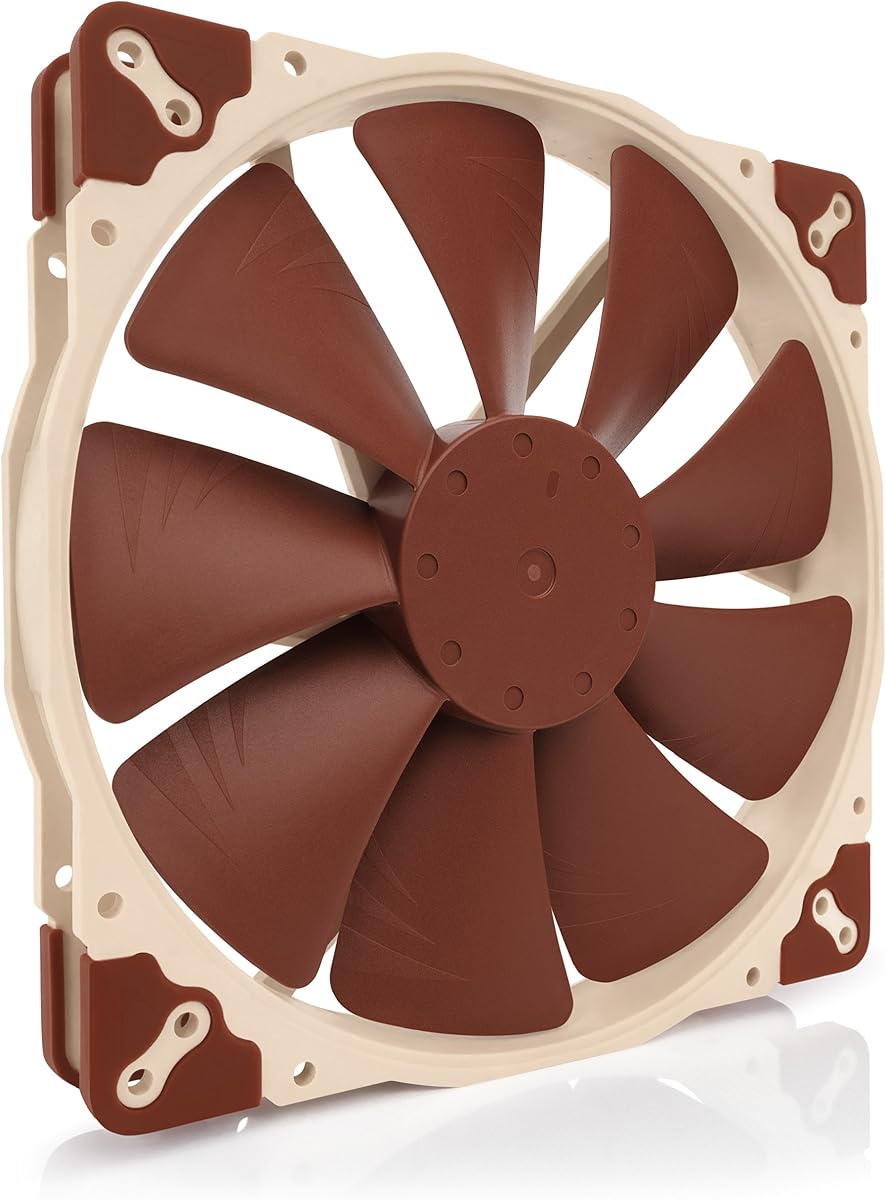
The Noctua NF-A20 PWM stands out as the top choice for builders prioritizing silence and reliability. With an impressive 4.8 rating, this fan delivers high airflow without compromising on noise levels, making it perfect for quiet gaming or workstations.
We may earn a commission when you buy through this link, at no additional cost to you.
Its award-winning A-series design features Flow Acceleration Channels and an Advanced Acoustic Optimisation frame that significantly reduce turbulence. The 150,000-hour MTTF ensures longevity, while the included low-noise adaptor allows for even quieter 550 RPM operation.
While it is more expensive than budget alternatives, the trade-off is minimal considering the build quality and performance. The three sets of mounting holes ensure it fits various case layouts without needing custom modifications.
Anyone seeking a set-and-forget cooling solution should buy this model. Its compatibility and included accessories make installation straightforward, ensuring your system stays cool and quiet for years to come.
The frame design minimizes air turbulence which reduces noise without sacrificing airflow volume for better overall system acoustics.
With over 150k hours of predicted life, this fan is built to last through multiple hardware upgrades and heavy usage cycles.
We may earn a commission when you buy through this link, at no additional cost to you.
The Thermaltake Pure 20 Series offers exceptional value for budget-conscious builders needing a large case fan. With a 4.5 rating, it provides high airflow and air pressure through its 200x30mm thick design without breaking the bank.
We may earn a commission when you buy through this link, at no additional cost to you.
The fan blades are designed to focus airflow while reducing noise, creating a torrent of air without excess noise. The anti-vibration mounting system helps dampen vibration, making it surprisingly quiet for its price point.
Though it uses a sleeve bearing which generally has a shorter lifespan than fluid dynamic or ball bearings, it still offers good reliability for everyday use. The shaved frame allows for easier installation in tight chassis spaces.
Buy this if you need a cost-effective replacement or upgrade without sacrificing too much performance. It is an ideal choice for secondary cases or builds where every dollar counts towards other components.
The blade design is optimized to push high volumes of air directly through the case which helps exhaust heat efficiently.
The shaved frame allows more room for connectors and tools making it easier to install in confined spaces.
We may earn a commission when you buy through this link, at no additional cost to you.
The Noctua NF-A20 chromax.Black.swap brings premium customization to high-performance cooling. It maintains the 4.6 rating expected from Noctua while offering an all-black design for modern, sleek builds.
We may earn a commission when you buy through this link, at no additional cost to you.
Its Flow Acceleration Channels and Advanced Acoustic Optimisation frame deliver superior quiet cooling performance similar to the standard PWM version. The standout feature is the swappable anti-vibration pads available in red, white, blue, yellow, and green.
The cost is higher than standard models, but you pay for the ability to match your build theme perfectly. The large diameter ensures high airflow at low noise levels, making it suitable for intake or exhaust positions.
Purchase this if you value aesthetics alongside performance and want to fine-tune the look of your system. It is ideal for enthusiasts who refuse to compromise on silence or style in their final build.
Swap the anti-vibration pads to match your build color scheme without changing the fan itself for total visual control.
The acoustic optimization ensures whisper-quiet operation even under load providing a distraction-free computing environment.
We may earn a commission when you buy through this link, at no additional cost to you.
The Thermaltake CT200 PWM is designed to compliment existing CT fan lineups for a cohesive build. With a 4.3 rating, it offers significant airflow capabilities up to 131.6 CFM which is excellent for large chassis ventilation.
We may earn a commission when you buy through this link, at no additional cost to you.
Hydraulic bearings provide reliable silent operation while the nine optimized blades push substantial air volume and static pressure. The daisy chain connectors make wiring simpler as you can link multiple fans to a single header.
The cost is moderate, placing it between budget and premium options. While it lacks the high-end acoustic optimization of Noctua, it offers better airflow numbers at a reasonable price for performance seekers.
Buy this for high-performance builds needing substantial air movement. The daisy chain feature is particularly useful for managing complex cooling setups without cluttering your motherboard fan headers.
Connect multiple fans in a series reducing cable clutter and simplifying fan header management on your motherboard.
The bearing technology ensures smooth operation and longevity reducing noise from friction over extended periods of use.
We may earn a commission when you buy through this link, at no additional cost to you.
The Cooler Master SickleFlow aRGB is engineered for cases that support 200mm fans while delivering high airflow and efficient cooling. With a 4.6 rating, it balances performance with stunning visual customization options for gaming rigs.
We may earn a commission when you buy through this link, at no additional cost to you.
The frosted blade design enhances the dispersion of aRGB lighting creating a vibrant effect. The hybrid frame design minimizes resonance for quieter performance while the bearing sealant extends the lifespan by preventing oil leakage.
Installation is simplified by the optimized PWM blades and flexible mounting system. The dynamic PWM allows speeds from 0 to 800 RPM giving you full control over the balance between noise and cooling performance.
Buy this if you want visual flair alongside efficient cooling. It is perfect for builds where the inside of the case is visible and you want your fans to contribute to the overall aesthetic.
The frosted blades scatter the LED light evenly preventing hot spots and creating a smooth glowing effect.
This design provides a balance of rigidity and flexibility which reduces vibration noise during high-speed operation.
We may earn a commission when you buy through this link, at no additional cost to you.
The Noctua NF-A20 FLX offers premium quiet performance without the complexity of PWM headers. With a 4.7 rating, it delivers high airflow through the award-winning A-series design while maintaining near-silent operation.
We may earn a commission when you buy through this link, at no additional cost to you.
This 3-pin FLX version provides fixed 800 and 550 RPM settings via a Low-Noise Adaptor. This simplifies motherboard compatibility and ensures stable speeds without needing BIOS configuration for fan curves.
The price is comparable to the PWM version but it lacks dynamic speed adjustment. However for cases where constant airflow is preferred over variable speed this simplicity is often a welcome trade-off.
Buy this if you prefer fixed-speed fans for stability. It is ideal for older systems or builds where simplicity and reliability are valued over dynamic control options.
The adaptor system allows you to select between full speed and low noise modes easily without complex software settings.
The 3-pin connector and included adaptor work with most older headers and power supplies reducing connection issues.
We may earn a commission when you buy through this link, at no additional cost to you.
The Noctua NF-A20 5V PWM is specialized for 5V PWM applications while maintaining the premium quality of the A-series. With a 4.7 rating, it offers the same superior quiet cooling performance as its 12V counterpart.
We may earn a commission when you buy through this link, at no additional cost to you.
It includes a USB power adapter cable allowing the fan to run on USB host ports or power banks. The OmniJoin adaptor set enables connection to proprietary fan headers ensuring broad compatibility with modern chassis.
While designed for 5V applications, it maintains a maximum speed of 800 RPM for efficient airflow. The polarity protection safeguards against incorrect connections which adds to its reliability and ease of use.
Buy this if you have a 5V PWM motherboard header or need versatile power options. It is a specialized choice for advanced builds requiring specific voltage standards for fan control.
Run the fan via USB ports or power supplies without needing a main motherboard header for unique installation scenarios.
Connect easily to proprietary case headers using the included adaptor set reducing the need for custom adapters.
We may earn a commission when you buy through this link, at no additional cost to you.
The Cooler Master MF200R RGB provides certified compatibility with major RGB ecosystems like Asus Aura and MSI Mystic Light. With a 4.4 rating, it brings a hybrid design that balances static pressure and airflow effectively.
We may earn a commission when you buy through this link, at no additional cost to you.
The jet engine and helicopter blade design applies the right amount of static pressure without sacrificing airflow. The smart fan sensor automatically stops the motor if jammed protecting the fan and components from damage.
It requires a separate RGB controller which adds to the setup cost but ensures synchronized lighting effects. The silent cooling technology and rubber pads help maintain quiet operation even during high airflow cycles.
Buy this for budget-friendly RGB synchronization in larger cases. The jam protection feature makes it a reliable choice for builders worried about dust or debris blocking their intake fans.
Certified with major board brands ensures your fans light up in sync with the rest of your system without extra hardware.
Automatically stops the motor if the fan jams preventing motor burnout and potential hardware damage in the case.
We may earn a commission when you buy through this link, at no additional cost to you.
The CHICIRIS ARGB Sync fan uses hydraulic bearing technology to ensure long life and silent operation. While rating data is inconsistent, it promises noise levels as low as 9dBA which is exceptionally quiet for a case fan.
We may earn a commission when you buy through this link, at no additional cost to you.
It features 34 LEDS providing vibrant illumination with 10 on the inner circle and 24 on the outer. The translucent 9-blade design optimizes airflow while diffusing light for a uniform glow.
The hydraulic bearing design reduces lubricant leakage and friction ensuring stable performance over time. It supports 5V 3pin ARGB synchronization compatible with major motherboard brands for easy control.
Buy this for cost-effective lighting and cooling balance. It is a good choice for budget builds where you want ARGB features and silent operation without paying for a premium brand name.
The oil sealed cover and large storage space reduce friction ensuring smooth operation and longevity.
The translucent blades scatter light evenly creating a soft glow that enhances the visual appeal of the case.
We may earn a commission when you buy through this link, at no additional cost to you.
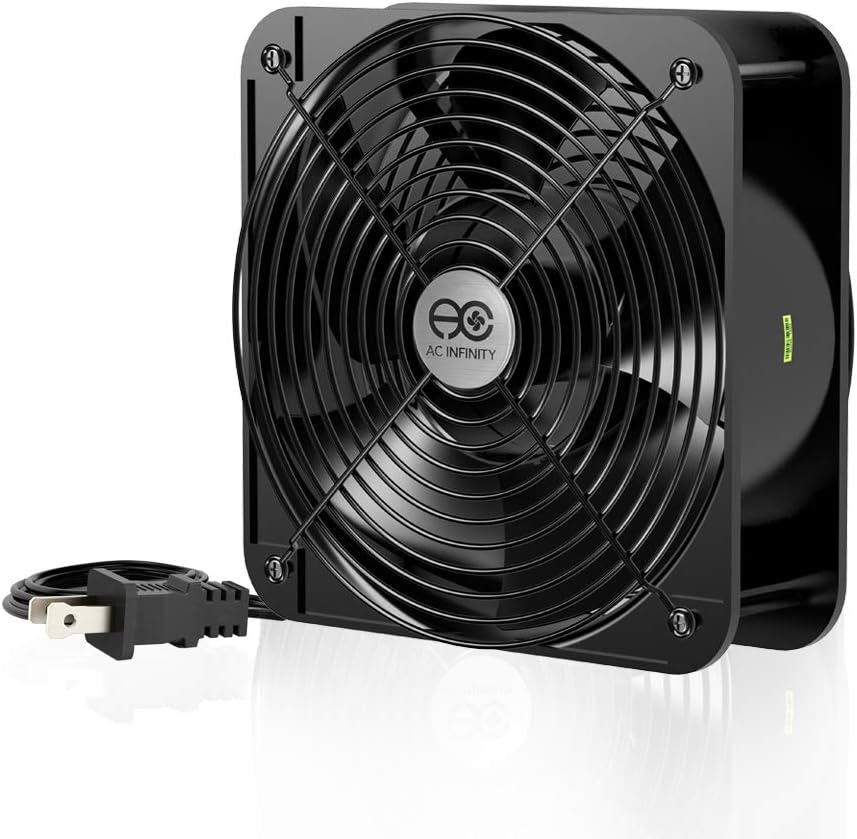
The AC Infinity AXIAL 2060 is a 120V AC muffin fan designed for projects requiring serious ventilation. With a 4.5 rating, it delivers 425 CFM airflow which is significantly higher than standard PC case fans.
We may earn a commission when you buy through this link, at no additional cost to you.
It runs directly on 120V AC power meaning it does not connect to your motherboard fan headers. This makes it ideal for external cooling setups or server racks where wall power is available and noise is secondary.
The dual-ball bearings provide a lifespan of 67,000 hours ensuring reliability in continuous operation environments. However at 3200 RPM and 65 dBA it is too loud for typical consumer gaming cases.
Buy this for industrial cooling or large cabinet projects. It is perfect for cooling equipment racks or external enclosures where maximizing airflow is the primary goal and noise is less of a concern.
This fan plugs directly into wall outlets allowing it to be used outside standard PC cases without motherboard wiring.
With 425 CFM it moves heat much faster than standard PC fans making it ideal for heavy industrial cooling needs.
We may earn a commission when you buy through this link, at no additional cost to you.
Choosing the right case fan involves balancing airflow, noise, and compatibility. This guide explains the key factors you need to consider before buying to ensure you get the best fit for your system.
Airflow is measured in CFM and indicates how much air the fan moves. Higher CFM is better for intake and exhaust. Static pressure matters for pushing air through radiators or dense filters. A balance of both ensures efficient cooling.
Prioritize high CFM for general case ventilation and static pressure if you are pushing air through radiators or dust filters.
Noise is measured in decibels (dBA). Lower numbers mean quieter operation. PWM fans can adjust speed to reduce noise during low load. Look for acoustic optimization features in the frame and blades to minimize turbulence noise.
If silence is a priority, look for fans rated below 20dBA and check the included adaptor options for low-speed modes.
Bearings support the fan motor and affect lifespan and noise. Sleeve bearings are affordable but wear faster. Fluid dynamic and ball bearings last longer and stay quieter. For long-term builds, invest in durable bearing types.
Check the MTTF rating to compare expected lifespan. A higher number means better reliability over time.
Fans use 3-pin or 4-pin connectors. 4-pin PWM allows speed control via motherboard headers. 3-pin uses voltage control. Ensure your motherboard has the matching headers or buy adaptors to avoid installation issues.
Confirm your motherboard supports PWM if you want dynamic speed control. 3-pin fans are easier to use with older systems.
200mm fans vary in mounting hole spacing. Most modern cases support 154mm or 170mm spacing. Check your case manual to confirm hole layout before buying to avoid fitment issues during installation.
Look for fans with multiple mounting hole sets to ensure they fit different case brands easily.
RGB fans offer lighting effects but cost more. Decide if you want visible lighting inside your case. Some RGB fans need separate controllers while others sync with motherboard software for integrated control.
Choose RGB only if your build theme requires it. Standard fans offer better airflow for the price without lighting components.
Standard 200mm fans are often 25mm or 30mm thick. Thicker fans offer more surface area for airflow. Ensure your case has clearance for thicker models especially near power supplies or radiators.
Measure your case clearance carefully before choosing a thicker fan to avoid clearance conflicts with other components.
Prices range from affordable to premium. Budget fans save cash but may lack durability or silence. Premium fans cost more but offer superior build quality and longer warranties. Decide based on your priority for performance vs. cost.
Allocate more budget to intake fans where you want the most efficiency and noise reduction.
Install the fan in the direction that creates positive pressure if you want less dust accumulation. Connect the 4-pin connector to a matching PWM header on your motherboard for speed control. Secure the screws through the vibration mounts to reduce noise.
Dust buildup reduces fan performance. Clean the blades and frame regularly using compressed air. Do not spin the blades manually with force as this can damage the bearing. Keep the surrounding area free of dust filters.
Monitor fan speeds in BIOS to ensure they operate correctly. If noise increases over time, check the bearings for wear. Replace the fan if vibration becomes excessive to protect the components and maintain airflow.
Generally you cannot force a 200mm fan into an 180mm cutout safely. You would need custom mounting plates or spacers which may cause vibration issues. Check your case manual for support before attempting to install a larger size.
A 3-pin fan uses voltage control and runs at fixed speeds. A 4-pin PWM fan allows dynamic speed control via the motherboard header. 4-pin is better for balancing cooling and noise but you can use adapters for older 3-pin headers.
Yes, hydraulic bearings typically last longer and operate more quietly than sleeve bearings. They reduce friction better which extends the lifespan. For high-performance systems, hydraulic bearings are often worth the extra cost.
Use compressed air to blow dust off the blades and frame while holding the fan steady. Do not use water or wet cloth on the motor. Regular cleaning every six months helps maintain airflow and reduces noise.
No, not all cases support 200mm fans. You must check the case specifications for fan support dimensions. Look for front panel or top vent cutouts specifically labeled as 200mm to ensure proper fit.
PWM control allows the fan to slow down when full cooling is not needed. This reduces noise and power consumption while maintaining performance under load. It is ideal for balancing efficiency and acoustics.
Static pressure is the force a fan uses to push air through obstructions like filters or radiators. If you are pushing air through dense components high static pressure is essential for effective cooling.
Quality 200mm fans run around 18 to 25 decibels. Budget models may be louder at 30 to 40 decibels. For silent builds look for fans rated under 20dB with high MTTF ratings.
We reviewed ten top options ranging from premium silent models to budget-friendly high airflow choices. The Noctua NF-A20 PWM stands out for its balance of silence and performance while the Thermaltake Pure 20 offers excellent value for cost-conscious builds.
Prioritize noise and bearing quality for long-term reliability. If you want visual flair consider models with RGB lighting but ensure your motherboard supports them. Proper mounting and airflow direction are just as important as the fan model itself.
Prices and availability change often so verify your current pricing before purchasing. Check for sales and updated stock to get the best deal. A well-chosen 200mm fan will improve your system cooling for years to come.