
Thermalright Trofeo Vision LCD AIO Display
4.3Editor score
Compact slim design
Simple USB-C connection
TRCC software customization
Modern gaming and workstation setups often benefit from additional visual elements that go beyond standard monitors. An LCD screen for PC case allows enthusiasts to monitor real-time hardware stats or display custom visuals directly within their chassis. This addition transforms a static build into a dynamic experience that showcases performance data or personal media.
We evaluated ten leading models based on resolution, connectivity options, software features, and mounting flexibility. Each product offers unique advantages ranging from budget-friendly sensors to high-resolution secondary displays. Our analysis focuses on usability, compatibility with common software like AIDA64, and the quality of the display panel itself.
Each pick in this list highlights specific strengths such as touch support, magnetic mounting, or dedicated case integration. You will find options suitable for various case sizes and budget levels. Please note that product availability and pricing may change over time, so verify current details before purchasing.
4.3Editor score

4.5Editor score

4.2Editor score
As an Amazon Associate we earn from qualifying purchases.
The following table provides a side-by-side comparison of the ten top-ranked LCD screens designed for PC cases. Each entry highlights key specifications such as resolution, screen size, and primary connectivity methods to help you quickly identify the model that fits your specific build requirements.




The WOWNOVA 8 Inch LCD Screen stands out as the top recommendation for users seeking a balance of features and ease of use. It earns a high rating of 4.5 stars due to its ability to function as both a system monitor and an extended desktop display. The inclusion of a single cable connection simplifies installation significantly compared to multi-cable alternatives.
We may earn a commission when you buy through this link, at no additional cost to you.
This model offers a unique software that supports dynamic video themes and custom layouts. You can display CPU, GPU, and RAM stats alongside custom images or videos. The software allows you to drag and drop elements to create a personalized interface that fits your aesthetic preferences. This flexibility is rare in the budget to mid-range segment.
While the screen requires the software to run in the background, it consumes minimal system resources. The main trade-off is that it is compatible only with Windows 10 and 11, which may limit Linux users. However, the energy-saving features and auto-start capabilities make it a reliable choice for daily workstation use.
We recommend this product for gamers and professionals who want a polished look without complex wiring. It is ideal for cases with enough internal space to mount the panel securely. For those who want an extended desktop experience in addition to hardware monitoring, this remains the most versatile option available.
The ability to switch to desktop mode allows the screen to act as a true secondary monitor. This expands your workspace without using GPU HDMI ports.
Pre-loaded and custom dynamic video themes add life to your build. You can upload your own clips to create a personalized display experience.
We may earn a commission when you buy through this link, at no additional cost to you.
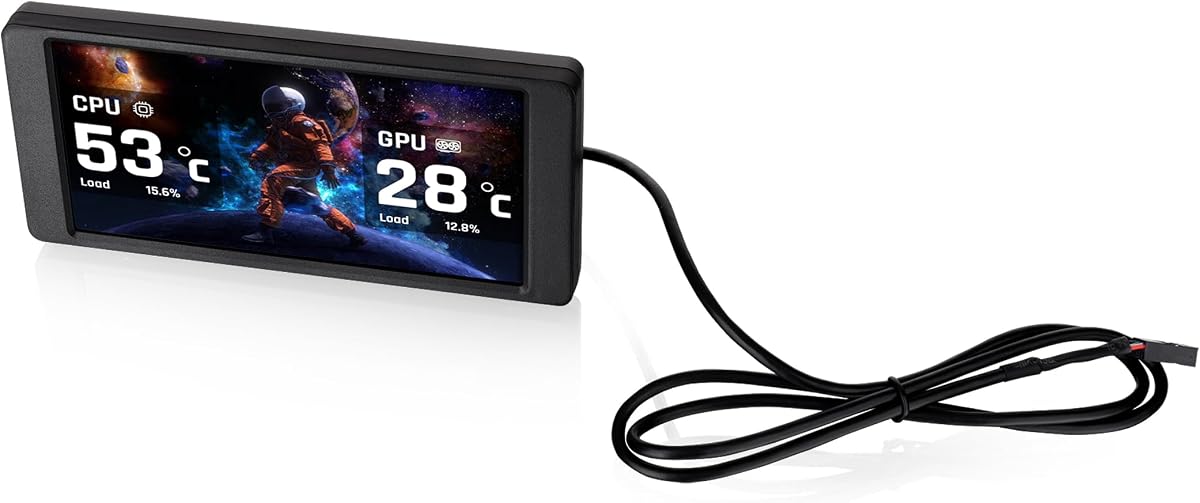
The Thermalright Trofeo Vision delivers exceptional value for users seeking a straightforward system monitor without breaking the bank. It holds a solid 4.3-star rating based on its high resolution relative to its compact size. The plug-and-play USB-C connection makes it accessible even for those with limited technical experience.
We may earn a commission when you buy through this link, at no additional cost to you.
Real-time tracking of CPU and GPU temperatures is handled smoothly through the included TRCC software. The interface offers preset themes that you can customize to show the metrics that matter most to your workflow. This simplicity ensures that you can get set up quickly without navigating complex configuration menus.
The main limitation is the basic nature of the customization options compared to higher-end models. The software interface is functional but lacks some of the advanced animation features found in other brands. However, for users who prioritize core monitoring over flashy visuals, this trade-off is minimal.
This screen is perfect for budget builds or small form factor cases where space is tight. Its slim profile fits easily inside or outside the chassis without obstructing airflow. If you need a reliable and affordable way to keep an eye on system health, this model is a top choice.
The USB-C interface ensures quick setup with most modern motherboards. No additional drivers are required for Windows systems.
Its slim dimensions allow it to blend seamlessly into various case styles. This makes it ideal for users with limited internal space.
We may earn a commission when you buy through this link, at no additional cost to you.
The wisecoco 12.6 Inch Bar LCD Screen stands as the premium choice for users who want a full secondary display experience. With a 4.2-star rating, it offers a massive 1920×515 resolution that provides crisp visuals for system stats and media. The integration of dual speakers adds an audio layer that many competitors lack.
We may earn a commission when you buy through this link, at no additional cost to you.
Designed specifically to fit cases like the Hyte Y60, the mounting process is streamlined to require no extra hardware. The Mini HDMI connection allows you to use this as a true external monitor without relying solely on USB headers. This makes it versatile for use on your desk or mounted inside the case.
The main consideration is the need for a HDMI output or external source if not using internal headers. The larger size also means it requires more space than the narrower 8 or 9-inch alternatives. For high-end builds, this extra space is often justified by the superior visual real estate.
We recommend this for enthusiasts who want a high-end look and functional media capabilities. The built-in audio is great for system sounds without needing external speakers. If you want a screen that acts as a true second monitor with audio, this is the best option available.
Built-in speakers provide audio output without the need for extra wiring. This creates a cleaner setup for media playback.
The 1920×515 resolution ensures sharp text and images. This makes reading stats easy even from a distance.
We may earn a commission when you buy through this link, at no additional cost to you.
The Lian Li SM088X offers a premium aesthetic with its integrated ARGB lighting strip and sleek black design. It holds a 4.4-star rating based on its robust build quality and versatile mounting options. The display supports independent operation via USB or 9-pin headers without using valuable GPU ports.
We may earn a commission when you buy through this link, at no additional cost to you.
L-Connect 3 software provides a rich set of tools for customizing themes and layouts. You can upload videos and photos to create a personalized display that matches your system colors. The diffused ARGB lighting adds a cohesive look when synchronized with other components in the build.
While the price is higher than other options, the build quality and software experience justify the cost for many users. The main drawback is the reliance on Lian Li's software ecosystem which may limit cross-platform compatibility. However, for Lian Li case owners, it integrates seamlessly with existing hardware.
This screen is ideal for users who prioritize aesthetics and a polished finish. It works well in cases where the frame complements the overall design. If you want a display that adds color and style while monitoring stats, this is a top-tier choice for premium builds.
The built-in diffused ARGB lighting enhances the visual appeal. This allows for seamless synchronization with other system components.
The versatile bracket supports height and tilt adjustments. You can mount it on fan frames or flat surfaces easily.
We may earn a commission when you buy through this link, at no additional cost to you.
The darkFlash V92 stands out with its ultra-wide 9.2-inch panel that provides a unique viewing experience. It has a 4.1-star rating due to its sharp visuals and slim aluminum body. The 1920×462 resolution ensures that text and stats remain clear from wide viewing angles.
We may earn a commission when you buy through this link, at no additional cost to you.
Connectivity is flexible with support for USB-C or internal 9-pin headers. This allows you to connect it easily without occupying standard USB ports. The Station Space software offers free themes and widgets for weather and news updates alongside hardware monitoring.
The requirement to keep the software running in the background is a necessary trade-off for the rich widget support. Additionally, it is compatible only with Windows 10 and 11. If you need a Linux or macOS compatible display, this model will not meet your needs.
This screen is best for users who want a modern ultra-wide look without a high price tag. The slim profile makes it easy to fit in many case styles. For those who want weather and custom widgets alongside system stats, this is a strong contender in the market.
The 1920×462 resolution provides extra space for widgets. This is ideal for displaying multiple metrics side-by-side.
The slim body measures only 12 mm in thickness. This allows for easy internal mounting without bulk.
We may earn a commission when you buy through this link, at no additional cost to you.
The Hosyond 8.8 Inch Touchscreen provides a versatile option with capacitive touch and HDMI input. It holds a 4.0-star rating for its bright display and flexible connectivity options. The screen is designed to work with a wide range of systems including Raspberry Pi and Windows PCs.
We may earn a commission when you buy through this link, at no additional cost to you.
For PC cases, the HDMI connection allows you to treat the screen as a standard secondary monitor. The touch capability is useful if you plan to use it as a desktop display. This dual-use nature makes it a flexible choice for various applications beyond just system monitoring.
The power consumption is low which is beneficial for internal mounting. However, the touch feature might not be strictly necessary if the screen is inside a closed case. Still, having the capability adds value for those who may use the screen externally.
We recommend this for users who want a multi-purpose display that can serve as a second monitor. The HDMI input simplifies setup significantly if you have a spare port. For those who want touch capability alongside standard monitoring, this offers a unique advantage.
The screen works with Windows, Linux, and Raspberry Pi. This versatility makes it suitable for diverse computing setups.
The HDMI interface allows you to use it as a standard monitor. This expands its utility beyond internal PC stats.
We may earn a commission when you buy through this link, at no additional cost to you.
The Thermalright TV 9.16 LCD introduces a magnetic suction design that eliminates the need for screws. It holds a 4.3-star rating for its convenient installation and strong build quality. The screen attaches to metal surfaces easily and can be removed without tools.
We may earn a commission when you buy through this link, at no additional cost to you.
The resolution is sharp enough to display detailed stats and static images clearly. Software control is handled by TRCC which allows for automatic startup when the computer boots. This seamless integration ensures the display is always ready when you need system information.
The magnetic design requires a compatible metal surface which may limit where you can place it. For cases with plastic panels, you may need an adapter. However, for metal chassis owners, this feature saves significant time and effort during the build process.
We suggest this for builders who want a clean look without visible mounting screws. It is ideal for cases where a sleek finish is preferred. If you want to reposition your screen easily without tools, this magnetic option is a standout feature in the market.
The magnetic suction design allows for quick placement. This eliminates the need for complex bracket setups.
The 1920×480 resolution ensures clear text and images. This makes reading stats easy even from a distance.
We may earn a commission when you buy through this link, at no additional cost to you.
The Thermaltake 6.0 Inch LCD Screen Kit focuses on customization with TT RGB PLUS 3.0 software. It has a 3.8-star rating due to its decent performance but limited flexibility compared to newer models. The display supports multiple media formats for background images and videos.
We may earn a commission when you buy through this link, at no additional cost to you.
Connectivity is handled via USB Type-C to 9-pin headers which fits standard PC cases. The larger viewing surface provides ample room for real-time monitoring data and CPU temperatures. This makes it a functional choice for those who prioritize stats over media.
The rating reflects issues with software stability in some cases. The customization options are robust but may require troubleshooting. Users who already own Thermaltake components may find the ecosystem integration beneficial.
We recommend this for existing Thermaltake users who want consistent RGB lighting. The standalone functionality is useful for cases without complex software integration. If you prioritize software ecosystem compatibility over raw performance, this fits a specific niche.
Upload JPG, GIF, and video files for backgrounds. This allows for deep personalization of your display.
Get live data on key system components like CPU and GPU. This helps in tracking performance at a glance.
We may earn a commission when you buy through this link, at no additional cost to you.
The GeeekPi 12.6 Inch IPS LCD Touch Screen offers high resolution and multi-touch support for PC cases. It holds a 4.0-star rating for its responsive touch and built-in speakers. The design fits perfectly with the Hyte Y60 case panel for a clean look.
We may earn a commission when you buy through this link, at no additional cost to you.
The 10-point multi-touch capability allows for complex interactions if used externally. Internally, it serves as a secondary display with audio capabilities. The tempered glass adds durability and clarity to the viewing experience.
Installation is straightforward with included hardware and no extra screws required. However, users must remove the protective film before use. The screen film must be peeled off to avoid interference with touch functionality.
We recommend this for Hyte Y60 owners who want a high-end display. The touch feature makes it versatile for use on the desk too. If you want a large touch screen with audio in one package, this is a solid choice.
The screen supports up to 10 points of touch. This allows for natural interaction with gestures.
Built-in speakers provide audio output directly. This removes the need for external speakers in some setups.
We may earn a commission when you buy through this link, at no additional cost to you.
The Thermalright Trofeo 6.86 is a compact option designed for small cases or coolers. It holds a 3.4-star rating reflecting its limited resolution but useful magnetic features. It supports dynamic and static images via TRCC software for basic personalization.
We may earn a commission when you buy through this link, at no additional cost to you.
The magnetic attraction allows for flexible placement without fixed screws. This makes it easy to adjust the position for better visibility. The low profile ensures it does not obstruct airflow or other components.
The smaller resolution may limit how much detail you can display. For basic stats and simple animations, it is sufficient. Users who need detailed widgets or high-res videos should consider larger models.
We recommend this for budget builds with limited space. It is an affordable way to add a digital display to your PC. If you prioritize size and cost over resolution, this model meets the basic needs.
The 6.86 inch size fits tight spaces easily. This allows for installation on CPU coolers or small panels.
TRCC software enables simple dynamic themes. This keeps the display engaging without heavy processing.
We may earn a commission when you buy through this link, at no additional cost to you.
Selecting the right LCD screen requires understanding your specific needs regarding size, software, and connectivity. This guide breaks down the key factors to ensure you choose a model that fits your build and workflow.
The physical size of the screen ranges from 6 to 12 inches. Larger screens offer more space for detailed stats and media. Resolution quality dictates how crisp the text and images will appear.
Look for at least 1080p wide resolution for sharp visuals. A high pixel density ensures readability from a distance.
Most screens use USB-C or internal 9-pin headers. Some premium models support HDMI inputs for desktop use. Confirm your motherboard has the necessary headers available.
Ensure the cable type matches your available ports. A versatile option saves you from buying adapters later.
Software controls themes and data display. Some require AIDA64 while others have proprietary apps. Check if the software supports Windows or Linux.
A user-friendly interface simplifies customization. Ensure the software runs in the background without errors.
Mounting brackets vary between models. Some include magnetic options while others use screws. Check if your case has pre-drilled holes.
A secure mount prevents vibrations. Magnetic mounts offer easier adjustments if space is tight.
Some software consumes more system resources than others. Lightweight apps are better for gaming PCs. Ensure the app does not impact performance.
Auto-start features are convenient but check resource usage. Low power consumption helps maintain system stability.
Extra features like touch support or speakers add value. Touch is useful for secondary displays. Speakers save space if you want audio.
Determine if these extras are worth the cost. For PC cases, basic monitoring is often sufficient.
Prices vary significantly between models. Budget options may lack advanced customization. Premium models offer better build quality and software.
Set a realistic budget before purchasing. Balance features with what you actually need.
Reputable brands often provide better support. Check reviews for long-term reliability. Software updates are crucial for compatibility.
Choose a brand with a good track record. This ensures you get timely assistance if issues arise.
Start by connecting the power and data cables to your motherboard headers. Ensure the USB or 9-pin connection is secure before turning on the PC.
Install the required software on your operating system. Follow the setup instructions to link the screen to your hardware monitoring tools.
Clean the screen with a soft microfiber cloth. Avoid using harsh chemicals that could damage the coating. Keep dust away from the ventilation area.
Most screens do not require GPU power. They connect via USB or motherboard headers. This leaves your GPU ports free for monitors. Always check the power requirements before purchase.
Most software is designed for Windows. Some brands offer limited Linux support. Check compatibility details on the product page. If you use Linux, verify driver availability.
AIDA64 is often required. Some screens have proprietary apps. Check if the software supports your OS. Most apps run in the background automatically.
Installation varies by model. Most are plug-and-play with USB. Others need bracket screws. Magnetic screens are the easiest to install.
Yes, many support video playback. You can upload custom clips. Some screens require software to run video files. This adds a dynamic element to your build.
Power draw is usually low. Most use USB or 9-pin headers. This keeps system impact minimal. Always check the wattage rating.
We found the WOWNOVA 8 Inch LCD Screen to be the top choice for most users. It balances desktop extension with system monitoring effectively. The budget-friendly Thermalright Trofeo Vision is great for tight spaces.
Prioritize connectivity options that match your motherboard. If you need a secondary monitor, look for HDMI support. If you want a simple stats panel, USB options are sufficient.
Prices and availability may change over time. Always check the latest details before buying. These screens can elevate your setup with just a few extra features.