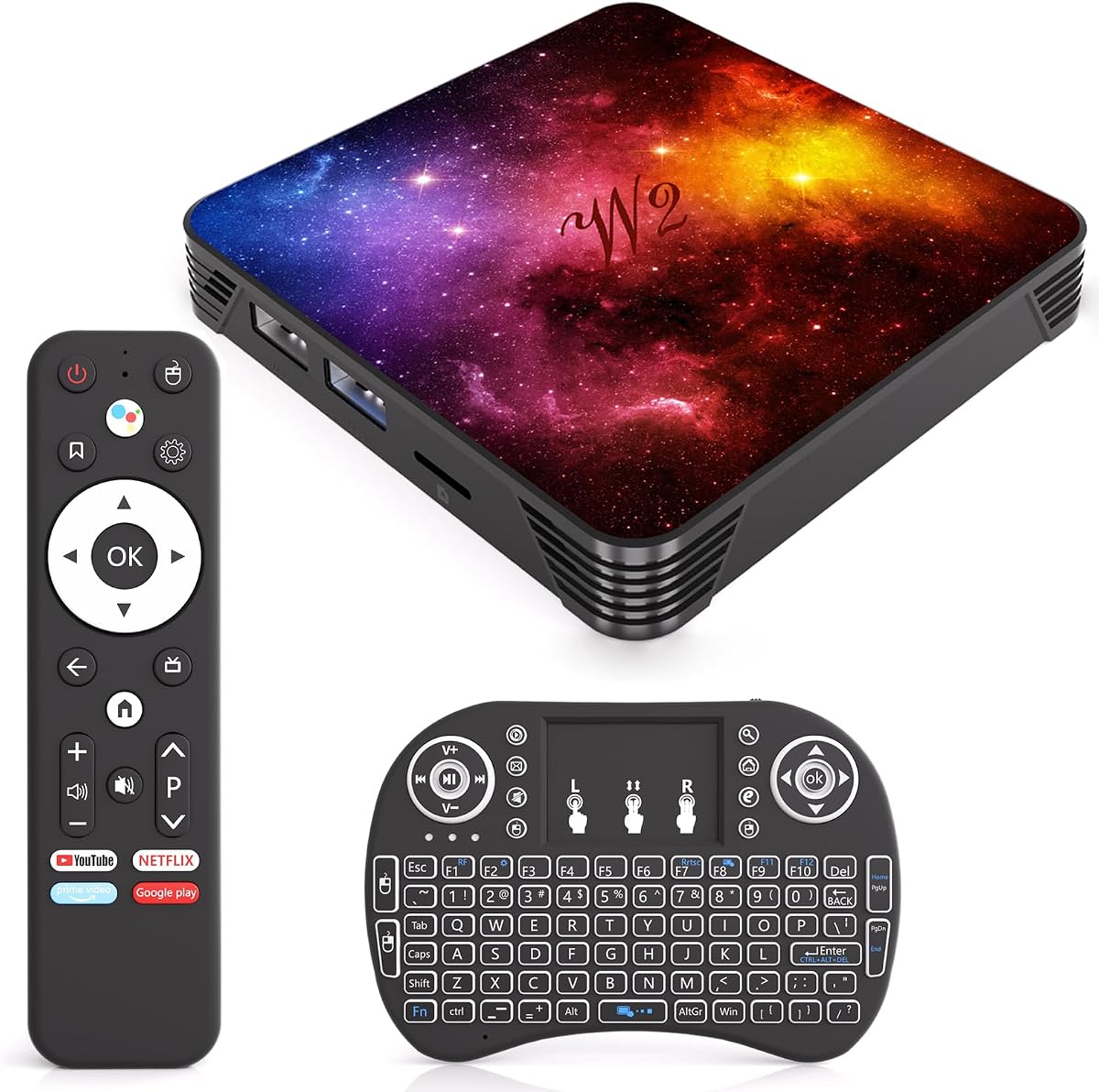
Android 14.0 TV Box 4GB
5.0Editor score
4GB RAM and 64GB ROM
Android 14.0 OS
Dual Band WiFi and Bluetooth
Discover the top Android TV Box options for 2026. We compare performance, streaming features, and value to help you choose the right smart TV upgrade today.
Finding the right Android TV Box can transform your standard television into a powerful smart entertainment hub. With so many options available, choosing one that balances performance, features, and value is essential for a smooth viewing experience.
We evaluated the latest models based on hardware specifications, operating system updates, connectivity options, and user ratings. Our analysis focuses on real-world streaming performance, app compatibility, and long-term usability across different price points.
Each pick highlights specific strengths like 4K support, storage capacity, or voice control integration. Please note that prices and availability change frequently, so verify current deals before making your final purchase decision online.
5.0Editor score

4.4Editor score

4.3Editor score
The following comparison highlights key specifications across all ten selected models to help you quickly identify the device that best matches your streaming needs and budget requirements.





The Xiaomi TV Box S 3rd Gen stands out as a top contender in the Android TV Box market with its balanced mix of features and performance. It earns a solid 4.4 rating from users who appreciate its sleek design and reliable streaming capabilities.
We may earn a commission when you buy through this link, at no additional cost to you.
This device delivers an immersive experience with 4K Ultra HD resolution supported by Dolby Vision and HDR10+ for enhanced contrast and color accuracy. The quad-core CPU ensures smooth navigation, while the integrated Google TV platform provides personalized content recommendations.
While 32GB storage may feel limited for heavy app users, the included accessories and compact footprint make setup straightforward. The lack of an Ethernet port is a minor trade-off for the high-speed dual-band WiFi 6 connectivity it offers.
Ideal for households wanting a premium streaming solution without overspending, this box is recommended for anyone seeking high-quality visuals and intuitive voice control via Google Assistant.
Support for Dolby Vision and Atmos creates a cinematic feel that rivals more expensive hardware setups.
Google TV OS unifies apps into one screen, making it easier to find shows without switching between menus.
We may earn a commission when you buy through this link, at no additional cost to you.
This Android 14.0 TV Box offers exceptional value for budget-conscious buyers seeking modern software support and ample storage. With a perfect 5.0 rating, users report smooth performance and easy setup for daily entertainment needs.
We may earn a commission when you buy through this link, at no additional cost to you.
Powered by a quad-core processor, the device handles multitasking and app launches efficiently. The 4GB RAM ensures responsive operation, while 64GB ROM provides space for games and media files without immediate need for expansion.
Although it lacks a well-known brand name, the inclusion of USB 3.0 and LAN ports adds flexibility. Users should note that documentation can be basic, so familiarity with Android setup helps maximize utility.
Perfect for those upgrading a basic TV to a smart system, this box delivers a secure and responsive experience at a very competitive price point in the current market.
Running Android 14.0 ensures compatibility with new apps and security updates for longer usability.
With 64GB built-in and USB expansion, you can store more apps and media than most standard boxes.
We may earn a commission when you buy through this link, at no additional cost to you.
The Xiaomi Android Google TV Box S is designed to deliver a rich audiovisual experience with strong support for high-resolution content. While it holds a 4.1 rating, its focus on cinematic features makes it appealing for media enthusiasts.
We may earn a commission when you buy through this link, at no additional cost to you.
Its 6nm platform supports smooth operation, and the inclusion of HDR10+ ensures vibrant colors on compatible TVs. The Google TV center allows cross-app search, simplifying the process of finding movies across different streaming services.
The 2GB RAM might limit heavy multitasking, but for standard streaming it is sufficient. The Bluetooth remote adds convenience for voice searches, making navigation easier for all family members.
Recommended for users prioritizing video quality and app ecosystem over raw processing power, this box serves as a reliable entry into modern smart TV functionality.
Wi-Fi 6 enables faster transmission speeds, reducing buffering for instant playback of online content.
Use the 360-degree Bluetooth remote with Google Assistant for seamless smart home management.
We may earn a commission when you buy through this link, at no additional cost to you.
This 2026 Android TV Box targets users needing significant storage and future-proof hardware. It has earned a 4.4 rating for its ability to run streaming software and offline games smoothly without lag.
We may earn a commission when you buy through this link, at no additional cost to you.
Supporting 8K UHD decoding prepares your setup for next-gen displays, even if content is scarce. The 4GB RAM ensures fluid multitasking, while the large ROM allows for extensive app libraries.
Though 8K visuals are a premium feature, the box delivers true color and detail even at 4K. The diverse interfaces support high-speed transmission, making it versatile for various home entertainment scenarios.
An excellent choice for power users who value storage and connectivity, this box offers a robust platform for diverse entertainment usage in any living room.
WiFi 6 dual-band technology realizes faster transmission and anti-interference capability for stable streaming.
We provide professional after-sales support to ensure a better user experience throughout the device lifespan.
We may earn a commission when you buy through this link, at no additional cost to you.
The Xiaomi Android Google TV Box S continues to impress with a focus on voice integration and quick access to content. Its 4.4 rating reflects satisfaction with its high-speed WiFi and reliable streaming performance.
We may earn a commission when you buy through this link, at no additional cost to you.
This model leverages a powerful 6nm platform to deliver smooth operation and instant playback. The voice remote simplifies navigation, letting you find shows through Google Assistant commands.
While storage is standard at 32GB, the smart recommendations ensure you find relevant content easily. The 4K UHD quality ensures visuals remain sharp during long viewing sessions.
Ideal for those who prefer hands-free control, this box streamlines your entertainment experience by integrating voice search directly into your daily routine.
Built-in Google TV integrates personalized recommendations for a customized entertainment experience.
Wi-Fi 6 ensures reliable connections for fast and smooth streaming without buffering.
We may earn a commission when you buy through this link, at no additional cost to you.
The TiVo Stream 4K is designed to centralize all streaming apps into one unified screen for easier navigation. Rated 4.2, it simplifies the user experience by reducing the need to switch between different interfaces.
We may earn a commission when you buy through this link, at no additional cost to you.
TiVo recommends shows based on your interests rather than where they live, creating a personalized feed. Integrated Google Assistant allows you to launch apps and dim lights with simple voice commands.
It includes access to major apps like Netflix and Prime Video immediately upon setup. Its recognition as a best invention highlights its unique approach to organizing smart TV content.
Perfect for users tired of hunting for content across apps, this streamer offers a convenient single-screen solution for modern home viewing.
Forget learning to navigate a new screen with every app by using one centralized place for browsing.
Integrated Google Assistant allows you to launch apps and dim lights with simple voice commands.
We may earn a commission when you buy through this link, at no additional cost to you.
The Google TV Streamer 4K delivers entertainment quickly with personalized recommendations based on family interests. With a 4.3 rating, it stands out for its high-quality visuals and smart home features.
We may earn a commission when you buy through this link, at no additional cost to you.
Up to 4K HDR with Dolby Vision ensures captivating details on compatible screens. It also provides access to over 800 free channels and allows easy addition to watchlists from various devices.
The premium price reflects advanced integration with the Google ecosystem. HDMI 2.1 cables are required for full performance, which may need extra investment for older setups.
Best for those invested in the Google ecosystem who value seamless home control and high-fidelity audio and video in a unified device.
Watch live TV and access over 800 free channels from services like Pluto TV and Tubi.
Connect speakers that support Dolby Atmos for more immersive 3D sound quality.
We may earn a commission when you buy through this link, at no additional cost to you.
The Ugoos AM6B Plus features the powerful Amlogic S922X-J chipset designed for fast and smooth operation. Its high 4.5 rating reflects the stable performance it offers for heavy media tasks.
We may earn a commission when you buy through this link, at no additional cost to you.
With 4GB LPDDR4 RAM and 32GB storage, it handles large files and apps effectively. The hexa-core CPU ensures excellent heat dissipation, preventing overheating during extended streaming sessions.
Support for 4K 60fps and 1000M Ethernet makes it ideal for high-bandwidth environments. The OTA updater keeps the device current without manual firmware updates.
Recommended for advanced users needing reliable hardware performance, this box delivers stable playback and efficient data output for demanding setups.
Dual-band dual WiFi connectivity ensures stable data and video output on your device 24/7.
USB 3.0 and Ethernet allow high-speed transmission and storage expansion needs easily.
We may earn a commission when you buy through this link, at no additional cost to you.
This Android TV Box 12.0 is equipped to let you download more movies and games with generous memory. It has a 3.8 rating, indicating decent performance for casual users in specific conditions.
We may earn a commission when you buy through this link, at no additional cost to you.
Powered by Allwinner H618 Quad core CPU, the box runs stable and smooth for loading movies and pictures. H.265 processing technology ensures movies play smoothly with consistent picture quality.
While the WiFi 6 signal is strong, some users report variability in real-world stability. The 3D playback support adds versatility for compatible media files.
A solid option for budget gaming and basic streaming, this box delivers stable operation for light entertainment needs without breaking the bank.
H.265 image processing technology makes you watch movies more smoothly with the same picture quality.
Fast and High Quality WiFi 6 signal ensures you enjoy a higher quality to browse and play.
We may earn a commission when you buy through this link, at no additional cost to you.
The 8K Android TV Box 13.0 delivers premium image output with the newest Android system. Its 3.7 rating suggests potential, though users may need patience to maximize its high-end features.
We may earn a commission when you buy through this link, at no additional cost to you.
Powered by RK3528 quad-core, it offers efficient and responsive performance for quick app loading. 8K Ultra HD decoding brings immersive visuals, though content remains scarce for now.
Multi-screen interaction allows easy casting from phones to TV. The included mini keyboard makes text search easier than standard remotes for better usability.
Best for tech enthusiasts ready for future display standards, this box prioritizes advanced visuals and connectivity over immediate widespread content support.
The built-in multi-screen interaction feature lets you seamlessly cast and share content from your mobile phone.
Supports 2.4GHz/5GHz dual-band WiFi ensuring buffer-free streaming even with high-bandwidth content.
We may earn a commission when you buy through this link, at no additional cost to you.
Choosing the right Android TV Box involves balancing performance, features, and budget to match your specific entertainment needs.
The Android version determines app compatibility and security updates. Newer versions like Android 14 offer better optimization and stability compared to older systems.
Prioritize models with the latest OS to ensure long-term support and access to all streaming apps.
RAM affects multitasking speed and overall responsiveness, while storage holds installed apps and media. At least 4GB RAM is recommended for smooth performance.
Look for 64GB or more internal storage to avoid constant space management and allow room for games and offline content.
High resolutions like 4K and HDR ensure crisp visuals, while formats like Dolby Atmos enhance sound immersion. Check your TV's capabilities to match these features.
Verify support for Dolby Vision and HDR10+ if you have a high-quality display to get the most out of your setup.
WiFi 6 and Bluetooth 5.0 improve streaming stability and peripheral pairing. Ethernet ports offer wired stability for high-bandwidth tasks.
Choose a box with dual-band WiFi and modern Bluetooth to prevent buffering and ensure smooth wireless connections.
A strong processor like a Quad-Core ensures lag-free navigation and video decoding. This impacts how quickly apps load and how smooth playback is.
Select a model with a modern chipset to avoid delays and ensure consistent performance during heavy use.
Bluetooth remotes with voice search simplify navigation and smart home control. Voice assistants like Google Assistant allow hands-free commands.
A high-quality remote with voice buttons is essential for easy access to content without typing manually.
Reputable brands often provide better firmware updates and customer support. Reviews can reveal reliability and longevity concerns for lesser-known brands.
Opt for established brands when possible to ensure access to technical support and reliable software patches.
Budget models offer essential features, while premium ones provide higher resolutions and advanced audio. Assess what matters most to your usage habits.
Balance cost against features by prioritizing needs like resolution and storage over unnecessary extras.
Start by connecting the box to your TV via HDMI and plugging it into power. Once powered on, follow the on-screen setup to connect to your WiFi network and sign into your Google account.
Regularly update the firmware through settings to keep performance optimal. Use apps like cleaners to manage storage space if you install many large files or games.
Keep the device in a well-ventilated area to prevent overheating. Dust off ports periodically and avoid placing it near moisture to ensure long-lasting functionality.
Standard Android Boxes often use older versions with basic interfaces, while Google TV offers a curated interface with personalized recommendations. Google TV also integrates smart home controls more tightly. Both run Android apps, but Google TV is generally easier to navigate for streaming.
Ethernet provides the most stable connection and helps prevent buffering during 4K streams. However, modern dual-band WiFi 6 is often sufficient for most households. Use Ethernet if you have connectivity issues with wireless networks.
Yes, many boxes support Android games. Ensure the model has enough RAM and processing power for demanding titles. Bluetooth controllers improve the experience significantly compared to remotes.
No, the boxes will work on standard HD TVs but will downscale content. You will still get smart features and streaming apps. To fully utilize 4K HDR and Dolby Vision, a compatible display is necessary.
For basic streaming, 32GB is often enough. If you plan to install many apps or offline files, 64GB or more is safer. External USB drives can expand storage on most models.
Most major streaming apps like Netflix and Prime Video are compatible. However, some apps may require specific certifications or hardware. Check your desired apps' requirements before purchasing.
The top picks highlighted in this guide provide a range of options for different budgets and needs. The Xiaomi Box leads in features, while budget models offer solid performance for casual viewing.
Prioritize what matters most to your setup, such as storage capacity, audio formats, or OS version. Investing in a model with future-proof hardware ensures longer usability.
Remember to verify current pricing and stock before buying. Prices fluctuate often, so checking for deals can help you secure the best value for your new streaming device.