
Tripp Lite OMNIVSX1500
4.0Editor score
Tower form factor
Automatic voltage regulation
International voltage support
This guide compares the top 240V UPS systems for workstations based on capacity, waveform quality, and features to help you secure critical equipment.
Protecting your workstation from power issues requires a reliable 240V UPS system that can handle surges and outages effectively. Choosing the right unit ensures your data stays safe and your workflow remains uninterrupted during unexpected electrical events. We evaluated leading models to find the best options available today.
Our team analyzed key specifications like output voltage, waveform type, and runtime capabilities to compare these power protection solutions. We focused on models that support international standards and provide robust features for professional environments. This list covers diverse needs from basic backup to advanced mission critical protection.
Each pick highlights specific strengths such as automatic voltage regulation, pure sine wave output, or extensive outlet configurations. You will find details on warranties, monitoring software, and physical design to aid your decision. Please note that availability and pricing may change so check current listings before buying.
4.0Editor score

4.6Editor score

5.0Editor score
This comparison table summarizes the critical specifications for all ten selected 240V UPS systems to help you quickly identify the unit that matches your power requirements.


The CyberPower CP2000PFCRM2U stands out as a reliable power solution for workstations requiring stable voltage and waveform quality. With a 4.6 rating this unit delivers 2000VA capacity using a pure sine wave output that protects sensitive electronics from distortion.
We may earn a commission when you buy through this link, at no additional cost to you.
Its primary strength lies in supporting active PFC power supplies which are common in modern workstations. The color LCD panel offers immediate insights into load and battery conditions. Automatic voltage regulation helps maintain uptime without draining the battery unnecessarily.
The short depth design is a practical benefit for space-constrained server rooms. However the rackmount only design may not suit tower-only setups. The warranty is generous but battery life depends heavily on usage cycles.
We recommend this model for technical offices or small labs needing professional grade protection without excessive bulk. It balances performance and compact size effectively for 240V environments.
The pure sine wave output ensures that computers with active PFC switches operate without overheating or shutting down unexpectedly.
Measuring only 10.8 inches in depth this UPS fits into compact cabinets where deeper units would not.
We may earn a commission when you buy through this link, at no additional cost to you.
The Tripp Lite OMNIVSX1500 offers a straightforward approach to power protection for budget-conscious buyers. It provides 1500VA backup in a tower format that is versatile for various workstation locations. The 4.0 rating reflects solid performance for basic utility.
We may earn a commission when you buy through this link, at no additional cost to you.
This unit supports multiple input voltages making it suitable for international office deployments. Automatic voltage regulation keeps connected gear safe from minor fluctuations without needing battery power. The recharge time allows for quick recovery after a short outage.
While it lacks the advanced features of premium models it fulfills the core promise of keeping systems running during brief interruptions. The tower design is robust but takes up floor space. It is a reliable choice where cost is a primary factor.
This model is ideal for small businesses or home offices that need simple backup without complex rack mounting. It delivers essential protection efficiently.
The ability to accept 220V 230V and 240V inputs makes it versatile for global offices.
Unlike rack units this design can sit on a desk or floor without a cabinet.
We may earn a commission when you buy through this link, at no additional cost to you.
The OPTI-UPS Online Double Conversion system is a premium choice designed for environments where power purity is non-negotiable. Its 5.0 rating highlights exceptional performance in isolating workstations from utility line noise. The 3000VA capacity supports demanding professional workloads easily.
We may earn a commission when you buy through this link, at no additional cost to you.
True online topology means the battery powers the inverter constantly ensuring zero transfer time when issues occur. This protects against micro-interruptions that other systems might miss. The pure sine wave output guarantees compatibility with any workstation power supply type.
The LCD screen provides clear status updates and includes monitoring software for network management. While the cost is higher it is justified for mission critical setups. The European voltage configuration must be verified before purchase.
We recommend this unit for high-end workstations or servers where data integrity is paramount. It offers the highest level of protection available in this comparison.
Online double conversion isolates the load from input power completely ensuring no noise passes through.
Switching to battery power happens instantly preventing even a microsecond of power loss.
We may earn a commission when you buy through this link, at no additional cost to you.
The APC Smart-UPS SRT 5kVA is a heavy-duty unit designed for large workstations or clustered equipment. Its 5000VA capacity can support a full workstation plus peripherals for significant durations. The tower design allows for flexible placement in server rooms.
We may earn a commission when you buy through this link, at no additional cost to you.
This model offers a wide variety of outlet types including NEMA and industrial connectors. The included transformer allows conversion to 120V which is useful for mixed voltage environments. It represents the top tier in terms of raw power backup.
The lack of rating data suggests it is a newer or specialized listing. Its price reflects its high capacity and robust build. It is best suited for industrial or high-end professional settings.
Consider this unit if you need to protect multiple high-power devices simultaneously. It provides the maximum backup power available in this list.
Multiple NEMA and industrial outlets mean you can plug in everything without needing a PDU.
The included transformer allows 208/240V input to be converted for 120V outputs.
We may earn a commission when you buy through this link, at no additional cost to you.
The CyberPower PR2200ELCDRTXL2U is a high voltage solution for workstations in regions using 240V power. It offers 2200VA capacity with a pure sine wave output. The 3.9 rating suggests mixed performance experiences or limited feedback.
We may earn a commission when you buy through this link, at no additional cost to you.
The rotatable LCD panel is a versatile feature that adapts to tower or rack mounting. It displays essential stats like load and runtime clearly. The pure sine wave ensures safe operation for modern workstation power supplies.
While the rating is modest the high voltage support makes it a specific choice for import setups. The SNMP card must be purchased separately for network monitoring. It provides a solid middle ground for capacity and features.
We suggest this model for users needing 240V input with rack flexibility. It balances voltage support with standard protection features.
The LCD screen can be rotated to suit either tower or rack orientations comfortably.
A 10 foot input cord provides extra flexibility for outlet placement.
We may earn a commission when you buy through this link, at no additional cost to you.
The CyberPower OR2200PFCRT2U is a robust option for 240V rack environments. It delivers 2200VA capacity with a pure sine wave output. The 4.3 rating reflects a good balance of features and reliability.
We may earn a commission when you buy through this link, at no additional cost to you.
Its ability to support active PFC makes it suitable for modern servers. The rotatable LCD allows you to view status regardless of orientation. AVR technology maintains voltage stability without using battery power unnecessarily.
However the unit offers only two outlets with backup protection. This may require additional strips for larger setups. The equipment guarantee adds value but the limited outlet count is a trade-off.
This model is recommended for rack-based workstations needing PFC compatibility. It offers solid features for a dedicated rack setup.
The pure sine wave output ensures that active PFC power supplies operate efficiently.
A display that rotates makes status viewing easy in any mounting position.
We may earn a commission when you buy through this link, at no additional cost to you.
The CyberPower OR2200LCDRT2U is a practical choice for general office use. It provides 2000VA backup with eight outlets. The 4.3 rating shows it performs well for standard equipment.
We may earn a commission when you buy through this link, at no additional cost to you.
The LCD screen offers immediate feedback on battery status. However it uses a simulated sine wave which may not suit all modern workstations. It is a good value for non-critical equipment.
Remote management is available but requires an additional card. This keeps the base price low. The 8 outlets mean you can connect more devices than smaller models.
We suggest this for offices with standard computers that do not need PFC power. It provides solid protection and monitoring for less.
Eight outlets allow you to connect multiple devices and monitors simultaneously.
An LCD screen provides clear details on battery and power status.
We may earn a commission when you buy through this link, at no additional cost to you.
The Eaton 9SX3000G is a high capacity unit suited for industrial or enterprise workstations. With 3000VA it supports substantial loads. The L6-20P input plug indicates compatibility with high voltage circuits.
We may earn a commission when you buy through this link, at no additional cost to you.
Eaton is known for reliable industrial equipment. The mix of C13 and C19 outlets offers flexibility for different power cords. It supports 240V inputs which is ideal for global deployments.
This model is designed for heavy usage and continuous operation. Its price and build reflect a higher tier of quality. It is best for setups requiring maximum uptime.
Consider this unit for server rooms or technical labs. It delivers professional grade power protection and capacity.
The L6-20P input ensures reliable connection to 240V circuits.
Both C13 and C19 outlets allow connection to various server and workstation devices.
We may earn a commission when you buy through this link, at no additional cost to you.
The Eaton Tripp Lite OMNIVSINT800 is a compact solution for small workstations. It provides 800VA backup which is sufficient for a single PC and monitor. The 4.2 rating indicates good value for entry-level protection.
We may earn a commission when you buy through this link, at no additional cost to you.
AVR technology corrects low voltage brownouts without using the battery. The USB port allows for software monitoring of power events. It is a cost-effective way to secure a single workstation.
Due to the low capacity it should not be used for multiple devices. It is best for individual user setups. The 4 outlets are enough for a desktop and peripherals.
We recommend this for budget-conscious users needing basic protection. It is small efficient and affordable for single PCs.
Automatic voltage regulation adjusts for low voltage without draining the battery.
A USB port allows software to track power events and battery status.
We may earn a commission when you buy through this link, at no additional cost to you.
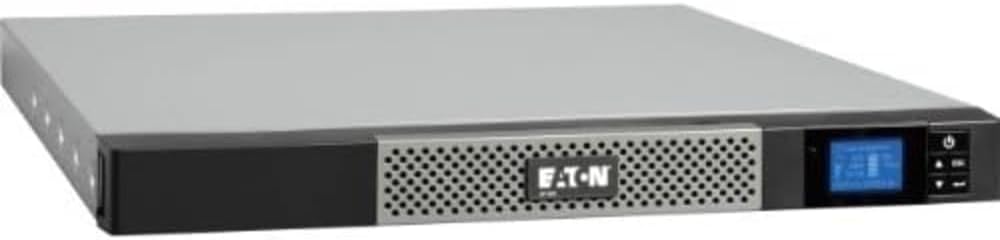
The Eaton 5P 1550VA is a compact 1U unit that offers flexibility with wall mounting. It provides 1550VA capacity with a true sine wave output. The 3.6 rating suggests room for improvement in user satisfaction.
We may earn a commission when you buy through this link, at no additional cost to you.
This model supports a wide range of voltages including 240V. It is ideal for closets or tight spaces where a tower won't fit. The true sine wave ensures safe operation for standard workstations.
Installation kits and cords are sold separately which adds to the initial cost. It is a solid choice for space constrained environments. The 1U size saves significant space.
We recommend this for workstations in server closets or small rooms. It offers flexible mounting and true sine wave power.
This unit can be mounted in a 1U rack or directly to a wall.
True sine wave output ensures compatibility with modern power supplies.
We may earn a commission when you buy through this link, at no additional cost to you.
Choosing the right UPS involves understanding voltage compatibility output waveform and capacity needs for your specific workstation setup.
Ensure the UPS accepts 240V input as this is critical for regions using this standard. Some units support a range like 208V to 240V which offers flexibility for international deployment.
Always check the input voltage range before buying to avoid compatibility issues.
Modern workstations often use active PFC power supplies that require a pure sine wave output. Simulated sine wave units may cause overheating or shutdowns in these systems.
Select a pure sine wave UPS to ensure maximum compatibility with modern hardware.
The VA rating determines how much load the UPS can support. Calculate the total wattage of your PC and peripherals and choose a unit with enough capacity to run them.
Select a unit with enough VA to cover your entire workstation including monitors.
Online double conversion units provide zero transfer time and clean power by always running on battery power. Line interactive models are more affordable and correct voltage fluctuations automatically.
Choose online topology for mission critical systems and line interactive for general use.
Consider whether you need a tower for a desk or a rackmount unit for a server room. Some 1U models can also be wall mounted to save space.
Verify the physical size and mounting options fit your available space.
LCD panels provide immediate visual status on battery and load. Remote monitoring via USB or network cards allows software to track power events centrally.
Look for LCD displays and software support for better management of power.
Warranties often cover the UPS and batteries for up to three years. A connected equipment guarantee can protect your devices against power damage.
Check the warranty period and connected equipment coverage before purchasing.
Count the number of outlets you need for your devices. Some units offer C13 and C19 options which are standard for server equipment.
Ensure the outlet types match your equipment's power cords.
Plug the UPS into a grounded outlet and connect your workstation devices to the protected outlets. Ensure the input voltage matches the local supply to avoid electrical hazards.
Allow the battery to charge fully after the first setup before relying on it for backup. Most units will provide a stable charge within a few hours of being plugged in.
Test the UPS periodically by unplugging it to simulate a power outage. Check the LCD panel for status alerts and replace the battery every few years to maintain performance.
No you cannot use a 120V UPS with a 240V outlet as the voltage difference can cause damage. Always choose a UPS rated for 240V input to ensure safe and proper operation in that region.
Pure sine wave output mimics utility power and is safe for active PFC supplies. Simulated sine wave is cheaper but may cause issues with sensitive equipment that requires a clean waveform.
Sum the wattage of your PC and monitors and add a margin of about 30 percent. Choose a UPS with a wattage capacity that exceeds this total to allow for future upgrades.
Yes many 240V UPS models include C13 or standard outlets for your devices. The input plug on the UPS must match the wall outlet which may be an L6 or IEC style.
Runtime depends on the load and VA rating. A typical unit might run a PC for 10 to 30 minutes. Heavier loads reduce the time significantly.
AVR adjusts the output voltage to stay within a safe range during brownouts or surges. It extends battery life by avoiding battery usage for minor voltage fluctuations.
No basic monitoring is available via the LCD panel and USB. A remote card is optional for advanced network monitoring or SNMP integration.
The best 240V UPS system depends on your capacity and waveform needs. For general use the Tripp Lite OMNIVSX1500 offers a budget friendly option. For critical needs the OPTI-UPS online model provides top tier protection.
Prioritize pure sine wave output if your workstation has active PFC power supplies. Ensure the voltage range matches your local power standards to avoid compatibility issues.
Check current prices and availability as these can change over time. A proper UPS investment secures your workstation and keeps your work safe from power problems.