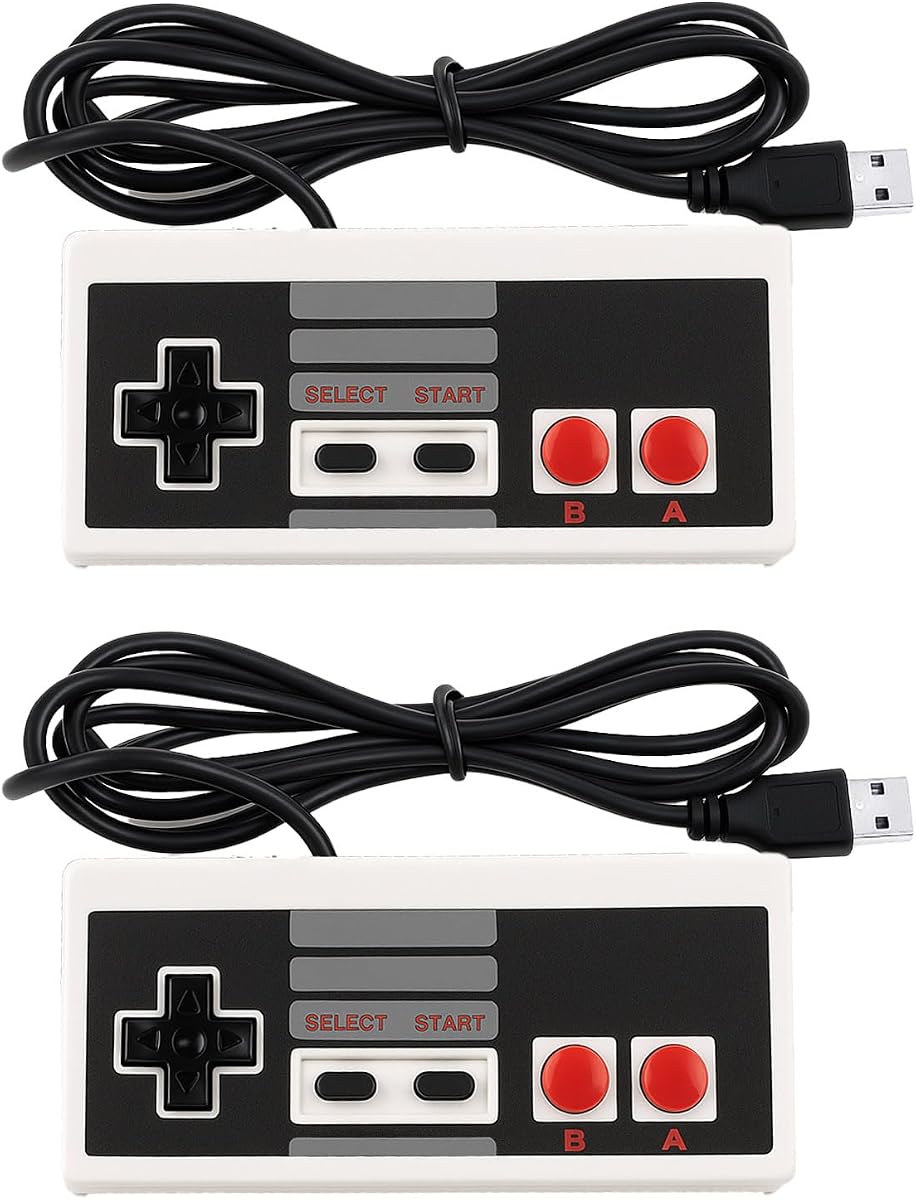
ZENANBiBi Usb Wired Controller 2-Pack
3.8Editor score
Wide system compatibility
Authentic classic feel
Includes two controllers
Discover the top Classic Nes Controller Replacement options for 2026. We compare wired, wireless, and adapter solutions for retro gaming on modern systems.
Finding the right Classic Nes Controller Replacement can transform your retro gaming experience. Whether you need longer cables, wireless freedom, or a budget-friendly option, the market offers diverse solutions tailored to modern consoles and PCs.
We evaluated ten top-rated controllers based on build quality, compatibility, and user feedback. Our analysis covers wired and wireless models, ensuring you find the perfect match for your specific gaming setup and personal preferences.
Each pick highlights key features, pros, and cons to help you decide quickly. Please note that availability and pricing may vary over time, so checking current listings is always recommended before making your final purchase decision today.
3.8Editor score

3.7Editor score

4.5Editor score
This side-by-side comparison highlights the key specifications and unique selling points of each controller to help you quickly identify the best fit for your specific gaming setup.


The NGHTMRE controller offers a practical solution for players seeking longer reach during gaming sessions. With a rating reflecting mixed feedback, it balances affordability with functional design for the 2016 Classic Edition.
We may earn a commission when you buy through this link, at no additional cost to you.
Its standout feature is the extended ten-foot cable, allowing comfortable seating distances without signal loss. The buttons are designed for sensitivity, ensuring precise inputs for classic platformers and arcade titles.
While functional, users report the button feel may lack the crispness of original hardware. This is acceptable given the low price point and the convenience of having two controllers for immediate multiplayer.
Buy this if you need extra cable length for couch gaming. It is a solid replacement option for the 2016 model but verify your console version before purchasing.
The ten-foot cable provides significant flexibility for positioning yourself away from the screen.
Including two controllers means you can play with a friend immediately after unboxing.
We may earn a commission when you buy through this link, at no additional cost to you.
This wireless pair offers freedom from cables, rated well for PC gaming on Windows or Linux. It brings a modern twist to retro titles by eliminating cord clutter on your desk.
We may earn a commission when you buy through this link, at no additional cost to you.
The rechargeable battery lasts up to 100 hours, reducing downtime for charging. Turbo functions allow rapid fire inputs, adding an edge to older arcade shooters.
Note that it does not support the Mini console, limiting its use to PC emulation. Setup may require mapping software, which adds a step for non-tech savvy users.
Ideal for PC emulator users wanting a clean setup. Ensure you need PC compatibility before buying.
Up to ten meters of range lets you play from anywhere in the room.
A single charge provides over a hundred hours of gameplay time.
We may earn a commission when you buy through this link, at no additional cost to you.
This controller provides a direct USB connection for retro gaming on modern computers. While ratings indicate reliability issues, its low cost makes it an accessible entry point.
We may earn a commission when you buy through this link, at no additional cost to you.
The design mimics classic shapes with ergonomic contours for comfortable holding. A six-foot cable offers decent reach without being too long for desk setups.
Users note potential connection stability issues. This trade-off is acceptable for budget buyers who need a spare controller for occasional use.
Best for budget-conscious gamers. Test immediately upon arrival to ensure functionality.
No drivers are needed; just connect and start gaming on your PC.
The layout replicates nostalgic controllers for familiar gameplay.
We may earn a commission when you buy through this link, at no additional cost to you.
Rated highly for retro console fans, this pack works with specific AV models. The high rating suggests reliable performance for those with compatible hardware.
We may earn a commission when you buy through this link, at no additional cost to you.
The nine pin plug ensures a direct connection to older units. Four-button support adds extra utility for advanced retro games requiring more inputs.
It is not compatible with the Mini console, so check your system carefully. The value is strong for owners of AV consoles.
Top pick for AV console owners. Verify port compatibility before purchase.
Designed for specific retro consoles with 9 pin ports for direct use.
Get two controllers for the price of one, ideal for two-player gaming.
We may earn a commission when you buy through this link, at no additional cost to you.
This two-pack offers exceptional value for retro gaming enthusiasts. With a solid rating for affordability, it fits seamlessly into various emulation setups.
We may earn a commission when you buy through this link, at no additional cost to you.
It supports a wide range of systems including RetroPie, making it versatile for hobbyists. The design aims to replicate the authentic feel of original hardware.
The cable length is standard but sufficient for most setups. It is not wireless, which may limit movement compared to higher-cost options.
Best value for budget shoppers. Perfect for building a multi-console setup.
Supports Raspberry Pi systems out of the box.
Get two controllers at a low price for multiplayer sessions.
We may earn a commission when you buy through this link, at no additional cost to you.
This adapter allows you to use existing controllers with your console. It is rated well for compatibility across different Nintendo platforms.
We may earn a commission when you buy through this link, at no additional cost to you.
It supports turbo features for enhanced gameplay without needing new controllers. The plug and play design makes it easy to integrate into existing setups.
It requires separate controllers to function, adding to the total cost. This is acceptable for those who already own compatible hardware.
Ideal for expanding existing collections. Check compatibility with your current controllers.
Built in turbo allows rapid inputs for action games.
Works with both Classic Edition and Wii U systems.
We may earn a commission when you buy through this link, at no additional cost to you.
For hands-on enthusiasts, this housing offers a unique NES aesthetic for Switch Joycons. The rating reflects user satisfaction with the design and finish quality.
We may earn a commission when you buy through this link, at no additional cost to you.
It includes a full set of buttons and tools for a complete custom job. The soft touch finish ensures comfort during extended play sessions.
Installation requires moderate electronic experience and time to complete properly. This is not for those seeking an immediate plug and play solution.
Best for modders and customizers. Requires patience and skill to install.
Personalize your Switch with classic 80s styling.
The anti-slip grip keeps your hands comfortable during long sessions.
We may earn a commission when you buy through this link, at no additional cost to you.
This bundle offers essential extras for console owners. While ratings are mixed, it addresses power and reach needs in one package.
We may earn a commission when you buy through this link, at no additional cost to you.
It includes a power supply and two extension cables to improve comfort. One controller is provided, which can serve as a spare.
The controller quality may be basic. This is acceptable if the primary need is power and extension solutions.
Best for power needs. Check cable quality before committing.
Includes a power supply to ensure consistent console operation.
Two six-foot cables provide better reach for couch gaming.
We may earn a commission when you buy through this link, at no additional cost to you.
Licensed by Nintendo, this grip offers a premium feel and reliable build. The high rating indicates strong satisfaction among users.
We may earn a commission when you buy through this link, at no additional cost to you.
The textured silicone material provides a non-slip finish for better control. It extends the grip for improved comfort during long sessions.
It is a single controller, so you may need another for multiplayer. The red color adds a touch of style to your setup.
Top quality for collectors. Great for those who value official licensing.
Manufactured by a top licensed accessory maker for quality assurance.
The extended grip reduces hand fatigue during play.
We may earn a commission when you buy through this link, at no additional cost to you.
Designed for emulation, this pack works well with PC systems. The rating suggests reliable performance for retro titles on modern platforms.
We may earn a commission when you buy through this link, at no additional cost to you.
The anti-sweat finish keeps hands comfortable during intense gaming. Both controllers support various emulators for classic SNES and NES games.
You must set up buttons manually in your emulator. This adds time but ensures custom control mapping for each title.
Best for emulator users. Check emulator compatibility before buying.
The frosted concave design prevents slipping during sweaty sessions.
Works with most PC emulation software for classic gaming.
We may earn a commission when you buy through this link, at no additional cost to you.
Choosing the right controller depends on your system, budget, and comfort needs. We outline key factors to consider for an informed decision.
Ensure the controller supports your specific console or platform. Some models work with the Mini while others are PC-only or AV-focused.
Always verify system compatibility before purchase to avoid return hassles.
Wired controllers offer zero latency and consistent power but require cable management. Wireless models provide freedom but depend on battery life and potential interference.
Choose wired for precision and wireless for comfort.
Standard cables can limit movement. Extended cables allow comfortable seating distances but may tangle easily.
Select length based on your seating distance from the screen.
High-quality materials ensure durability and a better tactile feel. Look for textured grips and sturdy buttons.
Prioritize build quality for long-term satisfaction.
Options range from basic affordable models to premium licensed ones. Determine how much you are willing to spend.
Balance cost with the features you need most.
Some models offer turbo buttons for rapid fire inputs. This feature is useful for older arcade games.
Consider this if you play action-heavy classics.
Buying a two-pack is cost-effective for multiplayer. Single controllers may require additional purchases later.
Opt for a pack if you play with friends regularly.
Plug and play models save setup time. Others may require software configuration or physical assembly.
Choose based on your technical comfort level.
Connect your controller to the console or PC. Ensure any adapter or software is ready before starting.
Clean buttons gently to remove dust. Avoid harsh chemicals that may degrade materials.
Store in a dry place. Avoid heat and direct sunlight to preserve plastic and electronics.
Not all controllers work with the Mini. Check the product description for compatibility with the 2016 model. Some are designed only for PC or AV consoles.
Most wired controllers are plug and play. Some may require mapping software for advanced features. Check the manual for specific setup steps.
Wireless options vary by model. Some offer up to 100 hours per charge. Others may need more frequent recharging depending on usage.
Turbo buttons automate rapid inputs for shooting games. They allow faster action without constant tapping. This enhances gameplay for older arcade titles.
Many models support Raspberry Pi. Check compatibility lists for specific OS support. Most standard USB controllers work well with RetroPie.
Licensed controllers often have better quality control. They ensure official design and compatibility. Third party options may offer more features or lower prices.
You can use extension cables or choose models with longer wires. Some bundles include extra cables for flexibility.
Use isopropyl alcohol on a cloth to gently clean. Avoid soaking the electronics. Let dry completely before reconnecting.
We reviewed ten controllers covering budget and premium needs. The NGHTMRE and RDS options stand out for their specific strengths.
Prioritize compatibility and comfort to match your gaming style. Check for features like turbo or wireless if needed.
Prices and stock change often. Verify current listings before you buy to ensure you get the best deal today.