
Office Desk Accessories 2pcs Monitor Memo Board
4.3Editor score
Transparent acrylic memo boards
Easy install and remove adhesive
Multi-scene use for home office
Discover the top rated Adhd Desk Accessories for productivity and focus. This guide compares timers, planners, and organizers to help neurodivergent adults
Finding the right tools to manage your workspace can be a game changer for anyone dealing with attention challenges. Adhd Desk Accessories help streamline your environment, reduce visual clutter, and keep important tasks front and center without overwhelming your senses.
We have carefully evaluated the market to select products that address common pain points like time blindness, forgetfulness, and disorganization. Our selection includes visual timers, specialized planners, and organizational tools designed to support neurodivergent workflows effectively.
Each pick in this list highlights specific features that enhance focus and routine building. Please note that prices and availability change frequently so check current listings before making your final decision on the best tools for your setup.
4.3Editor score

4.5Editor score
4.6Editor score
The following table provides a side-by-side overview of every product reviewed to help you quickly identify which features match your specific organizational needs and workspace constraints.


This analog planning system stands out as a top choice for maintaining focus without digital distractions. With over 130 double-sided cards included, you get a comprehensive kit designed to streamline daily tasks and long-term goals efficiently.
We may earn a commission when you buy through this link, at no additional cost to you.
The design features distinct sections for priority setting and a dedicated magnetic display to separate completed tasks from active ones. Using 100GSM paper ensures that writing is smooth and ink does not bleed through even with heavy marker use.
While the initial cost is higher than standard notepads, the durability and flexibility of the undated cards make it a long-term investment. You will not feel pressured to restart a new planner every month just because you skipped a day.
This kit is ideal for individuals who prefer tactile interaction with their schedules and need a visual representation of progress. If you struggle with digital overwhelm, this physical system offers a calming and structured approach to productivity.
The magnetic divider allows you to physically move cards to a completed pile, providing immediate satisfaction and visual proof of progress.
Made from thick 100GSM paper, these cards withstand daily handling and folding without tearing or wearing out quickly.
We may earn a commission when you buy through this link, at no additional cost to you.
This affordable set of memo boards offers a simple yet effective way to organize notes directly on your workspace. The two transparent panels stick to the sides of your monitor, keeping essential reminders in your line of sight without cluttering the desk.
We may earn a commission when you buy through this link, at no additional cost to you.
Constructed from durable acrylic, these boards are lightweight yet sturdy enough to hold paper securely. The transparent design ensures that you can read your notes easily through the panel, maintaining visibility while protecting them from dust and wear.
Installation is straightforward as the adhesive strips allow for quick attachment and removal without damaging your equipment. However, you should test the adhesive on a small area first if you are concerned about residue on sensitive surfaces.
For anyone looking to minimize desktop clutter on a tight budget, this accessory provides excellent value. It is a practical solution for keeping important memos and business cards accessible while maintaining a clean and organized desk surface.
Peel off the protective film and stick the panels to the monitor edge for instant organization without tools.
The clear acrylic allows you to read sticky notes placed behind the panel easily while keeping them neat.
We may earn a commission when you buy through this link, at no additional cost to you.
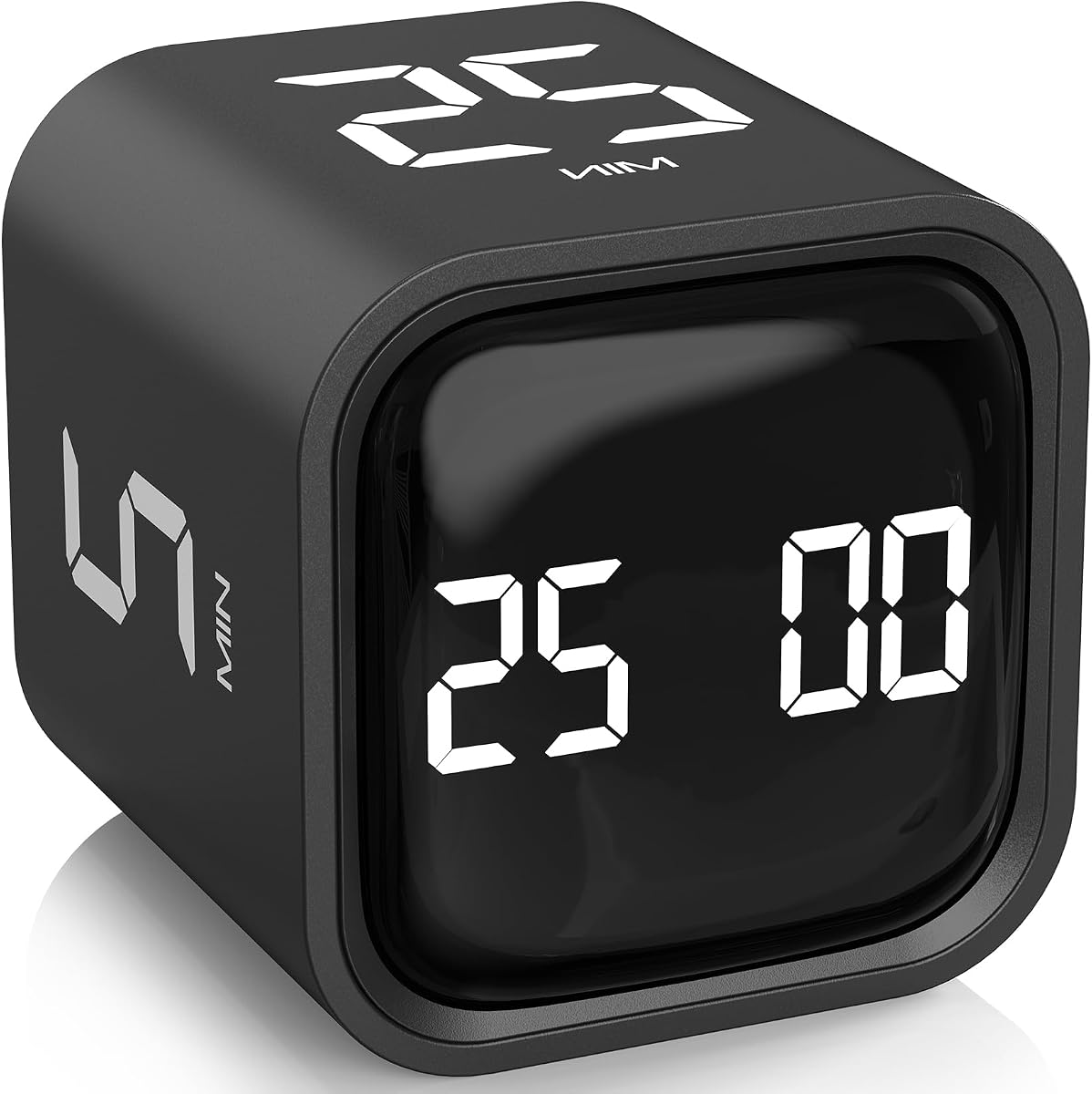
This timer is engineered to simplify time management with a unique gravity sensor mechanism that starts counting when flipped. It comes with preset intervals specifically designed for focus techniques, making it easy to start work sessions without fiddling with settings.
We may earn a commission when you buy through this link, at no additional cost to you.
The ability to customize times and switch between stopwatch and countdown modes adds flexibility for various tasks. With three volume levels including a silent vibration option, it works well in quiet environments like libraries or shared offices without disturbing others.
Some users may need a few tries to get used to the flip gestures for stopping and resetting the timer. However, once mastered, this intuitive interface reduces the friction of starting and stopping tasks which is a common hurdle for focus maintenance.
Investing in this tool is highly recommended for those who struggle with time blindness and need a reliable visual and physical cue. The combination of preset productivity cycles and customizable features makes it a powerful ally for structured work days.
Simply flip the timer screen upwards to start the countdown instantly without pressing buttons or navigating menus.
Use the silent mode to get noticeable vibration alerts that keep you aware of time without auditory distractions.
We may earn a commission when you buy through this link, at no additional cost to you.
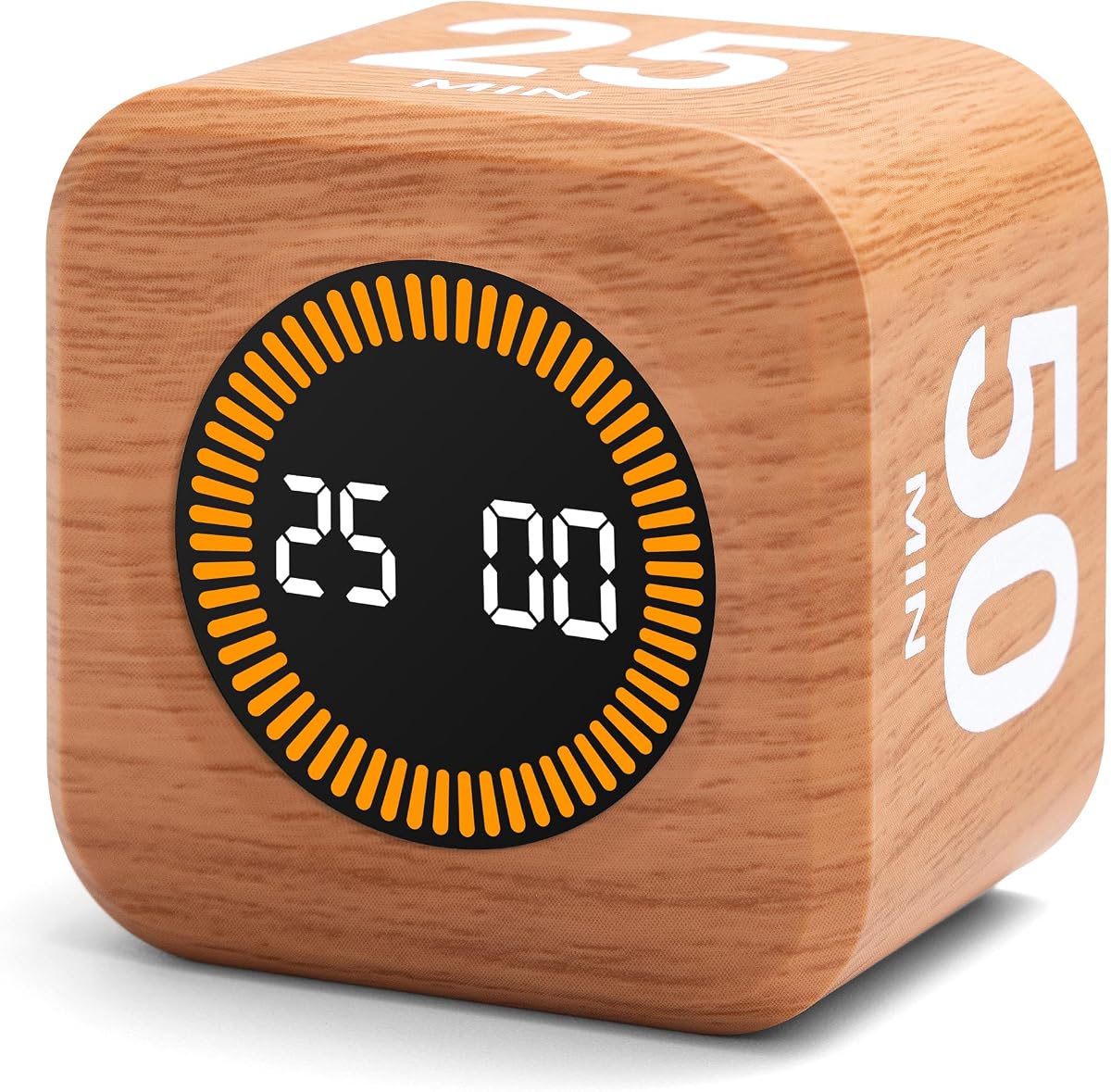
This timer brings a touch of elegance to your desk with its exclusive wood grain finish that complements modern workspaces. It functions similarly to other gravity sensors but adds a rechargeable battery which eliminates the need for disposable power sources.
We may earn a commission when you buy through this link, at no additional cost to you.
The display features a light-up screen ensuring that you can read the remaining time clearly even in dim lighting conditions. Its compact size makes it easy to toss into a bag for use at school or in different work locations throughout the week.
Although it requires a charge, the USB-C charging port is a modern convenience that ensures long-term usability without waste. Users should keep in mind to charge it periodically during light usage to ensure it is ready for important focus sessions.
This model is perfect for individuals who value aesthetics alongside functionality in their productivity tools. It serves as both a functional timer and a stylish decorative piece that enhances the look of your office or study area.
The built-in USB-C rechargeable battery offers a sustainable alternative to disposable batteries while keeping costs down.
Its lightweight construction allows you to carry it easily between rooms or offices for consistent routine tracking.
We may earn a commission when you buy through this link, at no additional cost to you.
This notepad provides a structured approach to daily task management with its undated layout allowing flexibility in scheduling. It includes fifty-two pages of high-quality paper designed to offer a smooth writing experience without ink bleeding through the sheets.
We may earn a commission when you buy through this link, at no additional cost to you.
A transparent PP cover protects your notes from dust and wear while the thick cardboard back provides a firm surface for writing anywhere. The design encourages you to start each day with a positive outlook and clear priorities for maximum productivity.
While the page count is limited compared to yearly planners, it is perfect for focused monthly or project-based planning. Users may find that tearing off pages is slightly less convenient than spiral bound options but the stability compensates for this.
Ideal for professionals and students alike, this planner helps streamline daily routines and maintain consistent progress. It serves as a reliable tool for organizing thoughts and ensuring that important tasks are not overlooked during busy periods.
Since it is undated you can start using it on any day without feeling pressured about missed dates or gaps.
The thick paper and sturdy cover ensure that your notes remain intact even when used in a bag or on the go.
We may earn a commission when you buy through this link, at no additional cost to you.
This classic visual timer uses a disappearing disk to show how much time is left making it easy for everyone to understand. It is specifically designed to help with time management and concentration tasks for both kids and adults in various settings.
We may earn a commission when you buy through this link, at no additional cost to you.
The silent operation mode ensures that you can use it during study sessions or meetings without the noise of an audible alert. You can choose from different colored silicone covers to color code different activities which helps in organizing your daily routine visually.
While it relies on a standard AA battery which is not included, it provides a dependable timing method without needing charging cables. The only limitation is that it lacks custom time settings, but the sixty-minute limit covers most typical work or study blocks.
This timer is an excellent choice for creating a calm and structured environment that reduces stress during tasks. It helps ease transitions between activities and ensures that you stay mindful of time without constant looking at digital clocks.
The red disk disappearing as time passes offers a concrete visual cue that helps you manage work sessions effectively.
Different colored silicone covers allow you to assign specific colors to different tasks or times of day for clarity.
We may earn a commission when you buy through this link, at no additional cost to you.
This planner is specifically crafted to support neurodivergent adults with sections that address common challenges like task prioritization and mental clutter. It includes a dedicated space to brain dump thoughts which prevents them from taking up mental space while you work.
We may earn a commission when you buy through this link, at no additional cost to you.
The checklist includes a rewards feature to keep you motivated and positive about completing daily tasks. Since it is undated you can start using it at any time without worrying about gaps in dates or wasted pages from missed days.
The large A4 size makes it suitable for desk use but it may not be the best option if you need to carry it around frequently. Users looking for a smaller portable option might find this too large for pockets or small bags though it offers more writing space.
This tool is ideal for individuals who struggle with standard planners and need a layout that accounts for their unique working style. By addressing specific needs like distraction management and motivation, it helps create a more supportive environment for daily planning.
The brain dump section allows you to write down intrusive thoughts quickly so you can return focus to your task.
Including rewards in the checklist helps reinforce positive behavior and makes completing tasks feel more achievable.
We may earn a commission when you buy through this link, at no additional cost to you.
This weekly planner offers a well-organized layout that helps you prioritize tasks with distinct sections for top and low priorities. It features spiral binding which makes it easy to turn pages or tear off completed sheets to reset your planning space cleanly.
We may earn a commission when you buy through this link, at no additional cost to you.
The planner includes a transparent cover to protect your pages from dirt and damage while keeping them looking professional. Written on thick paper, it prevents ink from bleeding through ensuring a smooth writing experience even if you use heavy pens or markers.
Being undated means you can start planning at any time of the year without skipping dates or wasting pages unused. While the focus is on weekly planning which may be less granular than daily planners, it is great for broader task management and scheduling.
This tool is perfect for individuals who need a clear overview of their week and prefer a tidy tear-off system. The design helps you stay organized by separating tasks into manageable parts and tracking daily habits effectively.
Spiral binding allows the planner to lay flat and pages to be torn off easily without ripping or damaging the book.
Dedicated sections for high and low priorities help you focus on what matters most before moving to secondary tasks.
We may earn a commission when you buy through this link, at no additional cost to you.
This organizer provides a safe way to attach notes to your monitor without risking damage from adhesive clips or traditional sticky pads. It includes a sturdy wooden base and an acrylic panel that holds notes securely while keeping your workspace looking neat.
We may earn a commission when you buy through this link, at no additional cost to you.
The innovative dual-slot design allows you to position the board at different angles to suit your viewing comfort. It comes with sticky notes included making it ready to use right out of the box for capturing quick reminders or meeting notes.
Because it sits on the edge of the monitor, it keeps notes within your line of sight without taking up valuable desk real estate. Users should note that the notes are not refillable in the unit itself but the base remains a permanent fixture on your desk.
This item is great for those who need a visual anchor for reminders but want to avoid cluttering their desk surface. The combination of style and function makes it a practical accessory for keeping important information easily accessible during work.
The design ensures no adhesive touches the screen directly protecting your monitor from potential scratches or residue.
Positioned on the monitor edge, notes stay in your direct line of sight so you do not forget them.
We may earn a commission when you buy through this link, at no additional cost to you.
This footrest helps improve posture and circulation by elevating your feet which reduces leg pressure during long sitting hours. It features massage rollers that allow you to promote blood flow and relieve fatigue while working at a desk for extended periods.
We may earn a commission when you buy through this link, at no additional cost to you.
The swingable design lets you adjust the footrest forward or backward to find the most comfortable position for your legs. It is made from durable PP material that is easy to clean and includes a non-slip base to prevent it from sliding on the floor.
While it may lack high-end aesthetics, its functionality is excellent for anyone looking to reduce physical strain during work. The lightweight design makes it easy to move between home and office setups so you can maintain ergonomic habits wherever you are.
This accessory is recommended for anyone who experiences leg discomfort or needs extra support while working. By providing a stable and adjustable surface for your feet, it contributes to a more comfortable and productive work environment.
Elevating your feet helps align your spine and reduce pressure on your lower back for better overall posture.
Rollers on the surface offer a gentle massage that helps keep your feet active and reduces stiffness during long sitting sessions.
We may earn a commission when you buy through this link, at no additional cost to you.
Choosing the right accessories involves understanding your specific challenges and workspace needs to ensure they support rather than overwhelm your workflow.
For many with attention challenges, having information within your line of sight is crucial. Look for accessories like monitor memo boards or clear organizers that keep your tasks visible without cluttering your desk surface.
Prioritize items that are transparent or high-contrast to ensure you do not lose track of important notes or tools.
Visual timers are highly recommended for addressing time blindness. These devices use physical cues like disappearing disks or digital displays to show remaining time making it easier to track how long a task has been going.
Select timers that offer silent modes if you work in shared spaces to prevent distractions while still getting necessary time alerts.
Undated planners offer flexibility that is often necessary for irregular routines. This allows you to restart your planning process whenever you miss a day without feeling discouraged or wasting pages.
Look for planners that include sections for prioritization and brain dumping to help manage mental clutter effectively.
Accessories should withstand regular use without breaking quickly. Choose items made from sturdy materials like thick paper or durable plastics that can handle being moved or handled frequently during work.
Investing in higher quality items often pays off in the long run by reducing the need for replacements.
Tools should be intuitive to avoid adding friction to your workflow. Products that require complex setup or maintenance are less likely to be used consistently.
Opt for simple solutions that can be integrated into your routine immediately without extensive training.
Consider the available space on your desk before purchasing large organizers. Wall mounted or monitor attached solutions are great for saving valuable surface area while keeping essentials within reach.
Measure your workspace dimensions to ensure the accessories you choose fit comfortably without causing clutter.
Items that feel pleasant to use can boost your motivation to stay organized. Aesthetics like wooden finishes or color-coded elements make the planning process more engaging.
Choose designs that appeal to your personal taste to encourage consistent use and routine building.
Comfort during long work sessions is essential for maintaining focus. Accessories like footrests help improve posture and reduce physical fatigue which can impact mental energy levels.
Prioritize tools that support your physical well-being to create a sustainable working environment.
Start by placing visual timers within your direct line of sight and set them for your intended work blocks. Flip or set them immediately when you begin a task to create a physical cue that you are in work mode.
Regularly clean acrylic and plastic surfaces with a soft cloth to keep them looking clear and functional. For paper planners ensure you store them in a dry area to prevent moisture from damaging the pages.
Replenish sticky notes and refill supplies as needed to maintain the utility of your organizers. Consistency in using these tools is key to building habits that support your productivity goals effectively.
The best accessories include visual timers for time management, undated planners for flexible scheduling, and clear organizers to reduce visual clutter. These tools help structure your environment to support focus and routine building.
Visual timers provide a concrete representation of time passing which helps with time blindness. Unlike digital clocks that show numbers, visual timers show how much time is left as a physical object making it easier to understand.
Use monitor mounted memo boards to keep notes in your line of sight without using desk space. Limit your desk to essential items and use dedicated containers to store frequently used tools to reduce clutter.
Undated planners are often better because they remove the pressure of keeping up with a strict calendar. You can start using them at any time without feeling discouraged by missed days which supports a more forgiving workflow.
Using smooth writing pens that do not bleed through paper is recommended. Since many planners use standard 100GSM paper, standard ballpoint or gel pens usually work well without causing ink bleed.
Footrests help maintain proper posture and blood circulation which reduces physical discomfort during long work sessions. By reducing leg fatigue you can focus more on tasks without being distracted by physical needs.
The top picks in this guide cover essential tools like analog planners and visual timers that address common challenges for neurodivergent adults. Each product has been selected for its ability to streamline workflows and reduce distractions effectively.
When choosing accessories, prioritize items that align with your specific workflow preferences and workspace constraints. Whether you prefer digital or analog tools the key is consistency and ease of use in your daily routine.
Prices and availability are subject to change so always check current listings before purchasing. Regularly update your tools as your needs evolve to maintain a workspace that continues to support your productivity goals.