
ASUS Vivobook S16 Laptop (2026)
5.0Editor score
AMD Ryzen AI 9 465 Processor
16 Inch WUXGA OLED Display
Up to 23 Hours Battery Life
AI laptops represent the forefront of modern computing technology, integrating specialized hardware and software designed to accelerate artificial intelligence tasks directly on the device. These machines leverage neural processing units to handle complex workloads like content creation, data analysis, and real-time language translation without relying solely on cloud connectivity.
This comprehensive guide evaluates ten leading models available in the current market, focusing on their AI capabilities, performance metrics, display quality, and overall user experience. We compare processors from major manufacturers, battery life claims, and specific AI features like Copilot+ PC integration to help you find the perfect match for your workflow.
Each selection highlights unique strengths, whether you need a portable ultraportable for travel or a robust workstation for creative professional tasks. Please note that pricing and availability fluctuate frequently due to market demand and seasonal promotions, so checking the latest offers before purchasing is always recommended for the best value.
5.0Editor score
4.8Editor score

4.4Editor score
As an Amazon Associate we earn from qualifying purchases.
The following comparison table provides a side-by-side overview of key specifications across all ten selected models to help you quickly identify which device aligns best with your specific performance and portability requirements.


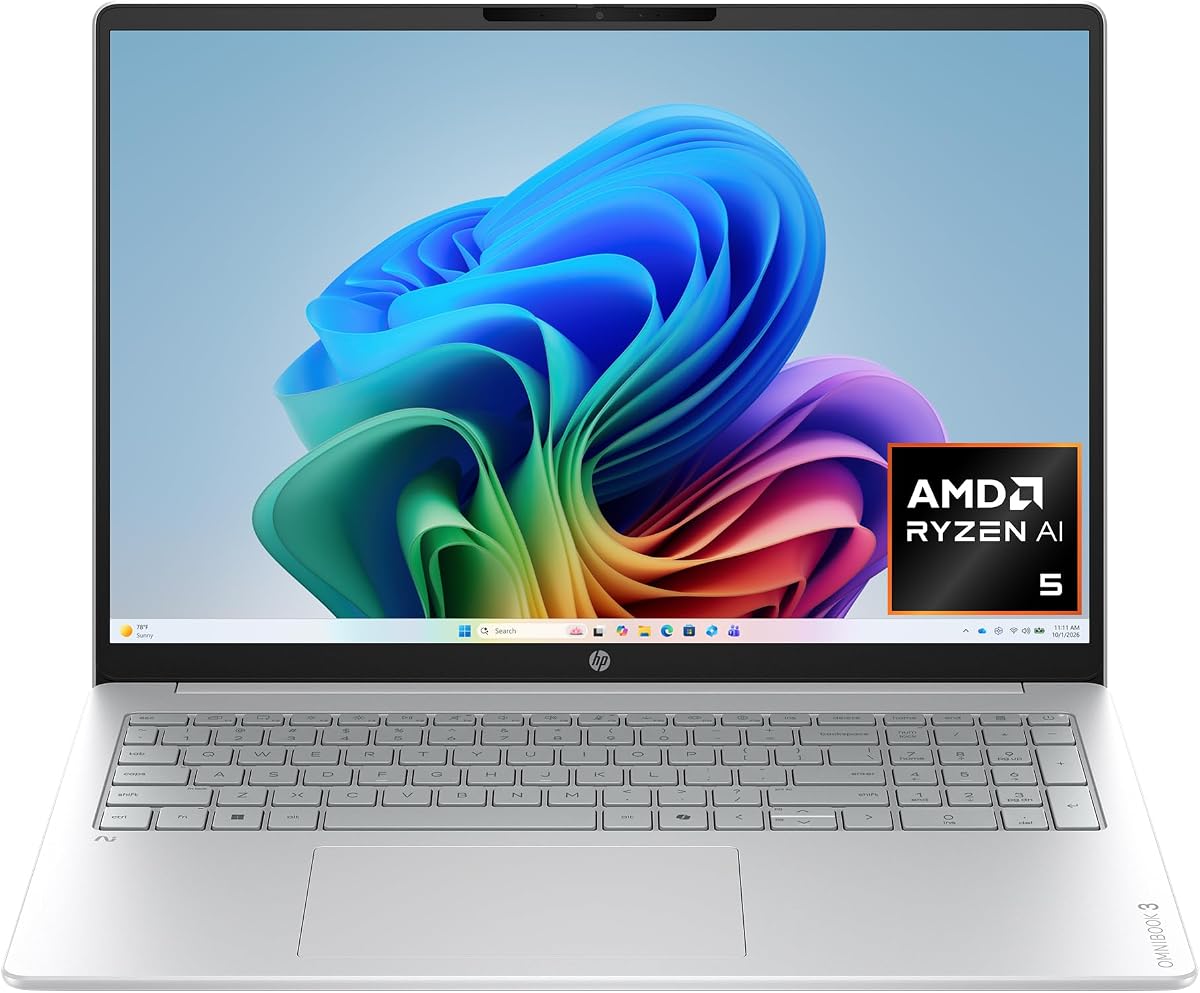
The HP OmniBook 3 16 inch stands out as a top contender for those seeking a balance of performance and battery efficiency in the AI laptop space. With a high rating from users, it delivers robust AI capabilities through the AMD Ryzen AI 5 430 processor, making it ideal for daily productivity tasks and intelligent workflows.
We may earn a commission when you buy through this link, at no additional cost to you.
Its standout quality lies in the seamless integration of AI features that streamline everyday work, such as automatic noise cancellation during video conferences and quick access to Copilot assistance via a dedicated key. The 2K IPS touchscreen ensures vibrant visuals and responsive touch interaction, while the 16 GB RAM supports smooth multitasking across multiple applications.
While it lacks a discrete graphics card for intensive gaming, the integrated Radeon 840M GPU handles everyday media and light creative tasks competently. The primary trade-off is the 512 GB storage limit, but the fast Gen4 SSD ensures quick boot times and efficient file access for most users who utilize cloud storage.
This laptop is best suited for students, remote workers, and professionals who prioritize long battery life and AI-enhanced productivity over heavy graphical rendering. Its combination of speed, portability, and smart features makes it a highly recommended choice for the majority of general computing needs in the current market.
The Ryzen AI 5 430 processor enables on-device AI tasks like natural language processing and image recognition without slowing down the system or requiring constant internet access.
With up to 19 hours and 30 minutes of battery life, users can work through a full day without needing a charger, supported by fast charging that restores 50 percent in about 45 minutes.
We may earn a commission when you buy through this link, at no additional cost to you.
The Lenovo ThinkBook 16 Gen 8 is engineered specifically for business environments where reliability, security, and raw processing power are paramount. Its 16-Core Intel Ultra 7 255H processor provides the necessary horsepower to handle complex spreadsheets, virtual machine tasks, and demanding enterprise applications without hesitation.
We may earn a commission when you buy through this link, at no additional cost to you.
Key strengths include the generous 32GB of DDR5 RAM and a spacious 1TB SSD, which eliminate lag when running multiple resource-intensive applications simultaneously. The inclusion of Windows 11 Professional ensures advanced security features like BitLocker encryption, while the fingerprint reader adds a convenient layer of biometric protection for sensitive data.
The display offers ample screen real estate for data analysis, but it is limited to FHD+ resolution which may not satisfy creative professionals who need color accuracy. Additionally, the chassis is slightly heavier than consumer ultrabooks, prioritizing durability and port selection over extreme portability.
Ideal for corporate users and IT departments, this model supports remote manageability through the Intel vPro platform, ensuring long-term stability and security compliance. It is a robust workstation alternative that delivers professional-grade performance for teams that need consistent, secure computing power on the go.
Windows 11 Professional and the fingerprint reader provide enhanced security protocols required for handling confidential business data in corporate settings.
The 16-Core Ultra 7 255H processor ensures that complex computations and multitasking workflows remain smooth even under heavy load conditions.
We may earn a commission when you buy through this link, at no additional cost to you.
The HP OmniBook X 14 inch distinguishes itself with a visually immersive 3K OLED touchscreen that delivers deep blacks and vibrant colors ideal for media consumption and creative work. Rated highly for its display quality, this model brings a premium feel to the AI laptop category while maintaining strong performance from its Intel Core Ultra 7 356H processor.
We may earn a commission when you buy through this link, at no additional cost to you.
The OLED technology lights each pixel individually, resulting in exceptional contrast and power efficiency compared to traditional LED screens. With up to 27 hours of battery life, users can rely on extended usage times between charges, supported by a fast charging system that restores half capacity in roughly 30 minutes.
Trade-offs include the higher price tag associated with OLED panels and the potential for screen burn-in if static images are displayed for prolonged periods. The Intel integrated graphics are sufficient for general tasks but may struggle with heavy 3D rendering or modern AAA gaming titles.
This laptop is perfect for content creators, executives, and power users who demand top-tier visuals and long battery life in a portable 14-inch chassis. Its Smart Sense feature intelligently adjusts performance and fan noise based on activity, ensuring a comfortable and efficient user experience in various environments.
The 3K OLED display provides richer contrast and enhanced color depth, making it superior for editing photos or watching high-definition content on the go.
Smart Sense AI dynamically switches modes to optimize performance based on your activity, adapting fan noise and temperature for comfort without manual input.
We may earn a commission when you buy through this link, at no additional cost to you.
The HP OmniBook 5 16 inch offers a spacious 16-inch touchscreen that enhances productivity by providing more workspace for windows and documents. Built with Intel Core Ultra 7 processing power, it ensures fast, intelligent performance for multitasking, productivity, and creative workloads that require consistent speed and reliability.
We may earn a commission when you buy through this link, at no additional cost to you.
Its 16GB RAM and massive 1TB SSD ensure smooth multitasking and ultra-fast boot times, while the touch interface allows for intuitive navigation and creative input. The backlit keyboard makes typing comfortable in dim environments, and the sleek silver aluminum design maintains a professional aesthetic suitable for both office and home settings.
While the weight may be slightly higher than ultralight models, the larger screen and robust internal components justify the trade-off for users who prioritize visual space. The integration of Copilot AI into Windows 11 helps users work smarter with intelligent suggestions and enhanced security features that simplify daily tasks.
Suitable for home users, students, and business professionals who need a reliable daily driver with ample storage and screen real estate, this model balances premium design with practical functionality. It delivers a comprehensive computing experience that supports long-term use without compromising on performance or storage capacity.
The 16-inch touchscreen provides ample room for side-by-side window management, making it easier to work on multiple projects simultaneously without feeling cramped.
A 1TB SSD ensures you have plenty of storage for large media files, applications, and backups without needing to rely heavily on external drives.
We may earn a commission when you buy through this link, at no additional cost to you.
The HP OmniBook 5 16 inch featuring the Snapdragon X X1-26-100 processor is designed for users who prioritize extreme battery life and mobile connectivity. With an impressive rating from verified buyers, this model delivers essential performance and long-lasting battery life that supports all-day productivity without interruption.
We may earn a commission when you buy through this link, at no additional cost to you.
Its standout quality is the battery endurance, offering up to 34 hours and 45 minutes on a single charge, which is ideal for travelers or professionals working away from power outlets. The 2K OLED display provides rich colors and crisp visuals, while the Qualcomm Wi-Fi 6E technology ensures fast and stable wireless connections anywhere.
The Snapdragon processor offers efficient computing with AI capabilities, but some users may encounter compatibility issues with legacy x86 applications that are not yet optimized for ARM architecture. The storage capacity is limited to 512 GB, which might require cloud reliance for those with large local file libraries.
This laptop is best for users who need reliable web-based productivity, media consumption, and communication tools on the go. Its combination of exceptional battery life, vibrant display, and always-on connectivity makes it a strong option for those who value mobility and endurance over heavy local processing tasks.
The Snapdragon X processor optimizes power consumption to extend battery life, allowing you to work from morning to night without needing a charger.
On-device AI features enable efficient processing of tasks like noise cancellation and language translation without relying on external server connections.
We may earn a commission when you buy through this link, at no additional cost to you.
The HP OmniBook 3 14 inch is engineered for maximum portability and endurance, making it an ideal companion for students and professionals who travel frequently. Powered by the Snapdragon X X1-26-100 processor, it delivers essential performance and AI capabilities while maintaining an incredible battery life that supports usage beyond 40 hours on a single charge.
We may earn a commission when you buy through this link, at no additional cost to you.
Key strengths include its compact footprint and lightweight design, which fit easily into backpacks without sacrificing screen quality. The 2K OLED display ensures rich colors and crisp visuals for work and entertainment, while the infrared camera adds security with Windows Hello support for quick logins without passwords.
Trade-offs involve the 256 GB storage limit, which may fill up quickly with large files and requires strategic cloud storage management. The display is smaller than 16-inch alternatives, which could feel tight for users accustomed to larger workspaces, but it remains sufficient for standard productivity tasks.
This model is best suited for budget-conscious buyers and frequent travelers who need a reliable, long-lasting machine for web browsing, document editing, and video conferencing. Its combination of price, battery life, and AI features offers significant value for those prioritizing mobility and efficiency in a small package.
The 14-inch form factor is easy to carry in any bag, ensuring you can take your work anywhere without dealing with bulky equipment.
Priced competitively with strong AI capabilities, it provides an affordable entry point into the next generation of AI-enabled laptops for everyday use.
We may earn a commission when you buy through this link, at no additional cost to you.
The Dell 16 Plus represents the high end of the AI laptop market with its Intel Core Ultra 9 processor and 32GB of LPDDR5X memory. Designed for professional productivity, it offers a 16-inch AI capable PC with built-in AI chips that support demanding creative workflows and seamless multitasking without performance degradation.
We may earn a commission when you buy through this link, at no additional cost to you.
Its standout features include support for Wi-Fi 7 which ensures ultra-fast wireless speeds, and a 1TB SSD that provides ample space for large datasets and media libraries. The modern modular design enhances durability, while the Ice Blue power button and fingerprint reader add a touch of premium aesthetics and secure access.
While the performance is exceptional for video editing and complex data processing, the price reflects this premium positioning and may be unnecessary for basic users who do not require such extensive hardware. The FHD+ display is functional but does not match the color fidelity of OLED panels found in other top models.
This laptop is best for professional designers, engineers, and business users who need reliable power and advanced security features like the Intel vPro platform. It serves as a robust replacement for older Latitude models, offering modern AI capabilities and long-term stability for enterprise environments.
With 32GB of LPDDR5X RAM, you can run multiple creative applications simultaneously while maintaining smooth performance and quick rendering times.
Wi-Fi 7 support ensures you are ready for the next generation of internet speeds, reducing latency and improving download speeds significantly.
We may earn a commission when you buy through this link, at no additional cost to you.
The ASUS Vivobook S16 has achieved a perfect user rating for its sleek design and powerful performance, making it one of the most reliable options in the 2026 lineup. Powered by the AMD Ryzen AI 9 465 processor, it delivers smooth intelligent performance and Copilot+ PC features that keep tasks running seamlessly.
We may earn a commission when you buy through this link, at no additional cost to you.
Key strengths include its ultra-portable 3.75 lb weight and thin profile, which make it easy to carry without sacrificing power. The 16-inch WUXGA OLED display provides deep contrast and vivid detail, perfect for content creators who need accurate colors. The 70Wh battery offers up to 23 hours of use for all-day productivity.
Although it lacks a dedicated GPU, the integrated Radeon graphics handle everyday entertainment and light creative tasks efficiently. The selection of ports is limited compared to bulkier laptops, but the included USB-C and HDMI ports cover most connectivity needs for external displays and accessories.
This model is ideal for creative professionals and students who require a lightweight machine with high-end visuals and long battery life. Its combination of speed, portability, and premium display technology makes it a top choice for users who value style and performance in equal measure.
The 100% sRGB OLED display ensures that colors appear accurate and vibrant, which is essential for graphic design and video editing work.
Weighing just 3.75 lbs, this laptop is light enough to carry daily without strain, making it perfect for commuting or working from different locations.
We may earn a commission when you buy through this link, at no additional cost to you.
The Acer Aspire 16 AI brings next-level performance at an accessible price point, featuring a Snapdragon X X1-26-100 processor with 45 TOPS of NPU power. It offers a vibrant 16-inch WUXGA touchscreen with 120Hz refresh rate, making interactions feel fluid and responsive for both work and entertainment.
We may earn a commission when you buy through this link, at no additional cost to you.
Its standout feature is the AcerSense AI solutions which allow users to effortlessly get answers, streamline settings, and optimize video presence with intuitive tools. The integrated Qualcomm Hexagon NPU supports Windows Studio Effects and other AI-accelerated applications, ensuring that productivity tools like video call enhancements work smoothly.
While the build is solid for the price, it may feel less premium than aluminum chassis competitors. The 512GB storage is adequate but not expandable internally for some users. However, the Wi-Fi 7 support ensures future-proof connectivity for high-speed internet needs without additional hardware upgrades.
This model is perfect for budget-conscious users who want AI features and a high refresh rate screen without paying a premium price. It balances essential performance with modern connectivity features, making it an excellent choice for general computing, streaming, and casual workloads.
The 120Hz refresh rate makes scrolling and animations look smoother than standard 60Hz screens, providing a more pleasant experience for daily use.
Wi-Fi 7 support ensures you can take advantage of the fastest wireless networks available, reducing congestion and improving connection stability.
We may earn a commission when you buy through this link, at no additional cost to you.
The HP Omnibook 16 inch delivers elite performance for professional workflows with its AMD Ryzen AI 7 350 processor and 50 TOPS NPU for seamless AI workloads. Designed for creators and power users, it handles large project files and media libraries with ease, ensuring reliability for daily tasks.
We may earn a commission when you buy through this link, at no additional cost to you.
Its 32GB DDR5 RAM supports smooth multitasking across multiple heavy applications, while the 1TB SSD provides ample space for professional workflows. The 2K IPS touchscreen offers crystal-clear detail, and the full-size backlit keyboard with numeric keypad ensures efficient input for data entry and coding.
Trade-offs include a slightly heavier build compared to ultraportable laptops and variable battery life depending on usage intensity. However, the inclusion of Windows 11 Pro offers enterprise-grade security and BitLocker encryption, which are vital for business environments handling sensitive data.
This laptop is best for professionals who need a balance of AI capabilities, large memory, and robust security features. It serves as a reliable workstation for creative work and business tasks, ensuring that users can handle complex software and data processing without performance bottlenecks.
Windows 11 Pro includes advanced security features like BitLocker encryption, protecting your data if the device is lost or stolen.
The full-size backlit keyboard with a dedicated numeric keypad speeds up data entry and makes typing in low-light conditions much easier.
We may earn a commission when you buy through this link, at no additional cost to you.
Selecting the right AI laptop requires understanding specific hardware and software capabilities that define its performance. Below are the essential factors to consider before making your purchase decision.
The processor is the heart of any AI laptop. Look for dedicated Neural Processing Units (NPU) or AI cores within the CPU like Intel Core Ultra or AMD Ryzen AI. These components handle machine learning tasks locally without relying on cloud services, which improves speed and privacy.
Always check the NPU TOPS count as higher numbers indicate better capability for running AI features like background blur or real-time translation efficiently.
AI applications and modern operating systems require significant memory to function smoothly. Aim for at least 16GB of RAM, though 32GB is preferred for heavy multitasking and future-proofing your device for upcoming software updates.
Storage speed is equally important for boot times and loading large files. Choose a PCIe Gen 4 SSD with at least 512GB capacity to ensure your system remains responsive as your data grows.
A high-quality display is crucial for content creators and professionals. Consider OLED screens for better contrast and color accuracy if you work with media, or IPS panels for wider viewing angles and longevity.
Resolution should be at least 1920×1200 (WUXGA) to provide enough screen real estate for multitasking and sharp text rendering in high-contrast environments.
AI features can consume power quickly, so battery capacity and efficiency matter. Look for laptops that advertise long battery life and support fast charging to minimize downtime during travel.
Check independent reviews to verify claimed battery hours as real-world usage often differs from manufacturer specifications depending on workload intensity.
Modern workflows require fast and reliable internet. Ensure the laptop supports Wi-Fi 6E or Wi-Fi 7 to take advantage of newer network speeds and lower latency for cloud-based AI services.
USB-C with Thunderbolt 4 or USB4 is also essential for connecting to external monitors and high-speed storage devices without bottlenecks.
The OS plays a major role in AI integration. Windows 11 Home or Professional is standard for Copilot+ PC features and offers the broadest compatibility with mainstream AI applications.
Verify that the OS version supports the specific AI features you want, such as Recall or Copilot integration, which may not be available on older systems.
If you travel often, weight and dimensions are key factors. Ultrabooks generally weigh under 3.5 pounds and are under 0.8 inches thick for easy transport in bags.
Balance portability with screen size and battery capacity. Sometimes a slightly larger laptop is worth it if it offers better battery life for your daily commute.
A laptop is an investment, so durability matters. Metal chassis and reinforced hinges offer better protection against drops and wear compared to plastic alternatives.
Look for military-grade durability certifications like MIL-STD-810H if you work in challenging environments that require robust equipment.
To maximize AI performance, keep your system software up to date. Manufacturers frequently release updates that improve NPU drivers and optimize AI features for specific apps. Ensure Windows and BIOS are always on the latest versions.
Protect your hardware by using a sleeve or case when traveling. The internal components of AI laptops are sensitive to physical shock, and avoiding unnecessary movement reduces the risk of damage to storage or motherboard parts.
Manage your battery health by avoiding extreme temperatures. Do not leave your laptop in hot cars or direct sunlight for long periods. Charge your battery when it drops below 20 percent and unplug it once full to extend its lifespan.
A Copilot+ PC is a category of Windows laptops that meet specific hardware requirements to run advanced AI features directly on the device. These include a Neural Processing Unit with at least 40 TOPS of performance and 16GB of RAM. This designation ensures the laptop can handle features like Recall and real-time translation.
Many AI features work without internet because the processing happens locally on the device. However, features like cloud-based translation or online search integration will require a connection. Local AI tasks such as background blur or noise cancellation function independently of Wi-Fi.
AI models need fast access to data which RAM provides. Insufficient RAM causes the system to use slower storage as virtual memory, leading to lag. For smooth AI operation, 16GB is the minimum, but 32GB is recommended for heavy usage and multitasking.
Many modern AI laptops have soldered RAM and SSD to save space and improve performance, meaning upgrades are not possible. It is crucial to buy the configuration you need upfront. Always check the spec sheet to confirm if components are upgradable before purchasing.
Battery life varies by model and usage. Most AI laptops claim between 15 to 40 hours depending on efficiency. Real-world usage usually results in 8 to 15 hours for typical workloads. Always check user reviews for real battery performance.
Entry-level AI laptops rely on integrated graphics which are sufficient for light gaming but not high-end titles. For serious gaming, look for models with dedicated GPUs. However, AI features can still enhance gaming through image upscaling or background optimization.
An NPU handles AI tasks more efficiently than the CPU or GPU. It allows for continuous AI features like voice recognition without draining the battery or slowing down other applications. This separation of workloads keeps the system running smoothly.
AI features that process data locally on the device are more secure than cloud-based ones. However, always review privacy settings for features like voice or camera access. Enterprise models often include additional encryption and management tools for sensitive data.
We explored ten distinct models ranging from budget-friendly options to high-end professional machines. Whether you chose the HP OmniBook 3 for battery life or the ASUS Vivobook S16 for display quality, each option offers unique AI capabilities to enhance your workflow.
Prioritize your specific needs such as memory for multitasking or screen quality for creative work before deciding. The processors and NPUs inside these machines will define how well they handle future software features and AI updates.
Prices and availability can change quickly in the tech market so always verify the current deal before finalizing your purchase. These laptops represent a significant step forward in personal computing and will serve you well for years to come.