
MEKO Stylus Pen for Touchscreen
4.6Editor score
3-in-1 universal design
Protective cap included
No battery required
This guide compares ten top-rated fine point stylus pens for iPad, iPhone, and Android, highlighting accuracy, comfort, and value for every digital artist.
Finding the right fine point stylus can transform your digital workflow. Whether you are sketching, note-taking, or navigating menus, precision matters. A good stylus should feel natural in your hand, avoid lag, and protect your screen from scratches. These qualities define the best tools for creative professionals and casual users alike.
We evaluated ten leading products based on tip design, compatibility, and ease of use. Each item was assessed for build quality, responsiveness, and value. Our process considered user feedback and technical specifications to ensure a fair comparison. This list covers versatile options ranging from budget-friendly packs to active pens with advanced features.
Each pick highlights specific strengths to help you choose confidently. You will see detailed pros, cons, and technical breakdowns for every product. Note that prices fluctuate regularly due to market demand and promotions. Always verify current offers before purchasing to ensure you get the best deal available today for your needs.
4.6Editor score

4.5Editor score

4.2Editor score
The following table provides a side-by-side comparison of all ten products featured in this guide. Review the key specifications and features to identify which stylus aligns best with your specific device and usage requirements for optimal performance.




This 4-pack offers exceptional value and performance for daily digital tasks. It combines a transparent disc tip with a soft rubber tip for accuracy. The aluminum barrel provides a comfortable grip that feels premium in your hand.
We may earn a commission when you buy through this link, at no additional cost to you.
The design allows seamless transitions between writing and browsing. The disc tip ensures pixel-perfect precision without leaving disconnected lines. You get twelve replacement tips, ensuring longevity even with heavy daily use across multiple devices.
While the tips are durable, heavy pressure might wear them faster than expected. There is no protective case included, so keeping them organized requires a separate pouch. These are minor issues compared to the overall utility provided.
Ideal for families or teams needing multiple reliable styluses. Whether you use iPhones, Android tablets, or Windows laptops, this pen adapts easily. It is a practical choice for users wanting precision without a high price tag.
Switch between the transparent disc tip for drawing and the rubber tip for general navigation effortlessly.
With twelve replacement tips included, you can maintain optimal performance for months without buying extras.
We may earn a commission when you buy through this link, at no additional cost to you.
This universal stylus delivers reliable performance at a budget-friendly price point. It features a 3-in-1 design with a disc tip and dual rubber tips. A protective cap ensures the sensitive tip remains clean when not in use.
We may earn a commission when you buy through this link, at no additional cost to you.
Its high sensitivity makes it suitable for writing and navigating touchscreens. The dual-sized rubber tips offer smooth scrolling without scratching your device. Since it requires no battery, it is always ready when you need to write quickly.
The build quality is simple but functional. It may lack the premium feel of more expensive models. However, for basic tasks like email signing or simple note-taking, it performs admirably without breaking the bank.
Perfect for students or casual users needing a dependable tool. It works seamlessly with all capacitive touchscreens from iPads to Samsung tablets. If you want simplicity and savings, this is a strong contender for your digital toolkit.
With no batteries or charging required, you can pick it up and start writing immediately without setup.
The included cap shields the tip from dust and damage, extending the lifespan of the stylus.
We may earn a commission when you buy through this link, at no additional cost to you.
Designed for professionals who need an active feel, this pen offers a 1.5mm tip for precision. It mimics a real pen with buffer technology for smooth lines. The lightweight design ensures comfort during extended drawing sessions.
We may earn a commission when you buy through this link, at no additional cost to you.
Its battery provides up to eight hours of active use on a single charge. Smart saver technology automatically shuts it off after inactivity to save power. It works seamlessly with iPad models from 2018 onwards and other touch devices.
Charging via Micro USB is functional but slower than modern standards. Compatibility is limited to newer iPad generations requiring active signal support. However, the writing experience justifies the setup for serious digital artists.
Best suited for artists, teachers, and journalists needing active input. If you want a digital tool that feels like traditional paper and ink, this is an excellent upgrade from passive capacitive options. It bridges the gap between tech and art.
The active tip provides resistance-free movement that feels like using a traditional pen on paper.
With eight hours of battery life, you can work through a full day without interruptions for charging.
We may earn a commission when you buy through this link, at no additional cost to you.
This 3-in-1 stylus offers three distinct tips for varied usage scenarios. The transparent disc tip provides high precision while the rubber tips handle scrolling. It is an adaptable tool for writing, gaming, and general screen interaction.
We may earn a commission when you buy through this link, at no additional cost to you.
Users appreciate the replaceable tips that extend the device's lifespan. The flexible writing angle minimizes lag during fast strokes. It works across iPhones, tablets, and even gaming devices like Nintendo Switch effectively.
Some users report tip connections can feel slightly loose with heavy use. The plastic body lacks premium weight. However, given its low cost and versatility, these trade-offs are acceptable for casual daily productivity tasks.
Great for kids learning or seniors navigating devices. The design allows easy tool-free replacement if tips wear out. If you need one pen for work, games, and school, this all-in-one option covers all bases efficiently.
The pen adjusts to different angles without lag, making handwriting look natural on any touchscreen.
Replacement tips allow you to restore the stylus to like-new condition without buying a new pen.
We may earn a commission when you buy through this link, at no additional cost to you.
This stylus features a magnetic design that keeps it securely attached to your iPad. The one-touch switch allows for quick activation without fiddling with buttons. It delivers lag-free performance suitable for note-taking and sketching.
We may earn a commission when you buy through this link, at no additional cost to you.
It includes complimentary nibs for precision variations. The battery lasts up to ten hours on a single charge. It is ideal for iPad Pro users who want a seamless connection to their device.
Compatibility is limited to specific iPad Pro models with magnetic support. Setup requires Bluetooth pairing which may confuse some users. However, once set up, the experience is intuitive and reliable for creative work.
Perfect for iPad Pro owners needing a magnetic attachment solution. If you want a pen that stays near your workspace and turns on instantly, this meets that need. It simplifies the transition from phone to paper.
The magnetic side attachment prevents loss and keeps the stylus ready for immediate use.
Quick charging and long runtime ensure you can work all day without worrying about power.
We may earn a commission when you buy through this link, at no additional cost to you.
This active pen delivers a realistic writing experience with a 1.5mm tip. It powers on instantly without needing Bluetooth connection. The battery offers up to twelve hours of continuous use for daily productivity needs.
We may earn a commission when you buy through this link, at no additional cost to you.
It is compatible with a wide range of tablets and phones. The design focuses on fine lines for drawing and note-taking. It avoids accidental touches due to active technology, improving accuracy significantly over passive pens.
Micro USB charging is slower than modern alternatives. It does not support pressure sensitivity, so line width remains constant. Despite this, it remains a reliable tool for general digital writing tasks and simple illustrations.
Ideal for users needing an active signal without complex setup. If you want better accuracy than a finger but don't need advanced pressure features, this is a practical choice. It balances performance and affordability well.
Turn the pen on in one second to start writing immediately without connecting to your device.
The active tip draws clear, consistent lines that are perfect for clean handwriting and basic diagrams.
We may earn a commission when you buy through this link, at no additional cost to you.
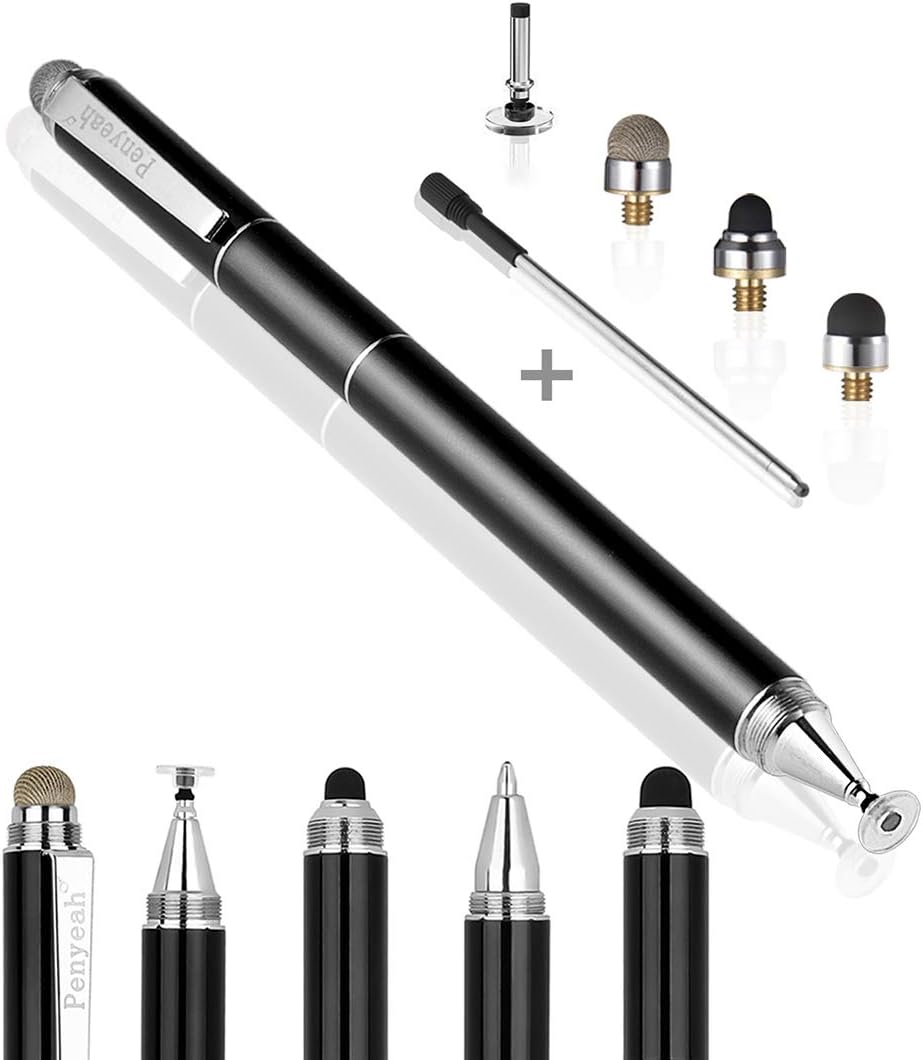
This stylus stands out with a metal body and a built-in ballpoint pen. It offers four replaceable tips for various tasks. The pocket clip ensures it stays with you wherever you go. It is a robust choice for professionals.
We may earn a commission when you buy through this link, at no additional cost to you.
The disc tip allows for accurate digital work. The mesh fiber tip glides smoothly on screens. The metal casing feels durable and resists corrosion. It handles both digital and physical writing needs in one package.
The weight may be heavier than standard styluses. Palm rejection is not supported so resting your hand may cause errors. These are standard limitations for passive tools but do not negate the overall utility.
Best for those who value physical durability and multi-functionality. If you switch between screen and paper often, the dual nature saves space. It is a smart solution for office workers or travelers needing reliable tools.
Switch between digital stylus tips and a real ink pen instantly for mixed media workflows.
The high-grade metal body ensures long-term durability and a premium feel in your hand.
We may earn a commission when you buy through this link, at no additional cost to you.
This bundle offers six styluses for families or teams. Each pen has a durable rubber tip for smooth use. The clips allow you to attach them to bags or notebooks. They work across all capacitive touchscreens effectively.
We may earn a commission when you buy through this link, at no additional cost to you.
With no batteries required, they are always ready to write. The different colors help identify owners easily in shared spaces. They are simple and effective for basic navigation and note-taking tasks.
The build is straightforward without premium features. Tips may wear faster under heavy daily use. However, for the price of six pens, they offer exceptional value for shared environments.
Perfect for classrooms or offices. If you need multiple pens for students or staff without spending much, this is ideal. It ensures everyone has a reliable tool for their devices immediately upon arrival.
The six distinct colors make it easy to assign pens to different users in a group.
Since there is no battery, you never need to charge them before use.
We may earn a commission when you buy through this link, at no additional cost to you.
This bulk set provides ten alloy styluses with dual tips each. It offers exceptional cost-effectiveness for schools or offices. The tips are quick to replace. The metal bodies ensure durability against daily wear and tear.
We may earn a commission when you buy through this link, at no additional cost to you.
It works seamlessly across all capacitive touchscreens. The alloy construction feels solid and sturdy. Vibrant colors help distinguish pens easily. It is a high-value solution for shared environments needing multiple units.
The metal may feel heavier than plastic. It lacks advanced features like buttons or active sensors. For basic pointing and writing, it performs reliably without needing complex setup or maintenance.
Best for bulk procurement. If you need many pens for a classroom or team, this set is unmatched in value. It ensures everyone has a functional tool without compromising on screen safety.
Ten pens plus replacement tips provide years of supply for multiple users in one order.
The metal construction ensures the stylus survives drops and daily handling better than plastic.
We may earn a commission when you buy through this link, at no additional cost to you.
This 10-piece set offers sleek aluminum styluses for daily use. The dual tips allow versatile navigation. It protects your screen from scratches and fingerprints. The design is elegant yet functional for both home and office.
We may earn a commission when you buy through this link, at no additional cost to you.
The high sensitivity tips glide effortlessly across screens. It works well for writing and gaming. The aluminum body provides a premium feel. It adapts easily to different devices without additional configuration steps.
Replacement tips are not included, so budget accordingly. The packaging is simple. Despite this, the performance is reliable. The set ensures you have backups when others are lost or damaged.
Perfect for small businesses or home offices. If you want stylish pens that also protect screens, this set works well. It balances aesthetics and function for a smooth digital experience on any device.
Soft silicone tips prevent scratches and keep your device screen pristine during daily use.
The aluminum body looks professional and pairs well with modern tech setups.
We may earn a commission when you buy through this link, at no additional cost to you.
Selecting the right stylus depends on your device, budget, and specific use case. Below are key factors to consider before making a purchase.
Tip material determines how your pen interacts with the screen. Rubber tips are durable and smooth, while disc tips offer higher precision for detailed work. A smaller tip size like 1.5mm is ideal for fine lines.
Look for replaceable tips to maintain long-term value. Disc tips allow better accuracy for artists while rubber tips are better for general browsing.
Passive styluses rely on screen conductivity and require no battery. Active pens mimic real styluses and may work with specific iPad models for features like tilt.
Choose passive for simplicity and active for advanced features like palm rejection. Passive works on all devices while active may have limitations.
Active pens require charging which can be a drawback. Look for models with long battery life like 8 to 10 hours to avoid interruptions during work sessions.
Ensure the charging port is convenient. Micro USB is common but USB-C is preferable for modern setups. Always check if a charger is included.
Verify the stylus works with your device. Most passive styluses work universally across Android, iOS, and Windows. Active pens often require specific models like iPad 2018 or newer.
Read product descriptions carefully. If you own a specific tablet, ensure compatibility before purchasing to avoid returns.
The grip should feel natural for extended use. Metal bodies offer durability while plastic is lighter. Consider weight if you use the pen for long sessions.
A comfortable grip prevents hand fatigue. Look for textured surfaces or ergonomic designs that fit well in your hand.
Tips wear out over time. Buying a pack with extra tips saves money. Consider the long-term cost if tips are not included.
A good set should come with spare tips or offer affordable replacements. This ensures your investment lasts longer without extra expense.
For families or teams, buying a pack is more cost-effective. Bundles often include multiple colors for easy identification.
A bulk pack ensures you have backups. This is practical for shared devices where pens are frequently misplaced.
Ensure the stylus has soft tips that won't scratch your screen. Many models include anti-scratch rubber or disc tips.
Protect your device screen from damage. Choose pens with protective caps to avoid tip damage when stored.
Before using, ensure your screen is clean to avoid scratching. For active pens, pair via Bluetooth or charge fully. Passive styluses work instantly upon contact.
Replace worn tips promptly to maintain precision. Clean the tip with a soft cloth to remove dust or oils. For metal bodies, wipe with a damp cloth if needed.
Store your stylus in a case or pocket clip to prevent damage. If the pen stops responding, check battery or try a different device. Proper care extends lifespan significantly.
Most passive styluses work on any capacitive screen including iPhones, Android tablets, and Windows laptops. Active styluses may be limited to specific devices like certain iPad models.
If you notice gaps in lines or increased friction on the screen, the tip may be worn. Replacing tips restores precision and protects your device.
Yes, most styluses work with screen protectors. Ensure the protector is smooth and does not add excessive resistance to the stylus tip.
Disc tips offer high precision for drawing and writing. Rubber tips are durable and better for scrolling and general navigation.
Most active styluses do not support pressure sensitivity. They focus on accuracy and tilt features rather than line weight changes.
Rubber tips typically last several months depending on usage. Disc tips may wear faster. Having replacements ensures continuous performance.
Palm rejection is usually found in active styluses. Passive styluses may not prevent accidental touches when resting your hand on the screen.
Yes, many universal styluses work with the Nintendo Switch. Ensure it is compatible with capacitive screens for smooth gameplay navigation.
We highlighted top options like the MEKO 4 Pack for its versatility and the Active Stylus for professional needs. Each product offers unique strengths for different users.
Prioritize tip precision and device compatibility. Active pens suit artists while passive styluses offer universal simplicity. Consider battery life and tip replacement options for long-term value.
Always check current prices and availability. Tech deals change frequently. Ensure you select a model that matches your device specs for the best experience.