
Redragon K617 HE Wired Hall-Effect Rapid Trigger Magnetic Gaming Keyboard
4.3Editor score
Hall Effect magnetic switches
8000Hz hyper-polling
Software-adjustable actuation
Compare the top 10 keyboards for CS2 in October 2026 featuring Hall Effect switches, rapid trigger tech, and competitive specs for peak performance.
Finding the right keyboard for CS2 can significantly impact your competitive edge in tactical shooters. Players need fast response times, reliable actuation, and durable builds to handle intense ranked sessions without technical interruptions or hardware failures.
We evaluated ten leading models based on switch technology, polling rates, build quality, and software features. Our analysis focuses on how each device performs under pressure during clutch moments and whether it supports the specific mechanics required for high-level Counter-Strike gameplay.
Each pick in this list highlights unique strengths like adjustable actuation, rapid trigger capabilities, and compact layouts optimized for mouse movement. Keep in mind that prices and availability fluctuate frequently so check the latest deals before making your final purchase decision.
4.3Editor score
4.4Editor score
4.5Editor score
This side-by-side comparison highlights the core specifications and performance features of ten top-rated keyboards designed for Counter-Strike 2 and other competitive FPS titles.



The Redragon K617 HE offers an accessible entry point into Hall Effect keyboard technology with solid performance for CS2 players. It earns a 4.3 star rating and stands out by delivering rapid trigger functionality at a price point that rivals standard mechanical boards.
We may earn a commission when you buy through this link, at no additional cost to you.
Its built-in Hall Effect magnetic switches detect keypresses without physical contact to enable up to ten times faster response compared to typical boards. Users can fine-tune actuation points via software between 0.1mm and 3.4mm to match their aiming or movement preferences.
While the software lacks the polish of premium rivals the core gaming features work reliably during intense matches. The compact 60% layout frees up significant desk space for low-sensitivity mouse swipes which is essential for precise crosshair placement in tactical shooters.
Budget-conscious gamers seeking rapid trigger capabilities without spending hundreds will find this keyboard a compelling choice. It balances cost and performance effectively making it an excellent starting point for those upgrading from older membrane or mechanical setups.
Dynamic key activation cuts redundant keystrokes during direction changes so counter-strafing feels more responsive and precise.
Users get magnetic switch benefits like longer lifespan and smoother actuation without the high-end price tag usually associated with this feature.
We may earn a commission when you buy through this link, at no additional cost to you.
The Redragon K686 HE builds on the brand's Hall Effect legacy with a focus on sound dampening and tactile refinement. Earning a 4.4 star rating this model provides a soft Hi-Fi bounce instead of a harsh clack which appeals to players who value a quieter gaming environment.
We may earn a commission when you buy through this link, at no additional cost to you.
Its dual-module floating structure paired with dampening layers reduces wobble and vibration during fast key taps. The single control knob simplifies lighting and media adjustments without requiring extra key combinations which streamlines the setup process during matches.
Performance remains strong with 8000Hz hyper-polling and rapid trigger capabilities ensuring inputs register instantly during clutch moments. However the software driver offers fewer advanced customization options compared to higher-end competitors in the same price bracket.
This keyboard suits players who prioritize acoustics and ergonomics alongside competitive specs. The noise dampening features make it suitable for shared spaces while the magnetic switches ensure long-term durability and consistent actuation for daily CS2 practice.
Anti-wobble independent switch-plate design paired with dampening layers gives a soft silky sound instead of a harsh rigid clack.
A single control knob adjusts backlight brightness and media playback so you manage lighting and volume without memorizing extra key combos.
We may earn a commission when you buy through this link, at no additional cost to you.
The Redragon K673 HE delivers competitive features like rapid trigger and Hall Effect switches while adding dedicated media controls. With a 4.1 star rating it offers a balanced mix of gaming performance and usability features that appeal to players who stream or watch content while gaming.
We may earn a commission when you buy through this link, at no additional cost to you.
Its next-gen UltraMag POM magnetic switches sense keypresses without physical contact ensuring precise timing for peek-and-fire actions in CS2. The dual-module floating structure provides noise dampening for a smoother typing experience during long sessions.
While the software lacks advanced macro programming the core actuation tuning remains effective for adjusting sensitivity. The compact form factor keeps desk space open for wide mouse movements essential for flick shots and precise recoil control.
Players seeking a simple setup with built-in volume control will appreciate this model. It bridges the gap between pure gaming boards and versatile peripherals though advanced customization remains limited compared to pro-focused alternatives.
A single control knob adjusts backlight brightness and media playback for quick volume control without interrupting gameplay or needing software.
UltraMag POM magnetic switches sense keypresses without physical contact so peek-and-fire timing lands exactly when you mean it.
We may earn a commission when you buy through this link, at no additional cost to you.
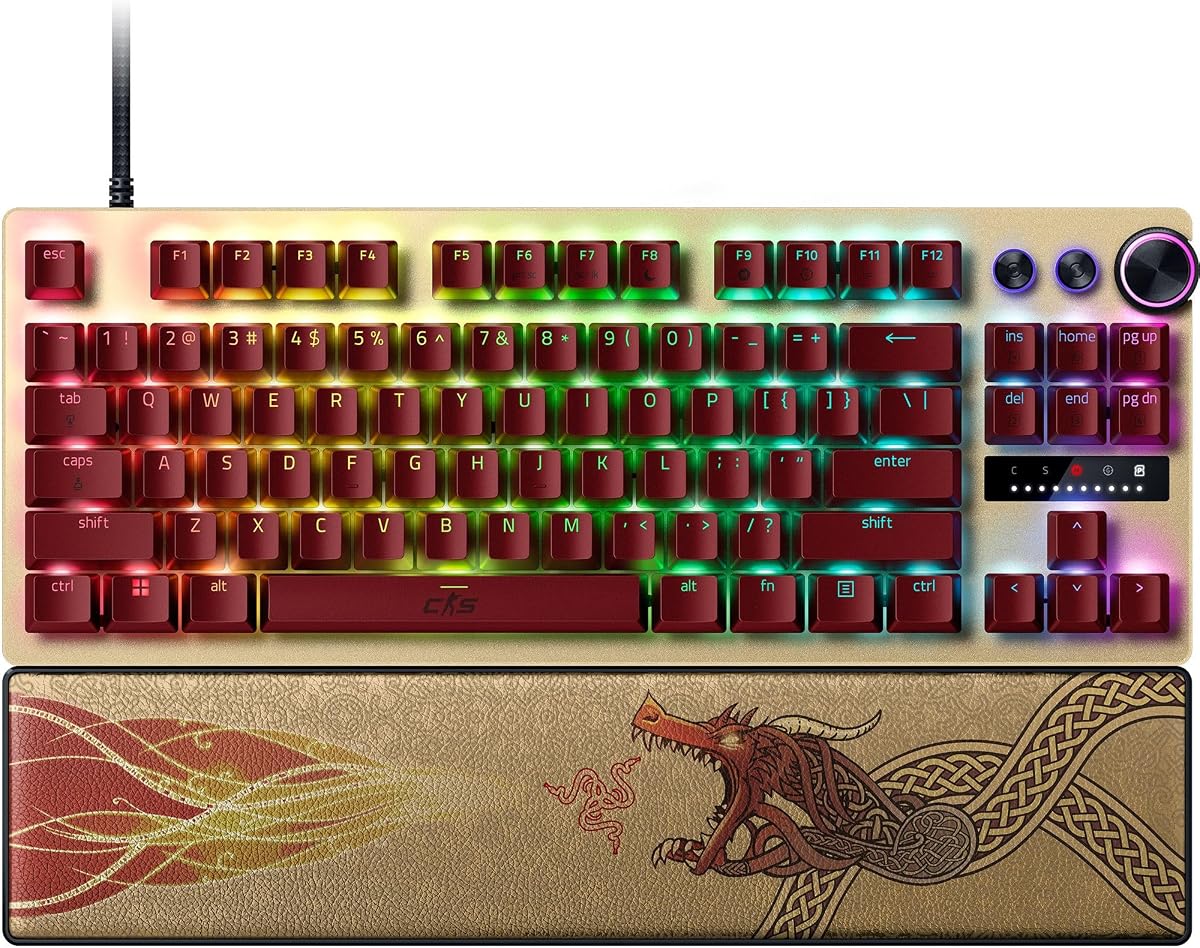
The Razer Huntsman V3 Pro TKL Counter-Strike 2 Edition stands as the premier choice for competitive players seeking elite performance. It boasts a 4.4 star rating and includes exclusive features like Snap Tap which prioritizes the latest input between two keys for near-instant directional changes.
We may earn a commission when you buy through this link, at no additional cost to you.
Its Rapid Trigger function resets keys at the slightest finger lift to provide a speed advantage in movement-heavy scenarios. The onboard LED array allows precise adjustments to actuation height without needing software installed which keeps the setup streamlined for tournaments.
Build quality reflects its premium status with textured double-shot PBT keycaps and a magnetic leatherette wrist rest that provides ergonomic support during long sessions. However the high price may be prohibitive for casual players who do not need tournament-grade specifications.
Serious competitors investing in a top-tier weapon will find unmatched value here. The Snap Tap mode and advanced analog optical switches offer a tangible edge in ranked matchmaking that justifies the cost for dedicated CS2 enthusiasts.
Snap Tap mode prioritizes the latest input between two selected keys for more responsive inputs during near-instant directional changes in FPS games.
Make precise on-the-fly adjustments to actuation height or Rapid Trigger sensitivity with visual LED aids and save settings without software.
We may earn a commission when you buy through this link, at no additional cost to you.
The Corsair Clipper PRO MINI 60 excels in robust construction while maintaining high-end gaming performance features. It earns a 4.4 star rating and is IP57-rated for water and dust resistance ensuring reliability even during intense gameplay sessions where spills or accidents might occur.
We may earn a commission when you buy through this link, at no additional cost to you.
Its MGX Hyperdrive Hall Effect switches offer fast actuation with zero drift ensuring consistent performance over millions of keystrokes. FlashTap SOCD technology enables cleaner directional inputs for sharper counter-strafing which is critical for precise movement in CS2.
While the compact layout maximizes mouse space the absence of onboard memory means settings rely on driver software for persistence. Users must ensure their system boots with the necessary software active to maintain custom actuation and macro configurations.
Players prioritizing physical durability and resistance to environmental hazards will find this keyboard ideal. The balance of protective features and competitive specs makes it a strong contender for both competitive gaming and casual daily use.
IP57-rated durability with water and dust resistance plus durable PBT double-shot keycaps resist wear through extended FPS gameplay.
FlashTap SOCD enables cleaner directional inputs and sharper counter-strafing so every movement lands exactly when needed.
We may earn a commission when you buy through this link, at no additional cost to you.
The Redragon K745 HE focuses on delivering a vibrant esports aesthetic without sacrificing core competitive features. While it holds a 3.9 star rating it still provides essential Hall Effect performance like rapid trigger and 8000Hz polling for responsive gameplay.
We may earn a commission when you buy through this link, at no additional cost to you.
Its five-layer noise dampening system creates a soft Hi-Fi bounce that enhances typing comfort during extended use. The adjustable RGB lighting modes allow users to customize the desk ambiance to match their personal style or setup theme.
Performance remains solid for budget-conscious gamers seeking rapid trigger support at a lower price point. However inconsistent quality control across production batches may lead to variability in build quality or switch performance compared to higher-rated models.
Players who value style and basic magnetic switch tech will enjoy this model. It serves well as a budget-friendly option for those willing to accept potential build inconsistencies in exchange for attractive lighting and functional performance.
Adjustable RGB lighting modes bring your desk to life day or night with vibrant effects that enhance your gaming setup visuals.
Anti-wobble independent switch-plate design paired with multiple dampening layers gives a soft silky Hi-Fi bounce instead of a harsh clack.
We may earn a commission when you buy through this link, at no additional cost to you.
The Keychron C0 HE 8K provides a unique one-handed layout optimized for content creators and streamers needing rapid access to shortcuts. It earns a 4.2 star rating and features 35 programmable keys ideal for OBS scene triggering or complex command execution during live streams.
We may earn a commission when you buy through this link, at no additional cost to you.
Its web-based configurator simplifies key mapping and RGB adjustments without requiring software installation which supports multi-system setups efficiently. The 8K polling rate ensures low latency for gaming inputs while the Hall Effect switches provide precise control over actuation.
While this device cannot replace a main keyboard it pairs well as a companion for managing macros or media during gameplay. Users must adapt to the compact layout which may require adjustment time for precise key placement and muscle memory development.
Streamers and power users looking for efficient workflow tools will appreciate its versatility. It offers dedicated control for video editing and streaming tasks alongside gaming functionality making it a specialized tool for productivity-focused gamers.
Perfect for content creators to trigger OBS scenes control push-to-talk or manage streaming shortcuts with one hand while gaming.
Customize key mapping actuation settings and RGB lighting through a browser-based configurator with no software installation required.
We may earn a commission when you buy through this link, at no additional cost to you.
The Renewed version of the Razer Huntsman V3 Pro TKL offers a cost-effective route to premium esports performance. It carries a 3.5 star rating reflecting potential variations in cosmetic condition or minor functional history while still delivering the core high-end features.
We may earn a commission when you buy through this link, at no additional cost to you.
Snap Tap mode and rapid trigger capabilities remain available for users needing responsive directional changes and precise inputs during competitive matches. The analog optical switches Gen-2 offer adjustable actuation and high durability ensuring reliable performance for thousands of keystrokes.
Buyers should inspect the physical condition upon arrival as refurbished units may show signs of prior use. Despite this the solid aluminum top plate and ergonomic wrist rest maintain the premium feel and durability expected from this high-end model.
Budget-savvy gamers wanting flagship features at a reduced price will find this option compelling. It balances cost savings with essential competitive specs though buyers must accept the inherent risks of refurbished electronics when making this purchase.
Snap Tap mode and rapid trigger capabilities remain available for responsive directional changes and precise inputs during matches.
The solid aluminum top plate and ergonomic wrist rest maintain the premium feel and durability expected from this high-end model.
We may earn a commission when you buy through this link, at no additional cost to you.
The Corsair K55 RGB PRO represents a reliable budget option for players who prioritize durability and macro functionality over rapid trigger technology. With a 4.4 star rating it offers robust features like IP42 dust and spill resistance ensuring longevity in active gaming environments.
We may earn a commission when you buy through this link, at no additional cost to you.
Its six dedicated macro keys simplify complex command inputs allowing quick activation of skills or functions during intense matches. While it lacks the advanced speed of Hall Effect switches the responsive membrane keys provide consistent actuation for standard gameplay requirements.
The detachable palm rest and dedicated media keys enhance comfort and usability making it a practical choice for long sessions. However the absence of rapid trigger limits its edge in highly competitive scenarios where split-second movement adjustments are critical.
Casual players or those on a strict budget will appreciate its balance of features and affordability. It serves well as a reliable daily driver though serious competitors may eventually seek rapid trigger options for higher performance tiers.
Activate functions or keypresses in just one stroke with six dedicated macro keys set up through CORSAIR iCUE software.
IP42-rated protection guards against spills and dust so gameplay never has to stop due to minor accidents during sessions.
We may earn a commission when you buy through this link, at no additional cost to you.
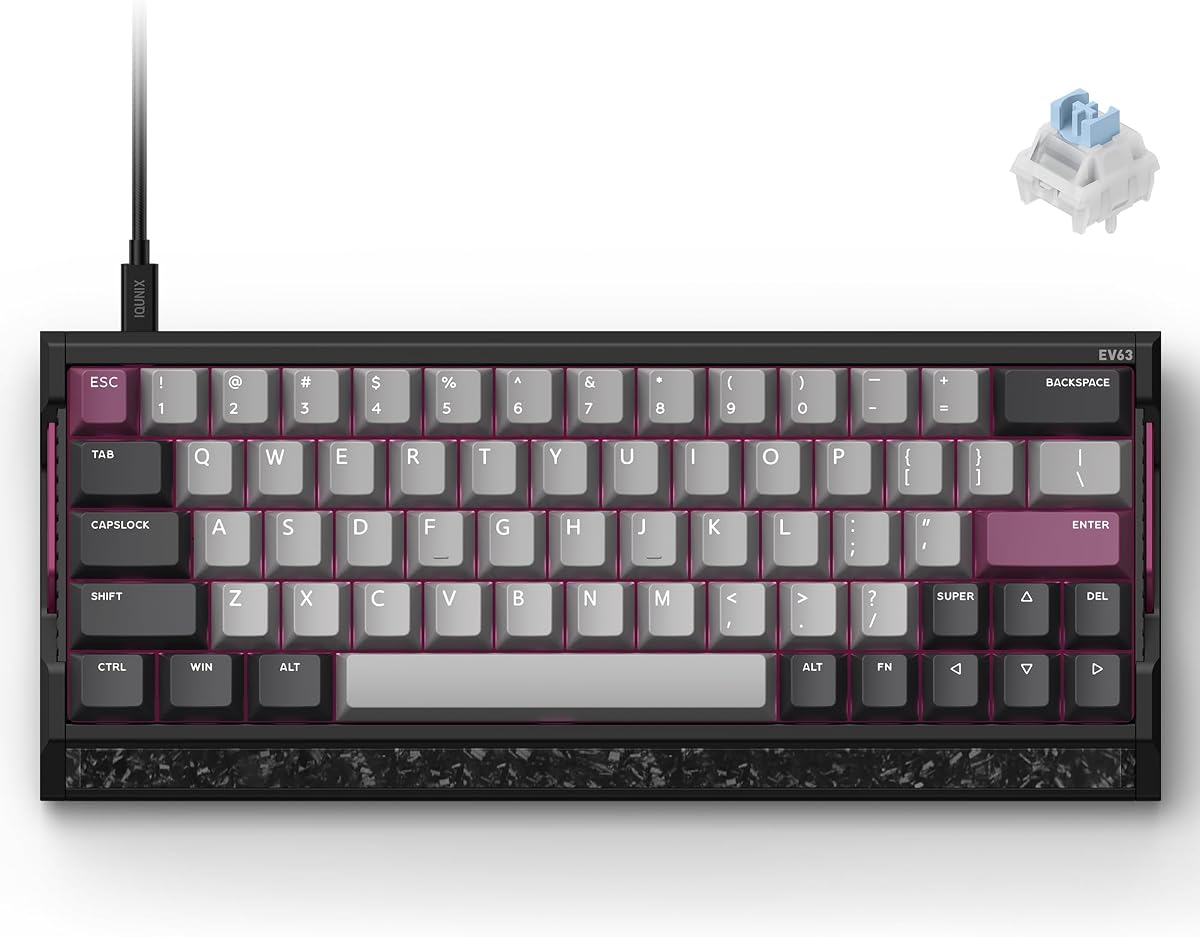
The IQUNIX EV63 stands as the most advanced option for players seeking absolute precision in Counter-Strike 2. It earns the highest rating in this guide at 4.5 stars and delivers 0.01mm rapid trigger accuracy with an advanced M.A.T. 2.0 algorithm that minimizes missed inputs.
We may earn a commission when you buy through this link, at no additional cost to you.
Its aircraft-grade CNC aluminum case with a real forged carbon front plate ensures a stable and premium custom-like feel during intense FPS gaming. The Magnetic X Ultra switches provide a smooth travel distance with factory lubrication for a silky feel that reduces finger fatigue.
The compact 64-key layout maximizes mouse space but may require time for full-size keyboard users to adjust. Driver 3.0 offers pro-tuned FPS presets based on champion settings allowing quick customization for competitive play without deep manual configuration.
Elite players willing to invest in top-tier precision will find unmatched performance here. The combination of stable input stability and rapid accuracy makes it the ultimate tool for those striving to perfect their mechanics in competitive environments.
The M.A.T. 2.0 Magnetic Auto-Tune checks each key in real time to maintain consistent magnetic sensing with fewer missed inputs.
Dual Hall power circuit separates sensor and RGB power to reduce voltage fluctuation for consistent performance during rapid movement.
We may earn a commission when you buy through this link, at no additional cost to you.
Selecting the right keyboard for Counter-Strike 2 requires understanding several critical technical factors that directly influence your performance and comfort during matches.
The most impactful decision is choosing between traditional mechanical switches and modern Hall Effect magnetic switches. Hall Effect switches detect keypresses using magnetic fields rather than physical contact which enables faster response times and adjustable actuation points. This technology allows you to set how far a key travels before registering making it ideal for rapid movements and precision aiming.
Prioritize Hall Effect or rapid trigger support if you compete in ranked matches where split-second reactions matter.
Polling rate measures how often the keyboard reports inputs to your computer typically ranging from 1000Hz to 8000Hz. Higher polling rates like 4000Hz or 8000Hz ensure inputs register with near-instant latency reducing the delay between pressing a key and seeing the action on screen. This consistency is crucial for maintaining rhythm during fast-paced sequences like strafing or recoil control.
Look for keyboards offering at least 1000Hz but consider 8000Hz for maximum competitive advantage.
Adjustable actuation allows you to change the depth required to register a keypress from the deepest to the shallowest position. This feature lets you customize sensitivity for different keys such as setting W to trigger faster for sprinting while keeping Space deeper for stable jumps. Consistency in actuation depth across keys helps build reliable muscle memory during extended practice sessions.
Ensure the keyboard driver supports saving custom profiles so your settings persist after reboots.
Layout choices range from full-size to tenkeyless (TKL) and compact 60% designs. Compact layouts remove number pads and navigation keys to free up desk space for low-sensitivity mouse movements essential in shooters. However ensure the layout does not remove keys you rely on for essential commands like inventory management or voice chat toggling.
Opt for TKL or 60% if you use large mouse movement and need more room.
A sturdy chassis prevents unwanted flex and vibration during intense tapping which maintains input stability. Look for materials like aluminum top plates or forged carbon fiber that reduce case vibration and keep the keyboard anchored during play. Water and dust resistance ratings like IP42 or IP57 add a layer of protection against accidental spills common in gaming setups.
Choose models with durable keycaps like PBT double-shot to resist wear and fading over time.
Robust software allows you to manage lighting macro programming and switch tuning efficiently. Some high-end keyboards offer onboard memory or onboard controls to adjust settings without relying on PC software which is useful during LAN events or tournaments. Cross-platform support ensures compatibility if you game across Windows and macOS systems regularly.
Check if the driver allows saving profiles directly to the keyboard's onboard memory.
For players using shared spaces or streaming keyboards with noise dampening layers reduce harsh clack sounds. Dual-module floating structures or foam layers absorb vibration making the typing experience quieter and smoother without sacrificing performance. This feature enhances comfort during long practice sessions and reduces distractions during focused gameplay.
Prioritize models with specific dampening mentions if acoustics are important to your setup.
Prices vary widely from budget-friendly options under forty dollars to premium models exceeding two hundred dollars. Evaluate whether you need advanced features like rapid trigger or Snap Tap versus standard reliable performance for casual play. High-end models offer marginal gains for pros but budget boards with solid switches can still improve performance significantly.
Set a budget based on how seriously you compete and invest in the best switch tech you can afford.
Begin by installing the manufacturer's driver software if required to enable full customization of actuation and lighting. For onboard keyboards skip this step and use physical controls to adjust settings directly during setup. Calibrate your preferences in a test environment before playing ranked matches to ensure muscle memory aligns with new actuation depths.
To maintain performance regularly clean the keyboard with compressed air to remove dust from key switches and crevices. If the keyboard has IP ratings for water resistance wipe away spills immediately with a dry cloth and avoid submerging the unit unless specified by the manufacturer. Check for firmware updates periodically to ensure all features like rapid trigger or Snap Tap function correctly.
Store your keyboard in a dry and dust-free area when not in use to prevent long-term degradation of components. If traveling use a hard case to protect the chassis and switches from physical impacts or scratches. Keep the USB cable organized to avoid bending or damage at the connector point which can cause connectivity issues during critical gaming moments.
Rapid trigger allows keys to reset instantly when lifted rather than requiring a full return to their original position. This feature provides split-second responsiveness for movements like counter-strafing where stopping and starting needs to be immediate. It offers a competitive edge by reducing input delay and increasing movement precision during high-pressure situations.
Hall Effect switches generally offer faster response times and greater durability because they rely on magnetic fields instead of physical contact. They also allow adjustable actuation points which mechanical switches cannot typically provide. This makes them superior for competitive players seeking precise control over key registration and reduced long-term wear.
Most gaming keyboards require installing dedicated driver software to access actuation settings. Within the software interface you can set specific trigger points for each key ranging from shallow to deep travel. Some premium models allow onboard adjustments using buttons or dials directly on the keyboard without needing software installed.
A polling rate of 1000Hz is standard and sufficient for casual play but competitive players benefit from 4000Hz or 8000Hz rates. Higher polling rates reduce input latency ensuring your actions register nearly instantly. This consistency helps maintain accurate movement patterns during fast-paced combat scenarios.
Compact layouts like TKL or 60% free up desk space allowing for larger mouse movements essential for low-sensitivity aiming. Removing the numpad reduces physical obstruction which helps prevent accidental bumps during intense aiming. Many pros prefer these formats to optimize their physical setup for maximum accuracy.
Snap Tap mode prioritizes the latest input between two selected keys enabling near-instant directional changes without releasing the previous key. While it improves movement fluidity users should check tournament rules as some competitive leagues may restrict such features. Using it in casual play can significantly enhance your directional control.
The Redragon K617 HE offers exceptional value for budget seekers while the Razer Huntsman V3 Pro TKL CS2 Edition delivers premium performance for elite competitors. The IQUNIX EV63 stands out for its precision and build quality making it ideal for players demanding top-tier reliability and customization.
Prioritize Hall Effect technology and rapid trigger capabilities when selecting a keyboard to maximize responsiveness and movement precision in matches. Consider your budget and form factor needs to ensure the device fits comfortably into your existing setup without limiting desk space or comfort during play.
Always check current pricing and availability before purchasing as deals fluctuate frequently across online retailers. Investing in a keyboard that matches your skill level and playstyle ensures you have the right tools to improve your gameplay consistently over time.