
ASRock Z170 EXTREME4
4.2Editor score
Affordable Z170 chipset
Realtek ALC1150 audio
Flexible PCIe slot layout
This guide compares the top 1151 Z170 Skylake gaming motherboards for performance, features, and value to help you choose the best fit for your build.
Choosing the right motherboard is critical for any gaming PC build. The LGA1151 socket with Z170 chipset offers robust support for 6th and 7th gen Intel processors. These boards deliver essential features like DDR4 memory support, M.2 slots, and high-speed USB connectivity for modern gaming needs.
We evaluated ten top-rated Z170 motherboards based on build quality, connectivity options, audio performance, and overclocking capabilities. Our analysis focuses on real-world gaming scenarios and system stability. Each product was assessed for its unique strengths and potential limitations in a gaming context.
Each pick highlights specific advantages tailored to different budgets and performance goals. From budget-friendly options to premium enthusiast boards, this list covers a wide range of choices. Please note that availability and pricing may fluctuate, so verify current details before purchasing.
4.2Editor score

4.2Editor score

4.2Editor score
The following table provides a side-by-side comparison of the ten selected Z170 motherboards. It highlights key specifications such as memory support, expansion slots, and storage interfaces to help you quickly identify the best match for your specific hardware requirements.


The Asus ROG Maximus VIII Hero stands out as a top-tier option for enthusiasts building around the Z170 chipset. With a solid rating and reputation for reliability, this board excels in both performance and aesthetic appeal. It balances high-end features with practical usability for daily gaming tasks.
We may earn a commission when you buy through this link, at no additional cost to you.
Its Extreme Engine DIGI+ ensures stable power delivery for overclocking tasks. The SupremeFX 2015 audio system provides immersive sound without needing external DACs. USB 3.1 Type A and C onboard ports offer fast data transfer speeds for peripherals and storage devices alike.
While it is priced higher than many competitors, the build quality justifies the cost. Some users find the layout slightly crowded for massive cooling solutions. However, the overall stability and feature set make it a compelling choice for serious gamers.
This board is ideal for those who prioritize audio quality and power stability. If you want a board that supports future upgrades and offers premium features, this is a strong recommendation. It remains a versatile choice for high-performance desktop configurations.
The SupremeFX 2015 codec delivers crystal clear sound with minimal background noise. This enhances immersion during competitive gaming sessions.
USB 3.1 Type C support ensures compatibility with modern peripherals and high-speed storage drives.
We may earn a commission when you buy through this link, at no additional cost to you.
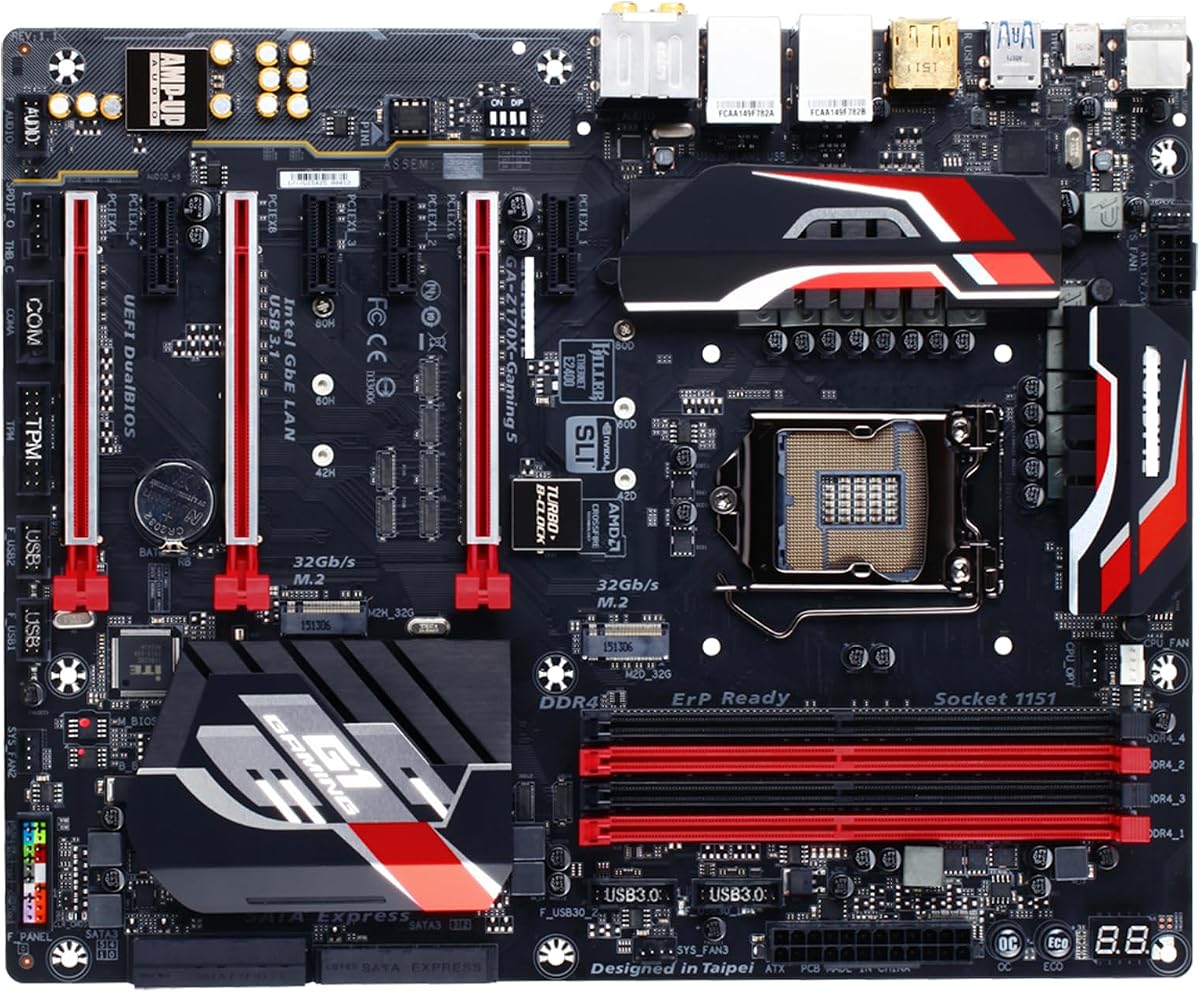
This GIGABYTE GA-Z170X-Gaming 5 offers genuine quality without the premium box cost. It is packaged in an industrial style, which lowers the price while maintaining original hardware integrity. The board supports both 6th and 7th gen Intel Core processors effectively.
We may earn a commission when you buy through this link, at no additional cost to you.
Memory handling is a highlight here, supporting up to 64GB of DDR4 RAM. It also features multiple M.2 sockets for fast SSD storage, which is crucial for modern gaming loads. The expansion slots are well-designed for multi-GPU setups if needed.
The industrial packaging means you get the motherboard and I/O shield but no extra accessories. If you are not comfortable with installation, professional help is recommended. However, the value proposition is significant for budget-conscious builders who know what they need.
Choose this if you want a reliable Z170 board at a lower entry price. It is perfect for those who prioritize raw performance and storage options over packaging or included software tools. Just ensure you have the latest BIOS for 7th gen support.
Supports a wide range of DDR4 speeds up to 3466MHz OC for fast system responsiveness.
Dual M.2 sockets allow for multiple high-speed storage drives without sacrificing SATA ports.
We may earn a commission when you buy through this link, at no additional cost to you.
The ASUS Z170 PRO Gaming is a versatile choice for those seeking reliable performance without excessive costs. It offers SupremeFX audio which ensures clear sound during intense gaming sessions. The Intel Gigabit Ethernet with LANGuard provides protected networking to prevent interruptions.
We may earn a commission when you buy through this link, at no additional cost to you.
Connectivity is strong with USB 3.1 Type A and C ports available onboard. The M.2 slot offers ultra-speedy transfer rates for your primary drive. Gamer's Guardian features ensure the components are highly durable for long-term use and stress.
While it may lack some high-end RGB features found in more expensive boards, it focuses on core gaming functionality. The design is practical and supports a variety of cases and cooling solutions. It is a balanced board for standard gaming setups.
This motherboard is recommended for users who need stability and speed on a reasonable budget. It serves well for both casual and competitive gaming environments. Its durability makes it a sound investment for long-term PC usage.
LANGuard technology protects against surges and ensures consistent internet speeds during matches.
High-quality components are used to withstand heat and pressure during extended gaming marathons.
We may earn a commission when you buy through this link, at no additional cost to you.
This motherboard offers an upgraded power design tailored for serious gamers looking for stability. It combines high-grade storage standards with enhanced cooling features to maximize potential. The design is battle-tested to ensure it can handle marathon gaming sessions without issues.
We may earn a commission when you buy through this link, at no additional cost to you.
Durability is a key focus here, ensuring that the system remains stable under load. Connectivity is seamless, allowing for smooth data transfer and peripheral interaction. While specific chipsets are not always detailed, the performance claims align with Z170 capabilities.
The lack of extensive official documentation might be a hurdle for some users. However, the rugged design appeals to those who prioritize longevity and reliability over flashy aesthetics. It is a strong contender for those seeking a workhorse board.
Consider this option if you want a board that emphasizes raw performance and durability. It is suitable for builds where thermal management and power stability are critical. Always verify compatibility with your specific CPU model before purchasing.
Enhanced power delivery ensures the CPU runs at peak efficiency during demanding tasks.
Advanced cooling features prevent overheating and maintain consistent performance over time.
We may earn a commission when you buy through this link, at no additional cost to you.
The Gigabyte GA-Z170X-Gaming 7 is designed for users who want top-tier performance and flexibility. It supports 2-Way NVIDIA SLI and 3-Way AMD Crossfire for advanced graphics setups. This makes it a perfect choice for high-end gaming and rendering workloads.
We may earn a commission when you buy through this link, at no additional cost to you.
Connectivity is robust with 1 USB 3.1 port and multiple USB 3.0 ports. The memory sockets support 4x DDR4 DIMMs for ample system RAM. PCIe slots are arranged to maximize bandwidth for multiple expansion cards without bottlenecks.
While the price is higher than standard boards, the feature set justifies the investment for enthusiasts. The build quality is excellent, ensuring longevity even under heavy use. It fits well in large cases due to its ATX form factor.
If you plan on running dual GPUs or need extensive USB connectivity, this board is unmatched. It is ideal for power users who demand the best from their hardware. Consider your case size and power supply needs when selecting this model.
Support for SLI and Crossfire allows for scalable graphics performance in demanding titles.
Abundant USB ports ensure you can connect multiple peripherals without adapters.
We may earn a commission when you buy through this link, at no additional cost to you.
This GIGABYTE GA-Z170X-GAMING 5 provides a stable platform for 6th gen Intel Core processors. It supports both NVIDIA SLI and AMD Crossfire technologies for those looking to expand graphics capabilities. The layout is standard ATX, fitting most mid-tower and full-tower cases.
We may earn a commission when you buy through this link, at no additional cost to you.
Memory capacity is generous with 4 DDR4 DIMM sockets, allowing up to 64GB of RAM. Storage options include SATA Express connectors for fast access to SSDs. While older, it remains functional for users who do not need the absolute latest USB standards.
Some users have reported lower satisfaction due to specific connectivity quirks. However, it remains a viable option for budget-conscious gamers who need multi-GPU support. The build is sturdy enough for daily use and moderate overclocking.
Choose this if you want a classic Z170 experience with good memory and GPU support. It is a pragmatic choice for users prioritizing core performance over modern port speeds. Verify BIOS versions if you plan to mix CPU generations.
Support for SLI and Crossfire allows for scalable graphics performance in demanding titles.
SATA Express connectors provide a bridge to faster storage speeds without needing M.2.
We may earn a commission when you buy through this link, at no additional cost to you.
The ASRock Z170 EXTREME4 is a standout for budget buyers who still want solid features. It supports up to 64GB of DDR4 memory and offers flexible PCIe slot configurations. This makes it easy to build a system that can grow over time without breaking the bank.
We may earn a commission when you buy through this link, at no additional cost to you.
Audio is handled by the Realtek ALC1150 codec, which supports high definition 7.1-channel sound. SATA ports are plentiful, including RAID support for users who want redundancy. It is a no-nonsense board focused on performance over flashy lights.
While it may lack the RGB lighting of premium models, the value is hard to beat. It is a strong choice for budget gaming rigs or workstations needing high memory capacity. The design is practical and fits well in standard cases.
This board is ideal for those who want a solid foundation for a custom build. It delivers on performance and storage without unnecessary costs. Consider it if you prioritize functionality and budget savings in your next PC build.
Multiple PCIe slots allow for graphics cards and capture cards without bandwidth sharing issues.
The Realtek ALC1150 provides clear sound that competes well with many mid-range boards.
We may earn a commission when you buy through this link, at no additional cost to you.
The msi Z170 Krait Gaming offers a balanced feature set with a focus on durability. Steel Armor slots protect your graphics cards from bending and interference. Audio Boost 3 ensures you get immersive sound directly from the motherboard speakers or headset.
We may earn a commission when you buy through this link, at no additional cost to you.
Memory support includes DDR4 Boost technology which optimizes stability and performance. It supports 3-Way CrossFire setups for users invested in AMD GPU ecosystems. Connectivity is decent with plenty of USB ports for peripherals.
Some users have noted occasional BIOS quirks requiring updates for best performance. However, the hardware quality is solid for the price point. It is a good option for mid-range builds that need reliable expansion and audio quality.
This board suits gamers who want a mix of style and substance without spending a fortune. It is particularly good for AMD users or those needing robust PCIe protection. Verify your CPU support list to ensure smooth operation.
Reinforced PCIe slots ensure heavy GPUs stay stable and connected securely.
Enhanced audio hardware provides clear sound with reduced noise for better gameplay.
We may earn a commission when you buy through this link, at no additional cost to you.
The Asus Z170-A is known for its intelligent tuning capabilities. Dual Intelligent Processors 5 with 5-Way Optimization adjust system settings for peak performance. This ensures that your CPU and cooling systems work together efficiently during demanding gaming sessions.
We may earn a commission when you buy through this link, at no additional cost to you.
USB 3.1 Boost provides faster transfer speeds for compatible devices. M.2 and SATA Express support offer a variety of storage solutions to suit different needs. 5X Protection II ensures robust hardware protection against dust and surges.
It is a reliable choice for users who want a solid board without too much complexity. The sound quality is good thanks to DTS Studio Sound integration. While it lacks some advanced features, it covers all the basics well.
Choose this if you want a balance of performance, protection, and ease of use. It is suitable for most gaming configurations that need stability and connectivity. The price point makes it a popular choice for mid-tier builds.
5-Way Optimization automatically adjusts CPU and fan settings for better performance.
USB 3.1 Boost ensures your peripherals run at full potential speeds.
We may earn a commission when you buy through this link, at no additional cost to you.
This Certified Refurbished Asus ROG MAXIMUS VIII GENE offers high-end features in a compact mATX package. It has been tested to work like new with a 90-day warranty. This makes it a great option for small form factor builds on a budget.
We may earn a commission when you buy through this link, at no additional cost to you.
It includes Extreme Engine DIGI+ for stable power and SupremeFX 2015 for immersive audio. USB 3.1 Type A and C ports are present for fast connectivity. The lighting control allows for aesthetic customization within small cases.
While it is refurbished, the testing process ensures functionality. Users should be aware that it may arrive in a generic box. However, the value proposition for premium features at a lower cost is compelling for many builders.
Choose this if you need a small board with premium features and sound. It is ideal for HTPCs or compact gaming rigs. Always check the specific refurbishing terms and warranty details before finalizing your purchase.
The mATX form factor fits perfectly in small cases while delivering high performance.
Refurbished products are tested to ensure they look and work like new units.
We may earn a commission when you buy through this link, at no additional cost to you.
Selecting the right Z170 motherboard involves considering key factors that impact performance and longevity. This guide breaks down what to look for to ensure compatibility and value.
Ensure the motherboard supports your specific Intel Core processor generation. Z170 boards generally work with 6th and 7th gen chips but may need BIOS updates. Always check the manufacturer's CPU support list before purchasing to avoid boot issues.
Verify that the BIOS version is up to date for your chosen processor model.
Look for boards that support DDR4 memory with sufficient slots and capacity. High-speed memory can improve gaming performance significantly. Check for max capacity limits to ensure you can upgrade later.
Choose a board with at least 4 DIMM slots for future RAM expansion.
Check the number and type of PCIe slots available for graphics cards and peripherals. If you plan to use multiple GPUs, look for SLI or Crossfire support. Ensure bandwidth is sufficient for your GPU configuration.
Prioritize boards with full-length x16 slots for optimal GPU performance.
Fast storage is critical for load times and overall system responsiveness. Look for M.2 slots or SATA Express ports to utilize NVMe SSDs. Standard SATA ports should also be sufficient for additional hard drives.
Ensure the board has enough M.2 slots for your primary boot drive.
Integrated audio codecs vary widely between models. Premium boards often feature dedicated audio shielding and better DACs. Good audio reduces the need for external sound cards during gaming.
Select boards with high-end codecs if you prefer onboard audio over external solutions.
Adequate USB ports are essential for controllers, headsets, and storage drives. USB 3.1 support is a plus for faster transfer speeds and modern device compatibility. Check the rear I/O panel for sufficient port counts.
Ensure you have enough ports for all your peripherals without needing hubs.
Durability affects how well the board handles heat and stress over time. Look for features like reinforced slots and quality capacitors. Good power delivery ensures stable overclocking and system uptime.
Prioritize boards with robust VRMs and reinforced PCIe slots for longevity.
Balance the cost of the board with the features you actually need. Some boards offer premium features you might not use. Find the sweet spot that fits your budget and performance goals.
Avoid overspending on features that do not contribute to your specific use case.
When installing your Z170 motherboard, handle it by the edges to prevent static discharge. Ensure the I/O shield is correctly placed before seating the board into the case. Secure the motherboard with standoffs to prevent short circuits with the chassis.
After installation, update the BIOS to the latest version for optimal compatibility. This ensures that all features like M.2 storage and newer CPUs work correctly. Use the manufacturer's utility tools for safe and easy updates.
Regularly clean dust from the board and cooling components to prevent overheating. Proper airflow through the case helps maintain stable temperatures during gaming sessions. Periodic checks ensure longevity and consistent performance over the years.
While newer platforms exist, the Z170 is still viable for budget builds using 6th and 7th gen Intel CPUs. It offers good value and sufficient performance for 1080p gaming. If you are on a tight budget, it is a solid choice with low hardware costs.
Most Z170 boards support DDR4 memory. There are rare exceptions but they are uncommon. Always verify the memory type listed in the product specs before purchasing. Using the wrong memory type will not fit into the DIMM slots.
Z170 is an enthusiast chipset allowing CPU overclocking and more PCIe lanes. It offers better support for multiple GPUs and M.2 storage compared to lower tiers. This makes it ideal for gamers and power users who need flexibility.
Check the motherboard manufacturer's CPU support list on their website. Z170 generally works with 6th and 7th gen Core processors. However, a BIOS update may be required for newer 7th gen chips to function correctly.
Many Z170 boards include M.2 slots that support NVMe SSDs. Check for M key connectors on the board image or specs. This allows for much faster boot times and load speeds compared to standard SATA drives.
Industrial packaging often means the motherboard is sold without a retail box to reduce costs. It may still be genuine and original but lacks accessories. This is common for bulk or refurb listings but check seller ratings carefully.
Yes, many Z170 boards support multi-GPU setups like SLI or Crossfire. Look for boards with multiple x16 PCIe slots. Ensure your power supply and case can support the extra hardware before purchase.
We have highlighted ten top Z170 motherboards that offer a mix of performance, reliability, and value. The Asus ROG Maximus VIII Hero leads with premium features while the ASRock Z170 EXTREME4 offers unbeatable budget value. Your choice depends on your specific needs and budget constraints.
Prioritize compatibility and connectivity features that match your build. Ensure the board supports your intended CPU and memory speed. Also consider future-proofing with extra USB ports and storage options for long-term use.
Prices and availability change frequently, so always check current listings before buying. This guide aims to simplify your decision process with verified data and clear comparisons. Pick the board that fits your gaming style and technical requirements best.