
8Bitdo Ultimate 2 Bluetooth Controller
4.3Editor score
TMR Joysticks with high precision
Integrated charging dock included
Switchable trigger modes available
This guide compares the top ten Hall Effect Nintendo Switch controllers for durability and precision. Find the best wireless option for your console today.
Gaming enthusiasts know that controller drift can ruin even the most immersive sessions. Hall Effect technology solves this by using magnetic sensors instead of physical contacts. This eliminates wear and ensures precise input for years of play.
We analyzed ten top-rated controllers featuring Hall Effect joysticks. Our review covers compatibility, battery life, vibration quality, and extra features like macros. Each entry is based on real user feedback and technical specifications.
Every pick highlights unique strengths such as ergonomic design or extended battery life. Prices and availability fluctuate frequently so check the current offers before buying. Use this guide to find the perfect match for your gaming style.
4.3Editor score

4.5Editor score

4.4Editor score
This table provides a side-by-side comparison of all ten selected controllers. Review key specifications like battery capacity, connectivity options, and unique features to make an informed decision quickly.


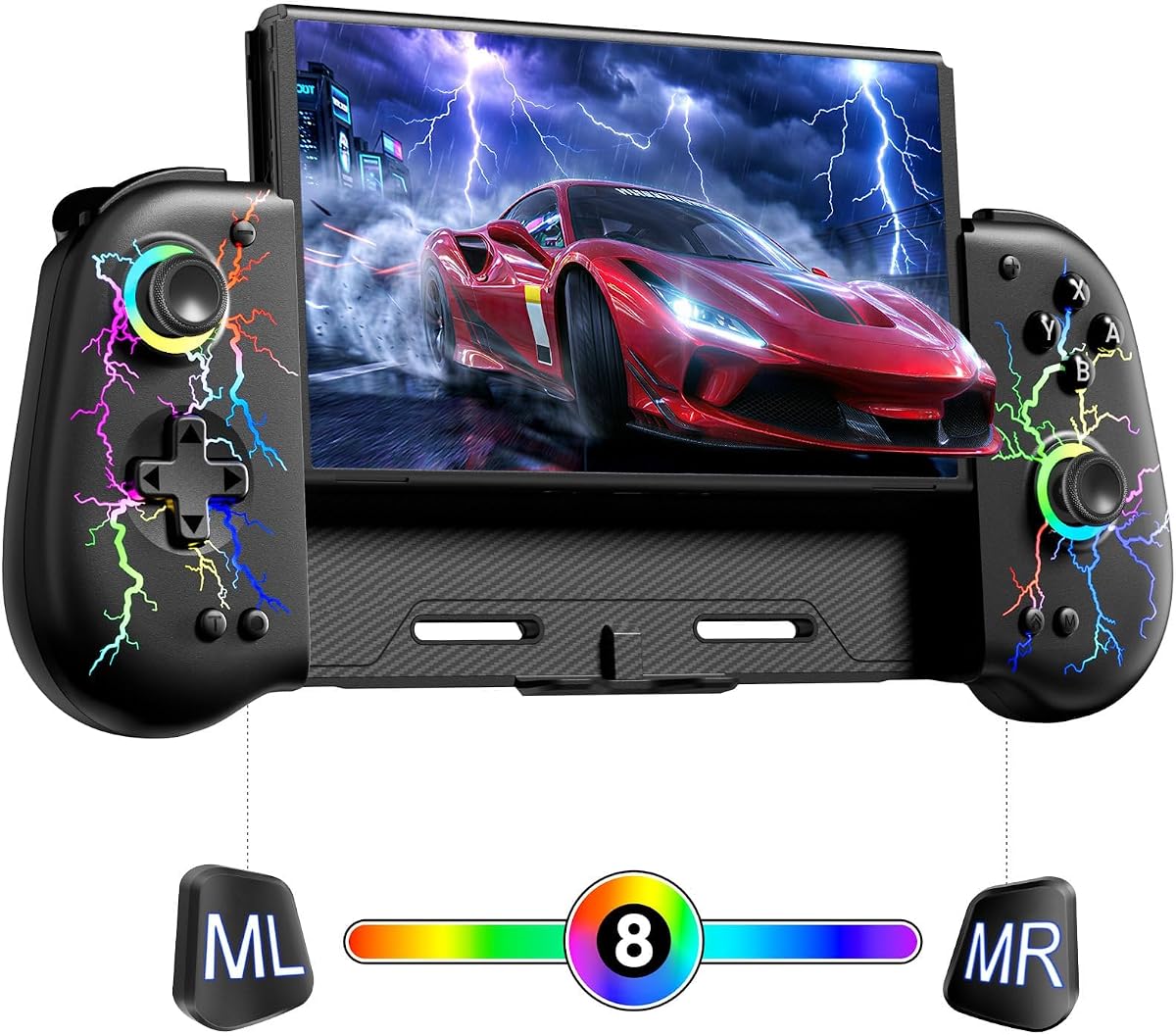


This two-pack controller set from AceGamer offers excellent value for households needing multiple input devices. It features Hall Effect joysticks that eliminate drift and supports various Switch models seamlessly. Users appreciate the solid build quality and responsive buttons for daily gaming needs.
We may earn a commission when you buy through this link, at no additional cost to you.
The standout feature is the 800 mAh battery which provides around twelve hours of continuous play. Programming buttons allow you to map complex moves easily. The dual vibration motors offer four levels of feedback to match different game genres accurately.
While it lacks app customization options found in higher end models the turbo function is still useful for rapid fire tasks. The lack of wake-up support on Switch 2 might be a minor inconvenience for some users but overall performance remains strong.
Buy this if you need reliable controllers for local multiplayer without spending too much. The Hall Effect tech ensures longevity making it a smart investment for casual and competitive players alike in 2026.
Getting two controllers in one package makes local gaming sessions easier to organize and set up for friends and family.
The large 800 mAh battery ensures you can play for extended periods without frequent recharging interruptions during marathons.
We may earn a commission when you buy through this link, at no additional cost to you.
Gammeefy brings a distinct aesthetic with its cracked design and nine color adjustable LED lights. This controller supports multiple platforms including PC and Android making it versatile for different setups. The Hall Effect joystick ensures precise control without drift over time.
We may earn a commission when you buy through this link, at no additional cost to you.
Customization is a major strength here as you can use the KeyLinker app to remap buttons and upgrade firmware easily. The 1000 mAh battery is impressive and supports long play sessions even with lights active. Turbo modes allow you to adjust speed for different game types.
The vibration feedback has four levels which adds immersion to action games. However the wake-up feature does not work with Switch 2 which is a notable limitation. Some users may find the LED effects distracting in dark rooms.
Choose this if you value style and deep button customization over standard functionality. It is a strong choice for those who want a controller that stands out visually and performs well across devices.
The KeyLinker app allows you to tailor button layouts to your specific preferences without needing complex physical switches.
Compatibility extends beyond Switch to iOS and Android games giving you a single controller for mobile gaming needs.
We may earn a commission when you buy through this link, at no additional cost to you.
Diswoe focuses on seamless connectivity with an upgraded wireless chip that guarantees zero latency. The Hall Effect joysticks provide pixel-precise accuracy essential for competitive play. Its ergonomic design ensures comfort during long sessions without hand cramps.
We may earn a commission when you buy through this link, at no additional cost to you.
The dedicated screenshot button is a standout feature for capturing moments instantly. Vibration feedback can be tuned across four levels to suit different game styles from stealth to action. The battery lasts up to twelve hours which covers most play sessions well.
While it lacks app customization the physical design and responsiveness make up for it. The 600mAh battery is sufficient but some competitors offer larger capacities. Still the reliability of the connection keeps it near the top of our list.
This controller is perfect for gamers who prioritize performance and comfort over extra features. It delivers a premium experience at a reasonable price point making it our editor's choice for 2026.
The upgraded wireless chip ensures your inputs register instantly without delay which is vital for fast-paced games.
The screenshot button lets you capture and share your gaming achievements directly from the controller interface.
We may earn a commission when you buy through this link, at no additional cost to you.
8Bitdo continues to impress with the Ultimate 2C offering refined ergonomics and Hall Effect joysticks. The non-linear digital triggers provide a unique tactile feel preferred by some gamers. Its motion controls include wake-on-shake which adds convenience for quick access.
We may earn a commission when you buy through this link, at no additional cost to you.
The extra R4 and L4 bumpers offer more input options for complex commands. Metal joystick rings enhance durability ensuring the sticks withstand heavy use over time. The build quality matches premium standards with double-shot buttons that resist wear.
Users should note that firmware updates are needed for full compatibility with Switch 2. Customization options are minimal compared to app-based controllers. However the pure gaming feel and precision make it a top pick for enthusiasts.
Choose this if you want a high-quality controller with a focus on tactile feedback and durability. The Hall Effect sticks ensure longevity and accuracy for serious gamers who demand the best.
The additional R4 and L4 bumpers provide more inputs for complex game mechanics without needing macro software.
Shake the controller to wake up your console for a quick start to your gaming session without extra steps.
We may earn a commission when you buy through this link, at no additional cost to you.
This controller offers one-touch instant wake-up for Switch 2 which is a huge convenience for players. It features Hall Effect joysticks to prevent drift and a robust 800 mAh battery for long sessions. Multi-platform support ensures you can use it across PC and mobile too.
We may earn a commission when you buy through this link, at no additional cost to you.
The M1 and M2 buttons allow complex macros and multi-assignment modes which are great for RPGs and strategy games. Four levels of vibration feedback add depth to gameplay. The ergonomic grips reduce fatigue during extended play.
While it lacks app-based customization the built-in macro options cover most needs. The battery life is solid but some might prefer faster charging options. Overall it balances features and performance effectively for daily use.
Buy this if you want a reliable controller that works well across devices and offers quick console wake-up. It is a practical choice for users who value functionality and battery life.
Press the home button to instantly wake your Switch 2 or standard Switch for immediate gameplay without menus.
Program back buttons to execute complex move combos with a single press to simplify difficult game challenges.
We may earn a commission when you buy through this link, at no additional cost to you.
Playnex provides a straightforward two-pack solution for local gaming. Both controllers feature Hall Effect joysticks ensuring no drift during play. They support Switch 2 and PC making them versatile for different setups. The RGB lighting adds a nice visual touch to your setup.
We may earn a commission when you buy through this link, at no additional cost to you.
The 600 mAh battery supports extended play though some competitors offer longer life. Macro buttons and three turbo speeds allow for some customization of controls. The home button wake-up works on supported consoles for convenience.
While it lacks app remapping the physical layout is comfortable for most hands. The price per unit is excellent when buying the bundle. It is a solid choice for families needing affordable controllers.
Choose this for a cost-effective way to upgrade your local multiplayer setup. The Hall Effect tech ensures durability making these a smart budget buy for regular gaming.
Get two controllers at a great price to play split screen games with friends or family instantly.
Magnetic sensors in the joysticks eliminate mechanical wear so the controls stay precise for longer.
We may earn a commission when you buy through this link, at no additional cost to you.
VOYEE brings a unique touch with digital triggers which are ideal for racing games. The dedicated M button allows easy macro mode without complex setups. Its joystick is rated for five million cycles ensuring long life. The halo RGB lighting is visually appealing.
We may earn a commission when you buy through this link, at no additional cost to you.
The six-axis gyro offers precise motion control and four vibration levels add immersion. The controller is built to be ergonomic and comfortable for various hand sizes. Wake-up is supported on original Switch models for quick access.
Users should note that this model is not compatible with Switch 2 which limits future proofing. Battery life is decent but not the best. Still the digital triggers and macros make it a strong contender for specific genres.
Pick this if you play racing games or need quick macro access. The build quality and trigger design justify its place on our list for specialized users.
ZR and ZL triggers work digitally for sharper feedback especially useful in racing and action titles.
The M button simplifies complex sequences making it easier to execute moves in RPGs or fighting games.
We may earn a commission when you buy through this link, at no additional cost to you.
NexiGo focuses on a comfortable grip ideal for those with larger hands. The Hall Effect joysticks eliminate dead zones and drift completely. Seven color RGB ring lights enhance the visual appeal of your setup. Turbo functionality allows for rapid button presses.
We may earn a commission when you buy through this link, at no additional cost to you.
The controller includes two extra mapping buttons for additional control options. It features a USB Type-C port for charging while playing. While it does not work wirelessly in handheld mode the ergonomic design is a major plus.
Users seeking a wired experience for handheld play will appreciate the stable connection. The RGB lights can be adjusted to match your mood. However the lack of wireless handheld support may be a dealbreaker for some.
Select this if comfort and visual style are your top priorities. The Hall Effect tech ensures precision and the ergonomic shape reduces strain during long sessions.
The shape of the controller ensures a natural hand position which reduces fatigue during long gaming sessions.
Dynamic RGB lighting flashes and changes color to add a mesmerizing visual dimension to your gameplay.
We may earn a commission when you buy through this link, at no additional cost to you.
This flagship controller from 8Bitdo offers TMR joysticks for higher sensitivity and precision. The integrated charging dock keeps it always ready and reconnects automatically. Switchable trigger modes let you choose between Hall Effect and tactile triggers. The RGB Fire Ring adds a stylish look.
We may earn a commission when you buy through this link, at no additional cost to you.
The build quality is exceptional with a focus on premium materials. Vibration and motion control work seamlessly on Switch. Turbo functions and wake-on-shake enhance the overall experience. It is a complete package for serious gamers.
The price is higher than most but the dock and features justify it. Firmware updates may be needed for full Switch 2 support. Overall it represents one of the best experiences available on the market.
Buy this if you want the ultimate setup with a dock and premium features. It is the top choice for those who value convenience and high-end performance.
The dock ensures your controller is always charged and reconnects instantly when you lift it off.
Toggle between Hall Effect and tactile triggers to match the feel you prefer for different game types.
We may earn a commission when you buy through this link, at no additional cost to you.
NexiGo provides a reliable wireless option with a unique LED indicator design. The sticks change color when used giving a cool visual feedback. It supports fast charging which gets you back to play in hours. The non-slip design reduces grip fatigue.
We may earn a commission when you buy through this link, at no additional cost to you.
The controller offers eight to ten hours of play on a single charge. Bluetooth connectivity is stable with strong anti-interference tech. It works well with Switch and Switch 2 for broad compatibility. Turbo and LED lights add extra fun.
While macro options are limited it covers the essentials well. The battery life is solid for most users but may need frequent charging for heavy users. Still the build quality and LED features are appealing.
Choose this for a stylish and reliable wireless controller at a good price. The fast charge and anti-interference tech make it a practical daily driver for your console.
The LED indicator changes color when you press the sticks offering a unique visual cue for inputs.
Recharge the controller in just two to three hours to minimize downtime during long play sessions.
We may earn a commission when you buy through this link, at no additional cost to you.
Choosing the right controller involves looking at several key factors beyond just the brand. This guide breaks down the most important features to consider for a satisfying gaming experience.
Hall Effect joysticks use magnetic sensors instead of physical contacts to detect movement. This eliminates mechanical wear and tear which is the main cause of stick drift. Ensure the controller explicitly states it uses this technology for long-term reliability.
Look for joysticks rated for millions of cycles to ensure longevity. This feature is essential for keeping your controller drift-free for years.
Battery capacity dictates how long you can play before needing a recharge. Aim for controllers with 800 mAh or more for longer sessions. Fast charging support helps reduce downtime when the power gets low.
Check if the controller offers auto-sleep features to save power when not in use.
Ensure the controller works with your specific Switch model and other devices like PC or mobile. Some models support Switch 2 while others only support older versions. Check connectivity options like Bluetooth and USB-C for your setup.
Universal controllers offer more value if you use multiple devices for gaming.
Back buttons and macro features allow you to execute complex moves with a single press. This is useful for RPGs and fighting games. Some controllers allow app-based remapping for deeper customization.
Choose a controller with macro options if you want to automate repetitive tasks in games.
Comfort is key for long gaming sessions. Look for non-slip grips and an ergonomic shape that fits your hand naturally. Textured surfaces reduce sweat and improve control during intense gameplay.
Consider the weight and size of the controller to ensure it feels balanced in your hands.
A 6-axis gyroscope enables motion control for games that require tilting or shaking. This adds immersion in racing and adventure titles. Ensure the controller supports calibration for accurate motion tracking.
Good motion control can enhance gameplay in titles that support aiming or steering via movement.
Dual vibration motors with adjustable levels add immersion to gameplay. Strong rumble can make explosions feel more realistic. Look for controllers with multiple levels of feedback intensity to suit different genres.
Adjustable vibration helps reduce fatigue during long sessions or when you want quieter feedback.
Durable materials like ABS plastic and metal rings contribute to a longer life. Check for reviews that mention durability over time. A sturdy controller will withstand daily use better than cheaper alternatives.
High build quality often correlates with better button resistance and stick durability.
To start pairing your controller, hold the sync button until the light flashes and select the device in your console menu. If supported use the home button to wake the console instantly from sleep mode.
Calibrate the joysticks before use to ensure accurate centering. Keep firmware updated via official tools to maintain compatibility with new Switch updates and features.
Charge the controller fully before first use. Store it in a dry place away from direct sunlight to prevent material degradation over time.
A Hall Effect controller uses magnetic sensors to detect joystick movement instead of physical contacts. This design eliminates mechanical wear and prevents stick drift over time. It provides precise control and extends the lifespan of the device.
Many modern controllers support Switch 2 but you should verify specific model details before buying. Check the product description for explicit Switch 2 compatibility mentions. Firmware updates may also be required to ensure full support.
Hall Effect technology fundamentally solves drift by using magnetic sensors. However regular calibration and keeping firmware updated can help maintain performance. Avoid touching the sticks while connecting to prevent initial offset.
Yes many of the reviewed controllers support PC via Bluetooth or USB. Some work in XInput mode for seamless integration with Steam games. Ensure the product states PC compatibility for your specific needs.
Most controllers offer between eight and twelve hours of play on a single charge. Larger battery units can reach up to sixteen hours with lights off. Charging times usually range from two to four hours.
Many models feature macro buttons or apps like KeyLinker for button remapping. Physical back buttons allow easy macro programming without software. Check if the controller supports app-based customization for deeper changes.
Wireless controllers reduce clutter and allow play from a distance. They use Bluetooth for stable low-latency connections. This freedom of movement enhances comfort during couch gaming sessions.
Most controllers reset by holding the sync button for a few seconds. Reconnect to your console after resetting to clear previous pairing data. Consult the manual for specific reset sequences for your model.
Hall Effect controllers represent the future of reliable gaming input with superior durability and precision. Our top picks offer a mix of affordability and premium features for different needs.
Prioritize Hall Effect joysticks and battery life when making your choice. Ensure compatibility with your specific console models and gaming platforms for a seamless experience.
Prices fluctuate often so check current offers before buying. Use this guide to find the perfect match for your gaming style.