
Hamile for iPad Case
4.5Editor score
400mAh battery life
7 color backlight keys
Detachable magnetic keyboard
Finding the right keyboard case for your 8th Generation iPad can transform your tablet into a productive workstation. These accessories offer typing comfort protection and often include stylus holders for a complete setup experience.
We evaluated ten top-rated options based on compatibility build quality battery life and typing experience. Each product was assessed for its ability to enhance your iPad workflow without adding unnecessary bulk or complexity to your daily tasks.
Each pick highlights key features pros and cons to help you make an informed decision. Prices and availability can change so please verify details on the product pages before finalizing your purchase online today.
4.5Editor score

4.4Editor score

4.4Editor score
As an Amazon Associate we earn from qualifying purchases.
This side-by-side comparison highlights the key specifications and unique features of each top-rated keyboard case to help you quickly identify the best match for your specific workflow needs.



The TUNKARMOR Case stands out as a top contender for users who want a complete laptop-like setup. It earns a solid 4.4 rating and comes with a Bluetooth mouse which is rare in this price range.
We may earn a commission when you buy through this link, at no additional cost to you.
This model features an adjustable 7-color backlit keyboard that ensures visibility in dark environments. The magnetic detachable keyboard allows you to use the tablet freely when typing is not required. It also offers three adjustable viewing angles for comfortable positioning during work or media consumption.
While the included mouse adds versatility it does increase the overall weight compared to simpler cases. Users should verify their model number carefully as compatibility is specific to 7th 8th and 9th Gen iPads plus Air 3rd and Pro 10.5.
This case is ideal for students or professionals who need extra input options without buying separate accessories. It balances protection functionality and affordability effectively making it a strong recommendation for multi-tasking iPad users.
The included Bluetooth mouse provides cursor control that enhances navigation efficiency beyond simple touch gestures.
The seven color backlight options allow for customization to match your environment and personal preference.
We may earn a commission when you buy through this link, at no additional cost to you.
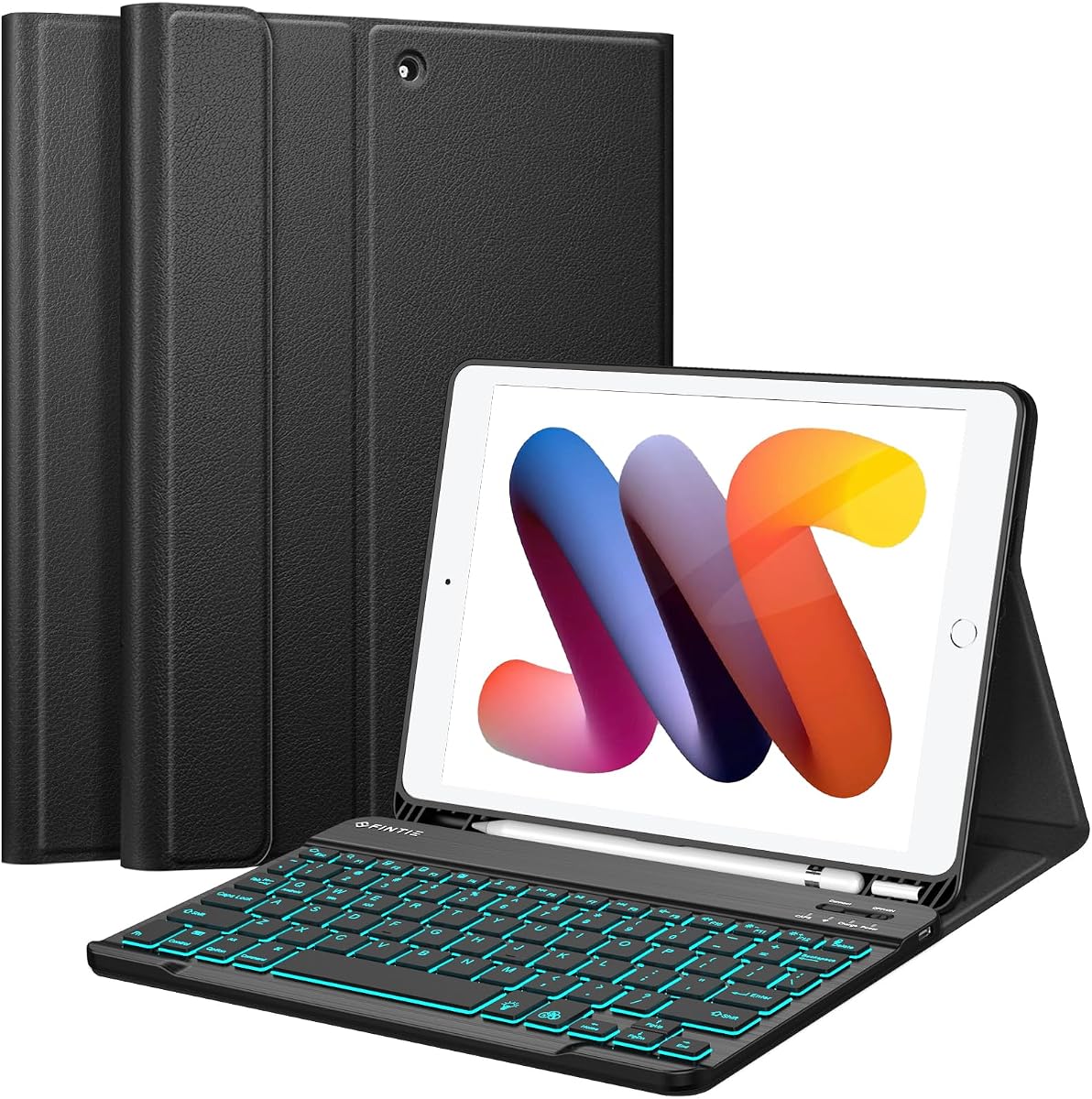
The FINTIE Backlit Keyboard Case delivers exceptional battery performance with up to 230 hours of continuous use. Its energy-efficient design and fast Type-C charging make it reliable for heavy daily users who need long uptime.
We may earn a commission when you buy through this link, at no additional cost to you.
It features ergonomic mechanical scissor keys that reduce noise while providing a comfortable typing feel. The case allows for easy detachment of the keyboard to switch between typing and media viewing modes. The adjustable backlight ensures readability in low light situations.
Users might find the lack of a trackpad limiting compared to more premium options. Additionally the compatibility is restricted to the standard 10.2 inch models which means Air or Pro variants are not supported.
If battery endurance is your top priority this case offers unmatched value in its category. It is best suited for travelers or students who type frequently and cannot tolerate frequent recharging interruptions.
The massive battery capacity ensures you can type for days on a single charge without anxiety about power loss.
Mechanical scissor keys provide a tactile response that mimics a laptop experience more closely than membrane options.
We may earn a commission when you buy through this link, at no additional cost to you.
The typecase Touch Keyboard Case offers a versatile 360 degree rotating hinge that allows seven distinct use modes. With a 4.4 rating it is known for its precision trackpad which transforms navigation on the iPad significantly.
We may earn a commission when you buy through this link, at no additional cost to you.
The keyboard features laser-etched keys that shine through an adjustable 10-color RGB backlight for a premium look. This case provides full protection while enabling seamless transition between laptop tablet and reading modes. It also includes a holder for the Apple Pencil to prevent loss.
The added mechanism for rotation does increase the weight and cost compared to simpler folios. Users seeking the lightest possible option might find this model too bulky for pocket or small bag storage.
This option is perfect for users who want a true laptop replacement experience. Its robust hinge and trackpad support make it ideal for productivity tasks that require frequent switching between typing and screen interaction.
The patented 360 degree hinge lets you adjust the device to any angle for comfort or sharing content with others.
The built-in trackpad offers multi-gesture controls that speed up browsing and editing workflows on the iPad.
We may earn a commission when you buy through this link, at no additional cost to you.
The Hamile for iPad Case is a top choice for budget-conscious shoppers seeking essential features. With a high 4.5 rating it provides a wireless keyboard with 180 hours of battery life at a very competitive cost.
We may earn a commission when you buy through this link, at no additional cost to you.
The keyboard is detachable via magnets allowing for flexible use scenarios. It features 7 vibrant backlit colors and a honeycomb design on the back of the case to aid in heat dissipation and prevent overheating.
Some users report that the magnetic attachment could be stronger to prevent accidental detachment. The overall build quality is good but it may not feel as premium as higher-priced alternatives in this roundup.
This case is excellent for those who need a basic typing solution without spending a lot. It is a strong pick for students or casual users who prioritize value and battery longevity over advanced features.
You get key functionalities like backlighting and detachment at a price that is hard to beat in the market.
The honeycomb pattern helps release heat which can extend the lifespan of your device during long sessions.
We may earn a commission when you buy through this link, at no additional cost to you.
The Divufus Case offers a practical solution with full shortcut keys that enhance productivity on iOS. It supports three systems including iOS Android and Windows making it versatile for cross-platform users.
We may earn a commission when you buy through this link, at no additional cost to you.
The keyboard is slim and lightweight with a battery that supports over 80 hours of active use. The honeycomb grid design helps with heat dissipation and the non-slip rubber lining ensures stability on various surfaces.
It lacks a trackpad which might be a drawback for users who rely on mouse-like navigation. The warranty period is also shorter than some competitors providing less long-term security.
This case is a great middle-ground option for general users who need efficient typing without extra bulk. It works well for those who prefer keyboard shortcuts to manage files and media on their iPad.
The dedicated function keys allow quick access to media controls and system commands without extra steps.
The anti-slip rubber lining prevents the tablet from sliding during use even when the case is open.
We may earn a commission when you buy through this link, at no additional cost to you.
The Logitech Slim Folio is a premium option known for its reliability and long battery life. It uses two coin cell batteries that can last up to four years making it a very low maintenance choice.
We may earn a commission when you buy through this link, at no additional cost to you.
Its keyboard is edge-to-edge which provides ample space for typing without feeling crowded. The case includes a full row of iOS shortcut keys for easy control over media and system functions. The design is notably lightweight to avoid adding bulk.
The lack of a backlight might be inconvenient for users who type in dark environments frequently. Also the reliance on coin cells means you need to buy replacements eventually though they last a long time.
This case is ideal for professionals who prefer a simple and durable solution without charging wires. Its premium build and brand reputation make it a trusted choice for daily productivity on the iPad.
With a potential four years of battery life you rarely need to think about powering up your keyboard case.
Dedicated iOS shortcut keys allow quick access to functions like media volume and brightness adjustments.
We may earn a commission when you buy through this link, at no additional cost to you.
The KBCASE Light Blue case focuses on portability and comfort with a slim wireless design. It features spacious scissor-structure keys that make typing relaxed and tactile for extended sessions.
We may earn a commission when you buy through this link, at no additional cost to you.
This model is designed to fit easily into bags and comes with a built-in pencil holder. The wave shock absorption and honeycomb pattern help protect the device from impacts and heat buildup during use.
Without a backlight it may be harder to use in low light conditions. The materials are functional but might not feel as rugged as some of the heavier cases in this guide.
It is a great pick for users who value aesthetics and lightness over extra features. This case suits those who carry their iPad often and need a quick typing solution without heavy accessories.
The slim profile ensures your tablet stays easy to carry in your daily bag or briefcase.
The wave shock absorption system provides an extra layer of protection against accidental drops.
We may earn a commission when you buy through this link, at no additional cost to you.
The Dexnor Floating keyboard case transforms your iPad into a laptop with a sturdy aluminum hinge. It features a precision trackpad that supports multi-finger gestures for smooth navigation on the device.
We may earn a commission when you buy through this link, at no additional cost to you.
The floating cantilever stand allows for customizable angles which helps reduce neck strain during typing. The keyboard includes 7 solid color backlights with three brightness levels for versatile use in different lighting environments.
This case is designed specifically for 7th 8th and 9th Gen models which means it does not support Air 3rd Gen. The higher price reflects the premium materials but may not suit all budgets.
It is an excellent choice for users who want a stable typing position without a bulky base. The trackpad and hinge strength make it ideal for office work or professional presentations.
The aluminum hinge provides a strong magnetic connection that holds the tablet securely in any angle.
Adjustable brightness levels let you tailor the keyboard illumination to match your room lighting.
We may earn a commission when you buy through this link, at no additional cost to you.
The INFILAND Black case is known for its zero-lag magnetic keyboard that delivers instant key response. It includes a precision trackpad for smooth cursor control without needing to touch the screen directly.
We may earn a commission when you buy through this link, at no additional cost to you.
The keyboard offers 7 backlight colors and 3 brightness levels to suit any environment. Strong magnets lock the keyboard firmly in place during typing and store it neatly when closed for protection.
The added weight of the trackpad might be a consideration for portable users. It also comes only in black which limits style options for those who prefer color.
This case is great for users who need a responsive keyboard for fast typing. The trackpad and zero-lag connection make it suitable for data entry and quick edits on the go.
The zero-lag connection ensures your keystrokes are registered immediately for a faster workflow.
The responsive trackpad brings familiar cursor navigation to your iPad for easier file management.
We may earn a commission when you buy through this link, at no additional cost to you.
The KBCASE Touchpad case features a 360 degree swivel and 180 degree flip for multiple viewing angles. It includes a touch keyboard that allows cursor control similar to a laptop.
We may earn a commission when you buy through this link, at no additional cost to you.
The hardshell design protects all sides of the tablet from scratches and wear. It comes with a built-in pencil holder to keep your stylus secure and prevent it from getting lost during use.
The swivel mechanism adds some weight which may affect portability in smaller bags. Support is limited to 7th 8th and 9th Gen models so it is not compatible with other iPad versions.
This case is suitable for users who value flexibility in viewing modes. The touchpad support makes it a good option for those who prefer using a cursor over touch only navigation.
The 360 swivel allows you to share your screen easily or adjust the angle for comfort.
Integrated touchpad support lets you control your cursor efficiently while typing or browsing.
We may earn a commission when you buy through this link, at no additional cost to you.
Choosing the right keyboard case involves balancing protection typing comfort and additional features like trackpads or backlighting.
Ensure the case matches your specific iPad model number. The 8th Generation iPad is 10.2 inches but older 7th and newer 9th generations share this size. Check the model number starting with A on your back.
Always verify compatibility lists before buying to avoid returns.
Decide between membrane and mechanical scissor keys. Scissor keys offer a more tactile feel and reduce typing noise while membrane keys are often quieter but feel flatter.
Scissor keys generally provide a better typing experience for long sessions.
Backlighting is essential if you work in dim environments. Look for cases with adjustable colors or brightness levels to suit your preferences and reduce eye strain.
Backlit keyboards are useful for night use and aesthetic appeal.
Check the battery capacity and expected hours of use. Some cases last 80 hours while others exceed 200 hours. Fast charging via USB-C is also a convenient feature to look for.
Longer battery life means fewer interruptions during work or travel.
If you prefer cursor navigation consider cases with a built-in trackpad. These add value for productivity but can increase weight and cost compared to standard models.
A trackpad is valuable for file management and precise browsing.
Look for cases with full coverage including hard shells or reinforced corners. Honeycomb patterns or shock absorption materials add durability against drops and impacts.
Strong protection safeguards your investment from daily wear and accidents.
Detachable keyboards allow you to use the iPad freely as a tablet. Magnetic connections are preferred for ease of use and stability when attached to the case.
Detachable designs offer flexibility between typing and media viewing modes.
If you use an Apple Pencil choose a case with a dedicated holder. This prevents loss and ensures you have the stylus ready when needed.
Pencil holders add convenience for artists and note-takers.
To start pairing ensure your iPad is on and set the keyboard to pairing mode usually by holding a key combination until a light blinks. Then select the keyboard from your iPad settings under Bluetooth.
Clean the keys regularly with a soft dry cloth to remove dust and debris. Avoid using liquids directly on the keyboard and ensure the case is dry before closing it.
Store the case in a cool dry place when not in use. If you plan to store the iPad long term charge the keyboard battery fully before closing it to maintain battery health.
Many of the listed cases support the 9th Generation iPad since it shares the 10.2 inch screen size as the 8th and 7th generations. However always double check the compatibility list in the product details to be sure.
Most of the selected cases include a built-in pencil holder to keep your stylus safe. However the Apple Pencil itself is not included in the package so you will need to buy it separately.
Most modern cases come with a USB-C charging cable. Connect it to your iPad or a power adapter and the keyboard will charge. Some models have a separate power indicator light to show charging status.
Some keyboards support multiple systems like Windows and Android in addition to iOS. Check the product description to see if it has multi-device pairing capabilities or system switch keys.
Many of these cases feature mechanical scissor keys that are designed to reduce noise. They provide a quiet typing experience suitable for libraries or shared workspaces.
If the keys stop working try turning Bluetooth off and on on your iPad or re-pairing the device. Ensure the keyboard has sufficient charge as low battery can cause connection issues.
We have reviewed ten top keyboard cases for the 8th Generation iPad offering options ranging from budget-friendly choices to premium models with trackpads.
Prioritize your needs such as battery life or trackpad support when making a final selection. The best choice depends on how you use your tablet daily.
Prices and availability can change quickly so please verify the latest details on the product pages before purchasing online.