
VOYEE PC Controller
4.3Editor score
Plug and play setup process
Ergonomic grip for long sessions
Compatible with Windows 11 systems
This guide compares the top joysticks for Windows 11 helping gamers choose the best flight controller for simulation, combat, and precision gaming experiences.
Finding the right joystick for Windows 11 can transform your gaming experience from standard play to immersive simulation. Whether you prefer flight sims or arcade action, a quality controller brings precision and comfort to your setup.
We evaluated ten top models based on compatibility, build quality, and feature sets to help you make an informed decision. Each product offers unique strengths tailored to different gaming needs and budget constraints across the market.
Every recommendation includes detailed specs, pros, cons, and real-world usage insights to guide your purchase. Keep in mind that prices and availability fluctuate frequently so always verify current deals before checking out.
4.3Editor score

4.4Editor score

4.0Editor score
The following comparison table outlines the core specifications and features of each joystick to help you quickly identify which model aligns best with your specific gaming preferences and hardware requirements.






The PXN 2113PRO offers a budget friendly option for those entering flight simulation on PC. It delivers essential controls with vibration feedback to enhance immersion during gameplay sessions.
We may earn a commission when you buy through this link, at no additional cost to you.
This stick features a rapid fire trigger and eight way hat switch allowing for detailed control in titles like Microsoft Flight Simulator and War Thunder. The ergonomic design ensures comfort during extended use.
While the vibration function requires high strength settings to be noticeable and it is strictly for Windows systems excluding consoles and Macs. Some users may find the driver setup slightly manual.
It is an excellent choice for beginners looking to test flight sims without a large financial commitment. The suction cups help stabilize the device on smooth desks for consistent performance.
The rapid fire trigger and programmable buttons let you replicate real aircraft controls for a more authentic simulation feel.
You can play games directly without installing drivers though custom mappings are available if you visit the official website.
We may earn a commission when you buy through this link, at no additional cost to you.
The Thrustmaster T-Flight Hotas One bridges the gap between entry level and premium controllers with a modular design. It supports both PC and Xbox platforms for broad compatibility.
We may earn a commission when you buy through this link, at no additional cost to you.
The detachable throttle allows you to use the stick on your lap for casual play or on a desk for precision. Resistance adjustments help you find the right feel for different aircraft types.
Although it lacks force feedback mechanisms the responsive trigger and hat switch deliver accurate inputs. It is expandable with pedals but requires additional purchases for a full cockpit setup.
This is the top pick for pilots who want flexibility in how they set up their controller. Its balance of comfort and functionality makes it suitable for long flight sessions.
Whether you sit at a desk or lounge on a couch the modular design adapts to your preferred gaming environment easily.
You can connect rudder pedals using the S.M.A.R.T system to add another layer of realism to your simulation setup.
We may earn a commission when you buy through this link, at no additional cost to you.
The V-one controller is a versatile budget choice that works across PC and Android devices. It offers multiple modes to ensure compatibility with a wide range of games.
We may earn a commission when you buy through this link, at no additional cost to you.
Vibration feedback and turbo functions add depth to gameplay without breaking the bank. The red design is distinct and the build feels solid for its price point.
You will need an OTG adapter to use it on Android devices which is a small extra step. It does not support Xbox One or PS4 limiting some console users.
For those seeking a single controller for multiple systems this model offers exceptional value. Its simplicity and broad support make it a strong contender for budget conscious gamers.
The ability to switch between Xinput and Android modes means you can use one controller for PC and mobile gaming.
Pressing the turbo button allows for rapid fire actions in games that support this feature giving you a competitive edge.
We may earn a commission when you buy through this link, at no additional cost to you.
This Thrustmaster USB Joystick is an entry level device designed for simplicity. It focuses on core controls without overwhelming the user with excessive buttons.
We may earn a commission when you buy through this link, at no additional cost to you.
The POV button helps with camera control which is useful in strategy and flight games. The ergonomic handle rests naturally in your hand to reduce fatigue.
With only four buttons and three axes it lacks the depth of modern controllers. It is best suited for older games or casual play where precision is not critical.
If you need a basic controller for simple tasks this model works well. However serious gamers will likely need more programmable inputs for a better experience.
The minimal button layout makes it easy to learn quickly without needing to reference a manual for every function.
Having a dedicated button for view changes saves your keyboard hands while you are in the middle of a battle.
We may earn a commission when you buy through this link, at no additional cost to you.
The Microsoft Sidewinder Precision 2 is a classic joystick that integrates throttle and rudder controls into a single device. It allows you to save game specific profiles for quick access.
We may earn a commission when you buy through this link, at no additional cost to you.
The rotating handle gives precise rudder control without needing extra pedals which is rare in this price range. Eight buttons and a hat switch offer decent customization for flight sims.
As a legacy product driver support may be less consistent on newer Windows versions. However it still works well with many simulation titles out of the box.
It is a great choice for purists who appreciate a traditional stick design. The all in one approach keeps your desk tidy while providing solid control authority.
You can download and save different command sets for each game so switching between titles is seamless.
The 146 degree throttle action on the stick lets you manage speed with one hand for efficient gameplay.
We may earn a commission when you buy through this link, at no additional cost to you.
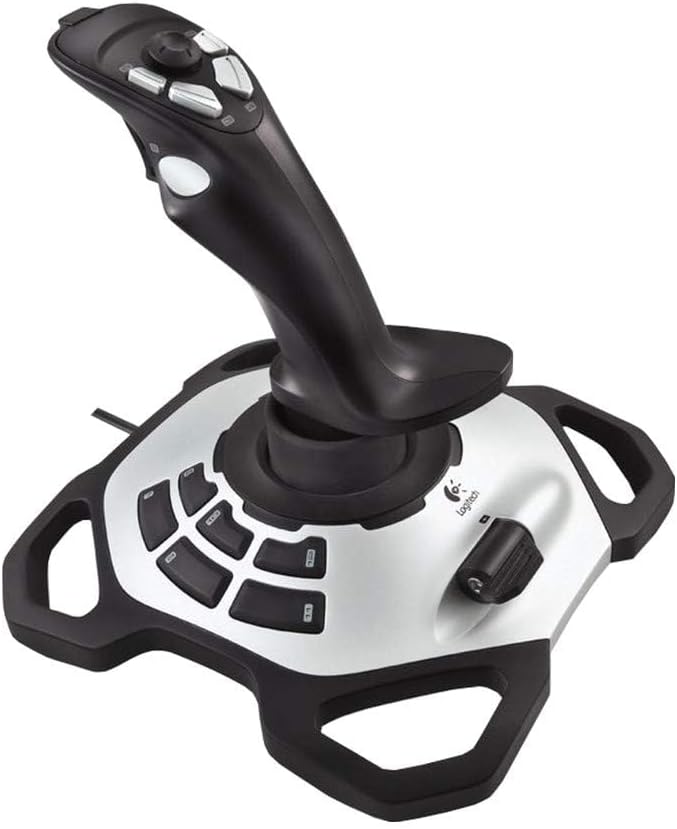
The Logitech Extreme 3D Pro is renowned for its precision and build quality. It features a 12 position throttle that is excellent for managing speed in games.
We may earn a commission when you buy through this link, at no additional cost to you.
The twist rudder control is precise and the button layout is intuitive. The ergonomic shape ensures you can use it for hours without strain.
It does not include vibration feedback which some gamers might miss. Setup requires the Logitech driver to fully utilize its customization features.
This model is a reliable choice for those who value accuracy and comfort. The combination of features makes it a strong contender for serious flight simulation.
The discrete steps on the throttle give you exact control over speed settings which is crucial for approach and landing.
Logitech quality ensures this controller withstands years of use without the mechanical parts becoming loose.
We may earn a commission when you buy through this link, at no additional cost to you.
The VOYEE PC Controller offers an Xbox 360 style layout that is familiar to many gamers. It works seamlessly on Windows 11 for a plug and play experience.
We may earn a commission when you buy through this link, at no additional cost to you.
Enhanced triggers and buttons provide responsive inputs without delay. The contours are designed to fit your hands comfortably for long sessions.
The cable length is somewhat short and it is not intended for flight simulation games. For action and shooter titles it delivers a high value experience.
If you want a simple controller for casual gaming this is an ideal choice. Its price point and compatibility make it a best budget pick for many users.
Upgraded trigger buttons ensure that your actions register quickly which helps in fast paced competitive gaming.
The contours of the grips are shaped to reduce hand strain so you can play for longer periods comfortably.
We may earn a commission when you buy through this link, at no additional cost to you.
The Thrustmaster SimTask FarmStick is purpose built for Farming Simulator 25 and similar titles. It offers precise control for tractors and heavy machinery simulation.
We may earn a commission when you buy through this link, at no additional cost to you.
With 33 programmable inputs you can manage every function without using a keyboard. The Hall Effect sensors ensure that the stick stays accurate over time.
It is best used with a racing wheel for a full cockpit setup. Standalone it still works well but a wheel enhances the experience significantly.
For fans of agricultural simulation this is the perfect tool. It provides the realism needed to operate complex machinery with ease and accuracy.
Magnetic sensors prevent wear and drift so your controls stay consistent even after hundreds of hours of use.
The flexible setup allows both left and right handed users to use the joystick comfortably without changing hardware.
We may earn a commission when you buy through this link, at no additional cost to you.
The Logitech G X56 H.O.T.A.S is a top tier system for serious simulation enthusiasts. It offers over 189 programmable controls for total command.
We may earn a commission when you buy through this link, at no additional cost to you.
The adjustable spring force lets you customize the resistance to your preference. RGB lighting adds a cool look to your setup and matches your rig.
It requires two USB ports and significant time to set up. The cost is high but the immersion level is unmatched for flight and space sims.
This is the ultimate choice for those who want a cockpit grade controller. It transforms your PC into a high fidelity flight deck with ease.
You can swap springs to change the stick tension allowing you to simulate different aircraft handling characteristics.
The controls are placed exactly where your fingers expect them which is essential when using a virtual reality headset.
We may earn a commission when you buy through this link, at no additional cost to you.
The Thrustmaster T.16000M FCS stands out for its H.E.A.R.T. technology which ensures high precision without drift. It is compatible with Windows 11 and older versions.
We may earn a commission when you buy through this link, at no additional cost to you.
You can switch to left handed use and the button layout is designed for tactile identification. The twist axis adds another dimension to your control.
It does not include a detachable throttle so you may need a separate pedal system for full flight simulation. The software allows for detailed mapping profiles.
This is a favorite among pros for its reliability and feel. If you want a stick that performs consistently every time this model delivers excellence.
Hall effect sensors ensure that your axis readings stay accurate and do not degrade with heavy use.
Three removable parts let you tailor the stick to left or right handed use so anyone can play comfortably.
We may earn a commission when you buy through this link, at no additional cost to you.
Selecting the right joystick for Windows 11 involves looking at compatibility, build quality, and specific features that match your game preferences.
Ensure the joystick lists Windows 11 in its system requirements. Most modern controllers work seamlessly but some older models may need driver adjustments.
Check for plug and play support to avoid complicated setup steps on your system.
Look for sturdy materials that can withstand repetitive use without wobbling or breaking. H.E.A.R.T. technology is a good indicator of long term durability.
A solid base or suction cups will help keep the device stable during intense gameplay.
More buttons give you greater flexibility to map complex actions without reaching for the keyboard. Aim for at least 10 programmable buttons if you play flight sims.
A hat switch and throttle are essential for realistic aircraft control.
The shape should fit your hand comfortably to prevent strain during long sessions. A wrist rest or angled grip can improve comfort significantly.
If you play with both hands check if the stick is ambidextrous or if you can swap parts for your dominant hand.
Vibration or force feedback adds immersion by reacting to game events like turbulence or explosions. This can make the simulation feel more real.
If force feedback is a priority check that your PC can support the power requirements of the device.
Some controllers have detachable throttles that let you adjust the setup for desk or lap use. This flexibility is great for changing environments.
Modular systems can also be expanded with pedals later if you want a more complete cockpit.
Dedicated software allows you to create game specific profiles and adjust axis sensitivity. This customization helps tailor the controller to your exact play style.
Check if the manufacturer offers driver updates to ensure compatibility with new games and Windows updates.
Set a budget based on whether you need basic controls or a premium simulation experience. Entry level models are affordable but may lack features.
Invest in a higher end model if you plan to use the joystick daily for serious gaming or professional training.
Connect the joystick to an available USB port and ensure it is detected by Windows 11. Install any drivers or software provided by the manufacturer to unlock all features and calibrate the axes correctly.
Configure your controls within the game settings or the controller software. Map the buttons to match your preferred commands and test them before playing to ensure they function as expected.
Store the device in a dry area away from direct sunlight to protect the electronics. Clean the buttons and stick with a soft cloth to remove dust and maintain smooth movement over time.
Most modern joysticks listed are fully compatible with Windows 11. Some older models might require a driver update or manual mapping to work correctly on the new system.
Many models feature plug and play functionality that works without drivers. However installing the official software often unlocks advanced customization and better calibration for optimal performance.
Yes all of these controllers connect via USB which works with both desktop PCs and laptops. Ensure your laptop has enough USB ports or use a hub if needed.
The Thrustmaster T.16000M FCS and Logitech G X56 are top picks for flight sims due to their precision and high button counts. They offer the realism needed for serious pilots.
Not all models include force feedback. Only premium options like the Logitech G X56 offer advanced resistance features while budget models focus on basic vibration or no feedback.
Some controllers support Xbox or Android but most are designed for PC. Check the product details for specific compatibility before purchasing if you plan to use it on a console.
Use a dry microfiber cloth to wipe the surface and buttons. Avoid using liquid cleaners directly on the device to prevent water damage to the internal electronics.
Try unplugging and replugging the device into a different USB port. You may also need to download the latest drivers from the manufacturer's website to ensure full system support.
The top picks like the Thrustmaster T.16000M FCS and Logitech G X56 offer the best balance of precision and features for flight and action gaming on Windows 11.
Prioritize ergonomics and button count if you plan to play long sessions. For casual gamers a budget friendly option like the VOYEE controller provides sufficient control without breaking the bank.
Remember to check current prices and availability as these models can vary in stock and cost over time. A quick comparison will help you secure the best deal for your setup.