
2 in 2 Out USB 3.0 Switch
4.6Editor score
2 in 2 Out USB 3.0 Switch
5Gbps Data Transfer Speed
One-Button Switch with LED
Compare the top 10 keyboard and mouse switch for 2 computers to find the perfect USB sharing solution for your dual PC setup today.
Managing multiple computers often requires constant cable swapping. A dedicated keyboard and mouse switch for 2 computers simplifies this by letting you share peripherals seamlessly across work and personal machines.
We evaluated ten top-rated models based on speed, build quality, port count, and ease of use. This list covers USB 2.0 and 3.0 options ranging from compact selectors to advanced sharing hubs.
Each pick highlights key features, pros, cons, and ideal use cases. Note that prices change frequently, so verify current costs before purchasing. We aim to help you choose the best fit for your needs.
4.6Editor score

4.1Editor score

4.3Editor score
This side-by-side comparison highlights key specs like port count, transfer speed, and compatibility to help you quickly identify the right switch for your dual computer setup.


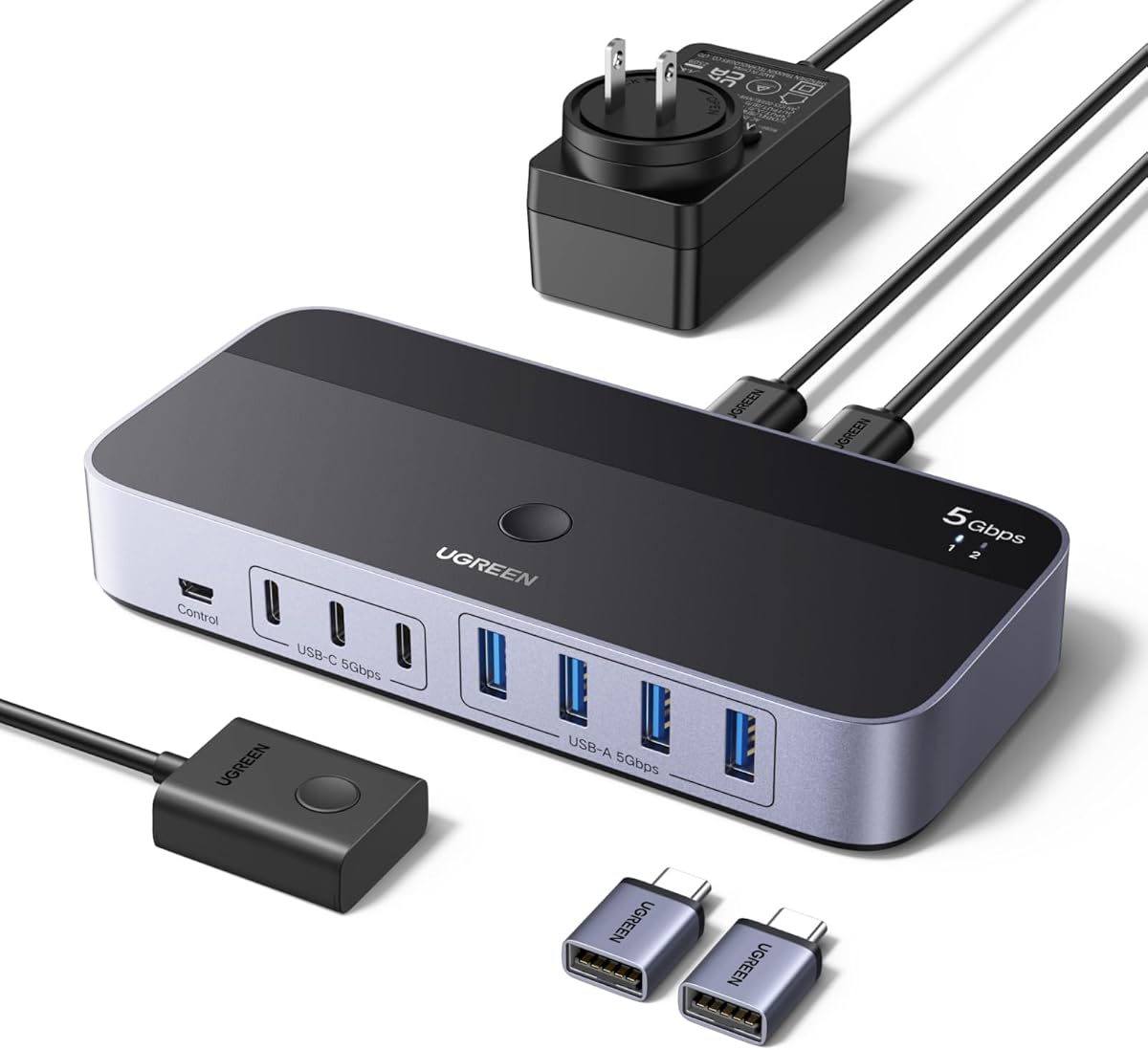

The UGREEN USB 3.0 Switch offers a versatile solution for sharing four devices across two computers. With a 4.0 rating, it stands out for its flexibility in connecting both USB-A and USB-C peripherals seamlessly.
We may earn a commission when you buy through this link, at no additional cost to you.
Its standout qualities include a dedicated USB-C power port that ensures stable performance for high-power devices like hard drives. The inclusion of an external controller allows you to keep your workspace neat while switching effortlessly between work and personal setups.
While it excels in data transfer, note that it does not support video transmission. This trade-off is acceptable if your primary need is peripheral sharing rather than monitor management. The power requirement might add slight clutter if not managed well.
Ideal for users needing to share printers, scanners, and keyboards across two systems without constant plugging. We recommend this switch for those valuing flexibility and speed over simple two-port solutions.
Supports mixing USB-A and USB-C devices for modern and legacy peripherals.
USB-C power port ensures reliable operation for power-hungry external drives.
We may earn a commission when you buy through this link, at no additional cost to you.
The BENFEI USB 3.0 Switch delivers excellent value at its price point. With a 4.1 rating, it provides reliable sharing for up to four devices between two computers. It is a top choice for budget-conscious users seeking performance.
We may earn a commission when you buy through this link, at no additional cost to you.
Its key strength lies in its simplicity and speed. You can transfer files quickly thanks to 5Gbps capabilities. The LED indicator clearly shows which PC is active. The included USB A to A cables make setup immediate without extra purchases.
However, high-power devices need an external adapter which is not included. This is a minor inconvenience for the cost savings. The warranty adds confidence in its build quality and support.
Choose this if you need an affordable, reliable way to share printers and mice. It suits home offices where cost efficiency matters but performance cannot be compromised.
5Gbps speed ensures quick data movement between connected computers.
LED lights provide clear visual feedback on active system selection.
We may earn a commission when you buy through this link, at no additional cost to you.
This compact switch achieves a remarkable 4.6 rating by focusing on reliability for basic needs. It allows two computers to share two essential devices like keyboard and mouse. Its simplicity is its greatest asset for straightforward dual-PC setups.
We may earn a commission when you buy through this link, at no additional cost to you.
The aluminum alloy shell ensures better heat dissipation and longevity compared to plastic alternatives. Setup is effortless with included 3.28ft USB 3.0 cables. The LED indicator adds a touch of clarity to the switching process.
Its limitation is the two-device cap, which may not suffice for printer sharing alongside peripherals. However, for users strictly needing keyboard and mouse switching, this trade-off ensures a clean, simple interface.
We recommend this for home users or students managing work and personal laptops. It offers premium build quality at an accessible price with no software headaches.
Aluminum housing offers durability and effective thermal management.
One-button toggle makes moving between computers instant and intuitive.
We may earn a commission when you buy through this link, at no additional cost to you.
This UGREEN model specializes in making printer and peripheral sharing simple for two users. With a 4.1 rating, it bridges the gap between basic switches and expensive multi-device hubs. It is perfect for small home offices needing shared printing.
We may earn a commission when you buy through this link, at no additional cost to you.
Its standout feature is the ability to act as a printer splitter, enabling both computers to use one device seamlessly. The compact design keeps your desk tidy. Data transfer remains fast at 5Gbps despite the smaller footprint.
It does not support more than two USB devices simultaneously. This might be restrictive if you also need to share a webcam. But for core keyboard, mouse, and printer needs, it performs reliably without complexity.
Ideal for couples or roommates sharing a single office. It provides a cost-effective way to reduce hardware duplication while maintaining smooth operation between systems.
Acts as a printer splitter to eliminate duplicate hardware costs.
No drivers needed; works instantly with Windows, Mac, and Linux.
We may earn a commission when you buy through this link, at no additional cost to you.
This KVM switch solves both monitor and peripheral sharing. With a 4.0 rating, it brings a premium experience for users wanting one screen and keyboard/mouse for two systems. It handles 4K video seamlessly without lag.
We may earn a commission when you buy through this link, at no additional cost to you.
Its strength is the comprehensive integration. You get HDMI control plus four USB ports for cameras and drives. The wired remote adds convenience if the main unit is tucked away. Adaptive EDID ensures stable image quality.
It costs more than basic USB switches because it handles video. If you do not need monitor sharing, a simpler USB switch saves money. But for a full dual-PC station, this is a complete solution.
Best for power users or gamers sharing a high-resolution display. It streamlines your desk by eliminating extra monitors and complex cable management.
4K@60Hz ensures crisp visuals for creative or gaming tasks.
Wired remote allows switching without reaching behind the desk.
We may earn a commission when you buy through this link, at no additional cost to you.
Despite being USB 2.0, this model holds a 4.4 rating due to its rock-solid performance with standard peripherals. It is ideal for office setups using scanners, card readers, and older keyboards. Speed is sufficient for these non-intensive tasks.
We may earn a commission when you buy through this link, at no additional cost to you.
Its strength lies in stability. Many users report fewer disconnects compared to generic brands. The micro USB power port helps maintain steady output. It is a workhorse for environments prioritizing reliability over raw speed.
Limitations include lack of USB-C and slower file transfer. If you move large files often, upgrade to 3.0. But for printers and scanners, it remains highly effective. The one-button design is intuitive for all ages.
Ideal for legacy systems or budget home offices. It bridges older hardware with modern PCs without needing expensive upgrades. Reliable and straightforward for daily tasks.
Optimized for stable performance with older USB 2.0 devices.
One-button swapping reduces clicks and confusion for users.
We may earn a commission when you buy through this link, at no additional cost to you.
This switch strikes a perfect balance with a 4.3 rating. It offers four USB 3.0 ports and high-speed transfer at a reasonable price. It is a versatile choice for users needing both speed and port count without high costs.
We may earn a commission when you buy through this link, at no additional cost to you.
Its main advantage is the USB C power supply, which supports demanding devices like external drives. The inclusion of two cables simplifies setup. It works instantly with Windows, Mac, and Linux without drivers.
Note that USB-C PCs need an adapter not included in the package. For USB-A PCs, it is straightforward. Power issues may occur if connecting many high-draw devices without the external supply.
Best for general home or office use where you need to share printers and hard drives. It offers robust performance for daily tasks at a fair price point.
Four ports allow sharing keyboard, mouse, and storage simultaneously.
USB C port provides extra juice for power-hungry external drives.
We may earn a commission when you buy through this link, at no additional cost to you.
This model is for users needing maximum connectivity. With seven ports and a 4.3 rating, it allows complex setups involving multiple cameras, drives, and peripherals. It is rare to find so many outputs in a single switch.
We may earn a commission when you buy through this link, at no additional cost to you.
Its strength is the mixed USB-A and C support. This eliminates adapters for modern MacBooks and older peripherals. The included power adapter and controller add professional-grade convenience. Performance is solid for data transfer.
The large physical size and price make it overkill for simple needs. But for studios or heavy workstations, it is efficient. It avoids clutter by replacing multiple hubs.
Ideal for content creators or IT professionals sharing many devices. It centralizes connections to ensure smooth workflow between two powerful machines.
Seven ports support complex setups without extra hubs.
Supports both USB-A and USB-C natively for long-term use.
We may earn a commission when you buy through this link, at no additional cost to you.
This simple switch is perfect for basic needs. With a 4.2 rating, it lets you share just two devices like keyboard and mouse. Its simplicity ensures easy setup with no learning curve for users.
We may earn a commission when you buy through this link, at no additional cost to you.
Its main appeal is the external controller. You can place the button exactly where needed. It is powered by the USB port itself, needing no wall outlet. This makes it ideal for laptops or clean setups.
Limitations include lack of support for multiple drives or heavy power draw. It is not a replacement for complex hubs. But for core peripherals, it works flawlessly and saves money.
Best for students or light home users. It delivers essential functionality without the cost of high-end features or complex configuration.
Desktop button keeps main unit hidden for a cleaner look.
USB-powered operation makes it easy to carry between setups.
We may earn a commission when you buy through this link, at no additional cost to you.
This top-tier model offers 10Gbps speeds with a 4.3 rating. It is ideal for transferring large files quickly between systems while sharing multiple peripherals. The speed advantage is clear for professional workflows.
We may earn a commission when you buy through this link, at no additional cost to you.
Its strength is combining high speed with massive port count. It handles external SSDs without lag. The included power adapter ensures stability. It is a premium tool for serious dual-PC users.
The cost and size might deter casual users. If you only transfer small files, slower switches suffice. But for video editors or developers needing speed, this is unmatched in convenience.
Best for power users needing both capacity and velocity. It ensures your workflow remains bottleneck-free across all shared devices.
10Gbps transfer reduces wait times for large file movements.
Includes all necessary adapters and power for immediate setup.
We may earn a commission when you buy through this link, at no additional cost to you.
Selecting the right switch depends on your specific needs, devices, and budget. This guide covers key factors to consider for optimal performance.
Determine how many devices you need to share simultaneously. Two ports suffice for keyboard and mouse, while four or more are needed if you also share printers or drives.
Choose a model with enough ports for your current and future needs to avoid immediate upgrades.
USB 3.0 and 3.2 switches offer faster data transfer speeds than USB 2.0. If you move large files or use high-bandwidth devices, prioritize 5Gbps or 10Gbps models.
Faster speeds improve workflow efficiency and reduce wait times during transfers.
Some switches require external power for stability with high-consumption devices. Ensure your chosen model supports your peripherals to prevent disconnections.
Models with dedicated power ports are more reliable for complex setups.
Check if your computers have USB-A or USB-C ports. Some switches support both, while others may need adapters for newer devices.
Verify connector types to avoid buying extra accessories or facing setup issues.
Switches may use a button, external controller, or software-based switching. External controllers help keep your desk tidy if the main unit is hidden.
Choose a mechanism that aligns with your workspace layout and convenience preferences.
Aluminum shells offer better durability and heat dissipation compared to plastic. Consider build quality for long-term reliability.
Sturdy construction ensures your switch withstands daily use and environmental factors.
Most switches support Windows, macOS, and Linux via plug-and-play. Check specific OS compatibility if you use specialized or older systems.
Universal compatibility ensures seamless integration without driver headaches.
Basic two-port switches cost less than multi-port hubs. Balance your budget against necessary features like speed and power options.
Prioritize features you genuinely need to avoid overspending on unused capabilities.
Start by connecting your keyboard and mouse to the output ports of the switch. Then plug the switch's input cables into your two computers. Ensure the power adapter is connected if the model requires external power.
Use the button or controller to toggle between systems. The active computer's LED indicator will show which setup is currently receiving input. You may need to change the default input device in OS settings if issues arise.
Keep the switch in a cool, dry place to ensure longevity. Avoid bending cables excessively. If you notice connection drops, try using the external power supply or reducing the number of connected devices.
Standard USB switches do not support video transmission. If you need to share a monitor, look for a KVM switch that includes HDMI or DisplayPort connectivity.
No, these switches are designed for plug-and-play. Most operating systems recognize them automatically without needing extra software installation.
This usually happens due to insufficient power. Connect the external power adapter included with your switch to ensure stable performance.
Yes, you can share a printer if it connects via USB. Ensure your switch has enough ports for both keyboard and mouse plus the printer.
The difference is port count. 2-in-2-out allows sharing two devices, while 2-in-4-out allows sharing four. Choose based on your number of peripherals.
Yes, most USB switches are compatible with both Windows and macOS. Always verify specific OS support in the product details before purchasing.
We highlighted top picks like the BENFEI for budget, UGREEN 2-in-7-Out for high connectivity, and the 2-in-2-out model for simplicity. Each meets specific user needs ranging from basic office setups to advanced workstations.
Prioritize transfer speed and power options if you use external drives. For simple keyboard and mouse sharing, a compact two-port switch offers the best value. Always match the switch to your specific port requirements.
Prices and availability may fluctuate. Check current deals and verify your system compatibility before buying to ensure the best fit for your dual computer setup today.