
SteelSeries Apex 3 Gaming Keyboard – Black
4.6Editor score
IP32 water resistant design
10-zone RGB illumination
Whisper quiet gaming switches
This guide compares the top 10 Mac Gaming Keyboard options for October 2026 to help you find the perfect mechanical or wireless board for gaming and productivit
Finding the right Mac Gaming Keyboard can transform your setup. You need reliable switches, solid build quality, and seamless macOS integration for smooth gameplay and efficient work sessions.
We analyzed ten top models based on compatibility, performance, and user feedback. Each product offers unique strengths ranging from budget-friendly options to premium wireless experiences designed for Mac users.
Each pick shows key specs, pros, cons, and real-world usage insights. Prices fluctuate often so check current listings before buying. This guide helps you choose confidently based on your needs.
4.6Editor score

4.6Editor score

4.0Editor score
The following table provides a quick side-by-side comparison of all ten keyboards. It highlights key specs like layout, connectivity, switch type, and special features to help you decide quickly.


The SteelSeries Apex 3 ranks as a top pick for budget conscious Mac gamers. It carries a high user rating and offers essential gaming features without breaking the bank. Its quiet operation and water resistance make it practical for daily use.
We may earn a commission when you buy through this link, at no additional cost to you.
This keyboard features whisper quiet gaming switches that are nearly silent. This reduces noise during late night sessions. The IP32 water resistant coating protects against spills. RGB illumination adds visual flair while dedicated controls manage media easily.
While it lacks mechanical switches, the keys still provide reliable feedback. The wrist rest adds comfort during long gaming marathons. However users may need to remap keys slightly to match Mac shortcuts exactly. Overall value remains high.
Buy this if you want an affordable entry level board. It suits shared spaces where noise matters. The water resistance adds peace of mind. For casual gamers who need reliability without premium cost this is a solid choice.
The IP32 rating means accidental spills won't ruin the board immediately. This is vital for drink heavy gaming setups.
Switches are designed for minimal noise. This prevents disturbing others in open office or dorm settings.
We may earn a commission when you buy through this link, at no additional cost to you.
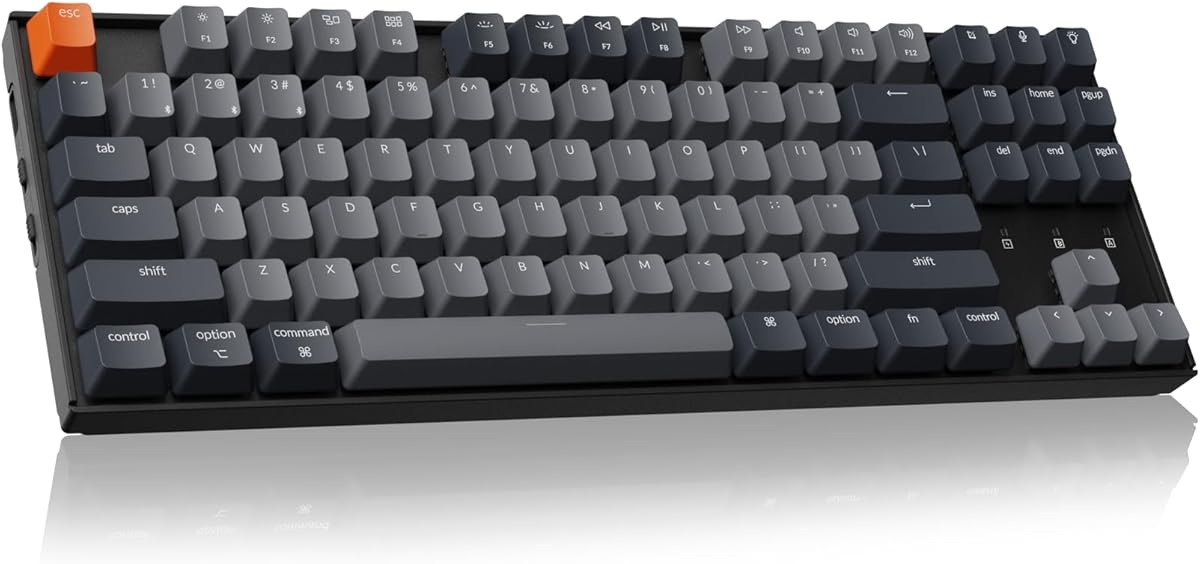
Keychron has a reputation for Mac friendly boards and the K8 continues this legacy. It offers a clean tenkeyless design that saves desk space. Users praise the seamless switching between devices via Bluetooth and wired mode.
We may earn a commission when you buy through this link, at no additional cost to you.
The brown switches provide a tactile bump without being clicky. This makes typing and gaming comfortable. The battery lasts up to 200 hours with backlight off. Extra keycaps for Mac and Windows ensure you have the right symbols.
Limitations include white backlight only rather than RGB. The build is solid but not exceptionally light. Some users may miss the full numpad. Yet the ergonomic support and battery life outweigh these minor points for most.
Choose this for a reliable wireless mechanical experience. It suits Mac users needing to switch between laptop and desktop. The TKL size fits smaller desks perfectly. Brown switches offer a balanced feel for both work and play.
The bottom frame provides great ergonomic support. Two level adjustable feet allow custom typing angles.
Connect up to three devices and switch instantly. This aids hybrid workflows mixing Mac and PC or tablets.
We may earn a commission when you buy through this link, at no additional cost to you.
The EPOMAKER F75 MAX stands out with a custom TFT screen and volume knob. It brings advanced customization to Mac users. The gasket mount design offers a premium typing feel. Users love the creamy sound profile out of the box.
We may earn a commission when you buy through this link, at no additional cost to you.
Hot swappable PCB lets you change switches easily. This allows fine tuning for personal preference. The TFT screen displays battery and custom animations. Connectivity supports Bluetooth and wired modes with high polling rates for games.
Setup may take time to master the software. The screen adds a bit of height but remains ergonomic. Some keys might need remapping for Mac functions. However the tactile and visual customization options are unmatched in this price range.
This is ideal for enthusiasts who love tweaking gear. It suits Mac users wanting modern features like the screen. The layout preserves navigation keys. If you value sound and feel this board delivers a high quality experience.
Foams and silicone reduce echo. This creates a mellow and pleasant thocky sound for typing.
Mac remapping and macros are supported. This boosts productivity and game performance significantly.
We may earn a commission when you buy through this link, at no additional cost to you.
Logitech G915 X brings next gen engineering to gaming. It offers a sleek low profile design that looks modern. The linear switches provide speed and precision with short travel. PBT keycaps ensure long lasting texture and durability.
We may earn a commission when you buy through this link, at no additional cost to you.
Master the game with custom key mapping and remapping. The LIGHTSYNC RGB creates immersive themes. A volume roller and nine G keys offer intuitive control. The aluminum top plate feels premium and sturdy against daily wear.
Being wired may limit setup flexibility compared to wireless models. The price reflects the premium build quality. If you prioritize aesthetics and feel this board excels. It fits desktop setups where cable management is easy.
Buy this for a high end command center feel. It suits gamers needing speed and comfort without bulk. Mac compatibility works well for key functions. If budget allows this delivers a top tier typing and gaming experience.
Short travel distance increases APM. This reduces finger fatigue during intense gaming sessions.
Measures only 23 mm high. This slim aesthetic keeps your desk looking clean and organized.
We may earn a commission when you buy through this link, at no additional cost to you.
Logitech G413 TKL SE focuses on durability and performance. It features heat resistant PBT keycaps that last long. The tactile switches offer uncompromising feedback for gaming. The top case combines aluminum and magnesium for a robust feel.
We may earn a commission when you buy through this link, at no additional cost to you.
6-key rollover prevents ghosting during complex inputs. The brushed aluminum finish elevates the setup look. FN keys control media easily without extra buttons. This keyboard balances cost and quality well for steady gamers.
The white LED lighting is simple but effective. It lacks RGB but ensures visibility. Some may prefer more customization options. Yet the build quality ensures it withstands heavy daily use for years.
Choose this for a no-nonsense reliable keyboard. It suits Mac users wanting mechanical feedback on a budget. The TKL layout saves space. If you prioritize durability over flashy lights this is a strong contender.
The top case acts as a backbone. This minimal flex ensures consistent key presses every time.
PBT material resists wear and heat. This keeps legends clear and keys smooth over time.
We may earn a commission when you buy through this link, at no additional cost to you.
Redragon K742 offers a compact 98% layout. This saves desk space while keeping essential keys. Gasket structure ensures a quiet and satisfying typing feel. Hot swappable PCB makes changes easy without soldering.
We may earn a commission when you buy through this link, at no additional cost to you.
Tri mode connectivity covers Bluetooth and wired options. The USB dongle storage is convenient. QMK VIA support enables deep customization for pros. The linear switches are pre-lubed for a creamy sound right away.
Battery life is good but varies with backlight. The layout takes a day to adjust if switching from full size. However the flexibility and sound make it worth it. It is great for hybrid office and gaming setups.
Buy this if you need versatility and control. It suits Mac users wanting open source software support. The included tools help maintenance. If you value a clean setup with rich features this fits well.
Tri mode switching is seamless. Connect three devices and toggle between them instantly.
QMK allows layer and macro editing. This empowers power users to build their perfect workflow.
We may earn a commission when you buy through this link, at no additional cost to you.
Keychron K4 brings a number pad to compact designs. The 96% layout keeps productivity high. It supports Mac function keys natively. Bluetooth connects three devices easily for multitasking. Brown switches offer reliable tactile feedback.
We may earn a commission when you buy through this link, at no additional cost to you.
The battery lasts up to 240 hours without backlight. Wired USB C is a backup. White LED backlight is bright and modern. Extra keycaps help switch between Windows and Mac modes seamlessly.
Some may find the size larger than pure TKL. The white light limits color customization. Yet the convenience of a number pad is valuable. This is ideal for data entry or spreadsheets on Mac.
Choose this for a productivity focused keyboard. It suits Mac users needing numpad but small size. The battery is huge. If you type numbers often or prefer Mac specific keys this is a great fit.
100 keys fit everything. This avoids needing a separate numpad.
Switch among phone laptop and tablet. The Broadcom chipset ensures stable Bluetooth.
We may earn a commission when you buy through this link, at no additional cost to you.
Logitech MX Mechanical is designed for comfort and workflow. Low-profile keys reduce strain. Smart illumination lights when hands approach. This saves battery. Tactile quiet switches allow precise feedback without noise.
We may earn a commission when you buy through this link, at no additional cost to you.
Flow control allows seamless work across devices. The USB-C charging is fast. Battery lasts months without backlight. Recycled plastic makes it eco friendly. It is elegant for professional environments and light gaming.
It lacks some deep gaming features like macros. The price is high compared to standard boards. However the ergonomics and smart features justify cost. This suits users who prioritize comfort and efficiency.
Buy this for an elegant daily driver. It suits Mac users needing quiet and precise typing. The smart lighting adds convenience. If you want style and ergonomics this is a top choice for pros.
Low profile keys improve comfort. This reduces fatigue during long coding or writing sessions.
Smart light senses your presence. It turns on and off automatically for power saving.
We may earn a commission when you buy through this link, at no additional cost to you.
GravaStar Mercury K1 features a futuristic exoskeleton design. The aluminum body is strong and light. RGB lighting has two systems for effects. Gasket mount softens keystrokes for a premium feel.
We may earn a commission when you buy through this link, at no additional cost to you.
Tri mode connectivity ensures versatility. The software personalizes lighting deeply. Linear switches offer quick reactions. This fits well in gaming setups wanting a unique look. It balances style and performance.
The design stands out visually. Some might find the custom look bold. Yet the build quality is excellent. If you want a standout desk piece this delivers on aesthetics and typing comfort.
Choose this for style and smooth typing. It suits Mac users wanting a custom look. The switches are fast. If you value design and solid build this is a great pick.
Aluminum exoskeleton provides stability. This ensures the board remains solid during intense use.
Kailh linear switches reduce friction. This ensures quick key presses without accidental presses.
We may earn a commission when you buy through this link, at no additional cost to you.
Logitech G213 Prodigy brings full size and RGB. It is durable and repels liquids. Five lighting zones allow customization. Integrated palm rest aids comfort. Anti-ghosting ensures key presses register accurately.
We may earn a commission when you buy through this link, at no additional cost to you.
G Hub software customizes lighting and macros. Dedicated controls handle media instantly. It suits gamers wanting style without high cost. The slim body fits many setups. It balances features and ease of use well.
It uses membrane-like keys not mechanical. Some may find them less tactile. Yet the reliability and cost are strong points. It is great for casual gaming or entry level setups.
Buy this for an affordable RGB solution. It suits Mac users needing a full board on a budget. The media controls help. If you want style and comfort this is a solid start.
Built to repel liquids. This keeps the board safe from spills in busy setups.
Five zones sync with games. This creates an immersive visual experience.
We may earn a commission when you buy through this link, at no additional cost to you.
Selecting the right board depends on your specific needs. This guide covers factors to ensure you find a perfect match for gaming and productivity.
Decide if you want wireless or wired. Wireless offers freedom but wired ensures zero latency. Most top options offer both or Bluetooth plus USB.
Choose based on your desk setup and tolerance for cables.
Consider desk space. Full size includes numpad but TKL or 60% saves space. Match the layout to your workflow needs for keys.
Compact sizes suit gaming while full sizes suit spreadsheets.
Mechanical switches come in tactile clicky or linear. Choose tactile for feedback or linear for speed. Ensure switches work well for Mac.
Test switches if possible to match your preference.
Ensure the keyboard supports macOS keys. Some models include specific Mac keycaps. Others require remapping. Check function key layouts before buying.
Prioritize models designed for Mac to avoid setup issues.
Look for durable materials like aluminum or PBT keycaps. This ensures longevity. A solid board withstands heavy typing and gaming.
Invest in quality for long term use.
Consider software support and hot swappable parts. Remapping keys aids productivity. Hot swapping lets you change switches later.
Choose options that allow growth and tweaking.
Decide if RGB or simple white backlight is needed. RGB adds style but simple backlight saves battery. Match to your aesthetic and usage.
Balance style with battery life needs.
Set a realistic budget. Premium boards cost more but offer features. Budget options provide basics. Determine what features matter most.
Focus on value for your priorities.
Connect the board via Bluetooth or USB. For Mac press Fn and connect. Install software if provided for full features.
Clean regularly with soft cloth and mild cleaner. Avoid liquid spills to protect electronics.
Store in dry place. Replace keycaps if worn. Keep firmware updated for best performance.
The EPOMAKER F75 MAX and Logitech G915 X are top for gaming due to speed and low latency. Both support quick inputs.
Yes modern wireless boards like Keychron K8 offer low latency. Ensure battery life supports long sessions.
Not required but mechanical offers better feel and longevity. For gaming mechanical is often preferred.
Use included software or system settings. Many boards come with Mac caps. Remap via system preference if needed.
Yes most work. But some key labels may differ. Remapping software helps align layouts.
TKL saves desk space for mouse. Full size has numpad for data. Choose based on your main tasks.
The top picks cover various needs from budget to premium. EPOMAKER F75 MAX leads in customization while Keychron K8 offers reliable wireless.
Prioritize switch feel and connectivity. Match the board to your workspace size. Check Mac compatibility before purchase.
Prices change often. Review current listings to get the best deal. Choose wisely for a better setup.