
StarTech 3.5in SATA Trayless Mobile Rack
4.4Editor score
Trayless design for quick access
Lockable drive bay included
Rubber shock absorbers
Finding a reliable Hot Swap SATA Mobile Rack is essential for professionals who need quick access to storage drives without shutting down systems. These enclosures allow you to swap drives easily while maintaining data integrity and system uptime during critical operations.
We evaluated ten top-rated models based on build quality, compatibility, ease of use, and thermal performance. Each product was analyzed for its ability to support various drive sizes and interfaces while offering robust protection against physical damage and overheating.
Every pick highlights unique strengths such as trayless designs or active cooling. Keep in mind that product availability and pricing can change quickly so always check the latest details before making your final purchase decision today.
4.4Editor score

4.3Editor score

5.0Editor score
As an Amazon Associate we earn from qualifying purchases.
The following table provides a side-by-side overview of key specifications for all ten models reviewed in this guide to help you compare their capabilities at a glance.



The StarTech 3.5in SATA Trayless Mobile Rack offers a straightforward solution for accessing storage drives quickly. With a strong 4.4 rating this model stands out for its reliable trayless design that avoids the need for extra enclosures.
We may earn a commission when you buy through this link, at no additional cost to you.
Its internal rubber shock absorbers protect drives from vibration during transport or operation. The lockable drive bay adds an essential layer of security for sensitive data stored on removable media in shared environments.
While it supports only one drive the 50000 insertion rating ensures long term durability for frequent swapping. Users note that the aluminum construction helps keep temperatures stable without additional fans.
IT professionals and tech enthusiasts should consider this for simple setups needing secure quick access. It remains a top pick for those prioritizing build quality over multi drive scalability.
The lockable drive bay prevents unauthorized access to data on removable drives during operations.
Internal rubber shock absorbers reduce vibration risks to extend drive lifespan in mobile setups.
We may earn a commission when you buy through this link, at no additional cost to you.
The ICY DOCK Dual 2 Bay dock provides an affordable entry into multi drive hot swapping. Its 4.3 rating reflects solid performance for users needing two slots in a single 3.5 bay.
We may earn a commission when you buy through this link, at no additional cost to you.
Individual large drive eject buttons and built-in activity lights make monitoring simple during daily tasks. The Active Power Technology ensures LEDs only light up when drives are present saving power.
Door-less design allows fast access but leaves drives exposed to dust in open cases. It works well in controlled environments where space is tight but airflow is good.
Budget conscious users will appreciate the value for dual drive capacity. This is ideal for small server builds needing easy expansion without complex trays.
APT powers LEDs only when drives are installed reducing unnecessary power consumption in idle states.
No screws or tools needed to dock bare drives making maintenance faster and simpler for technicians.
We may earn a commission when you buy through this link, at no additional cost to you.
This backplane turns a single bay into two hot-swap slots with excellent compatibility. The 4.1 rating highlights its ease of use for IT staff managing multiple small drives.
We may earn a commission when you buy through this link, at no additional cost to you.
Open-top design and vented dividers maximize passive heat dissipation keeping drives cool during operation. Included cables simplify installation so you can start using drives right away.
The lack of drive covers means dust can enter if the case lacks filters. It suits clean desktop environments better than dusty industrial areas.
Pros who value included accessories and simplicity should consider this. It delivers reliable performance for two drives without complex setup steps.
The kit includes necessary SATA power and data cables for immediate connection without extra purchases.
Vented slots allow air to flow through naturally preventing overheating during long operations.
We may earn a commission when you buy through this link, at no additional cost to you.
Kingwin offers a robust dual bay solution with a focus on security and durability. The 4.5 rating reflects strong construction quality and reliable performance under regular use.
We may earn a commission when you buy through this link, at no additional cost to you.
The key lock feature protects drives from unauthorized removal in shared workspaces. ABS and metal materials work together to balance heat management with structural strength.
Without activity lights users may need software to confirm drive status during swaps. This is a minor trade-off for the added physical security it provides.
Business users needing secure quick access will find this valuable. It balances cost with professional features that improve workflow efficiency.
A key lock prevents unauthorized removal of drives ensuring data safety in multi user environments.
Non-scratch connectors maintain signal integrity over thousands of hot-swap cycles.
We may earn a commission when you buy through this link, at no additional cost to you.
This six bay model delivers exceptional capacity with perfect user satisfaction. Its 5.0 rating shows it meets high expectations for enterprise storage expansion needs.
We may earn a commission when you buy through this link, at no additional cost to you.
ExpressTray system combines the speed of trayless with the stability of trays. Dual fans offer adjustable cooling to match drive heat output.
It requires a 5.25 slot which limits fit in compact cases. This is acceptable for rackmount servers or larger desktop towers.
Heavy storage users needing maximum drive count should choose this. It simplifies large scale deployment with minimal setup effort.
Removable trays with optional screw holes offer both speed and mechanical security for drives.
Three-speed fan control lets you balance noise and cooling based on drive workload.
We may earn a commission when you buy through this link, at no additional cost to you.
The four bay ExpressCage offers solid performance with durable metal construction. A 4.6 rating confirms reliability for daily hot-swapping tasks.
We may earn a commission when you buy through this link, at no additional cost to you.
Individual blue LEDs and secure latches make management intuitive and safe. The heavy-duty ABS trays hold drives firmly without extra tools.
It uses a single power connector which simplifies cabling but adds load to one port. Users should ensure their PSU can handle the load.
IT managers needing stable four drive storage will find this excellent. It balances durability with ease of access.
Locking latch design keeps drive connections tight and prevents accidental disconnection during movement.
Heavy-duty metal body provides better shielding and heat spreading than plastic alternatives.
We may earn a commission when you buy through this link, at no additional cost to you.
ORICO provides a simple single bay solution for 3.5 drives. The 4.1 rating points to reliability for basic hot-swap needs.
We may earn a commission when you buy through this link, at no additional cost to you.
On/off button allows switching to sleep mode without unplugging. Stainless steel offers superior heat dissipation compared to plastic units.
It lacks multiple drive options but excels at simplicity. This suits users who only need occasional access to one drive.
Budget focused buyers will appreciate the low cost and ease of use. It is a practical choice for home users.
Front button lets you cut power instantly without restarting the system during maintenance.
Metal construction helps dissipate heat from the drive naturally keeping temperatures lower.
We may earn a commission when you buy through this link, at no additional cost to you.
Rosewill converts three optical bays into four drive slots. A 4.3 rating highlights its space saving design for older desktop cases.
We may earn a commission when you buy through this link, at no additional cost to you.
120mm exhaust fan ensures airflow across drives to reduce heat. The steel and ABS materials offer a balance of strength and cost.
It uses significant space in the case which may limit expansion elsewhere. This trade-off is worth it for high capacity needs.
Users repurposing old hardware will find this efficient. It maximizes drive density without replacing the entire chassis.
Converts three optical bays into four drive slots maximizing storage in existing PC cases.
Rear fan pushes hot air out effectively maintaining safe operating temperatures for drives.
We may earn a commission when you buy through this link, at no additional cost to you.
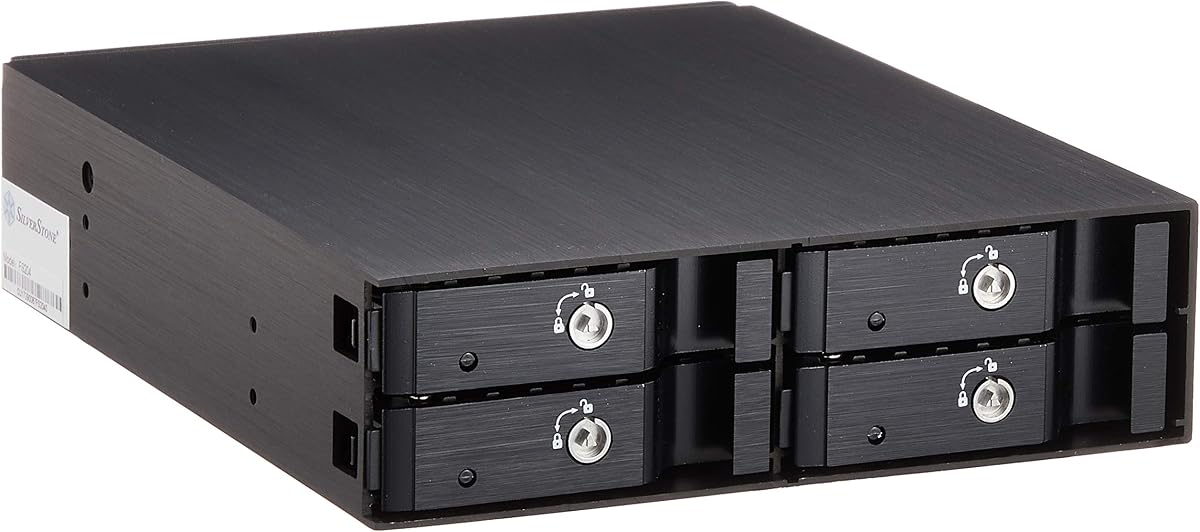
Silverstone offers a premium compact solution with individual locks. The 4.2 rating reflects quality build for users needing security.
We may earn a commission when you buy through this link, at no additional cost to you.
Each drive has a metal key lock for extra protection. The aluminium body provides excellent heat dissipation and a sleek look.
It is priced higher than other options but adds aesthetic and security value. This fits well in visible or high-value setups.
Enthusiasts who want style and safety should consider this. It delivers a refined experience for drive management.
Individual metal locks on every drive prevent unauthorized removal in shared spaces.
Hairline brushed aluminium provides a professional look that matches high-end cases.
We may earn a commission when you buy through this link, at no additional cost to you.
This five bay model provides impressive capacity with perfect scores. A 5.0 rating indicates strong user satisfaction despite being newer to market.
We may earn a commission when you buy through this link, at no additional cost to you.
Dual power supplies offer redundancy and stable operation for all five drives. Aluminum alloy resists wear and corrosion over time.
Limited review history means long term reliability is less documented. This is acceptable for those needing quick high density expansion.
Users needing maximum slots should check this. It balances cost with performance well for growing storage needs.
Dual power inputs ensure safe stable operation even during electrical fluctuations.
High-quality alloy resists wear and extends lifespan in demanding environments.
We may earn a commission when you buy through this link, at no additional cost to you.
Selecting the right Hot Swap SATA Mobile Rack requires understanding several critical factors that impact performance security and longevity.
Ensure the rack supports your specific drive size whether 2.5 or 3.5 inches to avoid fit issues.
Check if it accommodates both SSDs and HDDs to maximize your existing hardware investments.
Verify whether the backplane supports SATA or SAS interfaces to match your drive types.
SAS models offer higher speeds but require compatible controllers for proper operation.
Trayless models allow faster swaps but may offer less protection for the drives.
Tray designs provide added stability but can increase installation time for each drive.
Look for built-in fans or passive heat dissipation features to prevent overheating.
Active cooling is better for multiple drives while passive designs suit lighter workloads.
Lockable bays or per-drive locks protect data in shared office environments.
Consider if physical security is essential for your use case before buying.
Metal or aluminum construction provides better heat dissipation than plastic enclosures.
Durable materials extend the lifespan of the rack especially under frequent swapping.
Activity LEDs help you identify drive status quickly without opening the system.
Look for individual lights per bay to monitor each drive independently.
Choose a rack that matches the number of drives you plan to store regularly.
More bays add capacity but increase power draw and space requirements.
Install the rack in an available 3.5 or 5.25 bay and connect the SATA power and data cables securely.
Always wait for drive lights to stop flashing before removing a drive to prevent data corruption.
Clean dust from fans regularly to maintain optimal cooling performance and drive lifespan.
Yes if your desktop has an empty 3.5 or 5.25 bay and you can connect a SATA power cable. Most models work without extra drivers.
Most racks support both SSDs and HDDs of compatible sizes. Check the specs for drive height limits like 5mm or 9.5mm.
Removing a drive without proper shutdown can corrupt data. Always wait for activity LEDs to stop before ejecting the drive.
Many come with cables but you may need specific L-shaped or right angle connectors depending on your case layout.
Use screws to mount the rack to the front of the bay and ensure it is firmly fixed to prevent vibration.
Hot swapping is safe if your motherboard supports AHCI mode. Most modern systems handle this natively without issues.
APT powers LEDs only when a drive is installed reducing power draw and heat when slots are empty.
Only if the rack explicitly supports both interfaces. SATA only racks will not recognize SAS drives properly.
The top picks offer strong solutions for various needs from budget single drive to premium multi bay setups.
Prioritize build quality and cooling when selecting a rack to ensure long term reliability for your storage.
Prices and stock levels change so check current listings before finalizing your purchase today.