
8Bitdo M30 Wired Controller
4.2Editor score
Officially licensed by Xbox
USB-C wired connection
Custom profile switch button
This guide compares the top fightpads for Xbox including controllers and sticks to help you find the best gear for competitive fighting games.
Finding the right fightpad for Xbox can transform your gaming experience significantly. Whether you are a casual player or a competitive fighter, having a controller designed specifically for precision inputs matters. These devices offer unique layouts that enhance speed and accuracy during intense matches.
We evaluated ten top-rated fightpads and arcade sticks compatible with Xbox consoles. Our analysis focuses on build quality, button responsiveness, layout ergonomics, and software features. We looked at official licenses and third-party options to ensure broad compatibility across titles and platforms.
Each pick below highlights specific strengths like wireless connectivity, hot-swappable parts, or classic arcade layouts. Prices and availability change frequently so check current listings before purchasing. This guide helps you match your play style with the perfect controller setup for Xbox Series X and One.
4.2Editor score

4.6Editor score

4.4Editor score
This table provides a side-by-side view of all ten products to help you compare key specifications quickly. Look at connectivity options, button layouts, and special features to decide which fits your needs.


This controller stands out as the top choice for serious fighters due to its leverless design and high-quality switches. With a 4.6 rating it delivers precision and speed that traditional pads often lack. The all-button layout ensures every move is executed with maximum accuracy.
We may earn a commission when you buy through this link, at no additional cost to you.
The quad-movement design allows for ultra-fast inputs that are essential for competitive play. You can customize the feel by swapping the Kailh switches without soldering. Wireless support means less clutter and more freedom to move during intense gaming sessions on Xbox.
While the price is higher than standard controllers the durability and performance justify the investment. Learning curve for leverless controls might be steep for newcomers but veterans will appreciate the responsiveness. It is not the easiest switch but offers the best control available.
Buy this if you prioritize speed and customization in your fightpad setup. It is ideal for tournament players or enthusiasts who want premium features in a portable format. The build quality ensures it lasts through years of competitive use without degradation.
The leverless system eliminates mechanical levers for direct button presses that reduce input lag significantly.
Hot-swappable PCB allows you to change switch types easily to match your tactile preferences.
We may earn a commission when you buy through this link, at no additional cost to you.
This controller offers an affordable entry point into licensed Xbox fighting peripherals without compromising on core quality. It carries a 4.2 rating and supports Xbox Series X and One seamlessly. The wired connection ensures stable performance during critical matches.
We may earn a commission when you buy through this link, at no additional cost to you.
Featuring a six-button layout it mimics classic arcade setups for easier transitions from old console generations. The USB-C connection is modern and durable providing virtually lag-free input. You can switch profiles on the fly with a dedicated button for different game configurations.
Budget gamers will appreciate the value while still getting official licensing and solid build quality. The main trade-off is the lack of wireless which might limit mobility on your setup. However for stationary play the cable length is generally sufficient for most desks.
Choose this if you want reliable performance at a low cost without needing advanced features. It is perfect for casual fighters or those starting out who need a solid foundation. The simplicity of the design makes it easy to use right out of the box.
Fully licensed to work with Xbox Series X and One consoles for hassle-free setup and use.
Six-button configuration mirrors traditional fighting game consoles for familiar button mapping.
We may earn a commission when you buy through this link, at no additional cost to you.
The Nacon Daija is a premium arcade stick designed with collaboration from professional gamers. With a 4.4 rating it offers top-tier components like SANWA parts for durability and performance. It is officially licensed for Xbox ensuring compatibility with major fighting titles.
We may earn a commission when you buy through this link, at no additional cost to you.
The stick features fully configurable buttons via software allowing deep customization for specific games. You can switch between joystick heads to find the perfect control style for your hand size. The textured palm rest provides comfort during long sessions reducing fatigue and strain.
While it costs more than pads the investment pays off in longevity and competitive edge. The size is substantial so ensure you have enough desk space for optimal use. Cable management is easy with the detachable USB design included in the package.
Opt for this if you want an arcade experience at home with pro-level tools and comfort. It suits serious competitors who need precision and durability. The included accessories like tools and multiple heads add significant value for the price.
Uses leading brand components for consistent inputs and long-lasting performance in competitive play.
Switch joystick heads and use textured rest to tailor ergonomics to your preferred style.
We may earn a commission when you buy through this link, at no additional cost to you.
This leverless controller introduces next-generation Hall Effect switches that eliminate wear entirely. Rated 4.2 it brings advanced tech like Rapid Trigger to Xbox platforms. The LCD screen acts as a control hub for deep customization without external software.
We may earn a commission when you buy through this link, at no additional cost to you.
The Rapid Trigger allows adjusting trigger sensitivity from 0.1mm to 2.8mm for precise inputs. SOCD management ensures compliance with tournament rules by restricting simultaneous directional inputs. You can customize standby animations and settings directly through the browser-based driver.
While innovative the interface can be complex for users not used to detailed menus. The PC polling rate is high but console use might not fully utilize these specs. Still it offers a unique experience for those wanting to experiment with modern tech.
Select this if you want cutting-edge features and don't mind a learning curve. It is great for tech-savvy gamers who enjoy tweaking settings for optimal performance. The durability of magnetic switches ensures it remains reliable for years of use.
Contactless magnetic design removes physical friction preventing wear and debris buildup over time.
Built-in LCD lets you adjust modes and see inputs clearly during setup and play.
We may earn a commission when you buy through this link, at no additional cost to you.
HORI brings its legendary quality to this arcade stick with a focus on customization. Rated 4.3 it is officially licensed for Xbox Series X and One. The chassis opens easily for maintenance and part swaps without needing tools.
We may earn a commission when you buy through this link, at no additional cost to you.
You can swap the top housing artwork to personalize the look to your style. Buttons are assignable and include a lock mode to prevent accidental presses during play. The profile button helps manage different settings for various games quickly.
The design balances premium features with reliability making it a solid mid-range choice. It lacks some modern extras but delivers consistent performance for classic fighting games. The build quality reflects HORI's reputation for long-lasting arcade peripherals.
Buy this if you prefer a traditional stick with easy serviceability and official support. It is ideal for players who want customization without extreme complexity. The layout suits most fighting titles and ensures compatibility across Xbox generations.
Chassis opens easily for maintenance and part swaps without needing extra tools.
Top housing artwork can be swapped to match your personal gaming aesthetic.
We may earn a commission when you buy through this link, at no additional cost to you.
This is the first wireless arcade stick officially licensed for Xbox bringing freedom to fight. Rated 4.6 it combines classic layout with modern wireless tech. You can use 2.4G for wire-free play or USB for charging and stability.
We may earn a commission when you buy through this link, at no additional cost to you.
Button mapping is supported via Ultimate Software allowing customization for different titles. Fast-mapping buttons make setting up profiles quick and efficient. The audio jack connects directly to headsets for clear voice chat during multiplayer matches.
Battery life is up to 30 hours which is decent for occasional play but might need charging for marathon sessions. The white color looks clean but shows wear over time. Still the wireless advantage outweighs these small drawbacks for many users.
Choose this if you want the convenience of wireless without sacrificing stick accuracy. It suits players who need portability and clean setups. The official license ensures it works seamlessly with all Xbox fighting games.
First Xbox-licensed wireless stick allows playing without cords on the console.
3.5mm audio jack connects headsets directly for clear voice chat during matches.
We may earn a commission when you buy through this link, at no additional cost to you.
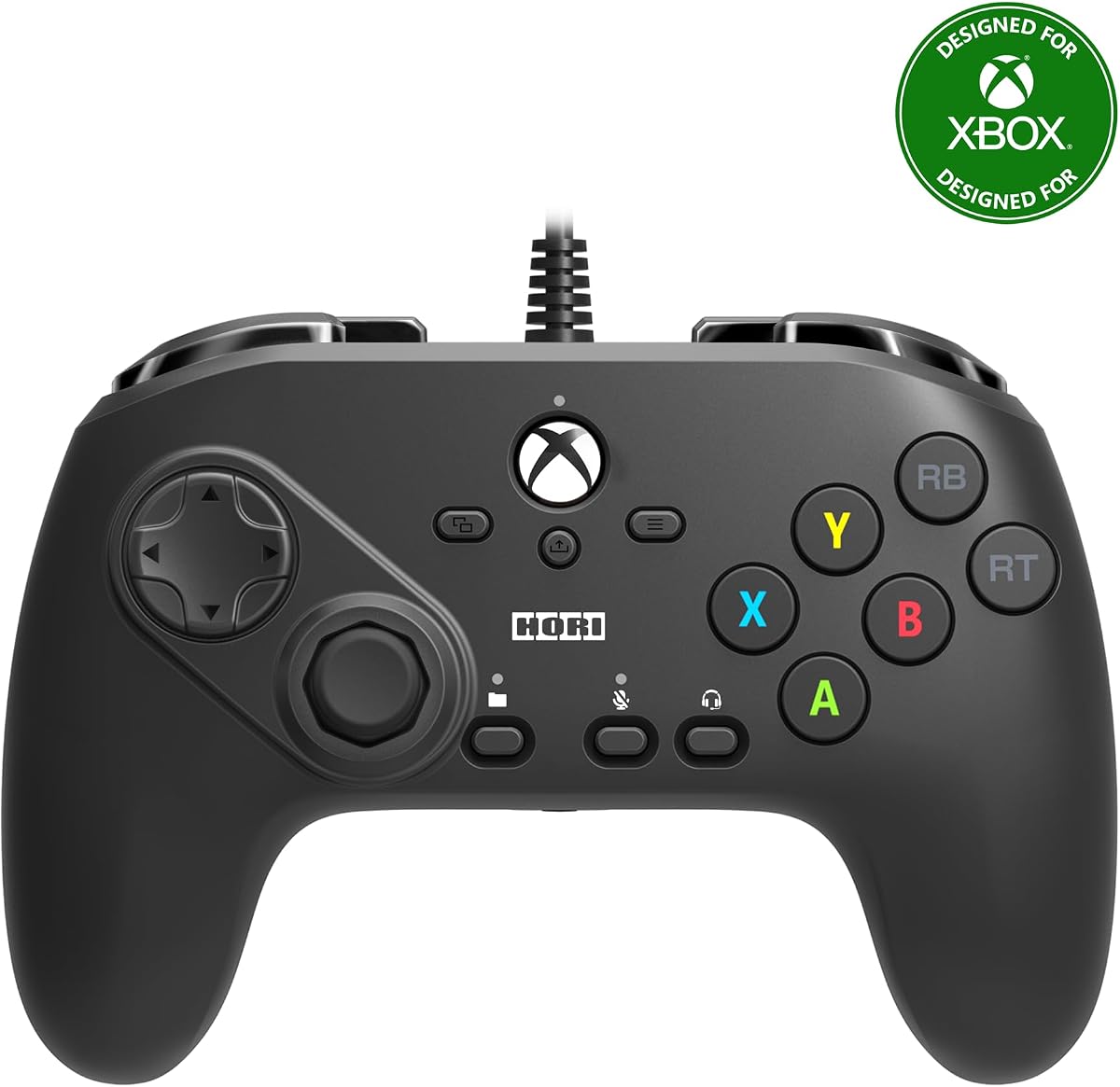
The Octa features a six-button layout optimized for fighting games with micro switches. Rated 3.5 it offers adjustable d-pads and short throw analog sticks for accuracy. It is officially licensed by Microsoft ensuring compatibility across Xbox platforms.
We may earn a commission when you buy through this link, at no additional cost to you.
You can save up to four profiles using the companion app for different game settings. Micro switches provide faster actuation which helps with rapid combos. The adjustable d-pad allows you to set resistance to match your preferred control style.
While the rating is lower the hardware is solid for those who prefer pads over sticks. Some users find the ergonomics less comfortable for long sessions. The wired connection ensures no latency which is crucial for competitive play.
Buy this if you want a controller specifically tuned for fighting games with speed features. It is best for players who prefer the feel of a pad over a stick. The profile feature adds convenience for switching between games quickly.
Micro switches offer faster actuation for rapid input execution during combos.
Save up to four profiles via app for easy switching between games.
We may earn a commission when you buy through this link, at no additional cost to you.
HORI PAD Pro allows fine tuning of analog stick and trigger sensitivity for precise control. Rated 4.2 it includes Share Button for capturing game highlights. It is officially licensed ensuring full compatibility with Xbox Series X and One.
We may earn a commission when you buy through this link, at no additional cost to you.
Adjustable vibration feedback lets you customize haptic responses during gameplay. Profiles can be saved and switched via companion app for different titles. The build quality matches HORI's reputation for reliable and durable accessories.
The adjustability makes it versatile for different game types beyond just fighting. However the price is higher than standard generic controllers. Wired connectivity ensures stability which is often preferred for competitive scenarios.
Select this if you want a customizable controller that adapts to your grip and play style. It fits players who need sensitivity tweaks for specific fighting games. The Share Button adds utility for streaming or sharing clips easily.
Fine tune stick and trigger sensitivity for precise input control.
Adjust vibration feedback to customize feel during gameplay sessions.
We may earn a commission when you buy through this link, at no additional cost to you.
This FightPad features an enlarged circular D-Pad and six-button layout. Rated 3.9 it includes Turbo functionality and a three-way switch for analog use. It connects via USB cable and supports headset port for chat.
We may earn a commission when you buy through this link, at no additional cost to you.
The circular D-Pad allows smooth motion which some players prefer for combos. Turbo features help with rapid button presses without holding keys. The headset port makes it useful for multiplayer sessions on older consoles.
Being an older model compatibility with newer Series X games might require verification. The design is iconic but lacks modern features found in newer pads. It appeals to retro fans and those familiar with 360 era controls.
Consider this if you have nostalgic value or specific retro console needs. It is best for collectors or players used to the original FightPad layout. Check compatibility before buying if planning for newer games.
Enlarged circular D-Pad allows smooth motion for precise directional combos.
Multi-speed Turbo helps rapid inputs without repetitive button pressing.
We may earn a commission when you buy through this link, at no additional cost to you.
HyperX Clutch Gladiate offers trigger locks and programmable rear buttons for versatility. Rated 4.3 it works on Xbox and PC with official licensing. Textured grips ensure comfort and stability during intense gameplay sessions.
We may earn a commission when you buy through this link, at no additional cost to you.
Dual trigger locks let you set short pulls for faster actions. Rear buttons map to thumb stick clicks for quicker access to functions. The Share Button makes it easy to capture game highlights for sharing.
It is a general controller with features that help fighting but is not a dedicated pad. Trigger locks provide advantage in shooter style actions too. Build quality is solid and durable enough for daily use.
Choose this if you want a versatile controller that works across genres including fighting. It suits players who need customization without buying a dedicated fightpad. The textured grips and triggers add value to regular gaming.
Dual trigger locks allow shorter pulls for faster input execution.
Programmable rear buttons map to thumb stick clicks for quicker access.
We may earn a commission when you buy through this link, at no additional cost to you.
Choosing the right fightpad involves evaluating layout preference build quality and features that match your play style. Use these factors to narrow down options effectively.
Decide between traditional controllers and dedicated arcade sticks or leverless pads. Layout affects speed comfort and muscle memory development over time.
Pick a layout that matches your preferred input method for best results.
Ensure the device is officially licensed for Xbox Series X and One to avoid connection issues. Cross platform support adds value if you play on PC as well.
Look for official Xbox logos to guarantee seamless setup.
Solid construction with high quality buttons and joysticks ensures longevity. Materials matter for durability under frequent heavy use in competitive play.
Check reviews for long-term reliability before purchasing.
Wired connections generally offer lower input lag compared to wireless alternatives. Fast polling rates are essential for precise inputs in fighting games.
Prioritize low latency options for competitive accuracy.
Hot swappable parts and software mapping allow adapting the controller to your needs. Look for adjustable features to optimize sensitivity and button assignments.
Customization options extend the device lifespan across different games.
Comfortable grips and palm rests reduce strain during long sessions. Design should fit your hand size to prevent fatigue and improve control.
Choose ergonomic features for extended gameplay comfort.
Budget options offer core functionality while premium devices provide advanced features. Determine your spending limit to balance cost with performance needs.
Select a price tier that matches your budget requirements.
Decide between wired and wireless based on your setup needs. Wireless offers mobility while wired ensures stable connection for competitive play.
Pick connectivity that fits your gaming environment best.
Connect the device to your console via USB or wireless receiver. Ensure the controller is charged if wireless or cable is secure for wired models.
Install any required companion apps to customize buttons and profiles. Configure sensitivity settings to match your playing style for optimal results.
Store in a cool dry place and clean regularly to maintain performance. Avoid dropping or exposing to moisture to prevent internal damage.
Yes most listed products are officially licensed for Xbox Series X and Series S. Always check product details for specific console compatibility before purchasing.
All recommended controllers support major fighting games like Street Fighter. They are designed to handle complex inputs and combos required for these titles.
Leverless use direct buttons for speed while traditional use sticks for feel. Leverless reduces wear and increases input speed for competitive play.
Most models support Windows PC alongside Xbox consoles. USB wired options are generally plug and play on PC without additional drivers.
Wireless options work well for casual play but wired offers lower latency. For competitive matches wired connections are preferred for stability.
Use the companion software provided by the manufacturer. These apps allow you to remap buttons and save profiles for different games.
The top picks cover budget casual and premium options for every type of player. The 8BitDo All-Button Arcade Controller leads for innovation while the M30 is budget friendly.
Prioritize build quality and input speed based on your competitive goals. Comfort features are vital for extended play sessions without fatigue.
Prices and stock change so review current listings before finalizing your decision. The right fightpad elevates your gaming experience significantly on Xbox.