
Redragon K618 PRO
4.1Editor score
Tri-mode connectivity support
Macro keys without software
Slim low-profile design
Compare the best low profile mechanical keyboards for gaming and work. We evaluate switch feel, connectivity, and build quality to help you find the perfect
Low profile mechanical keyboards offer a unique blend of traditional tactile feedback and modern slim design. They reduce wrist strain and provide faster actuation for both typing and gaming tasks. Finding the right one requires understanding switch types, connectivity options, and build materials.
We compared ten top-rated models based on user feedback, technical specifications, and real-world performance. Our analysis covers wireless capabilities, customization options, and ergonomic features across various price points. Each product was selected for its ability to deliver a superior typing experience in a compact form factor.
This guide presents detailed reviews of each keyboard including their strengths and potential limitations. You will see how each model fits different workflows from office productivity to competitive gaming. Please note that availability and pricing can change frequently so check current listings before purchasing.
4.1Editor score

4.6Editor score

4.7Editor score
The following table provides a side-by-side overview of all ten keyboards featured in this guide. It highlights key specifications such as layout size, switch type, and connectivity methods to help you quickly identify the model that suits your specific needs and preferences.




The Redragon K618 PRO stands out as an affordable entry into the low-profile mechanical keyboard market. It holds a solid user rating and delivers essential features for budget-conscious consumers. Its slim design and versatile connectivity make it a strong candidate for casual users and gamers alike.
We may earn a commission when you buy through this link, at no additional cost to you.
Key strengths include its tri-mode connectivity allowing seamless switching between USB-C Bluetooth and 2.4GHz wireless. The dedicated macro zone lets you record complex key combinations without installing extra software. This feature is particularly useful for productivity workflows where shortcuts are frequent.
Trade-offs exist in build quality compared to premium models. The plastic body feels lighter and less premium than aluminum alternatives. However the reduced cost makes up for this difference for users prioritizing function over luxury materials in their workspace setup.
This keyboard is ideal for students or professionals needing a compact wireless solution on a budget. If you value speed and macro functionality without spending much the K618 PRO delivers excellent value. It remains a top choice for entry-level low-profile mechanical enthusiasts.
The tri-mode connectivity ensures you can switch devices without re-pairing offering zero lag transitions across platforms.
A dedicated macro zone plus media controls let you adjust volume and tracks instantly without installing anything first.
We may earn a commission when you buy through this link, at no additional cost to you.
The Keychron K3 Version 2 is a compact 75% wireless mechanical keyboard built for peak productivity. It features a slim design and supports three devices via Bluetooth. Its unique Mac layout with extra keycaps ensures compatibility across operating systems out of the box.
We may earn a commission when you buy through this link, at no additional cost to you.
A major advantage is the open-source QMK firmware enabling endless customization possibilities. The Keychron Launcher web app simplifies remapping and macros. Even users unfamiliar with coding can tailor the layout using the built-in AI assistant for a personalized typing experience.
The lightweight aluminum body makes it portable yet durable for daily use. However the low-profile switches might feel different to those used to traditional keyboards. The short travel distance aids speed but may reduce tactile feedback for some typists.
This model fits best for professionals working across Mac and Windows ecosystems. Its AI-assisted features and flexible connectivity make it a smart choice for multitaskers. If you want a slim wireless board with deep customization options the K3 V2 is a solid contender.
With a unique Mac layout the K3 has all necessary multimedia keys while still being compatible with Windows systems.
Ask in plain language via the AI assistant and customization is handled automatically simplifying the setup process.
We may earn a commission when you buy through this link, at no additional cost to you.
Cherry MX 10.0N combines a slim profile with premium aluminum housing for durability and style. It features Low Profile Speed switches for fast actuation and quiet operation. This makes it suitable for both gaming and professional work environments where noise is a concern.
We may earn a commission when you buy through this link, at no additional cost to you.
The customizable RGB backlighting allows personalization to match your setup. The integrated stand folds out for ergonomic positioning during long sessions. The linear switches offer smooth feedback without the clickiness of tactile variants appealing to gamers.
While the aluminum build is sturdy it adds significant weight making it less portable. Wired connectivity limits flexibility for some wireless setups. However the robust construction ensures longevity which offsets the lack of mobility for desk-bound users.
If you prioritize build quality and speed over portability this is an excellent choice. The slim design reduces wrist strain while the RGB lighting adds a modern touch. It is recommended for gamers and typists seeking a reliable full-size low-profile experience.
Cherry MX Low Profile Speed Switches provide linear quiet and responsive feedback for smooth typing and gaming.
The aluminum housing offers a sturdy and sleek metal construction ensuring long-term durability for daily tasks.
We may earn a commission when you buy through this link, at no additional cost to you.
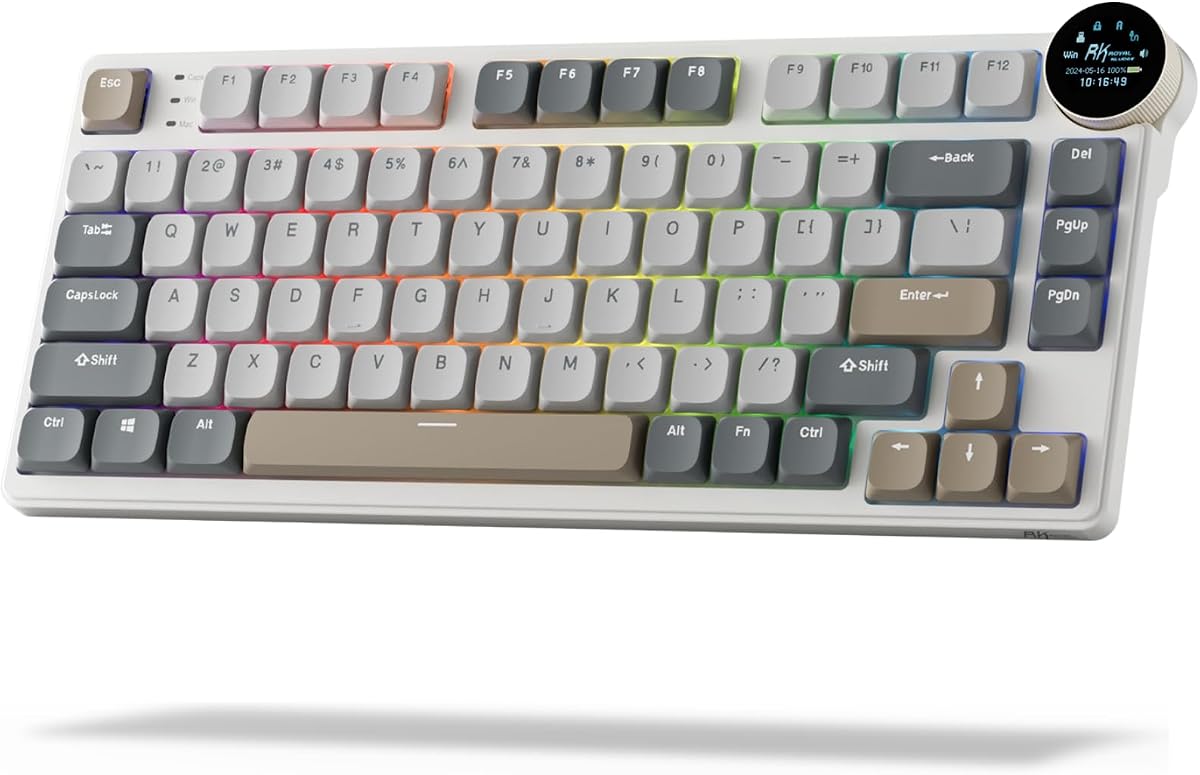
The RK ROYAL KLUDGE N80 redefines versatility with a dynamic smart display. It shows GIFs connection modes and battery status directly on the keyboard. An intuitive knob allows effortless control over volume and backlight settings enhancing usability without software.
We may earn a commission when you buy through this link, at no additional cost to you.
Sound-absorbing layers minimize hollow sounds and provide a smooth quiet typing experience. The top-mounted structure ensures stability during intense gaming sessions. Tri-mode connectivity allows seamless switching between devices for work and play.
The small screen might be distracting or hard to read in bright environments. Setup can be complex due to the various customization options. However these features add a unique flair that sets it apart from standard low-profile keyboards.
This keyboard is perfect for tech enthusiasts who want customization and visual flair. The combination of audio quality and smart features makes it a standout option. If you appreciate innovation and tactile reliability the N80 is worth considering.
Effortlessly control volume and modes with a simple twist or click of the knob on the top-mounted design.
Triple sound-absorbing layers significantly minimize hollow sounds delivering a super smooth and quiet typing experience.
We may earn a commission when you buy through this link, at no additional cost to you.
The Flow Lite 84 Keys is designed for comfort with a natural wrist position. It features low-profile mechanical keys providing effortless precision for long typing sessions. PBT keycaps offer durability and a textured surface that stays sharp over time.
We may earn a commission when you buy through this link, at no additional cost to you.
A gasket design adds soft cushioning and a richer tone to each keystroke. The built-in adjustable kickstand and roller volume enhance practicality. Battery life is remarkable allowing up to eighty hours of working time on one charge.
Transitioning from aluminum to ABS reduces cost but might feel less premium to some users. The lack of swappable switches limits future customization. However the ergonomics and material quality still deliver a high-quality typing experience.
Ideal for users focused on ergonomics and daily writing tasks. The smooth touch and quiet operation make it suitable for shared spaces. If you prioritize wrist health and a reliable wireless experience this is a great choice.
Designed for a more natural wrist position it features a lower front height to relax wrists during extended use.
PBT Double Shot Keycaps provide a durable textured typing experience with non-slip matte texture and sharp characters.
We may earn a commission when you buy through this link, at no additional cost to you.
The Keychron K1 Ultra sets a new standard with its 8K polling rate. This ensures ultra-fast responsiveness for competitive gaming and precise typing. The compact 80% TKL layout saves desk space while retaining essential keys for efficiency.
We may earn a commission when you buy through this link, at no additional cost to you.
Hardwood side panels paired with double-shot keycaps offer a durable and luxurious feel. ZMK firmware and the Launcher Web App provide deep customization. Sound-dampening layers help reduce noise and resonance during typing for a quieter workspace.
The high price point may deter budget users. However the build quality and performance justify the investment for enthusiasts. The AI-assisted customization makes advanced features accessible to average users.
Best suited for professionals and gamers who demand top-tier performance. The multi-system support ensures compatibility across your devices. If you seek a premium low-profile keyboard with cutting-edge features the K1 Ultra is unmatched.
Supports up to 8K wired polling along with 2.4GHz and Bluetooth 5.2 connectivity for ultra-fast responsiveness.
North-facing RGB backlighting pairs with wax-oil treated hardwood side panels for a durable and sleek design.
We may earn a commission when you buy through this link, at no additional cost to you.
The Keychron K17 Max features a popular 96% layout that balances compact size with functionality. It supports 2.4 GHz wireless connectivity with a fast 1000 Hz polling rate. This ensures smooth performance for both work and gaming sessions.
We may earn a commission when you buy through this link, at no additional cost to you.
Powered by QMK firmware it allows transparent and secure customization. The Gateron low-profile switches are 31% thinner than standard switches providing a satisfying tactile response. Double-shot PBT keycaps resist shine and oil for long-term use.
Some users may miss dedicated navigation keys common in larger boards. The tactile switches might not suit those preferring linear feedback. However the slim profile and reliable wireless connection make it a solid daily driver.
This keyboard fits best for users needing a compact full-function board. Its open-source firmware ensures future-proofing and flexibility. If you prioritize space-saving design and wireless reliability the K17 Max is an excellent option.
Gateron low-profile switches are 31% thinner than standard switches delivering a satisfying tactile response.
Running on QMK open-source firmware the K17 Max ensures transparency and security for all users.
We may earn a commission when you buy through this link, at no additional cost to you.
The Flow Lite 100 Keys offers a full-size layout in a low-profile design. It features Specter Full POM Linear Switches that reduce finger joint fatigue. The textured ABS body maintains a soothing touch while reducing costs compared to aluminum.
We may earn a commission when you buy through this link, at no additional cost to you.
Battery life is exceptional with a 3000mAh lithium battery providing up to 100 hours of use. A built-in adjustable kickstand and aluminum volume wheel enhance usability. The gasket design brings soft cushioning to every keystroke.
The larger size may not fit all desk setups. Some users might prefer metal bodies for a premium feel. However the battery performance and ergonomic design provide significant value for daily typing needs.
Ideal for those needing a full numeric keypad without sacrificing comfort. The long battery life ensures minimal interruption during work. If you prioritize endurance and typing comfort this model delivers strong performance.
Features a built-in 3000mAh lithium battery providing up to 100 hours of working time on one charge.
Designed for a more natural wrist position it lowers operating force significantly reducing finger joint fatigue.
We may earn a commission when you buy through this link, at no additional cost to you.
The Keychron K3 Max SE is a low-profile wireless mechanical keyboard with QMK firmware. It supports ultra-fast responsiveness with a 2.4 GHz wireless and 1000 Hz polling rate. This makes it suitable for competitive gaming and precise input tasks.
We may earn a commission when you buy through this link, at no additional cost to you.
Hot-swappable support allows easy switch changes without soldering. Premium double-shot PBT keycaps resist shine and oil for long-lasting performance. Advanced EPDM acoustic foam ensures a quieter and more cushioned typing experience.
The setup process may be complex for those new to custom keyboards. The higher price reflects the advanced features and build quality. However the customization options justify the investment for enthusiasts seeking a unique setup.
Best for users who want full control over their typing experience. The acoustic improvements reduce noise for shared environments. If you value customization and quiet operation this is a top-tier choice.
Empowered by QMK firmware it offers endless possibilities for key remapping macros shortcuts and enhanced productivity.
Elevate every keystroke with advanced EPDM acoustic foam for a quieter and more cushioned typing experience.
We may earn a commission when you buy through this link, at no additional cost to you.
The Razer Ornata V3 features low-profile keys for natural hand positioning. Its Mecha-Membrane switches fuse snappy feedback with a familiar feel. UV-coated keycaps ensure fade-resistant legends and protection against wear and tear from frequent use.
We may earn a commission when you buy through this link, at no additional cost to you.
Backlit dedicated media keys allow quick control over volume and playback. The magnetic soft touch wrist rest provides ample comfort for long periods. This design reduces strain and enhances overall typing comfort.
The hybrid switch technology may not satisfy purists preferring full mechanical switches. RGB customization is less extensive than competitors. However the balance of comfort and functionality makes it a reliable choice.
Ideal for gamers and office workers seeking a familiar feel with modern ergonomics. The wrist rest adds value for extended sessions. If you prioritize comfort and media controls this keyboard delivers solid results.
Mecha-Membrane switches fuse snappy clicky feedback of a mechanical switch with the familiar feel of a conventional keyboard.
Backlit dedicated media keys let you configure pause play skip and adjust everything from brightness to volume.
We may earn a commission when you buy through this link, at no additional cost to you.
Choosing the right low-profile mechanical keyboard depends on several critical factors beyond just aesthetics. This section explores key considerations to help you make an informed decision tailored to your workflow.
Switches determine the feel and sound of the keyboard. Low-profile switches come in tactile and linear variants. Linear switches offer smooth travel while tactile switches provide a bump at the actuation point.
Select a switch type that matches your preference for feedback and noise levels.
Modern keyboards offer wired Bluetooth or 2.4GHz wireless options. Wired connections ensure the lowest latency for gaming while wireless provides a clutter-free desk. Tri-mode keyboards allow seamless switching between devices.
Decide if you need multi-device support or prioritize low-latency performance.
Materials like aluminum or wood provide durability and a premium feel. Plastic bodies are lighter and more affordable but may feel less robust. Weight impacts portability and desk stability.
Choose materials that balance weight with durability based on your usage.
Layouts range from compact 60% to full-size. Smaller layouts save desk space but may lack navigation keys. A 75% or TKL layout offers a balance between size and functionality.
Ensure the layout includes keys you need for daily tasks.
Software or firmware like QMK allows deep key remapping and macro creation. Hot-swappable sockets enable switch changes without soldering. RGB lighting adds aesthetic flexibility.
Look for features that match your desire for personalization.
Low-profile keyboards naturally reduce wrist strain by keeping hands flatter. Some models include built-in stands or wrist rests. Adjustable kickstands help achieve a comfortable typing angle.
Prioritize models that support natural wrist positioning.
For wireless models check the battery capacity and usage estimates. Longer battery life reduces charging frequency. USB-C charging is now standard for most modern keyboards.
Consider how often you want to charge your device.
Some brands offer proprietary apps while others support open-source tools. AI assistants are emerging to simplify setup. Ensure the software is user-friendly and regularly updated.
Select a brand with software that supports your workflow.
Connect your keyboard via USB-C or Bluetooth and install necessary software for customization. Use the provided keycaps to switch between operating systems if needed. Configure macros and shortcuts to streamline your daily tasks.
Clean the keys regularly using a soft brush or compressed air to remove dust. Avoid liquids and harsh chemicals on the keycaps and body to prevent damage. Keep the device dry to maintain battery health.
Store the keyboard flat when not in use to prevent bending of the low-profile switches. Use a protective case for transport to avoid scratches. Regularly check for firmware updates to ensure optimal performance.
Yes they are excellent for gaming due to shorter travel distance and faster actuation. This reduces the time between pressing a key and registering the action. Many models support high polling rates for precise control in competitive games.
Yes low-profile switches generally have similar durability to standard mechanical switches. With proper care and minimal force they can handle millions of keystrokes. Build quality also plays a major role in long-term longevity.
Most modern low-profile keyboards support both systems seamlessly. They often include physical switch toggles or extra keycaps to accommodate different layouts. Software compatibility is standard across major operating systems.
Use compressed air to blow out dust between the low-profile keycaps. A soft brush helps remove surface debris. Avoid using liquids directly on the keyboard to protect internal components.
A hot-swappable keyboard allows you to change switches without soldering. This enables customization of feel and sound without opening the device. It is a great feature for enthusiasts who like to experiment.
Low-profile keyboards offer a sleeker design that fits better in compact spaces. They reduce wrist strain by keeping hands at a flatter angle. Many users find them lighter and more portable for travel.
We reviewed ten top low-profile mechanical keyboards ranging from budget-friendly to premium models. The Redragon K618 PRO leads in value while the Keychron K1 Ultra offers the best performance. Each model brings unique features suited to different workflows and preferences.
Prioritize ergonomics and connectivity based on your daily needs. A comfortable typing angle and reliable wireless performance can significantly boost productivity. Consider the switch type carefully to ensure it matches your tactile preferences.
Prices and availability change frequently so verify current listings before purchasing. We hope this guide helps you find the perfect low-profile mechanical keyboard for your setup.