10 Best 3D Printer Table Stand with Filament Storage (November 2026) Expert Guide
Written by Jamie · Updated November 2026
Finding the right support structure for your 3D printer is crucial for print quality and workspace organization. A dedicated table stand with filament storage keeps your printer stable and materials accessible.
We compared ten top-rated models based on durability, storage capacity, vibration absorption, and ease of assembly. Our analysis focuses on real-world usability for hobbyists and professionals.
Each pick highlights specific strengths like power hubs or heavy-duty frames. Prices and availability change frequently, so verify current details before purchasing to ensure the best value.
Top 3 Picks for Best 3D Printer Table Stand with Filament Storage
Best Budget
3D Printer Stand with Filament Storage, 29.5" x 18.9" Dustproof and Moisture-Proof Heavy Duty Large 3D Printer Table Cart with 360°Rolling & Cabinet for Workshop Studio Office (Rustic Brown)
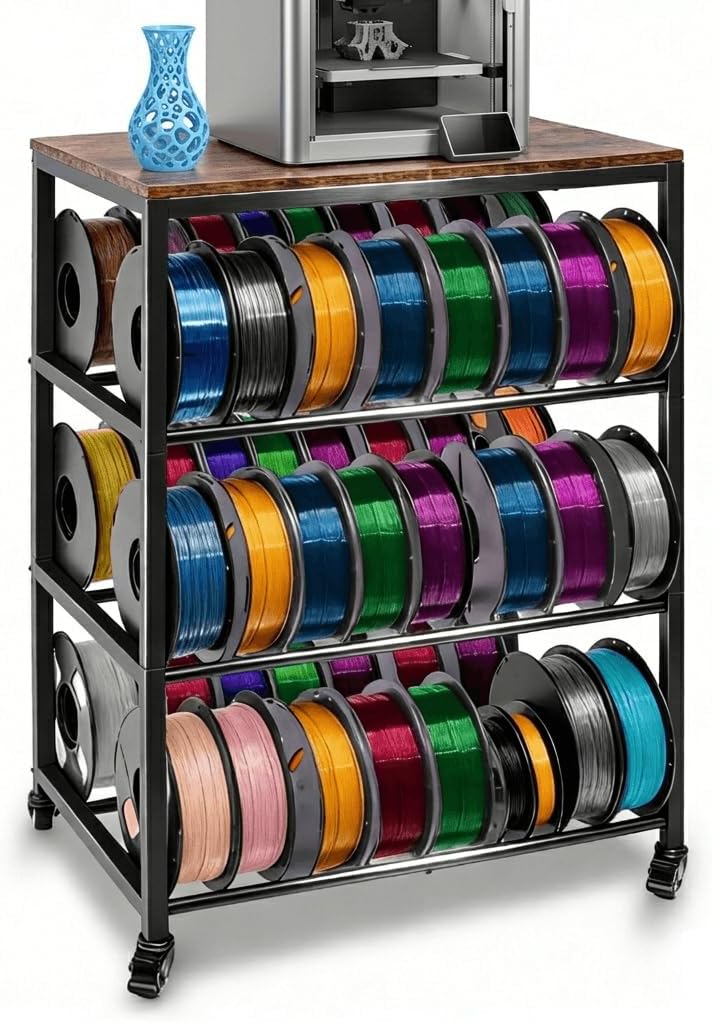
3D Printer Stand with Filament Storage, 4-Tier 3D Printer Table Cart Filament Storage Rack with Wheels, Heavy Duty Metal 3D Printer Desk Shelf for Studio Garage Office Workshop
As an Amazon Associate we earn from qualifying purchases.
Top 10 Best 3D Printer Table Stand with Filament Storage in 2026 Compared
The following table compares the key specifications and features of all ten reviewed models to help you quickly identify the right fit for your 3D printing setup.
ProductsSpecificationsEditor scorePrice
1
Editor's Choice
3D Printer Stand with Filament Storage – Heavy Duty 3D Printer Table with Metal Drawer, 36 inch 3 Tier Metal 3 D Printing Desk for 3 D Printers, Black
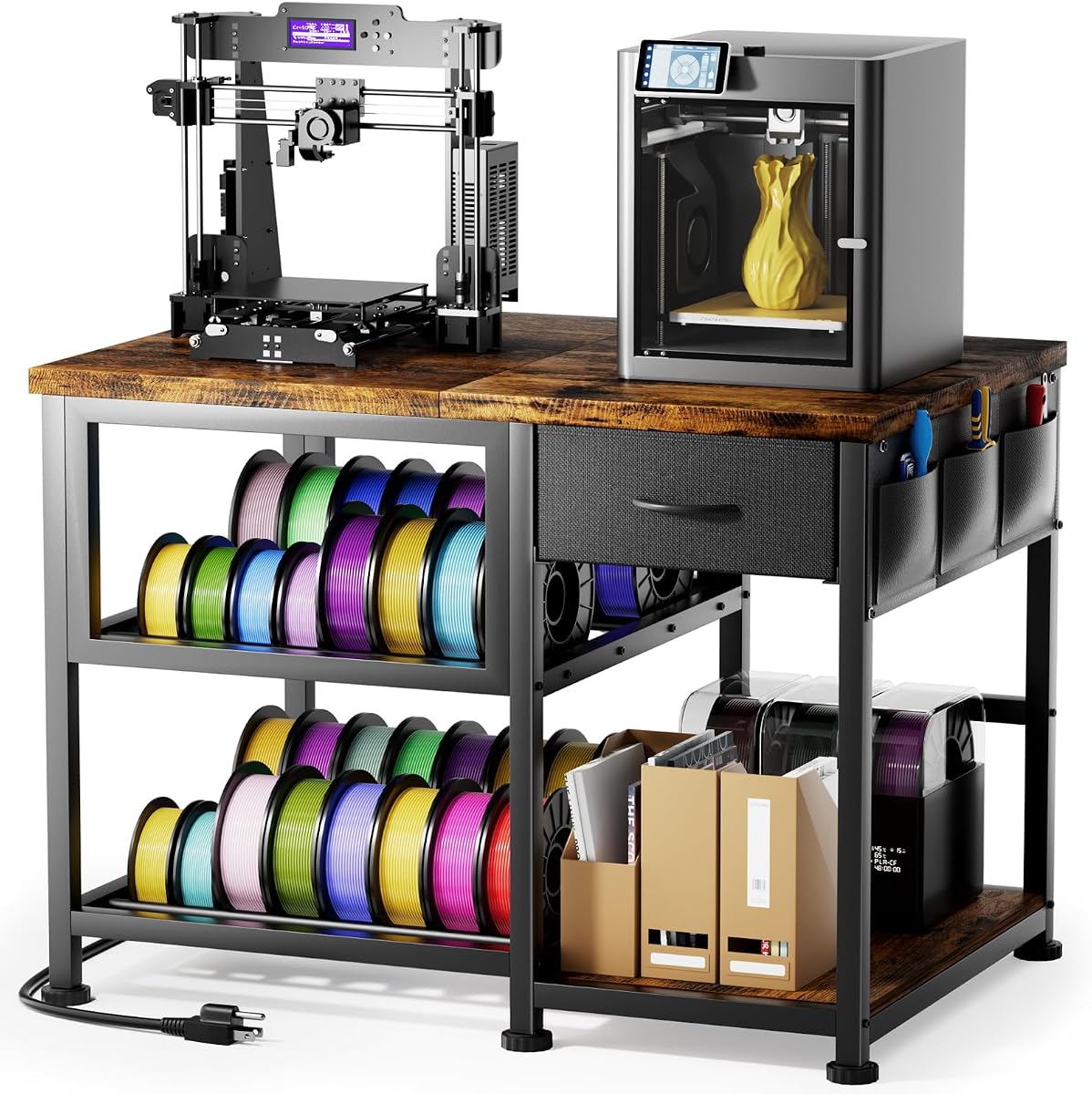
3D Printer Stand with Filament Storage Rack, Heavy Duty 3D Printer Table with Power Outlet, 3-Tier Filament Holder with Drawer, 3D Printer Filament Stand Organized for Office Workshop Studio
3D Printer Stand with Filament Storage – Heavy Duty 3-Tier 3 D Printer Table Shelf with 2 Fabric Drawers, 3 D Printing Desk for Tools and Supplies(Black)
3D Printer Table with Filaments Storage, 3D Printer Stand Storage Rack with Drawer, Wood Desktop Printing Workstation with 4-Tier Spool Holder for Workshop Studio Office
3D Printer Stand with Filament Storage, 29.5" x 18.9" Dustproof and Moisture-Proof Heavy Duty Large 3D Printer Table Cart with 360°Rolling & Cabinet for Workshop Studio Office (Rustic Brown)
3D Printer Stand with Filament Storage, 4-Tier 3D Printer Table Cart Filament Storage Rack with Wheels, Heavy Duty Metal 3D Printer Desk Shelf for Studio Garage Office Workshop
3D Printer Stand with Filament Storage Rack, Heavy Duty 3D Printer Table with Power Outlet, 3-Tier Filament Holder with Drawer, 3D Printer Filament Stand Organized for Office Workshop Studio
Wood and metal build
Integrated power outlet
Drawer and side pockets
This stand blends durability with style using wood and metal. It includes essential power connectivity and ample storage for tools and filaments.
Pros
High-quality materials
Built-in power outlet
Mobile design with wheels
Organized tool storage
Aesthetic modern finish
Cons
Premium price point
Weight may limit moving
We may earn a commission when you buy through this link, at no additional cost to you.
The mobile design allows easy rearrangement of your workspace. Side pockets keep frequently used tools like cutters within arm's reach.
While expensive, the quality justifies the cost. It stands as a centerpiece that reflects innovation and creativity in your studio.
Best for professionals needing a polished look. Choose this if you value aesthetics alongside functionality and power integration.
Integrated Power Solutions
The table includes a power outlet to keep your printer and accessories connected without extra extension cords.
Mobility and Access
Designed for mobility, this stand helps you rearrange your studio or transport filaments conveniently when needed.
3D Printer Stand with Filament Storage – Heavy Duty 3-Tier 3 D Printer Table Shelf with 2 Fabric Drawers, 3 D Printing Desk for Tools and Supplies(Black)
50+ filament storage
Two fabric drawers
36 inch length
This stand offers ample room for tools and parts. The fabric drawers help keep scrapers and pliers organized.
Pros
Spacious tabletop
Fabric tool drawers
Easy access to reels
Handles 150 lbs
Fast setup time
Cons
Fabric drawers lack rigidity
Assembly required
We may earn a commission when you buy through this link, at no additional cost to you.
Specially structured shelves securely organize reels. It handles heavy printers with zero flex.
Fabric drawers are convenient but not rigid. Assembly takes under 30 minutes for full setup.
Good for general tool organization. Choose this if you want accessible storage without metal drawers.
Tool Drawer Organization
Features dual fabric drawers to store 3D printing tools like scrapers and hex wrenches efficiently.
Spool Accessibility
Side and bottom shelves are engineered for 500g and 1kg filament spools keeping them accessible.
3D Printer Table with Filaments Storage, 3D Printer Stand Storage Rack with Drawer, Wood Desktop Printing Workstation with 4-Tier Spool Holder for Workshop Studio Office
4-tier spool holder
Power management system
Wood desktop finish
Combines durability with a clean modern look. The wood desktop provides a stable platform for your printer.
Pros
Modern wood appearance
USB and Type C port
Massive filament storage
Lower side shelf
Durable metal frame
Cons
Drawer size moderate
Assembly time varies
We may earn a commission when you buy through this link, at no additional cost to you.
Built-in power management includes USB and Type C ports. This keeps devices connected from one central workstation.
The lower shelf offers space for toolboxes. It keeps small accessories protected and close at hand.
Best for home office aesthetics. Choose this if you prefer a wood finish over industrial metal.
Modern Aesthetic
Built with a sturdy metal frame and a wood-style tabletop for a clean modern look suitable for offices.
Power Management
Equipped with 2 AC outlets and USB ports to reduce loose extension cords around your printing area.
3D Printer Stand with Filament Storage, 29.5" x 18.9" Dustproof and Moisture-Proof Heavy Duty Large 3D Printer Table Cart with 360°Rolling & Cabinet for Workshop Studio Office (Rustic Brown)
Enclosed cabinet space
Locking wheels
Dustproof enclosure
This cabinet protects sensitive spools from dust and moisture. It offers a clean and efficient workspace for any creator.
Pros
Enclosed lower storage
Dustproof and moisture-proof
360 degree mobility
Locking brakes included
Solid metal frame
Cons
Higher price point
Cabinet space limited
We may earn a commission when you buy through this link, at no additional cost to you.
The metal frame absorbs vibrations effectively. Locking wheels provide a balance of portability and stability.
Assembly is straightforward with clear instructions. It keeps your workspace tidy with tiered storage solutions.
Best for humid or dusty environments. Choose this for superior protection of your filament supplies.
Moisture Resistance
Integrated storage solutions keep sensitive spools protected from dust and moisture in the enclosed compartment.
Secure Mobility
Two of the wheels feature locking brakes to securely stabilize the unit during printing runs.
3D Printer Stand with Filament Storage, 4-Tier 3D Printer Table Cart Filament Storage Rack with Wheels, Heavy Duty Metal 3D Printer Desk Shelf for Studio Garage Office Workshop
480lb load capacity
4-tier storage
Silent casters
An astonishing load capacity ensures stability. It holds 48 rolls and moves smoothly with silent casters.
Pros
480lb heavy load capacity
Lockable rotating casters
48 standard spool capacity
Silent mobility
Detailed support
Cons
Wooden top smaller
Assembly steps required
We may earn a commission when you buy through this link, at no additional cost to you.
Each layer bears over 120 pounds safely. It keeps accessories neat and stable without toppling.
Adjustable feet enhance stability on uneven ground. Assembly support is available for any questions.
Best for heavy-duty needs. Choose this if you need maximum storage and mobility at a budget price.
Massive Load Capacity
The table has an astonishing overall load capacity of up to 480 pounds ensuring safe storage.
Silent Mobility
Equipped with lockable heavy-duty rotating industrial casters that are silent for easy movement.