
Hearvo USB 3.0 HDMI KVM Switch
4.0Editor score
Supports 4K@60Hz resolution
Includes wired remote switch
4 USB 3.0 ports
Discover the top laptop with KVM support solutions for seamless dual setups. We compare HDMI, USB-C, and Thunderbolt KVM switches for laptops and desktops.
Finding the right laptop with KVM support is essential for modern professionals who need to manage multiple systems efficiently. Whether you are a developer, content creator, or power user, a reliable KVM switch allows you to control two computers with a single set of peripherals. This guide explores the best options available to streamline your workflow and reduce desk clutter.
We compared ten leading products based on compatibility, video quality, USB data transfer speeds, and overall build quality. Our analysis focuses on devices that support the latest USB-C and Thunderbolt standards while maintaining backward compatibility with older HDMI and DisplayPort setups. Each entry offers unique features tailored to different workspace requirements and budget considerations.
Each pick highlights key specifications, pros, and cons to help you make an informed decision. We also include a detailed buying guide and FAQ section to address common setup questions. Please note that availability and specific configurations may vary by region and vendor, so always verify compatibility before purchasing.
4.0Editor score

4.2Editor score
4.6Editor score
This side-by-side comparison details the specifications and capabilities of each top-rated KVM switch designed for laptop and desktop integration. Evaluate port types, resolution limits, charging capabilities, and connection methods to find the perfect match for your technical needs.


The Hearvo USB 3.0 HDMI KVM Switch is a budget-friendly solution for users who need to switch between two computers using a single monitor. It supports up to 4K@60Hz resolution, ensuring that visuals remain sharp during productivity tasks. With four USB 3.0 ports, you can share a keyboard, mouse, and other peripherals seamlessly.
We may earn a commission when you buy through this link, at no additional cost to you.
Its four USB 3.0 ports (three USB-A and one USB-C) provide fast data transfer speeds up to 5Gbps, making it easy to connect printers, scanners, and flash drives. The Adaptive EDID feature ensures stable image transmission by optimizing display settings automatically. Installation is straightforward, requiring no driver software or external power supply.
While it does not support multiple monitors, its wired remote switch allows you to place the unit out of sight while keeping control within reach. Some users may find the 4K@60Hz limit slightly restrictive for ultra-high refresh setups, but it remains ideal for standard office environments. This makes it a strong choice for basic dual-computer sharing.
This KVM switch is perfect for home office workers or students who need to manage a work laptop and personal PC without clutter. If you need a simple, reliable way to share one monitor and peripherals, this model delivers excellent value.
USB 3.0 ports enable fast data transfer for connected peripherals.
Use the front button or wired remote for seamless switching.
We may earn a commission when you buy through this link, at no additional cost to you.
This hybrid KVM switch is designed for professionals who manage multiple computers simultaneously, supporting up to four different machines with two monitors. It accepts a mix of interfaces, including USB-C, DP, and HDMI, making it versatile for mixed PC environments. The 100W PD port allows you to charge a laptop while using the dock.
We may earn a commission when you buy through this link, at no additional cost to you.
The unit supports dual 4K@60Hz resolution and includes an EDID emulator to prevent window layout changes when switching computers. Four USB 3.0 ports allow you to share printers, webcams, and drives across systems. An external 12V/1A power adapter ensures stable performance even with high-power peripherals.
Setup requires careful cable management as each desktop needs two video cables and one USB cable to function correctly. However, the ability to connect a laptop and three desktops on one setup saves desk space significantly. For complex workstations needing robust multi-computer control, this switch offers excellent utility.
Buy this if you manage a network of PCs or need to switch between a laptop and multiple desktops. Its hybrid input support makes it a rare find for versatile multi-monitor KVM requirements.
Accepts USB-C, DP, and HDMI ports on different computers.
Share two monitors across up to four different machines.
We may earn a commission when you buy through this link, at no additional cost to you.
This USB-C docking KVM switch allows you to connect two laptops to three external monitors, effectively doubling your workspace without duplicating hardware. It supports dual 4K@60Hz and one 1080P@60Hz output, making it ideal for data analysts or traders who need multiple screens. The 10Gbps USB 3.1 Gen2 ports ensure fast peripheral data transfer.
We may earn a commission when you buy through this link, at no additional cost to you.
A built-in 100W Power Delivery port charges your laptop through the dock, reducing cable clutter. Switching between laptops takes seconds using the panel button or wired remote, with clear LED indicators. It supports Windows, Linux, and Chrome OS well, though macOS limitations apply for extended screens.
Note that this device relies on MST (Multi-Stream Transport) to drive three screens from one port, which some Mac models may not support fully. It works best with Windows laptops having DP Alt function and high CPU generations. For Windows users needing triple displays, it is a solid option.
If you need to extend your laptop workspace across three screens while switching between two devices, this KVM dock is an efficient solution. Just verify your laptop supports MST before purchasing.
Turn one laptop screen into three using MST technology.
USB 3.1 Gen2 ports provide faster peripheral data speeds.
We may earn a commission when you buy through this link, at no additional cost to you.
The AV Access 8K KVM Switch is a premium docking station that combines triple-monitor control with shared peripherals for laptop and desktop systems. It supports up to 8K@60Hz on desktop PCs, delivering sharp visuals for content creation or design work. With a single USB-C cable, you get video, data, and 100W power delivery.
We may earn a commission when you buy through this link, at no additional cost to you.
The device includes an SDXC card reader and 3.5mm headset jack for media access without extra adapters. Its shared 1Gb Ethernet connection keeps both computers online simultaneously, allowing background downloads or cloud sync on the inactive PC. Two USB-A 3.2 ports and one USB-C 3.2 port offer 10Gbps transfer speeds.
While it does not feature an SD card reader in some configurations, its overall connectivity remains robust for dual-computer workflows. It is not fully compatible with macOS extended displays due to MST limitations, so users should confirm their system before buying. This makes it best suited for Windows-based power users.
This premium docking station is ideal for developers or creators who need high resolution and a seamless switching experience. If you want a single device to replace a dock and KVM switch, this model delivers top-tier performance.
Desktop PC supports up to 8K@60Hz for sharp visuals.
Keep both computers online while you switch between devices.
We may earn a commission when you buy through this link, at no additional cost to you.
This KVM docking station is optimized for users who manage two laptops simultaneously, offering a 12-in-1 connectivity solution. It supports dual 4K outputs and allows switching in just 2-3 seconds via EDID emulation and automatic wake-up features. Two full-featured USB-C ports allow data transfer and charging simultaneously.
We may earn a commission when you buy through this link, at no additional cost to you.
The dock supports up to 60W charging per laptop while connected to the internet via the LAN port. It includes SD card slots, Ethernet, and multiple USB ports for peripherals. For developers or consultants, this ensures a seamless transition between work and personal systems without workflow interruptions.
macOS users should note that the device supports mirror mode only, limiting extended desktop functionality. Also, it is not compatible with 5K monitors or FreeSync/G-Sync. However, for standard dual-monitor setups, it provides an efficient, cable-saving solution.
Buy this if you need a quick way to switch between two laptops and a full docking experience. Its EDID emulation keeps your windows stable during switching, reducing setup time.
Includes Ethernet, SD card, and multiple USB ports.
Prevents window layout changes when switching computers.
We may earn a commission when you buy through this link, at no additional cost to you.
This KVM docking station delivers high-resolution and high-refresh support, making it suitable for trading, gaming, or design workflows. It supports up to 8K@60Hz on desktop PCs and includes VRR, FreeSync, and HDR for smooth visuals. A single USB-C cable provides video, data, and up to 100W charging.
We may earn a commission when you buy through this link, at no additional cost to you.
The shared 1Gb Ethernet ensures both computers stay connected while you switch. Three 10Gbps USB ports allow fast file transfers with external drives. It includes an SDXC card reader and 3.5mm headset jack to reduce the need for extra adapters.
While expensive, the performance it offers in terms of display fidelity and connectivity justifies the cost for professionals. It is designed for users who need high-quality visuals without compromising on peripheral sharing. However, macOS limitations apply for extended content.
This is a top choice for users requiring high refresh rates and sharp visuals. It is best suited for power users who need to switch between desktop and laptop while maintaining full connectivity.
Supports up to 8K@60Hz for crisp visuals.
Shared Ethernet keeps both systems online during switches.
We may earn a commission when you buy through this link, at no additional cost to you.
This dual-monitor KVM switch enables seamless switching between work and personal laptops through a single USB-C docking setup. It supports up to 4K@60Hz resolution and includes an 11-in-1 port selection for maximum connectivity. A single Gigabit LAN port ensures both laptops can access the internet simultaneously.
We may earn a commission when you buy through this link, at no additional cost to you.
Each USB-C input port supports MST for dual 4K outputs and includes a charging port for 100W power delivery. Switching is fast and automatic, thanks to EDID emulation. It is suitable for home offices where dual-laptop management is a priority.
Note that macOS users will only get mirror mode support, and original adapters are required for charging. It is best suited for Windows laptops with DP Alt Mode support. For those needing robust dual-laptop sharing, it is a strong option.
If you need a reliable dock that lets you switch between two laptops without clutter, this is a solid pick. Verify your laptop supports MST before purchasing for the best experience.
Includes Ethernet, SD, and multiple USB ports.
Both laptops can access the internet via shared LAN.
We may earn a commission when you buy through this link, at no additional cost to you.
This DisplayPort KVM switch is designed for users with DP-compatible monitors who need to share a single display across two computers. It supports resolutions up to 8K@60Hz, ensuring high visual quality. The four USB 3.0 ports provide stable peripheral sharing with up to 5Gbps transfer speeds.
We may earn a commission when you buy through this link, at no additional cost to you.
It includes a wired controller to hide the switch unit and maintain a clean desk. An external power adapter ensures stable operation with high-power USB devices like hard disks. It is backward compatible with older USB versions for broader device support.
While it is limited to one monitor, its high resolution support makes it suitable for advanced workstations. Some users may find it lacks USB-C charging options. For DP-focused setups, it is a reliable choice.
This switch is perfect for users with high-resolution DisplayPort monitors. If you prioritize resolution and stable USB connectivity, this model delivers solid performance.
Ideal for users with DP monitors and 8K capability.
External power adapter ensures stable peripheral operation.
We may earn a commission when you buy through this link, at no additional cost to you.
The Alxum 20Gbps USB C Switch is a portable solution for professionals needing to switch between laptops using a single USB-C monitor or dock. It supports data transfer speeds of up to 20Gbps, ensuring quick file transfers. A 140W PD pass-through keeps devices charged during switching.
We may earn a commission when you buy through this link, at no additional cost to you.
It features a wireless remote for easy control and supports up to 8K@30Hz resolution. The compact, tool-free design makes it easy to carry for work or play. However, it has specific compatibility limits regarding Dell docking stations and pigtail lengths.
If you use docks with pigtail lengths under 50cm and support DP ALT MODE, this switch delivers excellent speed. For those seeking a portable solution for high-speed switching, it is a strong contender.
This switch is best for travelers or professionals who need to connect to different docks. Verify your dock compatibility before purchasing to avoid issues with pigtail length.
Provides fast data transfer for connected storage devices.
High power pass-through keeps laptops charged.
We may earn a commission when you buy through this link, at no additional cost to you.
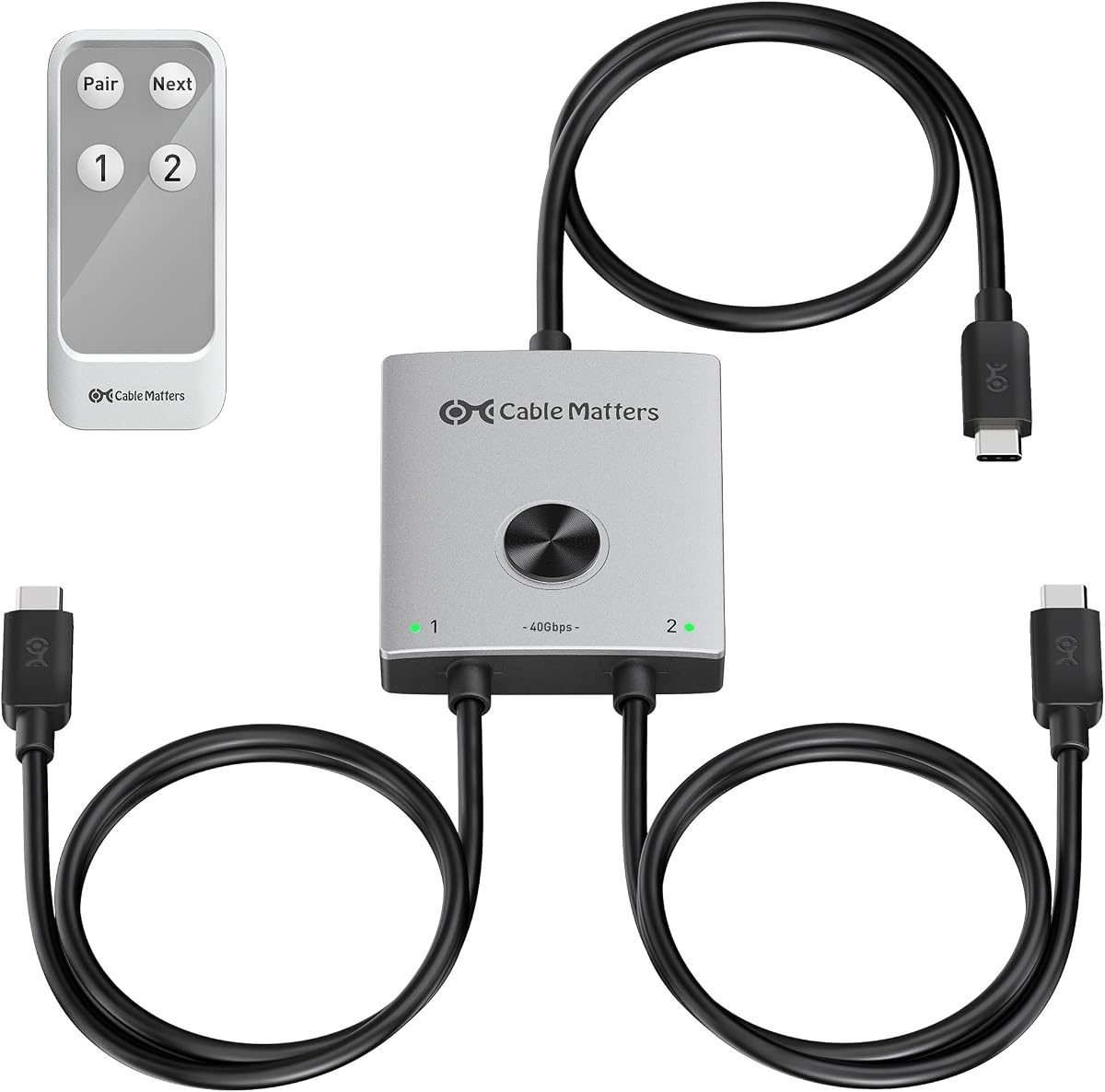
This high-speed USB C switch allows you to share compatible Thunderbolt 4 docks and monitors between two laptops. It supports up to 40Gbps bandwidth for external storage and peripherals, making it ideal for high-data workflows. Video support includes up to 8K@60Hz with compatible equipment.
We may earn a commission when you buy through this link, at no additional cost to you.
The switch offers 140W Power Delivery pass-through for the selected laptop and includes an RF remote for switching without line of sight. It works with popular Thunderbolt docks like CalDigit TS4 and Plugable models. Its built-in cables ensure a streamlined setup without extra adapters.
Note that docks with non-detachable cables are not supported. You must use compatible dock models with detachable host cables. While premium-priced, the bandwidth and versatility justify the cost for power users.
If you need a Thunderbolt 4 compatible switch for high-speed data and video, this is the top choice. It is perfect for professionals using MacBooks or high-end Windows laptops with advanced docks.
Supports high-speed data transfer for external storage.
Compatible with leading Thunderbolt 4 docks.
We may earn a commission when you buy through this link, at no additional cost to you.
Choosing the right KVM switch involves balancing video resolution, port compatibility, and charging needs. This section breaks down key factors to consider for a seamless setup.
Modern KVM switches should support at least 4K@60Hz. For advanced workflows, look for 8K or high refresh rates like 120Hz or 144Hz. Ensure your monitor and laptop support the desired resolution to avoid downscaling issues.
Check if your laptops use HDMI, DisplayPort, or USB-C with DP Alt Mode. Hybrid switches are ideal for mixed setups. Ensure the switch supports your specific port combinations without needing extra adapters.
USB 3.0 or USB 3.1 ports with at least 5Gbps are essential for fast peripheral sharing. Look for 10Gbps ports if you use external storage drives for quick file transfers.
A PD port with 60W to 140W allows you to charge your laptop through the KVM. This reduces cable clutter. Ensure the switch supports your laptop's charging requirements.
Decide if you need single, dual, or triple monitor support. Some KVMs allow only one monitor, while docking stations support up to three via MST. Verify your needs before buying.
Ensure the switch works with your OS. Some models have limitations with macOS extended displays. Check reviews for compatibility with Windows, Linux, and Mac systems.
Look for buttons, remotes, or hotkeys. Wired or wireless remotes allow flexible placement. EDID emulation ensures your desktop layout stays consistent when switching.
Sturdy construction ensures longevity. Check for warranties and customer support options. High-quality units often include external power supplies for stability.
Set up your KVM switch by connecting the HDMI or DisplayPort cables to the monitor and computers. Then, plug in the USB cables for peripherals and power. Ensure all connections are secure to avoid signal loss.
For USB-C models, verify your laptop supports DP Alt Mode. Use high-quality cables rated for the required data speed. If using docking stations, follow specific docking instructions for optimal performance.
To switch between computers, press the button on the unit or use the remote. To care for it, keep it in a cool, dry area. Avoid bending cables excessively to maintain signal integrity.
Yes, many KVM switches support both systems. However, macOS may only support mirror mode for extended screens due to MST limitations. Ensure the switch is explicitly compatible with macOS for best results.
Some KVM switches require an external power adapter for stable performance with high-power USB devices. USB-C models with 100W or 140W PD often do not need extra power.
Flickering can occur due to cable quality or unsupported resolutions. Use standard DP 1.4 cables and ensure your monitor supports the selected refresh rate. Avoid excessive cable length.
Yes, some KVMs include a shared Ethernet port. This allows both computers to access the internet simultaneously even when one is not selected on the display.
Most KVMs support hotkeys. Wired or wireless remotes are common. Check if the specific model includes a remote for line-of-sight switching.
EDID emulation ensures the monitor remembers the display settings when switching. This prevents desktop layout changes and ensures seamless transitions between computers.
Check your laptop manual for DP Alt Mode or Thunderbolt support. If your port has a lightning bolt or DP symbol, it likely supports video output.
Yes, but ensure the dock has a detachable host cable. Thunderbolt 4 docks like CalDigit TS4 are supported by specific KVM models.
We reviewed ten top laptop with KVM support solutions, including budget-friendly HDMI switches and premium Thunderbolt 4 models. Each offers unique features tailored to different needs, from single-monitor sharing to triple-screen setups.
When choosing, prioritize your monitor compatibility, resolution needs, and whether you need charging support. High-speed USB-C models offer the best future-proofing, while HDMI models remain effective for standard setups.
Please remember to verify current availability and configurations before purchasing. Prices and specs may vary, so always check the product page for the latest information to ensure you get the best value.