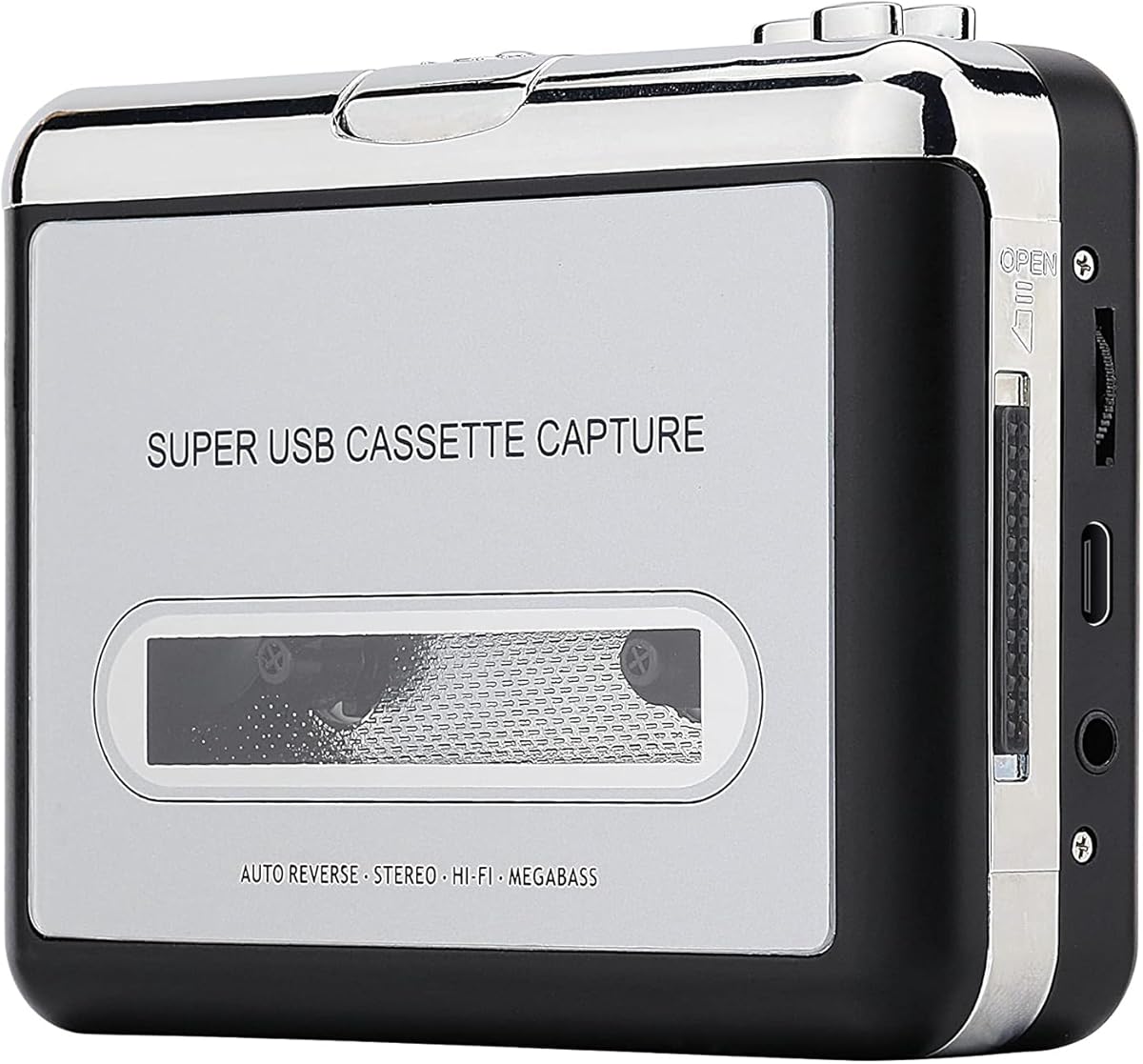
Reshow Cassette Tape Player
3.8Editor score
Lightweight compact design
Standard 3.5mm AUX input
Includes converter software
This guide compares the top cassette to MP3 converters for digitizing tapes with ease, featuring portable players, USB drives, and SD card options for every
Preserving your favorite cassette tapes in a digital format is essential for modern listening. A good converter transforms analog audio into MP3 files quickly and reliably. Look for devices with clear sound quality, easy file management, and reliable connectivity options for seamless transfers.
We evaluated ten top-rated cassette to MP3 converters based on portability, recording modes, storage options, and build quality. Each product offers unique features like built-in microphones, USB or SD card recording, and dual Bluetooth capabilities for versatile audio handling and playback.
Each pick highlights key strengths, pros, and cons to help you choose the right tool for your collection. Prices fluctuate often so check current listings before purchasing. Our expert analysis ensures you find a reliable converter that fits your specific needs and budget easily.
3.8Editor score

4.5Editor score

4.3Editor score
The following table offers a side-by-side view of all ten converters to help you compare key features quickly. Each entry includes essential specs like storage type, power options, and unique capabilities to guide your decision effectively.


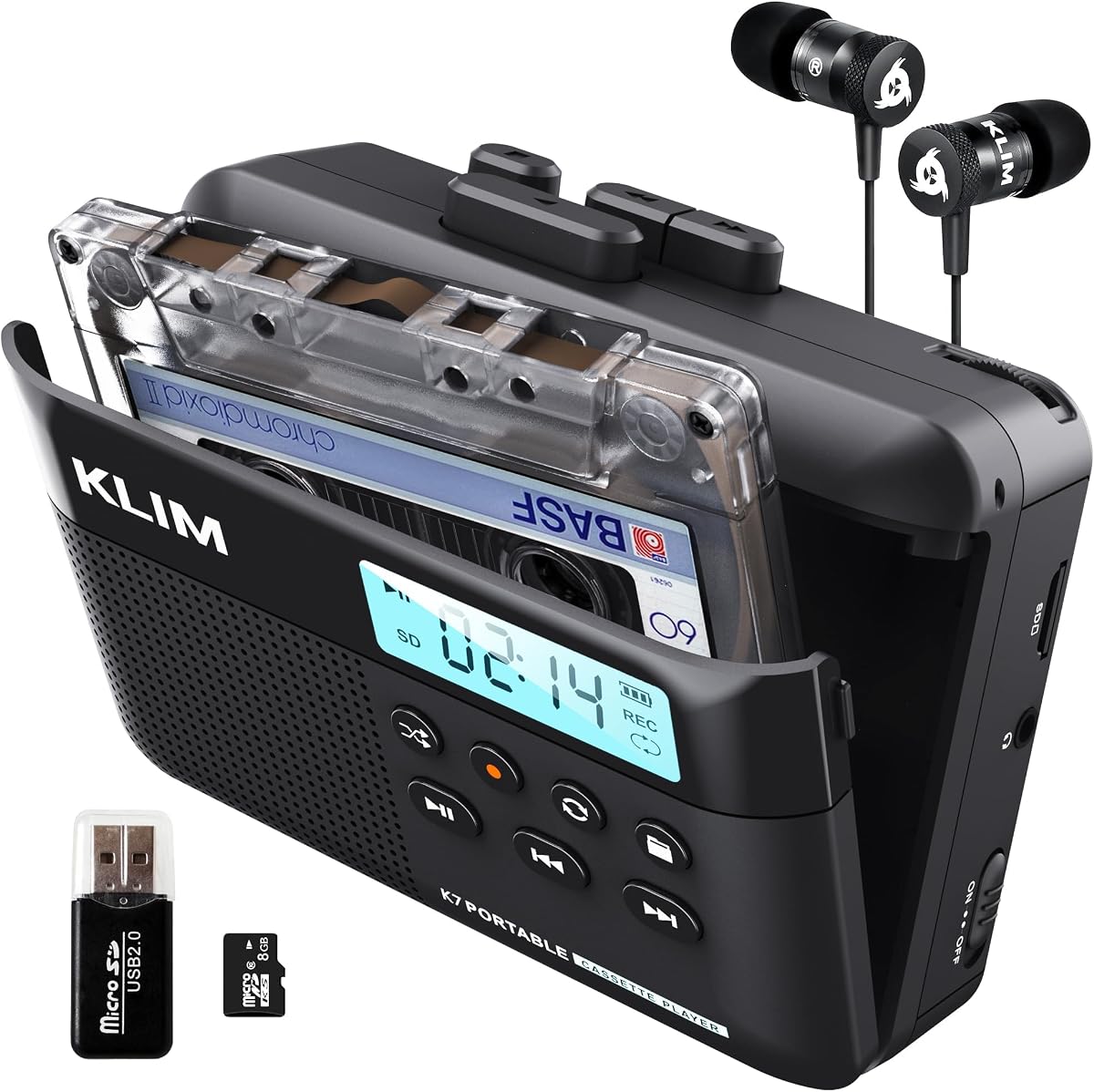


This ClearClick converter is a top choice for users who want a simple setup. With a 4.5 rating it stands out for its no-computer-required design. It saves directly to a USB drive making it ideal for quick conversions without software hassles.
We may earn a commission when you buy through this link, at no additional cost to you.
The automatic track splitting mode is a key strength. It separates songs into individual MP3 files automatically saving manual editing time. The included 16GB USB drive ensures you have storage ready immediately for your digitized tapes.
One trade-off is the higher price point compared to USB cable converters. However the convenience of instant setup and no software needs justifies the cost for many users. The portable design also lets you use it as a personal tape player.
This device is perfect for anyone seeking ease of use and reliability. Whether converting a few tapes or a full collection the ClearClick handles it smoothly. Its USA-based tech support adds confidence for long-term satisfaction and assistance.
The auto track splitting feature identifies silent gaps between songs to create separate MP3 files. This eliminates the need for manual editing in audio software after conversion.
Beyond conversion the device doubles as a personal cassette player with included earbuds. You can listen directly to tapes or converted files on the go without extra devices.
We may earn a commission when you buy through this link, at no additional cost to you.
The Reshow converter is an excellent budget-friendly option for basic digitization needs. With a 3.8 rating it delivers clear sound quality for its price. It connects via USB to your computer and includes software to manage the transfer process.
We may earn a commission when you buy through this link, at no additional cost to you.
Its compatibility with any standard 3.5mm AUX input is a major strength. You can use regular headphones or connect to car stereos for listening. The lightweight and compact design make it easy to store and transport.
The main trade-off is the need for a computer and software installation. This adds steps compared to standalone devices. However for users who have a PC nearby the cost savings make it a worthwhile choice.
Choose this if you want an affordable way to convert tapes with basic tools. It works well for small collections or occasional use. Ensure your computer has a free USB port and space for the provided software.
This unit offers a low-cost entry into cassette digitization without sacrificing core functionality. It is ideal for users who prioritize value over advanced features.
The 3.5mm AUX input allows use with any standard headphones. You do not need proprietary earbuds making setup flexible for different user preferences.
We may earn a commission when you buy through this link, at no additional cost to you.
This Gracioso converter is a premium choice for tech-savvy users. With a 4.3 rating it features dual Bluetooth modes for wireless streaming. It allows recording to USB directly or even making new cassette tapes from modern sources.
We may earn a commission when you buy through this link, at no additional cost to you.
The 6W speaker delivers clear and deep sound for playback. Combined with the 2000mAh battery it offers up to ten hours in Bluetooth mode. This makes it ideal for long listening sessions without constant recharging.
A trade-off is the requirement for FAT32 formatted USB drives between32GB or less. This limits compatibility with some high-capacity drives. However the rich feature set and sound quality compensate for this minor constraint.
It suits those who want to bridge vintage and modern audio seamlessly. If you value wireless convenience and high power output this is a top pick. Ensure you have compatible USB drives for the best experience.
Transmitter mode streams tape audio wirelessly to headphones while receiver mode lets you play phone music through the built-in speaker. This bridges old and new audio formats.
You can record music from your phone or PC onto blank cassette tapes. This recreates the mixtape experience with modern convenience for creative enthusiasts.
We may earn a commission when you buy through this link, at no additional cost to you.
The K7 player is a great portable option with included storage. With a 4.2 rating it converts tapes to MP3 on an SD card. No additional apps are required making it user-friendly for most collectors.
We may earn a commission when you buy through this link, at no additional cost to you.
It features a built-in microphone for recording thoughts or meetings. The 1000mAh battery lasts well for daily use. The included 16GB SD card provides ample space for many converted tracks.
One limitation is it does not support recording onto cassette tapes. This limits dual-direction use but is fine for conversion tasks. The 3.5mm earphone jack ensures private listening on the move.
This model fits those needing a simple portable converter. Its five-year assurance offers reliability for long-term use. Ensure you handle the SD card carefully to avoid data loss during transfers.
No computer or software is needed to convert tapes to MP3. Simply insert the SD card and follow the manual for effortless digitization.
Beyond conversion it functions as a standard SD card music player. You can play converted tracks or other files directly without a computer.
We may earn a commission when you buy through this link, at no additional cost to you.
This SEMIER unit offers flexibility with two conversion options. With a 4.0 rating it supports recording via SD card or USB to computer. The LCD display helps navigate settings easily for precise control.
We may earn a commission when you buy through this link, at no additional cost to you.
Its compact size makes it perfect for travel. The included 16GB SD card and USB reader simplify storage. It also plays music from the card for added convenience.
It does not support Type IV metal tapes which may limit some collections. Also you need AA batteries or USB-C for power. These are minor issues for the versatile features offered.
Ideal for those who want options for recording. Whether using SD or software you can choose what fits your workflow. Ensure tapes are Type I for best compatibility.
Convert to SD card directly or use software via USB cable. This flexibility adapts to different user preferences and tech setups.
The LCD screen provides clear visibility for settings. This helps avoid confusion during recording or playback steps.
We may earn a commission when you buy through this link, at no additional cost to you.
This variant of the K7 player offers double storage. With a 4.2 rating it converts tapes to MP3 with a 32GB SD card. It supports more tracks without needing frequent card swaps or transfers.
We may earn a commission when you buy through this link, at no additional cost to you.
Like other K7 models it includes a microphone for notes. The portable design with earphones allows on-the-go playback. The battery charges in two hours for convenient use.
It does not record to cassette tapes which limits bidirectional use. However for conversion needs the capacity is a strong advantage. The 5-year assurance provides added peace of mind.
Perfect for large tape collections needing ample digital space. It is reliable for frequent use without software hassles. Ensure you back up your SD card regularly to preserve recordings.
The 32GB capacity holds significantly more MP3 files. This suits collectors with many tapes to digitize over time.
Included earphones and a portable chassis make it ready for travel. Listen to converted tracks anytime without a computer.
We may earn a commission when you buy through this link, at no additional cost to you.
This K7 player provides basic conversion with included storage. With a 4.3 rating it suits smaller collections needing 8GB capacity. It converts tapes to MP3 without extra software or devices.
We may earn a commission when you buy through this link, at no additional cost to you.
It includes a microphone for recording thoughts. The portable nature with earphones allows flexible listening. The battery charges quickly for daily needs.
Storage is limited compared to 16GB or 32GB versions. This may require transfers if you have many tapes. The assurance still covers reliability for the price.
Best for casual users with a few tapes to convert. It balances cost and functionality well. Ensure you manage the SD card storage to avoid running out of space.
This model offers a lower cost entry with included storage. It is suitable for users starting to digitize small collections.
The 1000mAh battery charges in just two hours. This ensures minimal downtime between use sessions for convenience.
We may earn a commission when you buy through this link, at no additional cost to you.
This black variant of the Reshow player offers similar features. With a 3.9 rating it converts tapes via USB cable to your computer. It supports standard headphones for playback and clear sound quality.
We may earn a commission when you buy through this link, at no additional cost to you.
Its compatibility with any standard 3.5mm AUX input is useful. You can hook it up to car stereos easily. The lightweight design aids portability for travel.
It requires a computer and software for conversion like other models. This adds steps compared to standalone SD converters. However it is a reliable choice for budget-conscious users.
Choose this if you have a computer for transfers and want value. It works well for small collections. Ensure you have a free USB port available for connection.
The USB connection works with most laptops and PCs. This ensures broad compatibility for users with existing tech.
Connect to car stereos via the AUX input for crisp sound. This extends use beyond just computer transfers.
We may earn a commission when you buy through this link, at no additional cost to you.
This converter stands out for its auto reverse feature. With a 3.8 rating it allows switching tape sides automatically. You can record to USB directly without needing a computer.
We may earn a commission when you buy through this link, at no additional cost to you.
Volume control lets you adjust levels during conversion. This helps prevent clipping or weak audio. The auto mode splits songs automatically saving manual editing.
You need a USB drive with high read speed for best performance. If the drive is slow files may skip during playback. Also FAT32 format is required for compatibility.
Ideal for users wanting auto reverse and no software. It suits moderate collections well. Ensure you use a compatible USB drive to avoid playback issues.
The auto reverse flips tape sides automatically during conversion. This halves the time needed to convert full tapes manually.
Adjust volume during recording to balance levels. This helps capture clearer audio from variable tape recordings.
We may earn a commission when you buy through this link, at no additional cost to you.
This K7 player offers reliable conversion with included storage. With a 4.2 rating it converts tapes to MP3 on an SD card. It is user-friendly for most collectors needing simple setup.
We may earn a commission when you buy through this link, at no additional cost to you.
It features a built-in microphone for recording sessions. The portable design with earphones allows on-the-go playback. The battery supports two hours of charging for daily use.
One limitation is it does not record onto cassette tapes. This limits dual-direction use but is fine for conversion tasks. The 3.5mm earphone jack ensures private listening.
This model fits those needing a portable converter. Its five-year assurance offers reliability for long-term use. Ensure you handle the SD card carefully to avoid data loss.
No apps or extra devices are needed for conversion. Follow the manual to convert tapes to MP3 easily.
The lightweight design and earphones allow mobile listening. Enjoy converted tracks without needing a computer or speaker.
We may earn a commission when you buy through this link, at no additional cost to you.
Selecting the right converter requires considering your storage preferences, power needs, and desired features. Below are key factors to evaluate for a smooth digitization experience.
Converters save files to USB drives SD cards or via computer software. Standalone USB or SD models need no PC which adds convenience. Computer-based converters allow more editing but require a laptop.
Choose a standalone device if you want quick transfers. If you plan to edit files later software-based options offer more control.
Look for rechargeable batteries like lithium-ion models or AA battery powered units. Rechargeable types reduce waste and cost over time. USB-powered ones need a constant power source but offer stable operation.
Select rechargeable batteries for portability. AA options are good if you have spare cells handy.
Check for features like volume control and auto track splitting. These ensure clearer files and better organization. Models with built-in speakers let you listen before transferring which helps assess tape condition.
Prioritize volume control to avoid distortion. Auto splitting saves time when organizing music.
Compact and lightweight designs are ideal for travel or small spaces. Consider weight and dimensions if you plan to use it outside or in different rooms. Built-in earphones add convenience for immediate listening.
Pick small units if you need to carry the converter. Larger speakers are better for stationary use.
Ensure the device supports your tape types such as Type I or metal tapes. Some units only accept specific formats so check specs before buying. USB compatibility with 2.0 and 3.0 standards affects transfer speed.
Verify tape type support to avoid errors. Fast USB versions help prevent file corruption.
Look for simple interfaces with clear buttons and LCDs. No-software-required models reduce setup time significantly. If using computer software ensure it is included and supports your OS.
Choose models with clear navigation to avoid confusion. Software included simplifies the process.
Durable materials like ABS plastic extend the converter lifespan. Check warranty terms to protect your investment. Units with metal parts or reinforced casings are more resistant to wear and tear.
Opt for sturdy builds to last longer. Warranty support adds value to the purchase.
Advanced models offer Bluetooth modes for wireless streaming or recording. This lets you play phone music on the device or send tape audio to headphones. Such features bridge old and new tech easily.
Consider Bluetooth if you want wireless options. Extra recording modes add versatility to use.
First insert a formatted USB or SD card into the converter. Make sure it is compatible with FAT32 format to avoid errors. Some devices come with included cards so use those to start quickly.
Next clean your cassette tapes before conversion. Dust and mold can cause poor sound quality. Use a soft cloth to wipe the tape and ensure playback heads on the device are clean too.
Finally store converted files in organized folders on your computer or drive. Backup your data to avoid loss. Charge the device fully before storage if it is rechargeable to maintain battery health.
Not all converters need a computer. Many standalone models save directly to USB or SD cards without extra software. However some USB cable converters require a PC to process files so check the product details.
Most converters need FAT32 formatted drives. This includes both USB sticks and SD cards. High capacity drives above 32GB may need reformatting to FAT32 to be recognized properly.
Some models only support Type I tapes which are standard. Metal or Type IV tapes may not play well on all devices. Always check the product description for supported tape types before buying.
Many units have auto track splitting features that detect silence between songs. This creates separate MP3 files for each track without manual editing. Look for this feature in the product specs.
Quality depends on the converter model and tape condition. Modern units offer clear sound with good volume control. Cleaning your tapes and using high-quality converters helps maintain audio fidelity.
Not all converters allow recording back to tapes. Some models only support digital output to USB or SD. Check if the device lists recording to tape as a feature before purchasing.
Battery life varies by model with some lasting 6 to 10 hours. Rechargeable lithium batteries offer longer use than AA batteries. Charging time is usually short around 2 to 4 hours.
Standalone converters do not need software as they save files directly. Computer-based units usually include basic conversion software. Ensure it supports your operating system before installation.
These ten converters offer various solutions from budget-friendly to premium options. The ClearClick unit stands out for simplicity while Gracioso brings wireless features. Reshow models provide value for basic computer needs.
Prioritize storage method and power sources based on your routine. If you travel often pick portable rechargeable units. For home use a computer-based converter may suffice for editing needs.
Remember prices fluctuate and availability changes. Always check current listings to confirm specs and savings. With the right converter you can preserve your favorite tapes for years to come.