
Torjim 12 Inch Video Light Kit
4.5Editor score
2 pack 12 inch LED lights
30W high brightness output
Includes tripods and phone holders
Live streaming has become a vital tool for creators, educators, and professionals looking to engage audiences effectively. Quality lighting transforms poor webcam footage into professional-grade video, ensuring your face is well lit and colors appear natural. Choosing the right LED panel can make or break your content quality.
We evaluated ten top rated lighting kits based on brightness, color accuracy, portability, and ease of use. Each product was analyzed for its suitability in home studios, desk setups, and on the go streaming. Our goal is to help you find the perfect light for your specific streaming needs.
Each pick below highlights key features, strengths, and trade-offs to guide your decision. We include budget friendly options, premium kits, and specialized tools for different streaming scenarios. Please note that prices and availability may change frequently on retailer platforms.
4.5Editor score
4.6Editor score

4.7Editor score
As an Amazon Associate we earn from qualifying purchases.
The following table provides a side by side overview of all ten lighting kits, highlighting core specifications and unique features to help you compare options quickly.





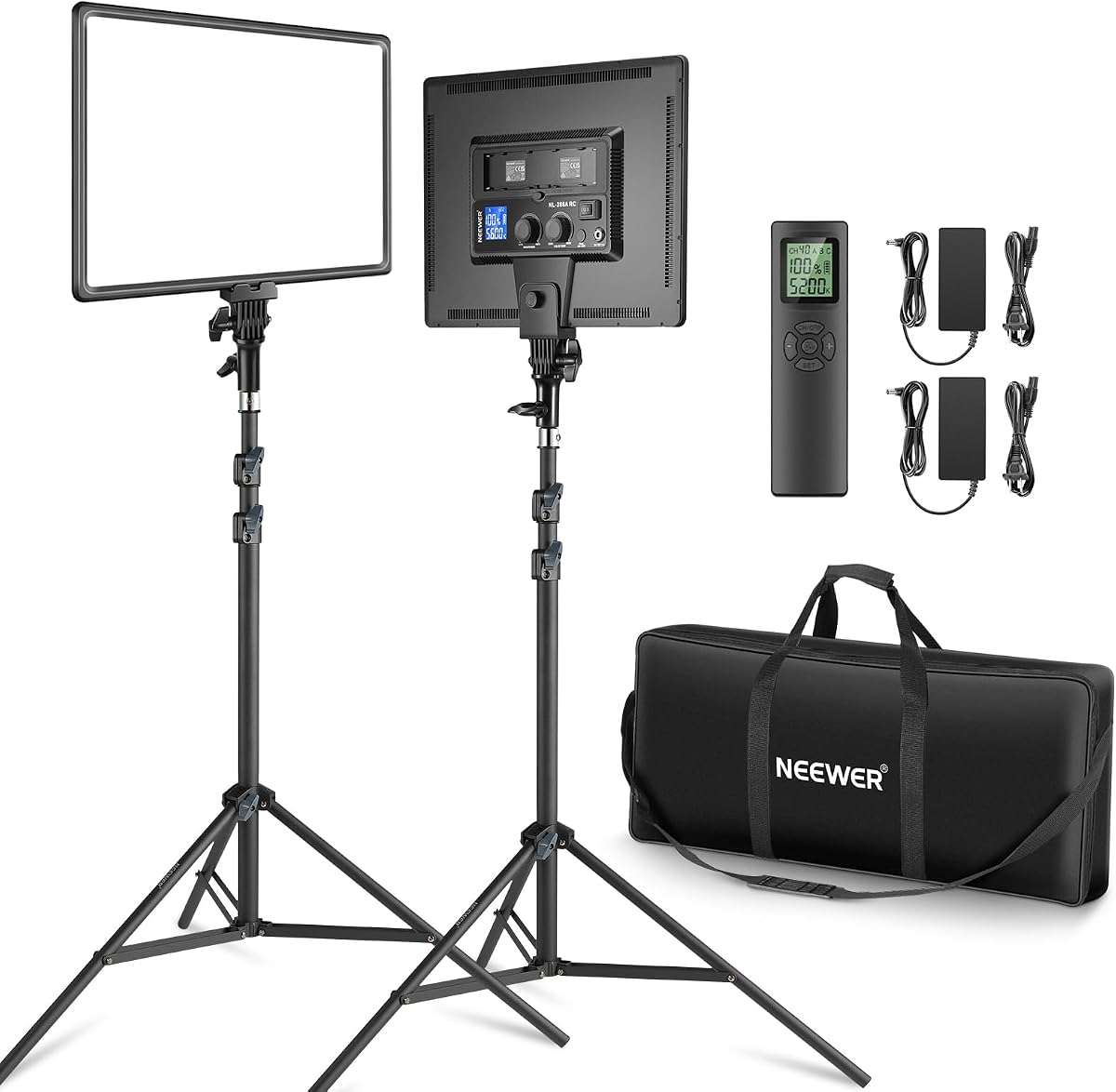
The Neewer 18 Inch Led Video Light Panel Kit stands out as a top choice for serious streamers needing reliable lighting. With a 4.6 rating from users, this 2 pack kit offers 45W of dimmable light per panel. It delivers soft continuous lighting ideal for YouTube, TikTok, and professional live broadcasts.
We may earn a commission when you buy through this link, at no additional cost to you.
Its high CRI 97+ ensures colors appear true to life, which is critical for product reviews and makeup tutorials. The color temperature range from 3200K to 5600K lets you match your environment. The included remote control simplifies operation during streaming without breaking your flow.
While the panels are powerful, they require external power via adapter or Sony NP-F batteries which are sold separately. The stands are sturdy but add weight to your travel kit. However, the consistent output and build quality justify these minor trade-offs for studio use.
This kit is perfect for creators upgrading from weak ring lights or building a permanent home studio. If you prioritize color accuracy and adjustable brightness over portability, this Neewer set is an excellent investment for professional results.
The high CRI rating ensures your skin tones and products look natural and vibrant on camera without color cast issues.
Use the 2.4GHz remote to adjust brightness and color from your desk, allowing seamless changes during live sessions.
We may earn a commission when you buy through this link, at no additional cost to you.
The NEEWER 660 PRO II RGB offers advanced lighting features for creators who want full creative control. Rated 4.7 stars, this light provides 360 degree full RGB color range plus traditional daylight temperatures. It includes a tripod stand, app control, and specialized barn doors.
We may earn a commission when you buy through this link, at no additional cost to you.
Its RGB capabilities allow you to create dynamic backgrounds for gaming streams or artistic effects for short videos. The app control lets you manage multiple lights together. The aluminum alloy panel ensures heat is managed well during long sessions.
The price is higher than basic kits, and mastering the RGB settings might take some time. You also need to buy batteries separately for portable use. Despite this, the versatility and precision make it a top tier option for pros.
Choose this if you want to elevate your visual style with creative colors or need a flexible light for diverse content types. It excels for TikTok, Instagram Reels, and professional streaming setups where lighting is key.
Use preset scenes like fireworks or police lights to add engaging visual effects to your background instantly.
Download the NEEWER app to adjust brightness, color, and scenes from your phone for hands free operation.
We may earn a commission when you buy through this link, at no additional cost to you.
The Torjim 12 Inch Video Light Kit is a fantastic entry point for creators on a budget. With a 4.5 rating, this 2 pack offers 30W brightness per light. It includes tripods, phone holders, and a carrying bag to ready for streaming.
We may earn a commission when you buy through this link, at no additional cost to you.
Its brightness helps solve dim room issues common in home setups. You can adjust color temperature between warm and cool tones. The included phone holders make it easy to position lights and phones for vertical content.
The kit is not fully dimmable, which limits control in very bright rooms. Some plastic components feel less robust than metal builds. However, for the price, it delivers excellent value and setup simplicity.
Perfect for new YouTubers or casual streamers needing a quick lighting upgrade. If you want a ready to use kit without spending much, this Torjim set is a reliable choice for better video quality.
Everything needed including stands and phone holders is in the box for immediate streaming or recording.
The 30W output ensures your face and products are well lit even in poorly lit rooms.
We may earn a commission when you buy through this link, at no additional cost to you.
This NiceVeedi kit is ideal for creators who prefer USB power for portability. With a 4.4 rating, the panels provide stable output with 97 plus CRI for color accuracy. It includes 73 inch tripods and phone holders for versatile setups.
We may earn a commission when you buy through this link, at no additional cost to you.
The USB-C adapters allow you to power lights from laptops or power banks. This is great for on the go streaming or small desks. The remote lets you adjust brightness and color easily.
At 15W per panel, it is less powerful than high end options. It may struggle in very large rooms. But for close up content or small studios, it performs well without complex power needs.
Buy this if you value convenience and flexible power sources. It suits vloggers and casual streamers who need lightweight gear for different locations.
Use power banks or laptops to run lights anywhere without needing wall outlets.
The aluminum stands are easy to carry making it simple to move your setup around.
We may earn a commission when you buy through this link, at no additional cost to you.
The UBeesize kit delivers 3000 lumens of soft lighting suitable for various content types. Rated 4.4, it offers 26W per light with color adjustable from 3000K to 6500K. The tripod extends to 72 inches and includes phone holders.
We may earn a commission when you buy through this link, at no additional cost to you.
Its brightness ensures clear video even in darker rooms. The included phone holders are great for vertical video formats popular on TikTok and Instagram. The carry bag makes storage and transport easy.
Power cords are attached which may limit placement options. The dimming levels are fewer than premium models. However, it remains a strong option for home use due to its brightness and convenience.
Ideal for creators making shorts or tutorials needing tall stands and phone support. It balances performance and price effectively for home studio use.
The 72 inch height allows lighting from above or below for different angles.
The 3000 lumens provide consistent illumination that reduces shadows and dark spots.
We may earn a commission when you buy through this link, at no additional cost to you.
Logitech Litra Glow is designed specifically for monitor based streaming setups. With a 4.5 rating, it uses TrueSoft technology for balanced light that eliminates harsh shadows. It plugs into USB and mounts directly to monitors.
We may earn a commission when you buy through this link, at no additional cost to you.
Its frameless diffuser spreads light evenly across your face. This is ideal for Zoom meetings and gaming streams where desk space is limited. The G HUB app allows quick preset changes.
It is not as bright as large panels so it works best at close distances. You cannot move it far from your screen. But for webcam users it offers seamless integration.
Perfect for professionals and gamers wanting simple plug and play lighting. It enhances webcam video without cluttering your desk or requiring stands.
Attach the light directly to your monitor for perfect positioning without extra stands.
The TrueSoft tech reduces glare making your skin look natural on video.
We may earn a commission when you buy through this link, at no additional cost to you.
The FS600C is a powerhouse for serious production needs. Rated 4.7, it delivers 600W COB output for massive illumination. It supports Bowens mounts for modifiers and offers DMX and app controls.
We may earn a commission when you buy through this link, at no additional cost to you.
Its brightness allows lighting large sets or outdoor shoots. RGB modes give creative control for artistic effects. The cooling system ensures stable operation during long recording sessions.
It is heavy and pricey making it overkill for casual streaming. Requires professional setup knowledge for best use. However, for top tier content it is unmatched in power.
Choose this for professional filming or large scale streams. If you need cinema level brightness and control this light is worth the investment.
52500 lux output ensures your subject is well lit even in challenging environments.
Use DMX or apps to sync multiple lights for synchronized scene changes.
We may earn a commission when you buy through this link, at no additional cost to you.
This desk lamp combines lighting with a functional desk accessory. With a 4.4 rating, it uses edge-lit tech to avoid glare during calls. It has adjustable height and includes a phone holder.
We may earn a commission when you buy through this link, at no additional cost to you.
Its design prioritizes comfort for long meetings. The soft light reduces eye fatigue. The base is stable and non-slip. USB power keeps it simple to use.
It is not a primary studio light but a supplement. The height range is shorter than tripods. Still, it fills gaps for remote workers and streamers.
Best for those needing a simple desktop solution. It enhances webcam video without taking up much space on your desk.
The edge-lit approach prevents harsh glare making calls more comfortable.
Extend to 32.5 inches to find the perfect angle for your face.
We may earn a commission when you buy through this link, at no additional cost to you.
The Torjim softbox kit provides professional diffusion for photos and videos. Rated 4.4, each 16×16 inch softbox uses 85W bulbs for even illumination. It includes tripods and a remote control.
We may earn a commission when you buy through this link, at no additional cost to you.
Softboxes reduce shadows making it great for portraits and product shots. The rotatable heads allow flexible angles. The set comes with two units for full lighting.
Setup is more complex than panel lights. It takes space to store fully assembled. However, for soft quality it excels compared to harsh direct lights.
Ideal for photographers and creators wanting soft diffusion. If you prioritize light quality over speed this kit offers studio results at home.
The baffle design spreads light evenly to eliminate harsh shadows on your subject.
Two units allow key and fill lighting for balanced professional illumination.
We may earn a commission when you buy through this link, at no additional cost to you.
This single softbox option offers diffusion for those needing one key light. With a 4.4 rating it provides 85W of continuous output. It includes a tripod and remote for control.
We may earn a commission when you buy through this link, at no additional cost to you.
It creates soft shadows ideal for product photos or solo streaming. The rotatable head allows quick repositioning. It is simpler to manage than full kits.
You get only one unit so you may need to add more lights later. The softbox is heavier than flat panels. Still, it offers great value for entry level photography.
Choose this if you need a single strong light for key lighting. It works well for home studios needing better diffusion without buying a full set.
Perfect for beginners who need just one soft light without complexity.
Adjust the angle easily to direct light precisely where needed.
We may earn a commission when you buy through this link, at no additional cost to you.
Selecting the right LED lighting requires understanding your needs budget and space. This guide outlines key factors to consider for optimal results.
Brightness measured in watts or lumens determines how well you light your subject. Higher wattage is better for large rooms but may be too strong for close up streams. Consider your environment size when choosing output levels.
For most home setups, 20W to 50W per light provides sufficient brightness without being harsh.
Adjustable color temperature allows you to match your room lighting. Look for lights ranging from 3000K to 6500K to switch between warm and cool tones easily.
Bi-color or full spectrum options offer flexibility for different times of day and moods.
CRI indicates how accurately colors appear under the light. Aim for CRI 95+ to ensure skin tones and products look natural on video.
High CRI prevents unnatural color casts that can make content look unprofessional.
Decide between AC powered lights for stationary setups and battery or USB options for portability. USB lights offer flexibility but may have lower output.
If you stream from different locations, choose lights with battery compatibility.
Tripods monitor mounts and desk clamps affect how you position lights. Tripods offer height flexibility while monitor mounts save desk space.
Ensure the mounting system fits your desk setup and preferred angles.
Physical buttons, remotes, and app controls determine ease of use. Remotes allow adjustments without stopping your stream. Apps offer advanced features for RGB lights.
Select a control method that integrates smoothly into your workflow.
If you travel for events, weight and storage matter. Lightweight panels with carrying bags are easier to transport than heavy softboxes.
Check folded dimensions to ensure your gear fits in your bag or case.
Prices vary widely from under $50 to over $300. Set a budget based on your needs entry-level kits work for most creators while premium options suit pros.
Balance cost with features to get the best value for your setup.
Position your main light at eye level or slightly above to avoid harsh shadows under your eyes. Angle it toward your face rather than pointing directly at the camera.
Use a secondary fill light or bounce light off a wall to soften shadows on the other side of your face. This creates a more balanced and professional look.
Regularly clean dust from LED panels and softbox covers to maintain brightness. Store lights in their carrying cases when not in use to prevent damage.
For most home setups, 30W to 50W per light provides adequate brightness. If your room is large or dark, higher wattage helps. For close up desk use, lower wattage is sufficient.
RGB lights add creative flexibility for backgrounds and effects but may cost more. If you create dynamic content or gaming streams, they are valuable. For simple talking head videos, standard colors may suffice.
Tripods offer height and angle flexibility ideal for full body or varied shots. Monitor mounts are better for fixed webcam setups where space is limited. Choose based on your positioning needs.
Yes if your power source is stable. However, USB ports may have lower power limits. For hours of streaming, consider AC powered lights or ensure your USB source delivers enough wattage.
Avoid covering the lights and ensure they have ventilation. Modern LED panels run cool but still need airflow. Use built-in fans if available and allow rest between sessions.
Softboxes diffuse light for softer shadows and smoother skin tones. Panels are more direct and compact. For interviews and portraits, softboxes excel. For general streaming, panels are often easier to set up.
We explored ten top lighting kits ranging from budget friendly panels to premium RGB solutions. Each offers unique strengths for different streaming needs and setups.
Prioritize brightness, color accuracy, and portability based on your environment. A well chosen light can transform your video quality instantly.
Check current availability and prices before purchasing as deals change regularly. Selecting the right LED ensures your content stands out in every stream.