
ASUS Pro WS W890E-SAGE SE EEB Workstation Motherboard
5.0Editor score
Intel Xeon 600 Processors ready
NitroPath DRAM technology support
USB4 and 20Gbps Type-C
This guide compares the top ASUS Server Motherboard options for workstations and enterprise systems, evaluating performance, connectivity, and reliability
Choosing the right ASUS Server Motherboard is critical for building reliable workstations and enterprise systems. These boards offer robust power delivery and advanced connectivity for demanding computing tasks and professional environments.
We evaluated ten top models based on socket support, PCIe lane availability, memory capacity, and remote management capabilities. Each selection targets specific workload requirements from AI training to general server deployment.
Each pick highlights key specifications and real-world performance traits. Prices and availability change frequently so verify details before purchasing to ensure compatibility with your current hardware components and cooling solutions.
5.0Editor score

3.7Editor score
4.3Editor score
The following table compares all ten ASUS Server Motherboard models side by side. It highlights core specifications including processor sockets, memory support, and connectivity options to help you find the best fit.


This motherboard is a powerhouse for high-end workstations. It carries a 3.7 rating and offers exceptional expansion for professional computing tasks requiring extreme bandwidth.
We may earn a commission when you buy through this link, at no additional cost to you.
It supports AMD Ryzen Threadripper PRO 7000 WX-Series processors up to 96 cores. Seven PCIe 5.0 x16 slots allow multiple GPUs or accelerators. Dual 10Gb LAN ports and four M.2 slots provide fast networking and storage.
The board is large and requires a compatible EEB chassis. It uses significant power and needs strong cooling. These trade-offs are acceptable for users building dedicated render or compute nodes.
Buy this if you need maximum expansion and remote management. It is ideal for architects, video editors, and researchers running demanding local workloads.
Hardware and software IPMI support with dedicated LAN ensures secure out-of-band control and real-time system monitoring for critical deployments.
32 power stages with massive heatsinks and active fans maintain stability under heavy multi-core loads during prolonged operations.
We may earn a commission when you buy through this link, at no additional cost to you.
This board delivers top-tier performance with a perfect 5.0 rating. It is built for advanced AI PCs and demanding workstation workloads needing modern connectivity and power.
We may earn a commission when you buy through this link, at no additional cost to you.
It supports Intel Xeon 600 processors. NitroPath DRAM technology enhances ECC memory performance. Seven PCIe 5.0 x16 slots and USB4 support provide massive I/O bandwidth for GPUs and storage.
The EEB form factor and high power needs limit case choices. It runs hot without proper airflow. These requirements are standard for high-end servers.
Choose this for AI training or complex simulations. It suits professionals needing the latest Intel platforms with uncompromised connectivity and reliability.
Designed for future AI computing with connectivity and power tailored for complex applications and heavy data processing.
USB4 and 20Gbps Type-C alongside MCIO and SlimSAS ensure flexible and fast peripheral and storage connections.
We may earn a commission when you buy through this link, at no additional cost to you.
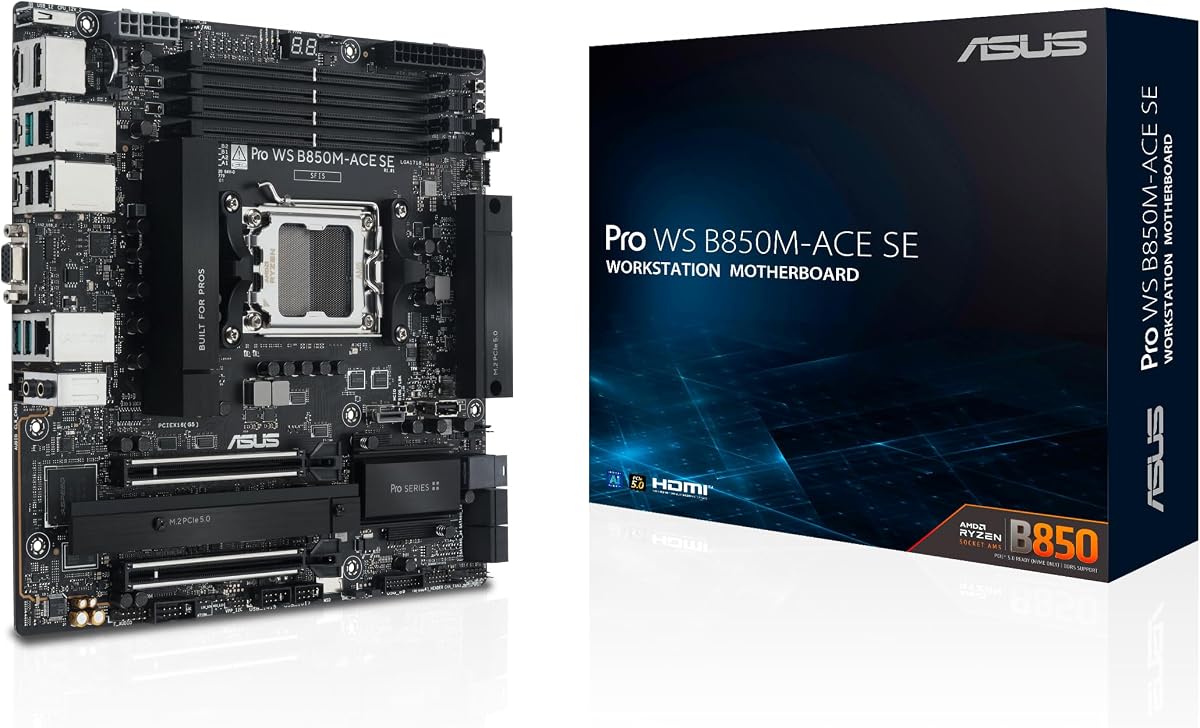
This microATX board brings server features to a smaller footprint. It rates 4.3 and supports AMD Ryzen 9000 and EPYC 4005 Series with reliable remote management.
We may earn a commission when you buy through this link, at no additional cost to you.
It offers two PCIe 5.0 x16 slots and 10G LAN. Front USB 20Gbps and MCIO support enable modern storage. BMC AST2600 ensures control without a monitor.
PCIe expansion is limited to two primary slots. It may not suit multi-GPU setups. For single GPU workstations it offers great efficiency.
Select this for compact servers or office workstations. It is ideal for businesses needing remote management in a space-saving form.
Built to power next-gen AI workloads with robust performance and future-proof architecture in a small chassis.
AsUS Control Center Express software enables real-time monitoring and management through an onboard BMC controller.
We may earn a commission when you buy through this link, at no additional cost to you.
This CEB board offers similar performance to the SAGE SE. It supports Intel Xeon 600 and provides seven PCIe 5.0 slots with IPMI ready via expansion card.
We may earn a commission when you buy through this link, at no additional cost to you.
Power design includes 12 plus extra stages. It features Realtek 10Gb and Intel 2.5Gb LAN. USB4 and 20Gbps Type-C ensure modern peripheral support.
IPMI requires an optional expansion card. This increases cost and complexity. The CEB size may limit case choices.
Buy this if you prefer modular management. It suits workstations needing flexibility in remote monitoring and storage configurations.
Hardware and software IPMI support allows adding management features via an expansion card to fit budget needs.
Designed for advanced AI computing with connectivity tailored for demanding applications and heavy workloads.
We may earn a commission when you buy through this link, at no additional cost to you.
This workstation board supports Threadripper PRO 7000 WX-Series and includes WiFi 7. It offers robust power and remote management for professional users needing flexibility.
We may earn a commission when you buy through this link, at no additional cost to you.
Three PCIe 5.0 x16 slots allow multi-GPU setups. Front and rear USB 20Gbps Type-C offer fast connectivity. SlimSAS NVMe support enables high-speed storage arrays.
Memory support caps at 1TB ECC. It lacks the expansion of other SAGE boards. For single socket builds this is a strong contender.
Ideal for mobile workstations needing high power. It suits users who value wireless speed without sacrificing server features.
Latest WiFi 7 ensures ultra-fast wireless performance and low latency for seamless collaboration and data transfers.
Massive VRM cooling and active fans maintain performance stability under continuous heavy workloads and complex rendering tasks.
We may earn a commission when you buy through this link, at no additional cost to you.
This board supports the latest Threadripper 9000 and 7000 Series. It features strong power delivery and dual USB4 ports for versatile workstation builds.
We may earn a commission when you buy through this link, at no additional cost to you.
Three PCIe 5.0 x16 slots plus one 4.0 slot support expansion. Front USB 20Gbps and SlimSAS NVMe enable modern storage. IPMI software supports remote access.
Power delivery uses 20 stages. It is solid for most workloads. Limited PCIe slots constrain heavy multi-GPU designs.
Use this for AI or rendering workstations. It suits professionals needing high core counts and fast USB connectivity.
Dual USB4 40Gbps and front USB 20Gbps provide unmatched speed for peripherals and external storage arrays.
Designed for advanced AI computing with connectivity and power tailored for demanding applications and workloads.
We may earn a commission when you buy through this link, at no additional cost to you.
This ATX board supports 13th and 12th Gen Intel Core. It includes an IPMI expansion card and Thunderbolt 4 support for versatile workstation deployment.
We may earn a commission when you buy through this link, at no additional cost to you.
Two PCIe 5.0 Safeslots allow robust GPU support. Three M.2 slots and SlimSAS provide storage. Dual 2.5Gb LAN offers reliable networking.
It lacks extensive PCIe lane counts. The ATX size fits standard cases. For single CPU setups this is a balanced choice.
Choose this for office servers or workstations. It suits users needing Thunderbolt connectivity and remote management out of the box.
Large VRM and M.2 heatsinks with hybrid fan headers maintain stable temperatures during intense processing.
USB port management and software controls via ASUS Control Center Express ensure secure system administration.
We may earn a commission when you buy through this link, at no additional cost to you.
This MicroATX board supports Intel Xeon E-2300 processors. It offers a budget-friendly path to server features with a proven Intel C252 chipset.
We may earn a commission when you buy through this link, at no additional cost to you.
It maintains solid power delivery with ProCool connectors. MicroATX size fits tight cases. Basic server requirements are met with ease.
Platform is older with limited future compatibility. PCIe lanes are fewer compared to newer models. Suitable for simple tasks.
Select this for small business servers. It fits users needing reliable basic server capability at a lower cost.
Provides essential server features in a compact MicroATX design for reliable entry-level deployments.
Stable power ensures consistent performance for standard computing tasks and light server duties.
We may earn a commission when you buy through this link, at no additional cost to you.
This E-ATX board supports two Intel Xeon 5th Generation processors. It allows up to 4TB RAM and includes dual M.2 slots with PCIe 5.0.
We may earn a commission when you buy through this link, at no additional cost to you.
Each CPU supports up to three PCIe cards. Dual 10Gbps LAN ensures fast networking. ASMB11-iKVM and ACC provide comprehensive IT management.
The board requires significant power and cooling. It fits only compatible E-ATX cases. Best for dedicated enterprise servers.
Ideal for database or cloud servers. It suits organizations needing massive memory and multi-CPU scalability.
Dual CPU and massive memory support enable handling large datasets and complex enterprise applications.
Dual M.2 with PCIe 5.0 allows faster OS booting and storage access for efficient system performance.
We may earn a commission when you buy through this link, at no additional cost to you.
This W680 board supports 13th and 12th Gen Intel Core. It includes an IPMI expansion bundle with dedicated BMC connectivity for remote access.
We may earn a commission when you buy through this link, at no additional cost to you.
Dual PCIe 5.0 SafeSlots allow robust GPU support. Three M.2 slots with PCIe 4.0 and SlimSAS provide storage. HDMI and DisplayPort support basic visuals.
User rating is lower than others. It may have compatibility or feature issues. Check current reviews before buying.
Use this for basic remote management setups. It fits users needing IPMI on a standard ATX budget platform.
Bundle includes a dedicated Ethernet controller for BMC intelligence enabling reliable IPMI management and monitoring.
VRM and M.2 heatsinks with hybrid fan headers support stable thermal performance under load.
We may earn a commission when you buy through this link, at no additional cost to you.
Selecting the right ASUS Server Motherboard requires evaluating your workload needs against technical specs. These factors help you match hardware to performance goals.
Verify the socket supports your intended CPU. AMD sTR5 works for Threadripper PRO while Intel LGA 4710-2 fits Xeon 600. Check vendor lists for validated parts.
Ensure the board supports your CPU generation to avoid performance issues or incompatibility.
Determine how much RAM your tasks require. Some boards support 1TB while others reach 2TB or 4TB. ECC R-DIMM is essential for server stability.
Choose a board with enough DIMM slots and supported speeds to prevent bottlenecks during heavy workloads.
Count the number of PCIe 5.0 or 4.0 slots available. GPU and accelerator support often depends on these lanes. Ensure physical fit and power connectors exist.
Prioritize boards with sufficient slots for your expansion needs to avoid upgrading too soon.
Assess LAN speed and USB options. Dual 10Gb LAN is key for servers needing fast data transfer. USB4 or high-speed Type-C helps with external storage.
Select connectivity matching your network speed and peripheral needs to ensure smooth workflow.
Strong VRMs are critical for stable CPU and memory overclocking. Look for boards with robust heatsinks and fan headers for sustained loads.
Ensure the board's cooling design matches your case's airflow to maintain reliability.
IPMI or BMC support allows control without a monitor. Check if the board includes bundled cards or requires separate purchases.
Choose remote management that fits your admin needs to reduce downtime and monitoring costs.
ATX CEB and EEB sizes vary greatly. EEB boards need larger enclosures. Measure your chassis before choosing to avoid physical conflicts.
Confirm the board fits your intended case and supports standard mounting points.
Check customer ratings and tested hours. Boards validated for 24/7 operation offer higher reliability. Look for warranty terms and support policies.
Prioritize reliability for critical deployments to ensure minimal downtime and issues.
Install the motherboard in a compatible case with adequate airflow. Connect all power cables and ensure CPU and RAM are seated properly. Use thermal paste between CPU and cooler.
Configure BIOS settings for stability and performance. Update firmware via ASUS tools and enable ECC if supported. Verify network settings for IPMI or LAN access.
Monitor system temperature and fan speeds using ASUS Control Center. Keep firmware updated and clean dust regularly to maintain reliability under continuous operation.
The ASUS Pro WS W890E-SAGE SE is ideal for AI workloads due to its Intel Xeon 600 support and massive PCIe 5.0 bandwidth. It handles GPUs and accelerators efficiently. Check compatibility with your preferred framework.
Most models in this roundup support ECC R-DIMM DDR5 memory. ECC improves stability by correcting memory errors. Confirm specific DIMM compatibility with the vendor before purchasing to ensure safety.
IPMI allows remote system management without a monitor. It is essential for servers in hard-to-reach locations. Choose boards with bundled IPMI cards for easier setup and cost savings.
Many models like the WRX90E-SAGE SE support multiple GPUs through PCIe 5.0 slots. Ensure your case fits and power supplies can handle the demand. Check slot spacing for GPU cooling.
ATX models like the W680-ACE fit standard cases. Larger boards such as EEB require specialized chassis. Always verify dimensions and mounting holes before purchasing to avoid fit issues.
Memory capacity ranges from 1TB to 4TB depending on the model. High-end boards support more DIMM slots and faster speeds. Choose capacity matching your workload needs and future growth.
Only some models like the TRX50-SAGE WIFI include built-in WiFi. Others may require PCIe adapters. Consider your connectivity needs when selecting the board to avoid extra purchases.
ASUS Control Center Express is included for monitoring and management. It provides real-time stats and control. Use ASUS BIOS tools for firmware updates to maintain optimal performance and safety.
The ASUS Pro WS WRX90E-SAGE SE leads overall with massive expansion. The W890E-SAGE SE excels for Intel platforms with premium features. The B850M-ACE SE delivers budget value with server tools.
Prioritize CPU compatibility and memory capacity to meet your specific tasks. Expansion and remote management features affect scalability and maintenance costs.
Prices fluctuate frequently. Verify current pricing and availability before purchase to ensure the best deal and correct specifications for your build.