
Eyoyo 3.5" Portable Digital Video Magnifier
4.6Editor score
2X to 25X zoom range
8 adjustable color modes
AV output for TV connection
Foldable bracket design
Digital magnifiers for low vision provide essential support for individuals struggling with sight impairments like macular degeneration or cataracts. These electronic devices use cameras and screens to enlarge text and images, making daily tasks easier and more independent for users.
We evaluated ten leading models based on screen size, magnification range, color modes, and user interface simplicity. Each product was assessed for portability, battery life, and specific features like OCR or dual lenses to ensure they meet diverse visual needs.
Each pick below highlights key strengths and trade-offs to help you choose the right tool. Prices and availability can change quickly, so verify current details on the product pages before making your final decision for your vision care routine.
4.6Editor score

4.0Editor score
4.0Editor score
As an Amazon Associate we earn from qualifying purchases.
The following comparison table outlines the core specifications of each ranked digital magnifier to help you quickly identify the device that matches your specific vision requirements and budget constraints.


The Eyoyo 5 inch Portable Digital Video Magnifier stands out as the most balanced option for users seeking a reliable tool without overspending. It holds a solid 4.0 rating from verified buyers who appreciate its clear display and robust battery life.
We may earn a commission when you buy through this link, at no additional cost to you.
Its standout quality lies in the customizable viewing experience with 17 color modes and automatic memory saving. This means you do not have to reset your preferred brightness or contrast every time you power on the device.
While the foldable handle makes it comfortable, the weight can be noticeable during very long sessions. However, this is a minor trade-off considering the 4500mAh battery allows over four hours of continuous reading without needing a charge.
This magnifier is ideal for seniors who need a straightforward interface but still want high-quality visuals. We recommend it for daily home use or short trips where a larger screen is preferred over extreme portability.
The device saves your last settings so you can resume reading immediately without navigating menus again.
The 5 inch LCD provides sharp text and vivid colors that reduce eye strain during extended reading tasks.
We may earn a commission when you buy through this link, at no additional cost to you.
This compact model offers an entry-level price for those needing basic magnification without extra frills. It receives a 4.6 rating, showing that users are highly satisfied with its simplicity and effectiveness for quick reading tasks.
We may earn a commission when you buy through this link, at no additional cost to you.
The main strength is its portability combined with essential features like 8 adjustable color modes. This allows users to switch between high contrast settings like black on white or blue on yellow to find what works best.
The smaller screen may feel limiting for long books but works well for labels and menus. Users note that the AV output is a bonus for connecting to a TV when they want a larger display at home.
We suggest this device for anyone on a tight budget or needing a secondary unit to keep in a bag. It is a practical choice for occasional use where cost and size are top priorities.
Its small size fits easily into a purse or pocket, making it ready for shopping or dining out.
Eight different color combinations help accommodate various light sensitivities and color vision needs.
We may earn a commission when you buy through this link, at no additional cost to you.
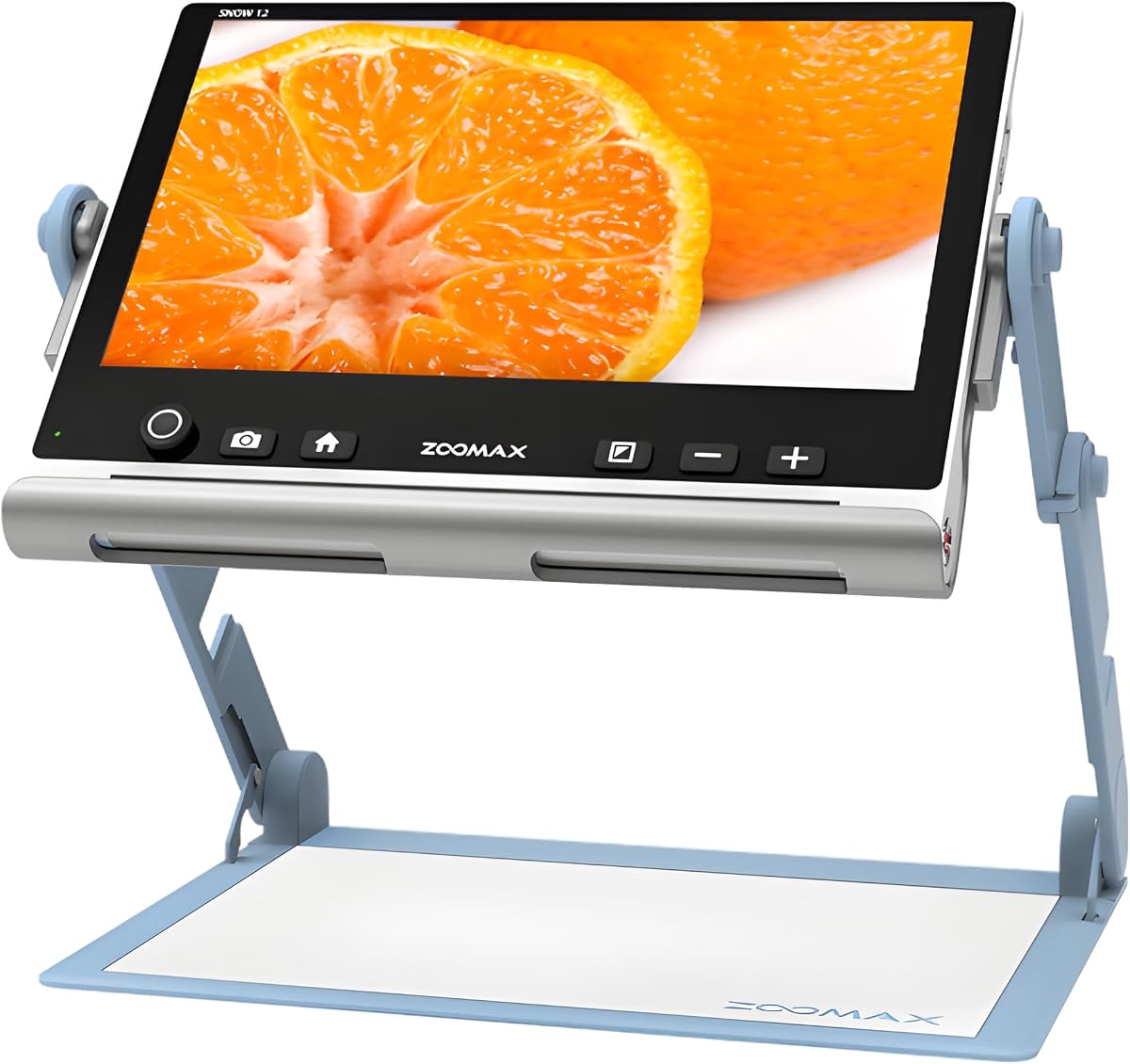
The Zoomax Snow 12 Inch offers a premium experience with a massive screen and advanced text-to-speech capabilities. Its 4.0 rating reflects a solid choice for users who need high-end features like OCR for true visual independence.
We may earn a commission when you buy through this link, at no additional cost to you.
The standout feature is the ability to convert printed text into spoken words in over 20 languages. This functionality is a game-changer for reading documents or emails when eyes are too tired for visual scanning.
While the 12 inch display is excellent, it is bulkier than handheld units. However, the foldable stand adds flexibility for desk work, and the HD camera ensures detailed visuals for writing and reading alike.
We recommend this for users who need accessibility features beyond simple magnification. It is a valuable investment for long-term independence in managing paperwork or reading complex documents.
Optical character recognition reads text aloud, providing an alternative way to consume written information.
The large screen reduces the need for extreme zoom, keeping text and context visible at once.
We may earn a commission when you buy through this link, at no additional cost to you.
This model focuses on ease of use with simplified buttons that reduce confusion for elderly users. It holds a 3.9 rating, indicating it is a strong contender for those who struggle with complex interfaces.
We may earn a commission when you buy through this link, at no additional cost to you.
The 26 color modes and 2X to 32X zoom provide flexibility for many conditions like macular degeneration. Users note that the device remembers their habits so they do not need to adjust settings constantly.
Some feedback suggests the focus can take time to adjust in certain lighting. However, the HD screen restores colors well, and the ergonomic handle ensures you do not have to hunch over to read.
We suggest this for users who prioritize simplicity over advanced features. It is a good match for seniors who want a straightforward tool for reading menus or books.
The button layout is minimal to prevent accidental presses and reduce learning time.
26 customizable options allow fine-tuning for specific vision impairments like color blindness.
We may earn a commission when you buy through this link, at no additional cost to you.
This device is praised for its high-resolution screen and professional image processing DSP technology. With a 4.3 rating, it appeals to users who demand clear details without distortion at high magnification levels.
We may earn a commission when you buy through this link, at no additional cost to you.
The 26 color modes offer extensive customization for different vision needs. This ensures that text remains sharp and comfortable whether you need inverted colors or specific filters for low vision.
Users mention that the handle is foldable for comfortable positioning, though the price is higher than budget options. The connectivity to a TV via included cables is also a valuable feature for home use.
We recommend this for those willing to invest in higher image quality. It is a reliable choice for daily reading tasks where clarity is more important than portability.
Professional DSP technology ensures images remain sharp and true to life at any zoom level.
The foldable handle allows you to angle the device comfortably without straining your back.
We may earn a commission when you buy through this link, at no additional cost to you.
This unit is designed to support amblyopia and low vision with high power magnification and simplified controls. It has a 3.9 rating, suggesting it works well for basic needs but may require setup adjustments.
We may earn a commission when you buy through this link, at no additional cost to you.
The 800×480 HD screen restores colors and details effectively for long time reading. Users note that the device can connect to a television for greater and clearer visual effects during home sessions.
Feedback indicates the button layout is suitable for those with limited dexterity. However, some users report needing time to adjust to the focus mechanism on specific materials.
We suggest this for families looking for an affordable aid with TV connectivity. It is a practical tool for home use where a larger display can be achieved via cables.
The HDMI and AV outputs allow you to use a larger monitor for easier viewing at home.
Multiple modes help users with color blindness find a contrast that reduces eye fatigue.
We may earn a commission when you buy through this link, at no additional cost to you.
The VEVOR model distinguishes itself with a 13MP near and far dual lens system for versatile viewing. It holds a 3.4 rating, indicating that while the tech is advanced, usability may vary among users.
We may earn a commission when you buy through this link, at no additional cost to you.
The ability to switch between near and far lenses makes it useful for signs or documents alike. With 26 color modes and AV/HDMI outputs, it offers extensive customization for different environments.
Some users mention the weight can make it tiring for handheld use over time. However, the foldable handle helps when placing it on surfaces to reduce strain during longer sessions.
We recommend this for users who need extreme zoom levels and dual camera options. It is a solid pick for those who need to view both small text and distant objects with one device.
Switching between near and far lenses expands the range of tasks you can perform with one device.
The 2X to 48X zoom provides exceptional detail for very small print or fine textures.
We may earn a commission when you buy through this link, at no additional cost to you.
This model offers a balance of power and ease with 26 color modes and an ergonomic design. It receives a 4.0 rating, showing it is a reliable choice for everyday reading and visual tasks.
We may earn a commission when you buy through this link, at no additional cost to you.
The HD color LCD screen restores details well, and the simplified buttons make it suitable for elderly users. Users note that it memorizes habits so they do not need to adjust settings every time.
The foldable handle and TV connection add to its versatility for both mobile and home use. While the price is mid-range, the features justify the cost for those needing consistent magnification.
We suggest this for anyone looking for a dependable tool with high customization. It fits well for seniors who want a user-friendly device for home and travel.
The device remembers your last settings, saving time when you turn it on daily.
26 color modes ensure you can find a high contrast view that reduces eye strain.
We may earn a commission when you buy through this link, at no additional cost to you.
Eschenbach is a known name in vision aid, and this handheld HD video magnifier reflects that quality. It holds a 4.4 rating for its lightweight build and clear video performance in various lighting.
We may earn a commission when you buy through this link, at no additional cost to you.
The 5 viewing modes and image capture function make it useful for saving text or notes. Users appreciate the included cleaning cloth to keep the lens clear for optimal viewing.
The zoom steps are fixed at 5x, 7x, 9x, and 12x, which might feel less flexible than continuous zoom. However, the clarity and ease of use often outweigh this for casual readers.
We recommend this for users who prefer a trusted brand and simple controls. It is a great gift for someone who needs a lightweight tool for quick reading tasks.
Eschenbach has a long reputation for quality optical products that support vision health.
Save photos of text or labels to review later when you are not using the device.
We may earn a commission when you buy through this link, at no additional cost to you.
This unit offers an impressive 48X zoom for extreme magnification needs like reading fine labels. With a 4.0 rating, it is recognized for its utility in daily tasks like shopping or reading prescriptions.
We may earn a commission when you buy through this link, at no additional cost to you.
The simplified buttons make it easy for elderly users to navigate without confusion. It also supports a memory function so you can revisit your preferred settings whenever you turn it on.
Feedback notes it is best for short reading sessions rather than entire novels. The external battery lasts over four hours, which is sufficient for most daily outings or errands.
We suggest this for those needing high power in a portable format. It is a practical choice for anyone with macular degeneration who needs strong zoom for small text.
The 3X to 48X zoom allows you to read extremely small labels and fine print easily.
The external battery provides over four hours of use, ensuring you do not run out during the day.
We may earn a commission when you buy through this link, at no additional cost to you.
Selecting the right digital magnifier involves assessing screen size, magnification range, and specific features that match your daily reading habits. This section outlines the key factors to ensure you find a device that supports your independence.
Larger screens offer easier viewing for long periods but may be heavier to carry. Smaller units fit in a pocket but require a closer look. Consider where you will use the device most and balance the need for clarity with mobility.
Choose a size that fits your daily routine whether it is for home reading or on-the-go use.
Most devices offer zoom from 2X to 32X or higher. Higher magnification helps read tiny print but can reduce the visible area of text. Ensure the range covers your specific needs without making navigation difficult.
A versatile zoom range provides flexibility for various materials like books, menus, and labels.
Adjustable color modes like black on white or yellow on blue help reduce eye strain. Look for models with at least 8 or more options to suit changing light conditions or vision requirements.
More color options mean better comfort for users with color blindness or light sensitivity.
Rechargeable batteries should last long enough for your typical reading sessions. External packs may add weight but allow for quick swaps. Check the estimated hours of use to avoid interruptions during important tasks.
Ensure the battery life matches your daily needs for uninterrupted reading.
Simplified buttons and intuitive menus are crucial for elderly users. Models that save settings automatically reduce the need to adjust controls every time. Look for devices that minimize unnecessary complexity.
A user-friendly interface saves time and reduces frustration during daily use.
HDMI or AV outputs allow connection to a TV for a larger display. This is useful for home use when you want to avoid holding the device. Check if cables are included in the package to save extra costs.
Connectivity features extend the usability of the magnifier beyond handheld tasks.
Some high-end models include optical character recognition to read text aloud. This can be a vital feature for those who struggle with visual scanning. Consider if text-to-speech is a priority for your workflow.
OCR features provide a different way to access written information for improved independence.
Place the device on a flat surface or hold it steadily above the text to ensure the image remains sharp. Adjust the lighting to reduce glare on the screen for the best viewing experience.
Familiarize yourself with the color mode buttons to find high contrast settings that reduce eye strain. Save your preferred settings if your device supports memory functions to save time daily.
Clean the camera lens regularly with the provided cloth to prevent smudges that reduce clarity. Charge the battery fully before each use to maintain consistent performance throughout your reading sessions.
Digital magnifiers use cameras and screens to enlarge text with adjustable contrast and color modes. They often include features like image capture and text-to-speech that glass magnifiers cannot offer. This flexibility helps reduce eye strain and supports different visual needs.
Many users find them ideal for shorter texts like menus or documents. Reading whole novels may be tiring on smaller screens. Some larger models with TV connections can help reduce strain for extended reading sessions.
Most devices have HDMI or AV outputs that require a compatible cable. Plug one end into the magnifier and the other into the TV input. You may need to switch the TV to the correct input source to see the feed.
Yes, most digital magnifiers have built-in LED lights to illuminate the text below. This ensures clear visibility even in dim environments. Always check the brightness settings to balance comfort and battery life.
Many models support photo capture and memory cards to store images. This allows you to revisit labels or documents later. Look for a card slot or USB connection to manage your saved files.
Magnification between 2X and 32X is common and effective for macular degeneration. Higher power helps read small print but reduces the field of view. Choose a range that allows you to see enough text comfortably.
We highlighted ten excellent devices ranging from budget-friendly options to premium models with OCR. Each offers unique strengths in screen size, zoom range, and user control to suit different needs.
Prioritize features like battery life and color contrast based on your daily habits. If you read frequently, a larger screen with memory functions will offer the best value.
Prices and stock change often so verify the latest details on the product pages. Choose the device that best fits your budget and vision goals for a better reading experience.