
Thermalright TL-B6B
4.6Editor score
S-FDB V2 bearing
Low noise operation
7 fan blades design
This guide compares the top 60mm cooling fans for quiet operation and high performance in NAS, 3D printers, and small case applications.
Selecting the right 60mm cooling fan is crucial for maintaining optimal temperatures in compact electronic enclosures and specialized hardware setups. These small fans must balance airflow capacity with noise levels to ensure reliable operation without disturbing users in quiet environments.
We evaluated ten highly rated models based on bearing type, noise output, airflow performance, and compatibility with standard power connectors. Our analysis focuses on real-world usability for network storage, printers, and custom chassis builds where space is limited.
Each product selection includes detailed specifications, performance pros and cons, and installation considerations to help you make an informed decision. Please note that pricing and availability can fluctuate regularly, so verify current listings before purchasing your next cooling solution.
4.6Editor score

4.8Editor score
4.9Editor score
The following table provides a side-by-side comparison of key specifications for all ten selected models to help you quickly identify the best fit for your specific cooling requirements and hardware constraints.


The Noctua NF-A6x25 PWM stands out as a premium solution for users demanding silence without sacrificing cooling power. With a near-perfect rating, this fan delivers consistent performance across various small form factor applications.
We may earn a commission when you buy through this link, at no additional cost to you.
Its Flow Acceleration Channels and Advanced Acoustic Optimisation frame minimize turbulence and noise at any speed. The included Low-Noise Adaptor allows further reduction for near-silent setups while maintaining effective airflow for heat dissipation.
While the price is higher than average alternatives, the longevity and build quality justify the investment. You get anti-vibration mounts, screws, extension cables, and a y-cable, making installation flexible and straightforward for most users.
Buy this fan if you prioritize whisper-quiet operation and maximum reliability in NAS boxes or precision electronics. It is the ideal replacement for noisy stock fans in critical hardware that cannot afford to overheat or disrupt your workspace.
The frame design reduces airflow turbulence to keep noise levels as low as 19.3 dB(A) even at high speeds.
Anti-vibration mounts and extension cables ensure a secure fit and flexible wiring for complex chassis configurations.
We may earn a commission when you buy through this link, at no additional cost to you.
The Noctua NF-A6x25 FLX offers similar acoustic benefits to the PWM model but uses a traditional 3-pin connector for systems without PWM headers. It earns a top rating for its reliability and acoustic engineering.
We may earn a commission when you buy through this link, at no additional cost to you.
This version comes with two Low-Noise Adaptors allowing you to manually select speeds of 3000, 2400, or 1600 RPM. This flexibility is ideal for static environments where automatic bios control is unavailable or unnecessary.
Users note the high-quality bearing system ensures a long service life. The included 3:4-pin adaptor also enables direct power from the supply, giving multiple options for integration into diverse hardware ecosystems.
Choose this model if your system lacks PWM support or you prefer fixed speeds. It provides the same premium airflow and silence of the PWM version while remaining compatible with older motherboards and power setups.
Low-Noise Adaptors let you fine-tune fan speed manually without needing software or bios configuration settings.
The included adaptor allows direct power supply connection, ensuring compatibility with a wider range of legacy hardware.
We may earn a commission when you buy through this link, at no additional cost to you.
The Wathai EC AC Axial fan provides high-performance cooling using standard AC voltage instead of DC. It is a strong choice for DIY projects where wall power is more accessible than USB or DC rails.
We may earn a commission when you buy through this link, at no additional cost to you.
Designed with dual ball bearings, this fan offers a lifespan of 67,000 hours and supports both flat and upright mounting positions. Its brushless motor technology ensures efficient power consumption while delivering 24.8 CFM of airflow.
Be aware that the wires are not connected to the fan head, requiring careful assembly by the user. The package includes a power plug and wiring head, offering flexibility but adding a step to the installation process.
Select this fan for ventilating small spaces, industrial enclosures, or custom projects needing AC power. Its robust construction and high speed make it suitable for continuous operation in demanding industrial or hobbyist environments.
The fan accepts voltage between 90V and 270V, making it usable worldwide without needing voltage converters.
Running at 4800 RPM, this fan moves air efficiently for rapid cooling in tight industrial equipment or hobby builds.
We may earn a commission when you buy through this link, at no additional cost to you.
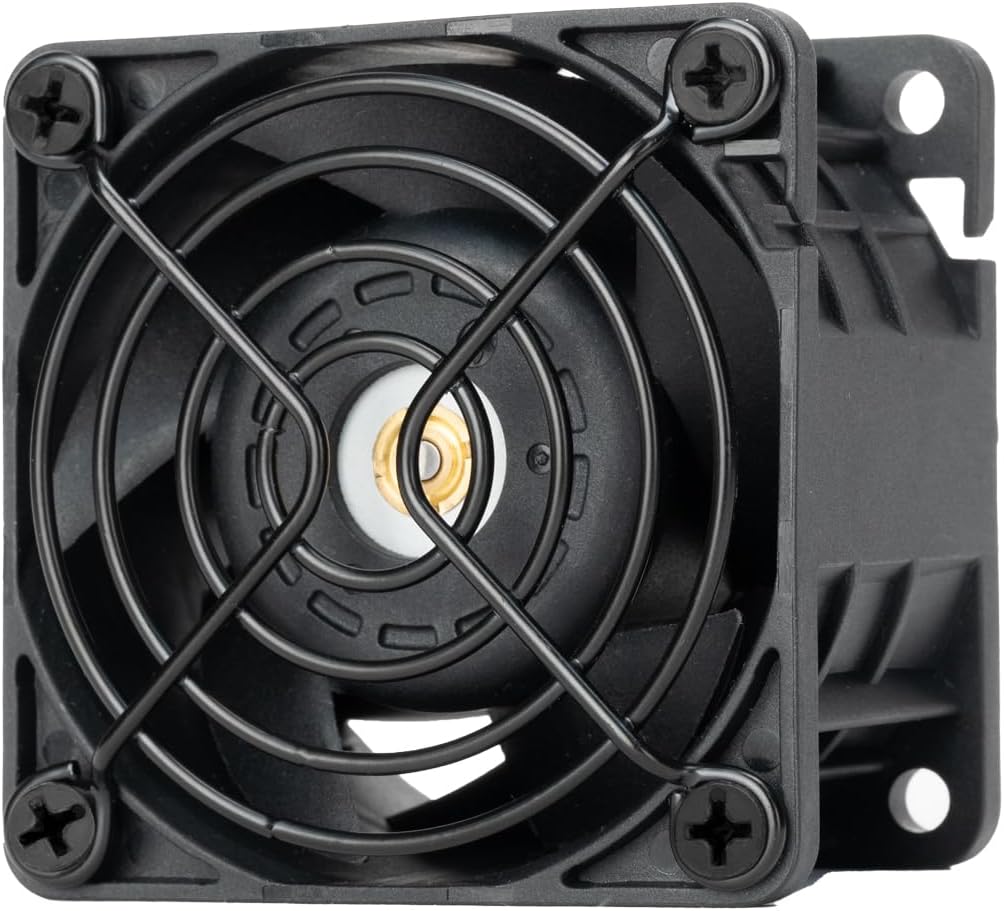
The Thermalright TL-B6B offers exceptional value for users needing a reliable 60mm fan without premium pricing. Its silent operation and PWM control make it a versatile choice for budget builds and custom cooling projects.
We may earn a commission when you buy through this link, at no additional cost to you.
Adopting S-FDB V2 bearing technology, this fan avoids shake issues and ensures smooth rotation. The double-sided silicone pads reduce vibration, keeping noise levels below 20.17dB(A) while maintaining efficient heat dissipation for the system.
Installation notes indicate the screw holes are not threaded, requiring careful force to secure the fan. The wind direction mark on the inner frame simplifies orientation, ensuring you install airflow correctly for optimal cooling performance.
Buy this fan for cost-effective chassis cooling or CPU coolers where silence matters. It balances price and performance well, making it a practical choice for budget builders or replacements in existing PC enclosures.
The S-FDB V2 bearing design minimizes vibration and mechanical noise for a silent and stable operation.
Double-sided pads around the frame absorb vibrations, protecting the chassis and keeping the environment quiet.
We may earn a commission when you buy through this link, at no additional cost to you.
The ANVISION 2-Pack provides two slim 15mm fans ideal for applications where depth is limited. This pack allows users to cool multiple components without worrying about single fan failure affecting the whole system.
We may earn a commission when you buy through this link, at no additional cost to you.
Running at 4000 RPM with dual ball bearings, these units offer good durability and consistent airflow for their size. The 17.6 CFM output is suitable for small enclosures where static pressure is not a primary concern.
Connectors use a standard 2-pin 2.5mm design common in hobby electronics. While not PWM compatible, the simplicity makes wiring easy for custom control circuits or direct voltage setups in small appliances.
Choose this pack when you need redundancy or to cool multiple small zones. It is cost-effective for bulk replacements in server racks, small routers, or DIY projects requiring multiple compact fans.
Buying a pack of two ensures you have a spare or can cool two devices simultaneously without extra shipping costs.
The 15mm thickness allows installation in tight spaces where standard 25mm fans simply will not fit.
We may earn a commission when you buy through this link, at no additional cost to you.
The Antrader 3Pcs set offers a practical solution for cooling multiple 3D printer hotends or similar electronic parts. This budget-friendly pack ensures you have enough fans to cover all necessary cooling points in your build.
We may earn a commission when you buy through this link, at no additional cost to you.
Designed with a slim 15mm profile and 9 blade impeller, these fans fit into tight print head assemblies. The 3600 RPM speed delivers enough air to cool filament melts quickly during printing to prevent heat creep.
While constructed primarily of plastic, the dual ball bearing design supports a decent lifespan for hobby applications. The 2 Terminal connector is standard for printer boards, making integration into existing hardware straightforward and simple.
Purchase this set for replacing worn fans in 3D printers or small hobby appliances. It is an economical way to upgrade multiple units at once without spending extra on expensive brand name components.
The 15mm thickness ensures the fan fits easily into standard 3D printer hotend housings without obstruction.
The 2-pin connector matches common 3D printer headers, allowing quick connection and soldering if needed.
We may earn a commission when you buy through this link, at no additional cost to you.
The UMLIFE 2PACK EC set provides two high-performance AC fans ideal for ventilation in small enclosures. These fans deliver consistent speed and airflow without needing internal power supplies for DC conversion.
We may earn a commission when you buy through this link, at no additional cost to you.
Rated for voltages between 90V and 270V, these fans adapt to global power standards. The dual ball bearings ensure they can be mounted in any orientation while maintaining a long service life of 67,000 hours.
Applications include small campers, projectors, or audio equipment. The design focuses on moving air efficiently in small spaces where standard muffin fans might fail to meet cooling needs.
Use this pack to ventilate electrical cabinets, small rooms, or DIY boxes. The AC compatibility makes it easier to wire into household power, avoiding the complexity of internal transformers or battery packs.
Dual ball bearings withstand heavy use and various mounting angles without wearing out quickly.
Supporting 90V to 270V makes these fans suitable for use in nearly any country without adapters.
We may earn a commission when you buy through this link, at no additional cost to you.
The Noctua NF-A6x15 PWM delivers the brand's signature silence in a compact 15mm form factor. Its near-perfect rating confirms it is a top choice for slim profile cooling requirements in constrained enclosures.
We may earn a commission when you buy through this link, at no additional cost to you.
With Flow Acceleration Channels and advanced acoustic optimization, it keeps noise below 19.8 dB(A) even at 3500 RPM. The Low-Noise Adaptor allows further speed reduction if absolute silence is required for your application.
This fan includes the same premium accessories as other Noctua models. Anti-vibration mounts and extension cables ensure a secure fit while the 4-pin connector allows seamless integration with modern motherboard or controller PWM outputs.
Select this fan for slim PC cases or equipment with tight depth constraints. It provides the quiet operation and reliability of a full-size Noctua fan while fitting into spaces where thicker units cannot be installed.
Despite its slim profile, the fan maintains the quiet operation Noctua is known for through optimized blade design.
Anti-vibration mounts reduce noise transfer to the case while the extension cable offers flexible wiring options.
We may earn a commission when you buy through this link, at no additional cost to you.
The Silverstone FHS 60X is an industrial-grade fan built for maximum cooling efficiency in server or heavy-duty applications. Its 38mm thick frame and dual ball bearings ensure it handles high loads without failure.
We may earn a commission when you buy through this link, at no additional cost to you.
Controlled via PWM from zero to 15,000 RPM, this fan offers unprecedented flexibility for balancing noise and cooling. At full speed, it generates 65.74 CFM of airflow and significant static pressure to push air through dense heatsinks.
The included protective metal grille adds durability for industrial environments where the blades might be exposed. This feature helps prevent damage while maintaining safety standards for open rack or industrial server setups.
Choose this fan when you need maximum airflow or high static pressure. It is perfect for custom liquid cooling reservoirs, industrial equipment, or server racks where noise is secondary to thermal performance.
The 38mm thick frame pushes air through restrictive filters or dense components without losing efficiency.
The included metal grille prevents foreign objects from contacting the blades in exposed industrial environments.
We may earn a commission when you buy through this link, at no additional cost to you.
The Noctua NF-A6x25 5V is a specialized version designed for 5V USB-powered applications. It offers the same acoustic performance as its 12V counterpart while fitting into low-voltage ecosystems.
We may earn a commission when you buy through this link, at no additional cost to you.
With a max speed of 3000 RPM, it maintains quiet operation around 19.3 dB(A). The polarity protection ensures safe connection even if wired incorrectly, which is useful for DIY portable projects.
Included accessories feature an OmniJoin adaptor set for connecting to proprietary headers. This flexibility makes it suitable for custom 5V builds like portable fans or small USB-cooled enclosures.
Buy this fan if your project runs on USB power. It provides high-quality cooling for small 5V devices without requiring a separate power adapter or high-voltage rail connection.
Built-in polarity protection prevents damage if wires are connected backwards during DIY installation.
The OmniJoin adaptor allows connection to various proprietary headers for maximum compatibility.
We may earn a commission when you buy through this link, at no additional cost to you.
Selecting the right fan involves balancing voltage requirements, noise levels, and physical dimensions. This section outlines the key factors to consider before purchasing your next 60mm cooling solution.
Always verify if your system uses DC (5V or 12V) or AC power. 12V DC fans are standard for PCs and electronics, while AC fans suit industrial enclosures with direct mains power.
Check your motherboard or device specifications before buying to ensure voltage mismatch does not damage the fan or your hardware.
PWM fans offer automatic speed control based on temperature while fixed speed fans run at a constant RPM. PWM provides better balance between noise and cooling performance.
Choose PWM if your motherboard supports it; otherwise, select a fixed speed fan with an adaptor or controller for manual adjustment.
While width and height are usually 60mm, thickness varies from 15mm to 25mm or more. Measure your available space to ensure the fan fits without obstruction.
Slimmer fans save space but may move less air than thicker ones. Consider airflow needs when choosing thickness.
Bearing technology affects noise and lifespan. Sleeve bearings are quiet but wear faster, while ball bearings last longer but may be slightly louder.
Opt for dual ball bearings if the fan will run continuously in harsh or high-temperature environments.
Airflow (CFM) indicates how much air is moved while static pressure measures resistance when pushing air through filters or heatsinks.
Pick higher static pressure for restricted cases and high airflow for open ventilation to maintain optimal cooling.
Noise ratings in dB(A) are crucial for quiet environments. Lower numbers mean quieter operation but often less airflow at the same speed.
Check decibel ratings if you need silence. Use Low-Noise Adaptors to reduce sound if necessary.
Some fans include anti-vibration mounts or special adapters for flexible installation. These reduce noise transmission to the case.
Ensure the package includes all necessary screws or mounts for your specific setup to avoid additional purchases.
A longer warranty reflects manufacturer confidence and protects your investment. Look for at least a two-year guarantee on critical components.
Verify if the seller offers support or easy returns in case of defects upon arrival.
Install the fan in a position where it can move air without obstruction. Use the provided anti-vibration mounts to secure it and prevent rattling during high-speed operation.
Periodically clean dust from the blades and frame to maintain airflow efficiency. Compressed air works well for blowing out debris without damaging the internal bearings.
Check wiring connections annually to ensure they remain tight. If the fan stops spinning smoothly, it may need replacement or professional inspection to avoid overheating.
The standard thickness for most 60mm fans is 25mm, though 15mm slim options exist for tight spaces. Thicker models like 38mm provide higher airflow but require more clearance.
Not necessarily. Fixed speed fans work well for hotends, but PWM allows speed tuning. Check your printer's controller board to confirm support before purchasing PWM models.
High-quality fans with ball bearings last 50,000 to 150,000 hours. Lower-end sleeve bearing fans may last fewer years under constant operation.
Yes, many mini-ITX cases support 60mm fans for CPU or system cooling. Always measure the available space to ensure fit.
Noise often comes from vibration or obstruction. Ensure screws are tight but not overtightened, and confirm no wires block the blades.
Most PC fans use 2-pin or 4-pin connectors. Industrial fans may use larger connectors. Always match your power supply or header type.
No. AC fans require mains power while DC fans need low voltage. Using the wrong voltage will damage the fan and potentially the power supply.
Look for an arrow on the frame indicating airflow direction. Usually, the side without the motor blows air toward the motor.
We have reviewed ten exceptional models ranging from silent Noctua fans to high-performance industrial units. Each option offers distinct benefits depending on your application, from precision electronics to server racks.
Prioritize voltage compatibility and dimensions first to avoid fit issues. Then balance airflow and noise based on where the device will operate to ensure optimal performance and user comfort.
Remember that prices and availability change often. Check current listings and read recent feedback before finalizing your choice to ensure you get the best product for your specific cooling needs.