
22MP Film & Slide Scanner with 5 LCD LCD
4.3Editor score
Affordable price point
Built-in memory storage
HDMI and USB output
Preserving memories from old film is easier with modern 35mm slide scanners. These devices convert negatives and slides into digital files quickly without needing a computer. They are ideal for families wanting to share history online or on screens.
We evaluated ten top scanners based on resolution, ease of use, and supported film types. Our list includes models with large screens, HDMI output, and standalone operation. Each option offers distinct benefits for different user preferences and budgets.
Each pick highlights key features, pros, and cons to help you decide. Prices and availability may change over time, so check current listings before buying. This guide ensures you find a scanner that matches your archiving goals perfectly.
4.3Editor score

4.3Editor score

5.0Editor score
As an Amazon Associate we earn from qualifying purchases.
This side-by-side comparison highlights the key specifications of each scanner. Compare screen sizes, resolution, and supported film types to find the perfect match for your collection.


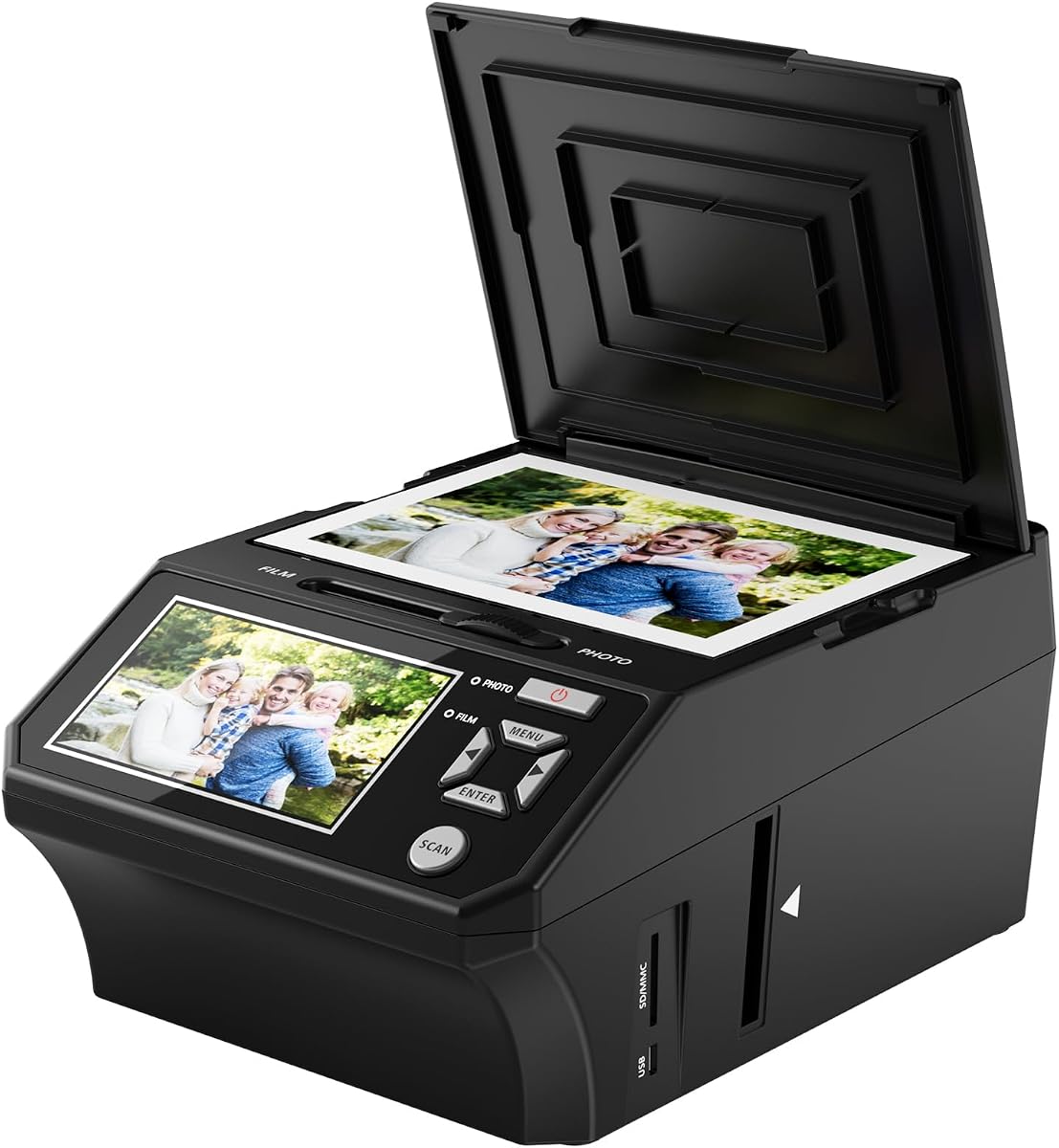




This KODAK scanner is a top choice for digitizing old slides and negatives. It offers 22MP resolution and a large 5-inch screen. Users can view images instantly without a computer.
We may earn a commission when you buy through this link, at no additional cost to you.
The tray system makes loading film fast and simple. You can edit brightness and color directly on the device. This saves time during batch scanning sessions.
While it lacks an SD card in the box, the device is compatible with standard cards. The plastic casing is durable enough for home use. The HDMI option is great for TV sharing.
Families looking for an all-in-one solution should consider this model. It balances features and ease of use well. This scanner helps preserve memories effectively without complex setup.
The large LCD allows you to check scans immediately. This helps catch errors early without re-scanning.
Supports 135, 110, and 126mm formats easily. This covers most standard vintage film types.
We may earn a commission when you buy through this link, at no additional cost to you.
The Magnasonic scanner delivers high 24MP resolution for detailed images. It supports Super 8 film in addition to standard slides. This makes it versatile for various legacy collections.
We may earn a commission when you buy through this link, at no additional cost to you.
Users appreciate the quick scanning speed of under five seconds per image. The standalone design means no software installation is required. You can adjust RGB settings directly on screen.
Keep in mind that HDMI and SD cards are not included. You will need to purchase these separately for full functionality. However, the memory slot supports up to 128GB.
This unit is great for those who want to scan old movies and photos. It simplifies the process significantly. It is a solid choice for home digitization projects.
Unlike many models, this handles Super 8 film well. This is rare for standalone scanners in this price range.
No computer or driver is needed to scan. This makes it accessible for non-tech-savvy users.
We may earn a commission when you buy through this link, at no additional cost to you.
This Max model from KODAK offers impressive resolution up to 4208×3120. The 13MP CMOS sensor ensures crisp details in every scan. It handles color and black-and-white negatives well.
We may earn a commission when you buy through this link, at no additional cost to you.
The smooth-moving tray makes continuous loading easier. You do not need to reposition film constantly. This improves efficiency during large batch tasks.
The price is higher than some basic units. The screen size is standard but not as large as others. However, the USB-C connectivity is a modern advantage.
Photographers wanting high-quality digital files will like this. It offers reliable performance for archiving. The direct SD saving adds convenience.
The high resolution captures fine details well. This is crucial for preserving aged or delicate film.
USB-C support ensures fast data transfer to PCs. This modern standard simplifies connectivity.
We may earn a commission when you buy through this link, at no additional cost to you.
This scanner stands out for including an 8GB SD card in the box. It also supports printed photos and business cards. This versatility is rare among slide-focused units.
We may earn a commission when you buy through this link, at no additional cost to you.
The 3-year warranty provides significant peace of mind. The interface uses intuitive one-touch buttons. You can preview and edit without external help.
It lacks HDMI output for TV viewing. Some users might prefer a larger screen. However, the included card saves immediate setup costs.
Gifts for parents or grandparents fit well here. It simplifies the process significantly for them. The warranty adds trust to the purchase.
Includes cleaning brush and accessories. This reduces the need for extra purchases immediately.
Can scan printed 3R, 4R, and 5R photos. This adds value beyond just slides and negatives.
We may earn a commission when you buy through this link, at no additional cost to you.
This model offers excellent value at a low price point. It includes a full accessory kit with cables. The 128MB internal memory is a handy backup feature.
We may earn a commission when you buy through this link, at no additional cost to you.
It supports up to 64GB SD cards for expansion. The 5-inch screen allows for easy viewing. HDMI output helps share photos on a large TV.
Internal memory is small compared to SD cards. Build quality is functional but not premium. However, the features match the price well.
Beginners wanting to try digitizing without investment will like this. It is a practical entry-level choice. The included warranty adds confidence.
Internal storage helps if no SD card is present. This allows immediate saving of a few images.
Includes HDMI, USB, and power adapter. This ensures you can start scanning right away.
We may earn a commission when you buy through this link, at no additional cost to you.
The HP FilmScan offers a large 7-inch touch display. This makes editing photos directly on the device easy. The gallery mode works well as a digital picture frame.
We may earn a commission when you buy through this link, at no additional cost to you.
Users can crop and adjust scans without software. The quick-feed tray speeds up the process. It supports multiple film formats like 135 and 126.
The user rating is slightly lower than others. This might be due to interface nuances. However, the touch screen is a premium feature.
Professionals who prefer touch interfaces may find this useful. It simplifies workflow significantly. The display size is a standout benefit.
Touch screen enables intuitive image control. This reduces the learning curve for new users.
Use the device as a digital frame. This keeps scanned memories visible at home.
We may earn a commission when you buy through this link, at no additional cost to you.
This HP model uses USB-C for power and data. This simplifies connection to modern laptops. It supports external 5V adapters for portability.
We may earn a commission when you buy through this link, at no additional cost to you.
The 22MP interpolation provides detailed image files. The 5-inch touchscreen allows easy editing. It includes a 50mm slide adapter for quick use.
HDMI is not included for TV viewing. The screen size is standard for this category. However, the USB-C feature is very useful.
Users who want portable operation will appreciate this. It works well with tablets or phones. The adapter ensures stable scanning.
Powered via USB-C for flexibility. This allows scanning anywhere without wall outlets.
Includes adapter for 50mm slides. This handles various sizes effortlessly.
We may earn a commission when you buy through this link, at no additional cost to you.
The SCANZA model supports rare 8mm film formats. The 3.5-inch LCD is bright and adjustable. It comes with multiple adapters for flexible use.
We may earn a commission when you buy through this link, at no additional cost to you.
The interface is simple with large buttons. This is good for seniors or casual users. The video cable adds extra connectivity options.
The screen is smaller than modern 5-inch options. It feels like an older generation device. However, the film support is unique.
Those needing 8mm or 110 formats will find this useful. It handles specific needs well. Check compatibility before buying.
Rarely seen in modern scanners. This helps preserve older home movie formats.
Adjustable brightness helps viewing in different rooms. This improves user experience significantly.
We may earn a commission when you buy through this link, at no additional cost to you.
DigitConvert offers a compact and portable scanner. The 2.4-inch LCD is functional for quick previews. Batch scanning helps move through strips quickly.
We may earn a commission when you buy through this link, at no additional cost to you.
The TV-out interface allows viewing on bigger screens. It is plug-and-play without software installation. The price is very accessible for casual users.
The small screen requires close viewing. Ratings suggest some quality variance. But it works for simple needs well.
Budget users looking for portability might like this. It handles basic conversions effectively. Verify support before purchase.
Small footprint saves space on desks. This is great for limited workspace.
Allows direct connection to TVs. This makes sharing photos easier.
We may earn a commission when you buy through this link, at no additional cost to you.
The ClearScan T7 boasts a perfect rating of 5.0. It includes a 16GB SD card for immediate use. The 7-inch touchscreen simplifies control significantly.
We may earn a commission when you buy through this link, at no additional cost to you.
Output resolution is 24MP for high quality. It supports Super 8 and multiple film types. The interface is easy for families to use.
The price is higher than average. It lacks some advanced manual controls. But the ease of use is excellent.
Families wanting simplicity and high satisfaction should choose this. The included card saves money. It is a top-tier option.
Touchscreen reduces button confusion. This helps grandparents and beginners scan easily.
16GB SD card is included. This adds value and convenience immediately.
We may earn a commission when you buy through this link, at no additional cost to you.
Choosing the right scanner depends on your collection size and desired output. Consider these factors to find the best match for your needs.
Resolution determines how detailed your digital images will be. Look for models with at least 20MP for high-quality prints. Higher resolution helps recover details from aged negatives.
Aim for scanners offering 22MP or higher for best results.
Larger screens make previewing and editing easier. Touchscreens simplify navigation compared to buttons. A good screen helps check quality without a computer.
Choose at least 5 inches for comfortable viewing.
Verify the scanner supports your specific film types. Some cover only 35mm while others handle Super 8 or 110. Ensure adapters are included for your needs.
Check compatibility for 135, 126, 110, or 8mm formats.
Standalone units do not need a computer. This is great for quick scanning without software. PC models offer more advanced editing options later.
Pick standalone for convenience and simplicity.
USB-C or standard USB helps transfer files easily. HDMI lets you view on a TV. This is useful for sharing photos with family instantly.
Ensure HDMI or USB-C output is available.
Built-in memory allows saving without an SD card. Check SD slot capacity for large batches. Cards are often sold separately, so budget for them.
Look for SD slots supporting 32GB or more.
Tray systems affect how fast you can scan. Quick-load trays reduce handling time. Stable holders prevent blurry images from movement.
Choose scanners with quick-feed trays for speed.
A longer warranty protects your investment. Customer support helps if you face issues. Good support adds peace of mind.
Opt for models with at least 2-year warranties.
Start by cleaning your slides with a soft brush. Dust can ruin the image quality. Use a microfiber cloth to wipe the light box gently.
Insert your film into the correct tray. Select the right format setting on the screen. Press the scan button and wait for the preview.
Store slides in dry conditions to prevent fading. Regularly update firmware if available. Keep the scanner covered when not in use.
Most modern standalone scanners do not require a computer. You can save directly to an SD card. However, some models offer extra software for editing.
Aim for 20MP or higher resolution. This ensures you can print images clearly. Lower resolutions are fine for screen viewing only.
Yes, most scanners handle both negatives and slides. They come with adapters for different sizes. Just ensure you select the right mode.
Connect the device via USB and access the files. You can also use the SD card directly. Most computers recognize them instantly.
Standard sizes like 135, 126, and 110 are common. Some support Super 8 or 8mm film. Check product specs before buying to be sure.
Most units do not include SD cards. You will need to buy one separately. Some bundles offer one, so check the package details.
Clean slides before scanning to remove dust. Use the brightness and color tools on the device. High resolution settings also help significantly.
Yes, but handle film carefully. These scanners use gentle trays. Always check the frame before scanning to avoid damage.
The KODAK Slide N Scan and ClearScan T7 are top contenders. They offer ease of use and high-quality outputs. Consider your needs for speed versus precision.
Prioritize standalone operation if you lack computer access. Look for features like touchscreens and HDMI for better sharing. Warranty support is also vital.
Prices change often so verify current listings. Check what accessories come with each model. This ensures you get the best value for your money.