
FLASHFORGE Creator 5 Pro
4.0Editor score
Four independent toolheads
Heated chamber 65C
Near-zero waste system
Discover the top 3D printer for figurines and models with detailed reviews comparing speed, precision, and multi-color features for creators.
Finding the right 3D printer for figurines and models requires balancing precision, speed, and ease of use. Whether you are creating collectibles or custom toys, the machine you choose defines the quality of your output and the enjoyment of your creative process.
This guide compares ten leading printers designed for detailed work. We evaluate speed, calibration, multi-color capabilities, and build volume to help you select the best tool. Each entry includes real specifications and performance notes to simplify your decision-making.
Each pick highlights unique strengths for different needs and budgets. Prices fluctuate often, so verify current deals before purchasing. Our goal is to provide clear, factual insights that empower you to start printing high-quality figurines and models with confidence.
4.0Editor score

4.7Editor score

4.4Editor score
This table provides a side-by-side view of the top ten printers. We highlight key specifications like speed, material support, and unique features to help you compare at a glance.





The Bambu Lab A1 is a standout FDM printer for creating detailed figurines. It scores high on precision and speed, delivering crisp results quickly. Its automated calibration ensures consistent quality without tedious setup.
We may earn a commission when you buy through this link, at no additional cost to you.
Its standout quality is the combination of speed and detail. With acceleration up to 10,000 mm/s², it prints fast yet maintains smooth surfaces. The active flow rate compensation further refines layers, reducing artifacts common in high-speed printing.
While the A1 excels in performance, multi-color printing requires the AMS lite accessory. Additionally, its open frame may limit compatibility with some engineering filaments. These trade-offs are acceptable for most hobbyists prioritizing speed and ease.
You should buy this if you want a reliable, fast printer for custom models. It suits beginners and enthusiasts alike who value precision without complexity. The A1 delivers professional-quality prints right out of the box.
The A1 achieves fast print times without sacrificing detail, making it ideal for intricate figurines and small model parts.
Full-auto calibration handles Z-offset and bed leveling, so you start printing immediately with minimal manual adjustment.
We may earn a commission when you buy through this link, at no additional cost to you.
The FLASHFORGE Creator 5 Pro is built for advanced users needing industrial-grade capabilities. It supports four toolheads for complex multi-color and material swaps. Its heated chamber and CoreXY design ensure stability and precision.
We may earn a commission when you buy through this link, at no additional cost to you.
It offers unique near-zero waste via its FlashSwap changer, eliminating purge waste during tool changes. The 65°C chamber enables printing with ABS and PC, expanding material choices. This is crucial for durable functional prototypes or high-temp models.
Its main downsides are cost and size, making it less suited for tight spaces or casual hobbyists. The complexity of managing four toolheads may also require learning time. However, these are justified for professional or workshop environments.
Buy this if you need true multi-material flexibility and reliability. It fits creators producing complex parts or colorful figurines with internal supports. The investment pays off in reduced waste and expanded material compatibility.
Switch toolheads without flushing filament, saving material costs and enabling vibrant multi-color designs with minimal waste.
CoreXY motion and rigid rails eliminate vibrations, ensuring smooth surfaces even at high 600mm/s print speeds.
We may earn a commission when you buy through this link, at no additional cost to you.
The FLASHFORGE AD5X brings multi-color printing within reach of budget-conscious users. With IFS technology, it prints up to four colors simultaneously. It also features fast 600mm/s speeds and supports high-temp materials.
We may earn a commission when you buy through this link, at no additional cost to you.
Its Independent Filament System enables complex designs without manual swaps. The auto leveling system ensures reliable first layers. These features make it versatile for both decorative figurines and functional parts.
Trade-offs include potential noise and software nuances compared to premium brands. While reliable, it may need tuning for best results. Still, it offers exceptional value for its price and capabilities.
You should choose this if you want colorful prints without overspending. It suits hobbyists exploring multi-color design. The AD5X balances performance and affordability well for entry-level advanced printing.
IFS technology allows four simultaneous colors, making vibrant figurines accessible without expensive upgrades.
600mm/s speeds with auto leveling keep production fast while maintaining quality for detailed model parts.
We may earn a commission when you buy through this link, at no additional cost to you.
The Bambu Lab P2S Combo is a powerful upgrade for serious model makers. It includes the AMS 2 Pro for multi-color prints. Its speed and calibration features ensure professional results consistently.
We may earn a commission when you buy through this link, at no additional cost to you.
It excels in workflow integration, with fast setup and AI failure detection. The AMS 2 Pro adds filament drying, enhancing print quality. This combo supports both creative and engineering projects.
While pricey, its convenience and performance justify the cost for dedicated users. The lack of resin support limits some figurine needs. However, FDM is ideal for larger, durable models.
Buy this if you want top-tier FDM multi-color features. It fits creators needing reliability and speed. The P2S delivers unmatched workflow ease for high-volume printing.
Setup in 15 minutes with auto calibration, so you start printing complex models immediately.
AMS 2 Pro dries filament up to 65°C, preventing moisture issues for cleaner, stronger prints.
We may earn a commission when you buy through this link, at no additional cost to you.
The Bambu Lab P1S is an enclosed FDM printer optimized for reliability. It supports up to 16 colors with AMS. Its speed and auto leveling make it a strong choice for varied projects.
We may earn a commission when you buy through this link, at no additional cost to you.
Enclosure improves performance with materials like ABS and ASA. This reduces warping and ensures consistent quality for models. The P1S is compact yet powerful for its size.
Its small build volume may limit large figurines. AMS costs add to the total, but performance is solid. These trade-offs are acceptable for small-to-medium model printing.
You should buy this for reliable multi-material FDM printing. It suits creators needing enclosure benefits without premium costs. The P1S delivers fast, consistent prints efficiently.
Fully enclosed body supports engineering filaments, reducing warping for durable and detailed prints.
Setup takes 15 minutes, and 500 mm/s speeds keep turnaround times short for busy workflows.
We may earn a commission when you buy through this link, at no additional cost to you.
The Snapmaker U1 offers unique four-toolhead capabilities for complex prints. It swaps tools in 5 seconds, reducing downtime. This system enables mixed-material prints, like flexible supports or multi-color parts.
We may earn a commission when you buy through this link, at no additional cost to you.
Its CoreXY motion and 500 mm/s speeds ensure accuracy. Smart calibration maintains quality without manual tuning. These features make it a strong tool for detailed prototypes.
Higher cost and complexity may deter casual users. Yet the reduced waste and material freedom are valuable for advanced projects. The trade-offs suit professional or serious hobbyist environments.
Buy this if you need multi-material flexibility. It fits creators making detailed, durable models. The U1 balances speed, precision, and material versatility effectively.
Combine rigid and flexible materials in one print, enabling functional prototypes and intricate models.
AI monitoring and auto calibration protect prints, ensuring reliability for long jobs.
We may earn a commission when you buy through this link, at no additional cost to you.
The Creality SPARKX i7 includes AI tools to simplify model creation. Upload a photo to generate a 3D figurine quickly. Its 5-minute setup and AI failure detection enhance user experience.
We may earn a commission when you buy through this link, at no additional cost to you.
Multi-color capability with less waste makes it cost-effective. The large build volume supports bigger projects. These features suit creators wanting simplicity and smart tools.
AI features may need connectivity, and precision is decent but not top-tier. For basic to intermediate use, these trade-offs are minor. It delivers value through convenience and smart features.
You should choose this for smart, fast printing. It fits hobbyists exploring custom figurines. The SPARKX i7 combines speed with user-friendly AI.
Turn photos into 3D models instantly, speeding up custom figurine creation without CAD skills.
Night mode and 50% waste reduction make overnight printing quiet and cost-effective.
We may earn a commission when you buy through this link, at no additional cost to you.
The Adventurer 5M Pro excels in speed and high-temperature printing. Its CoreXY design reaches 600mm/s reliably. The 280C nozzle supports ABS and ASA, expanding material choices.
We may earn a commission when you buy through this link, at no additional cost to you.
Nozzle swaps take 3 seconds, reducing downtime. Enclosed design with filtration keeps prints clean. These features make it a robust tool for functional models.
Lack of native multi-color limits creative designs. Software may be basic compared to competitors. Yet its speed and heat capability remain strong selling points.
Buy this if you prioritize speed and material flexibility. It fits users needing durable parts. The 5M Pro delivers professional FDM performance.
Vibration compensation ensures 600mm/s prints stay accurate for clean model surfaces.
Tool-free nozzle swaps in 3 seconds minimize downtime between jobs.
We may earn a commission when you buy through this link, at no additional cost to you.
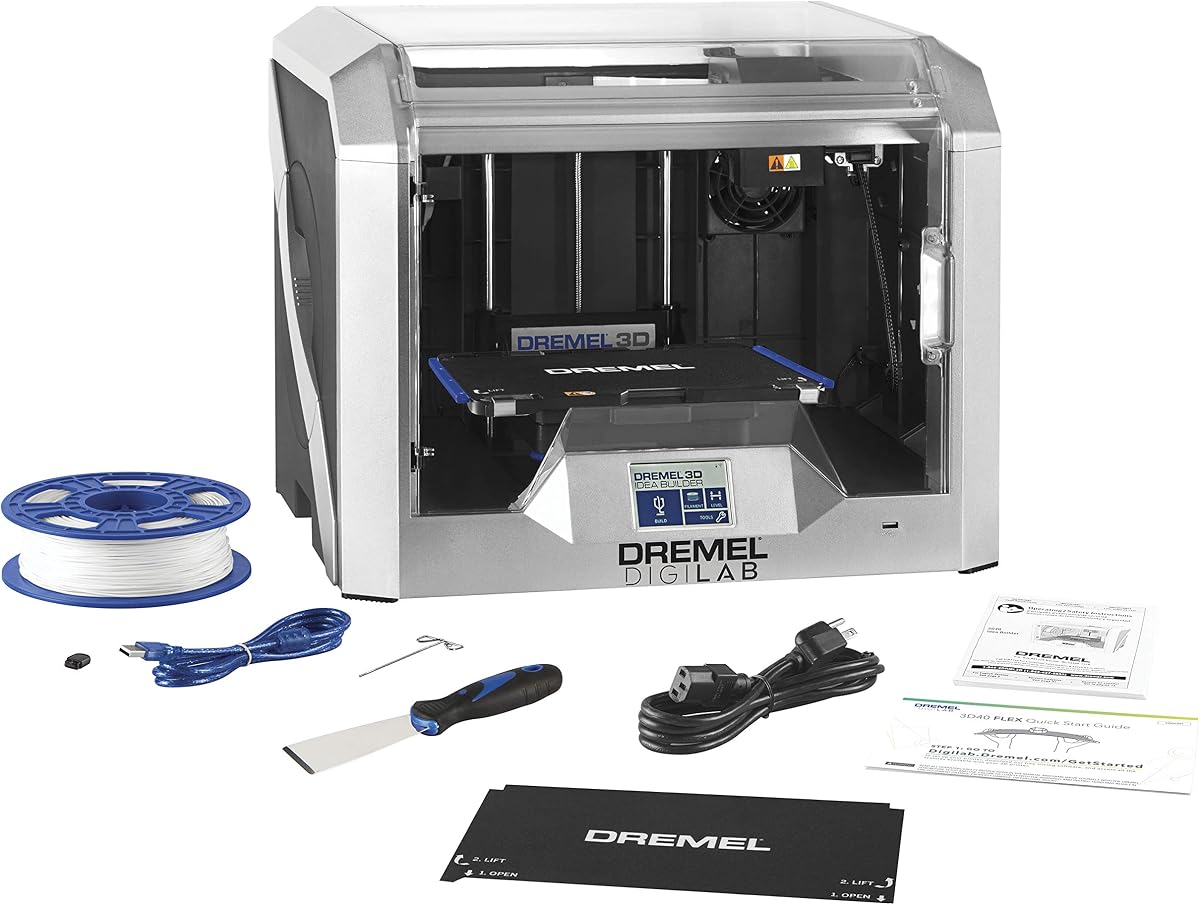
The Dremel 3D40 Flex is designed for reliable, easy use. Its flexible build plate simplifies part removal. Enclosed housing and auto leveling ensure safe, successful prints.
We may earn a commission when you buy through this link, at no additional cost to you.
Dremel's support and warranty add peace of mind. Network compatibility allows remote management. These features suit schools or home studios.
Slower speeds limit productivity for large batches. It lacks multi-color capabilities. For entry-level reliability, these trade-offs are acceptable.
You should buy this for dependable beginner printing. It fits users needing safety and support. The 3D40 Flex is a steady entry point.
Flexible build plate makes removing printed models simple, preventing damage during post-processing.
Fully enclosed housing protects users and ensures stable thermal conditions for better prints.
We may earn a commission when you buy through this link, at no additional cost to you.
The A1 Combo includes everything needed for multi-color prints. It integrates AMS lite seamlessly. Fully automatic calibration ensures reliable, high-quality results out of the box.
We may earn a commission when you buy through this link, at no additional cost to you.
Its active flow compensation refines layer adhesion. The quick-change nozzle simplifies maintenance. These features deliver consistent performance for detailed figurines.
Priced higher than standard A1, but value comes from included AMS. Open frame limits material range slightly. For most users, convenience is worth the trade-off.
Buy this if you want a complete solution. It fits creators needing ready-to-print capability. The A1 Combo is ideal for hassle-free multi-color models.
Includes AMS lite for multi-color printing without extra purchases, saving time and cost.
Z-shift and vibration compensation calibrate automatically, ensuring perfect layers every time.
We may earn a commission when you buy through this link, at no additional cost to you.
Choosing the right printer depends on several factors. We explain each to help you match features to your needs.
For figurines, layer height and nozzle size define detail. Look for printers supporting 0.1mm layers and fine nozzles. Accuracy ensures smooth curves and clear textures.
Prioritize models with high-precision features like auto-leveling and compensation.
Fast printers save time but may sacrifice detail. Balance speed with your quality needs. Many modern units offer both via adaptive layering.
Choose speed for prototypes and precision for final models.
Multi-color systems like AMS or IFS enable vibrant models without painting. They increase cost but reduce post-processing work.
Select based on whether color adds value to your workflow.
Build volume determines max part size. Small volumes suit miniature figurines. Larger beds allow full-body models without assembly.
Match size to your typical project scale.
Engineering materials like ABS and ASA provide durability. Ensure the printer supports desired filaments. Heated chambers help prevent warping.
Check nozzle temperature limits for material flexibility.
Auto-calibration and bed leveling reduce setup time. These features benefit beginners or busy workflows.
Prioritize automation for consistent, reliable results.
Enclosed designs with HEPA filters reduce fumes. This is vital for indoor use and health safety.
Ensure filtration is included for odor control.
Integrated slicing and AI monitoring simplify production. Cloud features enable remote control and alerts.
Choose software that fits your existing tools.
Start by leveling the bed using auto features to ensure first-layer adhesion. This prevents failed prints and improves accuracy.
Use appropriate settings for your filament type. Adjust speed and temperature for detail when printing figurines.
Keep the printer clean and store filament dry. Regularly check nozzles and update firmware for best performance.
Resin printers are best for small, highly detailed miniatures. For larger models, FDM printers with fine nozzles work well.
Not essential, but it adds value for vibrant designs. It can reduce painting time significantly.
Auto calibration typically takes under five minutes per job. This is faster than manual setup.
PLA is easy, but ABS or ASA offer strength. Use these for functional parts.
Build volumes vary. Check sizes before buying to ensure your model fits.
Not with auto tools and quick-swap parts. Follow the manual for routine cleaning.
Our top picks include the Bambu Lab A1 for overall value, the FLASHFORGE Creator 5 Pro for advanced needs, and the AD5X for budget multi-color.
Prioritize precision and automation for figurines. Speed and material flexibility matter for larger or custom projects.
Prices change frequently, so confirm current listings. This guide ensures you pick the best tool for your creative goals.