
MOVONE Wireless Controller
4.2Editor score
Dual vibration motors
Compatible with PC
Audio jack support
Discover the top aftermarket PS4 controllers for 2026. This guide compares wireless and wired options to help you choose the perfect gaming controller.
Finding the right controller can transform your gaming experience on the PlayStation 4. Aftermarket options often provide unique features like paddles, turbo modes, and custom designs at competitive prices.
We evaluated ten top-rated controllers based on build quality, responsiveness, battery life, and compatibility. Our analysis ensures you get a reliable device whether you play casually or competitively.
Each pick highlights specific strengths such as ergonomics, motion sensors, or audio support. Prices fluctuate frequently so please check current listings before purchasing your next upgrade.
4.2Editor score

4.2Editor score

3.8Editor score
This table provides a side by side overview of key specifications for all ten products reviewed in this guide to help you make an informed decision quickly.


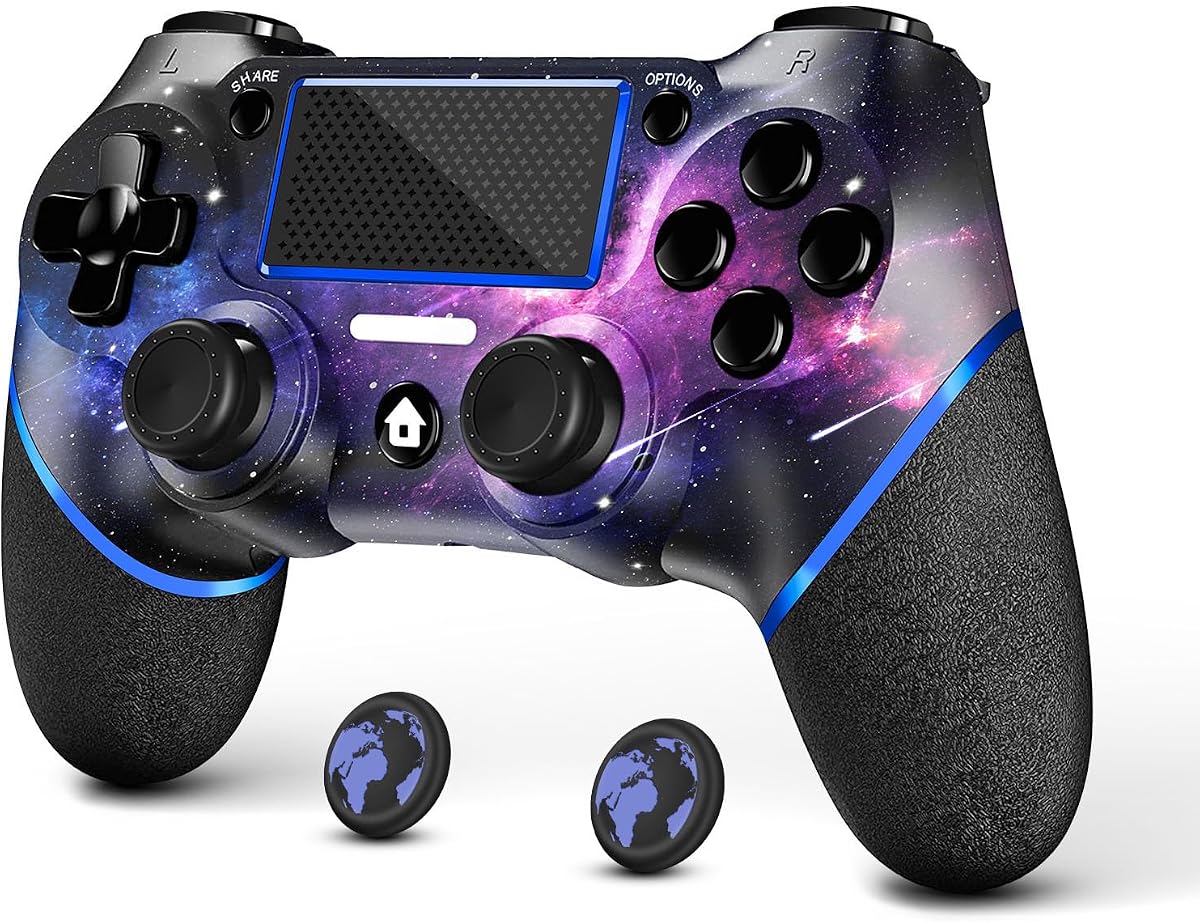


The AceGamer 2 Pack offers exceptional value for gamers needing multiple controllers without breaking the bank. With a solid 4.2 star rating it delivers reliable performance for casual and competitive play across PS4 and PC platforms.
We may earn a commission when you buy through this link, at no additional cost to you.
Its standout feature is the customizable turbo key which lets you automate rapid button presses with simple hold and click sequences. The non-slip grips ensure stability during intense sessions while the dual motor vibration adds immersive feedback to every action.
While the wireless connection requires a USB cable for initial pairing it remains a minor inconvenience once set up. Users connecting to PC should note that a Bluetooth receiver is not included which might add to the total cost depending on your setup needs.
Ideal for households or friend groups this set provides a practical solution for local multiplayer games. The included charging cable and manual support ease of use making it a top choice for budget-conscious gamers seeking quality.
Customize any key as a turbo function by holding share then clicking the desired button to automate rapid inputs effortlessly.
Non-slip grips on both sides prevent slipping during long gaming sessions ensuring comfort and control throughout the night.
We may earn a commission when you buy through this link, at no additional cost to you.
The MOVONE Wireless Controller stands out as an affordable choice for gamers seeking core functionality without premium costs. Rated highly for compatibility it works seamlessly with PS4 consoles and Windows PCs offering a versatile gaming experience.
We may earn a commission when you buy through this link, at no additional cost to you.
It features two built-in motion motors that provide realistic feedback during gameplay enhancing immersion in action and racing titles. The optimized layout includes a clickable touch pad and integrated light bar adding modern features usually found on costlier models.
While the build feels utilitarian it holds up well for regular use. Users must activate the device with the included USB cable on first use which is a common requirement for third-party controllers but becomes unnecessary thereafter.
Perfect for backup needs or secondary setups this controller ensures you have a reliable option without overspending. Its support for audio controls on the device itself keeps gameplay uninterrupted making it a smart pick for casual players.
Upgraded buttons provide higher sensitivity and accuracy ensuring your commands execute precisely without delay during critical moments.
Volume controls located directly on the controller let you adjust sound without pausing or navigating menus to keep you focused on the game.
We may earn a commission when you buy through this link, at no additional cost to you.
Designed for serious players the Wireless Anti Drift controller addresses common issues like stick drift while adding pro features like rear paddles and turbo settings. Its focus on control and comfort makes it a strong contender for competitive shooters and sports games.
We may earn a commission when you buy through this link, at no additional cost to you.
The ALPS sticks ensure steady movement and aiming reducing unwanted drift that plagues many standard controllers. Coupled with customizable back buttons users can create complex combos or remap functions to reach key actions without lifting their thumbs from the sticks.
Battery life is a highlight with a robust 1200mAh cell reducing charging interruptions during extended sessions. While the setup might feel slightly more involved initially the increased customization options pay off for those wanting greater control over their gameplay.
Ideal for gamers prioritizing performance and longevity this controller offers features typically reserved for expensive pro models. Its inclusion of a 3.5mm jack and dual vibration further enhances immersion making it a comprehensive choice for daily use.
Create up to thirteen button combos or use rear paddles to remap inputs giving you faster access to essential actions during intense matches.
A 1200mAh rechargeable battery helps you play longer between charges supporting marathon gaming sessions without frequent interruptions.
We may earn a commission when you buy through this link, at no additional cost to you.
The DualShock 4 remains the benchmark for PS4 controllers offering unmatched compatibility and refined design. With a 4.6 rating it delivers a polished experience trusted by developers and players alike for its precision and intuitive layout.
We may earn a commission when you buy through this link, at no additional cost to you.
Features like motion sensors and a clickable touchpad open up unique gameplay mechanics that third-party units often struggle to replicate. The shape and sensitivity of sticks and triggers are optimized to provide a greater sense of control across diverse game genres.
Charging via Micro-USB feels dated compared to modern USB-C options but the convenience of plugging into the console in rest mode mitigates this. The built-in speaker and headset jack offer versatile audio options enhancing immersion without extra accessories.
For those seeking the most reliable experience this controller is worth the investment. Its seamless integration with system features and consistent performance make it a top choice for primary use.
Highly sensitive accelerometer and gyroscope detect tilt and rotation enabling motion-based controls for enhanced immersion in select titles.
The new multi-touch clickable touchpad expands gameplay possibilities allowing gestures and menu navigation with simple taps.
We may earn a commission when you buy through this link, at no additional cost to you.
The AceGamer Galaxy controller combines aesthetic appeal with solid performance making it ideal for gamers who value style alongside function. Its nebula-inspired design printed via water transfer ensures durability beyond standard stickers offering a truly unique look.
We may earn a commission when you buy through this link, at no additional cost to you.
Performance-wise it includes essential features like turbo keys and non-slip grips that enhance usability during long sessions. The included thumb caps add extra comfort while the audio jack ensures you can connect headsets for private sound without interrupting others.
Pairing with PC requires a specific key hold sequence which might confuse new users but becomes routine quickly. The oil coating on the surface prevents sweat from eroding the design maintaining its pristine appearance over time.
For those wanting a controller that stands out without sacrificing functionality this is an excellent pick. It caters to users looking for personal expression in their gaming setup alongside reliable daily performance.
Galaxy designs are printed using water transfer processes with oil coating to prevent wear from sweat ensuring long-lasting beauty.
Hold the share key to set any button as turbo then adjust frequency with joystick touches for rapid inputs in shooters.
We may earn a commission when you buy through this link, at no additional cost to you.
For budget-conscious shoppers who still want an authentic Sony controller this renewed Magma Red DualShock 4 offers a compelling middle ground. It provides official hardware quality at a reduced price though ratings reflect minor inconsistencies common with refurbished units.
We may earn a commission when you buy through this link, at no additional cost to you.
The controller retains all core features including refined sticks and triggers ensuring a reliable gaming experience. The vibrant color adds personality while the official layout guarantees full compatibility with game mechanics designed for the platform.
While it may show signs of prior use performance is generally verified to meet standards. Checking specific seller ratings before purchase can help ensure you receive a unit in satisfactory condition.
This option suits users seeking brand authenticity without the new-unit price tag. It delivers the core DualShock experience with added visual flair making it a practical choice for casual and dedicated gamers alike.
Standard Sony button configuration ensures all games work as intended without compatibility mapping issues or button swapping.
Refurbished units undergo testing to ensure core functions work reliably offering a budget-friendly way to get premium hardware.
We may earn a commission when you buy through this link, at no additional cost to you.
The Nacon Wired Controller brings official licensing to a reliable and cost-effective wired device. Ideal for players who prioritize zero latency it offers a robust connection suitable for competitive gaming or setups where wireless isn't necessary.
We may earn a commission when you buy through this link, at no additional cost to you.
Its larger face buttons and rubber coating enhance grip making it comfortable for marathon sessions. The integrated three-meter cable provides ample reach while supporting low latency inputs essential for fast-paced action titles.
PC users may need additional software like DS4Windows for full feature support outside Steam but basic functions work natively. The official license ensures touchpad and LED indicators function as expected within the PlayStation ecosystem.
This controller is perfect for stationary setups where reliability trumps mobility. Its blend of official quality and ergonomic design makes it a strong alternative for those who prefer wired simplicity.
The three-meter USB cable ensures direct low latency transmission keeping inputs responsive without wireless interference or lag.
Larger face buttons and rubber coatings provide enhanced comfort and grip reducing hand fatigue during extended play periods.
We may earn a commission when you buy through this link, at no additional cost to you.
This renewed Jet Black DualShock 4 offers the classic experience at a fraction of the cost. While ratings are slightly lower due to refurbishment variability many units deliver solid performance for players seeking an original controller without full price.
We may earn a commission when you buy through this link, at no additional cost to you.
Features like the Share button enable easy video capture and streaming while the touchpad adds interactive gameplay options. The classic Jet Black color remains a versatile choice for any setup blending seamlessly with modern consoles and TVs.
Charging via Micro-USB is straightforward but users should check port condition when purchasing. Overall it provides a dependable way to access premium hardware features at a budget-friendly entry point for casual users.
Recommended for those prioritizing function over novelty this unit delivers the core PlayStation experience effectively. Its blend of modern connectivity and familiar controls makes it a safe bet for daily gaming sessions.
The Share button makes capturing gameplay moments effortless allowing you to upload screenshots without leaving your current game session.
A 3.5mm audio jack provides a personal audio solution for headsets enabling private sound without disconnecting other peripherals.
We may earn a commission when you buy through this link, at no additional cost to you.
The HEXGAMING NEW EDGE targets competitive gamers seeking hardware that maximizes speed and customization. Features like hair triggers and four rear buttons deliver tactical advantages essential for high-stakes matches and professional play environments.
We may earn a commission when you buy through this link, at no additional cost to you.
Hair triggers reduce activation distance to just 1.5mm allowing instant shooting responses that can win rounds. The controller also supports up to six remapping profiles and eight thumbstick options enabling deep personalization to fit your unique grip style.
While it lacks an included cable which adds to the total cost the USB-C port ensures modern connectivity. Build quality feels premium though the price reflects the advanced features available on this specialized unit for serious players.
Best suited for esports enthusiasts this controller transforms standard inputs into optimized commands. Its high-performance specs make it a top tier option for those wanting every competitive edge available on the PS4 platform.
Hair triggers reduce activation distance to 1.5mm for ultra-fast response times essential in competitive shooters and rapid gameplay.
Choose from eight interchangeable thumbstick options with varying heights and designs to improve grip and accuracy during long sessions.
We may earn a commission when you buy through this link, at no additional cost to you.
The Collective Minds Strike Pack FPS Dominator transforms your existing DualShock 4 into a pro gaming setup instantly. With built-in mods and paddle mapping it offers competitive advantages without needing advanced technical knowledge or software installation.
We may earn a commission when you buy through this link, at no additional cost to you.
Features like rapid fire and anti-recoil improve shooting consistency while magnetic paddles let you remap inputs on the fly. The 10ft cable ensures flexible movement while keeping the connection lag-free for responsive gameplay across action titles.
Setup is straightforward with an included QR guide for quick starts. However users need a compatible DualShock 4 which adds to the initial cost compared to standalone controllers. This modular approach allows customization without full hardware replacement.
Ideal for shooters and tactical players this kit elevates standard controllers into specialized tools. Its ease of use and powerful mod options make it a compelling choice for those seeking an edge in competitive play.
Assign any controller input to paddles instantly without apps to keep thumbs on sticks for faster reactions and accuracy.
Activate rapid fire and anti-recoil mods instantly to enhance shooting mechanics and gain a competitive edge in every match.
We may earn a commission when you buy through this link, at no additional cost to you.
Selecting the right controller depends on your playstyle, budget, and technical needs. This guide breaks down the key factors to consider before making a purchase.
Wireless controllers offer freedom of movement while wired units ensure zero latency. If you play competitive shooters, wired might be better, but most wireless models are sufficient for casual play.
Consider your setup: if you play from a couch, wireless is essential, but for desk gaming, wired can save battery life and connection issues.
Battery capacity varies significantly across aftermarket options. Look for models with higher mAh ratings if you game for long sessions without interruption.
USB-C charging is becoming standard and makes it easier to find cables compared to older Micro-USB options.
Many controllers offer turbo modes or paddle mappings for faster inputs. Check if these features align with your favorite game genres.
Higher-end models allow profile saving so you can switch between game-specific settings quickly during gameplay.
Durability is key for long-term value. Controllers with rubber grips and reinforced buttons tend to last longer than cheaper alternatives.
Review materials and warranty options to ensure your investment is protected against wear and tear over time.
If you plan to use the controller on a computer, verify Bluetooth support or required drivers. Some models need additional receivers for wireless PC play.
Check if the controller supports Steam Input or XInput for seamless integration with PC game platforms.
Most PS4 controllers include a 3.5mm jack for headsets, but verify this feature if audio privacy is a priority for you.
Models with built-in volume controls let you manage sound levels without needing to navigate system menus.
Aftermarket options often provide better value than official units. Balance cost against features like build quality and specialized functions.
A slightly higher price might be worth it if it means longer battery life or superior comfort during extended gaming sessions.
Opting for established brands often ensures better customer support and quality control. Read reviews to gauge reliability and longevity.
A solid reputation can mean smoother returns or replacements if issues arise shortly after purchase.
Always start by pairing your controller with the console using the provided USB cable for the initial connection. Once recognized, you can switch to wireless mode for uninterrupted gaming sessions.
Keep your controller clean by wiping it with a soft, dry cloth after each use to remove oils and dust. Avoid exposing it to liquids or extreme temperatures that could damage internal electronics.
Regularly check for firmware updates if available and charge the battery when indicators show low levels. Proper maintenance ensures longevity and consistent performance over time.
Many aftermarket controllers are reliable for long-term use, especially those from reputable brands with high ratings. Look for models with positive feedback on build quality and durability. Always check warranty options before purchasing.
Most listed controllers support PC either via Bluetooth or USB. However, some may require a receiver or software setup. Verify compatibility details in the product description to ensure seamless operation on your computer.
To reset a wireless controller, look for a small reset button on the back near the L2 button. Press it with a paperclip for a few seconds, then reconnect to your console using the USB cable.
You cannot charge a PS4 controller without a cable. While some docks exist, a USB cable is still required to connect to a power source. Ensure you have the right port type for your model.
Turbo modes are generally accepted but some games may detect automation. Using them in competitive online modes could lead to unfair advantages. Use them responsibly to comply with game rules and terms of service.
The MOVONE Wireless Controller is an excellent budget option. It offers dual vibration and basic customization at a very low price. It suits casual gamers who need a secondary controller without high costs.
Official controllers guarantee compatibility and build quality but come at a higher price. Aftermarket options provide more features like paddles and turbo at lower costs. Your preference depends on your specific gaming needs.
Connect to PlayStation by first using the USB cable to pair, then use the Home and Share buttons simultaneously to enter pairing mode. Once the controller appears in Bluetooth settings, select it to finish the connection.
Choosing the right aftermarket PS4 controller can greatly enhance your gaming experience. Our top picks range from budget-friendly wireless models to high-performance pro units with advanced features.
Prioritize features like battery life, build quality, and customization options based on your playstyle. For casual players, simple models may suffice, while competitive gamers should consider paddles and turbo functions.
Prices and availability change frequently so check current listings before buying. This guide aims to simplify your decision by highlighting proven options with detailed specifications and expert insights.