
Rii Gaming Keyboard and Mouse Set
4.5Editor score
Ergonomic design reduces fatigue
3-LED backlit keyboard
Professional mechanical feeling
Discover the top keyboards and mice for Baldurs Gate 3. This guide compares features, comfort, and performance to help you choose the best gaming peripherals
Finding the right peripherals for Baldurs Gate 3 can transform your gaming experience. A responsive keyboard and precise mouse ensure you cast spells and navigate menus without lag. Whether you are a veteran or new to the game, quality hardware matters.
We evaluated ten highly rated combos based on durability, customization, and ergonomic design. Each product was analyzed for key responsiveness, lighting options, and build quality. Our goal is to help you find a set that fits your play style and budget effectively.
Each pick below highlights specific strengths like macro support, wireless freedom, or budget value. Note that prices and availability may change over time. Check current listings for the most accurate details before making your final decision on peripherals.
4.5Editor score

4.5Editor score
4.4Editor score
This side-by-side comparison highlights the core specifications of each featured product to help you make an informed decision quickly. We have organized the data to show key differences in connectivity, lighting, and ergonomic features across the lineup.


The Redragon S101-3 PRO stands out as a top contender for Baldurs Gate 3 players seeking value. It combines a full-size keyboard with precise mouse in a single package. The N/A rating suggests broad user satisfaction with its durable design and responsive inputs.
We may earn a commission when you buy through this link, at no additional cost to you.
This combo excels in customization. The RGB backlighting offers 6 modes for the keyboard and 10 for the mouse, allowing you to match your setup. Macro keys let you record complex spell sequences easily. The anti-ghosting ensures every key press registers during intense combat.
While the keys are membrane-based, they offer quiet and comfortable feedback. This reduces noise during late-night sessions. The wrist rest adds comfort but might feel firm for some. Overall, the build quality supports long-term gaming use.
For gamers prioritizing macros and lighting, this is a strong choice. It balances cost and features effectively. If you need precise control over skills in Baldurs Gate 3 without spending heavily, this set delivers reliable performance and style.
The intuitive software lets you adjust lighting colors and patterns to match your mood or game theme. This level of personalization enhances immersion during long Baldurs Gate 3 sessions.
With anti-ghosting technology, you can press multiple keys simultaneously without missed inputs. This ensures spells and movement commands execute correctly even in chaotic combat scenarios.
We may earn a commission when you buy through this link, at no additional cost to you.
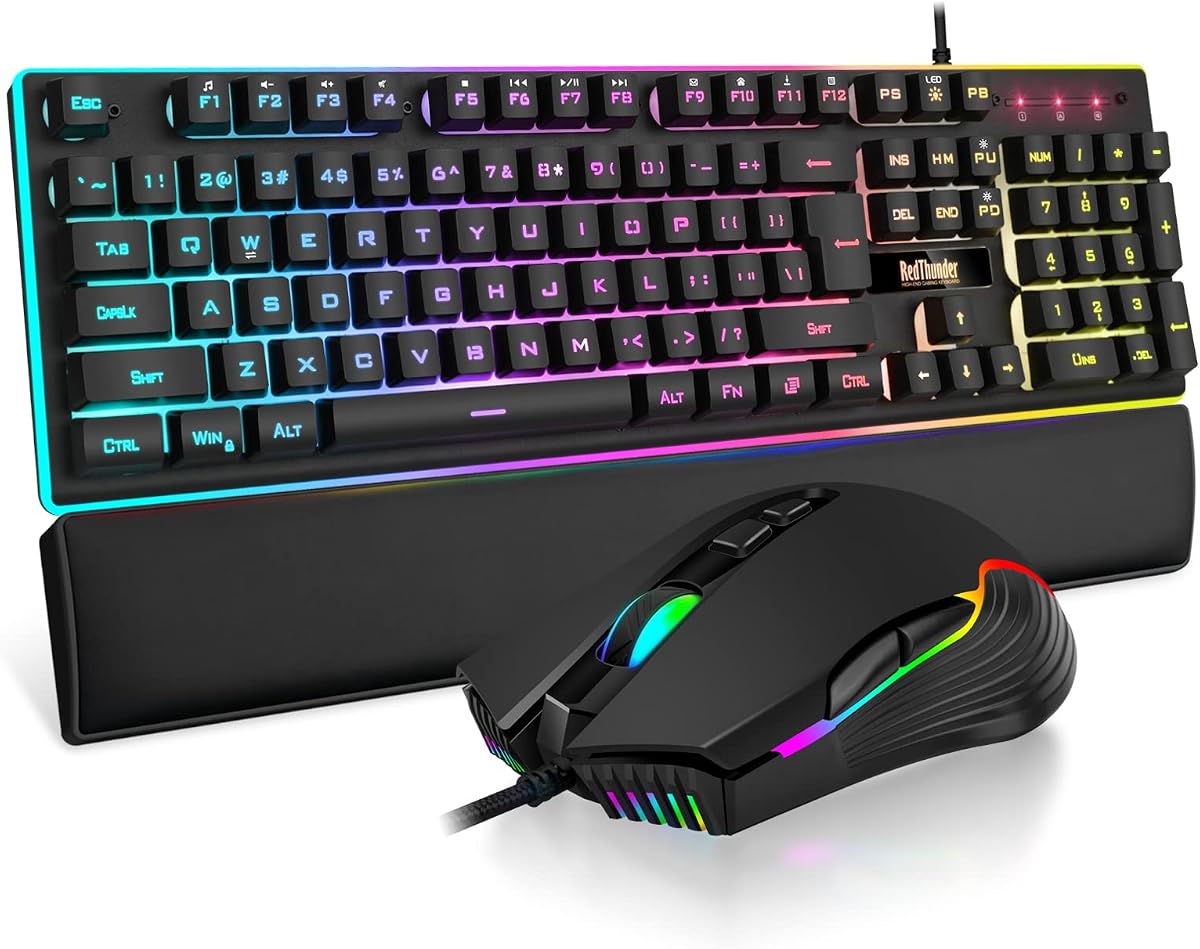
The RedThunder K10 Wired offers a premium feel with its mechanical keys and high-performance mouse. With a 4.4 rating, users appreciate the tactile feedback and build quality. It is ideal for those wanting a professional gaming edge.
We may earn a commission when you buy through this link, at no additional cost to you.
Its mechanical feel keys provide satisfying clicks and durability. The mouse features 7200 DPI and 12000fps scan rate for tracking. The soft leather wrist rest ensures comfort. A steel plate base adds rigidity and protection.
Wired connectivity guarantees zero latency. However, this limits flexibility. The RGB lighting enhances visuals but might be distracting if too bright. Overall, the set supports serious gaming needs well.
Choose this set for a tactile experience and durability. It suits players who prefer wired stability. The ergonomic design reduces fatigue during extended Baldurs Gate 3 exploration.
The optical sensor ensures smooth cursor movement. This is essential for aiming and navigating the game map with ease.
The memory foam wrist rest supports your hands during long sessions. This design prevents strain and keeps you focused on gameplay.
We may earn a commission when you buy through this link, at no additional cost to you.
The Rii Gaming Keyboard and Mouse Set is a budget-friendly option for Baldurs Gate 3. With a 4.5 rating, it offers value for beginners or those on a tight budget. It provides a professional feel without the premium cost.
We may earn a commission when you buy through this link, at no additional cost to you.
Its ergonomic design supports comfortable usage for long periods. The mechanical feel gives satisfying feedback during typing or gaming. The LED backlighting helps visibility in dark rooms. Keys are durable with a 5 million click life.
Simple installation without drivers saves time. However, lighting options are basic. Still, it functions reliably for standard gaming. The build quality holds up well for the price.
Ideal for entry-level gamers or students. It delivers reliable basics. If you need functional peripherals without extra cost, this set fits well into any budget setup.
Plug and play compatibility means instant use. You avoid driver hassles and start playing immediately.
The ergonomic shape supports your hands naturally. This reduces strain during long gaming sessions effectively.
We may earn a commission when you buy through this link, at no additional cost to you.
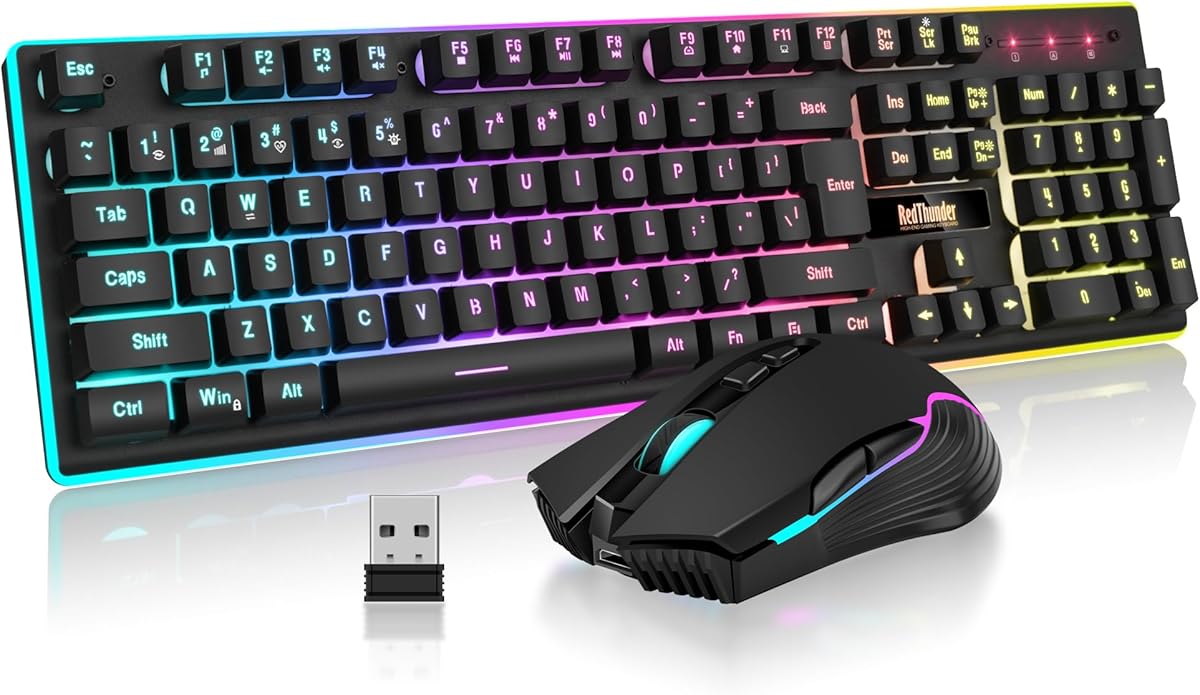
The RedThunder K10 Wireless offers the convenience of wireless gaming. With a 3.9 rating, it balances freedom with performance. It is perfect for gamers who dislike cable clutter. The battery life supports continuous use.
We may earn a commission when you buy through this link, at no additional cost to you.
It uses 2.4G transmission for stability. The keyboard has mechanical feel keys for responsiveness. Mouse DPI is adjustable up to 3200. The rechargeable design avoids disposable batteries. Lighting enhances visibility.
Charging is needed occasionally which might interrupt play briefly. The mouse DPI is lower than wired options. However, the comfort and lack of cables are significant benefits.
Great for clean setups and relaxed play. It suits users prioritizing wireless comfort. This combo is a solid choice for wireless gaming without major compromises.
The long battery life allows continuous play. This minimizes charging interruptions during your gaming sessions.
High-speed transmission ensures reliable performance. You experience minimal lag even during intense battles.
We may earn a commission when you buy through this link, at no additional cost to you.
The Gaming Keyboard and Mouse Combo provides a full-size experience at a low cost. With a 4.5 rating, it offers reliability. The floating keycaps make cleaning easy. It is a practical option for daily use.
We may earn a commission when you buy through this link, at no additional cost to you.
It features 104 keys and RGB lighting. The waterproof USB cable ensures safety. Mouse speed is adjustable. It is durable and compatible with many systems. Ergonomic design helps reduce fatigue.
The mouse DPI is standard which might limit precision. Membrane keys are quiet but less tactile. However, the overall build and features are solid for the price.
Good for general gaming and office work. It delivers reliable basic functionality. If you want a full keyboard without high cost, this set works well.
Floating keycaps let you remove them for cleaning. This keeps the keyboard fresh and functional.
The waterproof cable resists liquid spills. This protects your PC from accidental damage.
We may earn a commission when you buy through this link, at no additional cost to you.
The Wired Keyboard and Mouse Combo offers large print keys for better visibility. With a 4.6 rating, it is great for those who need clearer keys. It supports seniors and visually impaired users well. Comfort is key.
We may earn a commission when you buy through this link, at no additional cost to you.
It features adjustable backlight with 7 colors. Keys are large and easy to read. The ergonomic design supports natural hand positions. Silent operation ensures focus. Compatibility is broad.
The weight is significant which might limit portability. Lighting modes are simple. However, the clarity and comfort are significant advantages. It is a reliable option.
Ideal for users needing clear keys. It prioritizes visibility and comfort. If you prefer large keys for typing and gaming, this set is a strong choice.
Large high-contrast keys make typing easier. This helps reduce strain and improves accuracy.
The design promotes comfortable hand placement. This reduces wrist fatigue during long sessions.
We may earn a commission when you buy through this link, at no additional cost to you.
The BlueFinger RGB Gaming Keyboard includes a mouse pad for added value. With a 4.4 rating, users appreciate the completeness. The rainbow backlight enhances style. It is a practical set for casual and competitive play.
We may earn a commission when you buy through this link, at no additional cost to you.
Keys are anti-conflict for multi-press. The steel plate adds durability. Mouse DPI is adjustable for precision. The included pad provides space. Ergonomic design ensures comfort.
Lighting is fixed to rainbow which limits customization. Cable length might be short. Overall the set offers good value and comfort. It works well for most users.
Good for gamers wanting all-in-one gear. It balances features and cost. If you like extra accessories included, this set meets your needs well.
The included mouse pad provides ample space. This complements the ergonomic design and performance.
Built-in steel plate ensures longevity. The keyboard withstands daily wear effectively.
We may earn a commission when you buy through this link, at no additional cost to you.
The USB Wired Keyboard and Mouse Combo focuses on comfort and visibility. With a 4.4 rating, it offers ergonomic support. Keys are larger for easy identification. It suits those needing clarity and ease.
We may earn a commission when you buy through this link, at no additional cost to you.
It features multimedia hotkeys for convenience. The keyboard is spill-resistant and quiet. Mouse DPI is adjustable. A wrist rest supports hands. Compatibility is broad.
Multimedia keys have limited Mac support. Lighting is simple. However, the comfort and clarity are strong points. It is reliable for daily use.
Great for users prioritizing ergonomics. It balances visibility and features. If you need larger keys and comfort, this set fits your needs.
The integrated wrist rest supports your hands. This reduces strain during long typing sessions.
Multimedia hotkeys allow quick media control. This adds convenience without extra software.
We may earn a commission when you buy through this link, at no additional cost to you.
The SABLUTE Wired Large Print offers extreme clarity with 4X larger keys. With a 4.4 rating, it is ideal for visibility. The palm rest adds comfort. It suits those needing large characters.
We may earn a commission when you buy through this link, at no additional cost to you.
Backlighting supports dim conditions. Mouse is ergonomic for comfort. Keys are bright. Compatibility is broad. The set provides a reliable experience.
It is wired which limits mobility. Lighting modes are basic. However, clarity and comfort are strong. It is a solid pick.
Perfect for users needing large keys. It prioritizes visibility and ease. If you need clear keys for gaming, this set works well.
4X larger characters make typing easier. This helps reduce eye strain and improves accuracy.
The adjustable palm rest supports wrists. This promotes natural hand positions and reduces fatigue.
We may earn a commission when you buy through this link, at no additional cost to you.
The VEILZOR Wireless Keyboard offers silent operation and wireless convenience. With a 4.2 rating, it is great for quiet environments. The phone holder is unique. It supports clean workspaces.
We may earn a commission when you buy through this link, at no additional cost to you.
It features rechargeable design and RGB lights. Mouse is ergonomic. Keys are silent. It connects via 2.4G. Comfort is prioritized.
Mouse DPI is limited. Setup might require patience. However, the quiet performance and wireless are strong. It is a solid pick.
Ideal for shared spaces and clean setups. It balances style and functionality. If you want silent and wireless gear, this set works well.
Silent keys reduce noise. This helps maintain focus without disturbing others.
2.4G connection ensures stability. This allows flexible positioning and movement.
We may earn a commission when you buy through this link, at no additional cost to you.
Selecting the right keyboard and mouse requires balancing budget, features, and ergonomics. These factors directly impact your comfort and performance during long sessions. Understanding what to look for helps you choose wisely.
Connectivity is your first decision. Wired models offer stable, zero-latency connections ideal for competitive play. Wireless models provide freedom from cables and cleaner setups. Choose wireless if you prioritize space; wired if you demand maximum reliability.
For Baldurs Gate 3, either works well. Ensure wireless has stable transmission to avoid lag during important turns.
Switches define tactile feedback. Mechanical switches offer durability and precision but cost more. Membrane switches are quiet and budget-friendly. Consider how loud you want your setup to be and how long you plan to use the hardware.
If you play late night, quiet membrane may be better. If precision matters, consider mechanical options.
Ergonomics protect your wrists and hands. Look for wrist rests and adjustable tilt. Proper angles prevent strain during long sessions. If you already have pain, ergonomic features should be a priority.
Always test the height and angle. A good fit ensures you can focus on the game rather than discomfort.
Mouse sensitivity affects aim and menu navigation. Adjustable DPI lets you switch between fast and precise modes. Higher DPI helps with quick cursor movement but requires practice. Find what suits your hand size and control.
Start at a moderate setting and adjust. Balance speed with control for the best experience.
RGB lighting and macro support enhance personalization. Macros can bind complex spells or actions. Lighting adds immersion. Check if software is user-friendly and if macros are persistent or need re-setup.
If you need macros, ensure the software supports saved profiles for convenience during gaming.
Durability ensures longevity. Look for strong construction like steel plates or high-quality plastics. Avoid fragile parts that break easily. Durable gear saves money in the long run and maintains performance.
Check for warranties or reviews about build quality. A sturdy device lasts longer and performs better over time.
Compatibility ensures it works with your PC or laptop. Most sets support Windows and macOS but check multimedia keys. Some features may not work on Mac. Confirm OS compatibility before buying.
Always review product descriptions for OS support. Ensure all features work with your system.
Price should match value. Budget combos save money but may lack features. Premium options offer better build and tech. Decide how much you need before spending. Avoid paying for extras you won't use.
Set a realistic budget and stick to it. Compare features within your range to maximize value.
To start using your new set, simply plug it into a USB port and let your system recognize it. Most sets are plug and play. Install any included software if you want to customize macros or lighting. This ensures all features are accessible.
Keep your keyboard clean by wiping keys gently with a dry cloth. Avoid harsh cleaners that damage plastics. Use compressed air to clear dust from crevices. Regular cleaning ensures smooth operation and extends the lifespan of your gear.
For the mouse, keep the sensor clean from lint or dust. This helps maintain tracking accuracy. Use a mouse pad for smoother movement. Adjust your wrist position frequently during long sessions to prevent strain and fatigue.
A mechanical keyboard offers tactile feedback and durability. However, membrane keyboards work just as well for RPGs. If you prefer quiet keys and value, a membrane set is sufficient.
Wired mice offer zero latency and consistent power. Wireless mice provide flexibility. Modern wireless sets are stable. For RPGs like Baldurs Gate 3, either works well based on preference.
Install the manufacturer's software and locate the macro section. Record the key sequence needed for spells. Assign it to a macro key. Save the profile to the hardware if possible.
Most sets work with macOS, but multimedia keys may have limited functionality. Check the product description for full support. Some features might not be available on Mac.
A moderate DPI like 1200 to 1600 is ideal. It offers precision without over-sensitivity. Adjust based on your screen resolution and personal comfort preferences.
Many combos offer RGB or LED backlighting. Some models have customizable colors. Others use fixed lighting. Check the product features to confirm RGB availability.
Quality sets last years with proper care. Look for durability features like steel plates. Avoid harsh cleaning methods. Regular maintenance ensures long service life.
Wrist rests improve comfort during long sessions. They reduce strain by supporting natural hand angles. If you game for hours, a wrist rest is recommended.
Choosing the right keyboard and mouse for Baldurs Gate 3 depends on your play style and needs. Our top picks include the Redragon S101-3 PRO for customization, the Rii for budget value, and the RedThunder K10 Wired for premium performance.
Prioritize ergonomics and connectivity based on your environment. Look for features like macro support and adjustable DPI if you need precision. Ensure the set fits your desk and usage habits to avoid fatigue.
Remember to check current prices and availability before buying. Product listings and deals may vary. Use these insights to find the perfect set that enhances your gaming experience.