
ASRock DeskMini X300 2.5G Series
4.2Editor score
AM4 Socket Support
1.92L Compact Size
Triple Display Output
This guide compares the top barebone PCs with AMD processors, evaluating performance, connectivity, and upgrade options for users seeking powerful mini
Choosing the right barebone PC with AMD technology can transform your computing experience. These compact systems offer powerful processing without the bloat of pre-installed software or unnecessary components. Whether you need a gaming rig or a workhorse, these units deliver efficiency.
We analyzed ten top-rated models based on processor architecture, thermal management, and expansion capabilities. Our comparison highlights key differences in connectivity, cooling solutions, and build quality to help you find the perfect match for your specific needs.
Each selection showcases unique strengths ranging from ultra-compact designs to high-performance gaming kits. Remember that prices fluctuate frequently so check current listings before purchasing to ensure you get the best value for your investment today.
4.2Editor score

4.0Editor score

3.1Editor score
This side-by-side comparison evaluates all ten models on critical specifications including CPU architecture, memory slots, storage options, and port availability to streamline your decision-making process.





The AOOSTAR MACO stands out as a top choice due to its powerful Ryzen 7 PRO 8845HS processor paired with Radeon 780M graphics. This barebone unit offers extensive expansion options including OCuLink for external GPUs making it ideal for gamers and professionals alike. Its compact design belies significant internal capabilities ensuring stable performance even under heavy multitasking loads.
We may earn a commission when you buy through this link, at no additional cost to you.
Performance-wise this system handles 4K video editing and AAA gaming without breaking a sweat thanks to the Zen 4 architecture. The inclusion of dual USB4 ports and a OCuLink port provides versatile connectivity for high-speed data transfer and external displays. Users can upgrade to 128GB RAM and 16TB storage ensuring longevity for demanding workflows.
While the lack of included memory and storage requires upfront investment these components are chosen separately to fit specific needs and budgets. The cooling system features a vapor chamber to manage heat effectively which is crucial for such a powerful chip in a small case. Overall it balances raw power with practical expandability better than most competitors.
This model is perfect for users needing a compact yet potent desktop for gaming or creative work. The inclusion of enterprise-grade encryption and fingerprint unlock adds security layers often missing in mini PCs. If you want a base unit that grows with your needs this AOOSTAR MACO delivers exceptional value and performance today.
The OCuLink port allows external GPU connections with minimal latency loss compared to USB4 solutions. This is crucial for users who need high-end graphics performance without sacrificing the mini PC footprint.
Integrated vapor chamber cooling distributes heat evenly across the chassis preventing hotspots during extended usage. This design choice ensures the CPU maintains turbo speeds without throttling under load.
We may earn a commission when you buy through this link, at no additional cost to you.
AOOSTAR GEM12+ distinguishes itself with robust quad 4K display support making it a standout for multi-monitor setups. The Ryzen 7 PRO 8845HS processor ensures smooth operation across all connected screens whether for coding or video production. Its OCuLink port adds flexibility for users requiring extra graphical power without compromising internal storage slots.
We may earn a commission when you buy through this link, at no additional cost to you.
The unit allows users to adjust BIOS modes ranging from silent to performance settings. This adaptability ensures noise levels stay low during office work while unlocking maximum power when needed. The dual M.2 slots offer significant storage expansion options ensuring you can store large project files locally.
Users should be aware that assembly is required as this unit ships without memory or operating system. This may be a hurdle for less tech-savvy buyers but provides freedom for custom configurations. The high customer rating reflects satisfaction with build quality and thermal performance during operation.
Ideal for professionals needing multiple screens in a small form factor this GEM12+ balances versatility with raw compute power. It serves well as a central hub for content creation or complex administrative tasks. If screen real estate is a priority this model offers the best display capability in its class.
Connecting four 4K displays simultaneously via HDMI and USB4 ports allows for expansive workspace setups without clutter. This is rare for mini PCs and enables detailed workflows like trading or editing.
Users can select between Silent Balanced or Performance modes to tailor power consumption and noise levels. This flexibility ensures the unit adapts to different environments from quiet libraries to noisy offices.
We may earn a commission when you buy through this link, at no additional cost to you.
The GEM12+ PRO adds a layer of security with its built-in fingerprint recognition feature. This allows for quick and secure system access without complex password entries which is vital for business environments. Beyond security it shares the powerful Ryzen 7 PRO 8845HS processor ensuring high performance for all tasks.
We may earn a commission when you buy through this link, at no additional cost to you.
Its connectivity options mirror the standard GEM12+ with OCuLink support for external GPUs and four 4K displays. This makes it suitable for demanding graphics workloads while maintaining security protocols. The vapor chamber cooling ensures that performance remains stable even when utilizing all cores and threads.
Prospective buyers should note that this is a barebone unit requiring assembly of memory and storage. While this adds an initial setup step it allows for choosing high-quality components that match specific performance needs. The fingerprint feature adds value beyond standard password security methods.
If you need secure access combined with multi-display and GPU expansion this GEM12+ PRO is a strong candidate. It caters to professionals who require robust security without sacrificing graphical capabilities. This model is particularly useful for secure remote work or sensitive business operations today.
The fingerprint reader allows instant access to the device reducing login times significantly. This convenience is paired with enhanced security for sensitive data stored locally on the machine.
Vapor chamber technology transfers heat quickly away from the CPU preventing thermal throttling during extended gaming sessions. This ensures the system stays cool even when running intensive workloads.
We may earn a commission when you buy through this link, at no additional cost to you.
The DeskMeet X300 is unique because it includes a PCIe 3.0 x16 slot allowing full size GPU installation. This sets it apart from standard mini PCs that rely solely on integrated graphics or external docks. It also includes a 500W power supply which simplifies setup significantly for users wanting a complete build.
We may earn a commission when you buy through this link, at no additional cost to you.
Support for AM4 socket Ryzen processors means you can choose from a wide range of CPUs depending on your budget. DDR4 memory support ensures compatibility with existing parts reducing upgrade costs. The inclusion of dual M.2 slots provides fast NVMe storage options for your operating system and apps.
The main trade-off is that it requires a full desktop CPU and cooler which increases the total cost. It is also slightly larger than the 1 liter form factor mini PCs listed elsewhere. However the ability to add a desktop graphics card makes it incredibly versatile for gaming or 3D rendering.
This model is best suited for users who want the compact feel of a mini PC but need desktop-grade upgradeability. If you already have a Ryzen 5000 CPU or plan to build one this kit provides a solid foundation. Its high rating confirms reliability and excellent thermal management in a compact chassis.
Unlike other mini PCs this unit accepts a full size graphics card internally removing the need for external enclosures. This is a game changer for gaming and 3D work in a small case.
The included 500W PSU ensures you have enough wattage for a dedicated GPU and CPU combination. This simplifies the build process significantly compared to barebone kits that omit power units.
We may earn a commission when you buy through this link, at no additional cost to you.
This MINISFORUM model offers a full-body USB4 port which supports high-speed data and display output simultaneously. The inclusion of both USB4 and OCuLink provides flexibility for different external device needs. It uses the Ryzen 7 255 processor which delivers strong performance for daily tasks and light gaming.
We may earn a commission when you buy through this link, at no additional cost to you.
Triple display output capabilities allow users to connect three monitors for an immersive workspace. Wi-Fi 6e ensures stable wireless networking speeds which is useful for streaming or large file transfers. The unit supports PD charging input making it portable enough for use with power banks or travel adapters.
One constraint noted is that the OCuLink port requires an adapter plate included in the package. Users should also note the 3.9 rating which suggests some users may find the build quality or software support inconsistent. Despite this the feature set remains highly competitive for the price point.
For those prioritizing connectivity and portability this model is a strong contender. The support for triple displays and high-speed USB4 makes it versatile for travel or office setups. It is a good choice if you need a lightweight system with extensive connection options.
The full-body USB4 port enables 40Gbps data transfer and 8K video output capabilities. This ensures fast connectivity for external drives and monitors without bottlenecks.
Support for PD input allows the device to be powered by USB-C power banks increasing mobility. This makes it ideal for travelers needing a powerful desktop in a backpack.
We may earn a commission when you buy through this link, at no additional cost to you.
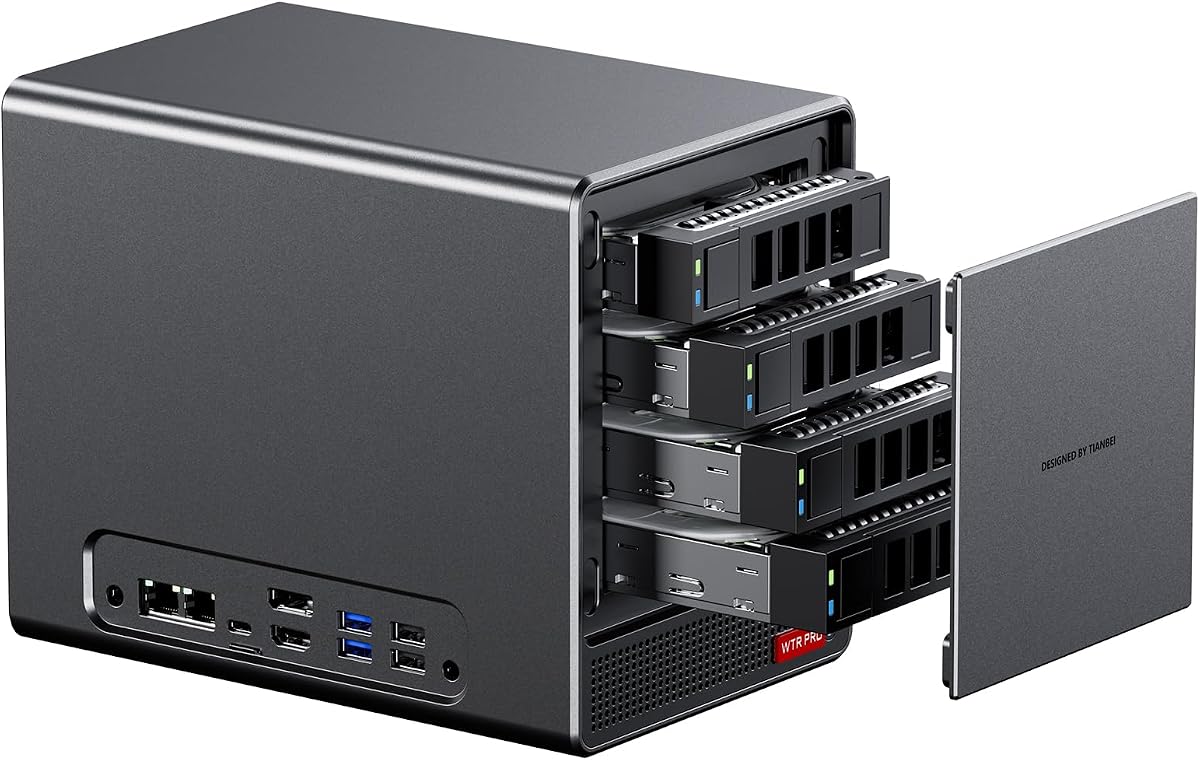
The WTR PRO is designed specifically for storage needs with four SATA drive bays supporting up to 22TB drives. This makes it a dedicated Network Attached Storage solution that can also function as a home media server. The Ryzen 7 5825U processor handles data transfer and streaming without overwhelming power usage.
We may earn a commission when you buy through this link, at no additional cost to you.
It features dual 2.5G LAN ports allowing for redundant or high-speed network connections. The system is designed to run 24/7 making it reliable for continuous file access and backups. Its low power consumption ensures it remains energy efficient even when fully loaded with drives.
Users should be aware that it requires a separate purchase of memory and drives. While the rating is not yet available the build quality is robust enough for home server use. The through-the-wall cooling design helps maintain quiet operation which is crucial for living room setups.
This unit is perfect for enthusiasts building a home media center or needing a robust backup system. The combination of NAS capabilities and mini PC processing power offers significant value. If storage capacity and reliability are your main goals this WTR PRO is an excellent choice.
Four 3.5-inch bays allow for massive storage capacity reaching up to 88TB total raw space. This is ideal for archiving large video libraries or backing up entire networks.
Dual 2.5G LAN ports provide fast file transfer speeds and network redundancy. This ensures your media server remains responsive even when handling multiple concurrent connections.
We may earn a commission when you buy through this link, at no additional cost to you.
The DeskMini X300 offers one of the most affordable entry points into barebone PCs with AMD support. Its 1.92L form factor is incredibly compact making it easy to fit into tight spaces. Support for AM4 Ryzen processors ensures compatibility with a vast library of budget-friendly CPUs.
We may earn a commission when you buy through this link, at no additional cost to you.
It supports three simultaneous displays which is useful for productivity setups without the cost of a large tower. The inclusion of a 2.5G LAN port ensures fast wired connectivity which is essential for streaming and downloads. Overall this model balances cost and features effectively for home users.
While it uses DDR4 and older AM4 architecture it remains highly capable for everyday tasks. The lack of PCIe slots limits GPU expansion but the integrated graphics are efficient. Users looking for a basic budget PC will find this model hard to beat for value.
For students or casual users this DeskMini provides everything needed without unnecessary complexity. It serves well as a school computer or home entertainment hub. If budget is a primary concern this remains a top recommendation.
At just 1.92 liters this unit takes up minimal desk space while providing substantial utility. Its small size allows it to fit easily behind monitors or in small home offices.
Using AM4 processors means you can often find used CPUs at low prices to pair with this unit. This flexibility lowers the total cost of ownership significantly compared to newer platforms.
We may earn a commission when you buy through this link, at no additional cost to you.
The ExpertCenter PN54 pushes the boundaries with Ryzen AI 300 Series processors and Wi-Fi 7 connectivity. This positioning makes it a premium choice for those needing the latest tech capabilities. Its ultra-thin 0.6L design is remarkably compact for the performance it offers.
We may earn a commission when you buy through this link, at no additional cost to you.
It supports up to four 4K displays and offers a toolless design for easy component upgrades. The inclusion of a 3-year warranty reflects confidence in reliability and durability. This unit is built for 24/7 operation making it suitable for professional agents or kiosks.
The higher price point is a barrier for casual users but justified for businesses needing robust features. Some users report mixed experiences which warrants checking specific batch compatibility. However the sheer feature density makes it unique in the market.
If you need a cutting-edge mini PC with advanced AI and networking features this is a top contender. It caters to professionals requiring maximum bandwidth and display support. For enterprise needs this PN54 sets a new standard.
Support for the latest Wi-Fi 7 ensures ultra-low latency and high throughput speeds. This is essential for future-proofing your network infrastructure against increasing data demands.
The chassis design allows for quick access to components without tools simplifying maintenance. This feature reduces downtime for businesses that need immediate hardware adjustments.
We may earn a commission when you buy through this link, at no additional cost to you.
This WTR PRO variant offers six total bays combining four SATA slots with two M.2 NVMe slots. This allows for a mix of high capacity and high-speed storage in a single compact unit. It is designed specifically for users needing a home server or soft router.
We may earn a commission when you buy through this link, at no additional cost to you.
The Ryzen 7 5825U handles virtualization well supporting Windows or Linux systems. The dual 2.5G LAN ports provide robust networking capabilities for data transfers. It consumes very little power allowing it to run continuously without high electricity costs.
Linux users may encounter a SATA power management issue which requires a simple configuration fix. This is a minor hurdle for those comfortable with technical adjustments. The 3.7 rating suggests some complexity in setup compared to standard PCs.
For those building a custom media or file server this model provides excellent flexibility. The ability to mix NVMe and SATA drives optimizes performance and capacity. It remains a strong choice for home labs and advanced users.
Having both SATA and NVMe bays allows placing OS files on fast SSDs and bulk data on HDDs. This hybrid approach optimizes speed and storage density in one device.
Support for VT-X and VT-D allows running multiple virtual machines for testing or hosting. This turns the mini PC into a versatile lab environment for developers.
We may earn a commission when you buy through this link, at no additional cost to you.
The PN54-S1 features a remarkably thin 34mm chassis making it one of the slimmest options available. It uses Ryzen 200 Series processors which provide efficient performance for business tasks. The tool-free design allows quick access for maintenance or upgrades without tools.
We may earn a commission when you buy through this link, at no additional cost to you.
It supports dual DisplayPort outputs ensuring compatibility with various monitor types. The inclusion of Wi-Fi 7 provides future-proof connectivity speeds even with older CPUs. This unit is built to run 24/7 which suits office environments needing reliability.
The price point is higher than budget units reflecting the build quality and thin form factor. While the rating is not available the brand reputation suggests high quality. It is a professional grade unit rather than a casual desktop.
For office setups needing a sleek discreet device this PN54-S1 offers the right balance. The thin profile allows it to fit under most desks or in small cubicles. It is ideal for business users prioritizing aesthetics and reliability.
At just 34mm thick this unit is thin enough to mount behind monitors for a fully hidden setup. This aesthetic benefit is rare for powerful mini PCs in the market today.
Built for continuous operation it ensures uptime for critical business applications. This reliability is key for offices needing minimal downtime and maintenance.
We may earn a commission when you buy through this link, at no additional cost to you.
Choosing the right barebone PC requires understanding core components and requirements for your specific use case.
The processor determines the performance ceiling of your unit. Newer architectures like Zen 4 offer better efficiency and single-core speed for modern applications. If you need high frame rates for gaming prioritize models with Ryzen 7 or 9 PRO series.
Check whether the unit supports DDR4 or DDR5 memory. DDR5 offers faster bandwidth which benefits heavy multitasking and data processing. Ensure there are two slots for future upgrades if you plan to increase capacity later.
Most mini PCs support M.2 NVMe SSDs for fast storage. Some units also have SATA bays for high capacity HDDs. Choose a model with multiple slots if you need to install both a system drive and storage drive.
Look for ports that match your peripherals such as USB4 HDMI or Ethernet. Units with OCuLink offer better external GPU support than standard USB ports. Multiple LAN ports are vital for network redundancy in home servers.
Cooling systems vary from standard fans to vapor chambers. Better cooling ensures sustained performance without throttling during long sessions. A quiet fan design is crucial for office environments where noise can be distracting.
Dimensions determine where the unit fits on your desk or rack. Units like the ASRock DeskMini are extremely compact for tight spaces. Consider depth for mounting behind monitors or fitting in existing furniture.
Some kits include a power supply while others rely on external bricks. Including a PSU simplifies setup but may add to initial cost. Verify wattage is sufficient for planned CPU and GPU combinations.
Barebone units usually do not include an OS so you must purchase one separately. Ensure the hardware supports your preferred OS whether Windows or Linux. Check compatibility for drivers if you plan to run specialized software.
Begin by installing compatible DDR4 or DDR5 memory sticks into the slots carefully aligning the notches. Next install an NVMe SSD into the M.2 slot securing it with the provided screw before mounting the cover.
Connect your monitor and peripherals to the HDMI or USB4 ports using high-speed cables for best performance. Ensure your power supply is connected securely to avoid intermittent power loss during operation.
Maintain your unit by keeping vents clear of dust using compressed air occasionally to ensure airflow remains efficient. Regularly update BIOS and drivers from the manufacturer website to ensure security patches and performance fixes are applied.
A barebone PC is a computer kit that comes without essential components like memory storage or operating system. AMD models feature processors from AMD such as Ryzen or Athlon providing strong performance options. This allows users to choose parts that fit their specific needs and budget.
Yes barebone units do not include RAM or storage. You must purchase compatible DDR4 or DDR5 SO-DIMM memory modules and install them into the slots. This provides the flexibility to choose capacity and speed that match your workload.
Many of these units feature integrated Radeon graphics which handle casual gaming and esports titles well. For high-end gaming models with OCuLink allow you to add external GPUs for desktop-level performance. Always check the graphics specs before buying for your target games.
Most models have multiple M.2 slots that support NVMe SSDs for easy expansion. Some also include SATA connectors for additional hard drives. You can simply insert new drives into the available slots and format them in the operating system.
DDR5 is a newer standard offering higher bandwidth and speeds than DDR4. It provides better performance for heavy multitasking and future software requirements. DDR4 remains cost-effective for general office work but DDR5 is recommended for demanding tasks.
Units with OCuLink ports support external GPUs with minimal performance loss compared to USB4. This allows you to connect powerful graphics cards for gaming or rendering tasks without a large tower. Check if your model has a dedicated eGPU port before purchasing.
Many models like the AOOSTAR WTR PRO feature silent cooling fans designed for low noise. However performance can impact noise levels during heavy loads. Look for models with adjustable fan modes to balance silence and cooling based on your environment.
Most reputable brands offer 3-year warranties covering defects in materials or workmanship. Some units include technical support to assist with installation questions. Always verify warranty terms on the product page before finalizing your purchase decision.
The AOOSTAR MACO and GEM12+ stand out for power users needing GPU expansion and multi-monitor support. These models provide the best balance of performance and flexibility for modern workflows and tasks.
For budget-conscious buyers the ASRock DeskMini X300 offers reliable AM4 performance at an accessible price point. It proves you do not need high-end specs to get a capable and compact desktop solution.
Prices change frequently so verify current listings to ensure you get the best deal. Check compatibility with your chosen components before purchase to avoid return hassles and wasted time.