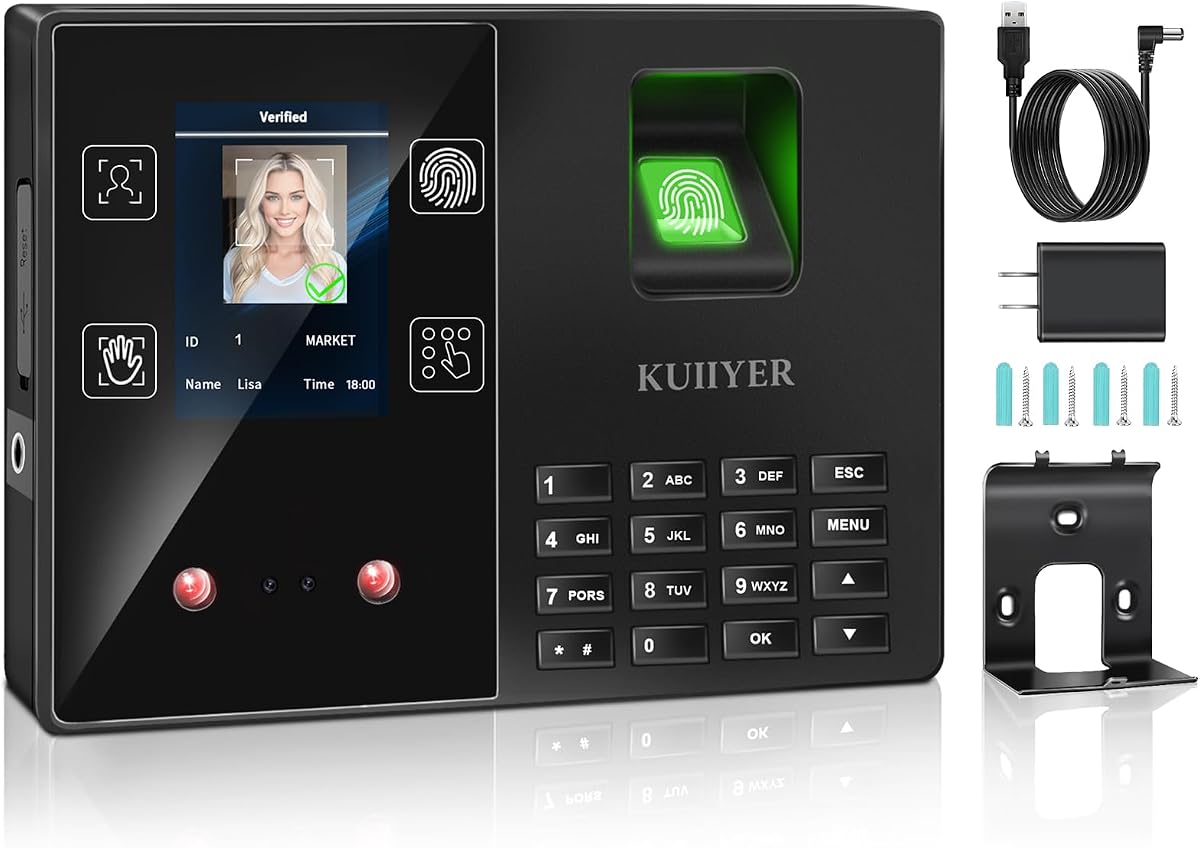
KUIIYER 4 in 1 Employees Time Clocks
3.7Editor score
Four biometric options in one device
Supports up to 1000 user capacity
No monthly fees required for operation
Discover the top biometric fingerprint scanner time clock options for small businesses, comparing features like cloud access, standalone modes, and multi-biomet
Finding the right biometric fingerprint scanner time clock is crucial for modern businesses aiming to streamline attendance tracking and reduce payroll errors. These devices offer secure, efficient ways to monitor employee hours without relying on vulnerable paper cards or manual entry systems.
We compared ten leading models based on security features, connectivity options, ease of use, and overall reliability. Our analysis covers standalone units, cloud-enabled systems, and hybrid devices to help you find the perfect fit for your workplace needs and budget constraints.
Each selection highlights specific strengths like face recognition, palm scanning, or robust offline capabilities. Keep in mind that pricing and availability can fluctuate, so verify current details before making your final purchase decision for your business operations.
3.7Editor score

4.7Editor score

4.1Editor score
This side-by-side comparison highlights key specifications across all ten selected biometric time clock models to help you quickly identify the best match for your specific business requirements and operational needs.


The NGTeco Time Clock for Small Business earns top honors with its impressive speed and user-friendly design. Rated highly by users, this device delivers accurate attendance tracking through its advanced fingerprint sensor and intuitive app interface.
We may earn a commission when you buy through this link, at no additional cost to you.
Its standout feature is the rapid 0.5 second recognition time, which minimizes queue times during shift changes. The built-in backup system ensures data remains safe even if power fails unexpectedly, providing peace of mind for business owners.
While it lacks face or palm scanning capabilities found in premium models, the fingerprint and PIN options cover most small business needs effectively. The requirement for a local network to sync edits might limit remote management flexibility slightly.
This clock is ideal for small businesses prioritizing speed and reliability over complex biometric diversity. Its robust support and warranty make it a trustworthy investment for daily workforce management operations.
The sensor authenticates wet or dry fingerprints in under a second to keep lines moving quickly during busy clock-in times.
Integrated backup mechanisms safeguard all attendance records against sudden power outages to prevent data loss or corruption.
We may earn a commission when you buy through this link, at no additional cost to you.
The KUIIYER 4 in 1 offers exceptional value by providing four distinct authentication methods at an affordable price point. It supports up to 1000 users and requires no monthly fees, making it attractive for budget-conscious small business owners.
We may earn a commission when you buy through this link, at no additional cost to you.
Its color LCD display and voice announcements in multiple languages add convenience for diverse teams. The device captures face, fingerprint, and palm data efficiently, reducing the need for multiple separate hardware purchases.
Some users report a steeper learning curve during initial setup and lower recognition consistency compared to pricier rivals. However, the trade-off in price and versatility often justifies these minor operational drawbacks for many companies.
This unit is perfect for businesses needing high capacity without ongoing costs. Choose it if you need flexibility in clock-in methods and prefer a completely offline system.
Employees can choose from face, palm, fingerprint, or PIN recognition to suit their personal preferences and accessibility needs.
With no monthly fees and automatic hour calculations, the system reduces administrative overhead and recurring expenses significantly.
We may earn a commission when you buy through this link, at no additional cost to you.
This premium biometric time clock offers the most comprehensive security features with face, palm, fingerprint, badge, and PIN options. Its web-based system provides real-time reporting and remote access to data, fitting modern business workflows perfectly.
We may earn a commission when you buy through this link, at no additional cost to you.
The included mobile app adds convenience with geo-fencing to verify employee locations during clock-ins. Automated alerts for overtime and late punches help managers stay on top of compliance and payroll issues without manual checks.
The necessity of a monthly subscription after a thirty-day trial can increase long-term costs. Additionally, reliance on cloud connectivity means functionality may be limited during internet outages compared to standalone alternatives.
Businesses prioritizing maximum security and remote management will find this system invaluable. It suits organizations ready to invest in a full-service ecosystem for workforce tracking and payroll integration.
Five distinct authentication methods eliminate buddy punching and ensure that only authorized personnel can clock in or out.
Owners can monitor punches and generate reports from anywhere using a web browser or mobile app for complete control.
We may earn a commission when you buy through this link, at no additional cost to you.
The NGTeco Standalone Time Clock excels for businesses that prefer keeping data local without internet dependencies. It starts working in minutes without complex software, and exports attendance data via a standard USB drive for immediate payroll processing.
We may earn a commission when you buy through this link, at no additional cost to you.
Its internal memory supports up to 50,000 punch records, allowing for long-term storage without frequent backups. The device is built with durable materials designed to withstand daily wear in warehouses or retail counters.
Lacking cloud connectivity means managers cannot access data remotely, which might be inconvenient for distributed teams. Physical data transfer via USB adds a minor step to workflow compared to automated cloud syncing options.
Ideal for small businesses needing simple, secure tracking without hidden fees. Choose this if you value data privacy and minimal technical requirements for daily operations.
All employee records stay on the device until manually exported to ensure sensitive data never leaves your premises.
Plug in a USB drive to retrieve ready-to-use Excel reports for instant integration with your payroll system.
We may earn a commission when you buy through this link, at no additional cost to you.
The uAttend JR2000 combines hardware with a robust cloud system designed to automate time tracking and payroll tasks. It offers real-time data access from any device, giving managers flexibility to monitor attendance remotely without being onsite.
We may earn a commission when you buy through this link, at no additional cost to you.
Its reporting capabilities provide deep insights into attendance trends and labor costs, helping optimize workforce efficiency. Automatic backups ensure records remain safe even if the physical device encounters issues or loses power unexpectedly.
While powerful, full feature access often requires a low-cost subscription which may add to operating expenses. Internet dependency also means functionality could be compromised during connectivity outages compared to offline alternatives.
This system suits businesses seeking seamless payroll integration and centralized data management. Prioritize it if you value remote access and detailed labor analytics for growth.
Time and attendance data automatically feed into payroll systems to reduce manual entry errors and streamline tax filings.
View and manage employee attendance in real time from any connected device for ultimate managerial flexibility.
We may earn a commission when you buy through this link, at no additional cost to you.
This USB-based fingerprint scanner offers a simple way to add biometric security to existing attendance software. Its compact design allows for easy desktop placement, making it suitable for smaller offices needing basic access control without bulky hardware.
We may earn a commission when you buy through this link, at no additional cost to you.
It supports multiple user enrollments and provides consistent performance with its advanced biometric algorithm. The device connects directly to a computer, eliminating the need for separate network cabling or wireless configuration.
Since it relies on external software for reporting, users must manage files on the host machine rather than on-device storage. This setup might lack the robustness of dedicated time clocks for standalone operations.
Ideal for businesses integrating biometrics into current systems. Choose this for quick verification needs in controlled environments where a separate time clock is unnecessary.
Connect directly via USB to a computer for immediate use without complex drivers or network settings.
Compatible with most attendance programs to enhance security and tracking within your existing software ecosystem.
We may earn a commission when you buy through this link, at no additional cost to you.
The H3 standalone time clock prioritizes privacy with zero internet requirements and automatic hour calculations. It comes ready to use out of the box with no monthly fees, making it an accessible solution for small businesses of any size.
We may earn a commission when you buy through this link, at no additional cost to you.
Its multi-language support assists diverse workforces in understanding clock-in instructions easily. The included RFID cards provide an alternative to fingerprints for employees who may have issues with biometric recognition.
Manual data transfer via USB limits remote monitoring options and relies on physical access to retrieve reports. While reliable, it lacks the advanced flexibility of networked systems for real-time oversight.
This device is perfect for businesses needing straightforward tracking with minimal tech involvement. Select it if you prefer a secure local-only system with immediate usability.
All data stays private on the device without internet access, ensuring sensitive employee records remain fully under your control.
Supports fingerprint and RFID card scanning to accommodate employee preferences and physical limitations efficiently.
We may earn a commission when you buy through this link, at no additional cost to you.
The NGTeco Cloud Time Clock TC1 provides extensive flexibility with its free cloud service and customizable shift options. It supports diverse workforces with multi-language software and ensures data security through bank-grade encryption standards.
We may earn a commission when you buy through this link, at no additional cost to you.
Offline functionality means employees can clock in during internet outages, with data syncing automatically once the connection is restored. This reliability prevents data loss and ensures continuous tracking regardless of network status.
While core features are free, unlocking advanced tools like GPS check-ins might require a separate subscription. The app requirement adds a small initial step for setup compared to purely standalone units.
This model suits businesses needing both cloud access and offline resilience. Choose it if you require detailed shift management and reliable data synchronization across multiple locations.
Configure fixed, rotating, or split shifts to match complex workforce schedules and reduce manual scheduling errors.
Punches are captured locally during outages and sync to the cloud automatically to ensure no work hours are lost.
We may earn a commission when you buy through this link, at no additional cost to you.
The H1 model offers a straightforward, no-frills approach to attendance tracking with automatic hour calculations. It requires no internet and carries no ongoing fees, delivering reliable performance for businesses seeking simplicity and cost-effectiveness.
We may earn a commission when you buy through this link, at no additional cost to you.
Its support for up to 1,000 employees makes it scalable for growing teams without needing hardware upgrades. Multi-language options help diverse workers interact with the device easily, reducing training time for new hires.
The basic interface lacks advanced features like cloud access or palm scanning found in higher-end models. While efficient, it may not offer the deep analytics some organizations need for detailed labor reporting.
Best for small businesses needing a functional, affordable tracker. Pick this if your priority is easy setup and accurate basic data with minimal maintenance.
Enjoy a simple one-time purchase with no hidden subscriptions or software installation fees to keep costs predictable.
Handle up to 1,000 employees with ease, making it suitable for expanding small to mid-sized businesses.
We may earn a commission when you buy through this link, at no additional cost to you.
The second NGTeco Cloud model stands out with dual-band WiFi for faster and more stable connectivity. It offers robust security through AWS cloud storage and includes an internal battery to keep tracking active during power outages.
We may earn a commission when you buy through this link, at no additional cost to you.
Flexible overtime rules and automatic calculation simplify payroll preparation significantly. Managers can monitor clock-ins and generate reports via the web portal or mobile app, ensuring real-time visibility into workforce activity.
Internet dependency remains a factor for full functionality, though offline backups help mitigate data loss risks. Advanced mobile tools may need a separate subscription, adding a slight layer of cost for maximum utility.
This system is ideal for businesses needing reliable connectivity and automated payroll math. Choose it if you value stable network performance and secure cloud data management.
Supports both 2.4GHz and 5GHz WiFi to minimize connection lags and ensure smooth daily tracking performance.
Built-in 2000mAh battery maintains operation during power cuts so attendance data is never lost unexpectedly.
We may earn a commission when you buy through this link, at no additional cost to you.
Selecting the right device requires evaluating security features, connectivity, and budget to match your business needs accurately.
Consider how many biometric options your workforce needs. Basic models offer fingerprint and PIN, while premium units add face, palm, or badge scanning for higher security against buddy punching.
Choose more methods if your staff has diverse accessibility needs or high security requirements.
Decide between standalone units that store data locally versus cloud-enabled systems that offer remote access. Standalone options protect privacy and avoid internet issues but require manual data transfer.
Opt for cloud models if you manage teams across locations or need real-time oversight.
Evaluate the depth of reporting tools. Some devices provide simple export files, while others include detailed labor analytics and overtime calculations that integrate directly with payroll software.
Prioritize advanced reporting if you need precise labor cost insights for decision making.
Check the maximum number of users the device supports. Small units may cap at 500 profiles while larger ones handle over 1000 employees, ensuring you do not outgrow the hardware quickly.
Select a capacity matching your current staff size plus future growth projections.
Look for internal backups or battery power to prevent data loss during power outages. This ensures your attendance records remain safe even if local electricity fails unexpectedly.
Always choose models with backup power to maintain continuous tracking during disruptions.
Be aware of subscription fees that some cloud systems charge after trial periods. Standalone models usually involve only a one-time purchase, whereas others might require monthly payments for full functionality.
Compare total cost of ownership to avoid unexpected recurring expenses over time.
Check warranty length and customer service availability. Devices with lifetime support and US-based assistance can save you money and time when technical issues arise later.
Pick brands with strong warranty coverage to protect your investment long term.
Start by placing the device near the entry or exit point where employees frequently pass. Ensure it is mounted at a comfortable height and angle so users can easily scan their biometric data without awkward movements.
Register each employee's fingerprint, face, or ID clearly in the system. Provide a brief training session to explain how to clock in and out properly so everyone understands the process and avoids repeated errors.
Clean the scanner lens regularly with a soft cloth to maintain recognition accuracy. Perform periodic software updates if the device supports cloud features to ensure it runs efficiently and stays secure from threats.
Modern sensors often detect moisture levels and adjust capture quality accordingly, allowing reliable recognition even when hands are wet or dry. If your workplace involves heavy manual labor where hands are dirty, consider models with face or palm scanning as alternatives.
Yes, cloud-enabled models allow you to log into a web portal or mobile app to view and manage attendance records remotely. Standalone units do not offer this feature, requiring physical access or USB transfer to retrieve the same data.
Standalone devices function without internet connections and store records locally until manually exported. Cloud systems need internet to sync data in real time but often include offline modes that save punches locally during network outages.
Many premium models include a backup battery that keeps the device running during short power cuts to ensure continuous data capture. Devices without batteries rely on stable power, so check backup capabilities carefully if your office experiences frequent outages.
Each model has a maximum user capacity typically ranging from 500 to over 1000 profiles. If your business grows beyond that limit you may need to upgrade hardware or split users across multiple devices to maintain smooth tracking operations.
Most devices support exporting data as CSV or Excel files through USB or cloud portals. You may need to format these files manually or select models with direct integration plugins to import them directly into specific payroll systems.
We highlighted ten top options ranging from budget-friendly standalone units to advanced cloud-based systems. The NGTeco Time Clock stands out for speed, while the KUIIYER 4 in 1 offers unmatched versatility at an affordable price.
Consider your business size, security needs, and whether remote access is essential before deciding. If budget allows, models with backup batteries and cloud features provide long-term peace of mind for growing teams.
Always check current prices and availability on the product pages before finalizing your purchase since offers and stock can change frequently for these items.