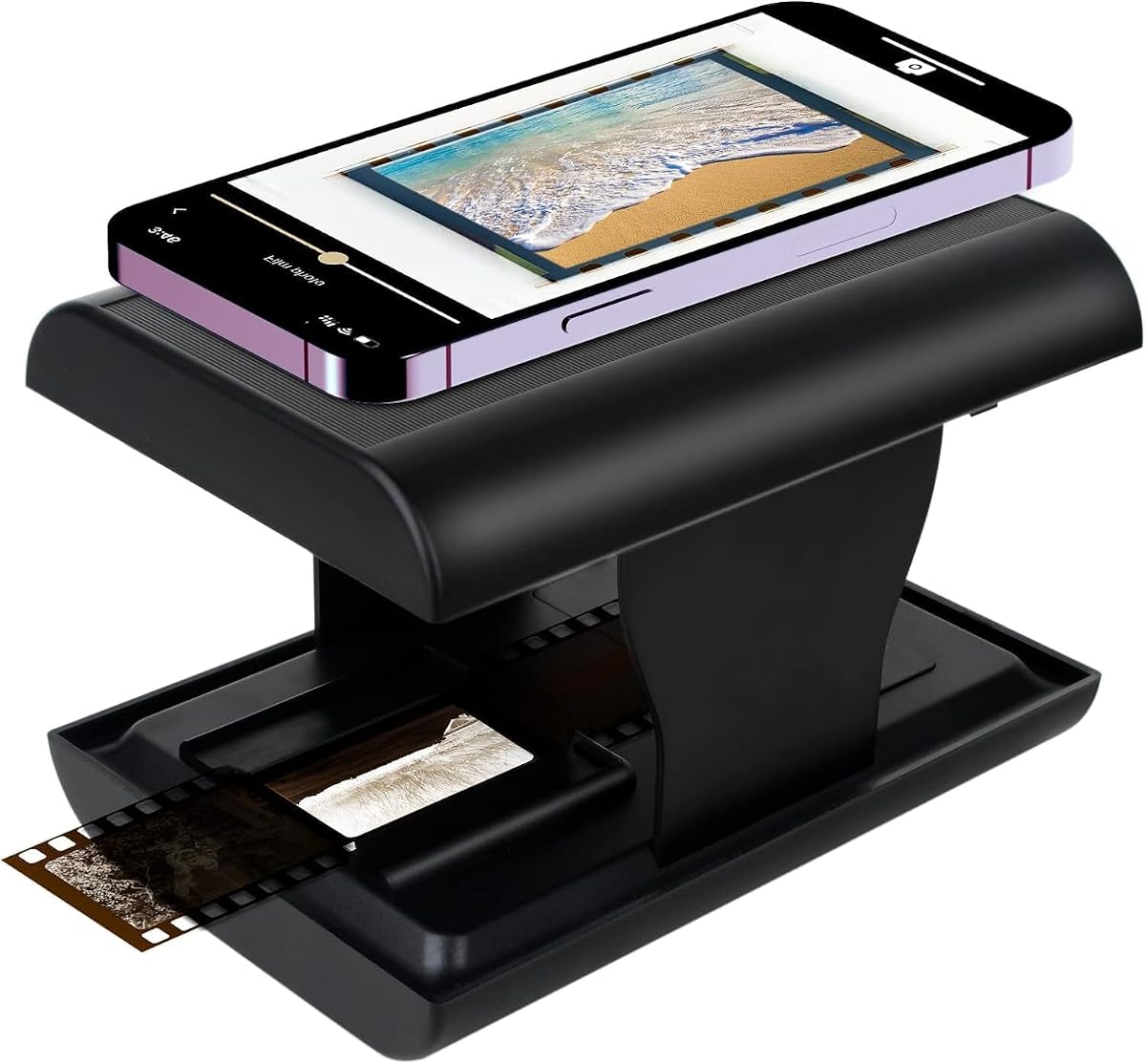
TCNEWCL 35mm Negative Slide Scanner
4.3Editor score
Foldable compact design
Uses smartphone camera
Free editing app included
Preserving your precious memories requires the right tools to convert old film into digital formats. A quality black and white negative scanner ensures every detail is captured accurately without losing the original essence of your photographs.
We have thoroughly reviewed the latest models on the market to bring you this comprehensive list. Our analysis focuses on resolution, ease of use, and compatibility with various film types to ensure you get the best value for your investment.
Each pick in this guide highlights specific strengths that cater to different user needs and preferences. Please note that prices and availability can change frequently, so checking current listings is always recommended before making a purchase decision.
4.3Editor score

4.2Editor score

4.3Editor score
As an Amazon Associate we earn from qualifying purchases.
Explore our detailed side-by-side comparison of the leading models available this month. We break down key specifications and features to help you make an informed choice for your digitization projects.


The BEONEGLOBAL ClearScan MINI stands out as a top contender for those seeking high-quality digitization without the hassle of a computer. With a 16MP CMOS sensor, it captures details that often get lost in lower-end devices.
We may earn a commission when you buy through this link, at no additional cost to you.
Its ergonomic design places buttons right below the screen, making it intuitive to use even for beginners. The built-in editing options allow you to adjust brightness and color before saving, ensuring your memories look their best.
While the screen is small, the clarity of the scans compensates for this. The ability to save directly to an SD card means you can take your memories anywhere immediately after scanning.
This scanner is ideal for families looking to preserve old albums without spending hours on software. It balances performance and ease of use effectively, making it a reliable choice for most users.
The 16MP CMOS sensor ensures that every grain and detail of your film is captured with precision and clarity.
Thoughtful button placement and a clear display make operation straightforward for users of all technical levels.
We may earn a commission when you buy through this link, at no additional cost to you.
The KODAK Slide N Scan Max delivers professional results with its smooth-moving tray system that feeds film effortlessly. This reduces the physical strain often associated with scanning multiple images manually.
We may earn a commission when you buy through this link, at no additional cost to you.
Its ability to handle various film types like 135mm, 110mm, and 126mm makes it incredibly versatile for collectors. The 22MP interpolation ensures that your digital files are crisp and ready for large prints.
One-touch editing simplifies the process, allowing quick adjustments without complex software. However, the price reflects its premium features which might not be necessary for casual users.
Choose this scanner if you value brand reliability and high output quality. It is designed for those who scan frequently and want a robust tool that handles diverse film types with ease.
The smooth-moving tray eliminates the need for constant repositioning, streamlining the scanning workflow significantly.
Supporting multiple film formats ensures you can digitize your entire collection without needing multiple devices.
We may earn a commission when you buy through this link, at no additional cost to you.
For those on a tight budget, the TCNEWCL 35mm Scanner offers a creative solution by leveraging your existing smartphone camera. It is incredibly affordable and perfect for occasional use.
We may earn a commission when you buy through this link, at no additional cost to you.
Its foldable design makes it easy to store in a drawer or take on trips. The built-in LED light ensures adequate illumination for your slides when paired with your phone.
While the resolution depends on your phone, the free app provided allows for easy editing and sharing. This makes it a fun project for families to work on together.
This device is not for professional archival work but is excellent for casual digitization. If you want a simple way to save memories without investing heavily, this is the right choice.
The low cost barrier makes it accessible for anyone wanting to digitize a few slides without financial stress.
Its compact and foldable nature means you can take your scanner wherever you go to capture memories on the fly.
We may earn a commission when you buy through this link, at no additional cost to you.
The Magnasonic All-in-One stands out with its large 5-inch display, offering a better viewing experience than most competitors. This is perfect for reviewing scans immediately after capture.
We may earn a commission when you buy through this link, at no additional cost to you.
With a 24MP output, it provides high-resolution files suitable for printing. The HDMI option allows you to project images directly to a TV, which is a great feature for family gatherings.
Scanning takes less than five seconds per image, thanks to fast-loading trays. The lack of required software simplifies the process for non-technical users.
This scanner is best for those who want to share memories on a big screen. It balances resolution and viewing convenience effectively, though it is heavier than other models.
The large screen allows for quick verification of scan quality, reducing the need for re-scanning.
Connecting to a monitor or TV turns your scanner into a digital photo frame for immediate enjoyment.
We may earn a commission when you buy through this link, at no additional cost to you.
Designed with simplicity in mind, the Memory Vault Box Scanner is an excellent choice for grandparents or beginners. It includes everything needed to start, like a cleaning brush and cables.
We may earn a commission when you buy through this link, at no additional cost to you.
The auto enhancement technology helps restore faded colors, which is a huge benefit for older photos. The LCD screen is straightforward, allowing you to see results instantly.
While the rating is lower than others, the ease of use is a significant advantage. It removes technical barriers, making it accessible for those less comfortable with technology.
This model is perfect for families focusing on simplicity over raw performance. If your priority is getting started quickly without reading a manual, this is a strong candidate.
Including essential accessories in the box saves you the hassle of buying extras to get started immediately.
Built-in tools automatically adjust color and brightness to improve the look of aged and faded images.
We may earn a commission when you buy through this link, at no additional cost to you.
The HP Film & Slide Scanner brings a modern touch to the category with its 5-inch touchscreen interface. This makes navigating menus much easier than pressing physical buttons.
We may earn a commission when you buy through this link, at no additional cost to you.
Powered via USB-C, it aligns with current device standards, offering better flexibility for power sources. The gallery mode turns it into a photo frame, which is a charming feature.
HP is a trusted brand, which adds confidence to the purchase. The scanner handles various formats well, ensuring your collection is covered without needing adapters.
Ideal for tech-savvy users who want a sleek interface. It balances modern convenience with solid scanning performance, making it a versatile tool for home use.
Using USB-C ensures you can power the device with cables you likely already own, reducing clutter.
A responsive touch screen makes selecting and reviewing your photos more intuitive and faster.
We may earn a commission when you buy through this link, at no additional cost to you.
There are various generic options available that serve as budget alternatives. However, without specific data, it is vital to check user reviews before buying to ensure reliability.
We may earn a commission when you buy through this link, at no additional cost to you.
These models often offer basic scanning capabilities at a low cost. They are suitable if you only need to scan a few images and are not concerned with high fidelity.
Be prepared for potential variability in build quality and customer support. Always review the return policy to ensure you can get a refund if the device does not meet expectations.
This option is for those willing to take a risk for a lower price. If you prefer established brands, it is safer to stick with the top-rated models mentioned earlier.
Always verify return policies and recent user feedback before purchasing from generic brands to avoid disappointment.
We may earn a commission when you buy through this link, at no additional cost to you.
Similar to other generic choices, this model focuses on affordability over advanced features. It can be a decent starter unit if you have very limited scanning needs.
We may earn a commission when you buy through this link, at no additional cost to you.
The lack of detailed data means you should rely on user feedback for performance insights. Some users find them functional, while others report issues with consistency.
Consider the time investment versus cost savings. If your scans turn out poorly, the time lost in re-scanning might not be worth the small savings.
Proceed with caution and look for recent reviews. If you value long-term reliability, investing in a known brand is usually the wiser financial choice.
Weigh the initial savings against potential future replacement costs when choosing a less established brand.
We may earn a commission when you buy through this link, at no additional cost to you.
Another entry-level option, this scanner is designed for those with minimal requirements. It might suffice for digitizing slides for a single project without recurring needs.
We may earn a commission when you buy through this link, at no additional cost to you.
Due to limited specs, it may not handle complex tasks like color correction or high-resolution printing. Ensure it supports your specific film type before buying.
Support from the manufacturer is often non-existent for these products. You will need to troubleshoot issues on your own or return the item if problems arise.
This is best for one-off tasks where quality is not paramount. For preserving family history, a more robust solution is recommended to ensure longevity of your digital copies.
Designed for simple tasks where high fidelity is not required, but verify film compatibility first.
We may earn a commission when you buy through this link, at no additional cost to you.
The final generic option listed offers a low-cost entry into film scanning. It is suitable for those who just want to try digitizing a few memories without commitment.
We may earn a commission when you buy through this link, at no additional cost to you.
However, the lack of advanced features limits its utility significantly. You may find yourself frustrated by the need to use a computer for basic editing or saving.
As with other generic brands, quality control can be inconsistent. It is always safer to check return policies and customer support options before making the purchase.
This model is not recommended for serious collectors. It serves as a functional placeholder, but for long-term preservation, investing in a specialized scanner is necessary.
While functional for simple tasks, the lack of features restricts its usefulness for detailed archival work.
We may earn a commission when you buy through this link, at no additional cost to you.
Choosing the right scanner involves balancing several factors to ensure you get the quality and convenience you need.
Resolution determines the level of detail your scanner can capture. For archival purposes, aim for at least 13MP to ensure prints remain crisp.
Higher resolution means larger files but better detail preservation for future use.
Ensure the scanner supports all film types in your collection. Some models handle 35mm only, while others support Super 8 or 110mm.
Universal compatibility saves you from needing multiple devices for different film types.
Look for scanners with simple interfaces and built-in screens. Models with physical buttons or touchscreens make operation intuitive without software.
A user-friendly design reduces frustration and encourages consistent scanning sessions.
Built-in editing tools like color correction or rotation are valuable for quick fixes. They save time compared to using external software later.
Basic editing features help ensure your scans are usable immediately after saving.
If you plan to scan at events or outside your home, portability matters. Compact models are easier to carry and store in tight spaces.
Lightweight designs make it feasible to digitize memories wherever you find them.
Some scanners need constant power, while others work on batteries or USB. Consider where you will use it to ensure it fits your workflow.
USB-C power sources are becoming standard and offer better versatility for charging and connection.
Set a realistic budget based on your scanning needs. High-end models cost more but offer better long-term value for frequent users.
For occasional use, budget options might suffice, but quality should not be entirely compromised.
Check if the scanner supports SD cards or direct computer connection. SD cards offer flexibility for storing photos without tethering to a PC.
Sufficient storage capacity is essential for large batches of images.
Start by cleaning your film or slides with a soft brush to remove dust. Dust particles can cause spots in your digital images, so cleaning before scanning is essential.
Insert your film or slide into the appropriate tray as indicated by the manufacturer. Ensure it is seated correctly to avoid jams or misaligned scans.
Turn on the scanner and follow the on-screen instructions to adjust settings. Select the correct resolution and start the scan. After saving, store your images in a safe location like a hard drive or cloud service.
Yes, most modern scanners are designed to handle both color and black and white negatives. The sensors capture light density differences regardless of color. However, check specific model descriptions to ensure B&W compatibility.
Many modern scanners work independently without a computer. They often include SD card slots to save files directly. This makes them portable and easier to use for quick digitization projects.
A resolution of 13MP or higher is generally recommended for slides. This ensures enough detail for printing large formats. Lower resolutions may suffice for digital viewing only.
Most scanners take between 5 to 10 seconds per image. Faster models exist but might compromise slightly on quality. Check product specs for specific speed estimates.
No, Super 8 film requires a specific scanner designed for that format. Standard slide scanners typically support 35mm or 126mm. Verify compatibility before purchasing.
Dark scans usually result from incorrect settings or dirty film. Adjust the brightness or exposure settings on the device. Also, clean the lens and the film before re-scanning.
Store files in multiple locations like an external hard drive and cloud storage. This protects your memories from hardware failure or accidental loss.
Clean the scanner every few months or whenever you notice dust on scans. Use a soft brush or lint-free cloth to wipe the sensor area gently.
We have explored a range of top scanners, highlighting their unique strengths and limitations. Whether you need a premium model or a budget option, there is a device here to meet your needs.
Prioritize resolution and ease of use when making your decision. The best scanner is the one you will actually use regularly to preserve your memories.
Always check current prices and availability before buying since these can change. Investing in quality digitization ensures your family history is preserved for generations to come.