
HP DeskJet 2955
3.7Editor score
Wireless connectivity
Compact design
AI optimization
Discover the top affordable fax machines for home and business. This guide compares features, speed, and reliability to help you choose the right cheap fax
Finding an affordable fax machine can be challenging in a digital world. Many businesses still require physical document transmission. This guide explores reliable options that balance cost with essential functionality.
We evaluated ten top-rated models based on speed, paper capacity, and user feedback. Each product offers unique features suited for different needs. Our comparison helps you navigate the market efficiently.
Every selection includes key specs and real-world performance notes. Prices fluctuate frequently due to market demand. Always verify current availability before making your final purchase decision.
3.7Editor score

3.8Editor score

4.0Editor score
This side-by-side comparison highlights the distinct capabilities of each model. From basic thermal transfer to advanced inkjet systems, we break down what matters most for your workflow.




The Brother FAX-575 stands out as a reliable choice for traditional faxing needs. It combines fax, phone, and copying functions into one unit. With a 4.1 star rating, it satisfies users needing consistent performance.
We may earn a commission when you buy through this link, at no additional cost to you.
Its 9600 BPS modem ensures quick transmission at roughly 15 seconds per page. The 512 KB memory allows storing up to 25 pages, which is useful for busy offices. Black-and-white copying at 400 x 400 dpi provides clear document output.
While it lacks modern connectivity features, its simplicity is a strength. The 50-sheet paper capacity minimizes refills. Some users may find the lack of wireless options limiting for remote work scenarios.
This machine is ideal for home offices or small businesses prioritizing function over tech. It delivers steady faxing without complexity. If you need a straightforward device, this model remains a solid contender.
The 9600 BPS modem ensures you spend less time waiting for faxes to send and more time focusing on other tasks.
Store up to 25 pages in memory to ensure transmission even if the paper runs out during a busy sending session.
We may earn a commission when you buy through this link, at no additional cost to you.
This renewed version offers the same capabilities as the original at a lower price point. It is tested to ensure functionality before shipping. Ideal for budget-conscious buyers needing traditional fax capabilities without premium costs.
We may earn a commission when you buy through this link, at no additional cost to you.
Performance matches the standard model with 15-second transmission and ample memory. The refurbishment process often includes cleaning and part replacements. This makes it a sustainable choice for those wanting to reduce electronic waste.
Buyers should inspect the item upon arrival to confirm condition. While warranties vary for renewed items, the core functions remain robust. It is a smart buy for temporary setups or secondary office locations.
If you seek reliability without high expense, this renewed unit fits well. It maintains the Brother brand quality while saving money. Consider this if new stock prices exceed your current budget constraints.
Get the exact same fax functionality at a reduced price, making it an accessible choice for startups or tight budgets.
Choosing a renewed product helps reduce electronic waste by giving high-quality hardware a second life in your office.
We may earn a commission when you buy through this link, at no additional cost to you.
The Sharp UXB20 uses inkjet technology to produce clear documents. It includes a corded handset for direct communication. While its rating is lower, it offers specific features like distinctive ring detection for better call management.
We may earn a commission when you buy through this link, at no additional cost to you.
With 9600 bps speed, it transmits data efficiently. The 24-page memory prevents data loss if paper runs out. Caller ID helps you screen calls effectively, adding a layer of privacy to your office line.
However, the 3.3 rating suggests potential durability issues over time. Inkjet heads might require maintenance to prevent clogs. Ensure you have a stable connection for optimal performance during long transmission sessions.
This model suits users needing inkjet clarity on standard paper. It is straightforward to set up for basic office tasks. Consider it if you need specific handset features not found in newer all-in-one units.
Inkjet printing provides sharp text and graphics, ideal for documents where visual quality matters more than speed.
Caller ID and distinctive ring detection help you manage multiple phone lines without confusion or missed calls.
We may earn a commission when you buy through this link, at no additional cost to you.
The HP DeskJet 2955 brings modern convenience to fax tasks via app integration. Its wireless setup allows printing from smartphones easily. The AI capability ensures precise formatting, reducing waste and improving document quality.
We may earn a commission when you buy through this link, at no additional cost to you.
At 7.5 ppm for black, it handles standard tasks adequately. The dual-band Wi-Fi reduces connection drops during transfers. Instant Ink trial offers cost savings, though the fee applies after three months. This is great for light users.
However, it lacks a traditional handset or standalone fax line in some configs. Users relying on physical line connection might find it limited. It is best paired with an existing line for scanning and sending.
This printer suits home offices needing versatility beyond faxing. It combines scanning and copying efficiently. If you want a compact device that fits anywhere, this model is a strong candidate for your desk.
Send faxes directly from your phone using the HP app, making it easy to manage documents on the go.
Its compact form fits perfectly on small desks, ensuring your workspace remains organized and clutter-free.
We may earn a commission when you buy through this link, at no additional cost to you.
The Canon PIXMA TR4720 integrates printing, scanning, copying, and faxing seamlessly. Its auto document feeder simplifies multi-page faxing. With a 3.8 rating, it balances performance and ease of use effectively.
We may earn a commission when you buy through this link, at no additional cost to you.
The 100-sheet paper tray reduces refills during peak times. Setup is streamlined via the Canon PRINT app, making it user-friendly. The ink installation is designed for quick replacement, minimizing downtime during busy days.
Some users may find wireless setup tricky initially. Ensure you follow instructions carefully for optimal connectivity. The borderless printing adds versatility for photos and graphics beyond text documents.
This unit is perfect for small teams needing multi-functionality. It delivers professional results without taking up much space. If you need a reliable fax and print solution, this model is worth serious consideration.
The auto document feeder lets you load multiple pages to fax at once, saving significant time on repetitive tasks.
Connect your device in minutes using the Canon PRINT app, so you can start sending faxes immediately.
We may earn a commission when you buy through this link, at no additional cost to you.
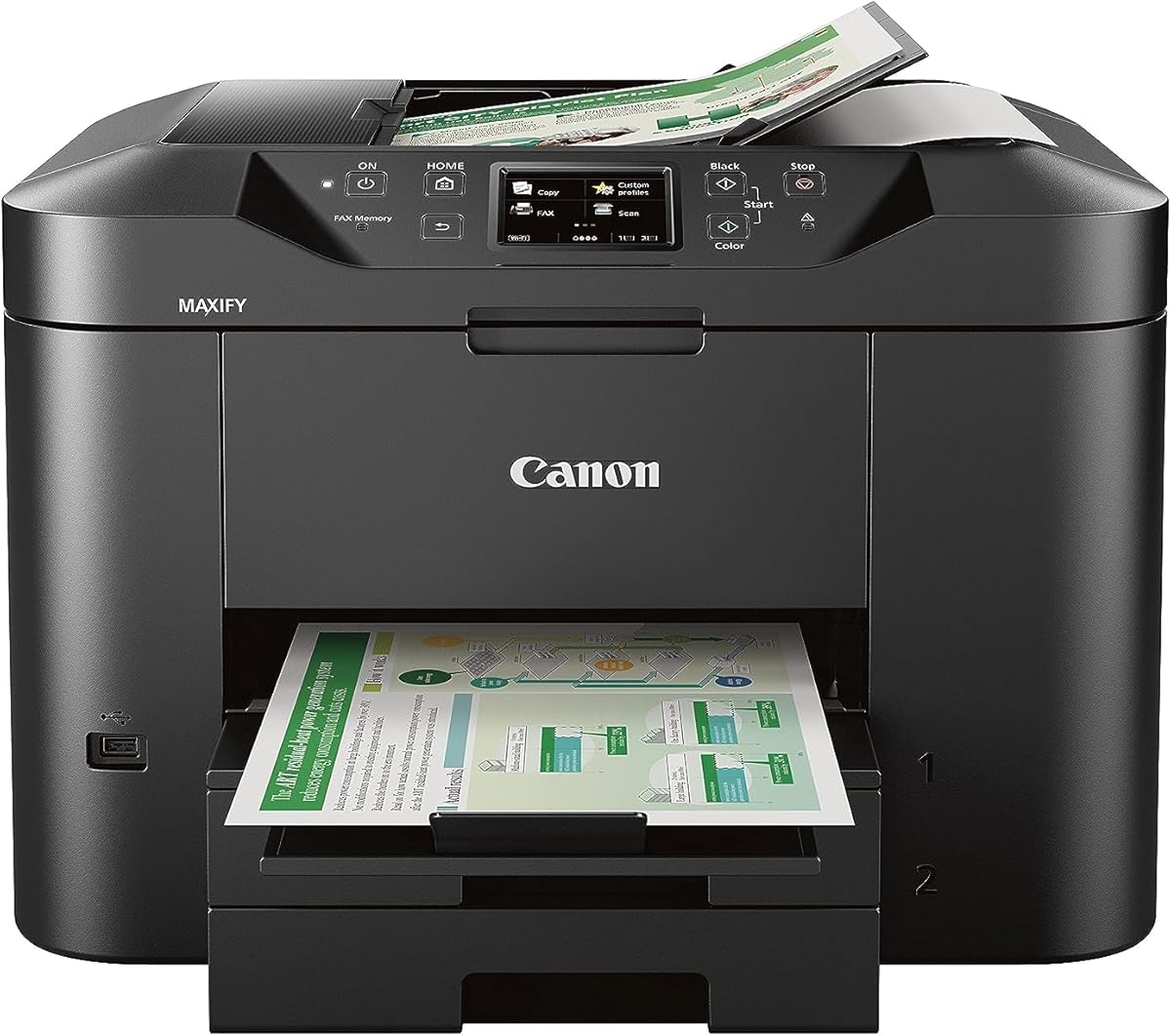
The Canon MAXIFY MB2720 targets business environments with heavy printing demands. With a 500-sheet capacity, it handles bulk jobs easily. Its dual-resistant inks ensure documents stay legible even when highlighted.
We may earn a commission when you buy through this link, at no additional cost to you.
The duty cycle of 20,000 pages means it is built to last. It supports Windows and Mac systems, offering broad compatibility. The 12-second color copy speed keeps workflows efficient during peak hours.
While robust, it may be overkill for casual home users. The initial setup and cost are higher than budget models. However, the return on investment is clear for high-volume offices.
Choose this if you prioritize durability and volume over initial cost. It reduces the need for constant maintenance. For growing businesses, this reliable machine ensures you are never stalled by printer jams.
Designed with a 20,000-page duty cycle, this printer withstands heavy daily use without frequent breakdowns.
Highlighter and smudge-resistant inks ensure your critical documents remain readable and professional over time.
We may earn a commission when you buy through this link, at no additional cost to you.
The Canon PIXMA TR8620a leads in smart features with Alexa integration. You can monitor ink levels via voice and enable auto-reorders. This ensures you never run out during an urgent fax. The 4-star rating reflects its reliability.
We may earn a commission when you buy through this link, at no additional cost to you.
With 15 pages per minute speed, it outperforms basic models. The auto 2-sided printing saves paper and reduces clutter. A 200-sheet capacity supports larger jobs, making it versatile for home offices and small businesses.
Smart reorders require enrollment, which some may find intrusive. However, the convenience outweighs this for busy users. The micro SD slot adds media flexibility for printing photos directly from cameras.
This is the top choice for tech-savvy users. It combines speed, automation, and quality. If you value convenience and advanced connectivity, this premium model delivers exceptional value for your daily tasks.
Simply use Alexa to discover your printer or check ink levels, freeing up your hands while you work.
Auto 2-sided printing cuts paper usage in half, helping you save costs and reduce environmental impact easily.
We may earn a commission when you buy through this link, at no additional cost to you.
The Brother IntelliFAX-2840 focuses on speed with laser technology. It prints at 21 pages per minute, ideal for high-volume needs. Laser output provides sharp text, suitable for professional documents that require clarity.
We may earn a commission when you buy through this link, at no additional cost to you.
With 200 x 300 dpi resolution, it balances quality and speed. While it lacks network capabilities, it works well on a single line. The sturdy build supports consistent operation in busy environments without frequent interruptions.
Toner cartridges can be more expensive than ink. However, the yield often compensates for the cost. It is a solid choice for those prioritizing speed and professional print quality over advanced digital features.
Select this if you need rapid document transmission regularly. It minimizes wait times and boosts productivity. For offices sending faxes hourly, this machine ensures your workflow remains smooth and uninterrupted.
With 21 ppm speed, this laser fax machine keeps up with your busiest sending days effortlessly.
Laser printing delivers crisp, clear text that remains legible and professional even after multiple copies.
We may earn a commission when you buy through this link, at no additional cost to you.
This thermal transfer model emphasizes simplicity and energy efficiency. It carries an Energy Star rating, reducing power usage. The 9.6 Kbps speed is standard for basic needs, ensuring consistent transmission without lag.
We may earn a commission when you buy through this link, at no additional cost to you.
The 512 KB memory allows for storing up to 25 pages. Thermal transfer means you avoid liquid ink issues entirely. This makes maintenance minimal and costs predictable over time.
Thermal paper may fade over time, so archiving important documents requires caution. It is best for temporary or short-term faxing. The 10-sheet ADF helps with quick multi-page sending without manual feeding.
This unit is great for low-volume users or backup systems. If you need an inexpensive solution that works, consider this model. It delivers core functionality without unnecessary frills or complex setup steps.
Save on electricity bills with a device designed to use less power while maintaining reliable performance.
Use thermal paper to avoid ink jams and maintenance, ensuring your fax runs smoothly with minimal fuss.
We may earn a commission when you buy through this link, at no additional cost to you.
The Panasonic KX-FHD331 offers plain paper faxing at a competitive price. It supports Caller ID, allowing you to identify incoming calls easily. The 9.6 Kbps modem handles standard transmission requirements without issue.
We may earn a commission when you buy through this link, at no additional cost to you.
Its 6-month warranty includes an exchange program, offering some protection against defects. Plain paper ensures your documents are easier to file than thermal rolls. This makes it suitable for basic home office needs.
With a 2.7 rating, reliability may vary over time. It lacks advanced features found in newer models. However, for users on a tight budget, it provides the core function of receiving and sending faxes.
Consider this if you need a no-fuss, low-cost fax line. It pairs well with a separate answering machine interface. If you prioritize simplicity over tech features, this basic model might suffice.
Use standard plain paper for your faxes, making them easy to file and read without special handling.
Identify who is sending a fax before you answer, giving you control over your incoming calls easily.
We may earn a commission when you buy through this link, at no additional cost to you.
Choosing the right fax machine depends on your specific workflow needs. Below are key factors to consider before purchasing a cheap fax machine.
Transmission speed determines how quickly documents are sent over the phone line. Faster modems reduce wait times significantly during busy periods. Look for models with at least 9600 bps to ensure efficiency in your daily workflow.
Prioritize higher speed if you send multiple pages daily to avoid bottlenecks.
Paper capacity impacts how often you need to refill the tray. Larger trays are essential for offices with high fax volume to minimize interruptions. Small 50-sheet trays suit casual users but may need frequent refills in business settings.
Choose a model with a tray that matches your typical daily fax load.
Memory allows a fax machine to store pages when paper runs out or during transmission errors. Models with higher KB capacity store more pages safely, ensuring documents are not lost. This is vital for uninterrupted sending during high-traffic times.
Look for at least 512 KB memory to protect your documents effectively.
Modern fax machines offer wireless or app-based connectivity for remote access. While traditional line models are cheaper, smart devices integrate better with digital workflows. Evaluate if you need to send faxes from a mobile device or computer.
Wireless connectivity is ideal for flexible home office setups.
Inkjet and laser technologies offer different trade-offs in cost and quality. Laser is faster and produces text-resistant documents, but inkjet may be cheaper for color. Thermal transfer is low-maintenance but uses special paper that fades over time.
Select technology based on whether you need permanent archives or just quick transmission.
A reliable machine should have a solid warranty and durable construction. Short warranties might indicate quality issues or limited support. Check the exchange program and service options to ensure long-term reliability.
Prioritize units with clear warranty terms to safeguard your investment.
All-in-one units combine fax, print, scan, and copy functions. While slightly more expensive, they save desk space and reduce hardware needs. Decide if you need just faxing or a full office suite for your workspace.
Multifunction devices are better if space and budget allow for extra features.
Interfaces should be intuitive to avoid errors during urgent transmissions. Digital screens and programmable buttons speed up the process. Simple setups ensure anyone in the office can operate the machine without training.
Choose user-friendly controls if multiple people will access the device regularly.
To use your fax machine effectively, ensure it is connected to a working landline. Verify the phone jack is secure and the machine has paper loaded properly. Check the display for any error messages before sending.
Regular maintenance keeps performance optimal. Clean the glass scanner weekly to prevent streaks on received faxes. Use compressed air to remove dust from internal rollers and vents to avoid jams.
Store paper in a cool, dry place to prevent moisture damage. If using thermal paper, avoid prolonged sun exposure to prevent fading. Follow the manufacturer's guidelines for firmware updates to maintain compatibility with modern systems.
Yes, many industries like healthcare and law still require faxes for security and compliance. While digital signatures are common, legal documents often need physical transmission. A cheap fax machine ensures you meet these standards without costly digital alternatives.
Thermal fax uses special heat-sensitive paper that is cheap but fades over time. Plain paper uses standard stock and offers better readability and longevity. Plain paper is generally better for filing and long-term record-keeping.
Modern all-in-one printers allow faxing via VoIP or app connections. However, analog fax machines require a traditional telephone line. Check compatibility if you plan to use digital services like Skype or internet fax providers.
Budget models range from $50 to $300 depending on features. Basic thermal units are cheapest, while multifunction inkjet models cost more. Always consider ink or toner costs alongside the purchase price.
For small businesses, speed, memory, and capacity are crucial. Look for multi-page memory to handle large jobs. Wireless connectivity and automatic document feeders also save time and improve efficiency significantly.
Check your phone line connection for stability and noise. Ensure paper is loaded correctly and the scanner glass is clean. If errors persist, reset the device or contact the service provider for line testing assistance.
Yes, most machines have an automatic document feeder (ADF). This lets you load multiple pages to send in one go. Ensure your model supports ADF if you frequently send multi-page documents.
Renewed devices are tested for functionality but may have cosmetic wear. They can be reliable if sourced from reputable sellers. Check warranty terms carefully before purchasing a renewed model to ensure support.
We reviewed ten top options ranging from basic thermal units to smart inkjet systems. Each model offers distinct benefits depending on your priority, whether cost, speed, or technology.
For most home offices, the Canon PIXMA TR4720 balances versatility and ease of use. If budget is key, the HP DeskJet 2955 offers modern features. High-volume needs benefit from the Canon MAXIFY MB2720.
Always verify current pricing and stock availability on Amazon before purchasing. Prices fluctuate based on sales and demand. Select the unit that fits your workflow to ensure efficient and reliable fax operations.