
Lenovo Chromebook S330
4.2Editor score
Lightweight three point three pounds
Ten hour battery life
Built-in virus protection
Finding a reliable cheap laptop for everyday use can be challenging when budget constraints meet high expectations. You need a device that handles browsing, streaming, and documents without breaking the bank. Our guide focuses on models that balance cost with essential features for daily productivity.
We evaluated ten top contenders based on processor speed, memory capacity, storage type, and display quality. Each model was selected for its ability to handle common tasks efficiently. We also considered build quality, portability, and battery life to ensure long-term satisfaction.
Each pick highlights specific strengths and potential trade-offs to help you make an informed decision. Remember that availability and stock can change rapidly online. Always verify the current configuration and warranty details before finalizing your purchase to ensure you get the best value available today.
4.2Editor score

4.8Editor score

4.4Editor score
As an Amazon Associate we earn from qualifying purchases.
This side-by-side comparison highlights the key specifications of every model in our list. Use this table to quickly identify which device matches your specific needs for performance and portability.




This laptop stands out as a top contender for daily computing tasks. It offers a large display and solid performance for browsing and document work. Users appreciate its quiet operation and modern charging options.
We may earn a commission when you buy through this link, at no additional cost to you.
The 15.6-inch Full HD screen provides ample space for multitasking. The N4020 CPU handles web browsing and light applications smoothly. The fanless design ensures it remains silent even during extended use.
While storage is limited to 128GB, it is expandable via TF card. The lack of a cooling fan might limit extreme performance but keeps noise low. It is an excellent choice for budget-conscious students.
Ideal for students and home users needing a large screen without high costs. The inclusion of Windows 11 adds versatility for running desktop apps. It delivers strong value for its specific target audience.
The fanless architecture eliminates noise and prevents dust accumulation inside the chassis for cleaner long-term operation.
USB-C Type-C PD fast charging allows you to carry one cable for both the laptop and other devices on the go.
We may earn a commission when you buy through this link, at no additional cost to you.
The S330 is a classic budget option known for reliability and simplicity. It runs Chrome OS which keeps maintenance minimal. Its light weight makes it perfect for carrying to classes or coffee shops.
We may earn a commission when you buy through this link, at no additional cost to you.
With a MediaTek processor and 4GB RAM, it handles basic web tasks well. The battery lasts up to ten hours which is great for all-day use. Built-in security means you don't need extra antivirus software.
Storage is the main limitation with only 32GB built in. You will rely heavily on cloud storage for files. The HD resolution is adequate but not as sharp as Full HD options.
Best for users who prioritize portability and low cost over raw power. If you live in the cloud and mostly use browser apps, this is an affordable entry point into computing.
Google Drive provides ample cloud storage to compensate for local limitations ensuring your files are safe and accessible anywhere.
Weighing only 3.3 pounds and under one inch thick it slips easily into backpacks for effortless daily transport.
We may earn a commission when you buy through this link, at no additional cost to you.
This model offers premium internals usually found on more expensive devices. The 8GB RAM allows for smooth multitasking. The UFS storage provides significantly faster boot times compared to standard eMMC.
We may earn a commission when you buy through this link, at no additional cost to you.
Intel N100 processor delivers solid performance for web apps and media. It supports 4K streaming which is rare at this price point. The anti-glare screen helps reduce eye strain during long sessions.
The display is still HD not Full HD which may disappoint some users. The chassis is functional but feels less premium than metal options. It balances internal power with external simplicity well.
Recommended for power users who need speed within a Chromebook form factor. If you open many tabs or run Android apps heavily the extra RAM makes a noticeable difference.
Universal Flash Storage offers faster read write speeds and lower power consumption compared to traditional eMMC drives.
With eight gigabytes of memory you can keep dozens of browser tabs open without significant system slowdowns.
We may earn a commission when you buy through this link, at no additional cost to you.
This Chromebook is designed for endurance and portability above all else. The battery life is exceptional for its class. It is ideal for long flights or days without easy access to power outlets.
We may earn a commission when you buy through this link, at no additional cost to you.
Intel Celeron N4120 provides reliable performance for basic tasks. The system includes fast charge technology for quick top-ups. The design is thin which adds to its travel-friendly appeal.
Storage and RAM are on the lower side of average. You will need to manage files carefully or use cloud storage. The display is standard HD which is fine for text but not media.
Perfect for travelers and students who need a device that lasts all day. If battery life is your top priority this model delivers strong value without compromising too much on performance.
HP Fast Charge technology allows the battery to reach fifty percent capacity in roughly forty five minutes.
The thin and lightweight construction makes it easy to carry in a backpack without adding unnecessary weight.
We may earn a commission when you buy through this link, at no additional cost to you.
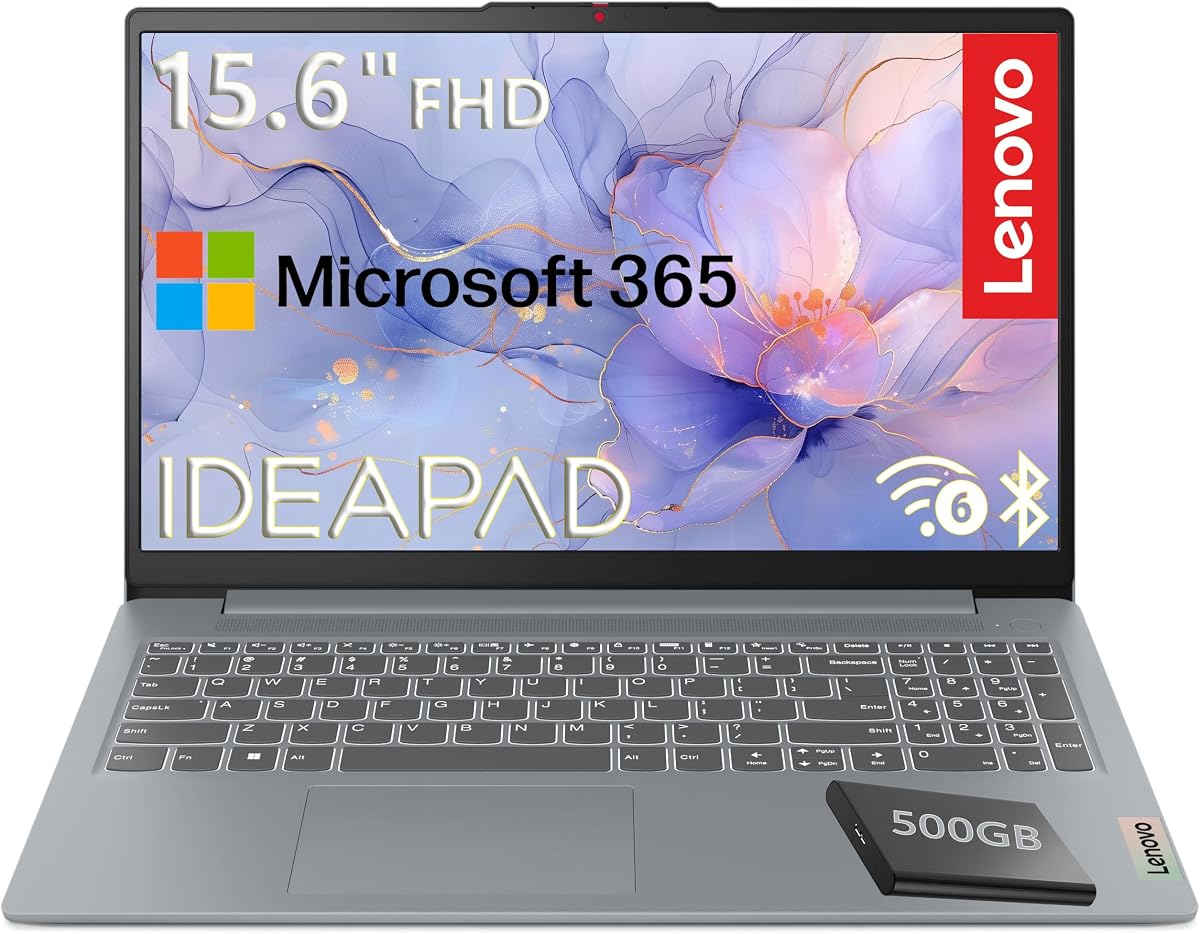
This laptop offers generous storage options through its external hard drive bundle. It also features a Full HD screen for crisp visuals. The build is rated for durability making it sturdy for daily use.
We may earn a commission when you buy through this link, at no additional cost to you.
The N100 processor handles modern tasks efficiently. The external drive gives you significant space for media and documents. Military-grade certification ensures it can withstand minor drops and bumps.
Using an external drive is less convenient than internal SSD. Windows S mode restricts app installation until you switch out of it. The external cable adds a bit of clutter to your setup.
Great for home users who need local storage for large files. The combination of speed and space makes it a versatile choice for media consumption and family use.
MIL-STD-810H certification means the chassis has passed rigorous tests for shock vibration and thermal shock.
Full HD resolution ensures sharp text and vibrant images for a comfortable viewing experience on a large screen.
We may earn a commission when you buy through this link, at no additional cost to you.
This model comes pre-loaded with Office 365 making it ready for work. The Intel N150 is one of the newest efficient processors available. It includes AI features to assist with daily productivity tasks.
We may earn a commission when you buy through this link, at no additional cost to you.
Windows 11 provides a familiar and capable environment for traditional apps. The fast charge technology ensures you stay powered up quickly. The Natural Silver finish looks professional in any setting.
The display remains HD which is a compromise for cost. You will not get a Full HD experience on this screen. Port selection is adequate but not extensive for many peripherals.
Perfect for professionals who need a reliable machine with essential software included. The AI tools help streamline routine tasks and boost overall efficiency for home or office work.
Built-in Copilot AI helps summarize text and assist with research without needing third party tools.
The sleek Natural Silver chassis adds an elegant touch to any workspace setup or home office.
We may earn a commission when you buy through this link, at no additional cost to you.
Designed for remote work and learning this model focuses on communication quality. The camera and microphone setup is optimized for calls. It includes the full Windows 11 experience for flexibility.
We may earn a commission when you buy through this link, at no additional cost to you.
Wi-Fi 6 ensures fast internet speeds even in crowded areas. The speakers are tuned to provide clear audio for meetings. The design is slim making it easy to carry between rooms or trips.
The screen resolution is standard HD which might look soft on text. 4GB RAM is sufficient for light multitasking but may struggle with heavy loads. It is a balanced tool for remote professionals.
Recommended for anyone working from home who prioritizes call quality. The dedicated Copilot key helps access help quickly during busy work hours without needing complex shortcuts.
AI noise reduction filters background sounds to ensure your voice comes through clearly during important video calls.
Bluetooth 5.4 and Wi-Fi 6 provide faster and more stable wireless connections for all your accessories.
We may earn a commission when you buy through this link, at no additional cost to you.
This slim laptop combines modern features with a compact form. It uses DDR5 RAM which is a step up in memory speed. The chassis is very light making it ideal for frequent travelers.
We may earn a commission when you buy through this link, at no additional cost to you.
Wi-Fi 6 ensures you stay connected at high speeds. The keyboard and touchpad are designed for comfort during long typing sessions. It maintains a professional look suitable for any setting.
Battery life is decent but not exceptional compared to others. The webcam is standard quality which may not suit high-end video conferencing. It is a solid choice for mobility and design.
Ideal for users who want a thin and light device for daily tasks. The inclusion of DDR5 RAM suggests good longevity and responsiveness for web-based workloads.
DDR5 RAM offers higher bandwidth and better power efficiency than previous generations for smoother performance.
The sleek Natural Silver chassis is both durable and visually appealing for modern professional environments.
We may earn a commission when you buy through this link, at no additional cost to you.
This Chromebook offers a rare touchscreen interface in a budget-friendly package. The display resolution is sharp for a Chromebook at this price. The processor is efficient and handles web apps well.
We may earn a commission when you buy through this link, at no additional cost to you.
Touch input allows for natural navigation through menus and apps. It is great for students who use tablet-like apps frequently. The build is slim and light for easy carrying.
The internal storage is limited to 64GB which fills up quickly. You will need to manage files or rely on cloud storage. Chrome OS is great for basics but not all PC apps run on it.
Best for users who want a tablet-like experience on a laptop. The Full HD touchscreen adds significant value for browsing and media consumption without needing a separate tablet.
Natural finger-touch navigation makes browsing and selecting items feel intuitive and responsive without a mouse.
Designed for class-leading battery life this processor ensures you can go longer between charges.
We may earn a commission when you buy through this link, at no additional cost to you.
This laptop stands out with its high RAM capacity for the price. The 12GB memory allows for smooth multitasking across many apps. The IPS screen provides wide viewing angles and good color.
We may earn a commission when you buy through this link, at no additional cost to you.
It includes a wide range of ports so you don't need dongles. The Pentium processor is energy efficient and handles basic tasks well. It is a strong contender for general home use.
The processor is slightly older compared to newer models. This might affect performance in newer software. The weight is average but not the lightest on the list.
Excellent for users who need RAM for multiple open windows. If you run many browser tabs or background apps this high memory option will keep your system responsive.
With 12GB of memory you can run multiple apps and browser tabs without performance degradation.
IPS technology ensures the colors remain accurate and vivid even when viewed from the side.
We may earn a commission when you buy through this link, at no additional cost to you.
Choosing the right budget laptop requires understanding which features matter most for your daily needs. We break down the critical components that affect performance and value.
The processor is the brain of your laptop and dictates how fast tasks complete. Look for modern chips like Intel N100 or N150 for decent speed on a budget. Avoid older Celeron models if you plan on multitasking heavily.
A faster processor ensures smooth browsing and quick app launches. It is worth investing a bit more for a newer generation CPU if possible.
RAM controls how many applications you can run simultaneously without slowing down. Aim for at least 8GB of RAM for comfortable daily use. Lower amounts like 4GB may struggle with modern web apps.
More memory means fewer system freezes and a smoother experience. If you find a model with 12GB RAM it offers excellent value for multitasking.
Storage speed affects how quickly your system boots and apps open. Solid State Drives (SSD) or Universal Flash Storage (UFS) are much faster than traditional hard drives. Avoid models that only offer eMMC if possible.
Choose a laptop with SSD or UFS storage for snappy performance. It makes a noticeable difference in daily usability and responsiveness.
A good screen reduces eye strain and improves viewing comfort for hours of use. Look for Full HD resolution (1920×1080) for sharp text. IPS panels provide better colors and viewing angles than TN panels.
Prioritize Full HD resolution to ensure text looks crisp. An anti-glare coating helps if you work in bright environments.
Battery life determines how long you can work unplugged during travel or meetings. Aim for at least 8 to 10 hours of actual usage time. Look for fast charging features to top up quickly.
Long battery life ensures you can work anywhere without hunting for outlets. It is a key factor for students and travelers.
The OS determines which applications you can run on your device. Windows 11 offers full compatibility with traditional PC software. Chrome OS is faster and simpler but relies heavily on cloud apps.
Choose based on your software needs. If you need specific Windows apps stick to Windows. Otherwise Chrome OS provides excellent speed and security.
Ports allow you to connect peripherals like mice, monitors, and drives. Ensure the laptop has enough USB-A and USB-C ports for your setup. Check if it has an HDMI port for external screens.
Sufficient ports reduce the need for adapters or hubs. A well-connected laptop saves you time and extra costs on accessories.
Durability ensures your laptop lasts for years of daily use. Look for models with sturdy hinges and reliable construction. Some budget laptops come with military-grade certification for extra protection.
A solid build protects your investment against wear and tear. It is a sign of better long-term value.
Keep your laptop in a cool environment to maintain battery health and performance. Avoid leaving it in hot cars or direct sunlight which can damage internal components over time. Use a hard surface for typing to ensure proper airflow.
Update your operating system regularly to patch security vulnerabilities and fix bugs. Install only trusted applications to prevent malware and keep your system running smoothly. Clear temporary files periodically to free up storage space.
Handle the screen with care to avoid scratches or cracks. Use a microfiber cloth to clean the display gently. Keep food and drinks away from the keyboard to prevent spills that could damage electronics.
For basic tasks like web browsing and email 4GB is sufficient. However if you run multiple apps at once you might experience slowdowns. 8GB is recommended for smoother performance in 2026.
SSD drives are faster and more durable than eMMC storage. SSDs offer quicker boot times and better multitasking. eMMC is cheaper and acceptable for very light use.
Most budget laptops have soldered RAM that cannot be upgraded. Always check the specs before buying. If you need more RAM buy a model with enough installed from the start.
Chrome OS is excellent for web-based work and light productivity. It cannot run traditional Windows desktop software. If you rely on specific apps check if they have web alternatives first.
With proper care a budget laptop can last three to five years. Battery life might degrade after two years. Hardware failure rates can be higher than premium models so buy from trusted brands.
Many budget models do not include backlit keyboards to save costs. Check the specific product specs before purchasing. If typing in low light is important prioritize a model that explicitly lists this feature.
Our top picks cover a range of needs from students to home professionals. The Amzboy laptop leads with its balance of screen size and performance. The HP Chromebook stands out for those needing speed and reliability.
Prioritize RAM and storage type over screen size if you want longevity. A good processor and modern storage ensure your device stays relevant longer. Choose the OS that fits your specific application requirements.
Remember that prices change frequently online so verify the current deal before buying. Always check the warranty terms to ensure you are covered. Make your choice based on daily tasks you need to complete.