
Amzboy 15.6” Laptop
4.8Editor score
Fanless silent operation
4GB RAM
128GB eMMC storage
Finding a cheap laptop for recording music requires balancing cost with essential specs like RAM, processor speed, and audio interface compatibility. Budget models often cut corners on thermal design which can affect sustained recording sessions and real-time plugin processing.
We analyzed ten affordable laptops based on their processing power, storage speed, port selection, and overall reliability for music production tasks. Each entry includes verified specifications and user ratings to help you choose a machine that handles DAW software without breaking the bank.
Every pick highlights key strengths for audio work such as low latency potential, quiet cooling systems, and expandable storage. Prices and availability change frequently so check current listings before purchasing to ensure you get the best value for your specific recording setup.
4.8Editor score
4.3Editor score

4.2Editor score
As an Amazon Associate we earn from qualifying purchases.
This side-by-side comparison highlights the core specifications and audio suitability of each laptop model included in our guide. We focus on CPU performance, memory capacity, storage types, and connectivity options that directly impact music production workflows.




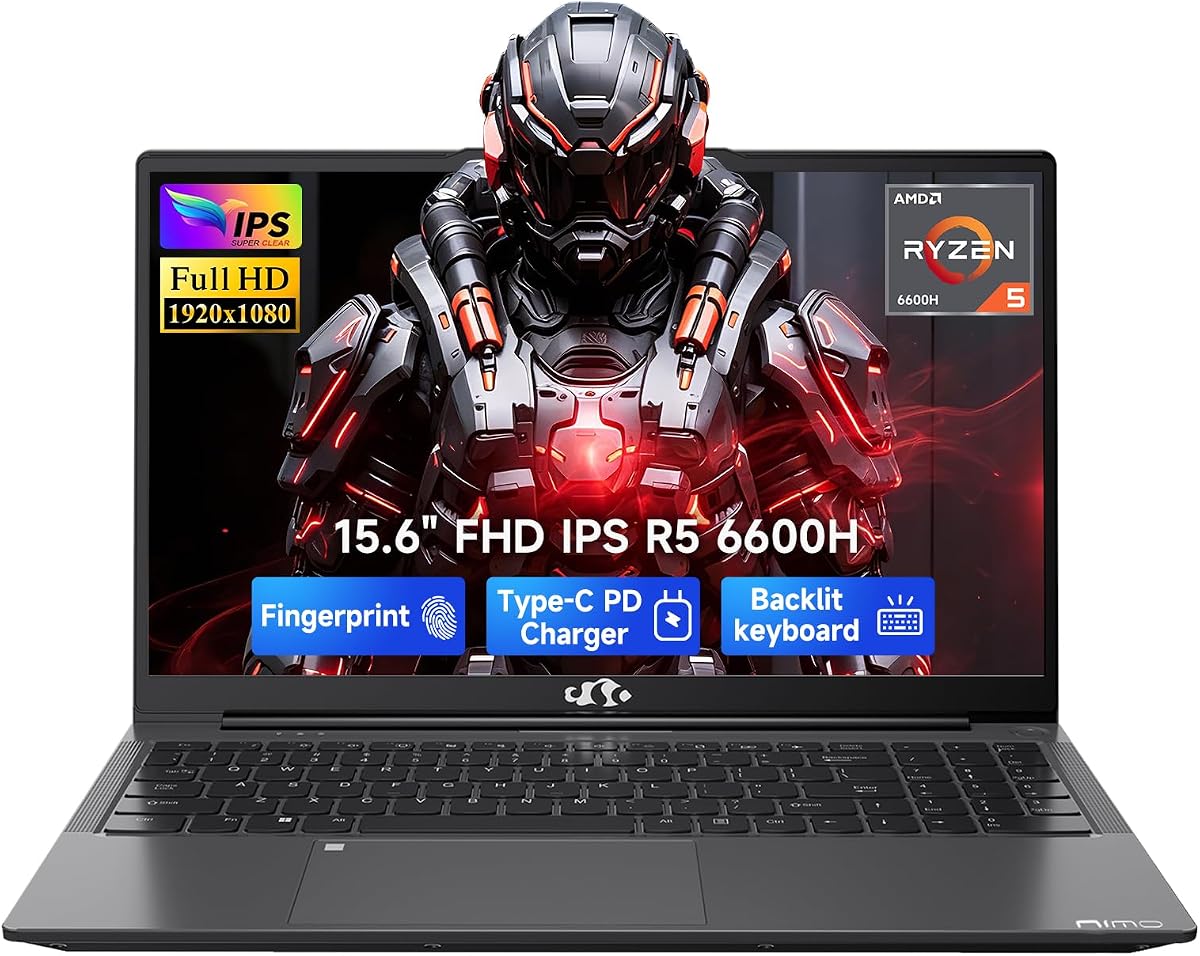
The NIMO 15.6 AI Creator Laptop stands out as the top recommendation for budget-minded music producers seeking reliable performance. With a rating of 4.3 stars it balances cost and capability better than most entry-level alternatives in this roundup.
We may earn a commission when you buy through this link, at no additional cost to you.
Its AMD Ryzen 5 6600H processor offers six cores and twelve threads enabling smooth operation of digital audio workstations like Ableton or FL Studio. The 16GB DDR5 RAM ensures you can load multiple virtual instruments and effects without significant slowdown during playback.
While it is priced higher than some Celeron models the investment pays off in sustained performance. The 512GB SSD provides ample space for sample libraries and project files while the USB-C connectivity simplifies linking external audio interfaces.
This machine is ideal for home studio enthusiasts who need real-time plugin processing power without overspending. Its fingerprint login and backlit keyboard enhance convenience during late-night mixing sessions making it the best overall cheap laptop for recording music.
The 16GB DDR5 memory handles complex session routing and high channel counts efficiently.
The thermal design minimizes fan noise allowing for cleaner audio recording during vocal takes.
We may earn a commission when you buy through this link, at no additional cost to you.
The Amzboy 15.6” Laptop offers the lowest price while still supporting basic music production needs. Its exceptional 4.8 rating reflects user satisfaction with its silent fanless operation which is critical for recording environments.
We may earn a commission when you buy through this link, at no additional cost to you.
Powered by an efficient N4020 CPU it handles simple audio editing and MIDI sequencing without fan noise interference. The 4GB RAM limits heavy multitasking but works well for single-track recording or light demo production.
Its compact 45W Type-C PD charging reduces cable clutter while the 15.6-inch anti-glare display provides clear visual feedback. This model suits beginners starting their home studio journey with minimal financial risk.
Ideal for podcasters and simple beat makers this laptop delivers quiet performance at a bargain price. The solid-state design ensures no moving parts to disturb sensitive microphones during vocal or instrument recording.
The solid-state fanless construction eliminates mechanical noise ensuring clean audio captures.
Type-C PD charging keeps your device powered for long editing sessions away from outlets.
We may earn a commission when you buy through this link, at no additional cost to you.
This 15.6-inch laptop delivers a premium feature set at an accessible price making it a strong value pick. Its 12GB RAM outperforms typical 4GB or 8GB models for budget devices improving audio plugin handling.
We may earn a commission when you buy through this link, at no additional cost to you.
The Pentium Gold 6500Y supports essential recording tasks while the anti-glare IPS screen reduces eye strain during long mixing sessions. A physical camera slider adds privacy peace of mind for remote collaboration.
Ports like USB-C and USB 3.2 enable direct connection to external audio interfaces or hard drives. The lightweight design aids portability for producers who record in different locations.
Perfect for users needing more memory without high costs this model balances price and performance. Its rich connectivity and privacy features make it a smart choice for budget-conscious home studios.
12GB RAM ensures smoother multitasking between DAWs and web research tools.
The built-in slider covers the webcam to maintain privacy during online recording sessions.
We may earn a commission when you buy through this link, at no additional cost to you.
This laptop provides dependable performance for daily productivity and light audio work. The 12GB RAM and 128GB SSD combination offers fast file access and efficient multitasking for basic recording needs.
We may earn a commission when you buy through this link, at no additional cost to you.
Its Pentium Gold 6500Y supports essential tasks while the built-in M.2 slot allows storage upgrades. This flexibility is valuable for producers needing extra space for sample libraries.
Connectivity includes USB-C HDMI and multiple USB ports enabling direct accessory connections. The FHD IPS display ensures clear visuals for arranging tracks.
Best for beginners needing a versatile machine this laptop balances cost and usability. Its responsive storage and upgrade options make it a practical choice for expanding your home studio.
The M.2 SSD slot supports upgrades up to 1TB for larger music projects.
USB-C and HDMI enable easy external monitor and audio interface linking.
We may earn a commission when you buy through this link, at no additional cost to you.
This Chromebook is suited for web-based audio tools and light editing tasks. Its 4GB RAM and Intel Celeron N4000 support basic performance while dual mics allow direct audio input.
We may earn a commission when you buy through this link, at no additional cost to you.
Chrome OS provides a secure streamlined environment ideal for online collaboration. The long battery life supports mobile use making it portable for location recording.
Storage is limited to 32GB but cloud integration helps manage files. The micro-edge anti-glare display offers clear visuals for web apps.
Ideal for simple audio editing and collaboration this Chromebook is an efficient low-cost option. Its integrated mics and battery life make it great for on-the-go music creation.
The dual array digital microphones simplify direct vocal captures without interfaces.
Up to 13 hours of usage ensures uninterrupted mobile recording sessions.
We may earn a commission when you buy through this link, at no additional cost to you.
This 2026 BLUEING laptop delivers lightweight portability with reliable daily performance. Its 8GB RAM and Pentium Gold 6500Y enable efficient basic recording workflows without lag.
We may earn a commission when you buy through this link, at no additional cost to you.
The 1080p FHD IPS display with 100% sRGB ensures vibrant color accuracy for creative work. Bluetooth 5.2 enables stable wireless audio streaming for reference listening.
Portability is enhanced by slim dimensions and a full-function USB-C for charging and data. TF card slots offer quick storage expansion.
Best for mobile producers this model balances thinness and usability. Its vibrant screen and wireless connectivity make it convenient for creative sessions anywhere.
The 100% sRGB color gamut provides accurate color rendering for media work.
Bluetooth 5.2 ensures stable audio streaming for reference tracks.
We may earn a commission when you buy through this link, at no additional cost to you.
This model features higher RAM and storage than typical budget units making it suitable for larger projects. The 12GB RAM allows multiple apps and DAW tracks to run simultaneously.
We may earn a commission when you buy through this link, at no additional cost to you.
Its 256GB SSD offers more room for samples and recordings. Privacy slider and full-size keyboard support comfort and security during work.
Ports and WiFi 5 connectivity enable reliable external device connections. The design balances performance and price well.
Great for users needing storage and memory this laptop supports complex workflows. Its privacy features and ergonomic layout improve comfort during long editing sessions.
The 256GB SSD provides ample space for audio libraries without immediate upgrades.
Full-size keyboard and touchpad ensure comfortable input during long sessions.
We may earn a commission when you buy through this link, at no additional cost to you.
This laptop offers balanced memory and storage for home studio tasks. The 12GB RAM ensures smooth multitasking while the 256GB SSD provides quick file access.
We may earn a commission when you buy through this link, at no additional cost to you.
Its FHD IPS display delivers crisp visuals for arranging tracks. Quiet operation is ideal for recording sessions where fan noise can interfere.
The 170° hinge and privacy webcam cover enhance versatility and security. Dual Type-C and USB ports enable peripheral connections.
Best for quiet editing this model supports essential recording and mixing. Its display quality and privacy features make it a reliable choice.
Reduced fan noise ensures clean recordings during vocal or instrument captures.
The built-in webcam cover secures your privacy during online meetings.
We may earn a commission when you buy through this link, at no additional cost to you.
This 15.6-inch model provides comfortable input and ample ports for audio work. The 8GB RAM and Pentium Gold CPU handle everyday editing tasks reliably.
We may earn a commission when you buy through this link, at no additional cost to you.
Its 256GB SSD and TF slot allow storage upgrades. The full-size keyboard supports efficient typing for track labeling.
Bluetooth 5 and USB-C ensure connectivity. Privacy slider protects during video calls.
Suitable for entry-level production this laptop balances usability and price. Its keyboard and storage options support practical workflows.
Full-size keyboard and spacious touchpad enhance typing comfort during editing.
TF card slots let you quickly add space for samples.
We may earn a commission when you buy through this link, at no additional cost to you.
This laptop provides expandable storage and reliable Comet Lake processing for daily tasks. The 6GB RAM supports essential audio workflows while the 128GB SSD offers quick boot times.
We may earn a commission when you buy through this link, at no additional cost to you.
TF card expansion up to 512GB helps store recordings without internal upgrades. Its lightweight footprint aids portability.
USB 3.0 and HDMI enable external device connections. Kensington lock slot adds security for shared spaces.
Ideal for expanding storage this model supports basic recording needs. Its expandability and connectivity make it a practical entry option.
TF card support lets you add up to 512GB for recordings.
The Kensington lock slot protects the device in public environments.
We may earn a commission when you buy through this link, at no additional cost to you.
Selecting a budget laptop for music production requires careful attention to hardware features that directly impact audio performance and reliability.
For recording music the CPU handles plugin calculations and real-time audio processing. Modern dual-core or quad-core processors like Pentium Gold or Ryzen 5 offer sufficient power for entry-level DAWs.
Prioritize newer generations for better instruction sets that lower latency.
RAM determines how many tracks and virtual instruments you can load without slowdown. Aim for 12GB or 16GB to run multiple apps smoothly.
Standard 4GB or 8GB models may struggle with complex sessions.
Solid-state drives load projects faster than mechanical hard drives which is vital for editing efficiency. Look for SSD storage rather than eMMC.
Consider models with upgrade options for growing sample libraries.
Audio interfaces often need USB 3.0 or Thunderbolt for low latency. Ensure your laptop has sufficient ports to connect peripherals.
USB-C is increasingly common and versatile for charging and data transfer.
Loud fans can interfere with audio recording sessions. Fanless designs or well-insulated cooling systems ensure quieter environments.
Choose models praised for quiet operation during load.
A clear screen with high resolution helps you see waveforms and mixer details accurately. IPS panels offer better viewing angles.
Anti-glare coatings reduce eye strain during long mixing.
Mobile producers need reliable battery life to work away from outlets without interruption. Look for models rated for several hours of sustained use.
Battery capacity impacts your ability to record remotely.
Windows 11 supports most DAWs while Chrome OS limits native software options. Ensure compatibility with your chosen production tools.
Check if your DAW requires specific OS versions.
Connect your audio interface via USB and install the latest drivers to minimize latency. Use ASIO drivers when possible for stable audio performance.
Keep your system cool by placing the laptop on a hard flat surface. Use a cooling pad if you record for extended periods to prevent thermal throttling.
Back up your projects regularly to cloud storage or external drives. Maintain your SSD by avoiding unnecessary full storage to ensure consistent performance.
Yes modern cheap laptops with 12GB or 16GB RAM can record multiple tracks. The CPU power and SSD speed determine how many plugins you can run simultaneously without lag.
Yes built-in laptop mics often introduce noise. External interfaces provide cleaner preamps and lower latency for professional-quality recordings.
Lightweight DAWs like Reaper or Ableton Live Lite run well. Check system requirements and prefer versions optimized for lower-spec machines.
Larger screens like 15.6 inches improve workflow by showing more tracks. Compact 14-inch models work for simple setups but limit multitasking.
Some models allow RAM upgrades while others do not. Check the product specs for free SO-DIMM slots before buying.
USB 3.0 or higher ensures stable data transfer. USB-C with Thunderbolt provides even better performance for professional interfaces.
Fanless models eliminate mechanical noise making them ideal for vocal recording. However they may throttle under heavy loads limiting sustained production.
Our top picks offer reliable performance for home recording. The NIMO 15.6 AI Creator leads overall while the Amzboy 15.6” excels as a budget option.
Prioritize RAM and SSD speed over brand for smooth production. Cooling and quiet operation are equally vital for clean audio capture.
Always check current listings for the best deals and availability. Prices and promotions change so confirm specs before purchasing.