
LeFix 2 Pins 2 Wires
4.6Editor score
Standard Molex connector
High quality battery cell
Anti static packaging bag
Discover the top CMOS batteries for motherboards in 2026. Our guide compares Duracell, Panasonic, and Maxell models for reliability and lifespan.
CMOS batteries keep your motherboard settings intact when power is off. Without one, your BIOS loses time and boot preferences. Choosing a reliable coin cell ensures stable system performance.
We evaluated ten top-rated models based on voltage stability and packaging safety. Each product offers specific connectors or standard shapes for easy installation. Our list helps you find the right fit quickly.
Every pick highlights key specs and real-world performance data. Prices and availability change often so check current listings before buying. Use this guide to maintain your PC system efficiently.
4.6Editor score

4.8Editor score

4.7Editor score
This side by side comparison highlights key specs for every model. Find the right voltage and connector type for your specific motherboard needs.


This Duracell 2032 Lithium Battery offers reliable power for your motherboard. It holds a top rating of 4.8 and comes in an 8 count pack. The bitter taste coating helps prevent accidental ingestion by children.
We may earn a commission when you buy through this link, at no additional cost to you.
Duracell guarantees precise specifications for every coin battery. This ensures stable voltage for your BIOS settings. The child safe packaging adds an extra layer of protection for households with young kids.
While excellent for standard coin slots, it lacks wire leads for some legacy motherboards. You may need an adapter if your board requires a Molex connector. This is a minor trade-off for the quality.
Buy this if you want a trusted brand for standard CMOS slots. It is ideal for keeping your system clock and settings intact. The long lifespan means fewer replacements over time.
The bitter taste on both sides helps deter children from ingesting the battery. Family-safe packaging provides an additional safety layer for homes.
Duracell lasts longer than competing brands in tests. Each battery is manufactured to precise specs to guarantee quality.
We may earn a commission when you buy through this link, at no additional cost to you.
The LeFix 2 Pins 2 Wires is a budget-friendly choice for Dell and HP laptops. It comes with a standard Molex connector for easy installation. The battery is manufactured by a Japanese giant for quality.
We may earn a commission when you buy through this link, at no additional cost to you.
Each item is tested before shipping to ensure performance. The anti-static packaging protects the battery during transit. You get exactly what you see with this reliable replacement option.
You must verify the polarity on the connector before installation. This product fits specific models like Dell E6530 or HP CQ41. It is not universal for all motherboard types.
Choose this for affordable replacement on compatible laptops. The connector makes it ready to use without extra adapters. It is a solid pick for keeping older machines running.
The standard Molex 51021-0200 connector fits many laptops. Check the polarity on the fourth image for proper installation.
Every item is tested before shipping to ensure quality. Anti-static bags provide safe protection during transit.
We may earn a commission when you buy through this link, at no additional cost to you.
This 3V 2032 CMOS Battery comes with wire leads and a MOLEX connector. It is perfect for replacing batteries in computers needing leads. The 5 pack offers great value for bulk replacements.
We may earn a commission when you buy through this link, at no additional cost to you.
The batteries have a 240mAh capacity and maintain voltage well. They are designed not to leak and offer long cycle life. You should store them in a cool dry place for best results.
These batteries cannot be charged as it is dangerous. Keep them out of reach of children. You may need to check voltage every three months during storage.
Buy this for computers needing wire leads like Alienware models. The included connector saves time on installation. It is a reliable option for gaming rigs or custom builds.
The MOLEX connector fits many computer mainboards. Wire leads allow easy connection without adapters.
Store cells in a cool dry place to maintain voltage. Do not attempt to charge these non-rechargeable cells.
We may earn a commission when you buy through this link, at no additional cost to you.
The Duracell 2032 Lithium Battery comes in a convenient 4 count pack. It shares the same quality and safety features as larger packs. The bitter taste coating ensures child safety in your home.
We may earn a commission when you buy through this link, at no additional cost to you.
Every battery is manufactured to precise specifications for reliability. Duracell guarantees against defects in material and workmanship. You get trusted performance for your motherboard or other devices.
This pack is smaller than the 8 count option which may cost more per unit. It is best for single device replacement rather than stocking up. Wire leads are not included for custom installs.
Choose this for standard slot replacement with brand reliability. It keeps your BIOS settings safe without needing special adapters. A solid choice for home office PCs.
Bitter taste on both sides helps keep children safe. Family-safe packaging adds another layer of protection.
Each battery is made to precise specs. Duracell guarantees against defects in material and workmanship.
We may earn a commission when you buy through this link, at no additional cost to you.
Amazon Basics CR2032 3V Lithium batteries offer reliable performance at a great price. They come in a child-proof package for safety. Each battery is engraved with the model for easy identification.
We may earn a commission when you buy through this link, at no additional cost to you.
These replace BR2032, DL2032, and ECR2032 models easily. They are ideal for small electronics and motherboard clocks. The 4-pack provides enough batteries for most home needs.
The non-coated surface may not have the same child deterrent taste. Import quality is consistent but may vary from domestic brands. It is still a solid everyday option.
Buy this for simple coin cell needs without extra cost. The engraving helps you grab the right battery quickly. A cost-effective solution for maintaining your motherboard settings.
Engraved model allows quick identification of the battery type. Prevents confusion when storing multiple battery packs.
Affordable pricing without sacrificing basic performance. A practical option for common electronics needs.
We may earn a commission when you buy through this link, at no additional cost to you.
The Duracell 2032 Lithium Battery 2 count is perfect for a quick swap. It keeps your motherboard settings safe with 3V power. The packaging is family-safe and child resistant for safety.
We may earn a commission when you buy through this link, at no additional cost to you.
Duracell lasts longer than other brands in standard tests. Every battery is made to precise specs. You get guaranteed quality for your BIOS or other electronics.
With only two batteries this is less cost-effective for bulk storage. It is meant for immediate replacement needs rather than stocking up. Otherwise quality remains consistent with other packs.
Choose this for urgent replacement needs at home. It keeps your system running smoothly with trusted power. A simple and effective choice for CMOS slots.
Duracell lasts longer than other brands in tests. Guarantees precise specs for quality.
Family-safe packaging offers extra protection. Bitter taste coating helps keep children safe.
We may earn a commission when you buy through this link, at no additional cost to you.
Panasonic CR2032 3.0 Volt batteries come in a useful 10 pack. They provide reliable power that lasts up to 8 years in storage. The packaging meets strict child resistant safety standards.
We may earn a commission when you buy through this link, at no additional cost to you.
These batteries are reliable in extreme temperatures from 14 to 140 degrees. They maintain voltage well over time. Made by Panasonic in Indonesia and packaged in the USA.
The 10 pack might be more than needed for a single device. Packaging design is a specific sunburst style which may change. Otherwise performance is consistent and trusted.
Buy this for bulk needs or family device storage. The long storage life ensures they are fresh when you use them. A strong choice for any coin cell application.
Maintain power up to 8 years when unused. Provides reliable long lasting power for devices.
Meets or exceeds IEC and ANSI standards. Child resistant packaging keeps children safe.
We may earn a commission when you buy through this link, at no additional cost to you.
The Duracell DL2032B2 offers a compact 2 pack of lithium cells. It delivers 3V power for your motherboard or similar devices. The coin shape fits standard slots perfectly without hassle.
We may earn a commission when you buy through this link, at no additional cost to you.
Duracell ensures high quality in every battery produced. You get reliable performance for keeping settings intact. This pack is easy to find and store on your shelf.
Limited to two batteries it is not ideal for bulk storage. It is meant for single or dual replacement needs. Otherwise quality remains consistent with the brand.
Choose this for simple standard replacement at home. It keeps your system running smoothly with trusted power. A reliable pick for basic motherboard needs.
High quality standards for every battery produced. Reli able for keeping settings intact.
We may earn a commission when you buy through this link, at no additional cost to you.
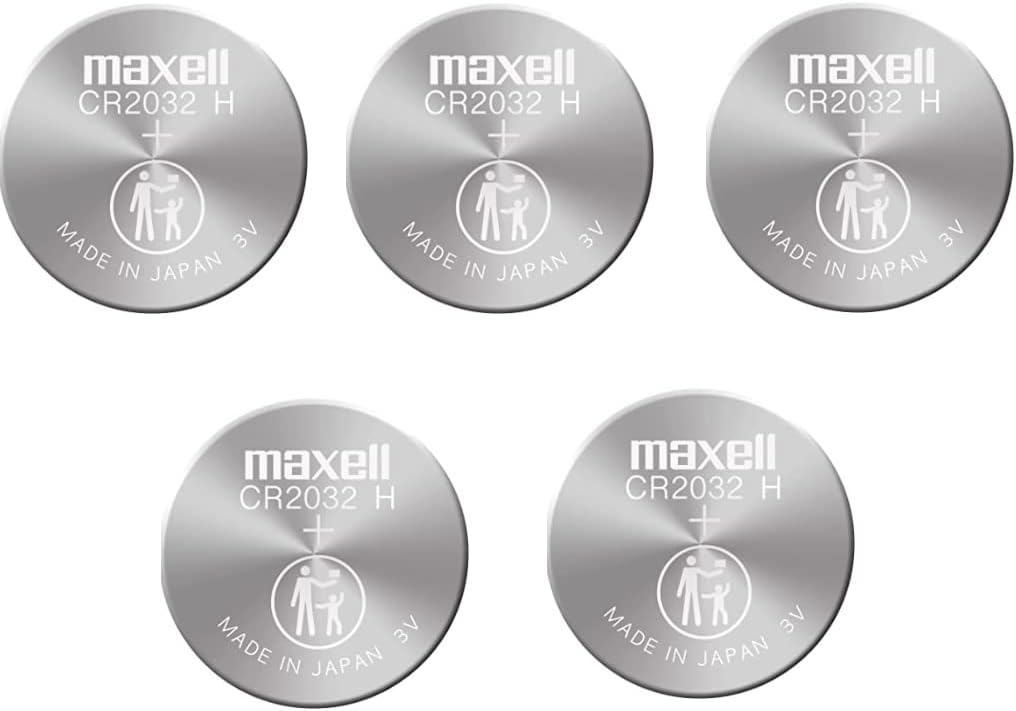
Maxell CR2032 lithium batteries come in a 5 pack for value. They offer 235mAh capacity for long run time. The repair or replace guarantee gives you extra peace of mind.
We may earn a commission when you buy through this link, at no additional cost to you.
Ideal for electronic devices needing reliable power. These batteries maintain voltage well for standard CMOS needs. The 5 count is a great size for most users.
Packaging may be older so check expiration dates on arrival. It is still a functional battery for standard use. The guarantee helps if you get a faulty unit.
Buy this for affordable bulk needs at home. The guarantee ensures you are covered against defects. A solid option for standard motherboard coin slots.
Repair or replace guarantee gives peace of mind. Coverage for defects in battery performance.
We may earn a commission when you buy through this link, at no additional cost to you.
Maxell Micro Lithium Cell CR2032 batteries come in a 5 pack. They are high quality and made in Japan for durability. The fresh expiration date ensures you get a long lasting unit.
We may earn a commission when you buy through this link, at no additional cost to you.
With 90mAh capacity these are standard coin cells. They provide reliable voltage for your motherboard settings. The value pack makes them affordable for multiple devices.
The capacity is lower than some competitors like 235mAh. It is suitable for low drain applications but check your needs. Manufacturing origin ensures consistent quality.
Choose this for trusted Japanese made cells on a budget. Keep your system running with reliable power. A simple and effective pick for standard CMOS slots.
High quality made in Japan for reliability. Ensures consistent performance across batches.
We may earn a commission when you buy through this link, at no additional cost to you.
Selecting the right battery involves checking voltage connectors and pack size. Use this guide to match your motherboard model to the best option available.
Ensure the battery provides 3V output which is standard for CMOS slots. The size should be 2032 or equivalent to fit the holder. Using incorrect voltage may damage your BIOS settings.
Check that the physical diameter and thickness match your slot to avoid fit issues.
Many modern motherboards use simple coin slots but some legacy models need wire leads. Look for Molex connectors or wire leads if your board requires them. Standard coins work for most desktop PCs.
Verify the polarity of wire leads to avoid incorrect installation or short circuits.
Choose a pack size that fits your storage needs without waste. A 5 pack or 10 pack is better for home labs while 2 count suits single swaps. Bulk options often offer better per unit pricing.
Buy extra batteries to save time on future replacements when the current one expires.
Stick to trusted brands like Duracell or Panasonic for consistent quality. These brands provide strict manufacturing standards and quality assurance. Generic options may vary in lifespan and stability.
A reliable brand ensures your motherboard settings are kept safe over years of use.
Child resistant packaging helps prevent accidents especially in homes with kids. Look for bitter taste coatings or secure closures on battery packs. Safety standards reduce risks of ingestion or leakage.
Proper safety features add peace of mind when handling small lithium cells at home.
A good battery should have a long shelf life of 8 years or more. This ensures freshness when you use the battery later on your board. Check expiration dates before purchasing for best results.
Store unused batteries in a cool dry place to maintain their maximum performance.
Confirm that the battery model is compatible with your specific motherboard. Some models may require special connectors or different voltage. Read descriptions carefully to ensure a fit.
Compatibility checks save time and prevent returns if the battery does not fit.
Before replacing the battery power off your system and unplug the power cord for safety. Open the case to locate the CMOS slot near the motherboard edge or chipset. Remove the old battery carefully to avoid shorting other components.
If using a coin battery simply insert it with the positive side up. For wire leads match the polarity with your connector and secure it. This ensures your BIOS settings remain intact during boot.
Store unused batteries in a cool dry place away from metal objects. Avoid mixing old and new batteries to prevent leakage. Regularly check your BIOS clock for signs of a weak battery.
You can tell if your motherboard needs a new battery when the system clock resets after power off. BIOS settings will reset to defaults and you may see error messages on boot. Replacing the battery fixes these issues.
The standard CR2032 3V coin cell is best for most desktop motherboards. It fits the standard slot and provides long lasting power for BIOS settings. Trusted brands ensure stability for your system.
Some laptop motherboards need special connectors like Molex wires instead of coin slots. Always check your laptop model and service guide before buying. Standard coins may not fit internal laptop battery slots.
You can reuse a CMOS battery if it maintains 3V voltage. However old batteries may fail unpredictably so replacement is recommended. Fresh cells ensure stability and prevent data loss.
Installing a CMOS battery backwards may damage your motherboard or BIOS. Always check the positive side is up or match polarity on wires. Reversing polarity can short circuit the board.
A good CMOS battery lasts 3 to 10 years depending on usage. Quality brands like Duracell or Panasonic offer longer run times. Replacing it every few years prevents unexpected reset issues.
All CR2032 batteries provide 3V power but brands vary in longevity. Some have safety coatings while others do not. Check packaging details to ensure safety and reliability.
We found that Duracell Panasonic and Maxell lead the field with reliable CMOS batteries. These brands offer stable power and safety features for your motherboard needs.
Prioritize compatibility and connector type before checking price or pack size. The right battery keeps your BIOS settings intact and your system running smoothly.
Always check current prices and availability as stock varies by seller. Our guide helps you choose wisely for a stable PC.