
Learning Resources Code & Go Robot Mouse
4.5Editor score
Screen-Free Coding Activity
Builds Critical Thinking
Includes Maze Grids
This guide compares the top rated coding toys for kids in October 2026 featuring screen-free options and robot kits to help you choose the perfect STEM gift
Coding toys provide an engaging way for children to learn programming concepts through hands-on play. These educational tools introduce logic and sequencing without requiring screen time. Parents and educators appreciate how they foster critical thinking skills in a fun and accessible format for young learners.
We evaluated ten standout products based on their educational value, ease of use, and durability. Each option offers unique features ranging from robotic pets to programmable cars. Our selection ensures there is a suitable choice for various age groups and skill levels within the modern STEM landscape.
Every pick highlights specific strengths and ideal use cases for different types of learners. You will find detailed insights to help you make an informed decision. Please note that pricing and availability can fluctuate so always verify current details before purchasing your new learning tool.
4.5Editor score

4.1Editor score

4.6Editor score
The following table provides a side-by-side comparison of all ten selected coding toys. It highlights key specifications and features to help you quickly identify the right fit for your child's needs and learning goals.





The Thames & Kosmos My Robotic Pet stands out as a top choice for introducing kids to coding without screens. It combines building and programming into a fun package that keeps children engaged. The robotic chameleon responds to gestures and changes colors which adds a layer of wonder to the learning experience.
We may earn a commission when you buy through this link, at no additional cost to you.
Its engineering is impressive with articulated joints that simulate realistic movements. The color sensor and action cards allow kids to program sequences easily. This screen-free approach ensures focus remains on logic and sequencing skills rather than passive consumption. It offers a true STEM experience that is both educational and entertaining.
While assembly may need adult help for younger users the detailed guide makes it manageable. Some users might find the battery dependency a minor inconvenience but it ensures portability. These trade-offs are acceptable given the high level of engagement and educational depth provided by the kit.
This toy is ideal for children aged eight and up who are ready for a challenge. It works well for home learning or classroom settings. We recommend it for anyone seeking a robust screen-free coding tool that inspires engineering curiosity and creativity in equal measure.
Building the robotic reptile teaches mechanical principles while coding teaches logic skills together.
The color sensor allows for creative programming scenarios that adapt to the environment.
We may earn a commission when you buy through this link, at no additional cost to you.
The Makeblock mBot is designed for kids who want to learn electronics and robotics seriously. It serves as an excellent entry-level tool that bridges the gap between simple play and real engineering. The ability to code in Scratch and then move to Arduino makes it a long-lasting educational tool for growing minds.
We may earn a commission when you buy through this link, at no additional cost to you.
Building the mBot takes about fifteen minutes and introduces kids to machinery components. It can function as a remote control car or an autonomous robot following lines or avoiding obstacles. The open-source nature means it is compatible with many add-on packs and LEGO parts which adds significant value.
Users should note that batteries for the robot and remote are not included in the box. This is a common oversight for parents expecting immediate play right out of the box. However the inclusion of free apps and software compensates for this minor setup requirement.
This kit is perfect for ages eight to twelve who are interested in tech and building. It supports learning step by step and encourages creativity. We suggest it for families looking to invest in a robot that can grow with the child's coding skills over time.
The curriculum moves from visual blocks to text-based coding for a smooth progression.
Compatible with over one hundred electronic modules for endless customization options.
We may earn a commission when you buy through this link, at no additional cost to you.
The Sphero Mini packs a lot of fun into a ball the size of a ping pong ball. It is an excellent entry point for beginners who want to explore robotics through gaming and coding. The colorful LED lights and responsive gyroscope make it engaging for kids who love tech and movement.
We may earn a commission when you buy through this link, at no additional cost to you.
You can code it by drawing on a screen or using drag-and-drop blocks. The drive mode allows for direct control via joystick or tilt which is great for obstacle courses. It also comes with cones and pins to set up games immediately which adds to the play value.
The main limitation is the battery life which offers about one hour of play. You will need to recharge it frequently if used in classroom settings. Additionally it relies on a smartphone for coding so it is not screen-free like other options.
This toy is best for ages eight and up who enjoy interactive gaming. It is ideal for learning coding concepts in a fun and fast-paced environment. We recommend it for kids who want a robot that can double as a game controller for fun.
Drive modes include joystick and tilt for immediate control without complex coding.
Supports drag-and-drop coding and JavaScript for advanced learners to explore.
We may earn a commission when you buy through this link, at no additional cost to you.
The Learning Resources Code & Go Robot Mouse is designed for young learners starting their coding journey. It teaches sequencing and problem-solving through simple buttons and cards without any screens. This makes it perfect for preschoolers and early elementary students who are not ready for tablets.
We may earn a commission when you buy through this link, at no additional cost to you.
The set includes maze grids and walls to build a custom challenge board. Kids program the mouse to navigate to cheese using directional commands. This hands-on process strengthens critical thinking and directional understanding in a playful and safe environment.
Assembly is not required and the mouse is ready to use quickly. Parents should remember to buy AAA batteries beforehand as they are not included. The simple controls might seem basic to older kids but they are exactly what little learners need.
This toy is ideal for ages four and up in home or classroom settings. It helps build confidence through trial and error in a fun way. We recommend it for parents looking for an affordable and effective introduction to robotics logic.
Helps children understand step-by-step sequences and cause-effect relationships easily.
Great for STEM centers with repeatable activities for small group rotations.
We may earn a commission when you buy through this link, at no additional cost to you.
The TEACH TECH Mech-5 is a unique mechanical coding robot that focuses on engineering principles. It allows kids to build a robot that can throw, lift, and kick using simple coding buttons. This approach teaches how mechanical parts work alongside basic coding concepts in a tangible way.
We may earn a commission when you buy through this link, at no additional cost to you.
The building process is detailed and takes multiple hours to complete which adds to the learning. It is not a pre-assembled toy so it requires patience and attention to detail. This makes it a true STEM project that rewards effort with a functional mechanical creation.
Users should be prepared for a challenging build that requires focus. The lack of software might appeal to screen-free advocates but it limits programmable depth. These factors make it better suited for older kids or those already comfortable with building kits.
This kit is ideal for future engineers aged ten and up. It is perfect for those who want to understand how robots move mechanically. We recommend it for kids looking for a deeper dive into mechanics combined with coding logic.
Learn how gears and levers work while building a functional programmable robot.
Snap-on coding buttons allow for easy program changes without complex screens.
We may earn a commission when you buy through this link, at no additional cost to you.
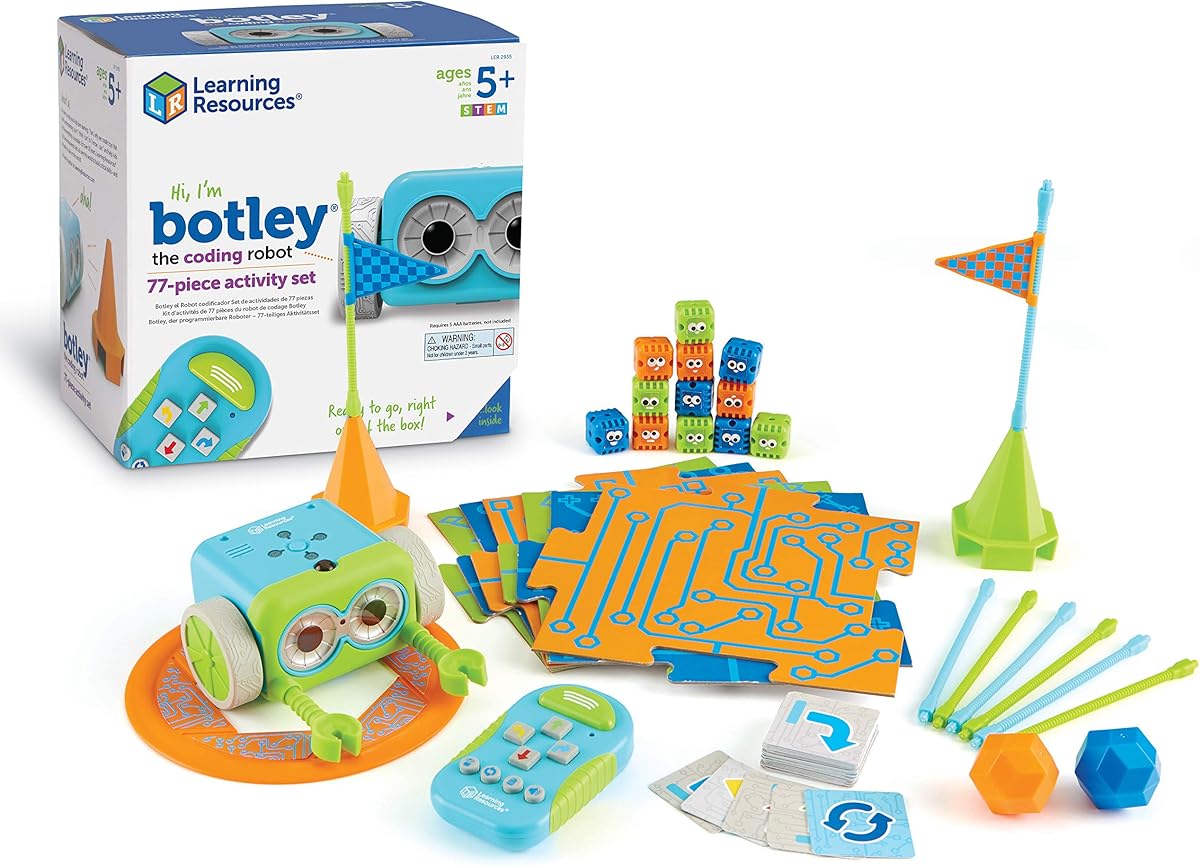
Botley from Learning Resources is a standout screen-free coding robot for young kids. It includes a remote programmer that sends commands without needing a tablet or phone. This makes it a fantastic choice for parents who want to limit screen time while teaching coding logic.
We may earn a commission when you buy through this link, at no additional cost to you.
The robot can detect objects and avoid them which adds a layer of interactivity. It supports looping commands and following black lines making it versatile for different activities. The set comes with 77 pieces including cards and obstacles to keep kids busy for hours.
Assembly requires a screwdriver and batteries which are not included in the box. This might be a hurdle for parents looking for immediate play but it ensures durability. The robust build makes it suitable for classrooms and active home environments.
This set is ideal for ages five and up in home or school settings. It supports critical thinking and problem-solving in a fun and safe way. We recommend it for families seeking a comprehensive screen-free robotics experience.
Encourages physical movement and spatial awareness while programming paths.
Looping commands allow for complex sequences and creative problem solving.
We may earn a commission when you buy through this link, at no additional cost to you.
The Ozobot Evo introduces coding through color codes and online platforms. It is designed for grades K to 12 and offers five skill levels that grow with the child. This adaptability makes it a solid long-term investment for schools and families serious about STEM education.
We may earn a commission when you buy through this link, at no additional cost to you.
The kit includes color markers that allow for screen-free learning by drawing paths. Online tools like Blockly provide a digital alternative for more complex coding. The extensive resource library of over seven hundred lessons supports teachers and parents in delivering structured learning.
The price point is higher than basic kits but the educational value is significant. Markers are essential for the color code feature so replacements might be needed over time. These costs are justified by the durability and depth of the curriculum provided.
This kit is ideal for ages five to eleven in home or classroom settings. It is perfect for those who want a blend of screen-free and digital learning. We recommend it for educators and parents seeking comprehensive STEM resources.
Color codes turn art into programming making learning visual and engaging.
Hundreds of free lessons support structured learning for any subject.
We may earn a commission when you buy through this link, at no additional cost to you.
Botley 2.0 builds on the original with new features like object sensing and secret codes. It uses a simple remote to introduce coding ideas through cause and effect actions. This multi-sensory approach with lights and sounds keeps kids engaged for long periods of play.
We may earn a commission when you buy through this link, at no additional cost to you.
The ability to sense objects adds complexity to obstacle courses and challenges. Kids can design routes that involve reactions to items in the environment. The set includes 78 pieces which allows for extensive customization and creativity in building activities.
It requires batteries for both the robot and the remote which can add to cost. Some users might find the price higher than the original but the added features justify it. This model is a strong upgrade for those wanting more interactive play options.
This robot is ideal for ages five and up who enjoy sensory feedback. It is great for classroom rotations or home learning. We recommend it for kids who want a more advanced and reactive coding experience.
Detects items in front to create dynamic and adaptive coding challenges.
Unlock hidden features to keep curiosity high and play sessions fresh.
We may earn a commission when you buy through this link, at no additional cost to you.
The Wonder Workshop Dash Robot is designed to provide a STEM advantage right out of the box. It requires no assembly and offers a long battery life of up to five hours. This reliability makes it a favorite for schools and families wanting consistent performance.
We may earn a commission when you buy through this link, at no additional cost to you.
It connects to multiple apps including Blockly which support various learning styles. Dash can sing, dance, and respond to voice commands which adds personality to the experience. It is widely used in schools globally making it a trusted educational tool.
The robot does not have a camera which limits some interactive features. It also relies on a tablet for full functionality so it is not screen-free. These factors are minor trade-offs for the robust software support and durability it offers.
This robot is ideal for ages six to eleven looking for a polished experience. It is perfect for those who want reliable long-term use. We recommend it for families and schools seeking a proven and feature-rich coding companion.
Used in over forty thousand schools globally for proven educational value.
Multiple apps support different coding levels from beginners to advanced learners.
We may earn a commission when you buy through this link, at no additional cost to you.
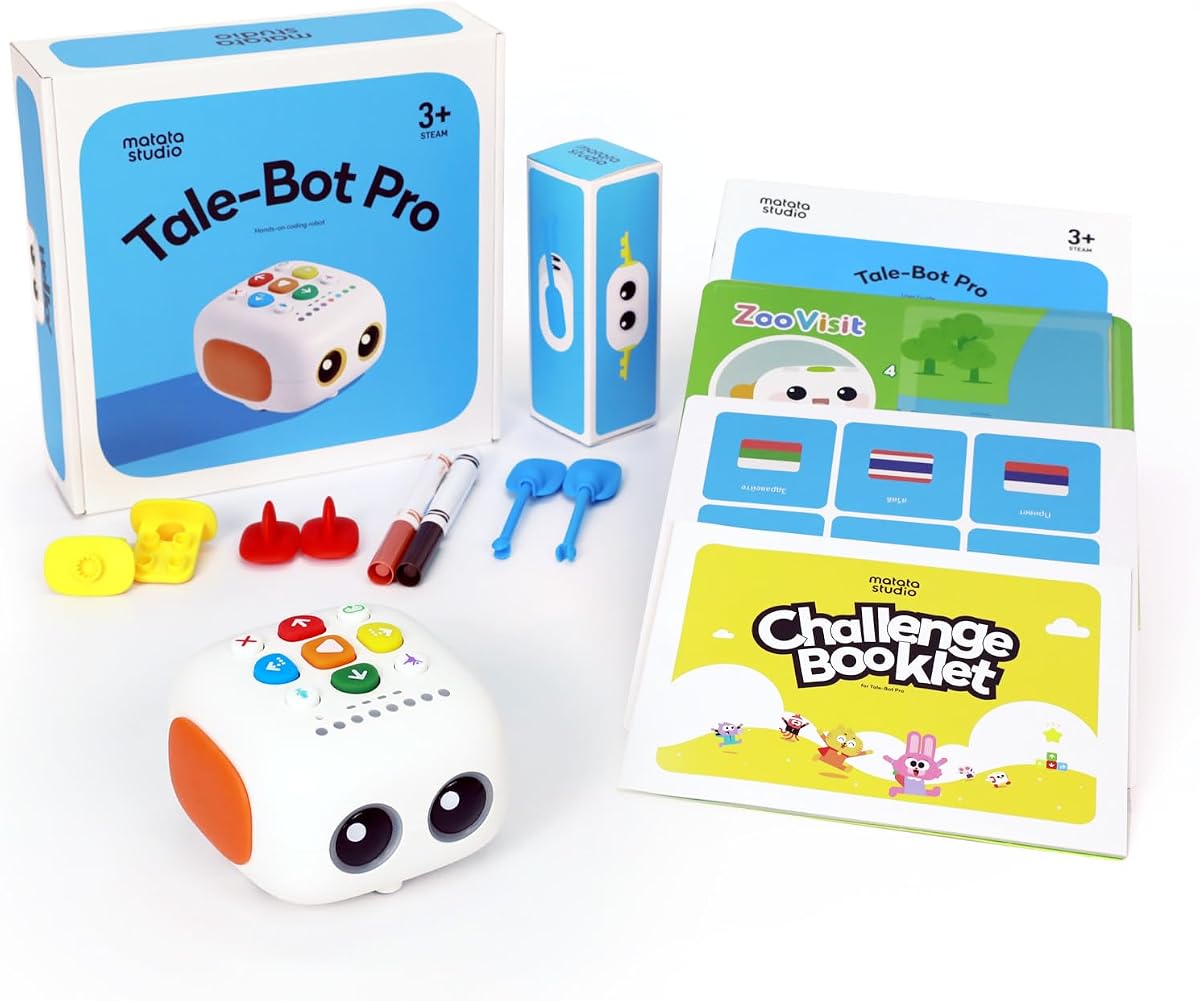
The TaleBot Pro is designed specifically for toddlers aged three to five. It uses an interactive map and voice feedback to teach coding concepts in a playful way. The storytelling function allows kids to record their own voices which adds a creative layer to learning.
We may earn a commission when you buy through this link, at no additional cost to you.
It supports ten languages and is compatible with Lego blocks for extra building fun. The touch-based controls make it accessible for young children or those with autism. This focus on sensory play and storytelling makes it a unique option for early learners.
Additional learning materials like activity boxes are recommended for full value. The coding depth is limited compared to older kits but it fits the age group. These trade-offs are acceptable for the developmental benefits it provides for little ones.
This toy is ideal for ages three to five in home settings. It is great for building language and creativity skills through play. We recommend it for parents of toddlers seeking an interactive and educational screen-free toy.
Voice recording and feedback help develop early language and communication skills.
Compatible with Lego blocks to expand building and storytelling possibilities.
We may earn a commission when you buy through this link, at no additional cost to you.
Choosing the right coding toy depends on your child's age and interests. Here are key factors to consider when selecting the best option.
Coding toys are designed for specific age ranges to ensure the concepts are understandable. For toddlers look for simple touch controls while older kids can handle complex app coding. Always check the recommended age on the box to match your child's skill level.
Selecting the right age range prevents frustration and ensures engagement with the toy.
Some robots work without screens using physical buttons or cards while others need tablets. Screen-free options are great for limiting digital time whereas app-based ones offer more features. Consider your family's screen time policies when making a choice.
Decide if you prefer physical coding or digital control to match your lifestyle needs.
Quality robots should withstand drops and active play especially for younger kids. Look for metal parts or sturdy plastics that ensure longevity. A durable toy is a better investment for long-term learning and classroom use.
Check material descriptions to ensure the toy is built to last.
Coding toys range from simple directional commands to complex scripting. For beginners start with drag-and-drop or button coding. As skills grow consider options that support text-based coding like Arduino or JavaScript.
Choose a robot that can grow with your child's coding abilities over time.
Some kits come with lesson plans or apps that guide learning. These resources help parents and teachers deliver structured lessons effectively. Look for toys with free online courses or activity cards to maximize educational value.
Prioritize kits with included learning materials for better results.
Robots usually require batteries which can be a recurring cost. Rechargeable models save money over time but might have less play time. Always check if batteries are included in the price before purchasing.
Compare battery life and charging options to avoid interruptions in play.
Some robots can connect to additional modules or parts for new challenges. This keeps the toy interesting as skills improve. Look for open-source systems that allow for future expansions.
Pick a system that allows adding parts to extend the fun.
Budget varies but consider the toy's longevity and features. Sometimes a higher price is worth it for more apps and durability. Compare what is included in the box to ensure you get the best value.
Balance cost with the features you need for your child's needs.
Start by reading the manual to understand the basic commands and setup. Most robots come with quick start guides that help you get coding in minutes. Make sure all parts are assembled correctly before powering on.
Charge batteries or insert them according to instructions to ensure reliable performance. Keep the robot away from water and extreme temperatures to avoid damage. Store parts in the original box to prevent losing small accessories over time.
Practice with simple challenges before moving to complex projects to build confidence. Use the included activity cards or apps to guide your learning path. Regularly update any software or apps to access the latest features and fixes.
Yes coding toys are designed to be beginner-friendly with visual blocks or physical buttons. They teach logic without needing prior knowledge. Parents can guide kids through simple challenges to start the learning journey.
No not all coding robots need a tablet. Many options use physical cards or buttons to program. However app-based robots offer more features so check the requirements before buying to be sure.
Most experts suggest starting as early as three or four with simple screen-free toys. For complex coding wait until six or seven when logic skills develop. Start with basics and increase complexity as they grow.
Screen-free toys reduce digital exposure and focus on logic. App-based ones offer more advanced coding features. The best choice depends on your family's screen time goals and learning needs.
Battery life varies by model and usage ranging from one to five hours. Rechargeable models save money over time. Check specifications to find a balance between play time and charging convenience.
Coding toys teach logic and math skills useful for school. They also improve problem-solving abilities. Many schools use these toys to supplement STEM curriculum with engaging hands-on activities.
We have reviewed ten top-rated coding toys that offer various features for kids. From screen-free options to advanced app-based robots there is something for every age and budget. Each toy was selected for its educational value and user-friendly design.
When choosing prioritize features that match your child's interests and learning goals. Consider whether you want screen-free play or digital app integration. Also factor in durability and expansion options for long-term use.
Always check current pricing and availability before buying to ensure you get the best deal. These toys make great gifts for birthdays and holidays. Start your child's coding journey today with a trusted and fun learning tool.