
Switch 2 Pro Controller Charging Station
3.5Editor score
Dual charging for Pro Controllers
5V/2A stable power input
Compact space-saving desktop design
This guide compares the top 10 controller charging dock for Switch 2 options to help you find the perfect charging station for your gaming setup.
Finding the right controller charging dock for Switch 2 is essential for any serious gamer. A good station keeps your devices powered and organized without cluttering your space. It ensures you never miss a session due to dead batteries during critical moments.
We evaluated the most popular models on the market to bring you this comprehensive list. Our selection focuses on reliability, charging speed, and overall design quality. Each option offers unique features tailored to different gaming preferences and setups.
Each pick in this guide highlights key strengths and potential trade-offs for buyers. We include detailed specs and user feedback to help you decide quickly. Keep in mind that availability and features may shift as new products arrive.
3.5Editor score

4.7Editor score

4.7Editor score
This side-by-side comparison highlights the key specifications and features of every model on our list. It helps you quickly identify which dock matches your specific controller type and charging needs.



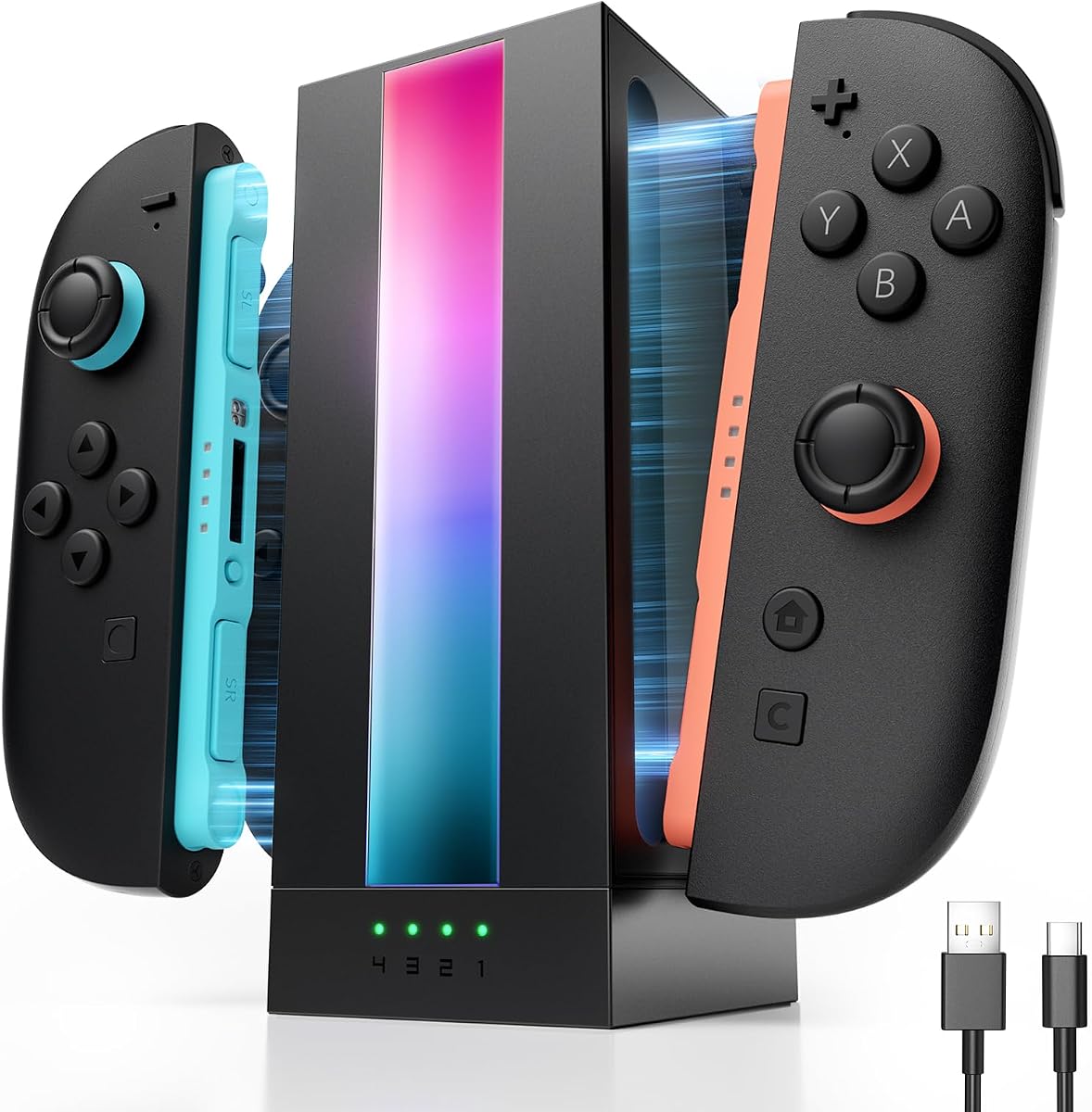
The FASTSNAIL Charging Dock stands out as a top choice for Switch 2 owners. It holds a strong rating from users who value convenience and design. Its magnetic alignment makes dropping in Joycons effortless every time.
We may earn a commission when you buy through this link, at no additional cost to you.
This dock supports simultaneous charging for up to four controllers. It features clear LED indicators to show exactly which units are active. The customizable RGB lights add a vibrant touch to any desk setup.
While the magnetic design is convenient, thick cases might interfere with alignment. The RGB lights are bright which some may find distracting in dark rooms. However these are minor issues for most casual and serious gamers.
Anyone looking for a reliable and stylish charger should consider this model. It balances performance with aesthetics effectively. Its safety features ensure your controllers remain protected during extended charging cycles.
The magnetic design allows users to place Joycons in either direction. This prevents port damage from repeated plugging and ensures a secure fit.
Nine vivid lighting modes let you match the dock to your mood. The memory function keeps your preferred setting for when you power it back on.
We may earn a commission when you buy through this link, at no additional cost to you.
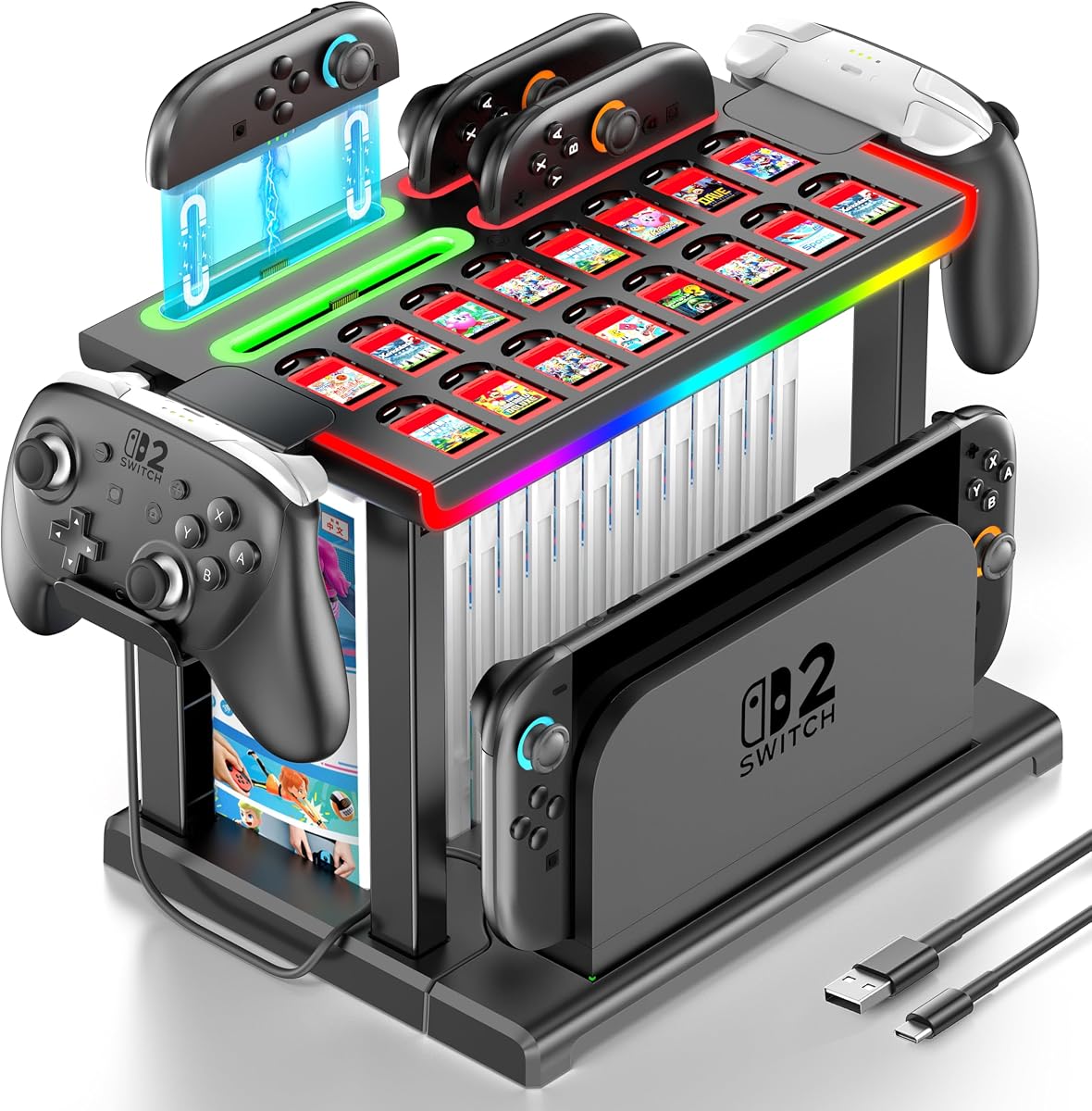
This organizer station offers exceptional value for gamers needing extra storage. It doubles as a charging dock while keeping your collection tidy. The price point makes it accessible for most budgets.
We may earn a commission when you buy through this link, at no additional cost to you.
It holds up to sixteen game cases and sixteen memory cards. You can charge four Joycons simultaneously without confusion between left and right units. The RGB lights cycle through seven single colors and two breathing modes.
The unit is large so it requires significant desk space. The Switch 2 TV dock is not included in the box which buyers should note. However the non-slip pads keep it stable on smooth surfaces.
If you need an all-in-one storage and charging solution this is ideal. It keeps your gaming area neat and organized. The tool-free assembly makes setup quick and hassle-free.
This station holds 16 game cases and memory cards alongside controllers. It reduces clutter by centralizing your essential gaming accessories.
Press and hold the switch to toggle lights off or cycle modes. This feature helps sync your setup with your personal gaming style.
We may earn a commission when you buy through this link, at no additional cost to you.
The SUPCASE Charging Dock delivers premium build quality and functionality. It is designed specifically for the 2025 Switch 2 Joy Cons. Users praise its secure magnetic placement and reliable charging performance.
We may earn a commission when you buy through this link, at no additional cost to you.
It features four slots that allow you to place Joycons either way. The smart chip automatically stops charging once the units are fully powered. This prevents overcharging and helps extend battery lifespan over time.
The price is higher than basic docks but the quality justifies it. It lacks support for Pro Controllers so focus remains on Joycons. The RGB modes add a nice visual element to the design.
Ideal for those seeking a high-end charging experience this dock excels. Its dual-side charging makes it easy to use. The safety features ensure your controllers stay protected during long sessions.
You can place Joycons in either orientation without worrying about slots. This flexibility makes charging more convenient during busy gaming nights.
The smart chip detects full charge status to stop power flow. This protects your controllers from heat buildup and battery degradation.
We may earn a commission when you buy through this link, at no additional cost to you.
This dual charging station offers a straightforward solution for Pro Controllers. It is priced affordably making it accessible for budget-conscious buyers. The design focuses purely on charging without extra frills.
We may earn a commission when you buy through this link, at no additional cost to you.
It supports 5V/2A input for efficient charging speeds. LED lights indicate whether units are charging or fully powered. This simplicity ensures it integrates easily into any desktop setup.
The lack of advanced features might disappoint power users. The rating suggests some users experience issues with stability. However it serves the basic purpose of keeping controllers powered well.
Buyers needing a simple dual dock will find this useful. It saves space while keeping your controllers ready to play. Just ensure you use a compatible adapter for best results.
The stand allows two Pro Controllers to charge at the same time. This reduces wait time and keeps your setup organized.
Red lights show charging while green indicates a full charge. You can monitor power levels at a glance easily.
We may earn a commission when you buy through this link, at no additional cost to you.
PowerA is a well known brand in gaming accessories. This base offers a simple way to keep your controllers powered. It works with both Joy-Con and wireless controllers effectively.
We may earn a commission when you buy through this link, at no additional cost to you.
It charges devices simultaneously while showing status via LED lights. The design looks great with any gaming set up you have. Users appreciate its straightforward operation and build quality.
It lacks modern RGB features found in newer models. The functionality is basic but sufficient for regular charging needs. It is a solid choice if you trust established brands.
Anyone wanting a no-fuss charging solution will like this. It ensures your controllers are always ready. The compact footprint fits well on most desks or stands.
This base charges Joy-Con and wireless controllers at the same time. It simplifies your charging routine significantly.
Built-in lights tell you when your controllers are fully charged. This visual cue prevents over-plugging devices.
We may earn a commission when you buy through this link, at no additional cost to you.
This charger is highly versatile supporting various controller types. It can handle Nintendo and PlayStation controllers in one unit. The 6 in 1 design makes it a strong all-rounder for mixed setups.
We may earn a commission when you buy through this link, at no additional cost to you.
It uses a USB Type-C port for flexible power delivery. The built IC chip helps protect against short circuits and overcharging. Users appreciate its simplicity and ability to charge multiple devices.
The design is utilitarian without flashy lighting features. This might not appeal to gamers wanting a visual upgrade. However it focuses heavily on functional performance and value.
Buyers with mixed console controllers will find it practical. It allows you to centralize charging for different brands. Just ensure you use a compatible power source for best performance.
This station supports Nintendo Switch and PS5 controllers together. It solves the need for multiple separate chargers.
The smart chip protects against overcharging and short circuits. This safety feature helps maintain long-term controller health.
We may earn a commission when you buy through this link, at no additional cost to you.
This dock offers a compact solution for dual charging. It uses USB-C adapters to reduce wear on controller ports. The design fits neatly on desks without taking up much room.
We may earn a commission when you buy through this link, at no additional cost to you.
It charges two controllers simultaneously with stable power delivery. The LED indicators show status clearly at a glance. It works well with PS5 and Xbox Series X|S as well.
Lower power USB ports may cause intermittent charging issues. Users must ensure they use a 5V/2A adapter for reliability. It lacks lighting features which might reduce visual appeal.
Ideal for those needing a discreet and functional dock. It keeps your setup organized and chargers hidden. Just use the right power source to ensure consistent charging speeds.
It comes with adapters to allow easy drop-in charging. This protects the controller ports from wear and tear.
The dock is designed to sit flush on desks and stands. It saves space while keeping your controllers ready to play.
We may earn a commission when you buy through this link, at no additional cost to you.
This 10-in-1 dock is highly compatible with multiple Switch models. It can charge both Joycons and Pro controllers simultaneously. The extensive slot count makes it great for families or large groups.
We may earn a commission when you buy through this link, at no additional cost to you.
It features 11 RGB modes including marquee and gradient effects. You get extra USB 2.0 ports for data transfer or other devices. The multi-protection chip ensures safe charging operations at all times.
Full load might require specific power adapters for efficiency. The features are extensive which might be overkill for casual users. But it solves the need for buying multiple separate chargers.
Buyers needing maximum versatility should consider this model. It organizes and stores controllers effectively. The USB ports add extra utility beyond simple charging.
This dock supports both Switch 2 and earlier models. It solves the problem of needing separate stations for different hardware.
Two extra ports allow data transfer or charging other devices. This adds functionality beyond standard controller charging needs.
We may earn a commission when you buy through this link, at no additional cost to you.
The JSAUX EnergyFlow dock offers high-speed charging for Joycons. It reduces waiting time by up to 30 percent compared to older models. The design focuses on efficiency and rapid power delivery.
We may earn a commission when you buy through this link, at no additional cost to you.
It features a dynamic RGB light bar for style. Each port has its own indicator showing status clearly. It includes comprehensive safety protection against overcurrent and overheating.
Power adapter not included which adds to the total cost. It does not work with older 2017 or OLED Joycons. This limitation requires checking compatibility before purchasing.
Anyone wanting fast charging and modern style will like this. It ensures you are never interrupted by low batteries. The smart safeguards extend the lifespan of your controllers.
Charge all four Joycons in just 2.5 hours total. This efficiency ensures you are ready for the next session quickly.
Each port has its own light to show status. This makes it easy to track which controllers are full.
We may earn a commission when you buy through this link, at no additional cost to you.
This dock is a versatile option supporting multiple console brands. It charges two controllers at once efficiently. The removable Type-C adapters make charging easier and less damaging to ports.
We may earn a commission when you buy through this link, at no additional cost to you.
It works with Switch Pro PS5 and Xbox Series X|S controllers. The smart chip protects against low power consumption issues. LED indicators show red for charging and green for full.
Lower power USB ports may cause slow or intermittent charging. It does not support PowerA or third party controllers. Buyers need to confirm their controller model before purchase.
Ideal for gamers with mixed console setups. It keeps your controllers neat and ready to play. The stable base ensures it stays put on your desk or TV setup.
Charge two units at once for faster readiness. This feature ensures you always have a spare controller ready.
Adapters drop in to reduce wear on controller ports. This extension design helps extend the life of your hardware.
We may earn a commission when you buy through this link, at no additional cost to you.
Selecting the right dock depends on your specific controller types and charging needs. Here are the key factors to consider before you buy.
Always verify that the dock matches your specific Switch 2 Joycon or Pro controllers. Some models are designed exclusively for Joycons while others handle both. If you own multiple console types check if the dock supports them all to avoid buying extra chargers.
Check the product details to ensure it supports your specific model before purchasing.
Faster charging reduces downtime during intense gaming sessions. Look for docks that support 5V/2A input for optimal performance. Some newer models charge four units in under three hours which is ideal for multiplayer nights.
Prioritize docks that explicitly state fast charging capabilities to minimize wait times.
The number of charging slots depends on how many controllers you use. For families or multiplayer groups a dock with four slots is beneficial. If you only play solo a dual dock might be sufficient and more compact.
Choose a slot count that matches your household needs to save space.
Smart chips protect your controllers from overcharging and overheating. Look for docks with overvoltage and short-circuit protection to extend device lifespan. Quality safety features ensure your controllers remain safe during long charging cycles.
Ensure the dock has built-in protection to safeguard your expensive equipment.
Many docks now include RGB lighting to match your gaming setup. Consider if you prefer a sleek black look or colorful lights. The design should complement your desk and TV stand without taking up too much room.
Select a visual style that fits your personal gaming setup preferences.
Some docks require specific power adapters to function efficiently. Others may include them while others rely on your console port. Ensure you have the correct USB wall adapter to avoid slow or intermittent charging.
Verify power requirements and included accessories before purchasing.
Some units double as organizers for game cases and cards. This added functionality helps reduce clutter on your desk. If you need storage for accessories a combo station might be more cost-effective than buying separate items.
Look for extra storage features if you need to organize game cards.
Magnetic alignment and touch controls simplify daily usage. Docks that allow drop-in charging without careful alignment save time. Look for models with clear LED indicators so you can check status easily.
Prioritize features that make plugging in your controllers quick and simple.
Plug the charging dock into a power source that meets the recommended voltage. For best performance use a 5V/2A USB wall adapter if it is not included.
Place your controllers into the dock ensuring the pins align with the contacts. Magnetic docks will snap into place securely while others may require careful placement to ensure a solid connection.
Keep the dock clean and free of dust by wiping it occasionally. Avoid exposing it to direct sunlight or moisture to maintain the integrity of the LEDs and internal electronics.
Most docks are designed specifically for official Nintendo controllers. Some models may support PS5 or Xbox controllers but rarely PowerA or other third party variants. Always check the product description for explicit compatibility details before purchasing.
High speed docks can fully charge four Joycons in about 2.5 to 3 hours. Standard docks might take longer depending on the power input speed. Ensure you use a recommended adapter to achieve the fastest charging times.
Many docks are designed specifically for the 2025 Switch 2 Joycon. Some are backward compatible with the original Switch and OLED versions. Check the specs to confirm if it supports your current controller model.
Usually red indicates the controller is actively charging while green means it is fully charged. Some models use blue for standby and orange for active charging. Refer to the manual for the specific meaning on your unit.
No it is safe to remove controllers once they are fully charged. The docks have smart chips that prevent overcharging but removing them saves space. You can leave them in place until you are ready to play again.
Many models offer multiple lighting modes that you can cycle through. Touch buttons usually allow you to change colors or turn them off completely. Some even save your preferred setting for when you power it back on.
Some docks handle both Pro controllers and Joycons simultaneously while others are specific. Look for models explicitly stating support for both types if you need that versatility. Always verify compatibility based on your specific setup.
Weak adapters may cause slow charging or intermittent power issues. It is recommended to use a 5V/2A adapter for stable performance. Using the wrong power source might prevent the dock from functioning correctly.
We found the FASTSNAIL Charging Dock to be the top choice overall. It combines magnetic convenience with multi controller support and vibrant design features.
For budget buyers the Switch 2 RGB Organizer Station offers great value. It provides large storage capacity alongside essential charging capabilities for your collection.
Check current availability and verify compatibility before making your final choice. The right dock will keep your gaming setup ready for action every time.