
Nyko Charging Station for Xbox Series XS
4.2Editor score
Dual port charging dock
Includes 1100 mAh batteries
Extra USB port available
Compare the top 10 controller charging stations for Xbox Series X and One to find the best dock with batteries LED lights and fast charging for your setup.
Finding the right controller charging station for Xbox can save you money and keep your gaming sessions uninterrupted. A good dock offers reliable power storage and a clean look for your console setup. With many options available choosing the best one requires careful consideration of battery life and compatibility.
We compared ten top rated charging stations based on battery capacity charging speed design and overall value. Our analysis focuses on models that support Xbox Series X and One controllers with rechargeable packs included. This list helps you avoid disposable batteries and ensures your controllers are always ready for action.
Each pick highlights unique features like LED indicators RGB lighting or magnetic connections to suit different preferences. Prices and availability can change so check the current details before buying. Use this guide to find a charging solution that fits your gaming style and budget perfectly.
4.2Editor score

4.6Editor score

4.4Editor score
This table compares all ten models side by side to highlight their key specifications and features for easy decision making.




This upgraded controller charging station offers exceptional value with two 6200mWh battery packs included. It holds a strong 4.6 rating due to its reliability and long playtime. The standout feature is the high capacity batteries that let you game for days without interruption.
We may earn a commission when you buy through this link, at no additional cost to you.
The unique X shape LED indicators provide clear visual feedback without being distracting. Green means fully charged while red shows charging status. This visual design helps you manage your power needs effectively. The dock supports Xbox One Series X and Series S controllers making it versatile for various setups.
One trade-off is that the batteries sit on the bottom of the dock which might be less accessible for some users. Also it does not support third party controllers which limits compatibility slightly. However the safety features and long cycle life make up for these minor inconveniences.
Gamers who want a reliable and long lasting charging solution should buy this kit. It eliminates the need for disposable batteries and saves money over time. The combination of capacity and safety makes it the top choice for most Xbox players.
The 6200mWh capacity provides up to 25 hours of playtime reducing frequent recharging needs.
The X shape LED lights offer a unique and clear way to monitor charging progress.
We may earn a commission when you buy through this link, at no additional cost to you.
The Fosmon Fast Charging Dock provides reliable performance with a 4.5 rating. It includes two 5280mWh batteries that offer up to 45 hours of playtime. This model is SGS certified ensuring high safety standards for your controllers. A lifetime warranty adds extra peace of mind for buyers.
We may earn a commission when you buy through this link, at no additional cost to you.
Its place and charge design makes it easy to use without complex setup. The intelligent charging board stops charging when full to protect battery health. The LED indicators show the status of each slot clearly. This simplicity appeals to users who want functionality without extra features.
The main limitation is that it does not support the Xbox Elite 2 controller. The design is also fairly standard compared to more aesthetic options. However the safety certification and warranty make it a strong budget friendly choice for most families.
Anyone seeking a safe and long lasting dock at a reasonable price should consider this. It is ideal for households with multiple players needing consistent power. The warranty ensures long term value even if issues arise later.
SGS certification and smart charging protect your controllers from overheating or short circuits.
With up to 45 hours of play time you can game for days on one charge.
We may earn a commission when you buy through this link, at no additional cost to you.
The PowerA Solo Charging Stand is designed for users who need a simple and official solution. It carries a 4.6 rating reflecting its quality build. Being officially licensed ensures it fits Xbox Series X and One controllers perfectly. It includes a 1100 mAh battery and charging cable for convenience.
We may earn a commission when you buy through this link, at no additional cost to you.
This stand is great for displaying one controller neatly while it charges. The two year limited warranty shows confidence in its durability. The design eliminates the need for disposable batteries easily. It is a straightforward product that focuses on core functionality without extra features.
The main trade-off is the single slot design and smaller battery compared to others. It might not suit gamers who need multiple controllers charged simultaneously. However for a primary controller it offers reliable performance and official branding.
Buyers wanting an official compact dock for a single controller should choose this option. It works well for casual gamers or as a secondary stand. The warranty and license provide trust in its long term use.
As an officially licensed product it guarantees compatibility with Xbox wireless controllers.
Includes everything needed to start charging right away with no extra purchases.
We may earn a commission when you buy through this link, at no additional cost to you.
The OlVO XSX Controller Charger stands out with a perfect 5.0 rating from users. It charges batteries in under 2.5 hours which is faster than most competitors. The 5580mWh batteries support over 3000 recharge cycles ensuring long term use. It works with Elite controllers expanding its appeal to pro gamers.
We may earn a commission when you buy through this link, at no additional cost to you.
The LED indicators show red during charging and green when full for easy tracking. The battery packs can be charged separately adding flexibility to your workflow. Installation requires attention to polarity but is straightforward with clear instructions. This model balances speed and capacity effectively for daily use.
It does not support the older Xbox 360 controllers which limits legacy use. Users must ensure correct polarity during installation to avoid issues. Despite these minor points the performance and rating make it a top contender for modern setups.
Gamers who prioritize fast charging and high reliability should buy this charger. It is perfect for those who play frequently and need quick turnarounds. The perfect rating suggests consistent satisfaction across many users.
Fully charge batteries in under 2.5 hours to minimize downtime between games.
Batteries support over 3000 cycles providing years of reliable recharge cycles.
We may earn a commission when you buy through this link, at no additional cost to you.
The 8BitDo Charging Dock features a sleek design that complements Xbox controllers well. It holds a 4.6 rating and is officially licensed for Series X and One models. The magnetic secure charging ensures your controller stays in place during charging. An amber light shows charging and white indicates full status clearly.
We may earn a commission when you buy through this link, at no additional cost to you.
This dock includes a 1100 mAh battery and two battery doors for immediate use. The design allows for light adjustment to fit your room lighting. It also includes a storage compartment to keep accessories organized. The seamless look makes it a great addition to any gaming display.
One limitation is the single controller slot and smaller battery capacity. It may not suit users needing multiple charges or longer playtimes. However the magnetic design and official license offer premium quality for single dock users.
Buyers valuing design and secure connection should choose this dock. It is ideal for those who want a tidy and stylish setup. The magnetic feature ensures you never lose a charge connection.
Magnetic contacts ensure a reliable connection that won't disconnect accidentally.
Officially licensed status guarantees perfect fit and function with Xbox controllers.
We may earn a commission when you buy through this link, at no additional cost to you.
This charger station stands out with a robot helmet inspired aesthetic that adds fun to your setup. It has a 4.6 rating thanks to its reliable performance and included accessories. The dual dock supports two controllers and comes with 5520mWh batteries. Four battery covers ensure compatibility with both Series X and One models.
We may earn a commission when you buy through this link, at no additional cost to you.
The USB C cable enables fast charging to get you back to gaming quickly. A storage compartment on the bottom keeps spare batteries organized. LED indicators show red for charging and green for full status. You can toggle the lights on or off to avoid brightness at night.
The unique design might not match all room themes but adds character. Batteries are stored on the bottom which could be less convenient for some. Still the value of included covers and capacity makes it a strong contender.
Users who want a fun and functional dual charging solution should buy this. It is great for families or co-op gamers needing multiple controllers. The included accessories save extra costs and setup time.
The unique aesthetic adds a fun and modern touch to your gaming room.
Includes covers for multiple models to fit all your existing controllers.
We may earn a commission when you buy through this link, at no additional cost to you.
The Nyko Charging Station offers dual charging at an affordable price point. It holds a 4.2 rating reflecting its basic but effective function. The drop and charge design simplifies the process with no cables needed for controllers. It includes 1100 mAh batteries and a USB C charging cable for use.
We may earn a commission when you buy through this link, at no additional cost to you.
An extra USB port allows you to charge other devices simultaneously. The green LEDs show status clearly and add a cool look to your desk. It supports both Series X and One controllers making it versatile. This is a practical option for casual gamers or smaller budgets.
The build quality is standard plastic which may not feel premium. The rating is lower than some competitors suggesting mixed user experiences. However the dual slots and extra USB make it cost effective.
Buyers wanting dual charging without spending much should consider this Nyko option. It suits families needing two chargers in one unit. The extra port adds utility for other USB devices.
The additional USB port lets you charge other gadgets while your controllers charge.
Just place controllers on the dock and charging starts automatically without cables.
We may earn a commission when you buy through this link, at no additional cost to you.
The Controller Gear Pulse Red Stand is designed to match the Xbox Series X Pulse Red controller. It has a 4.6 rating for its quality and aesthetic appeal. The magnetic contact system ensures a secure and perfect charge every time. It is officially licensed by Microsoft confirming its compatibility and quality standards.
We may earn a commission when you buy through this link, at no additional cost to you.
You can navigate the dashboard with one hand while the controller is docked. This ergonomic design is perfect for quick checks without picking up the controller. The build material matches the controller for a seamless look. It is a premium single dock for those who value design.
It supports only one controller and comes in a specific color which may limit choice. The price might be higher than generic models due to branding. But the design and security make it worth it for style conscious gamers.
Users who own a Pulse Red controller and want matching gear should buy this. It is ideal for collectors or those who prioritize appearance. The license and magnetic system ensure reliable performance.
The stand matches the controller color for a clean unified gaming setup.
Navigate menus easily while the controller stays on the stand securely.
We may earn a commission when you buy through this link, at no additional cost to you.
The Razer Universal Quick Charging Stand offers a premium experience with a 4.4 rating. It charges controllers in under three hours for quick turns. The design matches Xbox controllers and uses a magnetic system for secure mounting. It supports almost all controllers except the Elite 2 ensuring wide compatibility.
We may earn a commission when you buy through this link, at no additional cost to you.
Ergonomic engineering allows one handed navigation even while docked. This is useful for checking settings without interrupting play. The durable materials and color matching show attention to detail. It is powered via USB for flexible connectivity to any port.
The price is higher than other options which may limit budget shoppers. Excluding the Elite 2 is a notable limitation for pro users. However the build quality and features justify the cost for many.
Gamers wanting a premium brand and design should choose this stand. It is perfect for those who value aesthetics and quick charging. The magnetic mount ensures reliability and security.
Charge your controller in under three hours to get back to games quickly.
Magnetic contacts keep the controller fixed in place for reliable charging.
We may earn a commission when you buy through this link, at no additional cost to you.
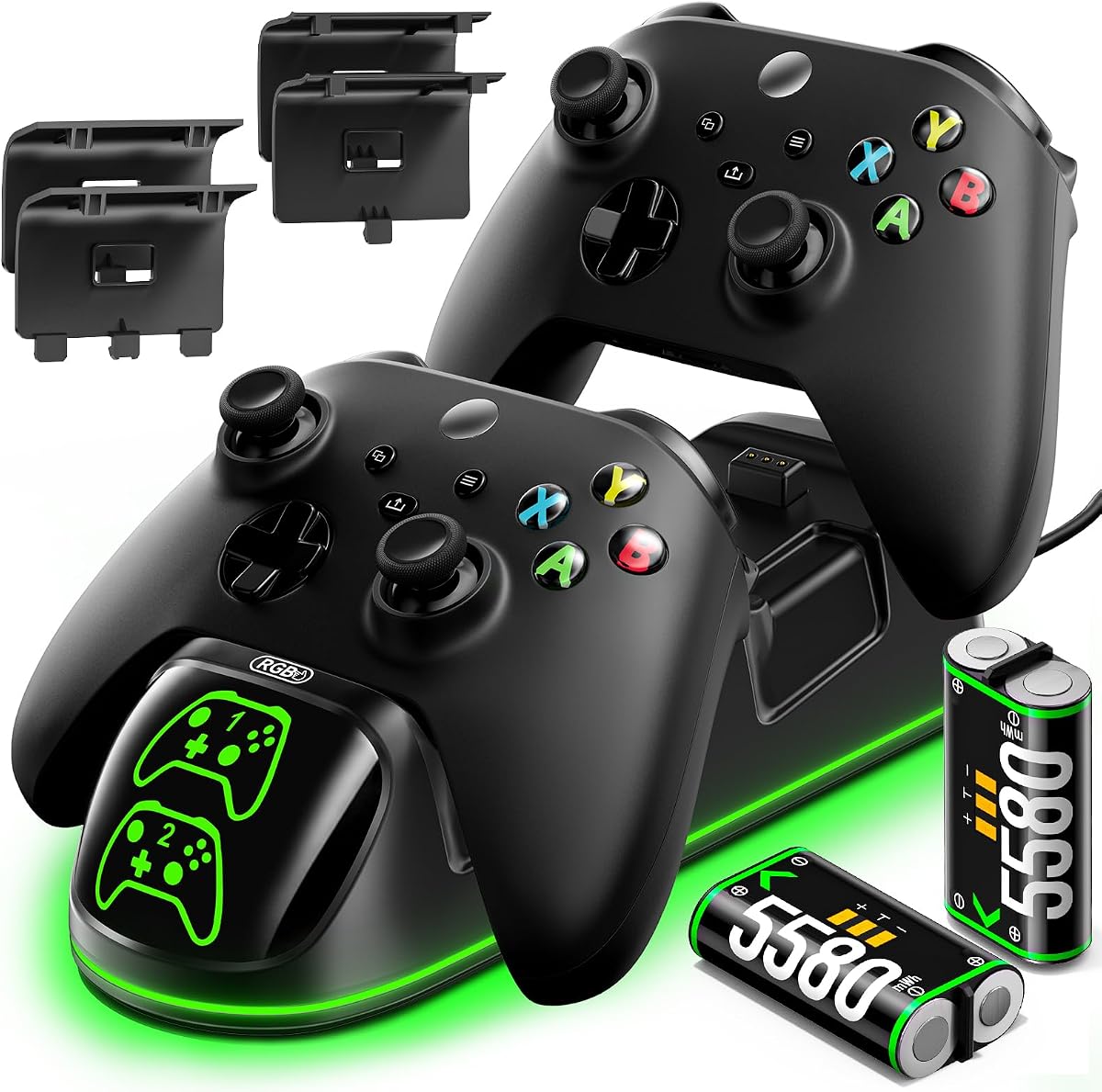
This controller charger station features 9 RGB lighting modes to enhance your gaming atmosphere. It holds a 4.5 rating for its fun design and reliable performance. The 6200mWh batteries offer 25 to 30 hours of play and support 3000 cycles. It comes with four battery covers for all major Xbox models.
We may earn a commission when you buy through this link, at no additional cost to you.
Safety is ensured with auto adjustment of power to prevent overcharging. You can use it as a display stand when controllers do not need charging. The RGB modes include single and multi-color options to match your style. This is a feature rich option for those who love customization.
The RGB lighting might be too much for users who prefer simplicity. The complexity of features could add to the price slightly. However the battery life and modes make it a standout for gamers.
Users wanting colorful and high capacity charging should buy this station. It is ideal for gamers who enjoy ambient lighting effects. The battery life ensures you rarely need to recharge.
Choose from 9 RGB modes to match your room setup and mood.
6200mWh batteries provide up to 30 hours of play time consistently.
We may earn a commission when you buy through this link, at no additional cost to you.
Choosing the right charging station involves evaluating several factors to match your gaming needs and preferences.
Battery capacity determines how long you can play before recharging. Look for models with at least 5000mWh to get 20 hours of play. Higher capacity reduces the need to swap batteries during long gaming sessions.
Prioritize high capacity batteries to maximize your play time between charges.
Decide if you need one or two charging slots. Dual docks are better for households with multiple players. Single docks are more compact for individual use.
Choose a dual dock if you need to charge two controllers simultaneously.
Fast charging speeds reduce wait times when you need a controller quickly. Look for models that fully charge batteries in under three hours. This ensures minimal downtime between games.
Select a station with fast charging capability for quicker turnarounds.
LED lights show you when the controller is charging or fully charged. Green usually means full and red means charging. Some models offer adjustable lights to avoid distraction.
Opt for clear LED indicators to easily monitor charging status.
Ensure the station supports your specific controller model. Most modern stations work with Series X S and One models. Check if Elite controllers are supported if you use them.
Verify compatibility with your controller model to ensure proper fit.
Safety features like overcharge and overheating protection protect your controllers. Look for certifications like SGS or built-in protection systems. This ensures long battery life and prevents damage.
Choose stations with safety systems to protect your controllers from damage.
The look of the station should match your gaming setup. Some have RGB lights while others are minimal. A design that complements your room adds to the experience.
Select a design that fits your style and gaming environment.
A good warranty indicates the manufacturer stands behind the product. Look for at least one year of coverage for peace of mind. Support availability helps if issues arise later.
Prioritize models with solid warranties for long term reliability.
Place the charging station on a stable flat surface near your TV. Plug it into your console or wall outlet to provide power. Ensure the USB connection is secure to avoid charging interruptions.
Align the controller with the charging points carefully before dropping it. Most docks will start charging automatically once connected. Check the LED lights to confirm the charging status.
Keep the station in a cool dry place to prevent overheating. Clean the contact points occasionally with a dry cloth to ensure good connections. Store spare batteries in a cool place to maintain their health.
Most modern stations support standard Series X and One controllers. Some models also support Elite controllers but not all. Check the product compatibility list before buying if you use an Elite controller.
Many stations come with rechargeable batteries included in the package. Some basic stands do not include batteries so check the listing. Most dual chargers include two battery packs to start immediately.
Charging times vary by model but most take between two to four hours. Faster stations can charge in under three hours for quick turns. Higher capacity batteries may take slightly longer to reach full power.
Yes most modern stations have overcharge protection to stop when full. This ensures it is safe to leave them overnight without damage. However removing them when full helps maintain battery health over time.
These docks charge built-in rechargeable packs instead of disposable AA batteries. They are more cost effective and eco friendly in the long run. They also provide more play time per charge than standard AA batteries.
Most stations support the Xbox One S along with Series X and One X. They are designed for the wireless controllers used across these models. Always check the compatibility details for your specific console version.
This guide reviewed ten top controller charging stations for Xbox Series X and One models. The top picks offer a balance of battery life safety and value for different needs. Whether you need a dual dock or single stand there is a fit for you.
Prioritize battery capacity and safety features to ensure long term use. Choose a design that matches your setup and supports your controller models. Fast charging and LED indicators add convenience to your gaming routine.
Prices and availability can change so always check current listings before buying. Verify the included accessories and warranty coverage for the best value. Use this guide to find a station that keeps your controllers ready for action.