
Power Strips with Surge Protection
4.8Editor score
16-in-1 charging capacity
Slim flat plug design
Affordable price point
Discover the top desk mounted outlet towers for 2026. This guide compares charging speed, safety, and design to help you organize your workspace effectively.
Desk mounted outlet towers transform chaotic workspaces into organized hubs by consolidating power sources. These vertical charging stations save valuable surface area while keeping cables manageable and accessible for everyday use.
We evaluated ten top-rated models based on port variety, surge protection, and build quality. Our analysis focuses on real-world performance, ease of installation, and how well each unit integrates into modern office setups.
Each pick highlights unique strengths from budget-friendly options to premium clamping designs. Prices may fluctuate over time so check current listings before purchasing to ensure you get the best value available today.
4.8Editor score

4.8Editor score

5.0Editor score
This side-by-side comparison highlights key specifications across all ten selected models to help you quickly identify the right fit for your specific power needs and spatial constraints.




The Anker Nano Power Strip stands out as the top choice for professionals needing reliable power. With a 4.8 rating and robust features it delivers consistent performance. Its standout quality is the 70W USB-C port capable of charging laptops directly.
We may earn a commission when you buy through this link, at no additional cost to you.
Its dual-zone layout splits ports into top and bottom sections reducing cable tangles significantly. The adjustable clamp secures firmly to desk edges up to 1.8 inches thick allowing one-handed plugging. Built with GaN technology it remains cool even under heavy loads.
The main trade-off is its higher cost compared to standard towers. The clamp also requires a straight edge which might not fit curved desks. These are acceptable given the stability and charging speed it provides for demanding workflows.
Ideal for home offices or studios where space is limited but power needs are high. We recommend this model for anyone wanting premium build quality and fast charging in a single unit.
The 70W USB-C port supports PD charging for most modern laptops eliminating bulky bricks.
The adjustable clamp holds tight allowing easy access to ports without moving the tower.
We may earn a commission when you buy through this link, at no additional cost to you.
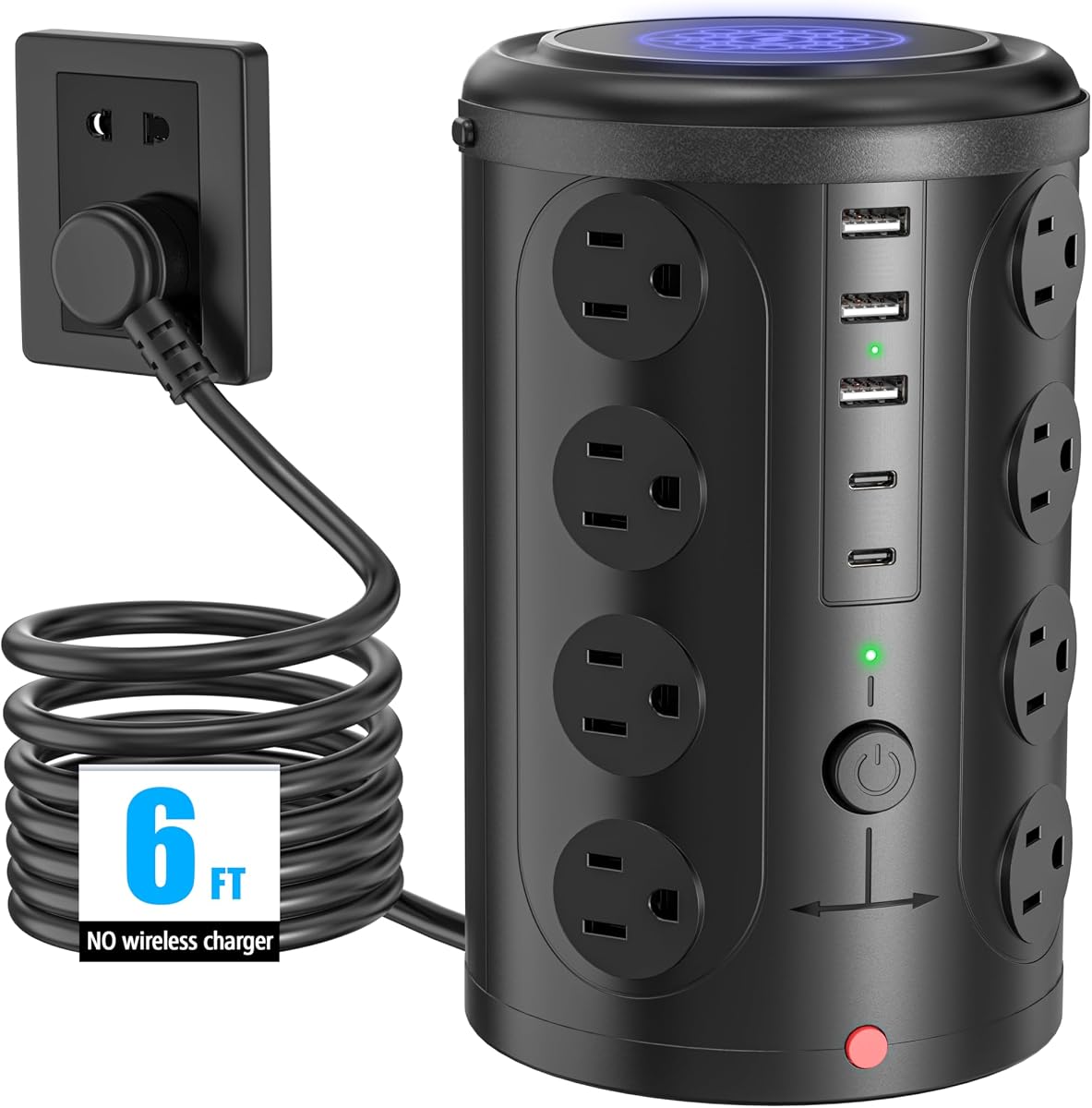
This model offers exceptional value for users prioritizing capacity over premium features. It holds a 4.8 rating due to its reliability and safety. The standout quality is its ability to power 16 devices simultaneously without overcrowding.
We may earn a commission when you buy through this link, at no additional cost to you.
It includes 12 AC outlets with wide spacing for bulky adapters. Four USB ports detect devices to optimize charging speed automatically. The slim 0.35 inch plug fits easily behind furniture keeping cords neat and hidden.
While it lacks advanced tech like retractable cords its protection features are robust. The circuit breaker prevents overloads effectively. These limitations are acceptable for those seeking a straightforward and affordable solution.
Perfect for dorm rooms or shared offices where budget matters most. We recommend this to anyone needing high capacity charging without spending extra on brand names.
With 16 outlets it supports entire setups including monitors and peripherals easily.
Overload protection and circuit breakers ensure devices remain safe during power spikes.
We may earn a commission when you buy through this link, at no additional cost to you.
This retractable tower delivers unmatched convenience and a perfect user rating. It eliminates cord clutter by rewinding automatically. The standout quality is its ability to stay tidy without manual effort.
We may earn a commission when you buy through this link, at no additional cost to you.
The 6ft cord extends as needed and retracts fully to prevent tripping. Mountable feet allow wall installation freeing up desk space entirely. It includes four AC outlets and USB ports for essential devices.
The main limitation is the lower USB wattage compared to other models. Also the mechanism adds complexity and cost. These are acceptable for users valuing a clean cable environment above all else.
Ideal for minimalist setups or clean desks where wire management is crucial. We recommend this to anyone wanting premium organization and flexible placement options.
The cord retracts when released keeping surfaces clean and preventing tangles permanently.
Mountable feet let you secure it under desks or on walls easily.
We may earn a commission when you buy through this link, at no additional cost to you.
This tower excels in providing dedicated high-power USB-C ports for laptops. It holds a 4.5 rating for consistent performance. The standout quality is its 230W total capacity supporting diverse devices.
We may earn a commission when you buy through this link, at no additional cost to you.
Two orange USB-C ports deliver up to 65W each for fast laptop charging. Four blue USB-A ports handle phones and accessories efficiently. The flat plug fits snugly against walls preventing protrusion.
While the USB-A speed is standard it covers daily needs well. The build is functional but lacks premium textures. These are acceptable given the competitive price and specific high-power capabilities.
Perfect for students needing to charge laptops and gadgets together. We recommend this to anyone wanting reliable power without paying extra for unnecessary features.
Orange USB-C ports provide dedicated 65W output for reliable laptop power.
Its small 3.15 inch base fits on crowded desks without taking much room.
We may earn a commission when you buy through this link, at no additional cost to you.
This tower is ideal for setups requiring long reach and controlled zones. It holds a 4.7 rating for reliability. The standout quality is its 6.5ft cord offering flexible placement.
We may earn a commission when you buy through this link, at no additional cost to you.
Four separate switches allow individual control over outlet sections saving energy when unused. The 12 AC outlets are spaced to prevent blocking adjacent plugs. A single USB-C port adds modern convenience.
The cord is slightly heavier than fabric-wrapped options which is acceptable for stability. It lacks advanced GaN tech but meets standard needs. These limitations are acceptable for budget-conscious users.
Great for offices where outlets are far from desks. We recommend this to anyone needing a versatile and controlled power distribution system.
Separate switches let you turn off specific sections to save energy.
The 6.5ft cord ensures you can reach distant outlets without adapters.
We may earn a commission when you buy through this link, at no additional cost to you.
This model prioritizes safety with pure copper conductors and fire-resistant materials. It holds a 4.8 rating for durability. The standout quality is its robust protection against electrical faults.
We may earn a commission when you buy through this link, at no additional cost to you.
The shell withstands high temperatures reducing fire risks significantly. Reinforced junctions prevent wear at connection points. Overload protection ensures automatic power cutoffs during irregularities.
The cord is fixed but reinforced for longevity. USB tech is standard which is acceptable for this price range. These trade-offs are acceptable given the high safety standards.
Perfect for homes with heavy appliance usage. We recommend this to anyone prioritizing device safety above premium aesthetics.
Pure copper wiring ensures efficient power transfer and reduces heat buildup.
The shell resists high temperatures protecting your space from fire hazards.
We may earn a commission when you buy through this link, at no additional cost to you.
This tower supports massive device counts with 16 outlets and five USB ports. It holds a 4.6 rating for functionality. The standout quality is its sheer capacity for connected gear.
We may earn a commission when you buy through this link, at no additional cost to you.
Outlets are wide-spaced to accommodate large power bricks. USB ports deliver reliable power for phones and tablets. The 10A protection ensures safety during high-demand scenarios.
Build quality is functional but basic. USB-C power is standard which is acceptable for this class. These limitations are acceptable for users needing maximum connectivity options.
Great for busy workstations with many peripherals. We recommend this to anyone needing to power many devices from a single source.
With 21 total ports it handles every device in your workspace effortlessly.
Spaced outlets prevent adapters from blocking each other during use.
We may earn a commission when you buy through this link, at no additional cost to you.
This tower is designed for minimal clearance with an ultra-thin plug. It holds a 4.8 rating for performance. The standout quality is its ability to fit in narrow wall gaps.
We may earn a commission when you buy through this link, at no additional cost to you.
The 45-degree right angle design prevents blocking adjacent sockets. Three USB ports offer balanced charging speeds. The grey finish blends into modern office decor easily.
USB power is standard but sufficient for mobile devices. Build is lightweight yet functional. These trade-offs are acceptable for users needing discreet power access.
Ideal for apartments with limited outlet access. We recommend this to anyone needing a slim profile that doesn't compromise on safety.
The 0.31 inch plug fits behind furniture without protrusion.
A 45-degree angle allows dual usage on standard duplex wall sockets.
We may earn a commission when you buy through this link, at no additional cost to you.
This dual-layer clamp unit saves vertical space by attaching under desks. It holds a 4.4 rating for functionality. The standout quality is its ability to integrate into existing desk structures.
We may earn a commission when you buy through this link, at no additional cost to you.
The clamp secures firmly without tools allowing one-handed device access. Fire-resistant ABS ensures durability under daily use. 10 AC outlets cover most workstation needs effectively.
The surge rating is lower than premium models but adequate for electronics. Installation requires a flat edge which limits curved desks. These are acceptable for users wanting under-desk solutions.
Perfect for standing desks or creative studios. We recommend this to anyone needing hidden power access with stable mounting.
The clamp attaches securely under desks freeing up surface space.
Two layers of outlets allow organized cable routing and device charging.
We may earn a commission when you buy through this link, at no additional cost to you.
This tower offers strong surge protection with a 1800J rating. It holds a 4.7 rating for reliability. The standout quality is its balance of safety and compact design.
We may earn a commission when you buy through this link, at no additional cost to you.
The flat plug sits flush against walls to save space. Rubber feet keep it stable during use. Wide-spaced outlets handle large adapters without interference.
USB tech is standard but meets daily needs. The build feels solid but not premium. These are acceptable trade-offs for a highly affordable option.
Great for home use or student dorms. We recommend this to anyone needing reliable protection without overspending.
1800J rating guards electronics against strong voltage spikes and surges.
Rubber feet and slim design keep it steady on crowded surfaces.
We may earn a commission when you buy through this link, at no additional cost to you.
Choosing the right tower depends on your specific power needs and spatial constraints. Consider these critical factors to ensure a safe and efficient setup.
Total wattage determines how many high-power devices you can run simultaneously. Look for models exceeding your estimated draw to avoid tripping breakers.
Ensure the tower matches your devices total power needs for optimal safety.
Evaluate the mix of AC outlets and USB ports available. Ensure you have enough USB-C ports for modern laptops and tablets.
Select a model with sufficient port variety for your current devices.
Surge protection measured in joules guards electronics against power spikes. Higher ratings offer better defense for sensitive equipment like monitors.
Choose a tower with at least 1000 joules for reliable protection.
Cord length dictates where you can place the tower relative to outlets. Longer cords offer more flexibility for room layouts.
Verify the cord reaches your wall outlet without extension adapters.
Some towers offer clamps or mounts for under-desk installation. This frees up valuable desk space and keeps cables organized.
Check if the unit supports wall mounting or clamping based on your setup.
Materials like fire-resistant plastic and copper wiring impact durability. High-quality shells reduce fire risks and extend lifespan.
Prioritize towers with robust materials for long-term safety.
Smart technology like auto-sensing USB ports optimizes charging speed. Individual switches help manage energy use effectively.
Look for smart features that match your convenience requirements.
Compare cost against features to determine overall value. Budget options may lack premium build quality but offer basic functionality.
Balance your budget with essential safety and performance needs.
Place the tower on a flat stable surface near your primary workspace to ensure easy access to ports. Avoid placing it near heat sources or water to prevent electrical hazards.
Regularly check all connected cords for signs of wear or damage. If any plug feels loose replace the unit immediately to maintain safety standards.
Unplug the tower when not in use for extended periods to save energy. Keep the exterior clean with a dry cloth to prevent dust buildup inside vents.
Yes many models feature USB-C ports with high wattage specifically designed for laptops. Look for towers offering 60W or more to ensure fast and reliable charging.
Most towers come with built-in surge protection making external protectors unnecessary. Check the joule rating to ensure it meets your specific safety requirements.
Modern towers include overheat and overload protection allowing safe overnight use. Always use models with certifications to ensure compliance with safety standards.
Simply position the clamp on your desk edge and tighten the screw securely. Most models require no drilling and work on flat edges up to 1.6 inches thick.
Yes these towers allow simultaneous use of all AC and USB ports. Just ensure the total power draw does not exceed the unit's wattage capacity.
Most models have compact bases around 3 inches wide making them suitable for any desk. Clamping versions work on standard thicknesses without needing extra space.
Yes the AC outlets can power wireless charging pads easily. Ensure the outlet spacing is wide enough to accommodate the base without blocking other ports.
Some manufacturers offer warranty coverage for defects but replacement parts are rare. Contact customer support directly if you encounter issues with the unit.
Our top picks highlight the balance between high power output and versatile mounting. The Anker Nano and Uncaged Ergonomics models stand out for premium features.
Prioritize surge protection and USB-C capabilities based on your most critical devices. A secure clamp design can further enhance your workspace organization.
Check current pricing and availability on Amazon before making your final decision. Ensuring you get the latest version of these models guarantees best value.