
Dell Optiplex 9020 Desktop Computer PC
3.6Editor score
Intel Quad-Core i5 processor
8GB DDR3 RAM memory
500GB HDD storage space
This guide compares the top desktop computers for kids in 2026, evaluating performance, durability, and features to help parents choose the right machine for
Finding the right desktop computer for kids requires balancing performance with ease of use. Modern systems need to handle educational software, creative tools, and light entertainment without lagging or complicating daily tasks for young users.
We evaluated ten reliable desktop options based on processor power, memory capacity, storage speed, and overall build quality. Each system was assessed for its suitability in home learning environments and its ability to grow with a child's evolving digital needs.
Every pick highlights specific strengths like storage options, display clarity, and connectivity features. Prices and availability change frequently so verify current details before purchasing to ensure you get the best value for your family technology setup.
3.6Editor score

4.5Editor score

4.2Editor score
This side-by-side comparison outlines key specifications for each desktop model. It helps families quickly identify which system offers the best balance of speed storage storage, and display quality for their specific budget and usage needs.




This desktop bundle offers a complete solution for families needing a reliable computer without high costs. Rated at 3.6 stars it provides essential tools for schoolwork and basic tasks with a renewed warranty for peace of mind.
We may earn a commission when you buy through this link, at no additional cost to you.
The Intel Quad-Core i5 processor ensures smooth multitasking for multiple browser tabs and educational applications. With 8GB of RAM and 500GB storage it handles documents and media files efficiently while the 20-inch monitor supports comfortable viewing.
Older technology like DDR3 RAM and HDD storage may limit future upgrades and speed. However the included RGB keyboard mouse and monitor make it a ready-to-use package that avoids separate purchases and setup complexity.
Ideal for students needing a straightforward machine for writing and research this model balances performance with value. Parents seeking a low-cost entry point into desktop computing will find this renewed option both practical and functional.
Everything needed for immediate use comes in one package including monitor and input devices. This simplifies setup and reduces the need to buy additional accessories separately for a new user.
Amazon Renewed products include a 90-day warranty and technical support. This ensures that any unexpected hardware issues are addressed quickly without extra financial burden on the family budget.
We may earn a commission when you buy through this link, at no additional cost to you.
Rated at 4.5 stars this all-in-one system stands out for its speed and visual clarity. The combination of DDR5 RAM and a sharp display makes it ideal for students who need fast loading times and clear text for reading.
We may earn a commission when you buy through this link, at no additional cost to you.
Its Intel N100 processor handles daily tasks smoothly while the 32GB RAM supports heavy multitasking without slowdowns. The 8-in-1 docking hub adds versatility for connecting peripherals and expanding storage via SD cards when needed.
While internal storage is limited the docking hub compensates by allowing easy data management. However reliance on SD cards for extra space may not suit users who need permanent high-capacity internal drives for large media files.
This system offers a premium feel in a family-friendly package that saves desk space and simplifies cable management. It is an excellent choice for families prioritizing speed modern design and reliable daily performance over raw power.
32GB of DDR5 RAM ensures that multiple apps run simultaneously without lag. This future-proofs the system for heavier educational software and creative tasks as the child grows older.
Integrating the computer and monitor into one unit reduces clutter and setup time. It creates a clean workspace that is visually appealing and easier to keep tidy in a shared room.
We may earn a commission when you buy through this link, at no additional cost to you.
This Lenovo desktop earns top marks for its blend of professional design and student-ready features. With a 4.2 rating it delivers reliable performance through fast storage and robust connectivity options that support modern learning tools.
We may earn a commission when you buy through this link, at no additional cost to you.
The PCIe SSD ensures rapid boot times and quick access to files while 16GB of RAM keeps multitasking smooth. Wireless peripherals simplify desk organization and reduce trip hazards making the setup safer for younger children.
Business-grade security features in Windows 11 Pro offer parental control benefits but may require more initial setup. While storage is adequate for most users it may not hold massive media libraries without external drives.
For families wanting a polished efficient workspace this all-in-one offers premium quality and speed. Its blend of form and function makes it a strong investment for long-term educational needs and home office use.
Built-in WiFi 6 and Bluetooth 5.2 ensure stable connections for video calls and cloud resources. This minimizes lag during online classes and supports multiple device connections simultaneously.
Included wireless keyboard and mouse eliminate cable clutter and improve portability. Users can move around more freely during lessons or projects without being tethered to a desk.
We may earn a commission when you buy through this link, at no additional cost to you.
This renewed desktop emphasizes storage capacity with a full terabyte of space. It provides a solid foundation for storing educational materials and media while maintaining smooth performance through 16GB of RAM.
We may earn a commission when you buy through this link, at no additional cost to you.
The 22-inch monitor offers ample screen real estate for multitasking and detailed work. RGB lighting on keyboard and speakers adds a fun touch that appeals to younger users who appreciate customization.
Hard drives are slower than modern SSDs which may affect load times for large programs. The renewed status means component quality can vary but the 90-day warranty helps manage risk for buyers.
Families needing significant local storage for projects will appreciate the generous capacity. It balances affordability with enough power for schoolwork and casual entertainment without demanding a high-end budget.
A 1TB hard drive allows storing countless documents and video files locally. This reduces dependency on cloud storage and provides quick access to large libraries.
RGB peripherals bring a playful aesthetic to the workspace. This can motivate children to engage with their computer for learning and creative tasks.
We may earn a commission when you buy through this link, at no additional cost to you.
This model offers a staggering 2TB of storage capacity perfect for archiving years of projects. It runs on a solid i5 processor that handles daily tasks consistently while keeping the user experience fluid.
We may earn a commission when you buy through this link, at no additional cost to you.
The included 22-inch LED monitor provides a clear view for reading and design work. RGB accessories add visual flair that keeps the setup engaging and modern for a young user's environment.
HDD technology remains slower than SSDs affecting startup and file access speeds. While the 90-day warranty mitigates some risk buyers should expect older hardware performance levels for routine operations.
For users who prioritize local storage space above all else this bundle delivers exceptional value. It supports heavy file management without sacrificing basic performance or needing constant cloud sync.
Huge storage ensures sensitive project data remains on-device. This helps avoid data loss from internet outages or subscription lapses.
Everything needed for use arrives together including monitor and peripherals. This reduces the need for extra shopping and simplifies initial configuration.
We may earn a commission when you buy through this link, at no additional cost to you.
This HP desktop stands out for integrating a fast SSD which boosts system responsiveness significantly. It supports modern video calls and web browsing with a built-in webcam and reliable wireless connectivity.
We may earn a commission when you buy through this link, at no additional cost to you.
The 24-inch screen offers ample space for content creation and streaming. With 16GB of RAM multitasking remains smooth even when switching between multiple educational applications and browsers.
Being renewed means hardware conditions vary so quality control depends on the refurbisher. The 90-day warranty offers some protection but users should test components immediately upon delivery.
Families seeking a balanced mix of speed and storage will find this model compelling. It is a versatile option for both schoolwork and creative projects without demanding premium hardware costs.
SSD technology ensures apps launch instantly and files load rapidly. This reduces downtime during study sessions and keeps users focused on tasks.
Integrated webcam and audio tools simplify online learning and meetings. There is no need for extra purchases to enable video communication features.
We may earn a commission when you buy through this link, at no additional cost to you.
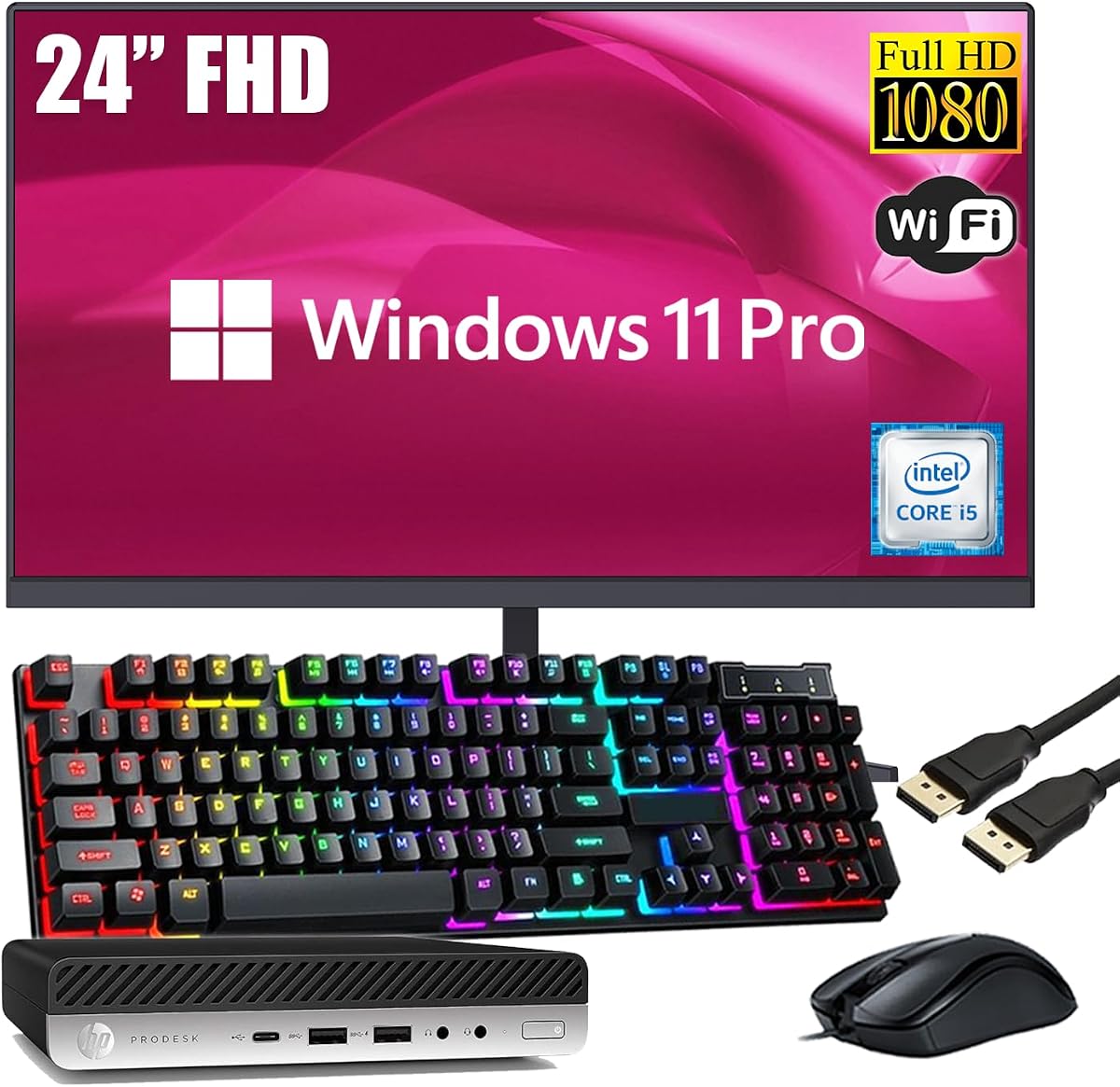
This compact system saves space while delivering dependable performance through its mini chassis. With 4.2 stars it offers a reliable solution for small rooms where a full tower would be too bulky.
We may earn a commission when you buy through this link, at no additional cost to you.
The SSD ensures quick boot times and responsive operation for daily apps. Its 24-inch monitor pairs well with the small unit to provide a complete workspace that fits easily on desks.
Internal storage is modest so users may need external drives for large files. The 8GB RAM is sufficient for basic tasks but heavy multitasking could lead to occasional slowdowns.
Ideal for children needing a dedicated workspace in limited room this mini desktop excels in efficiency. It combines portability and speed to create a functional and unobtrusive digital environment.
The mini tower fits easily on shelves or small desk areas. This preserves valuable floor space and keeps the room organized without clutter.
Components are pre-built and tested to simplify setup. Users just connect the cables and begin using the system immediately.
We may earn a commission when you buy through this link, at no additional cost to you.
This all-in-one features a modern octa-core processor and fast PCIe storage that supports advanced applications. With a 4.3 rating it balances performance and design for users who value responsiveness and visual quality.
We may earn a commission when you buy through this link, at no additional cost to you.
The borderless 23.8-inch screen offers immersive viewing for creative tasks and media. Built-in connectivity tools streamline setup and allow smooth interaction with other devices and peripherals.
The lack of touchscreen functionality may limit some interactive learning styles but the display remains sharp and clear. Fixed components mean internal upgrades are not possible but performance is sufficient for most current needs.
Families looking for a stylish and capable system for school and entertainment will appreciate this choice. It delivers a premium experience that adapts well to evolving educational requirements.
Eight cores enable smooth processing of demanding workloads. This ensures efficiency when handling multiple applications at once.
High color accuracy and resolution make editing and viewing pleasing. It supports creative work with faithful color reproduction.
We may earn a commission when you buy through this link, at no additional cost to you.
A straightforward desktop option for basic educational needs at an accessible price. It includes essential tools like a DVD drive and keyboard for users who prefer physical media and simple setups.
We may earn a commission when you buy through this link, at no additional cost to you.
The 19-inch monitor provides a decent view for reading and writing while the i5 processor handles daily tasks competently. This model is a no-frills choice for families prioritizing core functions over advanced features.
Limited port options and storage speed may restrict multitasking and large file handling. Still the renewed warranty helps protect against hardware failures and ensures reliable daily usage.
Best for users needing a reliable and simple system this package avoids unnecessary features. It offers a practical and cost-effective path to desktop computing for young learners.
Includes DVD drive for legacy media compatibility. This helps with older educational content or software installations that require physical discs.
Competitive pricing makes it accessible for strict budgets. It provides essential computing power without demanding expensive accessories.
We may earn a commission when you buy through this link, at no additional cost to you.
This all-in-one delivers efficient performance through its modern SSD and display. Rated at 4.3 stars it offers a clean and practical setup for students needing quick access to files and applications.
We may earn a commission when you buy through this link, at no additional cost to you.
The slim footprint maximizes desk space while the IPS panel ensures clear visuals for reading and design. Its connectivity options support essential peripherals and networks for a smooth learning experience.
Memory may limit heavy multitasking but 8GB remains sufficient for most daily tasks. Fixed components mean no future upgrades are possible but the hardware supports current software needs well.
Families seeking a tidy and effective system will find this model appealing. It combines modern storage and reliable processing to create a productive and user-friendly computing space.
PCIe storage ensures rapid system and app loading. This reduces wait times and helps students stay focused on tasks.
Minimalist design keeps the workspace organized. It blends well into any room decor while providing essential functions.
We may earn a commission when you buy through this link, at no additional cost to you.
Selecting the right desktop for children involves evaluating hardware needs against practical usage scenarios. This guide outlines essential factors to ensure the chosen system supports education creativity and entertainment effectively.
The processor determines how quickly a computer can execute tasks and manage multiple applications. For kids engaged in learning and light gaming a quad-core or better chip ensures smooth operation without frustrating delays.
Look for Intel Core i5 or comparable processors to maintain consistent performance over time.
RAM controls the number of programs a system can run simultaneously without slowing down. Eight gigabytes is a baseline for general use but 16GB or more helps handle research and creative tools better.
Prioritize 16GB DDR4 or DDR5 for future-proofing against increasingly demanding educational software.
Storage drives influence boot times and file access speeds. Solid State Drives (SSDs) are far faster than traditional Hard Disk Drives (HDDs) making them essential for responsive daily use.
Choose SSDs with at least 256GB capacity to balance speed with space for documents and media.
A clear screen reduces eye strain and improves focus during long study sessions. Full HD resolution is the minimum standard while IPS panels offer better viewing angles for shared use.
Select monitors between 20 and 24 inches to fit most home desks comfortably.
Modern peripherals and devices rely on USB and wireless standards. Ensure the system includes multiple USB ports and supports WiFi 6 for reliable internet access.
Check for Bluetooth support to connect wireless keyboards and headsets without extra cables.
Hardware reliability is critical for long-term usage in active family environments. Renewed systems should include a minimum 90-day warranty to protect against early failures.
Verify that the seller offers technical support and clear return policies for added safety.
Windows 11 provides current security updates and parental control features essential for home use. It also supports a wide range of educational applications and tools.
Ensure the device comes with a valid license to avoid software complications later.
Some desktop towers allow memory or storage upgrades while all-in-one units generally do not. Consider future growth when deciding between flexible and fixed configurations.
If possible choose a tower model with accessible components for long-term adaptability.
Place the desktop and monitor on a stable and ventilated surface to prevent overheating during extended use. Keep liquids away from electronics to avoid accidental spills that can damage internal components.
Install antivirus software and enable parental controls to create a safe digital environment. Regular updates to the operating system and applications help protect against vulnerabilities and improve performance.
Clean the screen and keyboard regularly using microfiber cloths to maintain clarity and hygiene. Restart the system weekly to clear temporary files and keep memory running efficiently.
Budget options like the Dell Optiplex 9020 bundle offer reliable performance with included monitors. These systems provide enough power for schoolwork without overspending on high-end components.
Most students require 256GB to 512GB for documents and media. Larger capacities become useful when storing video projects or extensive libraries of educational materials.
Certified refurbished systems undergo testing and include warranties. They offer significant savings while maintaining functional quality for typical educational tasks.
All-in-ones save space and reduce cable clutter. Towers offer better upgrade options but may require more setup and desk space.
Windows 11 includes Defender but third-party software can add extra layers of protection. Parental controls should also be configured for online safety.
Use built-in Windows Family Safety tools to set limits and track usage. Many routers also offer parental controls to manage internet access schedules.
The top picks include the HP 21.5 FHD All-in-One for speed and the Lenovo 24 FHD All-in-One for premium quality. Each model balances essential features that support learning and daily productivity effectively.
Prioritize SSD storage and sufficient RAM to ensure smooth performance as software demands grow. A quality display and stable connectivity are equally important for long-term satisfaction.
Prices and stock fluctuate so verify current details before finalizing any purchase. Checking availability ensures you receive the latest components at the best value for your family needs.