
2026 WiFi Extender Signal Booster for Home
5.0Editor score
Up to 15000 Sq.ft Coverage
1-Tap WPS Setup
Supports 70+ Devices
Discover the top distance WiFi extender models for 2026. This guide compares range, speed, and features to help you eliminate dead zones effectively.
Finding a reliable distance WiFi extender is crucial for modern homes with large layouts or thick walls. Weak signals can disrupt streaming and work from home setups. A quality extender amplifies your existing network to reach every corner.
We analyzed ten top models based on range, speed, and ease of setup. Our list covers everything from basic boosters to advanced outdoor units. Each product was evaluated for its ability to handle multiple devices and maintain stability.
Each pick highlights specific strengths and ideal use cases. We include detailed reviews and a buying guide to simplify your decision. Note that availability and offers change frequently, so verify details before purchasing.
5.0Editor score

4.1Editor score
4.5Editor score
This table provides a quick side-by-side comparison of the top ten distance WiFi extender options. It highlights key specifications like coverage area, supported standards, and unique features to help you narrow down your choices.


The TP-Link AX3000 stands out as a robust distance WiFi extender for modern households. With WiFi 6 technology, it delivers speeds up to 3000 Mbps across dual bands. Its intelligent signal indicator and EasyMesh compatibility make it a top pick for expanding coverage.
We may earn a commission when you buy through this link, at no additional cost to you.
This extender excels in handling multiple devices simultaneously without lag. The high-gain directional antennas use Beamforming to focus signals where needed. It supports up to 64 devices, ensuring smooth streaming and gaming throughout your space.
While it does not increase raw internet speeds, the improved reliability often feels like a boost. Users should note compatibility limits with some mesh systems. However, for most routers, it provides seamless connectivity and strong security features.
Ideal for medium to large homes needing reliable WiFi expansion. The gigabit port adds wired flexibility for consoles or PCs. If you prioritize speed and stability in a WiFi 6 setup, this model offers excellent value and performance.
Smart Adaptive Roaming automatically connects your devices to the strongest signal as you move around, ensuring uninterrupted coverage without manual switching.
TP-Link adheres to U.S. Cybersecurity Agency pledges, designing this device with core security requirements to protect your home network from threats.
We may earn a commission when you buy through this link, at no additional cost to you.
This budget-friendly extender promises impressive range with claims of up to 15000 sq.ft coverage. Its 1-tap WPS setup makes it accessible for non-technical users. The device supports multiple modes to adapt to various networking needs easily.
We may earn a commission when you buy through this link, at no additional cost to you.
Designed to eliminate dead zones, it uses four adjustable external antennas to stabilize signals. It handles up to 70 devices, which is rare for this price range. Users report reliable connections for streaming and basic browsing tasks.
While speeds are capped at 300Mbps, the stability helps reduce buffering significantly. The financial security features meet standard protocols to protect data. It is a practical choice for those needing coverage extension without high-end features.
Perfect for renters or smaller budgets needing quick coverage fixes. The simplicity of setup is a major advantage. If you need to reach a garage or backyard without complex configuration, this model delivers solid performance.
Simply press the WPS button on your router and the extender to connect within 30 seconds, requiring no additional software or technical knowledge.
Supports Repeater, Bridge, Access Point, and Router modes, allowing flexible deployment depending on your existing network structure and needs.
We may earn a commission when you buy through this link, at no additional cost to you.
The RE550 offers a proven dual-band solution for extending range without breaking the bank. It delivers up to 1900 Mbps total bandwidth, which is sufficient for most households. Its design focuses on stable connectivity rather than raw speed.
We may earn a commission when you buy through this link, at no additional cost to you.
Three external antennas help cover up to 2100 square feet effectively. The device supports up to 32 devices, making it suitable for average family usage. Smart Roaming ensures your device stays connected to the best signal.
While it is an older AC standard model, the performance remains robust. It does not increase internet speeds but improves coverage reliability. The Ethernet port allows for wired connections to gaming consoles or PCs.
Recommended for those needing a stable mid-range extender. It works well with most routers and offers simple setup via the Tether app. If you need reliable coverage without WiFi 6 complexity, this is a solid choice.
The app helps find the optimal location for the extender by visualizing signal strength, ensuring you place it for maximum coverage efficiency.
Designed with CISA Secure-by-Design pledges, ensuring advanced security is a core requirement for protecting your connected home devices.
We may earn a commission when you buy through this link, at no additional cost to you.
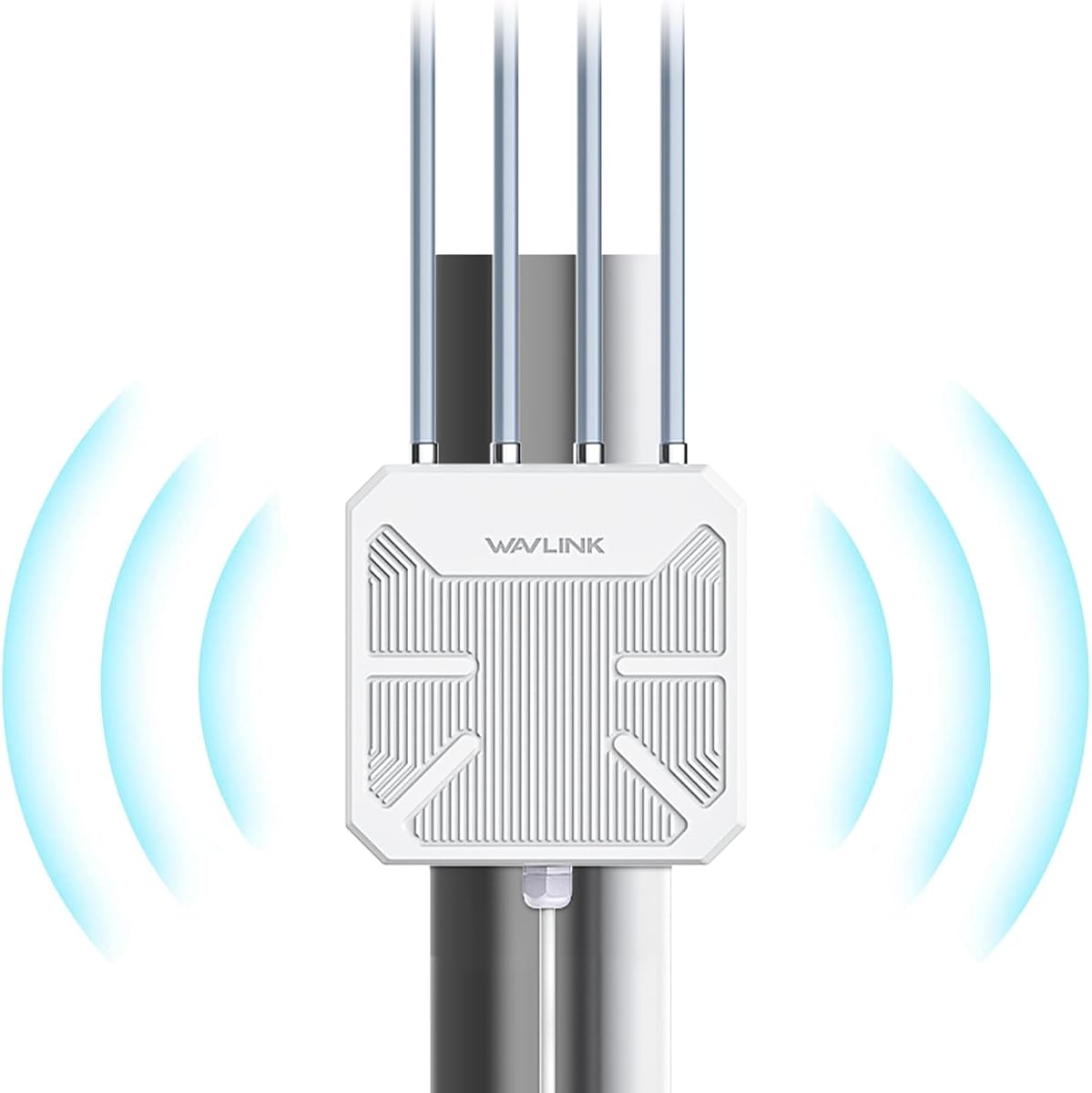
This unit is built specifically for outdoor environments where standard extenders fail. It offers a range of up to 300 meters in line-of-sight conditions. The IP67 weatherproof rating ensures it withstands rain, dust, and temperature extremes.
We may earn a commission when you buy through this link, at no additional cost to you.
It supports Starlink adapters, making it perfect for remote homes. The four detachable antennas allow customization for signal direction. With PoE power support, installation is flexible even without nearby outlets.
While it is more expensive, the durability justifies the cost for estates or farms. The AX1800 speeds handle 4K streaming and surveillance well. Users must ensure proper mounting for optimal performance and weather resistance.
Ideal for large properties, farms, or remote offices needing outdoor internet. It transforms wired connections into reliable outdoor hotspots. If you need coverage for a workshop or yard, this device delivers long-term reliability.
Supports both active and passive PoE, allowing you to power the device through a single Ethernet cable in hard-to-reach outdoor areas.
Designed to seamlessly connect with Starlink Gen 2 or 3 via Ethernet adapter, offering a perfect solution for rural or remote properties.
We may earn a commission when you buy through this link, at no additional cost to you.
The BE3200 brings Wi-Fi 7 technology to your extended network. It delivers speeds up to 3200 Mbps, optimized for future devices. The Multi-Link Operation combines bands for better throughput and lower latency.
We may earn a commission when you buy through this link, at no additional cost to you.
While it does not support the 6 GHz band, it excels on dual bands. Four optimally positioned antennas ensure reliable coverage up to 2400 sq.ft. It supports up to 64 devices, making it great for smart homes.
Setup is straightforward with the Tether app. Note that you need a Wi-Fi 7 router to unlock full benefits. If you have compatible devices, this extender offers excellent performance and reliability for heavy usage.
Best for tech-savvy users planning for next-gen upgrades. It handles AR/VR gaming and 8K streaming demands effectively. Investing in this now ensures your network stays relevant as newer devices enter the market.
When paired with a Wi-Fi 7 router, MLO combines bands to deliver enhanced throughput, lower latency, and improved reliability for apps.
Four antennas with Beamforming boost signal strength and range, providing seamless whole-home Wi-Fi coverage for up to 64 connected devices.
We may earn a commission when you buy through this link, at no additional cost to you.
This extender is designed for high-density usage with support for over 65 devices. Its four external antennas provide 360-degree coverage to eliminate dead zones. The setup is incredibly simple, requiring just a WPS button press.
We may earn a commission when you buy through this link, at no additional cost to you.
It uses a powerful CPU to avoid delays when streaming or gaming. The device ensures stable performance even when the whole family is online. With 99% compatibility, it works with almost any standard router.
Security features include WPA/WPA2 protocols to protect personal data. While it lacks advanced mesh options, it meets most household needs. The 10000 sq.ft claim offers wide coverage potential for medium homes.
Ideal for households with many smart devices needing stable connection. The high device count makes it useful for offices too. If you need a simple fix for buffering without technical complexity, this model is a strong contender.
Powered by a powerful CPU with a 2.4Ghz ultra-core processor, it provides strong signals to avoid delays and buffering during work or games.
Supports Repeater, Client, AP, Bridge, and Router modes to meet different network demands easily with just a few configuration settings.
We may earn a commission when you buy through this link, at no additional cost to you.
Hyzom offers extensive coverage with claims of reaching 18000 sq.ft. It uses a Bionic Chip to drive stable performance for 4K video. The four high-gain antennas penetrate walls and reach difficult spaces effectively.
We may earn a commission when you buy through this link, at no additional cost to you.
Users can connect 65+ devices without significant performance drops. The built-in Ethernet port provides a wired option for consoles or TVs. Setup is quick via WPS or guided browser instructions.
Security is maintained through WPA2-PSK encryption to protect data. While it lacks mesh integration, it offers solid standalone performance. The design focuses on reliability and eliminating buffering issues for smooth streaming.
Best for large homes or small offices needing broad coverage. The trusted status among 500,000+ families suggests reliability. If you need to cover basements or garages, this extender delivers consistent connectivity.
Stop losing WiFi in hard-to-reach spaces; this booster pushes strong signals through walls to ensure consistent coverage throughout your entire home.
WPA2-PSK encryption protects your network and personal data from unauthorized access, allowing you to browse and work with confidence.
We may earn a commission when you buy through this link, at no additional cost to you.
This extender emphasizes range with up to 15000 sq.ft coverage. The 4+4 high-power FEM antennas penetrate walls to ensure reliable signals in every room. It promises 6X faster speeds across the network for seamless streaming.
We may earn a commission when you buy through this link, at no additional cost to you.
Users can connect 65+ devices, making it suitable for busy homes. The 5 operating modes allow versatile deployment as a repeater or router. Setup takes minutes with WPS pairing and guided browser instructions.
Bank-grade encryption protects IoT devices and personal data. While hardware is basic, performance meets common needs like gaming and streaming. It is an accessible option for those needing broad coverage without technical skills.
Recommended for households needing quick setup and reliable performance. The mode flexibility helps adapt to different office or home setups. If you want to upgrade coverage without replacing your main router, this is a good choice.
With 4+4 antennas, this extender effortlessly penetrates walls and floors, ensuring reliable signal in every room from basement to backyard.
Protect your family devices with WEP/WPA/WPA2 encryption, shielding them from cyber threats while keeping your network safe and private.
We may earn a commission when you buy through this link, at no additional cost to you.
The RE615X delivers AX1800 speeds to expand your router's coverage efficiently. It supports dual bands and Beamforming to focus signals where needed. The device handles up to 64 devices for stable connections throughout your home.
We may earn a commission when you buy through this link, at no additional cost to you.
Setup is managed via the Tether app for quick configuration. It includes a gigabit port for wired connections to gaming or PCs. Adaptive Roaming ensures your devices stay connected to the strongest signal automatically.
While it lacks the 6 GHz band, it offers solid dual-band performance. It does not increase raw internet speeds but improves reliability. This makes it a practical choice for medium homes needing WiFi 6 features.
Ideal for users wanting an affordable WiFi 6 upgrade. The app helps find optimal placement for best performance. If you need a reliable extension without high-end costs, this model delivers consistent value.
Seamlessly move throughout your home with automatic connections to the strongest signal, ensuring uninterrupted coverage and optimal performance.
Use the intelligent signal indicator via the app to find the best location for your connection, ensuring peak performance with updated firmware.
We may earn a commission when you buy through this link, at no additional cost to you.
This bridge creates a point-to-point link up to 3KM between buildings. It operates on 5.8GHz to deliver stable transmission for surveillance or remote access. The 14dBi antenna focuses energy for stronger long-distance connectivity.
We may earn a commission when you buy through this link, at no additional cost to you.
It uses two Ethernet ports for flexible deployment needs. PoE power options help simplify wiring in remote areas. Pre-paired WDS mode allows quick plug-and-play setup without complex configurations.
While it costs more than standard extenders, it saves on trenching cables. The IP65 housing ensures durability against rain and dust. This is ideal for connecting barns or shops without running long cables.
Best for rural properties or industrial sites needing external connections. It handles network traffic effectively without trenching. If you need to extend internet between separate buildings, this bridge offers a cost-effective solution.
Extend a network between separate buildings without trenching or stringing long Ethernet cable, reducing installation labor and cabling costs.
IP65-rated enclosure helps protect the wireless bridge from rain, dust, and weather, suited for exterior walls and poles reliably.
We may earn a commission when you buy through this link, at no additional cost to you.
Selecting the right extender involves evaluating range, speed standards, and installation needs. Understanding these factors ensures you get reliable coverage that fits your home layout.
Determine the size of the space you need to cover and check the manufacturer's square footage ratings. Indoor models typically cover up to 3000 sq ft while outdoor options can reach further in open environments. Always aim for a slightly higher capacity than needed to ensure signal stability.
Choose a model rated for your specific area to avoid weak spots in your home or yard.
Check if the extender supports WiFi 6 or newer standards like Wi-Fi 7 for better performance and capacity. Newer standards handle multiple devices more efficiently and provide faster throughput compared to older AC models. Ensure your router matches the extender for full benefits.
Prioritize newer standards like WiFi 6 to future-proof your network against increasing device counts.
Look for external adjustable antennas that can focus signals through walls or toward specific rooms. High-gain antennas improve penetration and stability in large homes with obstacles. Models with beamforming technology direct signals where needed most.
Adjustable high-gain antennas are essential for maximizing range in homes with thick walls or multiple floors.
Consider setup methods like WPS buttons or mobile apps that simplify configuration for non-technical users. Some models offer guided browser installation to ensure optimal placement. Plug-and-play options save time and reduce frustration.
Choose a device with simple WPS or app-based setup to get your network running quickly.
Verify if the extender includes an Ethernet port for connecting devices like consoles or PCs. This allows for faster and more stable connections than wireless alone. A gigabit port ensures high-speed wired access for gaming or streaming.
An Ethernet port provides a reliable wired option for devices requiring stable high-speed connections.
Check the number of devices the extender can support simultaneously to ensure smooth performance. Households with many smart devices need units supporting 50 or more connections. This prevents lag when multiple family members are online.
Select an extender with sufficient device capacity to handle your entire household's connected technology.
For outdoor use, ensure the unit has an IP67 or similar rating to withstand rain and dust. Outdoor extenders should operate reliably in varying temperatures. Proper enclosure protects hardware from environmental damage.
Always choose outdoor models with IP67 ratings to protect against weather and ensure longevity.
If you plan to expand your network, check for EasyMesh compatibility to create a seamless system. Some systems do not support specific mesh brands so verify compatibility before buying. Mesh features allow roaming between access points.
Verify mesh compatibility to ensure your extender integrates smoothly with existing or future networks.
Position the extender halfway between your router and the dead zone for optimal signal strength. Use an app or signal indicator to find the best spot where the router signal is still strong. Avoid placing it behind metal objects or inside closed cabinets.
Update firmware regularly through the manufacturer's app to maintain security and performance. Check for updates monthly to fix vulnerabilities and improve stability. Some apps handle this automatically but manual checks ensure peak performance.
Clean the device periodically to prevent dust buildup which can cause overheating. Use a soft cloth to wipe vents and ensure airflow remains clear. Avoid using liquids directly on the unit and unplug before cleaning.
No, an extender does not increase your raw internet speed. It improves coverage so you get closer to your current speed in dead zones. Actual speeds may drop by half depending on signal distance but reliability improves.
Use the intelligent signal indicator app to find a location with strong router signal but within range of the dead zone. Ideally, place it halfway between the router and the area needing coverage to ensure stable backhaul connection.
Yes but only if it has a weatherproof rating like IP67. Standard indoor models will not survive rain or extreme temperatures. Check for outdoor-specific models designed to handle exposure to elements safely.
Yes, WiFi 6 offers better performance with multiple devices and improved efficiency over distance. It handles bandwidth more effectively than older AC models. Ensure your router also supports WiFi 6 for maximum benefit.
Most modern extenders support between 30 to 65 devices simultaneously. Higher-end models handle more connections without lag. Check product specifications to ensure it meets your household device count needs.
No, most can connect wirelessly via WPS or a mobile app. Some setups may require an Ethernet cable if using access point mode. Basic setup does not need specialized tools or cabling for wireless operation.
We reviewed ten top models ranging from budget boosters to premium outdoor units. Each offers unique strengths depending on your specific needs for range and speed. The TP-Link AX3000 and WAVLINK Outdoor stand out for their specialized performance.
Prioritize coverage area and standards compatibility when making your final choice. Consider device capacity if your household uses many smart products daily. A good extender eliminates dead zones without replacing your main router.
Always verify current offers before buying as availability changes frequently. Check product pages for the latest features and pricing to ensure you get the best value. Select a model that fits your current setup and future needs.