
Upgraded Watt Power Meter Plug
4.6Editor score
7 display modes for all data
Adjustable backlight timer options
Overload protection built-in
Memory function after power loss
This guide compares ten top energy monitors for PCs and homes, evaluating accuracy, smart features, ease of setup, and cost tracking to help you save on
Monitoring your energy usage is essential for modern homeowners and tech enthusiasts alike. Understanding where power goes helps reduce bills and protect the environment. A good monitor provides real-time data on voltage, current, and total consumption without needing complex tools.
We evaluated ten products ranging from simple plug-in meters to whole-home systems. Each option was assessed on accuracy, connectivity, app features, and safety certifications. The list covers devices for single appliances and comprehensive panel-level tracking solutions.
Each pick highlights specific strengths like solar integration, circuit-level detail, or budget-friendly design. Prices and availability change frequently, so verify details before purchasing. Use these insights to choose the right solution for your home or office energy needs.
4.6Editor score

4.6Editor score

4.3Editor score
This side-by-side comparison highlights the core capabilities of each selected energy monitor. From plug-in simplicity to whole-home intelligence, these devices offer distinct advantages for tracking power usage across different scenarios and budgets.


The Emporia Vue 3 stands out as a top choice for whole-home energy tracking. It offers a robust combination of hardware and software that delivers real-time insights into your electricity consumption across different circuits. With a solid rating of 4.6, users praise its reliability and ease of setup.
We may earn a commission when you buy through this link, at no additional cost to you.
Its standout feature is the ability to monitor up to 16 branch circuits using clamp-on sensors. This granularity helps identify high-energy appliances like heaters or dryers without guessing. The UL certification ensures safety during installation in your circuit panel, and the app provides minute-level data retention.
While it requires access to your electrical panel, the process is straightforward with the included instructions. The need for 2.4GHz WiFi might limit placement options slightly, but the benefits of accurate, real-time tracking outweigh this minor inconvenience for most households.
This monitor is ideal for homeowners seeking detailed insight into their energy habits. Whether you aim to reduce bills or integrate solar power, the Vue 3 provides the tools needed to make informed decisions about power usage.
The Vue 3 supports net metering and solar monitoring, allowing you to track how much power you generate versus consume without extra hardware.
UL listed components ensure that the sensors and hub meet rigorous safety standards, giving peace of mind during long-term operation.
We may earn a commission when you buy through this link, at no additional cost to you.
The Upgraded Watt Power Meter Plug is an excellent option for those wanting immediate insights without complex wiring. It fits between your appliance and the wall outlet, displaying key metrics like watts, volts, and amps instantly. Users appreciate its straightforward functionality and clear backlight display.
We may earn a commission when you buy through this link, at no additional cost to you.
It features seven display modes covering voltage, current, power factor, and cost estimates. The backlight can be adjusted to stay on longer for easy reading in dim areas. Additionally, the overload protection feature warns you when a device exceeds safe power limits, preventing potential hazards.
The device does not connect to WiFi, so you must read data directly from the screen. However, it stores data even when unplugged, so you don't lose tracking progress. This makes it a reliable tool for short-term appliance audits or rental property checks.
Ideal for renters or casual users, this plug-in monitor offers essential data at a low cost. It is perfect for checking the power draw of PCs, gaming consoles, or kitchen appliances without investing in a full system.
The 2.36-inch LCD with 180-degree viewing angles ensures you can read values from any position without needing to bend or stand directly in front.
Overload protection kicks in when power exceeds set limits, displaying a warning to prevent damage to your devices or electrical system.
We may earn a commission when you buy through this link, at no additional cost to you.
The Meross Smart Home Energy Monitor is designed for tech-savvy users who value privacy and automation. It offers precise tracking with ±1% accuracy and connects seamlessly with Home Assistant. This compatibility allows for advanced automation, such as running appliances when solar power is available.
We may earn a commission when you buy through this link, at no additional cost to you.
Unlike many competitors, Meross keeps all data local. This means no cloud delays, no privacy concerns, and no mandatory subscriptions. The app provides detailed charts for hourly and daily usage, and the hardware comes with a 2-year warranty for worry-free long-term use.
While it requires electrical panel installation and costs more than plug-in models, the privacy and precision benefits justify the investment. The ability to integrate with smart home systems adds significant value for those building a connected energy management ecosystem.
This monitor is best for homeowners who prioritize data security and want deep control over their energy use. If you have Home Assistant or plan to expand your smart home, Meross offers a premium experience unmatched by other options.
Local data storage ensures your energy habits remain private, with no cloud uploads unless you choose to export reports manually.
Home Assistant integration lets you set rules to automatically power high-use devices like EV chargers when your solar system is generating excess energy.
We may earn a commission when you buy through this link, at no additional cost to you.
The SURAIELEC Outlet Watt Meter is built for accuracy and durability. It supports a wide voltage range from 90V to 250V, making it suitable for various appliances. Its compact design ensures the lower outlet remains accessible, which is practical in homes with limited space.
We may earn a commission when you buy through this link, at no additional cost to you.
Accuracy is a strong point, meeting Class 1.0 standards with fine resolution for watts and volts. It also includes a rechargeable battery to retain data for 90 days even after power outages. This reliability makes it a great tool for long-term monitoring of single devices.
While it lacks smart connectivity, the straightforward interface makes it easy to use. You can set cost estimates manually, and the backlight helps reading in dark rooms. For those needing a simple yet precise plug-in meter, this model is a solid choice.
Best for users who prioritize accuracy and physical design over connectivity. It is ideal for monitoring electronics, printers, or kitchen appliances where knowing exact wattage matters more than remote access.
The low-profile design ensures your wall outlet is not blocked, allowing other devices to be plugged in without obstruction.
A built-in battery backup preserves your energy usage data during power cuts, so you never lose tracking progress unexpectedly.
We may earn a commission when you buy through this link, at no additional cost to you.
This energy monitor is uniquely designed for shared living spaces and rental properties. It comes with 16 branch sensors to track power usage per circuit, ideal for allocating electricity costs fairly among roommates or tenants. The app includes templates for peak and off-peak billing.
We may earn a commission when you buy through this link, at no additional cost to you.
A key feature is its ability to run without cloud or internet access via a local MQTT server. This ensures privacy and works even if your home internet is down. With ±1% accuracy, you get precise data on which circuits use the most power.
While the installation requires accessing your electrical panel, the flexibility of the sensors makes it adaptable to different home layouts. Landlords can use it to create transparent billing reports without needing separate meters for each room.
This is the top choice for property managers or tenants in shared housing. If equitable billing and privacy are priorities, this system offers specialized tools that generic monitors lack.
Customizable electricity rate templates allow automatic calculation of costs per room or circuit based on time-of-use tariffs.
Running on a local network ensures your energy data never leaves your home, providing peace of mind for privacy-conscious users.
We may earn a commission when you buy through this link, at no additional cost to you.
The HBN Watt Meter Plug offers a balance of features and affordability. It displays nine types of data including apparent power, frequency, and electricity cost. Users find the large LCD with backlight easy to read, even in low-light conditions.
We may earn a commission when you buy through this link, at no additional cost to you.
It saves data when unplugged, so you don't lose progress if you move it between devices. The 160-degree viewing angle ensures visibility from various positions. With a max rating of 1875W, it handles most household appliances safely.
The backlight automatically turns off after 15 seconds to conserve energy, which might be inconvenient if you need extended viewing. However, pressing any button brings it back on. For simple, reliable monitoring, this plug is a strong contender.
This monitor is perfect for users wanting detailed data without breaking the bank. Whether tracking a PC, fridge, or gaming setup, it provides clear insights into consumption habits.
The 160-degree wide viewing angle ensures you can read all display values clearly from almost any angle without straining your eyes.
Cumulative energy data is stored internally, ensuring no information is lost even during a sudden power outage.
We may earn a commission when you buy through this link, at no additional cost to you.
The KETOTEK Watt Meter features a convenient five-button interface for quick access to different parameters. Pressing M, +, -, or OK cycles through key data points like KWH, voltage, and power factor. This design simplifies reading without navigating complex menus.
We may earn a commission when you buy through this link, at no additional cost to you.
It offers robust overload protection, flashing a warning when power exceeds limits. The LCD display is wide-angle, making it readable from above or below. Data storage ensures cumulative metrics persist even if the device is unplugged.
While it lacks remote access, the physical interface is intuitive and efficient. The LED light flashes continuously during warnings to ensure you notice critical alerts. This simplicity makes it a favorite for users who prefer tangible controls.
Best for those who value ease of use and immediate feedback. It works well for monitoring PCs, routers, or any device where quick status checks are needed without app setup.
Five distinct buttons provide instant access to specific data points, reducing the need to cycle through unnecessary display modes.
When overload limits are exceeded, the LCD displays alerts while the LED flashes to ensure the user notices the warning immediately.
We may earn a commission when you buy through this link, at no additional cost to you.
Buying two plugs at once is cost-effective for monitoring multiple devices simultaneously. These units cover eight display modes including total cost and unit price. The ABS material ensures durability and fire safety for everyday home use.
We may earn a commission when you buy through this link, at no additional cost to you.
The backlight turns off after 10 minutes to save power but can be turned on manually when needed. Data resets are easy without tools, making it simple to start fresh for each device. Cumulative data is saved when removed from the socket.
For homes needing to track several appliances, this pair offers a practical solution. Whether you want to compare energy use between a TV and gaming PC, having two units makes setup flexible.
Ideal for families or shared spaces where tracking multiple appliances is necessary. The included two-pack saves time and money compared to buying individual units later.
Having two units allows you to monitor multiple devices at once without waiting to buy additional meters.
High-quality ABS material ensures the housing remains fireproof and drop-resistant for long-term safety around electronics.
We may earn a commission when you buy through this link, at no additional cost to you.
The Kill A Watt is a classic choice known for reliability and simplicity. It offers four settings to monitor usage by day, week, month, or year. The large LCD counts consumption by kilowatt-hour, making it easy to track expenses over time.
We may earn a commission when you buy through this link, at no additional cost to you.
It connects directly to appliances without complex setup. Compatible with inverters, it works well for backup power scenarios. The straightforward design means no apps or WiFi needed—just plug in and read the values.
While it lacks modern smart features, its focus on core functionality appeals to users who want a dedicated meter. It is particularly useful for estimating annual costs based on current usage patterns.
This monitor is best for users who prefer no-frills tools. If you want to check if a device is an energy hog without apps or accounts, the Kill A Watt is a proven solution.
With years of market presence, this device offers reliable readings that users trust for long-term energy tracking.
Designed to work with inverters, it can monitor devices during power outages or alternative energy setups.
We may earn a commission when you buy through this link, at no additional cost to you.
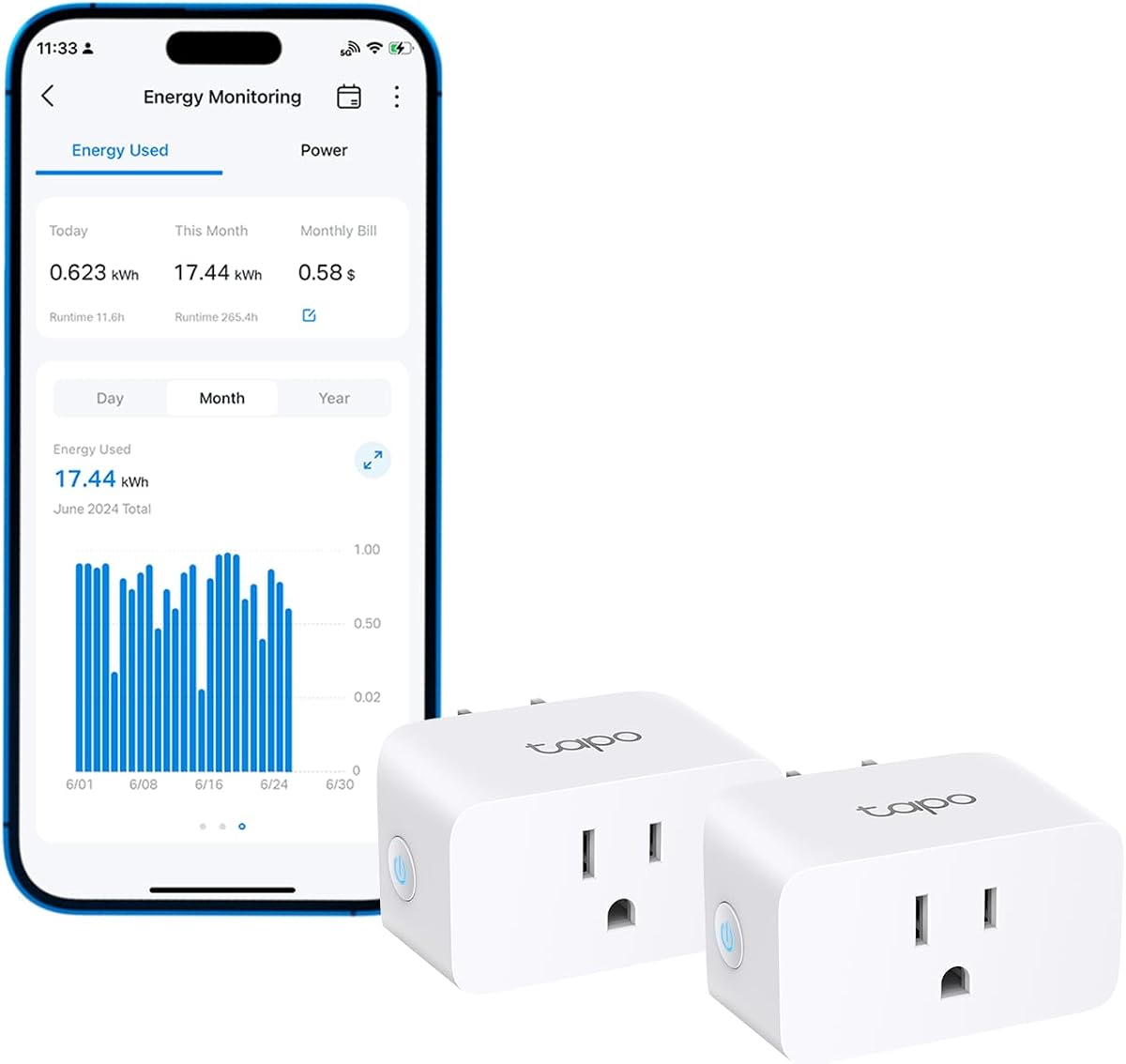
The Tapo Smart Plug combines energy monitoring with smart home control. It tracks energy usage via clear charts and integrates with Alexa or Google Assistant for voice commands. Scheduling features allow automatic operation during off-peak hours to reduce costs.
We may earn a commission when you buy through this link, at no additional cost to you.
Auto-shutoff protection prevents overload by turning off devices that exceed power limits. The app visualizes costs based on your rate settings. For those who already use smart plugs, this adds valuable energy insight without extra hardware.
It works best with devices that fit in a wall outlet. While it won't monitor a whole PC setup, it is perfect for lamps, chargers, or small electronics. The two-pack makes it easy to track multiple gadgets.
Best for smart home users wanting energy insights without wiring changes. If you already use Tapo products, this plug enhances your existing ecosystem with cost and usage tracking.
Set schedules to run high-consumption devices during off-peak hours, lowering your electricity bill without manual intervention.
Built-in support for Alexa and Google Assistant lets you check status or turn devices on and off with simple voice commands.
We may earn a commission when you buy through this link, at no additional cost to you.
Selecting the right energy monitor depends on your specific goals, from tracking a single PC to managing an entire home. This guide breaks down the key factors to help you find a system that fits your needs and technical comfort.
Decide between plug-in meters and whole-home systems. Plug-in models are easy to install but only track specific outlets. Whole-home systems require panel access but offer circuit-level insights for every appliance.
For single devices like PCs, a plug-in meter is sufficient. For comprehensive savings, consider a whole-home system with clamp sensors.
Check if the device supports WiFi or Bluetooth. Smart monitors let you track usage remotely via apps. Traditional models require you to read the display physically.
Choose a connected monitor if you want real-time alerts or remote access. Use a manual one for simplicity and privacy.
Look for accuracy ratings like ±1% or ±2%. Higher precision ensures you get true data on consumption. Safety certifications like UL or ETL are essential for panel installations.
Prioritize safety standards for any device touching your main panel. Accuracy helps when calculating long-term savings.
Evaluate what metrics the app provides. Some show cost estimates, solar data, and power factors. Others offer basic wattage and time stats.
Choose a monitor that displays cost or solar data if you want to track money saved or energy generation.
Consider if your data stays local or goes to the cloud. Local storage reduces privacy risks but limits remote features. Cloud services offer convenience but require trusting the vendor.
If privacy is a priority, select a model with local data options or offline modes.
Prices range from under $10 for basic plugs to hundreds for whole-home kits. Set a budget that balances features with what you can afford.
Higher prices often bring more sensors or better apps. Ensure the extra features justify the cost for your situation.
Ensure the device works with your home's voltage and wiring. Most US homes use 120/240V. Check if you need extra sensors for 3-phase systems.
Match the product's voltage rating to your home to ensure safe and accurate operation.
Read reviews about setup and app usability. Some systems are easy, while others need technical knowledge. A user-friendly app saves time.
Choose a system with clear instructions and an intuitive interface for best results.
To start, plug the monitor into a wall outlet or install it in your panel according to instructions. Make sure the device is stable and not exposed to water or heat.
For plug-in models, turn on the appliance you want to track. Navigate the display to see watts, energy used, or cost. If it has an app, connect it to WiFi and add your rate for cost estimates.
Regularly reset data to track usage by day or week. Keep the device clean from dust to ensure vents work. Update app firmware if needed for best performance.
Yes, plug-in monitors can track your whole PC if you plug the power strip into the monitor. Just ensure the total wattage does not exceed the monitor's rating. This method shows total energy use for the PC and peripherals.
It depends on your needs. If you want whole-home or circuit data, yes, you must access your panel. For single devices, plug-in meters are easier and do not require panel access.
Accuracy varies from 1% to 3%. Cost estimates are most accurate when you set the correct electricity rate in the app. Real-time power data is typically precise enough for savings insights.
Most basic models do not. Some advanced systems may offer extra features via paid plans, but many allow full use without fees. Always check the product description for hidden costs.
If an overload warning appears, turn off the appliance immediately. Check the wattage of your device and ensure it is within the monitor's rated capacity. This prevents damage to both devices.
Use two plug-in monitors or compare one at a time. Track energy over the same period and similar workloads. Many apps allow you to export data for easier side-by-side analysis.
Most monitors handle up to 1800W. Check your PC power draw before buying. If it exceeds limits, use a monitor with a higher rating or a whole-home system.
Yes, whole-home monitors like the Emporia Vue 3 track solar generation and usage. Plug-in models cannot measure solar directly but can track home appliances that use solar power.
We reviewed ten monitors to cover a wide range of needs from budget plug-ins to premium whole-home systems. Each device offers unique strengths for tracking energy and reducing costs.
Prioritize your needs: choose a plug-in model for simple tracking, or a panel system for deep home insights. Safety and privacy are key factors to consider before buying.
Prices and features change often, so check the latest specs and reviews before purchasing. With the right monitor, you can gain control over your energy use and save money effectively.