
SUNLU Filament Dryer Box 2026 New Upgrade S1 Plus, Black
4.3Editor score
Fast drying with fan design
Visual LCD display for settings
Compatible with multiple filament types
Explore our expert guide comparing the top filament dryer box options for 3D printing. We evaluate drying speed, capacity, temperature control, and storage
Choosing the right filament dryer box can dramatically improve your 3D printing results by removing moisture that causes stringing and clogging. Whether you work with PLA or engineering materials, keeping your spools dry is essential for consistent quality and reliable prints every time.
We compared ten leading filament dryer box models based on heating technology, capacity, ease of use, and overall value. Our analysis covers everything from budget-friendly single spool units to high-capacity multi-chamber systems designed for professional or high-volume printing environments.
Each pick highlights key strengths and ideal use cases so you can find the perfect match for your setup. Please note that prices and availability may change over time, so always check current listings before making your final purchase decision for your printing needs.
4.3Editor score

4.4Editor score

4.6Editor score
This side-by-side comparison highlights the key specifications and features of each filament dryer box model to help you evaluate capacity, heating technology, and ease of use across the full range of options available for your 3D printing needs.


The SUNLU Filament Dryer Box 2026 New Upgrade S1 Plus offers an affordable entry point for users needing reliable moisture removal. With a 4.3 rating, it addresses stringing and clogging through fan-assisted drying and clear LCD controls for time and temperature.
We may earn a commission when you buy through this link, at no additional cost to you.
Its standout feature is the fan design that speeds up the discharge of excess water from filaments. The adjustable temperature range and visual display let you personalize settings for different materials like PLA and PETG without guesswork or complex setup procedures.
While it lacks the high heat of engineering-grade units, the trade-off is acceptable for common filaments. The price remains competitive, and the compact design fits well on desktop workspaces without requiring dedicated shelving or significant floor space for operation.
Buyers seeking a cost-effective solution for basic filament storage and drying will find this model practical. It balances simplicity with essential features, making it ideal for hobbyists or small studios where budget constraints are a primary concern.
The fan design accelerates moisture removal compared to passive units, improving efficiency during regular printing cycles.
The 2 inch LCD screen clearly shows temperature and time, allowing quick adjustments without needing manuals.
We may earn a commission when you buy through this link, at no additional cost to you.
The Creality Space Pi X4 stands out with dual independent heating chambers and a high 4.6 rating. It supports high-volume users by holding four spools and drying them up to 85°C, ideal for advanced materials like ABS and PAHT.
We may earn a commission when you buy through this link, at no additional cost to you.
Its dual functionality as a dryer and storage system maintains humidity control even during printing pauses. The touch UI allows precise scene customization, letting users set different temperatures for various filament types in one unified interface.
The larger size and premium pricing reflect its industrial capabilities. While it takes more space, the efficiency gains and moisture protection justify the investment for serious makers or small businesses needing reliable engineering filament results consistently.
For users managing multiple printers or frequent printing schedules, this unit reduces downtime and waste. It protects filament investment by extending shelf life and ensuring consistent print quality through professional-grade drying technology.
Independent chambers allow simultaneous drying of different filament types at optimal temperatures without cross-contamination.
Silicone-sealed enclosure prevents moisture re-absorption continuously, keeping spools ready for immediate use.
We may earn a commission when you buy through this link, at no additional cost to you.
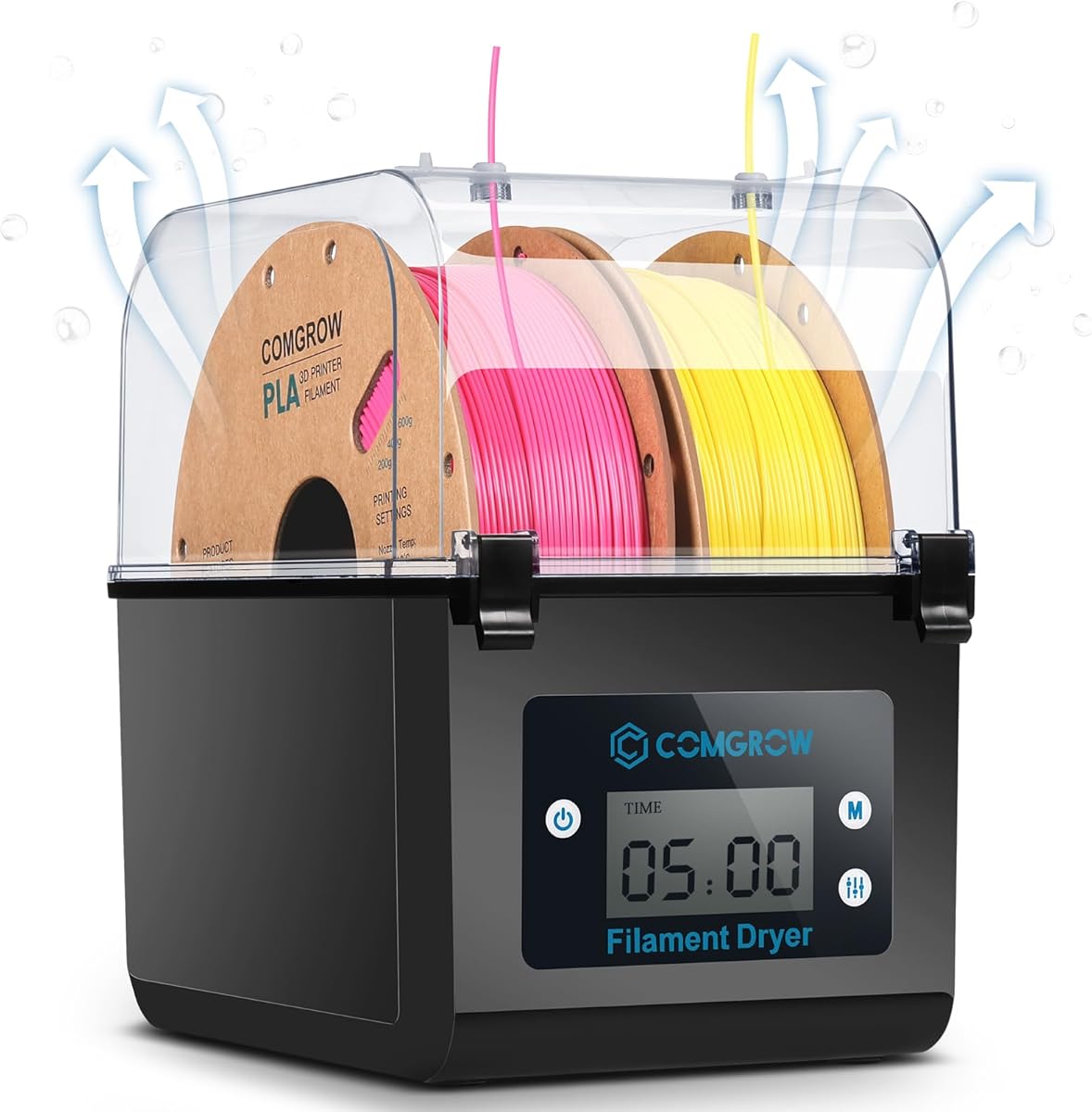
The Comgrow SH01 Filament Dryer Box offers solid performance with a 4.4 rating and features designed for moisture removal during printing. It holds two 1kg spools and includes real-time monitoring to ensure consistent drying without manual checks.
We may earn a commission when you buy through this link, at no additional cost to you.
Its internal heating during printing provides a dry environment that prevents common issues like entanglement and poor adhesion. The LCD touch interface makes it easy to adjust time and temperature, while the sealed structure keeps consumables dry effectively.
Although the temperature cap sits at 50°C, limiting it for engineering filaments, it remains effective for most common materials. The trade-off is acceptable given the affordable price and the convenience of integrated monitoring without needing external sensors.
Users focused on PLA and PETG will appreciate the straightforward design and reliable sealing. The outlet allows smooth feeding, and the snap button structure ensures the box stays closed when not in use to maintain dryness.
A 2 inch LCD screen displays humidity and temperature, giving users clear visibility into drying conditions.
Multiple sealing rings and a plug for the outlet hole prevent moisture re-absorption when the unit is idle.
We may earn a commission when you buy through this link, at no additional cost to you.
The Polymaker Polydryer focuses on passive storage with a sealed design and built-in hygrometer to monitor humidity levels. It helps keep moisture-sensitive filament in a better state between uses, reducing stringing and clogging without requiring electricity.
We may earn a commission when you buy through this link, at no additional cost to you.
Its airtight enclosure combined with desiccant support locks out humidity effectively. The visible humidity reading simplifies monitoring, letting users judge when to change the desiccant based on actual environmental conditions inside the box.
Without active heating, this unit works best for storage rather than drying damp filament. The trade-off is simplicity and safety, making it ideal for preventing moisture issues when active drying is not necessary for the current print.
Buyers looking for a lightweight, non-electric solution will find this box practical. It fits neatly into workspaces and supports common filament types, providing a consistent environment that protects spools until they are needed for printing.
Tracking humidity without guesswork ensures the filament stays in a dry state before printing starts.
Feed filament without breaking the seal to maintain dryness during pauses or overnight storage periods.
We may earn a commission when you buy through this link, at no additional cost to you.
The SUNLU Filament Dryer S2 is designed to significantly enhance printing results by removing moisture and reviving damp filament. With a 4.3 rating, it balances capacity and features like a translucent lid for easy filament inspection without opening.
We may earn a commission when you buy through this link, at no additional cost to you.
Its customizable time and temperature settings allow tailored drying for various needs. The large capacity and built-in spindle ensure even heating, improving print quality and optimizing the printing process for those working in humid environments.
While it lacks multiple spool capacity, its versatility makes it useful for frequent users. The touch screen simplifies operation, and the simple design ensures reliability without needing complex configuration or maintenance for regular filament preparation.
Users seeking a reliable solution for daily filament care will find this model effective. It saves money by reducing filament waste and ensures consistent quality, making it a practical addition to most 3D printing workspaces and setups.
Remove excess moisture from stored spools to restore them to print-ready conditions without buying new filament.
Check on filament progress through the lid without opening the dryer and disrupting the heating environment.
We may earn a commission when you buy through this link, at no additional cost to you.
The Comgrow SH02 Filament Dryer Box offers upgraded features like 360-degree PTC heating and one-key presets for nine filament types. Its 4.4 rating reflects solid performance and safety features that protect both the unit and your filament investment.
We may earn a commission when you buy through this link, at no additional cost to you.
Heating reaches 70°C with fast circulation, drying two 1kg spools simultaneously. The intelligent safety protection cuts power if temperatures exceed safe limits, ensuring the PTC module does not burn out even during extended drying cycles.
While the fan adds slight noise, it ensures uniform heating to prevent hot spots. This efficiency and safety balance makes the trade-off acceptable for users needing reliable drying for multiple filament types without complex manual settings.
Buyers seeking an upgrade from basic models will appreciate the touch screen and preset options. It saves setup time, reduces waste, and delivers consistent results, making it a practical choice for intermediate makers needing efficiency.
Select PLA or ABS directly to start drying with optimized temperature and time settings automatically.
Automatic shut off prevents overheating and protects the heating module from damage during extended use.
We may earn a commission when you buy through this link, at no additional cost to you.
The Creality Space PI 2026 Dryer features 360-degree hot-air heating and a 3.7-inch touch screen for easy operation. With a 4.4 rating, it supports 12 filament types and saves settings after power outages, offering reliability and convenience.
We may earn a commission when you buy through this link, at no additional cost to you.
Its advanced PTC technology ensures uniform drying, avoiding the uneven results common with pad-based dryers. The one-key presets and free adjustability provide flexibility, while the 48-hour timer allows full drying cycles for moisture removal.
Though it only holds one spool, the speed and precision are strong. The power-off memory ensures no manual resets after blackouts, saving users time and ensuring drying continues smoothly without disrupting their workflow or drying schedule.
For users prioritizing ease of use and accurate drying, this model delivers. It balances performance and simplicity, making it a strong choice for those needing consistent results without complex configuration or frequent monitoring of drying status.
Settings are remembered after power loss, ensuring your drying cycle resumes exactly where it left off.
Twelve presets cover common and high-performance composites, simplifying setup for diverse filament types.
We may earn a commission when you buy through this link, at no additional cost to you.
The Creality Space PI Plus adds dual-spool capacity to the proven Space PI design. It keeps 4.4 rating and features real-time humidity monitoring alongside 360-degree hot-air heating for consistent and even filament drying results.
We may earn a commission when you buy through this link, at no additional cost to you.
Its touch screen supports temperature switching between Celsius and Fahrenheit, offering convenience. The presets simplify selection, and the adjustable range allows customization for varied printing needs without needing manual temperature calculation or guesswork.
While the price reflects the added capacity, it saves time by drying multiple spools at once. The extra space requirement is manageable for most setups, and the efficiency gain justifies the investment for frequent printing users.
Buyers wanting higher capacity without switching brands will find this upgrade practical. It ensures continuous workflow by providing ready filament, reducing downtime between jobs, and maintaining consistent quality across multiple spools efficiently.
Dry two spools simultaneously to keep your printing schedule moving without waiting for one batch to finish.
Track humidity levels in real time to verify dryness and adjust settings as needed during the cycle.
We may earn a commission when you buy through this link, at no additional cost to you.
The Creality Space Pi X4L is built for high-volume users with dual chambers and a 4.5 rating. It holds four spools and reaches 75°C, eliminating stringing and layer adhesion issues for professional-grade printing consistency.
We may earn a commission when you buy through this link, at no additional cost to you.
Its dual functionality maintains humidity during pauses, preventing re-absorption. The touch UI offers precise control, and the sealed enclosure ensures dryness, making it ideal for studios managing multiple prints and complex filament types.
While larger and more power-hungry than basic boxes, the efficiency gains are significant. The trade-off suits those needing industrial-level capacity, ensuring reliable results and minimizing downtime during long or complex printing schedules.
Buyers managing multiple projects will benefit from the parallel drying capacity. This unit protects filament investment and reduces waste, delivering consistent quality and professional results for demanding environments and large-scale production needs.
Holds four standard spools so you can dry a full batch and print continuously without refilling.
Independent chambers allow faster drying by dividing the load and using two heating systems efficiently.
We may earn a commission when you buy through this link, at no additional cost to you.
The Official Creality Space Pi X4 DB-05 offers ultimate performance with 85°C and dual chambers. It supports four spools and up to eight filament holes, enabling multi-printer workflows and engineering material drying with precision and speed.
We may earn a commission when you buy through this link, at no additional cost to you.
Its independent PTC heaters allow different temperatures in one machine. The power-saving modes reduce usage by up to 40% in single mode, making it efficient while maintaining high output for diverse filament needs and professional environments.
Though it requires heat-resistant trays for optimal use, the versatility is unmatched. The trade-off is acceptable for users demanding maximum capacity and temperature, ensuring all filaments are handled correctly without compromising performance or drying efficiency.
Buyers seeking the top tier for filament care will find this model worth the investment. It reduces waste, extends shelf life, and ensures consistent high-quality prints, making it the ideal choice for serious 3D printing professionals.
Single chamber operation saves energy while still delivering effective drying for smaller batches of spools.
Eight holes allow drying and feeding for multiple printers simultaneously, streamlining production schedules.
We may earn a commission when you buy through this link, at no additional cost to you.
Selecting the right filament dryer box requires evaluating capacity, temperature range, and ease of use to match your printing needs and workspace constraints.
Look for PTC heaters or fan-assisted systems that ensure uniform heat distribution. Unlike heating pads, PTC and circulating air systems reduce hot spots, drying filament evenly and avoiding moisture traps that lead to inconsistent results.
Prioritize units with verified 360-degree hot-air circulation for the most reliable drying across all filament types.
Common filaments need around 45-60°C, while engineering materials require up to 85°C. Choose a dryer that exceeds your highest required temperature to ensure you can dry any filament you may use in the future without upgrading equipment.
Check maximum temperature limits before buying to avoid being stuck with a unit that cannot handle advanced materials.
Determine how many spools you need to dry at once. Single-spool boxes suit casual users, while dual or four-spool systems support multi-printer workflows or bulk drying, saving time during production-heavy weeks.
Ensure the internal dimensions fit your spool sizes, especially for larger 2kg spools if you use them regularly.
Airtight seals with silicone gaskets or cable outlets are essential to prevent moisture re-absorption. Some units include hygrometers to monitor humidity, which helps maintain a dry environment even when the heater is off.
Look for models with sealed cable exits to allow feeding during printing without breaking the humidity barrier.
Touchscreens or simple LCD panels with preset options simplify operation. One-key presets for different filament types save time, while displays that show real-time temperature and humidity help ensure the drying cycle completes properly.
Choose a control system that matches your technical comfort level for smoother daily use.
Overheat protection, automatic shut-offs, and alarm systems for fan failures prevent damage to the unit and filament. These safeguards are critical for units left running overnight or for extended cycles without supervision.
Confirm safety certifications and thermal cut-off functions before purchasing to ensure safe operation.
Measure your available desk or shelf space. Compact models save space but may hold fewer spools, while larger dual-chamber units require dedicated area but offer better throughput for active studios.
Consider weight and design for portability if you move printers or work between locations regularly.
Higher prices often bring better capacity, heat precision, and durability. Balance your budget against how much filament you use and whether the investment reduces waste and improves print quality enough to justify the cost.
Evaluate long-term savings from reduced filament waste when choosing a unit.
To begin drying, place your spool inside the box ensuring it feeds through the designated outlet smoothly. For best results, set the temperature and time according to your filament type. Most models provide presets that automate these settings for convenience and accuracy.
While drying, monitor the humidity display if available to confirm the environment remains dry. For units without built-in humidity monitoring, check filament quality by inspecting print quality or using a separate hygrometer to ensure effectiveness.
After use, allow the unit to cool before closing the sealing hole or power off. Regularly inspect the seals for wear and replace them if necessary to maintain airtightness, ensuring long-term reliability and effective moisture protection for all spools stored.
Drying time depends on moisture levels and temperature. Typically, 6-12 hours are needed for damp spools. Engineering filaments may require longer cycles, often 12-24 hours for optimal moisture removal. Always check the manufacturer guidelines for specific times.
Yes, most dryer boxes allow printing during the drying cycle. Feed the filament through a sealed cable outlet that maintains the moisture barrier. This ensures the filament stays dry even while actively being used by your printer.
PLA is sensitive to high heat. Use a range between 45-50°C to avoid deforming the filament. Exceeding 55°C risks warping. Always stick to the lower end of the range for safe and effective drying.
Yes, ABS and Nylon benefit significantly from drying. They absorb moisture quickly, causing bubbles. Use higher temperatures, typically 70-85°C, depending on the dryer's maximum, to effectively remove moisture and restore print quality.
Look for signs like popping sounds during printing, stringing, bubbles, or poor layer adhesion. These indicate moisture. Drying the filament often restores quality. Using a moisture meter or hygrometer in the box helps track needs.
Many units offer storage with active humidity control. Sealed boxes with hygrometers are ideal. Passive boxes also work but need desiccant. Ensure the model supports long-term storage without damaging filament over time.
Most modern units have safety features like overheat protection and auto shut-offs. These make unattended use generally safe. Still, follow instructions and place units on heat-resistant surfaces away from flammable materials for best practice.
Check power connections, fuses, or reset buttons. Many units show error codes on screens. Consult support if needed. For safety, avoid disassembling heating elements. Contact customer service for technical assistance if the issue persists.
Our top picks, including the Creality Space Pi X4 and SUNLU models, balance performance, capacity, and ease of use for different printing needs. Each offers unique strengths, from multi-spool drying to advanced touch controls and safety features.
Prioritize temperature range and capacity based on the filaments you use most often. If you frequently work with engineering materials, higher max temperatures are essential. For casual users, affordable single-spool units may suffice.
Always check current listings for pricing and availability as they fluctuate over time. Investing in the right dryer improves print quality, saves filament, and ensures consistent results for your 3D printing projects.