
Motherboard USB 2.0 to Type C Front Panel Cable
4.8Editor score
Converts 9pin USB 2.0 header
Simple plug and play setup
Compact 17cm cable length
Front Panel USB C Headers are essential for modern PC builds needing quick access to high-speed connections. These adapters convert internal motherboard headers into external ports for phones and drives.
We compared ten top-rated models focusing on data transfer speeds, build durability, and ease of installation. Our analysis covers adapters, hubs, and expansion cards for various motherboard configurations.
Each pick highlights key features like supported USB versions and bracket options. Note that availability and stock levels may change frequently so verify details before purchasing your chosen component.
4.8Editor score

4.6Editor score

4.2Editor score
As an Amazon Associate we earn from qualifying purchases.
This side-by-side comparison highlights the core differences between the ten selected products. We evaluate connector types, supported speeds, and physical form factors to help you find the right fit for your specific PC case and motherboard layout.


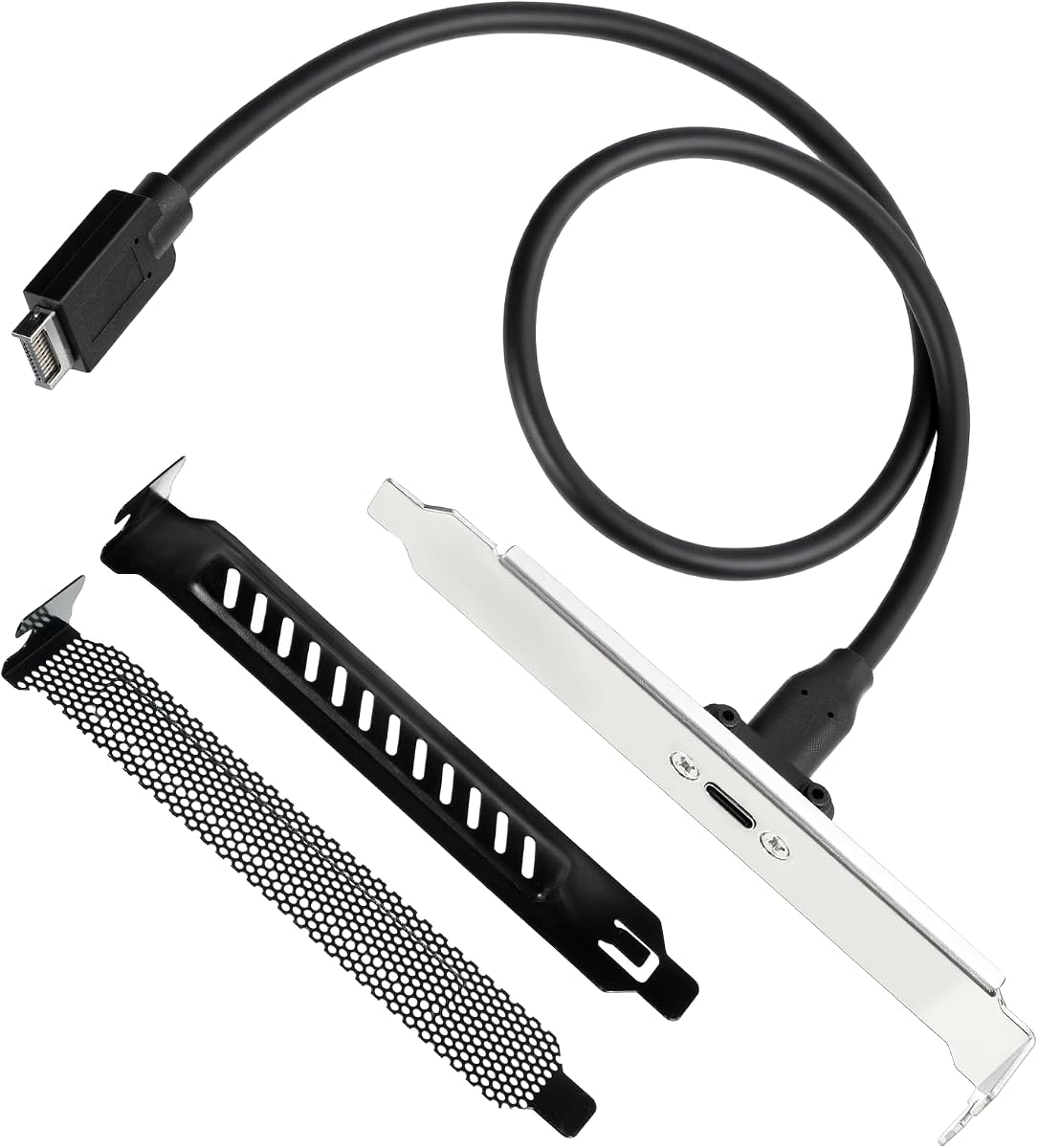


This GRAUGEAR extension cable stands out as a top choice for users needing high-speed front panel connectivity. With a solid 4.6 rating it is favored for its ability to handle the latest USB 3.2 Gen2x2 standards.
We may earn a commission when you buy through this link, at no additional cost to you.
The key strength lies in its support for 20Gbps transfer speeds which is ideal for external storage and fast peripherals. The sturdy metal construction and double shielded EMI wires ensure reliable performance and reduce signal noise effectively.
While it offers excellent speed users must ensure their motherboard has the correct 20-pin USB3.2 Key-A Type-E header. Older boards might need additional adapters which adds steps to the installation process.
This adapter is perfect for enthusiasts upgrading their desktop PC to support modern USB-C devices. If you have the necessary motherboard header it delivers the best balance of speed and reliability in this category.
The cable supports up to 20Gbps allowing for rapid file transfers between your PC and connected devices.
Constructed with metal components and shielded wires this cable is designed for long-term durability and stable connectivity.
We may earn a commission when you buy through this link, at no additional cost to you.
This adapter is another strong offering from GRAUGEAR focusing on extending internal headers to a convenient front panel location. It carries the same high-speed capabilities as the first product making it a reliable alternative.
We may earn a commission when you buy through this link, at no additional cost to you.
Its main advantage is the inclusion of a 60cm cable which provides ample length for routing within larger cases. The PCI bracket ensures the external connector is securely mounted preventing accidental disconnection.
Users should note that it relies on the Type-E header which is not present on older motherboards. Without the right header the high-speed features will not function as intended.
Choose this if you need extra cable length for your specific case layout. It is a solid choice for building a clean and functional front panel USB-C port.
The 60cm extension allows for flexible routing behind motherboard trays and through case compartments without tension.
Included PCI bracket secures the USB-C port to the back of the case for a professional look and easy access.
We may earn a commission when you buy through this link, at no additional cost to you.
This adapter expands functionality by providing both a USB-C and a standard USB-A port on the front panel. It connects to two different motherboard headers to deliver these combined options.
We may earn a commission when you buy through this link, at no additional cost to you.
The benefit is that users can connect a wider range of devices without needing additional hubs. It supports high 20Gbps speeds on the Type-C side while maintaining standard speeds on the Type-A side.
The trade-off is that it requires both a 20-pin Type-E header and a 19-pin USB3.0 header. If your motherboard lacks either you will need additional adapters which might be costly.
This product is ideal for users who want versatile front connectivity in one cable. Ensure your system has the required headers to take full advantage of its capabilities.
Provides both USB-C and USB-A connectivity from a single extension allowing you to serve different device types.
Capable of handling 20Gbps transfer rates for fast external drives and peripherals on the USB-C connection.
We may earn a commission when you buy through this link, at no additional cost to you.
This hub transforms a 3.5 inch drive bay into a powerful connectivity station with four USB ports. It draws independent power from the PSU which ensures stable operation for high-power devices.
We may earn a commission when you buy through this link, at no additional cost to you.
The main advantage is having multiple ports available at the front of the case for convenience. It supports USB 3.2 Gen2 speeds which are sufficient for most high-speed external storage needs.
However it requires a 15-pin SATA power cable which might not be available on older power supplies. This makes it less suitable for systems where power cables are limited.
Choose this hub if you need multiple front ports and have the necessary power connections. It is a robust solution for expanding USB access without compromising power stability.
Uses a SATA power connector to ensure devices receive consistent power without overloading the motherboard.
Offers four ports allowing you to connect several devices at once without needing a separate hub.
We may earn a commission when you buy through this link, at no additional cost to you.
This expansion card is a unique solution that uses a PCIe slot to provide internal headers instead of a simple cable. It is perfect for motherboards that lack front USB headers entirely.
We may earn a commission when you buy through this link, at no additional cost to you.
It offers both a 19-pin socket and a Type-C header providing options for different internal connections. The card uses polymer dielectric capacitors for stable power regulation during operation.
The speed is limited to 5Gbps which is standard for USB 3.0 but slower than newer USB 3.2 standards. This is acceptable for general peripherals but not for fast storage drives.
Select this card if your motherboard lacks internal headers or has them occupied. It effectively brings modern front panel connectivity to older or constrained systems.
Adds internal headers by utilizing an empty PCIe slot ensuring compatibility even on motherboards without front headers.
Includes voltage-regulating capacitors to protect connected devices from power fluctuations during use.
We may earn a commission when you buy through this link, at no additional cost to you.
This hub turns an unused 3.5 inch floppy drive bay into a convenient set of USB ports. It features a fast USB-C port alongside standard USB 3.0 ports for versatility.
We may earn a commission when you buy through this link, at no additional cost to you.
It supports up to 20Gbps speeds on the USB-C connection which is ideal for external SSDs and high-bandwidth tasks. The hub also includes safety features like over-current protection.
The downside is that it requires both a 20-pin Type-E header and a 19-pin USB3.0 header. This requirement limits its use on motherboards that lack these specific connectors.
This hub is great for users with available bay space and the necessary motherboard headers. It offers a clean and integrated way to add high-speed front ports.
Converts an empty 3.5 inch bay into functional USB ports keeping external devices organized at the front.
Built-in protection measures guard your connected devices against electrical faults and power surges.
We may earn a commission when you buy through this link, at no additional cost to you.
This cable offers a simple way to add a USB-C port to older systems that only have USB 2.0 headers. It is highly rated for its ease of use and compatibility with legacy boards.
We may earn a commission when you buy through this link, at no additional cost to you.
The 9pin connector matches standard USB 2.0 headers making it accessible for older PCs. It supports USB-C technology at basic speeds which is suitable for data transfer but not fast storage.
Speed is limited to 480Mbps which is standard for USB 2.0. This means it cannot support high-speed Gen 2 devices which might frustrate users expecting faster rates.
Buy this if you need basic USB-C access on an older motherboard. It is a budget-friendly way to modernize your connectivity options without complex hardware changes.
Designed to work with standard USB 2.0 headers found on older motherboards for easy upgrades.
Provides essential USB-C data transfer capabilities at standard speeds for general use.
We may earn a commission when you buy through this link, at no additional cost to you.
This adapter provides a solid 20Gbps connection for users with compatible Type-E headers. It comes with extra PCI slot covers which adds value by protecting the unused slots behind it.
We may earn a commission when you buy through this link, at no additional cost to you.
The construction uses metal and PVC to ensure durability and stability. The cable length is sufficient for most cases but shorter than other options available in this comparison.
Some users report lower satisfaction compared to other brands in this category. This might be due to fitment issues or build quality inconsistencies that affect overall experience.
Consider this if you have the required header and need extra slot covers. It is a functional solution but verify compatibility with your specific case before buying.
Includes two PCI slot covers to keep dust out of unused expansion slots and maintain a clean look.
Supports 20Gbps transfer rates allowing for fast data exchange with compatible external drives.
We may earn a commission when you buy through this link, at no additional cost to you.
This extension cable uses a flexible flat design which makes it easier to route inside tight cases. It supports 10Gbps speeds which covers most USB 3.2 Gen 2 devices effectively.
We may earn a commission when you buy through this link, at no additional cost to you.
The cable is made of TPE material allowing it to be bent frequently without damage. It also includes a mounting screw to secure the USB-C port firmly to the chassis.
While it supports 10Gbps it does not reach the higher 20Gbps speeds offered by Gen 2×2 standards. This is still plenty fast for most everyday devices and storage needs.
This cable is a practical choice for users wanting a slim profile and reliable 10Gbps performance. Ensure you have the 20-pin Type-E header for connection.
Uses a flat TPE cable that resists bending damage and fits easily into tight cable management paths.
Includes a panel mounting screw to keep the USB-C port stable and prevent it from loosening over time.
We may earn a commission when you buy through this link, at no additional cost to you.
This adapter has earned a perfect rating from users who value its ability to provide both Type-C and Type-A ports on the front panel. It connects to two headers to deliver versatile access.
We may earn a commission when you buy through this link, at no additional cost to you.
The standout feature is its support for 20Gbps speeds on the USB-C connection which ensures rapid data transfer. Users appreciate the sturdy metal build and the included PCI bracket.
However like other similar models it requires both a 20-pin Type-E header and a 19-pin USB3.0 header. If your motherboard does not have both this product will not function.
This is an excellent choice for systems with the required headers needing versatile and fast front ports. It combines reliability and speed in a single convenient cable.
Provides both Type-C and Type-A ports from a single extension for maximum device flexibility.
Supports 20Gbps speeds for external storage and high-bandwidth peripherals connected via USB-C.
We may earn a commission when you buy through this link, at no additional cost to you.
Choosing the right Front Panel USB C Header depends on your motherboard capabilities and case layout. We outline the key factors to consider before making your purchase.
The most critical factor is ensuring your motherboard has the correct internal header. Most modern cables use a 20-pin USB3.2 Key-A Type-E header. Older motherboards might only have a 19-pin USB3.0 or a 9pin USB2.0 header. Check your manual to confirm which header is available before buying a specific cable.
Always verify the pin count and type on your motherboard. Using a cable with the wrong connector can lead to installation failures or damage to your system.
Different headers support different speeds. Look for USB 3.2 Gen2x2 support for 20Gbps speeds which is ideal for external SSDs. Gen2 offers 10Gbps and Gen1 offers 5Gbps. If you transfer large files often opt for the 20Gbps models.
Choose a speed that matches your usage needs. For general peripherals 5Gbps or 10Gbps is sufficient but 20Gbps is future-proof for high-speed storage.
Measure the distance from your motherboard header to where the front port will sit. Most cables range from 17cm to 60cm. If you have a large case or motherboard tray you may need a longer cable to reach comfortably.
Select a cable length that allows for slack without being too loose. Too much slack can interfere with airflow or other components inside the case.
Most extension cables come with a metal PCI bracket to secure the port to the back of your case. This is essential for a clean installation and prevents the connector from hanging loose. Ensure the bracket matches your case size.
A sturdy bracket adds to the longevity of the port. Look for options that include screws for secure mounting to avoid vibrations loosening the connection.
High-quality cables use double shielded wires to prevent electromagnetic interference. Metal construction on the ports and bracket increases durability. Avoid cheap plastic connectors that may break after repeated use.
Check for features like over-voltage or over-current protection in hubs. These safety features protect your expensive devices from potential electrical issues.
Most simple cables draw power from the motherboard header. However hubs with multiple ports often need an external power source like a SATA connector. Check if the product requires extra power cables.
If you plan to connect high-power devices like charging phones ensure the power supply is adequate. Using hubs without extra power may result in slow charging or connection drops.
Some options provide a single port while others like hubs offer multiple USB ports. Decide if you need just one extra USB-C port or several for various devices. Hubs are useful for families or office setups.
Single port adapters are simpler and cheaper. Hubs offer more convenience but take up more space inside the case and require more power.
Most modern headers support plug and play on Windows and Linux. However some PCIe cards might require drivers for older systems. Check the product page for OS compatibility notes before purchasing.
Ensure the product is supported by your current OS version to avoid software issues. Most current systems do not need extra drivers for standard USB headers.
Begin by shutting down your computer and unplugging the power cable. Open the side panel of your case and locate the internal USB header on the motherboard. Ensure you know the exact type of header your board supports before inserting any connector.
Align the connector pins correctly before applying pressure. Most headers have a small plastic guide to prevent wrong orientation. Secure the bracket with screws to keep the external port stable. Once installed you can close the case and reconnect power.
Regularly inspect the ports for dust or debris. Use compressed air to clean the USB-C connector to maintain good contact. Avoid pulling cables by the connector itself which can damage the internal wires over time.
A Type-E header is a 20-pin connector on modern motherboards designed for USB 3.2 Gen2x2. It supports high data speeds up to 20Gbps for fast front panel ports. You need this specific header to use most 20Gbps USB-C cables.
You can use adapters to connect a USB-C front cable to a 19-pin USB 3.0 header but speeds will be limited to 5Gbps. If your board only has USB 3.0 you cannot get the full 20Gbps speed without a specific Type-E header.
No most of these cables are plug and play and do not require drivers on Windows 10 and later. However some older systems or specific PCIe cards might ask for drivers to function correctly.
Yes a 20Gbps cable is backward compatible with 10Gbps or slower devices. The connection will negotiate the speed automatically to match the capabilities of the connected device and the motherboard header.
USB 3.2 Gen2x2 refers to a USB standard that supports data transfer speeds up to 20Gbps. It is faster than the standard Gen2 which tops out at 10Gbps. This standard requires both a compatible motherboard header and a specific cable to work.
Hubs with multiple ports often require extra power to support all devices simultaneously. A SATA power connector draws power directly from your power supply to ensure stable operation and prevent brownouts or disconnects.
We have reviewed ten top options for upgrading your PC with front USB-C access. From simple cables to multi-port hubs each product offers different features to suit various build needs and motherboard configurations.
Prioritize compatibility with your motherboard headers and required speeds. If you have a modern board with a 20-pin Type-E header choose a model that supports 20Gbps for the best future-proof performance.
Remember that availability can change so check current listings before you finalize your order. With the right header your system will gain convenient and fast access to modern USB devices.